1
Switch position 8 defines the firmware update function. If the printer needs to
update the firmware, please set to “ON” position. In order to operating
perfectly, please set in “OFF” when the printer do not needs to update the
firmware or in normal situation.
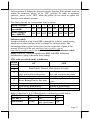
The factory default for each position listed as below:
1
2
3
4
5
6
7
8
Switch 1 Position
Default setup for
OFF OFF OFF OFF OFF OFF OFF OFF
Aura-6800L
Default setup for
OFF ON OFF OFF OFF OFF OFF OFF
Aura -6800/P/U
Software switch
Another method to setup Aura-6800 is through the software switch setting,
which means other functions must be change by software utility. The
information below applies to the latest version to the date of print of this
manual. Please visit our web site http://www.posiflex.com or
http://www.posiflex.com.tw for download the Aura-6800 software switch
utility. Software switch has divided into SW2 and SW3. Following
information is going to describe these settings.
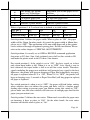
SW2 software switch works as following:
Switch
ON
OFF
position
1
Print Density (Normal, High Quality or Light)
2
Enable paper auto-cut at top hood Disable paper auto-cut at top hood
3
close and switch on the printer.
close and switch on the printer.
Full-cut mode.
Partial-cut mode.
4
Raster Bitmap Print by buffer
Raster Bitmap Print by line print.
5
batch.
Even parity
None parity
6
XON/XOFF handshaking
DSR/DTR handshaking
7
CR code (0Dh) effective
CR code (0Dh) invalid
8
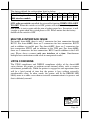
Effect of positions 1 & 2 of Print Density is defined as in table below:
OFF
ON
ON
SW2 Pos. 1
OFF
OFF
ON
SW2 Pos. 2
High Quality
Normal
Light
Print Density
(low speed mode)
Page 17