1
Overview of the Previous Orders
This Previous Orders Screen allows you to track your latest order as well as
go back to past orders and print them off or save to excel.
Overview
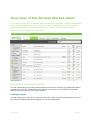
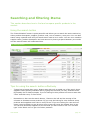
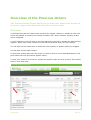
Your Orders are laid out in date order and then by supplier. When you submit an order the
screen will default to viewing your orders of today in the “open” position. All other orders
will be collapsed.
To view orders you need to click on the plus signs along the left to expand the date and the
supplier. Within each order number you will find the products that you have ordered.
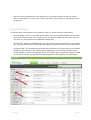
You can also use the search box to search by order number or specific product or supplier.
You can also sort the Date column.
To print your orders make sure the order you wish to print is in the expanded position. The
print button will only print those specific orders.
To save your order as an excel file, expand the specific order and click on print. Then select
save to excel and enter.
Previous Orders Overview
User Manual
page 23