1
How a Return is Charged to Your Account
Drake Software PPR User’s Manual
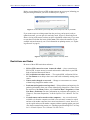
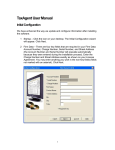
Before you are charged for a new PPR, an alert appears on your screen, informing you
that proceeding will reduce your store of PPRs by one. (Figure 1.)
Figure 1: An alert allows you to verify that you’re ready to use one of your PPRs
If you want to open an existing return from the previous year but aren’t ready to
update that return, you can open it in read-only mode. (Figure 2.) Read-only mode
allows viewing of the return, but does not allow calculation or data entry. If you want
to enter data or calculate the return, click Count. (This reduces the number of your
available activated returns by one.) For information on updating returns, see “Updating a Return” on page 9.)
Figure 2: Option for opening a return in read-only mode
Restrictions and Notes
Be aware of these PPR restrictions and notes:
•
•
•
•
•
4
SSNs or EINs entered on screen 1 cannot be edited — Once a return has an
SSN or EIN, it counts toward your total and cannot be added back to your PPR
bank of activated but unused returns.
SSN verification can reduce errors — The required SSN verification field on
the New Return screen helps reduce errors and avoid accidentally starting a new
return.
Names can be changed or corrected — Change or correct names on a return
without being charged for another return.
Proformas and organizers can be printed — Print proformas and organizers for
gathering information from your clients without being charged for a return. From
the menu bar of the Home window, select Last Year Data > Organizers or Last
Year Data > Proformas. For more information on proformas and organizers, see
Chapter 4, “Preseason Preparation,” in Drake Software User’s Manual: Tax Year
2014.
Created returns can be moved to other computers — An activated return is
available only from the computer on which it was activated; it cannot be copied
and moved to another computer. Once an activated return is created, however, it
can be copied and moved to another computer without counting against your total.
(For details on transferring returns, see “Backing up and Restoring Files” in Chapter 11 of Drake Software User’s Manual: Tax Year 2014.)
Tax Year 2014