1
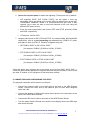
RTP PUBLIC IP: here you must type the PUBLIC_IP value provided by the
network administrator in paragraph 1.5, for example: 212.170.180.170
RTP PUBLIC PORT: here you must type the value assigned by the
administrator in paragraph 1.7, for example: 8002
4. REGISTERING AT THE AEQ SIP SERVER
At this point, we will check that we are able to access Internet and reach AEQ SIP
server, available at the host ”sip.aeq.es”, that at this moment has the IP address
82.165.157.20.
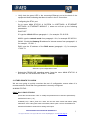
Check, entering MAIN STATUS
SYSTEM
9 SIP PROVIDERS
AEQ menu, that
NAME: AEQ
HOST: sip.aeq.es
If the DNS field referred in the previous chapter was not configured, you can
change the HOST name by its updated IP (HOST: 88.2.202.39 at the time of
writing this document)
PORT: 5060
DOMAIN : sip.aeq.es.
REGISTER : YES
EXPIRES: 60
INTERFACE: ETH1(Main)
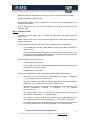
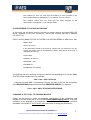
If everything has been correctly configured, the line corresponding to Ch1 at the MAIN
STATUS screen should show, for example:
Chn 1: Net 1 ONLY G722 OK
…It should end with “OK”. If something is wrong, the end of this line will temporarily
show REGISTERING and definitely become REGISTER ERROR. For example:
Chn 1: Net 1 ONLY G722 REGISTER ERROR
5. MAKING A TEST CALL TO PHOENIX MASTER
Finally, we are going to revise the adequate configuration of the equipment, and
prepare it to make a test call to an unit called [email protected] , that AEQ
maintains at the disposal of its customers, continuously transmitting audio and with
reachable in the public IP 212.170.163.189 (at the time of writing this document)
APLICACIONES ELECTRONICAS QUASAR S.A.
TEL: (34) 91 686 13 00 - FAX: (34) 91 686 44 92 - E-mail: [email protected] - Web:
5
www.aeq.eu