1
PanelView Plus 7 Standard Terminals
Product Dimensions
The table provides product dimensions. The 5.7-inch and 10.4-inch touch-screen terminals are shown for illustrative
purposes. All other terminal sizes look similar. For information on proper mounting clamp installation, refer to the
PanelView Plus 7 Standard Terminals User Manual, publication 2711P-UM007.
Figure 1 - PanelView Plus 7 Standard Dimensions - 5.7-in. and 10.4-in. Models
a
a
PanelView Plus
PanelView Plus
b
c
b
c
d
d
1
6
1
6
1
6
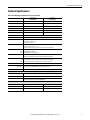
Table 5 - PanelView Plus 7 Standard Dimensions
Terminal
Size
Input
Type
Height (a)
mm (in.)
Width (b)
mm (in.)
Overall Depth (c)
mm (in.)
Mounted Depth (d)
mm (in.)
4.3 in.
Touch
110 (4.33)
135 (5.31)
56.5 (2.22)
50.14 (1.97)
5.7 in.
Touch
152 (5.98)
176 (6.93)
56.5 (2.22)
50.14 (1.97)
6.5 in.
Touch
170 (6.69)
212 (8.35)
56.5 (2.22)
50.14 (1.97)
9 in.
Touch
190 (7.48)
280 (11.02)
56.5 (2.22)
50.14 (1.97)
10.4 in.
Touch
252 (9.92)
297 (11.69)
56.5 (2.22)
50.14 (1.97)
TIP
When mounted in a panel, the front of the bezel extends less than
6.36 mm (0.25 in.) from the front of the panel.
Rockwell Automation Publication 2711P-TD008A-EN-P - October 2014
5