1
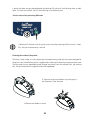
3. Remove all remaining cards
from the feeder.
4 Take a new cleaning card and load it into
the feeder.
5. Place the feeder back in its slot and press
the upper part on the feeder until it clicks.
6. Press the control panel push button for a second
to start cleaning.
7. The used cleaning card is ejected from the front side of the printer.
Wait a couple of minutes after cleaning and before using the printer to let the cleaning product evaporate completely.
The printer will operate even if the cleaning alert is triggered.
On the other hand, you can decide to run a cleaning process even when the relevant LED is off. In this case, press the control panel push button for a few seconds.
Make sure you fully observe all cleaning steps.
21