1
3.4
Connections
3.4.1
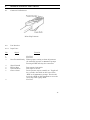
Connecting a Terminal for local access
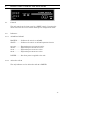
A local terminal (or PC) is required for setup and should be left
connected to Input Port 2. Attach the terminal to input port 2 (2 INDTE) using the green cable and the appropriate adapter (supplied). Set
the terminal for 9600 8,N,1 and no flow control
3.4.2
Connecting a Modem for remote access
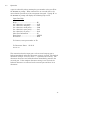
It is suggested that a dial-up modem also be connected to allow remote
access. Using a terminal set at 9600 bps, issue the following commands
to the modem before connecting it to the access switch: AT&F S0=1 &D2
&C1 &W. Use the cable labeled “MODEM TO COMPOSITE” to connect
the modem to the access switch Input Port 1.
To configure your Access Switch to work with the external DCB dial-up
modem first attach the modem to input port 1 (1 IN DTE) using the
Modem to Composite cable provided. Next attach a terminal or PC to
input port 2 (2 IN-DTE) using the green cable and the appropriate
adapter. Set the terminal for 9600 8,N,1 and no flow control. When
you see the Access >> prompt, follow the instructions below. User
responses are shown in BOLD.
To configure your Access Switch to work with the optional internal dialup modem attach a terminal or PC to input port 2 (2 IN-DTE) using the
green cable and the appropriate adapter (supplied). Set the terminal for
9600 8,N,1 and no flow control. When you see the Access >> prompt,
follow the instructions below. User responses are shown in BOLD.
To Disconnect enter: ^D^D^D
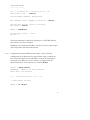
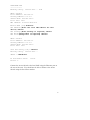
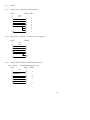
Access >> SETUP<Enter>
ATTENTION: There is no Setup Password
Enter PW to set password
****
AS-8 Access Switch - V7.7
****
>> Enter H<CR> for Help
SETUP >> CM<Enter>
7