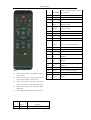
1
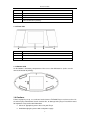
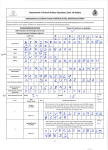
Internet TV/Radio
Delete favorite file& return to current
2
SUB-MENU
playing interface
3
TV OUT
Change TV out mode (LCD/TV)
4
Clock
Enter clock interface
5
MUTE
Press to mute audio output
Press to view previous page/file/FM
6
PG.UP
frequency modify
Press to view next page/file/FM
7
PG.DN
frequency modify
8
FAV
Press to access to My Favorite list
9
REPEAT
Press to repeat current file
10
INT.TV
Press to enter Internet TV menu
11
INT. RADIO
Press to enter Internet Radio menu
Navigationa
l
12
Buttons
Press to select menu/file options
13
OK
Press to confirm the selected file
14
EXIT
Press to return to the previous screen
15
HOME
Press to enter main menu
Press to fast forward the current
16
FF
playback
Press to fast reverse the current
17
:
Notice
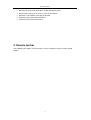
Remote control operation range: Within 6m from front
FR
playback
PLAY/PAU
Press to play/ pause the current
18
SE
playback
19
STOP
Press to stop playback
20
VOL +
Press to increase the volume
21
VOL-
Press to decrease the volume
Color
(blue/yellow/green)buttons,
buttons
function
panel, angel<60
22
When using the remote control, please point the
remote control towards the remote receiver.
Make sure the signal from the remote control to the
receiver on the player is not blocked by solid objects.
Remote control definition will be changed along with
FW upgrade.
After update FW, please notice the extra explain list.
KMP5
10
Button
1
Power
Definition
Power on/off
6
no