1
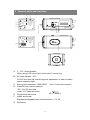
AE S
F L OF F
AE
B LC
A GC
A TW
INT
L .L UX
C O LOR
ME
F L ON
AI
B LC O F F
S U PA GC
A WB
L .L .
L .L U X
B /W
AE S ET T IN G
AG C M OD E
W B M O DE
SY N C M OD E
L OW LU X C OL OR M ON O OP T ION
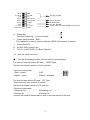
H. Phase Adj.
Line-lock Phase Adj.(Line-lock model)
I. Video output terminal(BNC)
V-phase
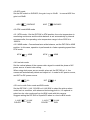
This connector is used to connect with the VIDEO IN connector of monitor.
J. Power pilot LED
K.
L.
3.1
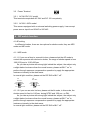
AC85V~265V Power Cord
DC 12V or AC24V/DC 12V Block Terminal
Auto Iris Lens Connector
●
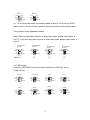
Use the accompanying auto iris lens control connector plug.
For auto iris lens with built-in EE amp.(VIDEO Type)
Set the lens selector switch to “Video” position.
Connector cable leads
1.Red----power
3.White----video
2.NC
4.Black----shielded
1
2
3
4
For auto iris lens without EE amp.(DC Type)
This is the view from external of camera
Set the lens selector switch to “DC” position.
Connector cable leads
1.Damping coil(-)
2.Dampling coil(+)
3.Driving coil(+)
4.Driving coil(-)
Connect the leads as shown above; refer to the instructions of the lens.
3