1
3 - Setup to Calibrate Noise Levels over Headphones to Comply
with Noise at Work Legislation
The SL22 has a single headphone output that is limited in the
same way as the speakers. Use the following procedure to
setup your headphones so that the SL22 provides calibrated
noise levels that conform to noise at work regulations.
a. Ensure that the system is connected correctly and that the
access to the both the SL22 and the headphone amplifier/
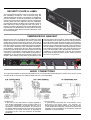
distributor that follows is limited. Plug the headphones (or
the headphone amplifier/distributor) into the headphone socket
on the rear of the SL22. Note that the volume for the
headphones should occur prior to the SL22 - so if gain can be
applied via a headphone amplifier this must be set to maximum
so that it could only attenuate the volume.
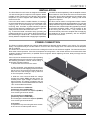
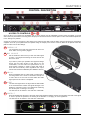
b. Using the screwdriver provided unscrew the front cover
plate to provide access the calibration controls.
Using an SPL meter to Calibrate Headphone
Noise Levels
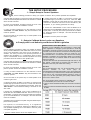
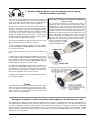
The recommended method of measuring the SPL of
headphones, that is accurate enough to work to ISO 119042 standards, is to use a meter coupler inserted into an
acoustic manikin, commonly known as a dummy head. This
best replicates a head wearing headphones, and is the most
accurate. However, this is very specialist equipment, is
expensive and often impractical for somewhere like a call
centre, radio station or recording studio to setup. A simple,
and less costly method of measuring the SPL is to insert a
disc to the end of the meter, to provide a seal around the
headphone cup, with the meter sensor protruding inside
the cup to provide the reading.
Though not quite as accurate,
it will be reasonably exact.
c. Using a small flat headed screwdriver turn the calibrate
controls “Threshold” and “Max Volume” fully anti-clockwise
to the minimum position.
d. Turn the incoming level to the SL22 to its maximum gain
level.
e. With the SPL meter measuring the headphones (see: Using
an SPL meter to Calibrate Headphone Noise Levels) play test
tones at 0dBu or a loud piece of music that will provide high
input levels to the SL22, rotate the “Max Volume” until the
desired reading is achieved on the SPL meter.
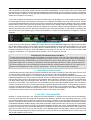
f. Rotate the “Threshold” control until the Alert led is
illuminated and the Protect indicator led turns on only on
signal peaks - in this way even if the input levels are increased,
by a DJ wanting more volume, for example, this noise level
will never be exceeded, and so protect his ears
g. Replace the front panel cover plate using the TORX tamperproof screws provided.
Finally:
In all cases test the system by increasing gain from the mixing
desk (or anywhere preceding the SL22 in the audio chain) as you increase the level the Protect LED should become
more active but the overall signal level of the system will
remain within the set parameters.
Setting the Calibration Levels of Speakers and Headphones for Simultaneous Use
In the real world it is difficult to exactly match the speaker volume to those in the headphones, and will be very dependant on
the sensitivity of the headphones used, as well as other factors. It is simpler to calibrate via one or the other depending on the
environment (calibrate on speakers within a nightclub, and headphones for a radio DJ, for example), however, if it is imperative
that the volume of the speakers and headphones match, e.g. in a studio for mastering purposes, most amplifiers or active
speakers will have a trimmer that allows the signal to be attenuated. If not, there is a facility within the SL22 to do this - contact
Drawmer for more information.
11