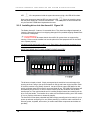
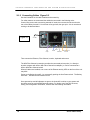
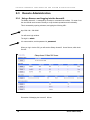
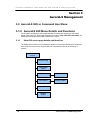
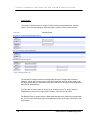
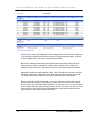
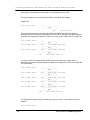
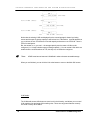
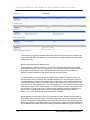
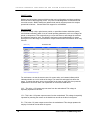
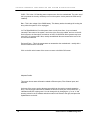
1
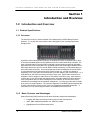
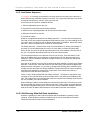
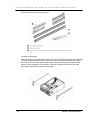
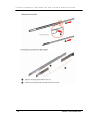
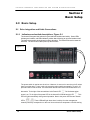
Galaxy® Aurora LS Series RAID Storage System Configuration and System Integration Guide Version 1.1 July 2009 G A L A X Y ® A U R O U R A L S C O N F I G U R A T I O N A N D S Y S T E M I N T E G R A T I O N G U I D E Rorke Data Inc 7626 Golden Triangle Drive Eden Prairie MN 55344-3732 952 829 0300 [email protected] [email protected] This manual only applies to the Galaxy® AuroraLS product. Version 1.0 Version 1.1 1 April 3,2009 July 22,2009 Section 1 Intro and Overview G A L A X Y ® A U R O U R A L S C O N F I G U R A T I O N A N D S Y S T E M I N T E G R A T I O N G U I D E Table of Contents Copyright 2009 ...................................................................................................................................................4 Disclaimer............................................................................................................................................................4 Trademarks .........................................................................................................................................................4 Notices .................................................................................................................................................................4 SAFETY PRECAUTIONS ......................................................................................... 5 CONVENTIONS ........................................................................................................ 6 Galaxy® AuroraLS EOS Updates ..................................................................................................................7 1.0 Introduction and Overview.....................................................................................................................9 1.1 Product Specifications............................................................................................................................9 1.1.1 Overview ...................................................................................................................................................9 1.1.2 Basic Features and Advantages........................................................................................................9 1.2 Model Variations ....................................................................................................................................11 1.2.1 Galaxy® AuroraLS Model Descriptions........................................................................................11 1.3 1.3.1 Product Description..............................................................................................................................12 Description of Physical Components.........................................................................................12 1.3.2 Component specifications ..................................................................................................................14 1.3.3 RAID storage specifications..............................................................................................................15 1.3.4 Embedded OS features......................................................................................................................15 1.4 Mounting / Securing AuroraLS............................................................................................................16 1.4.1 Rack Mounting the AuroraLS .............................................................................................................16 1.4.2 Installation Sequence..........................................................................................................................17 1.4.2.1 Ball Bearing Slide Rail Rack Installation......................................................................................17 2.0 Basic Setup ..............................................................................................................................................21 2.1 Drive integration and Cable Connections ........................................................................................21 2 Section 1 Intro and Overview G A L A X Y ® A U R O U R A L S C O N F I G U R A T I O N A N D S Y S T E M I N T E G R A T I O N G U I D E 2.1.1 Indicators and switch descriptions Figure 2.1 ...........................................................................21 2.1.2 Installing drives into the AuroraLS Figure 2.2 .......................................................................22 2.1.3 Connecting Cables Figure 2.3.....................................................................................................23 2.2 Configuration Setup...............................................................................................................................24 2.2.1 8Gb Fibre Channel Driver Installation on AuroraLS Clients ...............................................24 2.2.1.1 Windows Clients ..............................................................................................................................24 2.2.1.2 Linux Clients.....................................................................................................................................24 2.2.2 SAN software / driver installation................................................................................................24 2.2.3 Setting up Ethernet Connectivity on a Windows Client ........................................................24 2.3 Remote Administration ........................................................................................................................25 2.3.1 Using a Browser and Logging into the AuroraLS.......................................................................25 3.0 AuroraLS GUI or Command Line Menu ........................................................................................26 3.1.0 AuroraLS GUI Menu Details and Functions..............................................................................26 3.1.1 Main GUI screen page details and functions............................................................................26 4.0 Troubleshooting AuroraLS ..............................................................................................................38 4.1 Chassis Status Indicators ................................................................................................................39 4.2 GUI status indicators .........................................................................................................................40 4.3 Other troubleshooting .......................................................................................................................40 4.4 Further Technical help ......................................................................................................................40 3 Section 1 Intro and Overview G A L A X Y ® A U R O U R A L S C O N F I G U R A T I O N A N D S Y S T E M I N T E G R A T I O N G U I D E Copyright 2009 This Edition First Published 2009 All rights reserved. This publication may not be reproduced, transmitted, transcribed, stored in a retrieval system, or translated into any language or computer language, in any form or by any means, electronic, mechanical, magnetic, optical, chemical, manual or otherwise, without the prior written consent. Disclaimer Rorke Data makes no representations or warranties with respect to the contents hereof and specifically disclaims any implied warranties of merchantability or fitness for any particular purpose. Furthermore, Rorke Data reserves the right to revise this publication and to make changes from time to time in the content hereof without obligation to notify any person of such revisions or changes. Product specifications are also subject to change without prior notice. Trademarks Rorke Data and the Rorke Data logo are registered trademarks of Rorke Data, Inc. Rorke Data and other names prefixed with “AuroraLS” and “Galaxy” are trademarks of Rorke Data, Inc. in the United States, other countries, or both. Infiniband is a registered trademark of System I/O, Inc. iPass is a registered trademark of Molex, Inc. LSI and SAS-1068e are registered trademarks of LSI Logic, Inc. Mellanox, ConnectX, and Infinihost are registered trademarks of Mellanox, Inc. Microsoft, Windows, Windows XP, Windows 2003, and Windows Vista are registeredtrademarks of Microsoft Corp. OFED is a registered trademark of the Open Fabrics Alliance. Supermicro and SuperODoctor are a registered trademarks of Supermicro, Inc. All other names, brands, products or services are trademarks or registered trademarks of their respective owners. Notices The content of this manual is subject to change without notice. Although steps have been taken to create a manual which is as accurate as possible, it is possible this document may contain inaccuracies or that changes have been made to the system. 4 Section 1 Intro and Overview G A L A X Y ® A U R O U R A L S C O N F I G U R A T I O N A N D S Y S T E M I N T E G R A T I O N G U I D E Safety Precautions Precautions and Instructions The AuroraLS weights over 80 pounds. It is recommended that 2 people are required to properly move and mount it due to its size and weight. Be sure that the rack cabinet into which the subsystem chassis will be installed provides: sufficient strength and stability and ventilation channels and airflow circulation around the subsystem. INSTALL AURORA IN RACK MOUNTING BEFORE INSTALLING DISK DRIVES The AuroraLS RAID subsystem will come with up to twelve (12) drive bays. NOTE: a 13th drive slot is available but is not used in the present configuration. This drive slot, the furthest right slot for all drives, must have a empty drive canister in its place. Leaving any of these drive bays empty will greatly affect the efficiency of the airflow within the enclosure, and will consequently lead to the system overheating, which can cause irreparable damage. Prior to powering on the subsystem, ensure that the correct power range is being used. If a disk or power supply module fails, leave it in place until you have a replacement unit and you are ready to replace it. Airflow Consideration: The subsystem requires an airflow clearance, especially at the front and rear. Handle subsystem modules using the retention screws, extraction levers, and the metal frames/faceplates. Avoid touching PCB boards and connector pins. To comply with safety, emission, or thermal requirements, none of the covers or replaceable modules should be removed. Make sure that during operation, all enclosure modules and covers are securely in place. Provide a soft, clean surface to place your subsystem on before working on it. Servicing on a rough surface may damage the exterior of the chassis. If it is necessary to transport the subsystem, repackage all disk drives separately. If using the original package material, other replaceable modules can stay within the enclosure. ESD Precautions Observe all conventional anti-ESD methods while handling system modules. The use of a grounded wrist strap and an anti-static work pad is recommended. Avoid dust and debris or other static-accumulative materials in your work area. 5 Section 1 Intro and Overview G A L A X Y ® A U R O U R A L S C O N F I G U R A T I O N A N D S Y S T E M I N T E G R A T I O N G U I D E Conventions Naming From this point on and throughout the rest of this manual, the AuroraLS series is referred to as simply the “ AuroraLS”, “subsystem” or the “system.” Important Messages Important messages appear where mishandling of components is possible or when work orders can be mis-conceived. These messages also provide important information associated with other aspects of system operation. The word “important” is written as “IMPORTANT,” both capitalized and bold, and is followed by text in italics. The italicized text is the message to be delivered. Warnings Warnings appear where overlooked details may cause damage to the equipment or result in personal injury. Warnings should be taken seriously. Warnings are easy to recognize. The word “warning” is written as “WARNING,” both capitalized and bold and is followed by text in italics. The italicized text is the warning message. Cautions Cautionary messages should also be heeded to help you reduce the chance of losing data or damaging the system. Cautions are easy to recognize. The word “caution” is written as “CAUTION,” both capitalized and bold and is followed by text in italics. The italicized text is the cautionary message. Notes These messages inform the reader of essential but non-critical information. These messages should be read carefully as any directions or instructions contained therein can help you avoid making mistakes. Notes are easy to recognize. The word “note” is written as “NOTE,” both capitalized and bold and is followed by text in italics. The italicized text is the cautionary message. 6 Section 1 Intro and Overview G A L A X Y ® A U R O U R A L S C O N F I G U R A T I O N A N D S Y S T E M I N T E G R A T I O N G U I D E Galaxy® AuroraLS EOS Updates Please contact your system vendor for the latest software updates. NOTE that the version installed on your system should provide the complete functionality listed in the specification sheet/user’s manual. We provide special revisions for various application purposes. Therefore, DO NOT upgrade your software unless you fully understand what a revision will do. Problems that occur during the updating process may cause unrecoverable errors and system down time. Always consult technical personnel before proceeding with any firmware upgrade. 7 Section 1 Intro and Overview G A L A X Y ® A U R O U R A L S C O N F I G U R A T I O N A N D S Y S T E M I N T E G R A T I O N G U I D E This page left blank intentionally 8 Section 1 Intro and Overview G A L A X Y ® A U R O U R A L S C O N F I G U R A T I O N A N D S Y S T E M I N T E G R A T I O N G U I D E Section 1 Introduction and Overview 1.0 Introduction and Overview 1.1 Product Specifications 1.1.1 Overview The AuroraLS model the newest member of the Galaxy family of RAID Storage System products. It is a (4U) rack mount solution that is designed for your ultra high speed data storage needs. As with the earlier Galaxy® RAID products, the Galaxy® AuroraLS is characterized by many of the same outstanding features and attributes as those of other RAID family members. The most noticeable feature is that this RAID is blazingly fast while being surprisingly affordable. Other features include a preloaded Linux operating system and RAID Engine Software called EOS which does all the work of a normal RAID controller without the cost and dependency of other ASIC based controllers. Of course speeds that exceed 1000Mbytes/ second would be no good without the host connectivity which is built into the unit. AuroraLS is capable of supporting 1/2/or 4 port 8Gb Fibre Channel HBA [ host bus adapter ] with connections to 1,2, 4 hosts directly or with SAN connectivity connect to many more. Optical cable connectivity is available in various lengths to make direct or SAN switch connections easy. Other features include, easy to use GUI storage management tools, integrated software functions that help ease configuration and use, ease of deployment in the network, as well as built-in tools to facilitate remote management and systems management. Our ultra quiet “dark space” design gives a very low noise signature. The innovative approach to fast RAID rebuild translates into a 100% of the rebuild occurring in 20% of the time a hardware based RAID would take. A major feature is only seen during the rebuild: no bandwidth performance loss. 1.1.2 Basic Features and Advantages Galaxy® AuroraLS RAID products provide these important features and advantages: 9 Compact 4RU Steel and Aluminum Alloy enclosure with rack mount kit. 1000+ MB/s sustained bandwidth over 8Gb Fibre cables Upgraded quad core XEON mother board Section 1 Intro and Overview G A L A X Y ® 10 A U R O U R A L S C O N F I G U R A T I O N A N D S Y S T E M I N T E G R A T I O N G U I D E 12 Drive SAS controller 64 bit Linux based OS EOS embedded RAID Engine and GUI application 8Gb Fibre Channel SAN support 12 Removable Hot Swap Disk Drives Multiple 2TB partition support for 32bit OS support Web-based Graphical User Interface Remote Maintenance with browser or command line Remote Hardware Status monitoring LUN Partitioning and LUN Mapping Background Activities that include: RAID Rebuild; SMART condition polling; Enclosure and Media health monitoring and repair Failed drive , fan, and power supply indicators Auto-rebuild while maintaining peak data bandwidth performance Secured Administration Access Multiple Management Network Interface Card (NIC) Support Up to 12TB logical volume support UPS Support and Network UPS Support Console Tool as well as Remote Console Email Alert Notification and Log Function Supporting configurations that bridge to Fibre and Gbit Networks Section 1 Intro and Overview G A L A X Y ® 1.2 A U R O U R A L S C O N F I G U R A T I O N A N D S Y S T E M I N T E G R A T I O N G U I D E Model Variations 1.2.1 Galaxy® AuroraLS Model Descriptions The AuroraLS has 3 primary models with some variations: GAURLS-4FC8-18TA : 4RU model 12 bay hot swap SATA rack mount chassis with 865 watt power supply, rack mount kit, (3) fans, 2.66GHz CPU, 6GB RAM (3x2GB), (12) 1500GB Seagate SATA 7200 RPM drives, with Linux OS and EOS Application on DOM. RAID 6 RAID configuration; Quad Port 8GB Fibre Channel HBA GAURLS-2FC8-18TA : 4RU model 12 bay hot swap SATA rack mount chassis with 865 watt power supply, rack mount kit, (3) fans, 2.66GHz CPU, 6GB RAM (3x2GB), (12) 1500GB Seagate SATA 7200 RPM drives, with Linux OS and EOS Application on DOM. RAID 6 RAID configuration; Dual Port 8GB Fibre Channel HBA GAURLS-1FC8-18TA : 4RU model 12 bay hot swap SATA rack mount chassis with 865 watt power supply, rack mount kit, (3) fans, 2.66GHz CPU, 6GB RAM (3x2GB), (12) 1500GB Seagate SATA 7200 RPM drives, with Linux OS and EOS Application on DOM. RAID 6 RAID configuration; Single Port 8GB Fibre Channel HBA The AuroraLS models share the same basic setup, configuration, and administration so the main portion of the manual will discuss these functions. Each Model will have an Appendix assigned at the end of the manual to show differences and any uniqueness based on the model. For ease of purpose, the main portion of the manual will be based on the GAURLS-4FC8-18TA version of the AuroraLS . 11 Section 1 Intro and Overview G A L A X Y ® 1.3 A U R O U R A L S C O N F I G U R A T I O N A N D S Y S T E M I N T E G R A T I O N G U I D E Product Description 1.3.1 Description of Physical Components See the figure below for a diagram of the front of the Galaxy AuroraLS. OPERATOR INDICATORS Figure 1.3.1a 12 drive RAID area TH NOTE: THE 13 DRIVE SLOT WILL NOT SUPPORT A DRIVE IN THE CURRENT CONFIGURATION. DO NOT PLACE A DISK DRIVE IN THIS SLOT The figure below shows a detailed diagram of the front controls area: Figure 1.3.1b The figure on the following page shows a diagram of the rear of the Galaxy AuroraLS . Note that this configuration may be slightly different than your actual AuroraLS . 12 Section 1 Intro and Overview G A L A X Y ® A U R O U R A L S Figure 1.3.1c C O N F I G U R A T I O N A N D C B S Y S T E M O I N T E G R A T I O N G U I D E D F G A K L M N P QRS TUV E A) Upper Power Supply Module S) Network Port 1 Link LED B) Power Supply Reset PB T) Network Port 2 Activity LED C) Power Supply Overtemp LED U) Network Port 2 D) Fibre Channel HBA V) Network Port 2 Link LED H I E) Fibre Channel Port 1 F) 8Gb Fibre LED [both needed for 8Gb] G) SAS RAID Controller H) SAS Activity I ) SAS Heartbeat K) PS/2 Mouse Connector L) PS/2 Keyboard Connector M) USB Ports N) Serial Port (Not used) O) Exhaust Fan Area P) VGA Connector Q) Network Port 1 Activity LED R) Network Port 1 Facing the rear, the power supply module is located on the left. To the right of each power connector, is an over temp LED which is on if the power supply module is overheated because a fan is not operating and receiving power. If this LED goes on, it could mean that the power cable isn't operating properly, or there is a problem with the power supply, the module itself, or 13 Section 1 Intro and Overview G A L A X Y ® A U R O U R A L S C O N F I G U R A T I O N A N D S Y S T E M I N T E G R A T I O N G U I D E the AC outlet. To remove a power supply module, you will have to gain access to the mounting screws inside the chassis. Contact Tech support for help with the removal procedure. The two round connectors [K] [L] are for a PS/2 keyboard or a mouse. The green connector is for a mouse, and the purple connector is for a keyboard. To the right of these two connectors are USB connectors. These can be used for USB drive(s), memory key(s), hub(s), and/or a USB keyboard or mouse. To the right of the USB connectors is a green serial connector. It is not used. To the right of the serial connector is an analog VGA connector. You may attach a console monitor here. To the right of the VGA connector are two gigabit Ethernet ports. The left port (if you are facing the rear) is port 1, the right port is port 2. The vertical slits on the right (called slots) hold the host adapters which are inside the system. Going from left to right, we see an empty slot, then the Fibre Channel host bus adapters [used to connect to your host system], with two LEDs associated with each connector; one LED indicates 4Gb host connectivity, two LEDs indicate 8Gb connectivity. Each Fibre connector can be connected to a unique host system. Next to the Fibre HBA are empty slots, followed by a SAS RAID Controller card that the 12 Disk drives are connected to. Be aware that a green LED blinks continuously indicating the processor on the adapter is functioning. The other blinks during activity. 1.3.2 Component specifications The AuroraLS is a 4U 12-bay rack mountable storage enclosure that supports up to twelve hot-swappable hard disk drives. The Motherboard is an ATX server mother board. This board supports: 14 2.66Ghz Core i7 CPU EOS RAID application and RAID GUI On board externally connected video, mouse, and keyboard On board dual 1Gb Ethernet ports Ships with 6GB DDR RAM Up to 3 PCI-X , 3 PCI-E slots Supports up to 12 x 3.5", 1.0" 3Gb SAS or SATA half-height hard disk drives [storage size and speeds vary depending on model] Twelve hot-swappable hard disk drive bays Integrated backplane design that supports 3Gb SATA / SAS Disk Interface Built-in environment controller Enclosure management controller Ultra quiet ‘dark space’ fan design Advanced thermal design with hot-swappable fans Front panel LED Alarm and Function indicators Shock and vibration proof design for high reliability Dimensions: 13.1x 44.65x 56.1 cm (7.0 x17.2 x 26.1in) Weight: Gross weight (including carton): 27.5kg (58.7 lbs) with drives, 33.1 kg (72.0 lbs) with 12 drives Power Supply: 865 Watt, 100-240 Vac auto-ranging, 50-60 Hz Section 1 Intro and Overview G A L A X Y ® A U R O U R A L S C O N F I G U R A T I O N A N D S Y S T E M I N T E G R A T I O N G U I D E Operational Wattage / Amps: 275 watts / 2.3 amps Ventilation: Quiet ‘dark space’ 3 fan design Environment Controller Internal Temperature - visible and audio alarm 1.3.3 RAID storage specifications The AuroraLS has a sophisticated built in RAID software and drives that are pre-configured and prepared for you so it would be plug and play for most users. By default, the AuroraLS RAID has been configured into one RAID 6 logical volume. For 32 bit Windows XP configurations, multiple 2TB volumes would have been created for you. RAID 6 with its dual parity drive protection has been found to be the most protective and least costly way of guarding against not only initially failed SATA disk drives but primarily against the total loss of the RAID data because a second SATA drive detects an error during the RAID rebuild process. A RAID 5 configuration in that scenario would cause the RAID not to rebuild properly. Important : the RAID system must be setup to notify the administrator in cases where errors occur. RAID errors are posted to the AuroraLS’s logs and audible and visual alerts occur when the RAID has a problem. Certain RAID functions have an audible alarm but the most reliable way to be notified is with email. This means that the RAID controller’s email notification needs to be setup to warn the administrator. Follow the procedure specified later in this manual for email notification. 1.3.4 Embedded OS features Important: The AuroraLS EULA restricts you, the user, from loading any other software, such as application software, onto the AuroraLS. Tampering with, loading or using any other software voids the license agreement. Each AuroraLS is preloaded at the factory with its base operating system, RAID application, installation, administration and optional SAN software. The code is loaded onto the system's boot drives. In addition to the operating system and basic EOS embedded application software, each unit contains a web based browser interface which simplifies remote configuration and administration tasks. Specifically, the units come preconfigured with the following functions: EOS: Linux based RAID application and User configuration / troubleshooting interface Remote system administration: Administrative tasks can be performed in the Web-based GUI Alternate administrative task performed using Windows Terminal Service Advanced management functions available via Windows Terminal Service Optional SAN Management Software 15 Section 1 Intro and Overview G A L A X Y ® A U R O U R A L S C O N F I G U R A T I O N A N D S Y S T E M I N T E G R A T I O N G U I D E 1.4 Mounting / Securing AuroraLS 1.4.1 Rack Mounting the AuroraLS The AuroraLS is a rack mounted chassis. Mounting holes on the front panel are set to RETMA spacing and will fit into any standard 19” equipment rack. Rack Equipment Precautions These precautions and directions should be used only as an information source for planning your AuroraLS deployment. Avoid personal injury and equipment damage by following accepted safety practices. Floor Loading CAUTION: Ensure proper floor support and ensure that the floor loading specifications are adhered to. Failure to do so may result in physical injury or damage to the equipment and the facility. Deployment of rack servers, related equipment, and cables exceeds 1800 pounds for a single 42U rack. External cable weight contributes to overall weight of the rack installation. Carefully consider cable weight in all designs Installation Requirement CAUTION: Be aware of the center of gravity and tipping hazards. Installation should be such that a hazardous stability condition is avoided due to uneven loading. We recommend that the rack footings extend 10 inches from the front and back of any rack equipments 22U or higher. Adequate stabilization measures are required. Ensure that the entire rack assembly is properly secured and that all personnel are trained in proper maintenance and operation procedures. Tipping hazards include personal injury and death. Power Input and Grounding CAUTION: Ensure your installation has adequate power supply and branch circuit protection. Check nameplate ratings to assure there is no overloading of supply circuits that could have an effect on over current protection and supply wiring. Reliable grounding of this equipment must be maintained. Particular attention should be given to supply connections when connecting to power strips, rather than direct connections to the branch circuit. Thermal Dissipation Requirement CAUTION: Thermal dissipation requirements of this equipment deployment mandate minimum unrestricted airspace of three inches in both the front and the rear. The ambient within the rack may be greater than room ambient. Installation should be such that the amount of air flow required for safe operation is not compromised. The maximum temperature for the equipment in this environment is 122°F (50°C). Consideration should be given to the maximum rated ambient. 16 Section 1 Intro and Overview G A L A X Y ® A U R O U R A L S C O N F I G U R A T I O N A N D S Y S T E M I N T E G R A T I O N G U I D E 1.4.2 Installation Sequence CAUTION It is strongly recommended to securely fasten the mounting rack to the floor or wall to eliminate any possibility of tipping of the rack. This is especially important if you decide to install several AuroraLS chassis’ in the top of the rack. A brief overview of AuroraLS installation follows: 1. Select an appropriate site for the rack. 2. Unpack the AuroraLS and rack mounting hardware. 3. Attach the rack mounting hardware to the rack and to the AuroraLS. 4. Mount the AuroraLS into the rack. 5. Connect the cables. Decide on an appropriate location for the Galaxy AuroraLS . It is best if the unit is kept away from heat or from where high electromagnetic fields that may exist. If you are installing the unit into a rack, make sure the rack is in the proper location prior to installation. Moving the Galaxy AuroraLS while it is installed into the rack is not recommended. The Galaxy AuroraLS , requires 4 rack units of vertical clearance (7 inches), and a depth of 28 inches. It is recommended that you mount it in a rack which is at least 30 inches deep. Airflow for the unit comes in through right side and the front. Heat exhaust is from the rear of the unit. It is important that airflow at the front or the rear not be blocked. The rack slides permit the unit to slide out of the front of the rack. There are latches on the sides of the slides, and if you are planning on removing the unit from the rack to service or transport it, sufficient clearance should be available to allow you to activate the latches and unlatch the slides. If the rack is on wheels, be sure to use the wheel locks when installing or removing the Galaxy AuroraLS from the rack. If the rack does not have wheel locks, place something against the wheels to prevent movement, or if your rack is equipped with leveling jacks, extend the jacks to make sure the rack stays level during installation. Always make sure the rack is completely immobile before installing or removing any components. Never extend more than one component from the rack at the same time. There is a set of slides included with the Galaxy AuroraLS . The slides are required for rackmounting the unit, and the slides must be mounted with the rear extensions installed into the rack. The weight of the unit is sufficient that if this were not performed, damage would result to the unit, the slides, or the rack if installed. When installing the slides, loosely attach the rear end of the slide to the front end, then screw the front and rear rack portions of the slides into the rack. Finally, tighten the screws between the two ends. Repeat this process for the other side. Once the slides are installed in the rack, slide the unit into the slides. Slide extensions are included in case the rack is deeper. 1.4.2.1 Ball Bearing Slide Rail Rack Installation Unpack the package box and locate the materials and documentation necessary for rack mounting. All the equipment needed to install the server into the rack cabinet is included. Follow the instructions for each of these illustrations 17 Section 1 Intro and Overview G A L A X Y ® A U R O U R A L S C O N F I G U R A T I O N A N D S Y S T E M I N T E G R A T I O N G U I D E Kit Contents: the rack mounting kit include: Installing the Rack Rails Determine where you want to place the AuroraLS in the rack. Position the fixed rack rail/sliding rail guide assemblies at the desired location in the rack, keeping the sliding rail guide facing the inside of the rack. Screw the assembly securely to the rack using the brackets provided. Attach the other assembly to the other side of the rack, making sure both are at the exact same height and with the rail guides facing inward. 18 Section 1 Intro and Overview G A L A X Y ® 19 A U R O U R A L S C O N F I G U R A T I O N A N D S Y S T E M I N T E G R A T I O N G U I D E Section 1 Intro and Overview G A L A X Y ® A U R O U R A L S C O N F I G U R A T I O N A N D S Y S T E M I N T E G R A T I O N G U I D E Installing the System into the Rack You should now have rails attached to both the chassis and the rack unit. The next step is to install the system into the rack. You should have two brackets in the rack mount kit. Install these first keeping in mind that they are left/right specific (marked with "L" and "R"). Then, line up the rear of the chassis rails with the front of the rack rails. Slide the chassis rails into the rack rails, keeping the pressure even on both sides (you may have to depress the locking tabs when inserting). When the system has been pushed completely into the rack, you should hear the locking tabs "click". Finish by inserting and tightening the thumbscrews that hold the front of the chassis to the rack. This completes the installation and rack mounting process. CAUTION Due to the weight of the chassis with the peripherals installed, lifting the chassis and attaching it to the cabinet may need additional manpower. If needed, use an appropriate lifting device. 20 Section 1 Intro and Overview G A L A X Y ® A U R O U R A L S C O N F I G U R A T I O N A N D S Y S T E M I N T E G R A T I O N G U I D E Section 2 Basic Setup 2.0 Basic Setup 2.1 Drive integration and Cable Connections 2.1.1 Indicators and switch descriptions Figure 2.1 The AuroraLS front panel has indictors for good and fault conditions and activity. Green LEDs indicate good condition, red LEDs indicate a problem that will also log an error and send an email. The alarm reset needs to be depressed to silence the alarm. The Reset PB is used to restart the AuroraLS. The Power PB is used to power up the AuroraLS. Figure 2.1 The power switch is used to turn the unit on. However, do not use it to turn the unit off, unless there is no other way. To turn on the unit, press the power switch momentarily. To turn it off, press and hold it for 8 seconds. The reset switch also should not be used unless there is no alternative. To the right of the two switches is the Power LED. This illuminates when power is on. To the right of the power LED is the AuroraLS OS DOM activity LED . This LED will light intermittently during normal operation. Next to the power LED are two network LEDs. These LEDs will light when there is activity from the management network ports they correspond to on the rear. Next to these is a temperature / fan fail warning 21 Section 2 Basic Setup G A L A X Y ® A U R O U R A L S LED C O N F I G U R A T I O N A N D S Y S T E M I N T E G R A T I O N G U I D E . If the temperature inside the system becomes too high, this LED will illuminate. . If there is something wrong Next to the temperature warning LED is a power fail LED with the power supply fan , this LED will illuminate. The USB2 ports are active and should only be used with a USB based keyboard and mouse. 2.1.2 Installing drives into the AuroraLS Figure 2.2 The Galaxy AuroraLS features 12 removable drives. They have been shipped separately to insure the AuroraLS would not incur shipping damages from a possible shipping related shock to the drives or backplane. CAUTION: Be aware that the AuroraLS’s file system does not support drive roaming. Drives must be installed and must be placed into their prepared slots for the RAID set to operate properly. The drives will be tagged with numbers 1-12. Place them in their assigned numbered slot in the AuroraLS chassis as shown below. NOTE THAT DRIVE SLOT 13 HAS AN EMPTY DRIVE CANISTER! Figure 2.2 The drives are simple to install. Simply unwrap and push each drive into each empty drive opening as far as it will go, then push the handle in until the red button clicks into place. Each of the drive modules in the Galaxy AuroraLS has two LEDs the upper LED flashes for disk activity, while the lower LED is used for errors and flash ID use. The RAID’s EOS software will automatically find all drives. To remove a drive module, push the red button until the black handle pops out. Then pull the handle until it is sticking straight forward, and carefully pull the drive out by the handle. To reinstall a drive, make sure the handle is sticking out of the module (if it's not, push the red button to release the handle), The AuroraLS OS has been preloaded and RAID storage preconfigured to be ready for you to power up and start configuring it for use. Before powering up, make the cable connections to , ethernet, power, keyboard, and monitor [ in certain cases these components and cables are provided]. 22 Section 2 Basic Setup G A L A X Y ® A U R O U R A L S C O N F I G U R A T I O N A N D S Y S T E M I N T E G R A T I O N G U I D E 2.1.3 Connecting Cables Figure 2.3 See the illustration for the cable locations and connectivity. For safety reasons we recommend the cables be connected in the following order: Connect one power cord to an active powered AC outlet, then connect the other end to the rear of the Galaxy AuroraLS. You will hear a fan get loud, then get quiet – this is normal and nothing to be alarmed about. Figure 2.3 AC Cable DHCP PS/2 Keybd Monitor 192.168.1.129 8Gb Fibre Client or FC Switch Then connect the Ethernet, Fibre Channel, monitor, keyboard and mouse. The 8Gb Fibre Channel connection can either be connected point-to-point (I.e. directly to another computer with 4Gb or 8Gb Fibre Channel host adapter), or can be connected to a 4Gb or 8Gb Fibre Channel switch. When all cables are installed, one or more of the Ethernet activity LEDs on the front of the unit may blink. Power up the Galaxy AuroraLS by momentarily pushing the front Power switch. The Galaxy AuroraLS , will take several minutes to boot. Once powered up and all indicators are green, the AuroraLS is online to your system and should be seen as a typical RAID storage system. For further use of the GUI for sense, setting, and configuration information, continue with the following information. 23 Section 2 Basic Setup G A L A X Y ® A U R O U R A L S C O N F I G U R A T I O N A N D S Y S T E M I N T E G R A T I O N G U I D E 2.2 Configuration Setup 2.2.1 8Gb Fibre Channel Driver Installation on AuroraLS Clients 2.2.1.1 Windows Clients TBD Contact Rorke Tech Support 2.2.1.2 Linux Clients TBD Contact Rorke Tech Support 2.2.2 SAN software / driver installation Call Techsupport and they will assist you with the installation of the SAN Management Software you have purchased from Rorke Data. 2.2.3 Setting up Ethernet Connectivity on a Windows Client For you to administer AuroraLS, setup remote maintenance, or proceed with SAN usage you need to be able to see the AuroraLS with a standard internet browser over ethernet from your client. The process below will allow the client to talk to the AuroraLS over ethernet on a Windows Client. Contact your Network Administrator for support. LAN connection 1 [left most connector on the rear] is setup to automatically connect to your intra-net and have an IP address assigned using DHCP. This is an automatic ethernet protocol process and should not require any special setup. The DHCP address will automatically be displayed on your monitor console with the initial login of the system. Contact Rorke Tech support if you want to use DHCP connectivity. LAN connection 2 [right most connector on the rear] is setup to have a permanent IP address that we have assigned to it. Connect your ethernet cable to this connection on the AuroraLS. From any workstation on the same subnet, open a browser and type in the following IP address and press enter: The AuroraLS has been setup with a fixed default IP address of : 192.168.1.129:10000 24 Section 2 Basic Setup G A L A X Y ® 2.3 A U R O U R A L S C O N F I G U R A T I O N A N D S Y S T E M I N T E G R A T I O N G U I D E Remote Administration 2.3.1 Using a Browser and Logging into the AuroraLS The Galaxy AuroraLS is managed by a browser or command line interface. For ease of use the user should use a browser remotely to verify the basic operations and functionality. This is accessed by opening a browser, and typing the following URL: http://192.168.1.129:10000 You will see a login window. The login is: admin It is case-sensitive, and the password is: password When you log in via the GUI, you will see the Galaxy AuroraLS Home Screen, which looks like this: Discussion of Managing the AuroraLS follows. 25 Section 2 Basic Setup G A L A X Y ® A U R O U R A L S C O N F I G U R A T I O N A N D S Y S T E M I N T E G R A T I O N G U I D E Section 3 AuroraLS Management 3.0 AuroraLS GUI or Command Line Menu 3.1.0 AuroraLS GUI Menu Details and Functions The GUI Menu provides you with simple and basic functions that can give you the overall status of the AuroraLS. Once logged in through a browser [ http://192.168.1.129:10000] the following functions and features are available to the client. 3.1.1 Main GUI screen page details and functions The Galaxy Aurora GUI is run from within the Webmin environment, and allows for almost the same level of control over the array as does the command line. Here is the hierarchy of screens: Main GUI Screen Module Config Configuration Details RAID Details Lun Details Slots Details SMART Details Sensors Details Adapters Details 26 Section 3 Aurora LS RAID Management G A L A X Y ® A U R O U R A L S C O N F I G U R A T I O N A N D S Y S T E M I N T E G R A T I O N G U I D E On the local console, you can enter the GUI through the most web browsers. Once inside the browser, enter the following URL: http://192.168.1.129:10000. This will give you a login prompt. The user name is admin, with the password being password. Once inside, on the Webmin menu on the left, expand the selection called “Hardware.” Below this you will see Galaxy Aurora GUI – click on it to see the Main GUI Screen as follows: Main GUI Screen: On the upper left is a link called “Module Config” - this is used to enable or disable the ability to change settings. Below this, we see a configuration status table. The ‘Details’ button goes to the configuration details screen. To the right of this is a date and time which indicates the last time the configuration file was scanned. This is important because the GUI does not selfrefresh, and the configuration which is indicated my be old/out-of-date. Below the Configuration Status table is the RAID Status table. If you do not have any RAID(s) defined, it will indicate so. In the image above is an example with three RAID(s) defined. For each RAID, you can click on the Details button on the left to go to the RAID details screen, otherwise to the right of the details button, the RAID name, cache size, RAID size, RAID level, number of devices, and overall status are shown. Below the Raid Status table is a Raid Creation table. This is where you can create RAID(s). Simply Type a RAID name, select the cache size from the pull-down menu (If it is not already correct), select the RAID level from the pull (If it is not already correct), type the number of 27 Section 3 Aurora LS RAID Management G A L A X Y ® A U R O U R A L S C O N F I G U R A T I O N A N D S Y S T E M I N T E G R A T I O N G U I D E drives you would like to use for the RAID, then enter the starting slot (drive bay) number for the slots. Alternatively, you can enter a series of numbers in the slots area if the drives are not consecutive. Once all of your entries are made, click the create button on the left. A screen will appear indicating success or failure of the operation. Below the Raid creation table is a RAID enclosure status table. Here, you can see the overall status of the slots, or to get more details, click the details button on the left of the slots row. You can also see the overall status of the sensors, or to get more details, click the details button on the left of the details row. Finally, you can see details about the adapters/ports by clicking the details button on the left of the adapters row. On each of the screen outside of the Main GUI screen, there is a “Return to Index link at the bottom” - this is used to return to the Main GUI screen. Each of the details screens will be covered on the following pages. Module Configuration: The module configuration screen simply gives you the ability to enable or disable changes to the other screens. Configuration For module NumaRAID GUI Configurable options for NumaRAID GUI Allow Configuration Update O No O Yes Save ← Return to Index Next to “Allow Configuration Update”, whichever selection is checked when you enter this screen indicates what the current setting is. To change the setting, click on the bubble next to yes or no, perspectively, then click the save button. If you do not wish to make any changes, you may click the “Return to index” link at the bottom to return to the Main GUI Screen. 28 Section 3 Aurora LS RAID Management G A L A X Y ® A U R O U R A L S C O N F I G U R A T I O N A N D S Y S T E M I N T E G R A T I O N G U I D E Config Details: This screen is used to perform a number of utility functions as described below. On each function, the screen will change to reflect the output, success, or failure of the function. CONFIG Details Module Index Configuration File /usr/libexec/webmin/NumaRAID/nrconfig.xml File (Full Path) Backup Tar Restore Refresh Error Log File /usr/libexec/webmin/NumaRAID/errlog Log File Actions Display Reset NumaRAID Component Backup/Restore NumaRAID File File (Full Path) Display |= Backup |= Restore |= ← Return to NumaRAID GUI Main Page The top table of functions refers to the configuration file itself. The top button is labeled “Backup” - this is used to make a copy of the configuration file itself. To do this, simply enter the filename/path that you would like to back up to in the box to the right of the backup button, then click the backup button. The Tar button is used to make an archive of all of Galaxy Aurora. To do this, enter the file/pathname in the box to the right of the Tar button, then click the Tar button. The Restore button is used to restore a backup that was previously made of the configuration file. To use it, enter the file/path name of the backup in the box to the right of this button, and click Restore. 29 Section 3 Aurora LS RAID Management G A L A X Y ® A U R O U R A L S C O N F I G U R A T I O N A N D S Y S T E M I N T E G R A T I O N G U I D E The Refresh button causes the program to rescan the entire system, and update the configuration file based on what it finds. The middle table displays or clears the error log. Simply click the display button to see the error log, or click Reset to clear the error log. A confirmation window will appear if you click Reset. The bottom table lets you perform actions to a Galaxy Aurora file object. To display a file, simply select the file from the pull-down to the right of the display button, then click the display button. In the event that the file is binary, information about the file will be displayed instead. To backup the file, select the file from the pull-down to the right of the backup button, then enter the path/file name where you want to back up the file to, then click the backup button. Similarly, to restore a file, select the file that you would like to restore from the pull-down to the right of the restore button, then enter the path/file name of the file that you are restoring from in the box to the right, then click the restore button. When you are finished, you can click the link at the bottom to return to the Main GUI screen. RAID Details: The RAID details screen is used to view information about the devices which make up a RAID as well as view and define LUN(s) for the RAID. 30 Section 3 Aurora LS RAID Management G A L A X Y ® A U R O U R A L S C O N F I G U R A T I O N Slot 0 1 2 3 4 5 6 7 8 9 10 11 S Y S T E M I N T E G R A T I O N G U I D E RAID Details Module Index Delete A N D Name Cache Size myraid 8000 Vendor SEAGATE SEAGATE SEAGATE SEAGATE SEAGATE SEAGATE SEAGATE SEAGATE SEAGATE SEAGATE SEAGATE SEAGATE M odel ST3450856SS ST3450856SS ST3450856SS ST3450856SS ST3450856SS ST3450856SS ST3450856SS ST3450856SS ST3450856SS ST3450856SS ST3450856SS ST3450856SS RAID Size 4191 Rev 0005 0005 0005 0005 0005 0005 0005 0005 0005 0005 0005 0005 Capacity(G) 450 450 450 450 450 450 450 450 450 450 450 450 RAID Level Device Count Status 6 12 Online Device scsi-35000c50004c565b3 scsi-35000c50004c89a4f scsi-35000c50004c52d17 scsi-35000c50004c8c443 scsi-35000c50004c89b03 scsi-35000c50004c983f3 scsi-35000c50004c89a37 scsi-35000c50004c56597 scsi-35000c50004c899bf scsi-35000c50004c89ab3 scsi-35000c50004c89a63 scsi-35000c50004c46dc7 Linux Device sdc sdf sdi sdl sdd sdg sdj sdm sde sdh sdk sdn Status Healthy Healthy Healthy Healthy Healthy Healthy Healthy Healthy Healthy Healthy Healthy Healthy Lun Status Lun Name Details mylun RAID Name Size Offset myraid 4191 0 LUN Creation Lun Name Size(Optional) Offset(Optional) Create ← Return to NumaRAID GUI Main Page At the top of the screen, the RAID name is shown, along with the amount of cache assigned to it, the capacity of the RAID, the RAID level, number of devices, and overall status. To the left of this is a delete button. This button is used to delete the RAID. Below this is a table which shows the devices which make up the RAID. Going from left to right is the device number, manufacturer, model number, firmware revision, capacity (in Gigabytes), by-id device name, really short Linux device name, and the status of the device. Below this is a table which shows defined LUN(s), if any. The LUN Name is shown, as well as the RAID it is assigned to, along with the size of the LUN, and offset to the start of the LUN. The details button on the left will take you to the LUN details screen, discussed later. Below the LUN list is a LUN Creation table. You can use this table to define LUN(s). Simply enter the LUN name in the box to the right of the create button. You do not have to enter a size if this is the only LUN being created. Otherwise, you may enter a size. You do not need to enter an offset if this is the only LUN being created, however if you enter a size, then you must enter an offset. If this is the first LUN, the offset would be 0, otherwise the offset should be equal to the sum of the sizes of the previous LUN(s). 31 Section 3 Aurora LS RAID Management G A L A X Y ® A U R O U R A L S C O N F I G U R A T I O N A N D S Y S T E M I N T E G R A T I O N G U I D E Although the concept above is fairly simple, some illustrations are in order: For these examples, we are assuming the RAID is 4191GB in total capacity. Single LUN: Start of LUN (Offset) 0 -------------------| LUN | -------------------4191 End of LUN (Size) Here is the process used in configuring the RAID so that Windows XP/32 can support it. Windows XP/32 has a maximum single-device size of 2TB, so if we did the single LUN above, it wouldn't be recognizable. Instead, we have to cut it into (2) 2TB LUNs, and (1) 191GB LUN: Start of LUN1 (Offset) Start of LUN2 (Offset) Start of LUN3 (Offset) 0 -------------------| LUN 1 | -------------------2000 End of LUN 1 (Size=2000) -------------------| LUN 2 | -------------------4000 End of LUN 2 (Size=2000) -------------------| LUN 3 | -------------------4191 End of LUN 3 (Size=191) You can see that the storage capacity called out on the left side of the display show a graphical way that the LUNs are segmented. Below is a configuration with (4) 1TB LUNs, and one 191GB LUN: Start of LUN1 (Offset) Start of LUN2 (Offset) Start of LUN3 (Offset) Start of LUN4 (Offset) Start of LUN5 (Offset) 0 -------------------| LUN 1 | -------------------1000 End of LUN 1 (Size=1000) -------------------| LUN 2 | -------------------2000 End of LUN 2 (Size=1000) -------------------| LUN 3 | -------------------3000 End of LUN 3 (Size=1000) -------------------| LUN 4 | -------------------4000 End of LUN 4 (Size=1000) -------------------| LUN 5 | -------------------4191 End of LUN 5 (Size=191) The management tools allow you to delete any LUN you need to . Here LUNs 2 and 4 are deleted: Start of LUN1 (Offset) 32 0 Section 3 Aurora LS RAID Management G A L A X Y ® A U R O U R A L S C O N F I G U R A T I O N Start of LUN3 (Offset) Start of LUN5 (Offset) A N D S Y S T E M I N T E G R A T I O N G U I D E -------------------| LUN 1 | -------------------1000 End of LUN 1 (Size=1000) -------------------| | -------------------2000 -------------------| LUN 3 | -------------------3000 End of LUN 3 (Size=1000) -------------------| | -------------------4000 -------------------| LUN 5 | -------------------4191 End of LUN 5 (Size=191) Notice that the existing LUNS are displayed but the unused storage is shown by missing names and the span of storage capacity is still broken into 1TB sections. It would appear that you could use the two 1TB sections of unused capacity and create a new 2TB LUN – there is 2TB of unused space. But, the answer is: no, you can't – the storage capacity used to create a LUN must be contiguous (i.e. A single unbroken span of storage capacity ). You can create LUNs which are smaller than the unused sections of 1TB, but they too, must also be contiguous. Note: A RAID must have at least one LUN defined in order to be seen as useable storage. When you are finished, you can click the link at the bottom to return to the Main GUI screen. LUN Details: The LUN details screen drills down one more level in the hierarchy, and allows you to control LUN masking rules and target LUN masking rules. These are very power features currently not found on many other RAIDs. 33 Section 3 Aurora LS RAID Management G A L A X Y ® A U R O U R A L S C O N F I G U R A T I O N A N D S Y S T E M I N T E G R A T I O N G U I D E LUN Details Module Index Delete Lun Name RAID Name Size Offset mylun myraid 4191 0 Lun Masking Rules Delete Initiator Name LUN Name Access 06f423b62d7a35b9 mylun r Initiator Name Access(r/w/x) Create Target Lun Masking Rules Target Name Delete LUN Name AttoCelerity8FC_1 mylun Target Name Create |= ← Return to NumaRAID GUI Main Page In the top table, we see the information about the LUN from the previous screen, showing the name of the LUN, RAID it is assigned to, size, and offset. The delete button on the left is used to delete the LUN. Below are the (initiator) LUN Masking rules. There's two notes to keep in mind first: 1) If there are no initiators defined, then all initiators have read/write access – this is very dangerous, so it's important to add an initiator as quickly as possible if more than one client is being attached to the array; 2) Once an initiator is defined, no other initiators will have access until they are given access. The second table on the screen shows the initiators (The Initiator LUN masking rules). You see the initiator name (The GUID), the LUN that the setting is for, and the access. There are (4) access settings. The first is an unlisted initiator, which if there are no initiators would mean everyone has access. If there is an initiator in the list, but another is not in the list, the one not in the list has “no” access whatsoever. The second setting is “w”, which means the initiator can read and write to the LUN. The third setting is “r”, which means the initiator can read the LUN, but not write to it. Finally, there is an “x” setting, which means the initiator is visible in the list, but can neither read nor write to the LUN. The access setting is only a single character – either r, w, or x. The delete button on the left deletes the initiator. Below this table is another table, where you can enter an initiator. How do you know what to enter? There are two answers: The more unlikely of the two is that you have somehow written down or memorized the GUID (Globally-Unique Identifier) of the port on the client that you are attaching the cable to, right? Didn't think so. The second way is (with the client booted and all drivers installed, and cables connected) to briefly go back to the Main GUI screen, and click on 34 Section 3 Aurora LS RAID Management G A L A X Y ® A U R O U R A L S C O N F I G U R A T I O N A N D S Y S T E M I N T E G R A T I O N G U I D E the Details button next to Adapters at the bottom. This screen will be covered later, but you can use the mouse to select the GUID of the client you are setting up, and simply cut and paste it into the text box on this table. This will be explained in the Adapters Details screen section. The next thing you do is type the access you would like in the right box, then click the create button on the left. The bottom two tables are for target LUN Masking. This is a completely different concept than Initiator LUN masking, above. With Target LUN masking, you are limiting access to different LUNs to different connections on the array itself – not the client. You can have multiple LUNs defined for a RAID. Again, if there are no targets listed in the target LUN masking, then every target has access. You can give different initiators access, and then restrict the targets through which they can communicate. So, for example, you could set the target LUN masking, so that target ports 1 and 2 on an the AuroraLS 8GBit 4-port card have access to Lun1, while port 3 has access to Lun2, and port 4 has access to LUN3. In the upper table, the Target is shown along with the LUN it is associated with. To delete a target, click the delete button to the left of the target that you wish to delete. Creating a target is a very simple process – but where's the LUN? The answer is you are already in one if you are on this screen – you are setting the target for the current LUN you are in. To do this, select the target from the pulldown menu, and click the create button on the left. When you are finished, you can click the link at the bottom to return to the Main GUI screen. SLOT Details: The slots are the physical drive bays (or drive slots) located in the RAID itself. It's important to note that the slot number does not necessarily correspond to the logical position of a drive within a RAID. For example, you could have a chassis with 24 slots, but have (2) 12-drive RAIDs defined, each with a drive 0, 1, 2, etc. For each slot in the array (The example above shows a 12-slot array), we see the slot number, drive manufacturer, model, firmware revision, capacity (in Gigabytes), the by-id device name, really-short device name, and the most recent SMART status of the drive. The button on the left takes you to the SMART details for that particular drive – This will be covered in the next section. When you are finished, you can click the link at the bottom to return to the Main GUI screen. SLOT Details Module Index Slot Status Numbe r Ve ndor M ode l Re v Capacity(G) De v ic e Linux De v ice Status Smart 0 SEAGATE ST3450865SS 0005 450 scsi-35000c50004c565b3 sdc ok Smart 1 SEAGATE ST3450865SS 0005 450 scsi-35000c50004c89a4f sdf ok Smart 2 SEAGATE ST3450865SS 0005 450 scsi-35000c50004c52d17 sdi ok Smart 3 SEAGATE ST3450865SS 0005 450 scsi-35000c50004c8c443 sdl ok Smart 4 SEAGATE ST3450865SS 0005 450 scsi-35000c50004c89b03 sdd ok Smart 5 SEAGATE ST3450865SS 0005 450 scsi-35000c50004c983f3 sdg ok Smart 6 SEAGATE ST3450865SS 0005 450 scsi-35000c50004c89a37 sdj ok Smart 7 SEAGATE ST3450865SS 0005 450 scsi-35000c50004c56597 sdm ok Smart 8 SEAGATE ST3450865SS 0005 450 scsi-35000c50004c899bf sde Smart 35 9 SEAGATE ST3450865SS 0005 450 scsi-35000c50004c89ab3 Section 3 sdh Aurora Smart 10 SEAGATE ST3450865SS 0005 450 scsi-35000c50004c89a63 sdk ok Smart 11 SEAGATE ST3450865SS 0005 450 scsi-35000c50004c46dc7 sdn ok ← Return to NumaRAID GUI Main Page ok ok LS RAID Management G A L A X Y ® A U R O U R A L S C O N F I G U R A T I O N A N D S Y S T E M I N T E G R A T I O N G U I D E SMART Details: Modern hard drives have sensors within them that can log information and detect problems before the a drive failure actually occurs. They also run self-diagnostics on themselves and record the results. SMART details are gathered and used by support personnel to analyze potential drive failures. Contact Rorke tech support for more detatils. Sensors Details: A sensor is usually a chip, optical sensor, switch, or specialized resistor inside the system, used to detect something which is out of normal operating parameters, such as a voltage, fan speed, or temperature. This screen allows you to see the sensors, and change the minimum and maximum ranges for each. The default is the factory-recommended setting. A sensor which goes out of this range could indicate a component which either has failed or which may fail soon. SENSOR Details Module Config Sensor Status Name Value Status Lower Limit Upper Limit Update 3.3V 3.26 ok 2.9 3.6 Update 12V 11.81 ok +10.75 +13.25 Update 5V 4.82 ok +4.64 +5.65 Update 5VSB 4.87 ok +4.64 +5.65 Update Batt 3.34 ok +2.99 +3.66 Update IntRightFan 7988 ok 712 18000 Update IntMiddleFan 8437 ok 712 18000 Update IntLeftFan 7848 ok 712 18000 Update EnclosureTemp 17 ok +0 +50.0 ← Return to NumaRAID GUI Main Page For each sensor, we see the sensor name, it's current value, and a status indicator which indicates whether or not it is inside of the range. The lower limit and upper limit define the range. To change the range, enter a new number for the lower or upper limit, then press the Update button on the left. Here is an explanation of the sensors listed above: 3.3V – This is the +3.3V power output as seen from the motherboard. This voltage is especially important for the CPU. 12V – This is the +12V power output as seen from the motherboard. This voltage is especially important for powering the motors on the hard drives as well as the fans in the system. 5V – This is the +5V power output as seen from the motherboard. This voltage operates the majority of electrical circuits within the system. 36 Section 3 Aurora LS RAID Management G A L A X Y ® A U R O U R A L S C O N F I G U R A T I O N A N D S Y S T E M I N T E G R A T I O N G U I D E 5VSB – This is the +5V Standby power output as seen from the motherboard. The main use of this is it powers the circuitry necessary to turn on the system. It also powers the IPMI card (If installed). Batt – This is the voltage of the CMOS battery. This battery retains the settings for booting the array when the system is off or unplugged. Int. Fan Right/Middle/Left: On this system, there are only three fans – they are located internally in the center of the system, one on the right, one on the middle, and one on the left. On this system, the fans spin at a maximum of about 12,800 RPM. Other systems may have more fans. On systems with 5-fans, usually two additional fans are located at the rear of the unit and are monitored. EnclosureTemp – This is the temperature as measured at the motherboard – usually with a sensor located near the card slots. Click on the link at the bottom of the screen to return to the Main GUI screen. Adapters Details: This screen shows status information related to Ethernet ports, Fibre Channel ports, and sessions. At the top of the screen are the ethernet ports which can be used to remotely access the array. The current port name and IP address are shown for each port. In the DHCP box, “y” indicates that DHCP is being used. You can change this by changing the “y” to an “n” and entering values for the IP address and subnet mask in the boxes to the right, and press the Update button on the left. 37 Section 3 Aurora LS RAID Management ADAPTER Details Module Config NumaRAID Network Management Ports IP F I G U R DHCP A U R Port O U Name R A L SCurrent C O N A T I O N G A L A X Y ® Update eth0 192.168.0.28 y Update eth1 Unknown y NumaRAID Infiniband Ports Port Physical State 1 2: INIT 2 1: DOWN Address S Y S IP T E M I N T E G R A T I O N Netmask G U I D E State 5: LinkUp 2: Polling NumaRAID Fibre Channel Ports M odel WWNN Atto Celerity FC84EN 05fd54a7b0e47f90 Atto Celerity FC84EN 05fd54a7b0e47f91 Atto Celerity FC84EN 05fd54a7b0e47f92 Atto Celerity FC84EN 05fd54a7b0e47f93 Session Status Driver No sessions. A N D Rate 20Gb/Sec (4X DDR) 10Gb/Sec (4X) Link Status Up Link Speed 8Gbits/Sec Target Host ID ← Return to NumaRAID GUI Main Page Remote access to the GUI is accessed by opening a browser on the client, and typing the following URL: http://{IP Address}:10000 Note: When instructed to open a remote command line by Rorke Tech Support , Putty must be used (if using Windows), or by typing ssh {ip address} from Linux/Mac OS. Below the Ethernet table is a Fibre Channel table, where information can be seen relating to Fibre channel. The model of each port is shown, along with it's WWN#, the Link status, and link speed. In the example, port1 has a link to a system at 8GBits/second. The lower table shows sessions. A session could best be described as a two-way communication establishment between the initiator and target. This is very important for using when configuring LUN(s). When configuring a LUN, the GUID of the Initiators' port will show here, and can be selected with the mouse, and then by pressing CTRL-C, you can copy it into the copy buffer, for use for defining an Initiator in the LUN Details screen for a LUN. On the LUN details screen, you would paste in the Initiator with the CTRL-V key combination. Section 4 Troubleshooting Guide 4.0 Troubleshooting AuroraLS This section contains typical types of common errors a list of common error messages and their meanings as well as corresponding tips on how to resolve the underlying problem. If your error message is not listed here please contact Aurora support and service team (see section “help” above). Our staff will help you find a solution. Please verify that you have set up the error email notification in section 3.17 38 Section 3 Aurora LS RAID Management G A L A X Y ® 4.1 A U R O U R A L S C O N F I G U R A T I O N A N D S Y S T E M I N T E G R A T I O N G U I D E Chassis Status Indicators The front of the AuroraLS has some indicators that can help determine basic problems with the unit. Front Operator Panel Next to the front operator panel Power and Reset switches is the Power LED. This illuminates when power is on. Next to the power LED is the AuroraLS OS DOM activity LED for the internal boot drive. This LED will light intermittently during normal operation. Next to the DOM LED are two network LEDs. These LEDs will light when there is activity from the ports they correspond to on the rear. Next to these is a temperature warning LED. If the temperature inside the system becomes too high, this LED will illuminate. Next to the temperature warning LED is a power supply / fail warning LED. If there is something wrong with the power, this LED will illuminate. Top LED Green when drive is good Bottom LED Red when drive is bad Drive canister in RAID Each Aurora drive canister has 2 LEDs. The top LED flashes Green and indicates the drive is functional. The bottom LED shows Red when the drive has been detected as failing to operate properly. The bad drive will cause the RAID to show a “degraded” status in the GUI and its location in the RAID will have a Red ‘FAILED’ indication. 39 Section 4 Aurora LS Troubleshooting Guide G A L A X Y ® 4.2 A U R O U R A L S C O N F I G U R A T I O N A N D S Y S T E M I N T E G R A T I O N G U I D E GUI status indicators The AuroraLS has many background sensory programs that pass data to the GUI and simplify the ability to check status and determine where problems are. The simple use of colors simplifies the complexity even further. Green is good, Yellow is marginal and needs attention, Red is failing and should be addressed immediately. This is a normal screen with all indications as green: 4.3 Other troubleshooting As of the printing of this manual, all of the AuroraLS Error conditions and troubleshooting information was not available. Contact Tech Support for any error indications. Future updated manual versions will be available with the troubleshooting information included. Thank you for you patience. 4.4 Further Technical help Contact Rorke Tech Support for additional technical help. Rorke Technical Support email support is available at [email protected] or is available 8am-5pm CST five days a week by phone at 800 328 8147. 40 Section 4 Aurora LS Troubleshooting Guide