1
B.2 Installation
26
• Appearance: Enable target scope: Yes
• Configuration:
- Booting with a floppy: Create a boot disk. Startup the target with floppy
drive attached. New files are loaded to the target pc. Restart after loading.
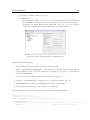
- Network boot: Insert MAC address target (00 − 1B − 21 − 31 − 79 − 12) and
click create Network Boot Image (this setting is recommended!)
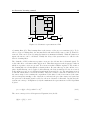
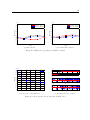
Figure B.2: xPC Target Explorer, communication.
Starting the real-time target:
1. Turn on the blue switch on the back of the real-time target
2. Run: » xpcnetboot(’TargetPC1’). This starts up the xPC Target Network Boot
Server, which is used to load the network boot image to the target pc and upload
the build Simulink files.
3. Pres the blue round button on the front of the xPC to start up.
4. Option: » xpctargetping, to assure there is a connection (answer: success)
5. Build Simulink file, compile it with Ctrl+B and start: » start(tg)
6. Stop the file from running (before end time): » stop(tg)
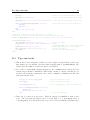
The following m-code was used to start the target and build the simulink files.
%% Starting up of the xPC
% Check with a dialog if the xPC is on.
choice = questdlg('Is the xPC on?','Dialog','Yes','No','Yes');
if strcmp(choice,'No')
questdlg('Turn on the main power switch on the xPC. And pres OK.','Dialog','Ok','Ok');
disp('wait')
% Acknowledge a key is pressed