1
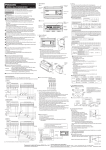
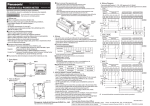
Zero set release
Arrow description in figures
Arrow
Automatic
Description
Press the TEACH key
Press UP key or DOWN key
Press DOWN key
will be displayed
during this period.
The PRO indicator (yellow) will turn ON when the PRO mode is set.
When the DOWN key is pressed for 3 seconds or more in the middle of the
PRO MODE setting, the display returns to the measurement display.
The setting or releasing of the zero set from an external input operates as in
the following figure.
>10ms
1s
OFF
ON
Setting
Default setting
Zero set release
Zero set setting
When the power is turned ON again, zero set from external input can be
released. At this time, the zero set will not be saved.
Even when the zero set is set in the sensor, the zero set can be set or
released from an external input. However, when the power is turned ON
again, the zero set set in the sensor will be displayed.
Response
speed
Output
operation
Select the control output operation mode.
”: Light-ON, “
”: Dark-ON
“
Sensing
output
Set the sensing output.
”: Normal sensing mode
“
”: 1-point teaching (Window comparator
“
mode)
”: 2-point teaching (Window comparator
“
mode)
”: 3-point teaching (Window comparator
“
mode)
”: Rising differential mode
“
”: Trailing differential mode
“
Key lock function
11
The key lock function is to prevent acceptance of key operations, so that
the conditions in each setting mode are not changed accidentally.
When the key operation is performed after the key lock is set, “
” will be
displayed on the digital display.
Description
Set the response time.
”: High precision 10ms
“
”: Standard 5ms
“
”: High speed 1.5ms
“
HG-C1030:
Hysteresis
HG-C1050:
HG-C1100:
Set the hysteresis width.
HG-C1030: 0.001 to 5.00mm
HG-C1050: 0.01 to 15.00mm
HG-C1100: 0.02 to 35.00mm
Key lock setting
Press the TEACH
key and DOWN key
simultaneously for 3
seconds.
External
input
Set the external input.
”: Zero set function,
“
”: Teaching function
“
”: Light emitting stop function
“
”: Trigger function
“
Timer
Set the timer operation. The timer time is fixed
at 5ms.
”: No timer,
“
”: OFF-delay timer
“
”: ON-delay timer
“
”: One-shot timer
“
Display
The display of the measured value can be
changed.
”: Normal
“
”: Invert
“
”: Offset
“
Hold
Set the control output and the analogue output
operation when a measurement error occurs
(insufficient light intensity, saturation of light
intensity, out of measurement range).
”: Hold OFF
“
”: Hold ON
“
ECO
The digital display can be set to go OFF when
key operation is not performed for 30 seconds.
Current consumption can be reduced.
”: ECO OFF
“
”: ECO ON
“
Reset
Return to the default setting (factory setting).
”: Reset NG
“
”: Reset OK
“
Automatic
Key lock release
Press the TEACH
key and DOWN key
simultaneously for 3
seconds.
Automatic
PRO mode setting
12
Part description
1
2
43
No.
Item
1
PRO indicator (Yellow)
2
DOWN key (Select)
3
UP key (Select)
4
TEACH key (Confirmed)
5