1
Procedure
13
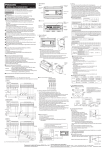
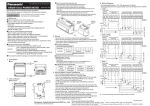
Measurement display
Error indication
In case of error, attempt the following measures.
DOWN: Press for 3 seconds
Response time
setting
High precision
TEACH
UP /
DOWN
Standard
UP /
DOWN
Error
indication
High speed
Hold OFF
---Hold ON
UP / DOWN
Output operation
setting
Light-ON
UP /
DOWN
TEACH
UP / DOWN
Normal sensing
mode
Sensing output
setting
TEACH
UP /
DOWN
UP /
DOWN
Measured
value blinks
Dark-ON
1-point teaching
Window comparator mode
UP /
DOWN
UP /
DOWN
2-point teaching
Window comparator mode
UP /
DOWN
UP /
DOWN
UP / DOWN
Rising differential mode
Trailing differential mode
3-point teaching
Window comparator mode
Hysteresis width
Hysteresis setting
TEACH
UP key
: Increases hysteresis width
DOWN key : Decreases hysteresis width
UP / DOWN
External input
setting
Zero set function
TEACH
UP /
DOWN
Teaching function
UP /
DOWN
Light emitting
stop function
UP /
DOWN
Trigger function
Description
Solution
Insufficient amount of
reflected light.
The sensing object
is out of the sensing
range.
Confirm that the sensing distance is within
the specification range.
Adjust the installation angle of the sensor.
Flash memory is damaged or passed its life
expectancy.
Please contact our office.
Load of the sensing
output is shortcircuited causing an
over-current to flow.
Turn OFF the power and check the load.
The semiconductor
laser is damaged or
passed its life expectancy.
Please contact our office.
When zero set is set,
the measurement
is not performed
normally.
Since the display setting is set to “Offset”,
the zero set function
can not be used.
Confirm that the sensing distance is within
the specification range.
Set the display to any setting except
“Offset.
During teaching, the
measurement is not
performed normally.
Confirm that the sensing distance is within
the specification range.
System error
Please contact our office.
UP / DOWN
No timer
Timer setting
TEACH
UP /
DOWN
OFF-delay
UP /
DOWN
ON-delay
UP /
DOWN
One-shot
14
UP / DOWN
Display setting
Normal
TEACH
UP /
DOWN
Invert
UP /
DOWN
Offset
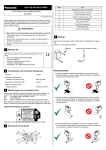
Cautions
● This product has been developed / produced for industrial use only.
● Make sure that the power supply is OFF before starting the wiring.
● If the wiring is performed incorrectly, it will cause a failure.
UP / DOWN
Hold OFF
Hold setting
TEACH
UP /
DOWN
● Do not run the wires together with high-voltage lines or power lines,
or put them in the same raceway. This can cause malfunction due to
induction.
Hold ON
● Verify that the supply voltage variation is within the rating.
UP / DOWN
ECO OFF
ECO Setting
TEACH
UP /
DOWN
● If power is supplied from a commercial switching regulator, ensure
that the frame ground (F.G.) terminal of the power supply is connected to an actual ground.
ECO ON
● If noise generating devices (switching regulators, inverter motors,
etc.) are used around the sensor mounting area, make sure to connect the frame ground (FG) terminal of the device.
UP / DOWN
Reset NG
Reset setting
TEACH
UP /
DOWN
Reset OK
● Do not use this product during the transient state when the power
supply is turned ON.
● The overall length of the cable can be extended to 10m maximum
with a cable size of 0.3mm2 or more.
UP / DOWN
Response time
setting
● Make sure that stress by forcible bend or pulling is not applied to the
sensor cable joint.
● Although it depends on the type, light from rapid start type or high
frequency lighting type, fluorescent lights, sunlight and etc. may affect
the sensing, therefore make sure to prevent direct incident light.
● This product is suitable for indoor use only.
● Keep water, oil, fingerprints and etc. which reflect light, dust or particles etc. which interrupts the light, away from the emitting / receiving
surfaces of this product. If contaminants adhere to the surface, wipe
off with a dust-free soft cloth, or lens cleaning paper.
● Do not use the sensor in locations where there is excessive vapor,
dust or etc. or in an atmosphere where corrosive gases, etc. is generated.
● Take care that the product does not come in contact with oil, grease,
organic solvents such as thinner, etc., strong acid or alkaline.
● Make sure to turn OFF the power supply, before cleaning the light
emitting / receiving windows of the sensor head.
6