1
Application Note
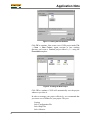
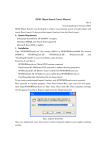
When finished, your Project Manager window should look like
this:
Figure 9: Project Manager Window with Project-Specific
Source Files
Adding Salvo-specific Files to the Project
Now it's time to add the Salvo files your project needs. Salvo
applications can be built by linking to precompiled Salvo libraries,
or with the Salvo source code files as nodes in your project.
Adding a Library
For a library build, a fully-featured Salvo freeware library for the
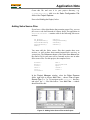
MSP430 for use with CS430 is libsfcs430-a.hza.7 Select the
Salvo Libraries folder in the Project Explorer window, rightclick, choose Add Existing File …, choose Files of type: All
Files, navigate to the \salvo\lib\cs430 directory and select
libsfcs430-a.hza:
Figure 10: Adding the Library to the Project
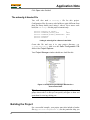
Click Open when you are finished. You can find more information
on Salvo libraries in the Salvo User Manual and in the Salvo
Compiler Reference Manual RM-CS430.
AN-23 Building a Salvo Application with Rowley Associates' CrossStudio for MSP430
5