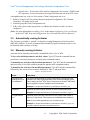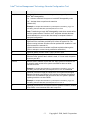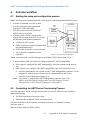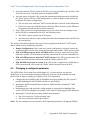
1
Intel® Active Management Technology Remote Configuration Tool 2. Introduction The Intel® vPro Technology Activator utility is a Windows utility that starts the setup and configuration process for an Intel® vPro system in an enterprise environment. In an enterprise environment, the Intel® vPro system with Intel® Active Management Technology (AMT)-enabled capabilities must be remotely setup and configured by the Intel® Setup and Configuration Service (SCS). The Intel® vPro system is only operational after SCS has finished setting up and configuring it over the network. The Activator windows utility is run locally on each vPro system to start its remote setup and configuration process. When an Activator is run, it retrieves from the local system via WMI the parameters that are necessary for successful configuration. The retrieved parameters include the system's FQDN or hostname and UUID. Activator then sends those parameters to SCS in a "Hello" message which triggers SCS to start the provisioning. SCS uses the parameters to find the correct profile, assign it to the vPro system, and then send the profile's setup and configuration settings to the system. The Intel® vPro Technology Activator utility is the latest generation of Intel's Remote Configuration Tool (RTC). It has the following new features: • The address or FQDN of the SCS can be input into Activator as a command line parameter (Activator doesn't have to get the address from the DNS server) • Eliminates the previous requirement to modify DNS or provide aliases • Sends "Hello" messages instead of the vPro system or can restart "Hello" messages if they stopped after a certain amount of time • Automates SCS provisioning by collecting system-specific information and sending it to SCS • Helps sync the OS/AMT hostnames by invoking SCS to check for a mismatch and reprovision the system if necessary • Enables AMT management mode for vPro systems that were delivered with it disabled in MEBx. • Can re-enable RCFG (Remote Configuration, ZTC) capability that was turned off after 24 hours on a Weybridge platform (3.0) and onwards. . - 2- Copyright 2008, Intel® Corporation