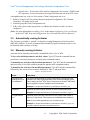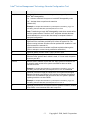
1
Intel® Active Management Technology Remote Configuration Tool • Operator role – If Activator will be used for changing the vPro system 's FQDN in the SCS repository, its user also needs to be assigned an Operator role in the SCS server. A straightforward way to give a vPro system a Client Configuration role is to: 1. Define a Group for all vPro systems that need setup and configuration. The "Domain Computers" AD group can be used. 2. Grant the group the Client Configuration role. 3. Add a vPro system to this group when it is added to the domain or when it is time to configure it. (Note: For more information see Adding a User in the chapter Configuring Users and Groups in the Intel® AMT Setup and Configuration Service Installation and User Manual.) 3.3. Automatically running Activator The Activator executable is “pushed” to clients by existing Management Consoles such as SMS and LANDesk. Activator is automatically launched by logon and startup scripts. It can be launched either remotely or locally. 3.4. Manually running Activator Activator can be manually run from the command line (Start>Run>CMD). To view all available parameters and their values: Type RCT into the command line and press Enter; Activator's parameters are listed in the command window. To manually run Activator with its default parameters: Type RCT into the command line and press Enter; a list of the available parameters appears in the command window. To manually run Activator with modified parameters: Type RCT into the command line, followed by one or more of the switches described in Table 1, and press Enter. Table 1: Activator Switches Switch Description /s <full SCS URL, including port if port is nonstandard > The URL that was defined for remote configuration use when SCS was installed. Use of http or https depends on the selected installation option (see Installing the Intel® SCS Server Components in the Intel® AMT Setup and Configuration Service Installation and User Manual). Example: rct /s https://ProvisionServer.yourenterprise.com/amtscs_rcfg /p profile-id (Optional) Numerical profile ID shown on SCS Console profile page. Example: rct /s https://ProvisionServer.yourenterprise.com/amtscs_rcfg /p 3 /o <organizational unit> (Optional) Active Directory OU where the vPro system's AMT object is placed, in LDAP format. This string has no embedded blank characters. Note: If you use the /o parameter, you must also use /p. Example: rct /s https://ProvisionServer.yourenterprise.com/amtscs_rcfg /p 3 /o OU=AMT_Users,DC=East,DC=yourenterprise,DC=com. - 4- Copyright 2008, Intel® Corporation