1
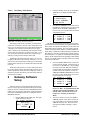
7.1.3.
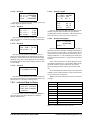
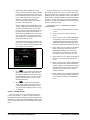
Screens 3 through 6: Firmware
Versions
1 ON [2.00B02]
2 ON [2.00B02]
3 ON [2.00B02]
4 ON [2.00B02]
5 ON [2.00B02]
6 ON [2.00B02]
7 OFF [
]
8 OFF [
]
9 OFF [
]
10 OFF [
]
11 OFF [
]
12 OFF [
]
13 OFF [
]
14 OFF [
]
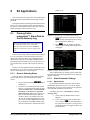
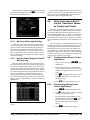
field, enter the number of the PerformanceAlert™ module you wish to view.
Press DOWN ARROW twice.
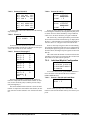
PF ALERT 1-14
SELECT: 1
You may only select a PerformanceAlert™ address for
a module that is set to ENABLE and is communicating
with the Gateway. If a module is not enabled or is not communicating, an error message will be given.
If the address selected is on-line, the Individual Module
Menu will be shown.
7.2.1.
Individual Module Status
SELECT: 1
1=STATUS 4=STATS
2=HISTORY5=RESET
3=CONFIG
These screens show the enable/disable status of all 14
PerformanceAlert™ module addresses, and the firmware
versions of the connected PerformanceAlert™ modules.
To view the status screens, press RIGHT ARROW to
move the cursor to the Select field. Press 1 and then
DOWN ARROW twice.
Addresses set to enable will be shown as ON or OFF in
these screens, while disabled module addresses will be
shown as DIS.
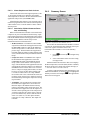
7.2.1.1. Screen 1
Any time a module is enabled and communicated with
a PerformanceAlert™ Gateway, its firmware revision
number is recorded by the Gateway and displayed in this
screen. In most cases, this means enabled modules will be
shown with firmware revision numbers, and disabled ones
will be shown without revision numbers between the
brackets. If a module is later removed or disabled, however, its revision number will remain in its address slot.
7.2.
Individual PerformanceAlert™ Module Status
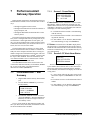
1.
Plug the HHT into the Gateway board’s HHT
jack.
2.
Press the DOWN ARROW key to move to
the Main Menu.
SELECT: 1
1=INDIVIDUAL
2=STAT SUMMARY
3=GW SETUP
3.
Press RIGHT ARROW and then 1 to select
“INDIVIDUAL.” Press the DOWN ARROW
key two times.
4.
Press the RIGHT ARROW key. In the Select
20 • PerformanceAlert Gateway I&O Manual
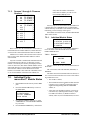
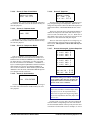
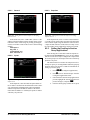
PF ALERT: 1
ONLINE
ALARM: NONE
This screen shows the on-line status and alarm status of
the module.
The on-line status will read ONLINE, OFFLINE, or
DISABLE.
The alarm status will read NONE when no alarm is active. It will read ACTIVE when one or more of the following conditions are true:
• The module is offline,
• The PerformanceAlert™ module has shut down the
compressor (see Copeland® PerformanceAlert™
Application Engineering Bulletin and Section
7.2.3.7., or
• Alert codes 4 (Locked Rotor Alarm), 5 (Open Circuit Detected), 6 (Missing Phase Alarm), 7 (Open
Circuit/Reverse Phase), 8 (Welded Contactor
Alarm), and/or 10 (Lost Communication) are active.
026-1724 Rev 1 15-JAN-2009