1
6
Installing Switch Software
User Interface software comes pre-loaded on your MPM. You do not have to reload unless
you are upgrading, backing up, or reloading due to file corruption.
There are different methods for loading software into your switch. The method you use
depends on your hardware configuration and the condition of the switch. These methods are:
• FTP Server - The OmniSwitch has a built-in FTP server. If you have FTP client software, you
can FTP to the switch and load new software.
• FTP Client - The OmniSwitch can also be an FTP client. You can use this by connecting a
terminal to the switch and using the set of FTP commands in the User Interface. You can
also do this through a telnet session.
• ZMODEM - You can load software directly through the serial port with any terminal
emulator that supports the ZMODEM protocol. You can do this using the file commands in
the User Interface or through the boot line prompt. Note that a ZMODEM transfer of larger
files can take several minutes to complete.
Do Not Mix Software Versions
When loading software, ensure that the versions of software for all the modules are from the
same release. Mixing earlier versions of software with current versions can cause the switch to
reset or hang.
File Transfer/Corruption Problems
If at anytime, a file transfer fails, a fragment of the file may be left on your system. This
remaining file is corrupted. You should delete the file fragment and reload the file before
continuing. If the MPM image file (mpm.img) is corrupted, you will receive a message during
the boot sequence requesting you to delete the file. You should delete the file and reload it
using ZMODEM through the boot line prompt. See Using ZMODEM With the Boot Line Prompt
on page 6-5 for information on loading through the boot prompt.
Page 6-1
Using FTP Server
Using FTP Server
The OmniSwitch is an FTP server. Using any compatible FTP client software you can load software to and from the switch. Consult the manual that came with your FTP client software
package. The following are general instructions on how to FTP to the switch.
1. You will need to configure the IP address in the switch. If you have not done this, refer to
the Getting Started Guide that came with your switch.
2. Use your FTP client software just as you would with any FTP server. When you connect to
the switch you will be able to see the files contained in the flash directory. It is the only
directory in the switch.
3. Note that because of the organization of files in the switch, any time a file is deleted, the
flash memory is compacted. Depending on the number of files in the switch and where
they are located in memory, this compaction can take anywhere from a few seconds to a
couple of minutes.
4. When you transfer a file to the switch and one of the same name exists, the old file must
first be deleted. You first delete the old file, then the compaction takes place, and then
you can transfer the new file. When you begin your transfer, you may not see anything
happening for approximately 2 minutes due the file compaction procedure. After compaction, the file will be transferred.
Page 6-2
Using FTP Client
Using FTP Client
The User Interface contains several FTP commands. Using these commands is similar to using
FTP on a UNIX system. Follow the steps below to start the FTP Client.
1. Log on to the switch and type ftp. For instructions on logging into the switch see the
Getting Started Guide that came with your switch.
2. The system will prompt for a host. It saves the last host name or IP address used. If it’s
the one you want, press <Enter> or enter the new address.
3. The system will prompt for a user name. It saves the last user name. If it’s the one you
want, press <Enter> or enter the new user name.
4. The system will prompt for a password. Enter your password.
5. After logging onto the system you will receive the ftp> prompt. Type a question mark (?)
to review the ftp commands. These commands are described in Chapter 7, “File Menu.”
The following screen displays:
Supported commands:
ascii
binary
bye
dir
get
help
put
pwd
quit
lpwd
cd
hash
remotehelp
delete
ls
user
ascii
Set transfer type to ASCII (7-bit).
binary
Set transfer type to binary (8-bit).
bye
Close gracefully.
cd
Change to a new directory on the remote machine.
delete
Delete a file on the remote machine.
dir
Obtain a long listing on the remote machine.
get
Retrieve a file from the remote machine.
hash
Print the hash symbol (#) for every block of data transferred. This
command toggles hash enabling and disabling.
ls
Summary listing of the current directory on the remote host.
put
Send a file to the remote machine.
pwd
Display the current (present) working directory on the remote host.
quit
Close gracefully.
remotehelp
List the commands that the remote FTP server supports.
user
Send new user information.
lpwd
Display the current (present) working directory on the local host.
?
Summarize this list.
If you lose communications while running ftp, you may receive the following message:
Waiting for reply (Hit ^C to abort)...........
6. You may press <cntl-c> to abort the ftp or wait until the communication failure is resolved
and the ftp transfer will continue. Note that Sun OS systems lose echo when you use the
cntl-c key combination.
Page 6-3
Using ZMODEM
Using ZMODEM
Normally you use FTP to transfer files to and from the switch. It is faster than using the serial
port. A ZMODEM transfer can take several minutes. There are generally two situations which
would require you to use the serial port to load software:
• You do not have access to an FTP client or server program. If the switch is up and
running, you can use the File commands to load software.
• You have deleted the image software files in the switch. If you are in this situation, the
only way to load software is using ZMODEM with the boot line prompt.
To use ZMODEM, you must have a terminal emulator that supports the ZMODEM protocol.
There are many packages on the market and they operate differently; therefore instructions
on how to use them are beyond the scope of this document. Consult the user manual which
came with your terminal emulation software.
Before doing a serial port transfer, you should set the baud rate to the highest possible
(however, it is not recommended that you run it at 38.4 Kbps). Running at 19200 is twice as
fast as 9600. To set the baud rate, use the ser command. For more information on the ser
command, see Chapter 2, “The Management Processor Module (MPM).”
Note
If a file you are transferring already exists in the
switch’s flash memory, you must remove the file before
transferring the new file via ZMODEM.
Using ZMODEM with the load Command
If your switch is up and running, log on to the switch. Type ls to list the files in flash
memory. If the file you are going to transfer exists, you must delete it first with the rm
command.
From the File menu, type ? to list the file commands. The command you use to start the
ZMODEM process is load. The load command does not support speeds greater than 19,200
bauds.
/File % load
The Console (DCE) port is currently running at 19200 baud
Type ÔyÕ to start ZMODEM download, ÔqÕ to quit (y) : y
Upload directory: /flash
ZMODEM ready to receive file, please start upload (or send 5 CTRL-XÕs to abort).
**B0100000023be50
Activate the ZMODEM transfer according to the instructions that came with your terminal
emulation software. When the transfer is completed use ls again to list the file or files you
have loaded.
Page 6-4
Using ZMODEM
Using ZMODEM With the Boot Line Prompt
If you encounter the situation where you have deleted some or all of the files in your switch,
you may need to load files through the boot line prompt. This load procedure is done before
the switch has booted. If there is no software available in the switch, then it cannot boot until
you reload the software.
Using ZMODEM with the boot prompt is similar to using it with the load command. This
section covers only specific step-by-step instructions to load a file using ZMODEM at the
[boot]: prompt. Before doing this you may want to familiarize yourself with the boot line
commands. See Appendix C, “Boot Line Prompt,” for more information.
♦ Important Note ♦
Loading software through the boot prompt should only
be done when the switch is off line and not being used
for normal network traffic.
Set Up the Correct Baud Rate
1. Connect a terminal to the console port. The terminal must be set to the last values set in
the switch before it was powered down. For example if you were running at 19200,8,n,1,
you must set your terminal to these values.
Note
If you have deleted or lost your configuration file
(mpm.cfg), the console port values will revert back to
the factory settings which are 9600,8,n,1.
If you are not sure what baud rate your switch is running, try the last known value. If
your terminal displays garbage, keep changing the baud rate on your terminal emulator
until you see normal ASCII characters.
2. If the switch is on, switch it off for a few seconds, then back on. You should see the boot
start up on your screen. You will see the following:
System Boot
Press any key to stop auto-boot...
2
The number 2 shown above counts down to 0. To stop the boot, you must press a key
before the number counts down to 0. If you miss this, simply turn the switch off for a few
seconds, then back on to restart the process. Note that if there is no software in the switch
it will not be able to boot and will eventually end up at the [boot] prompt anyway.
Page 6-5
Using ZMODEM
The [boot] Prompt
The [boot] prompt has its own set of commands that are built into the switch. You do not
need to have files or software loaded to use this set of commands. You can perform many of
the functions that the MPM software does; however, the purpose of these commands are to
reload software in order to get the switch up and running.
To see a list of the boot commands, type ? at the [boot]: prompt. The following screen
displays:
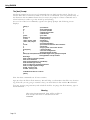
[Boot]: ?
?
- print this list
Q
- boot (load and go)
p
- print boot params
c
- change boot params
l
- load boot file
g adrs
- go to adrs
d adrs [,n]
- display memory
m adrs
- modify memory
f adrs, nbytes, value
- fill memory
t adrs, adrs, nbytes
- copy memory
e
- print fatal exception
n netif
- print network interface device address
L
- list ffs files
P
- Purge system: remove ALL ffs files
R file [files]
- remove ffs file(s)
S
- save boot configuration
V
- display bootstrap version
$dev(0,procnum)host:/file h=# e=# b=# g=# u=usr [pwr=passwd] f=#
tn=targetname s=script o=other
Boot flags:
0x02 - load local system symbols
0x04 - donÕt autoboot
0x08 - quick autoboot (no countdown)
0x20 - disable login security
0x40 - use bootp to get boot parameters
0x80 - use tftp to get boot image
0x100 - use proxy arp
0x1000 - factory reset
available boot devices: sl ffs zm
[Boot:]
Note that these commands are all case sensitive.
Type L to lists the files in flash memory. This will help you determine what files may be missing. If the file you are going to transfer exists, you must delete it first with the R command.
You may want to purge memory and reload all the files. To purge the flash memory, type in
the P command.
Warning
After using the P command, there will be no files in
flash and you will have to reload them all with
ZMODEM.
Page 6-6
Using ZMODEM
Starting a ZMODEM Transfer at the [boot] Prompt
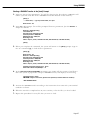
1. Type c to change boot parameters. You will be changing the boot device to zm. This will
tell the system to load files from a ZMODEM connection instead of flash memory.
[Boot]: c
Ô.Õ = clear field; Ô-Õ = go to previous field; ^D = quit
Boot device : zm
2. Type zm at this prompt. You will be prompted for more parameters. Just hit <Return> to
accept the defaults.
Boot file : /flash/mpm.img
Local SLIP adr :
Startup script: /flash/mpm.cmd
Console params : 9600,n8lc
Modem params : 9600,n8l
Boot flags :0xb
Other: dvip:no_name, 198.206.183.253, 255.255.255.0, 198.206.183.255;
[Boot]:
3. When you complete the command, the system will return to the [Boot]: prompt. Type in
the “at” command (@ ) to load the boot parameters.
[Boot]: @
Boot device : zm
Boot file : /flash/mpm.img
Startup script: /flash/mpm.cmd
Console params : 9600,n8lc
Modem params : 9600,n8l
Boot flags :0xb
Other: dvip:no_name, 198.206.183.253, 255.255.255.0, 198.206.183.255;
Attaching network interface lo0... done.
Disk load or Boot load (D/B/Q)? -> d
4. At the Disk load or Boot load {D/B/Q}? -> prompt, type in d to tell the system to load from a
disk. The system is prepared to accept a ZMODEM transfer, and displays the following:
Upload directory: /flash
ZMODEM ready to receive file, please start upload (or send 5 CTRL-XÕs to abort).
**B0100000023be50
5. Activate the ZMODEM transfer according to the instructions that came with your terminal
emulation software.
6. When the transfer is completed use L (case sensitive) to list the files you have loaded.
7. Repeat this procedure for every file that you want to load.
Page 6-7
Using ZMODEM
Page 6-8