1
Contents
Contents.........................................................................................................1
Read This First...............................................................................................3
Machine Functions............................................................................................................................ 3
To Ensure Safe Use..................................................................................6
Important Notes on Handling and Use.........................................................10
Chapter 1: Setup Preparation............................................................................ 11
1-1 Included Items........................................................................................12
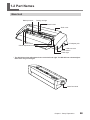
1-2 Part Names............................................................................................13
Main Unit............................................................................................................................................13
1-3 Installing.................................................................................................14
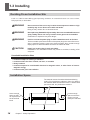
Deciding On an Installation Site................................................................................................14
Installation Space............................................................................................................................14
Removing the Packing Materials...............................................................................................15
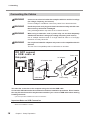
Connecting the Cables..................................................................................................................16
Chapter 2: Installing Software...........................................................................17
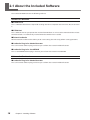
2-1 About the Included Software..................................................................18
2-2 If You're Using a Windows.....................................................................19
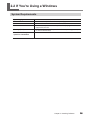
System Requirements....................................................................................................................19
One-operation Installation of Driver and Software............................................................20
2-3 If You're Using a Macintosh....................................................................23
System Requirements....................................................................................................................23
Installing the Software..................................................................................................................23
Chapter 3: Performing Cutting..........................................................................25
3-1 What to Know Before Cutting.................................................................26
Useable Material Types..................................................................................................................26
3-2 Cutting....................................................................................................27
Step 1: Load Material......................................................................................................................27
Step 2: Create Cutting Data.........................................................................................................30
Step 3: Perform Cutting.................................................................................................................34
Step 4: Apply the Cut Material....................................................................................................36
Chapter 4: Mastering the STIKA........................................................................37
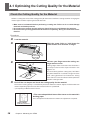
4-1 Optimizing the Cutting Quality for the Material................................................... 38
Check the Cutting Quality for the Material............................................................................38
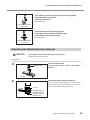
Adjusting the Blade Extension Amount..................................................................................39
4-2 Correcting the Angle of the Loaded Material............................................... 41
4-3 About Creating Cutting Data..................................................................42
Creating Various Text Data...........................................................................................................42
Creating Contour Data by Reading a BMP/JPG Format File.............................................44
Deleting Undesired Cutting Lines.............................................................................................46
4-4 Applying Large Materials........................................................................47
1