1
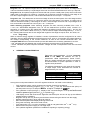
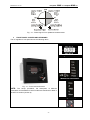
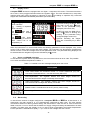
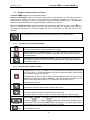
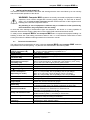
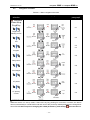
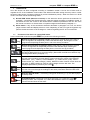
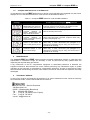
computer MAX 6 / computer MAX 12 M98228201-03-14A 7 RUN STATUS Once the device has been configured according to installation needs it can be set to RUN mode to regulate the PF of the installation. RUN mode is the default mode after exiting the set-up menu or after the device start (supply connection followed by a short initialisation period). When the device is in RUN mode it can reach one of the following status: a) Normal RUN status (Absence of alarm): In this status the device performs the automatic PF regulation, connecting and disconnecting the capacitor stages according to installation needs. In this status the user can access to the measurement of different parameters and can also force the manual connection or disconnection of capacitor stages as described in paragraph 7.1. b) Alarm status: If any of the anomalous situations described in paragraph 3.2 occur, the device jumps to alarm status and displays the error code. Depending on the error type the regulator may perform the disconnection of all the stages or continue regulating the PF as in normal RUN. 7.1 Functions of the device in normal RUN mode. In the normal RUN mode the Computer MAX can perform the following functions: long long short short long MAX Manual connection of capacitor stages. Keep the key pushed during more than 1s and the regulator will sequentially connect the different steps, following the normal program and respecting the delay time ton set in the set-up procedure Manual disconnection of capacitor stages: Keep the key pushed during more than 1s and the regulator will sequentially disconnect the different steps, following the normal program and respecting the delay time toff set in the set-up procedure. Displaying the number of connected steps: If both keys are simultaneously pushed the device displays the Nr of connected steps. (Remember the difference between step and stage described in paragraph 1.1) Parameters measurement: Performing successive short pushing of this key (<1 s), the user can travel along several display screens showing the values of the following parameters: (cos) , cosinus of the installation ; (I) , mains current; (THD), THD of mains current; (V) , Mains voltage; (I, MAX), MAXimum value of mains current since the last clear; (V MAX), MAXimum value of mains voltage since the last clear. The displayed parameter is pointed by the cursor Parameters measurement: Performing successive short pushing of this key (<1 s), the user can travel through the readings of the same parameters described above but in reverse order. Start the SET-UP mode: : Performing a long push of this key (<1 s), the device jumps to set-up mode. Clear MAX values: Performing a long push of this key (<1 s) while the cursor is pointing to MAX , the Computer MAX clears the MAXimum values of voltage and current recorded since the last clear. - 18 -