1
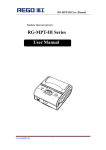
RG-MTP58B User Manual
RG-MTP58B
User Manual
V1.00
Beijing RuiGong Tech Co., Ltd.
www.regotek.com
-1-
RG-MTP58B User Manual
Record
Version
V1.00
Date
2014.05.12
www.regotek.com
Revision
The first version
-2-
RG-MTP58B User Manual
content
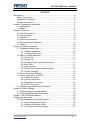
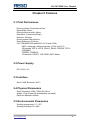
Precautions ..................................................................................................- 5 Safety Precautions ................................................................................- 5 Operation Precautions ..........................................................................- 5 Storage Precautions .............................................................................- 6 Chapter I Appearance and Model ................................................................- 7 1.1 Appearance ....................................................................................- 7 1.2 Model ..............................................................................................- 8 Chapter II Features ......................................................................................- 9 2.1 Print Performance ...........................................................................- 9 2.2 Power Supply..................................................................................- 9 2.3 Interface ..........................................................................................- 9 2.4 Physical Parameters .......................................................................- 9 2.5 Environmental Parameters .............................................................- 9 2.6 Others ........................................................................................... - 10 Chapter III Operation Method .................................................................... - 10 3.1 Preparation Before Use ................................................................ - 10 3.1.1 Battery Installation .............................................................. - 10 3.1.2 Loading Paper Roll ............................................................. - 10 3.2 Basic Function Operation.............................................................. - 11 3.2.1 Power On ............................................................................ - 11 3.2.2 Power Off ............................................................................ - 11 3.2.3 Feeding Paper (Feeding manually) ..................................... - 11 3.2.4 Self-Test ............................................................................. - 11 3.2.5 Hex Printing ........................................................................ - 11 3.2.6 Enter The Program Upgrade Mode..................................... - 12 3.2.7 Power Charging .................................................................. - 12 3.3 Printer Parameter Settings............................................................ - 13 3.4 Printer Connection and Print ......................................................... - 13 3.4.1 USB Connection ................................................................. - 13 3.4.2 Serial Connection ............................................................... - 13 3.4.3 Bluetooth Connection ......................................................... - 15 3.4.4 WI-FI Connection ................................................................ - 15 3.5 Indicator Light and Buzzer Description ......................................... - 16 Chapter IV Other Settings .......................................................................... - 18 4.1 Programming Command Manual .................................................. - 18 4.2 Pre-printed Black Mark Description .............................................. - 18 Chapter V WI-FI Wireless Module.............................................................. - 20 Setting and User guide .............................................................................. - 20 5.1 Web Management Page Description ............................................ - 20 5.1.1 Open Management Page .................................................... - 20 5.1.2 System Information Page ................................................... - 21 Pic. 5-2 System information page ................................................ - 21 -
www.regotek.com
-3-
RG-MTP58B User Manual
5.1.3 Work Mode Selection Page ................................................ - 21 5.1.4 STA Settings Page ............................................................. - 22 5.1.5 AP Settings Page................................................................ - 23 5.1.6 Other Setting Page ............................................................. - 24 5.1.7 Account Management Page ............................................... - 25 5.1.8 Software Upgrade Page ..................................................... - 25 5.1.9 Module Reset Page ............................................................ - 26 5.1.10 Restore Factory Default Settings ...................................... - 26 5.2 WI-FI Interface Usage Instructions ............................................... - 27 5.2.1 Software Debugging Tools ................................................. - 27 5.2.2 Net work Connection .......................................................... - 27 5.2.3 The Initial Parameters ......................................................... - 28 5.2.4 Printer Test ......................................................................... - 28 -
www.regotek.com
-4-
RG-MTP58B User Manual
Precautions
Please read the user manual carefully and strict compliance with use of
following instructions before operating the printer.
Safety Precautions
Warning: Do not touch the cutter of printer.
Warning: The print head is heating element; do not touch it and its peripheral
parts during the printing process or the print just ended.
Warning: Do not touch the surface of print head and its connections to avoid
damage it.
Operation Precautions
The printer can not be immersed in water, and do not expose it to rain, it may
cause damage to the printer
When printing by USB interface, you can not disconnect the USB cable,
otherwise, it may cause incomplete data. When using the Bluetooth mode
printing in the printing process no more than 10 meters, it may cause printing
garbled or not print.
Although the printer can operate stably at 0 ℃ to 50 ℃, however, the high
ambient temperature (45 ℃) or low temperature (5 ℃) will result in poor print
quality.
High ambient humidity (above 85% relative humidity) or low humidity (20%
relative humidity or less) will result in reduced print quality.
Use inferior paper or printing paper stored too long may cause the print quality
to reduce, or even damage to the printer.
When the printer is working under black mark detection mode (when printing
black mark paper), pls. refer to 4.2 Black Mark Detection Description
www.regotek.com
-5-
RG-MTP58B User Manual
Instructions. Otherwise, it may cause the printer inaccurately detected the
black mark
Using out of batteries before charge them, in this case you can effectively
ensure the battery life. Battery life is generally: ≥ 300 times charge and
discharge times, battery performance will decrease based on the increase of
charging.
Storage Precautions
The printer should be stored at a temperature of -40 ℃ to 70 ℃, relative
humidity of 10% to 95% of the environment.
Ordinary thermal paper storage time is shorter, if you want to print long-term
preservation of documents, please use the long-term thermal paper.
Do not put the thermal paper in direct sunlight or high temperature storage, if
you have opened the paper, please save it at dark place.
If want to prolonged storage printer, users need to make sure to remove the
printer batteries stored separately, otherwise it may lead to battery failure,
even leakage and damage the printer.
If the battery is stored for more than three months, it needs to be installed on
the printer and charge it one time to avoid damage due to self-discharge.
Statement
This product is Class A. In a normal environment, this product
may cause radio interference. In this case, users may be required to
take practical measures against interference.
Manufacturer reserves the right to modify the contents of the
specification without prior notice!
www.regotek.com
-6-
RG-MTP58B User Manual
Chapter I Appearance and Model
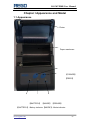
1.1 Appearance
Platen
Paper warehouse
【POWER】
【FEED】
【BATTERY】 【MODE】 【ERROR】
【BATTERY】: Battery indicator 【MODE】: Mode indicator
www.regotek.com
-7-
RG-MTP58B User Manual
【ERROR】: Error indicator
【POWER】: Power button【FEED】: Feeding button
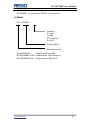
1.2 Model
RG – MTP58B - **
Interface
S: Serial
U: USB
BT: Bluetooth
W: WI-FI
Product Model
Manufacture code
RG-MTP58B-SU
Support serial and USB
RG-MTP58BBT-SUBT Support serial, USB, Bluetooth
RG-MTP58BW-SUW Support serial, USB, WI-FI
www.regotek.com
-8-
RG-MTP58B User Manual
Chapter II Features
2.1 Print Performance
Printing method: Direct thermal line
Paper width: 58mm
Printing effective width: 48mm
Resolution: 8 dots/mm(203dpi)
Dots/line: 384 dots
Printing speed: Max 80mm/s
Paper thickness: 60~80μm
Font: GB18030-2000 and BIG5 (16*16 and 24*24),
ASCII, codepage, defined character (12*24 and 9*17)
1D barcode: UPCA, UPCE, EAN13, EAN8, CODE39, ITF25,
CODABAR,
CODE93, CODE128
2D barcode: PDF417, QR CODE, DATA Matrix
2.2 Power Supply
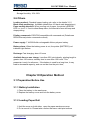
DC 5~8.5V, 2A;
2.3 Interface
Serial, USB, Bluetooth, WI-FI
2.4 Physical Parameters
Outer Dimension:108(L)*78(W)*45(H)mm
Weight: 150g (Paper roll and batteries excluded)
Paper roll diameter:≤40mm
2.5 Environmental Parameters
Working temperature: 0℃~50℃
Working Humidity:10%~80%
www.regotek.com
-9-
RG-MTP58B User Manual
Storage temperature: -40℃~70℃
Storage Humidity: 10%~95%
2.6 Others
Loading method: Clamshell paper loading, pls. refer to the details 3.1.2
Black mark positioning: Available (details see 4.2 black mark descriptions)
Paper ending detection: When running out of paper, the printer’s ERROR
LED has been lit. If set to allow Beep alarm, the internal buzzer will beep and
stops printing.
Printing commands: ESC/POS compatible with command set (Details see
REGO thermal printer commands manual)
Power supply: 7.4V/2000mAh rechargeable lithium polymer battery
Battery alarm: When the battery power is out, the printer [BATTERY] red
indicator light flashes
Recharge: Fast charging, about 3 hours
Available time on one charge: Less than 25% print density, printing length is
greater than 120 meters, standby time is more than 120 hours. This
parameter is only for reference. If the battery is used for a long time, it may
lead to decreased capacity, and can not be sure the print time;
Chapter III Operation Method
3.1 Preparation Before Use
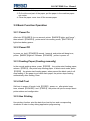
3.1.1 Battery Installation
1. Place the battery in the warehouse
2. Replace the battery cover and lock the battery cover.
3.1.2 Loading Paper Roll
1. Hold the cover on both sides, open the paper warehouse cover
2. Put a new roll in. Please take a notice that use a valid print surface
www.regotek.com
- 10 -
RG-MTP58B User Manual
on the outside of the paper
3. Pull out the end part of the paper, put the paper in the machine paperout center.
4. Close the paper cover torn off the excess paper.
3.2 Basic Function Operation
3.2.1 Power On
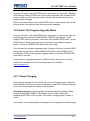
After hold 【POWER】 for one second, printer 【MODE】lights, and “beep” ,
then release 【POWER】, printer enter into working mode, 【BATTERY】
light show battery power.
3.2.2 Power Off
In power on, hold 【POWER】around 1 second, and printer will beep tone,
printer 【MODE】light-off. Release 【POWER】, printer is power off.
3.2.3 Feeding Paper (Feeding manually)
In the normal working status, press 【FEED】, the printer start feeding paper,
release 【FEED】, the printer stop feeding paper. In black mark mode, press
【FEED】, the printer start feeding paper, when passed the black mark it will
stop feeding. If the paper is not black mark paper, the printer stops feeding
automatically after feeding 30cm.
3.2.4 Self-Test
Self-test: in power off mode, hold 【FEED】, power on, after printer beep
tone, release 【POWER】 and 【FEED】, the printer will print a receipt about
printer status and configuration.
3.2.5 Hex Printing
Hex printing function: print the data from host by hex and corresponding
character in order to easy debug application programming.
www.regotek.com
- 11 -
RG-MTP58B User Manual
Hex printing:
In power off mode, first hold FEED button, then power on the printer, ERROR
LED flashing, holding FEED button more than 3 seconds, then release FEED
button, printer enter hex printing mode, and print the entrance hex printing
mode prompt message.
ESC hex printing: Power off or press FEED button 3 times, printer will exit hex
printing mode, and print exit hex printing prompt message.
3.2.6 Enter The Program Upgrade Mode
In power off mode, first hold FEED button, then power on the printer, after the
printer beep, then release POWER button. ERROR light flashes. Keep
holding FEED button more than 3 seconds, then release FEED button, press
FEED button 5 times, wait 3 seconds, printer enter the program upgrade
mode. At this time ERROR LED flash each 2 seconds
Fast entrance the program upgrade mode: In power off mode, first hold FEED,
then power on the printer, when ERROR LED lights, release FEED button
immediately. Printer enter program upgrade mode. At this time ERROR LED
flash each 2 seconds
If users want to upgrade program by USB and serial, they need to use the
professional software which can be download on our website:
www.regotek.com.
3.2.7 Power Charging
After working a period of time, printer will use out of battery power. When the
printer battery is near end of power, red battery power LED will flash alarming,
users need to recharge the battery at this moment.
Recharging method: Connect printer and power supply by adapter. When
charging, printer BATTEERY LED flashes as color order. When wellrecharged, BATTERY LED is green. The whole recharging time is about 3
hours
If the printer is on working when recharging, the recharging time will be longer.
www.regotek.com
- 12 -
RG-MTP58B User Manual
When recharging, if BATTERY LED is not lit, it means the battery charging
failure. Users need to check the battery installation and connection.
3.3 Printer Parameter Settings
By “Tool set”, printer can configure parameter by computer, such as setting
language, character, printing density, default code-page, printer bluetooth
name and password etc. Details see “Tool set” help file. This help file will be
available along with software.
3.4 Printer Connection and Print
3.4.1 USB Connection
RG-MTP58B printer USB interface standard is MICRO USB-B. Follow the
USB printer protocol.
3.4.2 Serial Connection
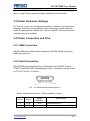
RG-MTP58B printer serial interface is compatible with RS232C. Support
RTS/CTS and XON/XOFF handshaking protocol, connection interface model
is JTC3-5A. See Pic..3-1 below
Pic.. 3-1 Serial interface socket pin no.
Serial interface socket pin no. Define as table 3-1 below:
Pin no.
Signal
Signal
direction
1
DTR
Out
2
RXD
In
www.regotek.com
Specification
The same as RTS
Printer received the data from PC.
- 13 -
RG-MTP58B User Manual
The printer will be sent XON/XOFF
3
TXD
Out
4
RTS
Out
GND
5
-
to PC when operating the
XON/XOFF handshake protocol.
This signal reflect the printer
status. SPACE indicates printer is
ready, and can receive data.
MARK indicates printer is busy,
can receive data
Signal ground
Table 3-1 Serial interface pin no.definition
Note: ①Source means the source of the signal emitted
In serial connection, set baud rate and data structures by “Tool set”. Default
setting is 9600bps, 8 bits of data, data structure is no parity, and 1 stop bit
There are 2 types of handshaking optional. 1. Hardware control, 2.X-ON / XOFF protocol. The description of two type handshaking is as follows Table 3-2
Handshaking
Data direction
Data can be
Hardware control
access
Data can be
access
RS-232C interface signal
RTS and DTR in Space status
RTS and DTR in Mark status
Data can be
Send X-ON 0x11 based on
X-ON/X-OFF
access
TXD
control
Data can be
Send X-OFF 0x13 based on
access
TXD
Table 3-2 Two types of handshaking
Corresponding connection relationship (Printer connect with computer DB9)
See Tablet 3-3.
No.
1
2
3
JTC3-5A socket
1
2
3
www.regotek.com
DB9pin
6
3
2
- 14 -
RG-MTP58B User Manual
4
5
4
5
8
5
Tablet 3-3 Printer serial port connect with computer DB9.
3.4.3 Bluetooth Connection
Hand terminal, notebook and other intelligence terminal drive to printer
through bluetooth. There are two versions of RG-MTP58B bluetooth, 2.0 and
4.0. Compatible with bluetooth 2.0 and bluetooth 4.0 standard bluetooth,
power lever is CLASS 2. Effective distance is 10m. Bluetooth of printer is
guest device. The initial device name for RG-MTP58B, the initial password is
"1234" or "123456" (4.0 Bluetooth). Users can use the "tool set" to modify the
device name and password. Changing the device name and password
method described in "setting tool" in the help file as needed.
The mobile printer need to pair with bluetooth host device first, the pairing
initiated by the master device before RG-MTP58B working. The pairing is as
follows:
1. Power on the printer
2. Host device search external bluetooth device
3. If there are many external bluetooth device, choose RG-K628 printer
4. Input password: 1234
5. Finish pairing
Pls. refer to the host device bluetooth manual with the detailed pairing method.
Note:
a. When pairing, printer RG-MPT58B must keep power on
b. When the bluetooth of printer and host device are well-paired, printer
bluetooth will not be available for other host device bluetooth
searching. Till the printer bluetooth disconnected from the paired host
device
c. After well-pairing, printer MODE LED flash 2 times
3.4.4 WI-FI Connection
With WI-FI hand terminal, notebook and other intelligence terminal drive to
printer through WI-FI
www.regotek.com
- 15 -
RG-MTP58B User Manual
Printer RG-MTP58B WI-FI support AP, STA, AP+STA.
RG-MTP58B Printer default parameter as below:
Device name: RG-MTP58B
AP SSID: RG-MTP58B;
AP Encryption: OPEN, NONE;
AP IP address: 192.168.1.1;
Network parameters: TCP, SERVER,9000,192.168.1.110;
Printer IP address: DHCP,0.0.0.0,0.0.0.0,0.0.0.0;
AP mode:
The printer RG-MTP58B as a wireless access point, the other device
as a wireless information terminal is connected to the printing.
STA mode:
The printer RG-MTP58B as a wireless terminal through a wireless
access point connects with other devices.
AP+STA mode:
RG-MTP58B printer STA interface can be connected to wireless router
and connected to the network server via TCP connections, while the
printer AP interface is also available. Mobile phone, PDA etc can control
the printer or configure WI-FI module through AP interface,
In the first use of WI-FI interface, you need to set WI-FI module. The details
see chapter V
3.5 Indicator Light and Buzzer Description
【ERROR】LED:
Printer has three indicator lights: 3-color BATTERY LED, green MODE LED,
and red ERROR LED
The definition of the indicator light:
【MODE】LED:
www.regotek.com
- 16 -
RG-MTP58B User Manual
Long lit: The printer is turned on and the wireless module (Bluetooth, WI-FI) in
a disconnected state.
Flash 1 time: External power supply is plugged, but the printer is turned off.
Flash 2 times: The printer is turned on and the wireless module (Bluetooth,
WI-FI) is connected.
【ERROR】LED:
Long lit: printer is out of paper
Flash: Printer appears error. Different flashes, different errors
.
1. Automatic recoverable error, LED light continuous flashing. Such as print
head temperature error
Error type
Error description
Automatic
recoverable
LED continuous flashing: print
head over-heated
ERROR flashing way
error
2. Unrecoverable error. After flash several times, LED light is on for a period,
and then cycling. The number of flashes indicates the type of error
Error type
Error description
Unrecoverable
error
LED flash 1 time: Memory read and
write errors
ERROR flashing way
LED flash 2 times: Overvoltage
LED flash 3 time: voltage shortage
LED flash 4 times: CPU Execution
errors (wrong address)
LED flash 5 times: UIB error
LED flash 6 times: FLASH write
error
LED flash 7 times: Parameter write
error
LED flash 8 times: Temperature
detecting circuit errors
【BATTERY】LED:
www.regotek.com
- 17 -
RG-MTP58B User Manual
Power LED is made of 3 color, to indicate battery charge status
Green: High power capacity
Blue: Medium power capacity
Red: Low power capacity
Red light flash: low power capacity, need to recharge timely
3 color off: power off or mis-installed battery.
Printer has a buzzer which can give prompt message. Pls. see the description
of buzzer beep prompt message.
Different buzzer beeps, different error types
When printer is in error status, the meaning of beep number is the same as
LED light flash number.
Power on: Beep 1 time
Power off: Beep 2 times
In addition, the buzzer can be set to beep when a cut is performed, in order to
prompt a receipt printing is complete.
Chapter IV Other Settings
4.1 Programming Command Manual
“RG Thermal Printer Programming Command Manual” is a technical manual
guide for users to develop RG-MTP58B, this manual can be obtained from the
REGO
This manual includes printer hardware interface technical description, printing
control commands set technical document, and how to print black mark, and
how to position black mark.
4.2 Pre-printed Black Mark Description
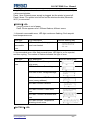
If user want to position black mark printing, pls. follow the guidelines below
otherwise it may cause the printer does not recognize the black mark. Preprinted black mark specification:
www.regotek.com
- 18 -
RG-MTP58B User Manual
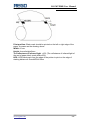
Print position: Black mark should be printed on the left or right edge of the
paper, the same as the drawing above.
Width: ≥7mm
Height: 4mm≤height≤6mm
The reflectance of infrared light: <10% (The reflectance of infrared light of
the rest of paper black mark width>65%)
HPS: HPS black mark from the edge of the printer to print on the edge of
starting distance.4.5mm≤HPS≤6.5mm
www.regotek.com
- 19 -
RG-MTP58B User Manual
Chapter V WI-FI Wireless Module
Setting and User guide
5.1 Web Management Page Description
In the first use of WI-FI interface of RG-MTP58B, users need to set the WI-FI
module. Users can connect PC with AP interface of RG-MTP58B, and set it by
WEB management.
The default SSID of AP interface is RG-MTP58B. IP address, user name and
passwords see below:
RG-MTP58B network default setting table
Parameter
SSID
IP address
Subnet mask
User name
Password
Default configuration
RG-MTP58B
192.168.1.1
255.255.255.0
admin
admin
5.1.1 Open Management Page
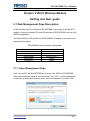
First connect PC with RG-MTP58B by wireless LAN. SSID is RG-MTP58B.
After well-connected, open IE, and enter http://192.168.1.1 in the address bar.
In the pop-up dialog box enter the user name and password, and then "OK."
www.regotek.com
- 20 -
RG-MTP58B User Manual
Pic. 5-1 Open management page
Then pop-up RG-MTP58B management web interface. This management
web interface can support Chinese and English optional. Menu includes 9
pages, like SYSTEM INFORMATION, MODE SELECTION, STA SETTINGS,
AP SETTINGS, OTHER SETTINGS, ACCOUNT MANAGEMENT,
SOFTWARE UPGRADE, MODULE RESET, and RESTORE FACTORY
DEFAULT SETTINGS.
5.1.2 System Information Page
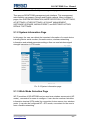
In this page, the user can obtain the important information of current device
including device serial number, firmware version, wireless networking
information and related parameter settings. Also can read wireless signal
strength instruction in STA mode.
Pic. 5-2 System information page
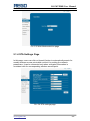
5.1.3 Work Mode Selection Page
WF-FI modules of RG-MTP58B can be used as a wireless access point (AP
mode) , convenient for users to configure. It can also be used as a wireless
information terminal (STA mode) by connection fortune server via a wireless
router. It can also be configured AP + STA mode, convenient for the user to
form a flexible networking.
www.regotek.com
- 21 -
RG-MTP58B User Manual
Pic. 5-3 Work Mode selection page
5.1.4 STA Settings Page
In this page, users can click on [search] button to automatically search for
nearby wireless access points and connect it by setting the network
parameters. It can be connected only when encrypted information is
consistent with the corresponding wireless access point.
Pic. 5-4 STA settings page
www.regotek.com
- 22 -
RG-MTP58B User Manual
Pic. 5-5 STA web search user router page
5.1.5 AP Settings Page
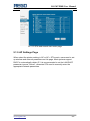
When select the printer working in AP or AP + STA mode, users need to set
up wireless and network parameters on this page. Most systems support
DHCP to automatically obtain IP. It is recommended to set the LAN DHCP
parameter type as "Server", otherwise STA need to manually enter the
appropriate network parameters
www.regotek.com
- 23 -
RG-MTP58B User Manual
Pic. 5-6 AP settings page
5.1.6 Other Setting Page
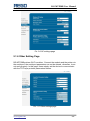
RG-MTP58B printers WI-FI modules: Connect the module and the printer via
the serial port, the serial port parameters can not be altered, otherwise, it can
not work properly. In this page, Users simply set the device to communicate
with the TCP layer protocol parameters fortune.
Pic.. 5-7 Other settings page
www.regotek.com
- 24 -
RG-MTP58B User Manual
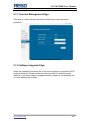
5.1.7 Account Management Page
This page is used to set the user-device Web Server user name and
password
Pic. 5-8 Account management page
5.1.8 Software Upgrade Page
Users can update the firmware file on the local computer to upload the WI-FI
modules firmware. Please consult our technical staff for detailed upload
methods. If not really need to upgrade firmware, please do not arbitrarily set,
or it may damage the module.
www.regotek.com
- 25 -
RG-MTP58B User Manual
Pic. 5-9 Software upgrade page
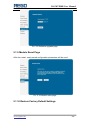
5.1.9 Module Reset Page
After the restart, newly saved configuration parameters will be used.
Pic. 5-10 Module reset page
5.1.10 Restore Factory Default Settings
www.regotek.com
- 26 -
RG-MTP58B User Manual
After restore the factory settings, the user's former configuration will be
deleted. Users can reconfigure at http://192.168.1.1, username and password
are admin. And the system will automatically turn off STA mode wireless.
Pic.. 5-11 Restore factory default settings
5.2 WI-FI Interface Usage Instructions
5.2.1 Software Debugging Tools
You can use the following general procedure as a debugging tool for WI-FI
interface (Users can also use other debugging tools)
Network debugging tool: TCPUDPDbg
5.2.2 Net work Connection
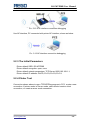
There are 2 kinds of connection when debugging. Users can be tested in
accordance with the actual application. Use STA interface, printer and PC
connected to a wireless AP respectively, shown as below:
www.regotek.com
- 27 -
RG-MTP58B User Manual
Pic. 5-12 STA interface connection debugging
Use AP interface, PC connected with printer AP interface, shown as below:
Pic. 5-13 AP interface connection debugging
5.2.3 The Initial Parameters
Printer default SSID: RG-MTP58B
Printer default encryption: open, none
Printer default network parameters: TCP,Server,9000,192.168.1.1;
Printer default IP address: DHCP,0.0.0.0,0.0.0.0,0.0.0.0;
5.2.4 Printer Test
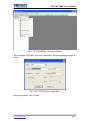
Connection shown above to open TCPUDPDbg program in PC2, create a new
connection. If printer works in Server mode, users should create a client
connection, or create a server mode connection.
www.regotek.com
- 28 -
RG-MTP58B User Manual
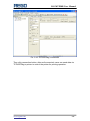
Pic. 5-14“TCPUDPDbg” Create connection
Then configure TCP/UDP connection parameter, default parameter shown as
below
Pic. 5-15“TCPUDPDbg” configuration
Well-configuration, click “Create”
www.regotek.com
- 29 -
RG-MTP58B User Manual
Pic. 5-16“TCPUDPDbg” connection
Then click connection button, after well-connected, users can send data via
TCPUDPDbg to printer to control the printer for printing operation.
www.regotek.com
- 30 -
RG-MTP58B User Manual
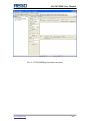
Pic. 5-17“TCPUDPDbg”connection succeed
www.regotek.com
- 31 -