1
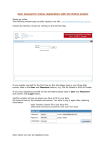
1. LOGIN
The login button is located on the right side, after clicking it you will be prompted to enter your
username and password. Press "Login" to finish the login procedure.
After you logged in the button on the right will change to "logout" and you can logout whenever you
want by pressing it.
2. EVENT SELECTION
On the "Event Registration" tab all events are listed in their chronicle order.
On the right side of the table are two dates, the 1st one is the deadline for the registration by
numbers the one in the2nd line is the deadline for the registration by names
If you want to enter your numbers or names and also if you want to check your current entered data
you have to click on the desired event (event-row).








![English [2012v1]](http://vs1.manualzilla.com/store/data/005666127_1-015c2c1b906ab908850f1f1f8721a849-150x150.png)