1
Connections (Continued)
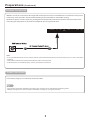
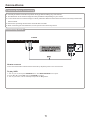
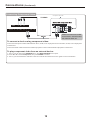
Connecting Component Video
Component video cable
TV REAR
Coax
Headphone
RF
Y
VGA
Pb
Pr
PC
Audio
Video
R
L
HDMI
USB
Cables are often color-coded
to connectors. Connect red to
red, white to white, etc.
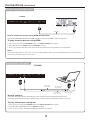
To connect a device using component video:
Connect the Component Video cable between the Y, Cb/Pb, Cr/Pr input jacks on the unit and Y, Cb/Pb, Cr/Pr output jacks
on the device .
Connect the Audio cable between the AUDIO input jacks on the unit and AUDIO output jacks on the device.
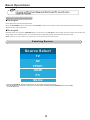
To play component video from an external device:
1. Turn on your TV, then press SOURCE button. The INPUT SOURCE menu opens.
2. Press ▲ or ▼ to select Component, then press ENTER to confirm.
3. Turn on your external device and set it to the correct mode. See the device's user guide for more information.