1
Mitglied der Helmholtz-Gemeinschaft
Debuggers and
Performance Tools
February 2015 | Markus Geimer, Alexandre Strube
Outline
Local module setup
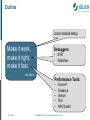
Make it work,
make it right,
make it fast.
Debuggers:
• STAT
• TotalView
Kent Beck
Performance Tools:
•
•
•
•
•
M. Geimer
Score-P
Scalasca
Vampir
TAU
HPCToolkit
JUQUEEN Porting & Tuning Workshop, Feb. 2015
2
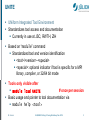
UNITE
UNiform Integrated Tool Environment
Standardizes tool access and documentation
Currently in use at JSC, RWTH, ZIH
Based on “module” command
Standardized tool and version identification
<tool>/<version>-<special>
<special>: optional indicator if tool is specific for a MPI
library, compiler, or 32/64 bit mode
Tools only visible after
module load UNITE
# once per session
Basic usage and pointer to tool documentation via
module help <tool>
M. Geimer
JUQUEEN Porting & Tuning Workshop, Feb. 2015
3
Example
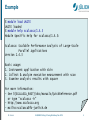
% module load UNITE
UNITE loaded
% module help scalasca/1.4.3
Module Specific Help for scalasca/1.4.3:
Scalasca: Scalable Performance Analysis of Large-Scale
Parallel Applications
Version 1.4.3
Basic usage:
1. Instrument application with skin
2. Collect & analyze execution measurement with scan
3. Examine analysis results with square
For more information:
- See ${SCALASCA_ROOT}/doc/manuals/QuickReference.pdf
or type "scalasca -h"
- http://www.scalasca.org
- mailto:[email protected]
M. Geimer
JUQUEEN Porting & Tuning Workshop, Feb. 2015
4
Documentation
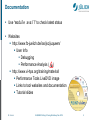
Use “module avail” to check latest status
Websites
http://www.fz-juelich.de/ias/jsc/juqueen/
User Info
Debugging
Performance Analysis ( )
http://www.vi-hps.org/training/material/
Performance Tools LiveDVD image
Links to tool websites and documentation
Tutorial slides
M. Geimer
JUQUEEN Porting & Tuning Workshop, Feb. 2015
5
Mitglied der Helmholtz-Gemeinschaft
Debugging on JUQUEEN
February 2015 | Alexandre Strube
STAT: Stack Trace Analysis Tool
Very lightweight helper tool
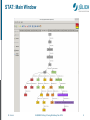
Shows merged call tree of whole program
Useful to detect deadlocks
Scales to millions of processes
http://www.hpcwire.com/hpcwire/2012-1203/bug_repellent_for_supercomputers_proves_effective.html
Pinpoint individual problems
NOT a real/full debugger
http://www.paradyn.org/STAT/STAT.html
M. Geimer
JUQUEEN Porting & Tuning Workshop, Feb. 2015
7
STAT: Main Window
M. Geimer
JUQUEEN Porting & Tuning Workshop, Feb. 2015
8
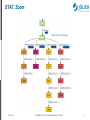
STAT: Zoom
M. Geimer
JUQUEEN Porting & Tuning Workshop, Feb. 2015
9
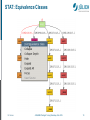
STAT: Equivalence Classes
M. Geimer
JUQUEEN Porting & Tuning Workshop, Feb. 2015
10
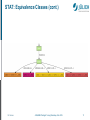
STAT: Equivalence Classes (cont.)
M. Geimer
JUQUEEN Porting & Tuning Workshop, Feb. 2015
11
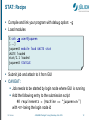
STAT: Recipe
Compile and link your program with debug option: -g
Load modules
% ssh -X user@juqueen
[...]
juqueen% module load UNITE stat
UNITE loaded
stat/2.1 loaded
juqueen% STATGUI
Submit job and attach to it from GUI
CAVEAT:
Job needs to be started by login node where GUI is running
Add the following entry to the submission script
#@ requirements = (Machine == “juqueen<n>”)
with <n> being the login node id
M. Geimer
JUQUEEN Porting & Tuning Workshop, Feb. 2015
12
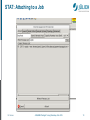
STAT: Attaching to a Job
M. Geimer
JUQUEEN Porting & Tuning Workshop, Feb. 2015
13
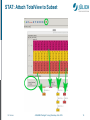
STAT: Attach TotalView to Subset
M. Geimer
JUQUEEN Porting & Tuning Workshop, Feb. 2015
14
Parallel Debugger
UNIX Symbolic Debugger
for C, C++, f77, f90, PGI HPF, assembler programs
“Standard” debugger
Special, non-traditional features
Multi-process and multi-threaded
C++ support (templates, inheritance, inline functions)
F90 support (user types, pointers, modules)
1D + 2D Array Data visualization
Support for parallel debugging (MPI: automatic attach,
message queues, OpenMP, pthreads)
Scripting and batch debugging
Memory Debugging
http://www.roguewave.com
M. Geimer
JUQUEEN Porting & Tuning Workshop, Feb. 2015
15
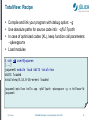
TotalView: Recipe
Compile and link your program with debug option: -g
Use absolute paths for source code info: -qfullpath
In case of optimized codes (XL), keep function call parameters:
–qkeepparm
Load modules
% ssh -X user@juqueen
[...]
juqueen% module load UNITE totalview
UNITE loaded
totalview/8.14.0-16-mrnet loaded
juqueen% mpixlcxx hello.cpp -qfullpath -qkeepparm -g -o helloworld
juqueen%
M. Geimer
JUQUEEN Porting & Tuning Workshop, Feb. 2015
16
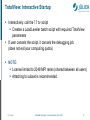
TotalView: Interactive Startup
Interactively: call the lltv script
Creates a LoadLeveler batch script with required TotalView
parameters
If user cancels the script, it cancels the debugging job
(does not eat your computing quota)
NOTE:
License limited to 2048 MPI ranks (shared between all users)
Attaching to subset is recommended
M. Geimer
JUQUEEN Porting & Tuning Workshop, Feb. 2015
17
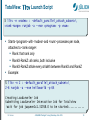
TotalView: lltv Launch Script
% lltv -n <nodes> : -default_parallel_attach_subset=\
<rank-range> runjob -a --exe <program> -p <num>
Starts <program> with <nodes> and <num> processes per node,
attaches to <rank-range>:
Rank: that rank only
RankX-RankZ: all ranks, both inclusive
RankX-RankZ:stride every strideth between RankX and RankZ
Example:
% lltv -n 2 : -default_parallel_attach_subset=\
2-6 runjob -a --exe helloworld -p 64
Creating LoadLeveler Job
Submitting LoadLeveler Interactive Job for Totalview
Wait for job juqueen1c1.32768.0 to be started:...........
M. Geimer
JUQUEEN Porting & Tuning Workshop, Feb. 2015
18
TotalView: Execution Recipe
TotalView tries to debug “runjob” and shows no source code
Ignore it and press “GO”
After some seconds, TotalView will detect parallel execution and
ask if it should stop. Yes, it should stop.
To find the correct point file/function to debug, use the
“File-Open” command.
Set your breakpoints, and press “GO” again. Debugging session
will then start.
To see a variable’s contents, double click on it in the source.
M. Geimer
JUQUEEN Porting & Tuning Workshop, Feb. 2015
19
TotalView: Main Window
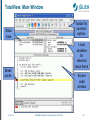
Toolbar for
common
options
Stack
trace
Local
variables
for
selected
stack frame
Break
points
M. Geimer
Source
code
window
JUQUEEN Porting & Tuning Workshop, Feb. 2015
20
TotalView: Tools Menu
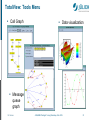
Call Graph
Data visualization
Message
queue
graph
M. Geimer
JUQUEEN Porting & Tuning Workshop, Feb. 2015
21
Mitglied der Helmholtz-Gemeinschaft
Performance Analysis Tools
on JUQUEEN
February 2015 | Markus Geimer
Typical Performance Analysis Procedure
■
■
■
■
■
Do I have a performance problem at all?
■ Time / speedup / scalability measurements
What is the key bottleneck (computation / communication)?
■ MPI / OpenMP / flat profiling
Where is the key bottleneck?
■ Call-path profiling, detailed basic block profiling
Why is it there?
■ Hardware counter analysis
■ Trace selected parts (to keep trace size manageable)
Does the code have scalability problems?
■ Load imbalance analysis, compare profiles at various
sizes function-by-function
M. Geimer
JUQUEEN Porting & Tuning Workshop, Feb. 2015
23
Remark: No Single Solution is Sufficient!
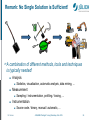
A combination of different methods, tools and techniques
is typically needed!
■
Analysis
■
■
Measurement
■
■
Statistics, visualization, automatic analysis, data mining, ...
Sampling / instrumentation, profiling / tracing, ...
Instrumentation
■
M. Geimer
Source code / binary, manual / automatic, ...
JUQUEEN Porting & Tuning Workshop, Feb. 2015
24
Critical Issues
■
Accuracy
■ Intrusion overhead
■
■
Measurement itself needs time and thus lowers performance
Perturbation
■
■
Measurement alters program behavior
E.g., memory access pattern
Accuracy of timers & counters
Granularity
■ How many measurements?
■ How much information / processing during each
measurement?
■
■
Tradeoff: Accuracy vs. Expressiveness of data
M. Geimer
JUQUEEN Porting & Tuning Workshop, Feb. 2015
25
Score-P
Community instrumentation and measurement
infrastructure
Developed by a consortium of performance
tool groups
Next generation measurement system of
Scalasca 2.x
Vampir
TAU
Periscope
Common data formats improve tool interoperability
http://www.score-p.org
M. Geimer
JUQUEEN Porting & Tuning Workshop, Feb. 2015
26
Collection of trace-based performance analysis tools
Specifically designed for large-scale systems
Unique features:
Scalable, automated search for event patterns
representing inefficient behavior
Scalable identification of the critical execution path
Delay / root-cause analysis
Based on Score-P for instrumentation and measurement
Includes convenience / post-processing commands
providing added value
http://www.scalasca.org
M. Geimer
JUQUEEN Porting & Tuning Workshop, Feb. 2015
27
What is the Key Bottleneck?
Generate flat MPI profile using Score-P/Scalasca
Only requires re-linking
Low runtime overhead
Provides detailed information on MPI usage
How much time is spent in which operation?
How often is each operation called?
How much data was transferred?
Limitations:
Computation on non-master threads and outside
of MPI_Init/MPI_Finalize scope ignored
M. Geimer
JUQUEEN Porting & Tuning Workshop, Feb. 2015
28
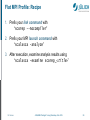
Flat MPI Profile: Recipe
1. Prefix your link command with
“scorep --nocompiler”
2. Prefix your MPI launch command with
“scalasca -analyze”
3. After execution, examine analysis results using
“scalasca -examine scorep_<title>”
M. Geimer
JUQUEEN Porting & Tuning Workshop, Feb. 2015
29
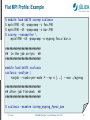
Flat MPI Profile: Example
%
%
%
%
module load UNITE scorep scalasca
mpixlf90 -O3 -qsmp=omp -c foo.f90
mpixlf90 -O3 -qsmp=omp -c bar.f90
scorep --nocompiler \
mpixlf90 -O3 –qsmp=omp -o myprog foo.o bar.o
##########################
## In the job script: ##
##########################
module load UNITE scalasca
scalasca -analyze \
runjob --ranks-per-node P --np n [...] --exe ./myprog
##########################
## After job finished: ##
##########################
% scalasca -examine scorep_myprog_Ppnxt_sum
M. Geimer
JUQUEEN Porting & Tuning Workshop, Feb. 2015
30
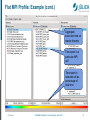
Flat MPI Profile: Example (cont.)
Aggregate
execution time on
master threads
Time spent in a
particular MPI
call
Time spent in
selected call as
percentage of
total time
M. Geimer
JUQUEEN Porting & Tuning Workshop, Feb. 2015
31
Where is the Key Bottleneck?
Generate call-path profile using Score-P/Scalasca
Requires re-compilation
Runtime overhead depends on application characteristics
Typically needs some care setting up a good measurement
configuration
Filtering
Selective instrumentation
Option 1 (recommended):
Automatic compiler-based instrumentation
Option 2:
Manual instrumentation of interesting phases, routines, loops
M. Geimer
JUQUEEN Porting & Tuning Workshop, Feb. 2015
32
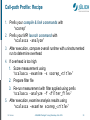
Call-path Profile: Recipe
1. Prefix your compile & link commands with
“scorep”
2. Prefix your MPI launch command with
“scalasca -analyze”
3. After execution, compare overall runtime with uninstrumented
run to determine overhead
4. If overhead is too high
1. Score measurement using
“scalasca -examine -s scorep_<title>”
2. Prepare filter file
3. Re-run measurement with filter applied using prefix
“scalasca –analyze –f <filter_file>”
5. After execution, examine analysis results using
“scalasca -examine scorep_<title>”
M. Geimer
JUQUEEN Porting & Tuning Workshop, Feb. 2015
33
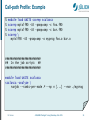
Call-path Profile: Example
%
%
%
%
module load UNITE scorep scalasca
scorep mpixlf90 -O3 -qsmp=omp -c foo.f90
scorep mpixlf90 -O3 -qsmp=omp -c bar.f90
scorep \
mpixlf90 -O3 –qsmp=omp -o myprog foo.o bar.o
##########################
## In the job script: ##
##########################
module load UNITE scalasca
scalasca -analyze \
runjob --ranks-per-node P --np n [...] --exe ./myprog
M. Geimer
JUQUEEN Porting & Tuning Workshop, Feb. 2015
34
Call-path Profile: Example (cont.)
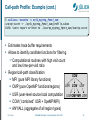
% scalasca -examine -s epik_myprog_Ppnxt_sum
scorep-score -r ./epik_myprog_Ppnxt_sum/profile.cubex
INFO: Score report written to ./scorep_myprog_Ppnxt_sum/scorep.score
Estimates trace buffer requirements
Allows to identify canditate functions for filtering
Computational routines with high visit count
and low time-per-visit ratio
Region/call-path classification
COM
MPI (pure MPI library functions)
USR COM USR
OMP (pure OpenMP functions/regions)
USR (user-level source local computation USR OMP MPI USR
COM (“combined” USR + OpeMP/MPI)
ANY/ALL (aggregate of all region types)
M. Geimer
JUQUEEN Porting & Tuning Workshop, Feb. 2015
35
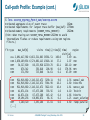
Call-path Profile: Example (cont.)
% less scorep_myprog_Ppnxt_sum/scorep.score
Estimated aggregate size of event trace:
162GB
Estimated requirements for largest trace buffer (max_buf): 2758MB
Estimated memory requirements (SCOREP_TOTAL_MEMORY):
2822MB
(hint: When tracing set SCOREP_TOTAL_MEMORY=2822MB to avoid
intermediate flushes or reduce requirements using USR regions
filters.)
flt type
max_buf[B]
visits
ALL 2,891,417,902 6,662,521,083
USR 2,858,189,854 6,574,882,113
OMP
54,327,600
86,353,920
MPI
676,342
550,010
COM
371,930
735,040
USR
921,918,660 2,110,313,472
USR
921,918,660 2,110,313,472
USR
921,918,660 2,110,313,472
USR
41,071,134
87,475,200
USR
41,071,134
87,475,200
USR
29,194,256
68,892,672
OMP
3,280,320
3,293,184
[...]
M. Geimer
time[s] time[%] time/
region
visit[us]
36581.51
100.0
5.49 ALL
13618.14
37.2
2.07 USR
22719.78
62.1
263.10 OMP
208.98
0.6
379.96 MPI
34.61
0.1
47.09 COM
3290.11
5914.98
3822.64
358.56
145.42
86.15
15.81
9.0
16.2
10.4
1.0
0.4
0.2
0.0
JUQUEEN Porting & Tuning Workshop, Feb. 2015
1.56
2.80
1.81
4.10
1.66
1.25
4.80
matmul_sub
binvcrhs
matvec_sub
lhsinit
binvrhs
exact_solution
!$omp parallel
36
Call-path Profile: Filtering
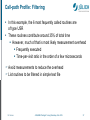
In this example, the 6 most fequently called routines are
of type USR
These routines contribute around 35% of total time
However, much of that is most likely measurement overhead
Frequently executed
Time-per-visit ratio in the order of a few microseconds
Avoid measurements to reduce the overhead
List routines to be filtered in simple text file
M. Geimer
JUQUEEN Porting & Tuning Workshop, Feb. 2015
37
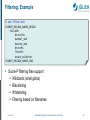
Filtering: Example
% cat filter.txt
SCOREP_REGION_NAMES_BEGIN
EXCLUDE
binvcrhs
matmul_sub
matvec_sub
binvrhs
lhsinit
exact_solution
SCOREP_REGION_NAMES_END
Score-P filtering files support
Wildcards (shell globs)
Blacklisting
Whitelisting
Filtering based on filenames
M. Geimer
JUQUEEN Porting & Tuning Workshop, Feb. 2015
38
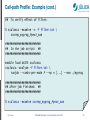
Call-path Profile: Example (cont.)
##
To verify effect of filter:
% scalasca -examine -s -f filter.txt \
scorep_myprog_Ppnxt_sum
##########################
## In the job script: ##
##########################
module load UNITE scalasca
scalasca -analyze -f filter.txt \
runjob --ranks-per-node P --np n [...] --exe ./myprog
##########################
## After job finished: ##
##########################
% scalasca -examine scorep_myprog_Ppnxt_sum
M. Geimer
JUQUEEN Porting & Tuning Workshop, Feb. 2015
39
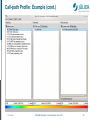
Call-path Profile: Example (cont.)
M. Geimer
JUQUEEN Porting & Tuning Workshop, Feb. 2015
40
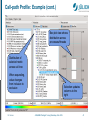
Call-path Profile: Example (cont.)
Box plot view shows
distribution across
processes/threads
Distribution of
selected metric
across call tree
When expanding,
value changes
from inclusive to
exclusive
M. Geimer
Selection updates
columns to the
right
JUQUEEN Porting & Tuning Workshop, Feb. 2015
41
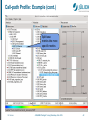
Call-path Profile: Example (cont.)
Split base
metrics into more
specific metrics
M. Geimer
JUQUEEN Porting & Tuning Workshop, Feb. 2015
42
Score-P: Advanced Features
Measurement can be extensively configured via
environment variables
Check output of “scorep-info config-vars”
for details
Allows for targeted measurements:
Selective recording
Phase profiling
Parameter-based profiling
…
Please ask us or see the user manual for details
M. Geimer
JUQUEEN Porting & Tuning Workshop, Feb. 2015
43
Why is the Bottleneck There?
This is highly application dependent!
Might require additional measurements
Hardware-counter analysis
CPU utilization
Cache behavior
Selective instrumentation
Manual/automatic event trace analysis
M. Geimer
JUQUEEN Porting & Tuning Workshop, Feb. 2015
44
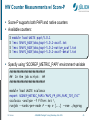
HW Counter Measurements w/ Score-P
Score-P supports both PAPI and native counters
Available counters:
%
%
%
%
module load UNITE papi/5.0.1
less $PAPI_ROOT/doc/papi-5.0.1-avail.txt
less $PAPI_ROOT/doc/papi-5.0.1-native_avail.txt
less $PAPI_ROOT/doc/papi-5.0.1-avail-detail.txt
Specify using “SCOREP_METRIC_PAPI” environment variable
##########################
## In the job script: ##
##########################
module load UNITE scalasca
export SCOREP_METRIC_PAPI=“PAPI_FP_OPS,PAPI_TOT_CYC“
scalasca -analyze -f filter.txt \
runjob --ranks-per-node P --np n [...] --exe ./myprog
M. Geimer
JUQUEEN Porting & Tuning Workshop, Feb. 2015
45
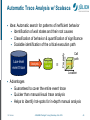
Automatic Trace Analysis w/ Scalasca
Idea: Automatic search for patterns of inefficient behavior
Identification of wait states and their root causes
Classification of behavior & quantification of significance
Scalable identification of the critical execution path
Low-level
event trace
Analysis
High-level
result
Property
Call
path
Location
Advantages
Guaranteed to cover the entire event trace
Quicker than manual/visual trace analysis
Helps to identify hot-spots for in-depth manual analysis
M. Geimer
JUQUEEN Porting & Tuning Workshop, Feb. 2015
46
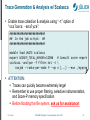
Trace Generation & Analysis w/ Scalasca
Enable trace collection & analysis using “-t” option of
“scalasca -analyze”:
##########################
## In the job script: ##
##########################
module load UNITE scalasca
export SCOREP_TOTAL_MEMORY=120MB
# Consult score report
scalasca -analyze -f filter.txt -t \
runjob --ranks-per-node P --np n [...] --exe ./myprog
ATTENTION:
Traces can quickly become extremely large!
Remember to use proper filtering, selective instrumentation,
and Score-P memory specification
Before flooding the file system, ask us for assistance!
M. Geimer
JUQUEEN Porting & Tuning Workshop, Feb. 2015
47
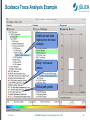
Scalasca Trace Analysis Example
Additional wait-state
metrics from the trace
analysis
Delay / root-cause
metrics
Critical-path profile
M. Geimer
JUQUEEN Porting & Tuning Workshop, Feb. 2015
48
Vampir Event Trace Visualizer
Offline trace visualization for Score-P’s
OTF2 trace files
Visualization of MPI, OpenMP
and application events:
All diagrams highly customizable (through context menus)
Large variety of displays for ANY part of the trace
http://www.vampir.eu
Advantage:
Detailed view of dynamic application behavior
Disadvantage:
Requires event traces (huge amount of data)
Completely manual analysis
M. Geimer
JUQUEEN Porting & Tuning Workshop, Feb. 2015
49
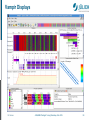
Vampir Displays
M. Geimer
JUQUEEN Porting & Tuning Workshop, Feb. 2015
50
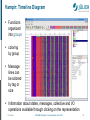
Vampir: Timeline Diagram
Functions
organized
into groups
coloring
by group
Message
lines can
be colored
by tag or
size
Information about states, messages, collective and I/O
operations available through clicking on the representation
M. Geimer
JUQUEEN Porting & Tuning Workshop, Feb. 2015
51
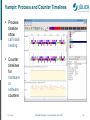
Vampir: Process and Counter Timelines
Process
timeline
show
call stack
nesting
Counter
timelines
for
hardware
or
software
counters
M. Geimer
JUQUEEN Porting & Tuning Workshop, Feb. 2015
52
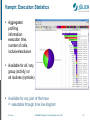
Vampir: Execution Statistics
Aggregated
profiling
information:
execution time,
number of calls,
inclusive/exclusive
Available for all / any
group (activity) or
all routines (symbols)
Available for any part of the trace
selectable through time line diagram
M. Geimer
JUQUEEN Porting & Tuning Workshop, Feb. 2015
53
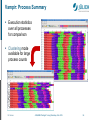
Vampir: Process Summary
Execution statistics
over all processes
for comparison
Clustering mode
available for large
process counts
M. Geimer
JUQUEEN Porting & Tuning Workshop, Feb. 2015
54
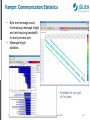
Vampir: Communication Statistics
Byte and message count,
min/max/avg message length
and min/max/avg bandwidth
for each process pair
Message length
statistics
• Available for any part
of the trace
M. Geimer
JUQUEEN Porting & Tuning Workshop, Feb. 2015
55
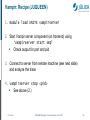
Vampir: Recipe (JUQUEEN)
1. module load UNITE vampirserver
2. Start Vampir server component (on frontend) using
“vampirserver start smp”
Check output for port and pid
3. Connect to server from remote machine (see next slide)
and analyze the trace
4. vampirserver stop <pid>
See above (2.)
M. Geimer
JUQUEEN Porting & Tuning Workshop, Feb. 2015
56
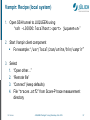
Vampir: Recipe (local system)
1. Open SSH tunnel to JUQUEEN using
“ssh -L30000:localhost:<port> juqueen<n>”
2. Start Vampir client component
For example: “/usr/local/zam/unite/bin/vampir”
3. Select
1. “Open other…”
2. “Remote file”
3. “Connect” (keep defaults)
4. File “traces.otf2” from Score-P trace measurement
directory
M. Geimer
JUQUEEN Porting & Tuning Workshop, Feb. 2015
57
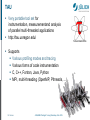
TAU
Very portable tool set for
instrumentation, measurementand analysis
of parallel multi-threaded applications
http://tau.uoregon.edu/
Supports
Various profiling modes and tracing
Various forms of code instrumentation
C, C++, Fortran, Java, Python
MPI, multi-threading (OpenMP, Pthreads, …)
M. Geimer
JUQUEEN Porting & Tuning Workshop, Feb. 2015
58
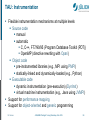
TAU: Instrumentation
Flexible instrumentation mechanisms at multiple levels
Source code
manual
automatic
C, C++, F77/90/95 (Program Database Toolkit (PDT))
OpenMP (directive rewriting with Opari)
Object code
pre-instrumented libraries (e.g., MPI using PMPI)
statically-linked and dynamically-loaded (e.g., Python)
Executable code
dynamic instrumentation (pre-execution) (DynInst)
virtual machine instrumentation (e.g., Java using JVMPI)
Support for performance mapping
Support for object-oriented and generic programming
M. Geimer
JUQUEEN Porting & Tuning Workshop, Feb. 2015
59
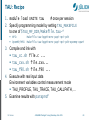
TAU: Recipe
1. module load UNITE tau
# once per session
2. Specify programming model by setting TAU_MAKEFILE
to one of $TAU_MF_DIR/Makefile.tau-*
MPI:
Makefile.tau-bgqtimers-papi-mpi-pdt
OpenMP/MPI: Makefile.tau-bgqtimers-papi-mpi-pdt-openmp-opari
3. Compile and link with
tau_cc.sh file.c ...
tau_cxx.sh file.cxx...
tau_f90.sh file.f90 ...
4. Execute with real input data
Environment variables control measurement mode
TAU_PROFILE, TAU_TRACE, TAU_CALLPATH, …
5. Examine results with paraprof
M. Geimer
JUQUEEN Porting & Tuning Workshop, Feb. 2015
60
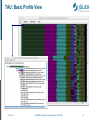
TAU: Basic Profile View
M. Geimer
JUQUEEN Porting & Tuning Workshop, Feb. 2015
61
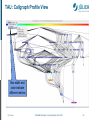
TAU: Callgraph Profile View
Box width and
color indicate
different metrics
M. Geimer
JUQUEEN Porting & Tuning Workshop, Feb. 2015
62
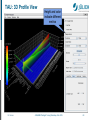
TAU: 3D Profile View
M. Geimer
Height and color
indicate different
metrics
JUQUEEN Porting & Tuning Workshop, Feb. 2015
63
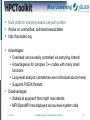
(Rice University)
Multi-platform sampling-based call-path profiler
Works on unmodified, optimized executables
http://hpctoolkit.org
Advantages:
Overhead can be easily controlled via sampling interval
Advantageous for complex C++ codes with many small
functions
Loop-level analysis (sometimes even individual source lines)
Supports POSIX threads
Disadvantages:
Statistical approach that might miss details
MPI/OpenMP time displayed as low-level system calls
M. Geimer
JUQUEEN Porting & Tuning Workshop, Feb. 2015
64
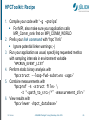
HPCToolkit: Recipe
1. Compile your code with “-g -qnoipa”
For MPI, also make sure your application calls
MPI_Comm_rank first on MPI_COMM_WORLD
2. Prefix your link command with “hpclink”
Ignore potential linker warnings ;-)
3. Run your application as usual, specifying requested metrics
with sampling intervals in environment variable
“HPCRUN_EVENT_LIST”
4. Perform static binary analysis with
“hpcstruct --loop-fwd-subst=no <app>”
5. Combine measurements with
“hpcprof –S <struct file> \
-I “<path_to_src>/*” <measurement_dir>”
6. View results with
“hpcviewer <hpct_database>”
M. Geimer
JUQUEEN Porting & Tuning Workshop, Feb. 2015
65
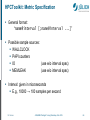
HPCToolkit: Metric Specification
General format:
“name@interval [;name@interval ...]”
Possible sample sources:
WALLCLOCK
PAPI counters
IO
(use w/o interval spec)
MEMLEAK
(use w/o interval spec)
Interval: given in microseconds
E.g., 10000 → 100 samples per second
M. Geimer
JUQUEEN Porting & Tuning Workshop, Feb. 2015
66
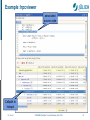
Example: hpcviewer
associated
source code
Callpath to
hotspot
M. Geimer
JUQUEEN Porting & Tuning Workshop, Feb. 2015
67