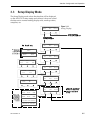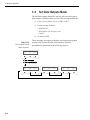
1
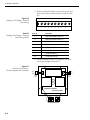
KVH Industries, Inc.
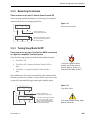
A Guide to GyroTrac
• Installation Instructions
• User’s Guide
• Technical Manual
GyroTrac
™
™
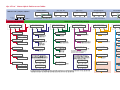
GyroTrac Wiring Quick Reference Guide
™
On
1
60 59 58 57 56 55 54 53 52 51 50 49
6
8
9
10 11 12
13 14 15 16 17 18 19 20 21 22 23 24
White/Green
7
Ship’s
Power*
25 26 27 28 29 30 31 32 33 34 35 36
Green/White
5
Orange/White
4
Blue/White
3
White/Blue
2
Ground
+12VDC
1
48 47 46 45 44 43 42 41 40 39 38 37
White/Orange
2
Data H
Data L
Ground
*Refer to Table 2-3,
GyroTrac Power
Requirements
Shift H
Furuno
Data
Shift L
Ground
KVH Display
NMEA, Cetrek
KVH Data
4800 baud
Sine/Cosine
(3-wire or
4-wire)
Refer to
Section 2.4.4
for complete
wiring details.
Power
TX1A(+)
TX2A(+)
TX1B(-)
Ground
TX2B(-)
Port #2
RS-422
Ground
NMEA, Cetrek
KVH Data
4800 or 9600
baud
TX3A(+)
Port #3*
RS-422
Ground
Ref
Cosine (inverted)
TX3B(-)
Cosine
Ground
Sine (inverted)
Sine
Ground
GPS A+ or HDG A+
Gyro RXD+
GyroTrac Sensor
Module Cable
#32-0623-30
NMEA, Cetrek
KVH Data
4800 or 9600
baud
*Unavailable when used
with TracVision system.
Refer to Section 3.5.4.
GPS B- or HDG B-
Gyro RXD-
GPS/Ship’s
Gyro Data
Input
RS-422 @
4800 bps 8.N.1
Gyro TXDGyro TXD+
Gyro Power
KVH Display
Power
Wiring Color Code Definitions
First Color: Wire
Second Color: Tracer
TX1A(+)
TX1B(-)
Ground
Complete installation and wiring directions
have been provided in Section 2, Installation.
KVH®, Azimuth®, GyroTrac™, and TracVision® are trademarks of KVH Industries, Inc.
Duplicate
(pass-through)
Port #1
RS-422
NMEA, Cetrek
KVH Data
4800 baud
GyroTrac O/M Cover 54-0142 Rev. G
Port #1
RS-422
GyroTrac™ Menu Quick Reference Guide
ADCU Primary Display Options
Compass Displays*
Pitch, Roll, Yaw
Magnetic Heading
###.#°
Mag/HDG
###.#°
SELECTED DISPLAY
Select Installed
Satellite A
Enter GyroTrac Mode Menus
Select Installed
Satellite B
Pitch
#.#°
Roll
#.#°
Set sine-cos levels?
Yes
Next
Return
Return
Magnetic Heading
###.#°
True/HDG
###.#°
Roll
#.#°
Yaw
#.#°
Rate of Turn?
Yes
Next
Return
Mag/Hdg
#.#°
Rate/Sec
#.#°
Latitude Longitude?
Yes
Next
Return
Lat:
Long:
Select Mag/True
Set Reference Voltage
Set Swing Voltage
##
##
Tracking <Sat Name>
###.#°
##.#°
####
†
Lat/Long Display requires GPS data
##
##
Setup configuration?
Yes
Next
Return
Yes
Set brightness?
Next
Return
Dim or Brighten ADCU Display
Select Serial Port 1, 2, or 3
Set Speed
Select Output Type
Set NMEA Outputs
Set Heading int/ext?
Yes
Next
Return
Select Internal or External
Heading Reference Source
Set AutoCal On/Off?
Yes
Next
Return
Get Antenna status?
Enter
Next
Return
control antenna?
Enter
Next
Return
Get System Errors?
Yes
Next
Return
Man control antenna?
Yes
Next
Return
Errors Detected
Adjust Azimuth
Adjust Elevation
Autocalibration On or Off
Set Gyro Offsets?
Yes
Next
Return
Select Mag/True
Set Data Rate
Set Offset Pitch
Set Offset Roll
Set Offset Yaw
* ARE YOU SURE? *
Yes
No
Antenna Restarts
Antenna Type and Version
Calibration Accuracy, Magnetic
Environment, and Calibration #
Default Display box?
Yes
Next
Return
Display Default
Clear Compass Cal?
Yes
Next
Return
Get serial number?
Yes
Next
Return
Antenna Serial Number
Compass Calibration Reset
set instant on/off?
Yes
Next
Return
The Control Compass Menus are only
availailable if the selected heading
reference source is INTERNAL.
PIN Code Screens
Certain functions require the entry of a
Personal Identification Number (PIN). PIN
entry and selection are done on the screens
below. The default setting is 0000.
Instant On Mode On/Off**
Get Thres/sig level?
Yes
Next
Return
Install satellite?
Yes
Next
Return
Install Sat Pair
Set Latitude
Set Longitude
Restart Antenna
Threshold and
Signal Levels
Enter pincode = XXXX
Enter
+
Set TV com on/off?
Yes
Next
Return
Antenna display?
Yes
Next
Return
Get version?
Yes
Next
Return
Sleep Mode On/Off*
Set Furuno outputs?
Yes
Next
Return
Alert Screens
Certain operations temporarily halt data
output. In this event, the ADCU will display a
set of alert screens. Select ÒYesÓ to proceed,
ÒNoÓ to return to the Main Data Display.
Read Cal score?
Yes
Next
Return
Set sleep on/off?
Yes
Next
Return
** WARNING **
Data will be HALTED
Tracking <Sat Name>
###.#°
##.#°
####
Control Compass?
Enter
Next
Return
Restart antenna?
Yes
Next
Return
Set serial outputs?
Yes
Next
Return
Pitch, Roll & Yaw?
Yes
Next
Return
Pitch
#.#°
Lat:
Long:
ANTENNA Initializing
No Antenna Information
* True North Display requires GPS data
Setup data outputs?
Yes
Next
Return
Mag/HDG
###.#°
Rate/Sec
#.#°
Antenna Displays
Return to Selected Primary Display
Setup display type?
Enter
Next
Return
compass?
Next
Mag/Hdg
#.#°
Latitude/Longitude
True/HDG
###.#°
GyroTrac Mode Menus
Yes
Yaw
#.#°
†
Rate of Turn
TV Antenna Communication On or Off
Yes
Get skew angle?
Next
Return
LNB Skew Angle
New pincode = XXXX
Enter
+
ANTENNA Initializing
No Antenna Information
Get bit error rate?
Yes
Next
Return
* Sleep Mode only available on the following systems: TracVision 3 (antenna software version 4.20 or later), TracVision G4 (antenna software version 3.02 or later), and TracVision G6
** Instant On Mode only available on the following systems: TracVision G4 (antenna software version 3.27 or later) and TracVision G6
Bit Error Rate
Yes
Set Lat/Long?
Next
Return
Set Latitude
Set Longitude
Select Satellite?
Yes
Next
Return
Select Active Satellite
A Guide to GyroTrac – ADDENDUM
GyroTrac Owner’s Manual
Addendum
(ECO #5619)
The following changes have been made to Revision G of the
GyroTrac Owner’s Manual (KVH Part Number 54-0142).
Inside Front Cover
The quick reference guide on the inside front cover has been
changed as follows:
1. The PIN Code Screens box has been deleted.
2. A menu item has been added to the column
headed by “Control antenna?” (see Figure A
below).
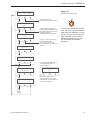
Figure A
New Menu Item on Quick
Reference Guide
Yes
Set Lat/Long?
Next
Return
Set Latitude
Set Longitude
Select Satellite?
Yes
Next
Return
Select Active Satellite
Sat frequency scan?
Yes
Next
Return
New Menu Item
Update Frequency
3.2.3 System Security
This section of the manual has been deleted. The little-used security
option is no longer available.
54-0142 Addendum to Rev. G
1
3.8
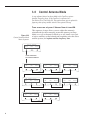
Control Antenna Mode
A new software feature has been added to the GyroTrac system –
Satellite Frequency Scan. If the GyroTrac is connected to a
TracVision G4 or TracVision G6, this option allows you to update the
frequency data of any satellite stored in the system’s library.
These screens are only seen if Antenna Comm is turned ON.
Figure 3-29
Control Antenna Mode
Menu Sequence
This sequence of steps allows a user to adjust the antenna’s
azimuth and elevation manually, restart the antenna, set Sleep
Mode on or off, set Instant On Mode on or off, install a new pair
of active satellites, set the latitude and longitude, select the active
satellite system, and update satellite frequency data.
Control antenna?
Enter
Next
Return
ALERT SCREENS
PIN CODE SCREENS
Man control antenna?
Yes
Next
Return
2
Restart Antenna?
Yes
Next
Return
Set sleep on/off?
Yes
Next
Return
Set instant on/off?
Yes
Next
Return
Install satellite?
Yes
Next
Return
Yes
select satellite?
Yes
Next
Return
Sat frequency Scan?
Yes
Next
Return
Set Lat/Long?
Next
Return
A Guide to GyroTrac – ADDENDUM
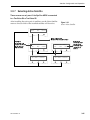
3.8.7 Selecting Active Satellite
Figure 3-36 has been updated to include “Updating Satellite Frequency
Data.”
Figure 3-36
Select Active Satellite
Select Satellite?
Enter
Next
Return
Proceed to Section 3.8.8,
"Updating Satellite Frequency
Data"
Sat Name A
corresponds to the
first satellite selected
during the Install
Satellite process.
Select <SAT NAME A>
Yes
Next
Cancel
Select <SAT NAME B>
Yes
Next
cancel
<SAT NAME A> selected
<SAT NAME B> selected
Sat Name B
corresponds to the
second satellite
selected during the
Install Satellite
process.
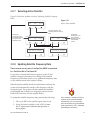
3.8.8 Updating Satellite Frequency Data
These screens are only seen if the GyroTrac ADCU is connected
to a TracVision G4 or TracVision G6.
If you select a channel but it doesn’t appear on the TV, the
satellite’s frequency data may have changed. The Satellite
Frequency Scan feature allows you to update the frequency data
of any satellite stored in the system’s library.
With the desired satellite, band, and polarization selected, the
system will automatically search for the frequency with the
strongest signal. The system will then update that satellite’s
programmed data with the new frequency (and associated
network ID) and store it in the satellite library.
To update the satellite frequency data, perform the following:
1. Place your IRD in the satellite signal meter mode.
2. Select the desired satellite on the ADCU. Ensure
the TV signal meter indicates that you have a
strong signal.
54-0142 Addendum to Rev. G
If the antenna is unable to find any
channel on the selected satellite
automatically, you can manually
point the antenna using the Manual
mode (see Section 3.8.1, “Manually
Controlling the Antenna”).
3
3. Select the desired polarization and band on the
IRD.
4. Do not move the vessel. Your boat must remain
motionless during the entire Satellite Frequency
Scan process.
5. Follow the ADCU menus on the next page. The
scan itself will take a couple of minutes. Once
complete, restart the antenna and ensure the
antenna will track the new frequency.
If you are unsure about when and how to use the Satellite
Frequency Scan feature, please contact your dealer/installer or
distributor for assistance.3
4
A Guide to GyroTrac – ADDENDUM
Figure 3-37
Satellite Frequency Scan
Sat frequency Scan?
Yes
Next
Return
Return to Section 3.8.1,
"Manually Controlling the Antenna"
Symbol Rate: XXXXX
Enter
+
Use the -/+ keys to select each
number. Selecting ENTER will cycle
through each digit and then launch
the FEC code screen.
(Valid settings are 01000-39999.)
-
Set FEC Code: X/X
Enter
+
Use the -/+ keys to scroll through
the available FEC codes:
1/2 - 2/3 - 3/4 - 5/6 - 6/7 - 7/8.
Use the ENTER key to accept your
selection.
To find a valid symbol rate and FEC
code, refer to an up-to-date satellite
table either in a magazine or on the
Internet. For your convenience, this
data is available (for the system’s
predefined satellites) on our web
site at www.kvh.com/footprint/
index.html.
Scan frequencies
Please Wait
Update frequency?
YES
NO
If no strong satellite signal is found
at the selected frequency, the
screen will display:
Updating frequency
Please wait
Restart antenna?
YES
NO
No strong frequency
Exit
Exit returns you to the "Sat
Frequency Scan" screen. Try the
process again, but using a different
symbol rate or FEC code.
Restart
Antenna
System
54-0142 Addendum to Rev. G
5
A Guide to GyroTrac – ADDENDUM
GyroTrac User’s Manual
Addendum
(ECO #5208)
The following changes have been made to Revision G of the
GyroTrac User’s Manual (KVH Part Number 54-0142).
2.5
Connecting to Vessel Power
The ADCU now has 2 fuses, a 1-amp fuse on the lower printed circuit
board (PCB) and a 4-amp fuse on the upper PCB. Therefore, the sidebar
tip should no longer refer to just one 1-amp fuse.
4
Troubleshooting
The two fuses in the ADCU differ in rating, as noted in the revised
troubleshooting section.
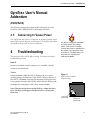
The ADCU is equipped with fuses
to protect against high-voltage
spikes. If the system is installed
correctly and power is available, but
the system is non-functional, refer
to Section 4, “Troubleshooting,” for
instructions on checking and
replacing the fuses.
Issue 2:
System is installed correctly and power is available, but the
system is non-functional.
Solution:
Check the fuses within the ADCU. Remove the two screws
securing the top and the base of the ADCU. Remove the top of
the ADCU. The fuses are secured in brackets on the upper and
lower printed circuit boards (PCBs) within the unit. Remove the
damaged fuse and replace with a new, functional fuse.
Figure 4-1
ADCU Fuse Locations
(Top Cutaway)
Note: The fuse on the lower (main) PCB is a 1-amp fast blow
fuse. The fuse on the upper (interface) PCB is a 4-amp fast
blow fuse.
1-amp Fuse
(Lower PCB)
54-0142 Addendum to Rev. G
ECO #5208
4-amp Fuse
(Upper PCB)
1
5.2
Replaceable Parts
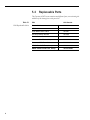
The Gyrotrac ADCU now contains two different fuses, necessitating the
addition of the 4-amp fuse to the parts list.
Table 5-1
Field Replaceable Units
2
FRU
KVH Part No.
Sensor Module
02-0991
ADCU
02-0961
Flush Mount ADCU Panel
20-0667
Horizontal Sensor Bracket
20-0658
Vertical Sensor Bracket
20-0666
Connector Wire Terminal Strip
23-0223-12
Sensor to ADCU Data Cable
32-0623-30
ADCU Main PCB Fuse, 1-amp
16-0009-1000
ADCU Interface PCB Fuse, 4-amp
16-0017-4000
A Guide to GyroTrac – ADDENDUM
GyroTrac Owner’s Manual
Addendum
(ECO #5206)
Due to a software revision designed to improve the GyroTrac’s
operation and user interface, some of the menu displays have
been modified. The following pages of Revision G of the
GyroTrac Owner’s Manual (KVH Part Number 54-0142) have
been updated to reflect these changes.
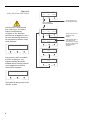
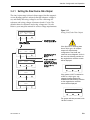
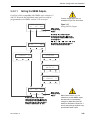
3.4.1 Setting the Sine/Cosine Data Output
The sine/cosine setup is done in three stages: first the magnetic
or true heading option is selected, then the reference voltage is
set, and finally the swing voltage is set. The valid range for
reference and swing voltages is between 0 and 6.5 volts. The
default value for reference voltage is 2.5 volts. The default
value for swing voltage is +/- 1.67 volts. Refer to your autopilot
manual for correct voltage requirements.
54-0142 Addendum to Rev. G
ECO #5206
1
Figure 3-13
Setting Sine/Cosine Data Output
Setup data outputs?
Yes
Next
Return
ALERT SCREENS
PIN CODE SCREENS
If the GyroTrac is receiving data
from a ship’s gyro, all compass
outputs are automatically
configured as True North and
cannot be set as Magnetic. If this is
the case, the following variation on
the magnetic/true selection screen
will be displayed:
Set sine-cos levels?
Yes
Next
Return
Proceed to Section 3.4.2
"Setting the Serial
Outputs"
Sine Cosine is: Mag
Mag
ENTER
True
only True available
Set Ref:
Enter
If the system is NOT connected to
a GPS or a ship’s gyro, only
magnetic heading data will be
available and the following variation
on the magnetic/true selection
screen will be displayed:
Only Mag available
The system will then proceed to the
“Set Ref” screens.
2
Proceed to Section 3.5
"Set Configuration Mode"
2.50 V
+
Set Swing:
+/- 1.67 V
Enter
+
Setting will blink "Mag" or
"True" based on the
current selection. Pushing
the MAG or TRUE buttons
will toggle between
selections.
A Guide to GyroTrac – ADDENDUM
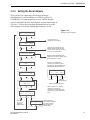
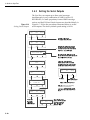
3.4.2 Setting the Serial Outputs
The GyroTrac can output up to three serial messages
simultaneously in any combination of NMEA version 2.2,
KVH RS-422, or Cetrek proprietary format. NMEA message
options and the KVH and Cetrek formats are described briefly in
Appendix C. Follow the procedures illustrated below to set the
serial outputs. The factory default speed setting is 10 Hz.
Figure 3-14
Setting Serial Outputs
Set serial outputs?
Yes
Next
Return
Proceed to Sec. 3.4.3
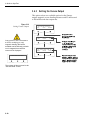
"Setting the Furuno Output"
Select serial port 1
Yes
Next
Cancel
Opens menus for Serial Ports 2 & 3.
All three serial ports have the same
selection options. However, the output
from Port 1 is only 4800 baud.
Serial port 1 config
Output Data: NMEA
Serial Port setting information will be
displayed for 2.5 seconds. Setting can be:
None, NMEA, KVH, or Cetrek
-
Set speed: 10 Hz
Enter
+
Resetting outputs?
Yes
No
If GyroTrac is configured as a
component of a TracVision system,
the following screen will appear when
attempting to configure Serial Port 3:
No Port 3. TV setup
Yes
Next
Cancel
No Action
Outputs erasing
Please Wait
Return to "Select Serial Port 1"
Select output type
NMEA
KVH
Cetrek
Proceed to
Sec. 3.4.2.1
"Setting the
NMEA Outputs"
54-0142 Addendum to Rev. G
ECO #5206
Return to
"Set Serial Outputs?"
Cetrek data is: Mag
Mag
ENTER
True
Refer to Section 3.5.5, "Selecting
TracVision or GyroTrac-only
Operations" to configure the system
as GyroTrac-only and activate Serial
Port 3.
This screen will only
appear if GPS is available
to provide True North
Data, otherwise the
default is "Mag."
3
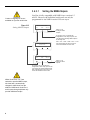
3.4.2.1
Custom configurations are not
available on GyroTrac at this time.
Figure 3-15
Setting NMEA Outputs
Setting the NMEA Outputs
GyroTrac is fully compatible with NMEA input versions 1.5
and 2.2. However, the individual serial ports can only be
programmed to use NMEA version 2.2 as an output.
Select output BWC?
Yes
Next
Cancel
Return to 3.4.2
"Setting the Serial
Outputs"
By choosing Next or completing the
configuration for each output, GyroTrac will
cycle through the remaining NMEA outputs in
the following order:
GGA — GLL — HDG — HDM — HDT — VTG —
setting selection
Please Wait
Each output follows the same sequence of
screens as illustrated in this flow chart.
Setup output GGA?
Yes
Next
Cancel
Return to 3.4.2
"Setting the Serial
Outputs"
By choosing Next or completing the
configuration for each output, GyroTrac will
cycle through the remaining NMEA outputs.
Each output follows the same sequence of
screens as illustrated in this flow chart.
When Serial Ports 2 or 3 are
selected to provide NMEA output,
the baud rate is automatically
changed to 4800 baud from the
default of 9600 baud. Serial Port 1
and its pass-through duplicate only
provide 4800 baud output.
4
A Guide to GyroTrac – ADDENDUM
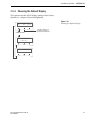
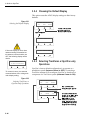
3.5.4 Choosing the Default Display
This option resets the ADCU display settings to their factory
defaults (i.e., compass, 50 percent brightness).
Figure 3-21
Selecting the Default Display
Default display box?
Yes
Next
Return
Proceed to Section 3.5.5,
"Selecting TracVision or
GyroTrac-only Operations"
ALERT SCREENS
Display defaulting
Please Wait
Default display done
54-0142 Addendum to Rev. G
ECO #5206
5
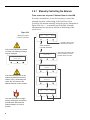
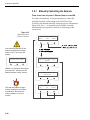
3.8.1 Manually Controlling the Antenna
These screens are only seen if Antenna Comm is turned ON.
In certain circumstances, it may be necessary to control the
azimuth, elevation, and tracking of the TracVision G4 or
TracVision G6 antenna manually, using the process illustrated in
Figure 3-30. Use +/- to manually move the dish. Azimuth
measurements are reported as relative to the bearing of the
vessel’s bow.
Figure 3-30
Manual Antenna
Control Procedure
Man control antenna?
Enter
Next
Return
Proceed to Section 3.8.2,
"Restarting the Antenna"
ALERT SCREENS
PIN CODE SCREENS
If the system started up in Instant
On mode, the following message
may be displayed:
Finding limit switch
Please wait
InstantOn Reboot
Please wait
AZ = XXX.X° EL = XX.X°
Azimuth
+
If the manual adjustment of the
antenna reached the maximum
rotation (720°), the antenna will
rotate 360° and return to the
Manual Antenna Control screens.
AZ = XXX.X° EL = XX.X°
Elevation
+
Make antenna track?
Yes
No
Cancel
YES tells the antenna to begin
actively tracking the set azimuth
and elevation. NO leaves the
antenna halted in its current
position.
6
This screen may appear under
certain conditions in antenna
software revision H or later.
Congratulations!
You have selected one of the most advanced heading sensors
available today. KVH® Industries’ GyroTrac™ offers stabilized
heading data as well as outputs compatible with most other
onboard systems, including radar and autopilot. GyroTrac also
serves as the external sensor for GyroTrac-compatible TracVision®
satellite television systems. This manual provides detailed
instructions on the proper installation, use, and maintenance of
your GyroTrac system.
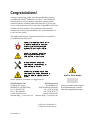
Throughout this manual, important information is marked for
your attention by these icons:
A helpful tip that either directs you to
a related area within the manual or
offers suggestions on getting the
highest quality out of your system.
An alert to important information
regarding procedures, product
specifications, or product use.
Information about installation,
maintenance, troubleshooting, or
other mechanical issues.
An electrical safety warning to help
identify electrical issues that can be a
hazard to either this KVH product or
GyroTrac Serial Number
a user.
Direct questions, comments, or suggestions to:
KVH Industries, Inc.
50 Enterprise Center
Middletown, RI 02842 USA
tel: +1 401 847-3327
fax: +1 401 849-0045
e-mail: [email protected]
internet: http://www.kvh.com
KVH Europe A/S
Ved Klaedebo 12
2970 Hoersholm Denmark
tel: +45 45 16 01 80
fax: +45 45 86 70 77
e-mail: [email protected]
internet: http://www.kvh.com
KVH Part # 54-0142 Rev. G
© 2000, KVH Industries, Inc.
54-0142 Rev. G
This serial number will be required
for all troubleshooting or service
calls made regarding this product.
TracVision® and KVH® are registered trademarks
of KVH Industries, Inc.
GyroTrac™ is a trademark of KVH Industries, Inc.
Cetrek™ is a trademark of Cetrek USA.
Furuno® is a registered trademark of Furuno USA, Inc.
B&G® and Halcyon® are trademarks of Brooks and Gatehouse, Inc.
Table of Contents
1
Introduction . . . . . . . . . . . . . . . . . . . . . . . . . . . . . . .1-1
1.1
GyroTrac Overview . . . . . . . . . . . . . . . . . . . . . . . . . . . . . . . . . . .1-1
1.2
The GyroTrac System . . . . . . . . . . . . . . . . . . . . . . . . . . . . . . . . .1-1
1.3
Materials Provided with GyroTrac . . . . . . . . . . . . . . . . . . . . . . . .1-3
2
Installation . . . . . . . . . . . . . . . . . . . . . . . . . . . . . . . .2-1
2.1
Choosing the Best Location . . . . . . . . . . . . . . . . . . . . . . . . . . . .2-2
2.1.1 Mounting on Steel Vessels . . . . . . . . . . . . . . . . . . . . . . . . .2-3
2.2
Mounting the Sensor Module . . . . . . . . . . . . . . . . . . . . . . . . . . .2-3
2.3
Mounting the ADCU . . . . . . . . . . . . . . . . . . . . . . . . . . . . . . . . . .2-6
2.4
Wiring the GyroTrac . . . . . . . . . . . . . . . . . . . . . . . . . . . . . . . . . .2-7
2.4.1 Connecting the GyroTrac to External Devices . . . . . . . . . .2-10
2.4.2 GyroTrac Wiring Diagram . . . . . . . . . . . . . . . . . . . . . . . . .2-10
2.4.3 Wiring an Optional GyroTrac-compatible
TracVision System . . . . . . . . . . . . . . . . . . . . . . . . . . . . . .2-12
2.4.4 Wiring the GyroTrac Sine/Cosine Interface . . . . . . . . . . . .2-12
2.4.5 True North Capability . . . . . . . . . . . . . . . . . . . . . . . . . . . .2-13
2.5
Connecting to Vessel Power . . . . . . . . . . . . . . . . . . . . . . . . . . .2-13
2.6
Calibrating the Sensor Module . . . . . . . . . . . . . . . . . . . . . . . . .2-14
2.6.1 Compensating the GyroTrac . . . . . . . . . . . . . . . . . . . . . . .2-14
2.6.2 The Calibration Score . . . . . . . . . . . . . . . . . . . . . . . . . . . .2-15
2.7
Completing the Installation . . . . . . . . . . . . . . . . . . . . . . . . . . . .2-15
3
Interface Configuration and Operation . . . . . . . . . . . . . .3-1
3.1
Startup and Self-test . . . . . . . . . . . . . . . . . . . . . . . . . . . . . . . . . .3-1
3.1.1 TracVision Startup and Self-test Screens . . . . . . . . . . . . . .3-2
3.2
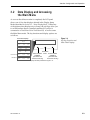
Data Display and Accessing the Main Menu . . . . . . . . . . . . . . .3-3
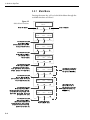
3.2.1 Main Menu . . . . . . . . . . . . . . . . . . . . . . . . . . . . . . . . . . . . .3-4
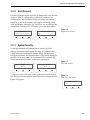
3.2.2 Alert Screens . . . . . . . . . . . . . . . . . . . . . . . . . . . . . . . . . . .3-5
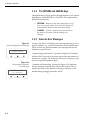
3.2.3 System Security . . . . . . . . . . . . . . . . . . . . . . . . . . . . . . . . .3-5
54-0142 Rev. G
i
3.2.4 The RETURN and CANCEL Keys . . . . . . . . . . . . . . . . . . . .3-6
3.2.5 Antenna Error Messages . . . . . . . . . . . . . . . . . . . . . . . . . .3-6
3.3
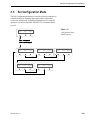
Setup Display Mode . . . . . . . . . . . . . . . . . . . . . . . . . . . . . . . . . .3-7
3.4
Set Data Outputs Mode . . . . . . . . . . . . . . . . . . . . . . . . . . . . . . . .3-8
3.4.1 Setting the Sine/Cosine Data Output . . . . . . . . . . . . . . . . .3-9
3.4.2 Setting the Serial Outputs . . . . . . . . . . . . . . . . . . . . . . . . .3-10
3.4.2.1
Setting the NMEA Outputs . . . . . . . . . . . . . . . . . . . . . .3-11
3.4.3 Setting the Furuno Output . . . . . . . . . . . . . . . . . . . . . . . .3-12
3.5
Set Configuration Mode . . . . . . . . . . . . . . . . . . . . . . . . . . . . . .3-13
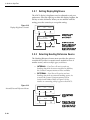
3.5.1 Setting Display Brightness . . . . . . . . . . . . . . . . . . . . . . . .3-14
3.5.2 Selecting Heading Reference Source . . . . . . . . . . . . . . . .3-14
3.5.3 Entering Gyro Offset Values . . . . . . . . . . . . . . . . . . . . . . .3-15
3.5.4 Choosing the Default Display . . . . . . . . . . . . . . . . . . . . . .3-16
3.5.5 Selecting TracVision or GyroTrac-only Operations . . . . . . .3-16
3.6
Control Compass Mode . . . . . . . . . . . . . . . . . . . . . . . . . . . . . .3-17
3.6.1 Selecting Autocompensation . . . . . . . . . . . . . . . . . . . . . . .3-17
3.6.2 Reading the Calibration Score . . . . . . . . . . . . . . . . . . . . .3-18
3.6.3 Clearing Compass Calibration . . . . . . . . . . . . . . . . . . . . . .3-18
3.7
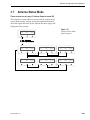
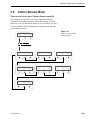
Antenna Status Mode . . . . . . . . . . . . . . . . . . . . . . . . . . . . . . . .3-19
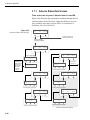
3.7.1 Antenna Status Data Screens . . . . . . . . . . . . . . . . . . . . . .3-20
3.8
Control Antenna Mode . . . . . . . . . . . . . . . . . . . . . . . . . . . . . . .3-21
3.8.1 Manually Controlling the Antenna . . . . . . . . . . . . . . . . . . .3-22
3.8.2 Restarting the Antenna . . . . . . . . . . . . . . . . . . . . . . . . . . .3-23
3.8.3 Turning Sleep Mode On/Off . . . . . . . . . . . . . . . . . . . . . . .3-23
3.8.4 Turning Instant On Mode On/Off . . . . . . . . . . . . . . . . . . . .3-24
3.8.5 Installing a New Satellite Pair . . . . . . . . . . . . . . . . . . . . . .3-25
3.8.6 Setting Latitude and Longitude . . . . . . . . . . . . . . . . . . . . .3-26
3.8.7 Selecting Active Satellite . . . . . . . . . . . . . . . . . . . . . . . . . .3-27
ii
4
Troubleshooting . . . . . . . . . . . . . . . . . . . . . . . . . . . . .4-1
5
Maintenance . . . . . . . . . . . . . . . . . . . . . . . . . . . . . . .5-1
5.1
Warranty/Service Information . . . . . . . . . . . . . . . . . . . . . . . . . . .5-1
5.2
Replaceable Parts . . . . . . . . . . . . . . . . . . . . . . . . . . . . . . . . . . . .5-1
Appendix A
System Specifications . . . . . . . . . . . . . . . . . .A-1
Appendix B
Optional KVH Displays . . . . . . . . . . . . . . . . . .B-1
B.1
Optional Display Specifications . . . . . . . . . . . . . . . . . . . . . . . . .B-1
B.2
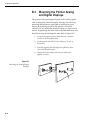
Mounting the Pointer Analog and Digital Displays . . . . . . . . . .B-2
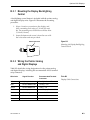
B.2.1 Mounting the Display Backlighting Control . . . . . . . . . . . . .B-3
B.2.2 Wiring the Pointer Analog and Digital Displays . . . . . . . . . .B-3
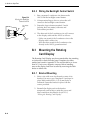
B.2.3 Wiring the Backlight Control Switch . . . . . . . . . . . . . . . . . .B-4
B.3
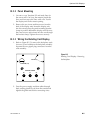
Mounting the Rotating Card Display . . . . . . . . . . . . . . . . . . . . .B-4
B.3.1 Bracket Mounting . . . . . . . . . . . . . . . . . . . . . . . . . . . . . . . .B-4
B.3.2 Panel Mountingq . . . . . . . . . . . . . . . . . . . . . . . . . . . . . . . .B-5
B.3.3 Wiring the Rotating Card Display . . . . . . . . . . . . . . . . . . . .B-5
Appendix C
Data Outputs . . . . . . . . . . . . . . . . . . . . . . . .C-1
C.1
Sine/Cosine Output . . . . . . . . . . . . . . . . . . . . . . . . . . . . . . . . . .C-1
C.2
Serial Port Outputs . . . . . . . . . . . . . . . . . . . . . . . . . . . . . . . . . . .C-1
C.3
Furuno Output . . . . . . . . . . . . . . . . . . . . . . . . . . . . . . . . . . . . . .C-4
C.3.1 Optional Stepper Components . . . . . . . . . . . . . . . . . . . . . .C-4
Appendix D
ADCU Flush Mount Panel Template . . . . . . . . . .D-1
Appendix E
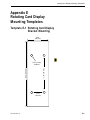
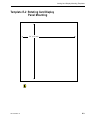
Rotating Card Display Mounting Templates . . . .E-1
Template E-1
Rotating Card Display Bracket Mounting . . . .E-1
Template E-2
Rotating Card Display Panel Mounting . . . . . .E-3
List of Figures
Figure 1-1
GyroTrac Identifies and Compensates
for Vessel Motion . . . . . . . . . . . . . . . . . . . . . . . . . . . . . . .1-1
Figure 1-2
GyroTrac Sensor Module . . . . . . . . . . . . . . . . . . . . . . . . .1-1
Figure 1-3
Front, Rear, and Angle View of GyroTrac ADCU . . . . . . . .1-2
54-0142 Rev. G
iii
A Guide to GyroTrac
iv
Figure 1-4
Possible GyroTrac System Configurations . . . . . . . . . . . .1-2
Figure 1-5
GyroTrac Package Contents . . . . . . . . . . . . . . . . . . . . . . .1-3
Figure 2-1
Horizontal Sensor Bracket . . . . . . . . . . . . . . . . . . . . . . . .2-3
Figure 2-2
Vertical Sensor Bracket . . . . . . . . . . . . . . . . . . . . . . . . . .2-3
Figure 2-3
Proper Orientation of the Sensor Module . . . . . . . . . . . . .2-4
Figure 2-4
Securing the Sensor Module and the
Horizontal Sensor Bracket . . . . . . . . . . . . . . . . . . . . . . . .2-4
Figure 2-5
Optional Bracket Orientations . . . . . . . . . . . . . . . . . . . . . .2-5
Figure 2-5a
Attaching the Horizontal and Vertical Brackets . . . . . . . . .2-5
Figure 2-6
Mounting the ADCU with Velcro Attachments . . . . . . . . . .2-6
Figure 2-7
Securing the ADCU to the Flush Mount Bracket . . . . . . . .2-7
Figure 2-8
Terminal Strip Order . . . . . . . . . . . . . . . . . . . . . . . . . . . . .2-8
Figure 2-9
Attaching the Terminal Strips to the ADCU . . . . . . . . . . . .2-8
Figure 2-10
Examples of Effective Strain Relief Arrangements . . . . . . .2-9
Figure 2-11
Proper Wiring for Connectors 1-36 (GyroTrac) . . . . . . . .2-11
Figure 2-12
Sample Calibration Score Screen . . . . . . . . . . . . . . . . . .2-15
Figure 3-1
Startup and Self-test . . . . . . . . . . . . . . . . . . . . . . . . . . . . .3-1
Figure 3-2
Startup Error Screen . . . . . . . . . . . . . . . . . . . . . . . . . . . .3-2
Figure 3-3
GyroTrac Startup Screens . . . . . . . . . . . . . . . . . . . . . . . .3-2
Figure 3-4
Soft Key Functions and Main Data Displays . . . . . . . . . . .3-3
Figure 3-5
Main Menu Functions . . . . . . . . . . . . . . . . . . . . . . . . . . . .3-4
Figure 3-6
Sample Alert Screens . . . . . . . . . . . . . . . . . . . . . . . . . . . .3-5
Figure 3-7
PIN Code Screens . . . . . . . . . . . . . . . . . . . . . . . . . . . . . .3-5
Figure 3-8
Erase PIN Code Screen . . . . . . . . . . . . . . . . . . . . . . . . . .3-5
Figure 3-9
Incorrect Response Error Message . . . . . . . . . . . . . . . . . .3-6
Figure 3-10
Non-responsive Antenna Error Message . . . . . . . . . . . . . .3-6
Figure 3-11
Setting Display . . . . . . . . . . . . . . . . . . . . . . . . . . . . . . . . .3-7
Figure 3-12
Data Outputs Mode Menu Sequence . . . . . . . . . . . . . . . .3-8
Figure 3-13
Setting Sine/Cosine Data Output . . . . . . . . . . . . . . . . . . .3-9
Figure 3-14
Setting Serial Outputs . . . . . . . . . . . . . . . . . . . . . . . . . . .3-10
Figure 3-15
Setting NMEA Outputs . . . . . . . . . . . . . . . . . . . . . . . . . .3-11
Figure 3-16
Setting Furuno Output . . . . . . . . . . . . . . . . . . . . . . . . . .3-12
Figure 3-17
Configuration Mode Menu Sequence . . . . . . . . . . . . . . .3-13
Figure 3-18
Display Brightness Controls . . . . . . . . . . . . . . . . . . . . . .3-14
Figure 3-19
Internal/External Reference Menus . . . . . . . . . . . . . . . . .3-14
Figure 3-20
Entering Gyro Offset Values . . . . . . . . . . . . . . . . . . . . . .3-15
Figure 3-21
Selecting the Default Display . . . . . . . . . . . . . . . . . . . . .3-16
Figure 3-22
Selecting TracVision- or GyroTrac-only Operations . . . . .3-16
Figure 3-23
Compass Control Mode Menu Sequence . . . . . . . . . . . .3-17
Figure 3-24
Setting Autocompensation . . . . . . . . . . . . . . . . . . . . . . .3-17
Figure 3-25
Reading the Calibration Score . . . . . . . . . . . . . . . . . . . .3-18
Figure 3-26
Clearing Compass Calibration . . . . . . . . . . . . . . . . . . . .3-18
Figure 3-27
Antenna Status Mode Menu Sequence . . . . . . . . . . . . . .3-19
Figure 3-28
Antenna Status Data Screens . . . . . . . . . . . . . . . . . . . . .3-20
Figure 3-29
Control Antenna Mode Menu Sequence . . . . . . . . . . . . .3-21
Figure 3-30
Manual Antenna Control Procedure . . . . . . . . . . . . . . . .3-22
Figure 3-31
Restart Antenna Menu . . . . . . . . . . . . . . . . . . . . . . . . . .3-23
Figure 3-32
Sleep Mode Menu . . . . . . . . . . . . . . . . . . . . . . . . . . . . .3-23
Figure 3-33
Instant On Mode Menu . . . . . . . . . . . . . . . . . . . . . . . . . .3-24
Figure 3-34
Installing Satellite Pair Process . . . . . . . . . . . . . . . . . . . .3-25
Figure 3-35
Set Latitude/Longitude Procedure . . . . . . . . . . . . . . . . . .3-26
Figure 3-36
Select Active Satellite . . . . . . . . . . . . . . . . . . . . . . . . . . .3-27
Figure 4-1
ADCU Fuse Location (Top Cover Cut Away) . . . . . . . . . . .4-1
Figure 5-1
Data Cable Terminal Arrangement . . . . . . . . . . . . . . . . . .5-2
Figure B-1
Display Options . . . . . . . . . . . . . . . . . . . . . . . . . . . . . . . .B-1
Figure B-2
Mounting the Analog/Digital Displays . . . . . . . . . . . . . . . .B-2
Figure B-3
Mounting the Display Backlighting Control Switch . . . . . . .B-3
Figure B-4
Wiring the Backlight Control Switch . . . . . . . . . . . . . . . . .B-4
Figure B-5
Rotating Card Display – Removing the Backplate . . . . . . .B-5
Figure B-6
Rotating Card Display – Terminal Strip Wiring . . . . . . . . .B-6
Figure B-7
Rotating Card Display – PC Board Jumpers
and Connectors . . . . . . . . . . . . . . . . . . . . . . . . . . . . . . . .B-6
Figure C-1
Stepper Interface . . . . . . . . . . . . . . . . . . . . . . . . . . . . . . .C-4
54-0142 Rev. G
v
Figure C-2
Optional 6-70v Stepper Voltage Converter
Wiring Diagram . . . . . . . . . . . . . . . . . . . . . . . . . . . . . . . .C-6
List of Tables
Table 1-1
GyroTrac Packing List . . . . . . . . . . . . . . . . . . . . . . . . . .1-3
Table 2-1
Recommended Power Cable Specifications . . . . . . . . . .2-1
Table 2-2
Kitpack Contents . . . . . . . . . . . . . . . . . . . . . . . . . . . . . .2-2
Table 2-3
GyroTrac/Autopilot Sine/Cosine
Wiring Arrangement . . . . . . . . . . . . . . . . . . . . . . . . . .2-12
Table 2-4
GyroTrac Power Requirements . . . . . . . . . . . . . . . . . .2-13
Table 2-5
Possible Compass Accuracy Levels . . . . . . . . . . . . . .2-15
Table 5-1
Field Replaceable Units . . . . . . . . . . . . . . . . . . . . . . . .5-2
Table 5-2
Data Cable Wiring/Terminal Assignments . . . . . . . . . . .5-2
Table A-1
System Performance . . . . . . . . . . . . . . . . . . . . . . . . . .A-1
Table A-2
Environmental Specifications . . . . . . . . . . . . . . . . . . . .A-1
Table A-3
Interface Assignments . . . . . . . . . . . . . . . . . . . . . . . . . .A-2
Table B-1
Display Specifications . . . . . . . . . . . . . . . . . . . . . . . . . .B-1
Table B-2
Display Cable Connections . . . . . . . . . . . . . . . . . . . . . .B-3
Table B-3
Rotating Card Display – Terminal Strip
Wiring Details . . . . . . . . . . . . . . . . . . . . . . . . . . . . . . . .B-6
Table C-1
NMEA1 Magnetic Heading Output . . . . . . . . . . . . . . . .C-2
Table C-2
NMEA2 Magnetic Heading Output . . . . . . . . . . . . . . . .C-2
Table C-3
NMEA3 True Heading Output . . . . . . . . . . . . . . . . . . . .C-3
Table C-4
KVH Output . . . . . . . . . . . . . . . . . . . . . . . . . . . . . . . . .C-3
Table C-5
Cetrek Output . . . . . . . . . . . . . . . . . . . . . . . . . . . . . . . .C-4
Table C-6
Stepper Interface Specifications . . . . . . . . . . . . . . . . . .C-5
Color quick reference guides for GyroTrac
wiring and menus have been provided on
the inside front cover of this manual.
vi
Introduction
1
Introduction
1.1
GyroTrac Overview
Your KVH GyroTrac is designed for a variety of applications
where an extremely accurate and reliable stabilized heading
output is required. This means that the heading output is free of
incidental movement by the host platform such as the pitch, roll,
and yaw inherent in all dynamic applications. GyroTrac, in fact,
eliminates all platform motion except actual changes in magnetic
heading. It does this by measuring pitch, roll, and yaw with its
gyroscope, digital compass, and inclinometer and correcting for
these values in its microprocessor, effectively removing them. The
result is accurate, drift-free heading output.
Figure 1-1
GyroTrac Identifies and
Compensates for Vessel Motion
TracVision
Although GyroTrac can be used as a stand-alone heading sensor,
it can also be integrated with other equipment, including radars,
autopilots, plotting systems, and computers. It is also fully
compatible with the KVH TracVision® 3, TracVision G4, and
TracVision G6 stabilized satellite TV systems. Its autocompensation feature measures local magnetic field distortion
and removes it, giving better than ±1˚ accuracy even on steel
vessels, when mounted correctly.
Heading output is available as standard NMEA 0183 (HDT,
HDM, or HDG), KVH heading, pitch, roll, and Cetrek™, plus
user-configurable sine/cosine or B&G 4-wire sine/cosine, and
Furuno® AD10S. A stepper unit (KVH Part Number 19-0078) is
available as an optional interface module. True north output is
available by interfacing with a GPS.
1.2
The GyroTrac System
GyroTrac consists of two key components: the Sensor Module
and the Advanced Digital Control Unit (ADCU).
Sensor Module
Figure 1-2
GyroTrac Sensor Module
The Sensor Module serves as the system’s compass, housing the
yaw sensor, inclinometer, rate gyros, and processing electronics.
The Sensor Module is compliant with the IP67 standard, making
the unit waterproof to a depth of 1 meter. The sensor module
may be mounted above decks if desired.
54-0142 Rev. G
1-1
A Guide to GyroTrac
Advanced Digital Control Unit (ADCU)
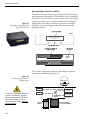
Figure 1-3
Front, Rear, and Angle View
of GyroTrac ADCU
The ADCU is the user interface, providing access to the system
and its functions through the LCD and three soft keys beneath it.
The ADCU also serves as the system’s junction box, allowing the
system to use ship’s power, interface with the Sensor Module,
supply and receive data to and from a GyroTrac-compatible
TracVision system, and supply and receive data from other
shipboard systems.
Liquid Crystal Display
FRONT
Magnetic Heading
270.4°
User Interface Soft Keys
12-Connector Terminal Strips
DB9 Low-speed
(included in kitpack)
Data Port
60 59 58 57 56 55 54 53 52 51 50 49
48 47 46 45 44 43 42 41 40 39 38 37
Connectors 60 - 37
1
2
3
4
5
6
7
8
9
10 11 12
13 14 15 16 17 18 19 20 21 22 23 24
25 26 27 28 29 30 31 32 33 34 35 36
Connectors 1 - 36
REAR
The system is designed to interface with additional onboard
equipment, as illustrated in Figure 1-4.
Figure 1-4
Possible GyroTrac System
Configurations
TracVision
GPS
Satellite TV
Receiver
PC
If a GyroTrac-compatible TracVision
system is connected to GyroTrac,
the power supply to the TracVision
MUST NOT exceed 16V or the
TracVision power supply will suffer
serious damage!
1-2
Other Equipment
(autopilot, radar)
Vessel Power
Sensor
Module
Advanced Digital
Control Unit (ADCU)
Introduction
1.3
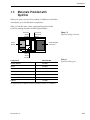
Materials Provided with
GyroTrac
When you open your GyroTrac package, in addition to the cables
and kitpack, you will find these components:
Table 1-1 lists the units, cables, and materials packed in the
GyroTrac package by name and KVH part number.
Horizontal
Sensor
Bracket
Figure 1-5
GyroTrac Package Contents
Flush Mount
ADCU Panel
Bracket
Sensor
Module
Advanced Digital
Control Unit
Vertical
Sensor
Bracket
Component
KVH Part No.
Sensor Module
02-0991
ADCU
02-0961
Flush Mount ADCU Panel
20-0667
Horizontal Sensor Bracket
20-0658
Vertical Sensor Bracket
20-0666
Sensor to ADCU Cable (30 ft.)
32-0623-30
Kitpack*
72-0095
Table 1-1
GyroTrac Packing List
*A complete list of the kitpack contents is provided in Section 2, “Installation.”
54-0142 Rev. G
1-3
Installation
2
Installation
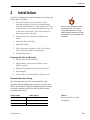
GyroTrac is designed for simple installation and setup. Just
follow these easy steps:
1. The serial number of your GyroTrac will be
required during any service or troubleshooting
calls. The serial number is on the inside front cover
of this manual, on the Sensor Module end cap, and
on the back of the ADCU. The serial number for
both components is the same.
2. Choose locations for the Sensor Module and
ADCU.
Plan the entire installation before
proceeding! Take into account
component placement, running
cable distances between units and
accessibility to the equipment after
installation.
3. Mount the Sensor Module.
4. Mount the ADCU.
5. Wire components together, to ship’s DC system,
and to onboard systems as appropriate.
6. Calibrate the sensor.
Recommended Tools and Materials
• Electric drill, assorted drill bits
• Light hammer; center punch; adhesive tape;
scriber or pencil
• Phillips (long shank) and flat tip screwdrivers
• Wire strippers
• Power cable to connect ADCU to ship’s power
Recommended Power Cabling
The following cable sizes are recommended for the
specified running lengths and are based on Lloyd’s and
ABYC specifications. Cable jacketing should meet marine
insulation standards while the cable should be tinned,
stranded marine stock.
Cable Length
Cable Gauge
mm2)
to 50 ft (15 m)
14 AWG (1
50-80 ft (25 m)
12 AWG (1.5 mm2)
+80 ft (+25 m)
10 AWG (2.5 mm2)
54-0142 Rev. G
Table 2-1
Recommended Power Cable
Specifications
2-1
A Guide to GyroTrac
Kitpack
Table 2-2 lists the materials provided in the GyroTrac kitpack.
Table 2-2
Kitpack Contents
Part
Qty.
KVH Part No.
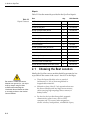
#8 Fiber Washer
10
14-0239
#8 Flat Washer
10
14-0037
#8 Self-locking Nut
5
14-0065-08
#8 Pan (Phillips head) Screw
5
14-0041-06
#10 Flat Washer
5
14-0048
#10 Lock Washer
5
14-0049
#10 Pan (Phillips head) Screw
5
14-0051-03
#8 Pan (Phillips head) Screw
5
14-0243-05
#8 Lock Washer
5
14-0038
#8 Pan (Phillips head) Screw BP
5
14-0047-08
Velcro Self-Adhesive Backing
8
19-0146
Velcro Washer
4
19-0147
4" Tie-wrap Clamp
5
22-0013
Tie-wrap Screw Mount
6
22-0038
Connector Wire Terminal Strip
5
23-0223-12
Sensor Module to ADCU Power Wire Ferrite
1
29-0037-02
2.1
Choosing the Best Location
Ideally, the GyroTrac sensor module should be mounted as low
as possible in the center of the vessel – but NOT in the bilges.
• Place the Sensor Module as far as practical
Be certain to isolate the Sensor
Module from ground (i.e., the ship’s
hull) by always using the fiber
washers when attaching the
Horizontal Sensor Bracket to either
a mounting surface or the Vertical
Sensor Bracket.
(minimum 3 ft./0.9 m) from magnetized or
magnetizable materials.
• Maintain at least 4 feet (1.3 m) separation between
the Sensor Module and any large ferrous masses,
cables carrying high amperage direct current, or
battery banks.
• Be alert for devices that change their magnetic
characteristics when in use, such as CRTs,
computer and TV screens, radar magnetrons,
electric winches, loudspeakers, windshield wipers,
2-2
Installation
and other devices with DC motors. GyroTrac
cannot compensate for changing magnetic fields
created by these devices.
• Ensure that the ADCU is located within the
running cable distance (30 ft./9.2 m) of the Sensor
Module.
• If necessary to fabricate custom mounting brackets
for the Sensor Module, they should be made from
non-ferrous materials such as wood, brass,
aluminum, fiberglass, or plastic.
2.1.1 Mounting on Steel Vessels
The GyroTrac sensor module is a digital magnetic compass and
great care is required when positioning the unit on steel-hulled
craft. The ideal location is in the wheelhouse or above decks.
Mount on an aluminum pole or bracket, well away from
magnetic fields such as cranes, derricks, motors, radomes,
antennas, etc.
DO NOT mount the sensor module on a steel or iron platform.
Use aluminum, brass, plastic, or wood.
2.2
Mounting the Sensor Module
If uncertain of the best location
for the sensor module, make a
temporary installation and conduct
a compass calibration (as
described in Section 2.6,
“Calibrating the Sensor Module.”)
Any necessary adjustments to the
sensor location can be made
based on the calibration scores.
Figure 2-1
Horizontal Sensor Bracket
GyroTrac’s Sensor Module comes equipped with two mounting
brackets. The first is the Horizontal Sensor Bracket, which
attaches directly to the Sensor Module housing, and must be used
in all mounting arrangements.
The Vertical Sensor Bracket allows the Sensor Module to be
mounted on a vertical surface. The following steps detail the
correct use of each bracket.
These brackets should enable the Sensor Module to be
placed as level in pitch and roll as possible. If you are unable
to place the Sensor Module in a level arrangement, refer to
Section 3.5.3, “Entering Gyro Offset Values” to compensate.
54-0142 Rev. G
Figure 2-2
Vertical Sensor Bracket
2-3
A Guide to GyroTrac
Figure 2-3
Proper Orientation of
the Sensor Module
Horizontal Bracket Only
1. Choose a mounting location free of excessive
vibration and flexing.
2. The module must be oriented so that the forward
reference on the end cap is pointed forward and
parallel to the vessel’s fore-and-aft axis (to ±5°).
The proper orientation is illustrated in Figure 2-3.
3. Position the Horizontal Sensor Bracket so that the
Sensor Module will be properly oriented when
placed in the bracket.
R
WA
TO
D
4. Use the holes in the bracket feet to spot for
mounting screws. Center punch and drill 4 holes
with a 1/8˝ (0.125˝ or 3.5 mm) bit.
W
BO
5¡
5¡
5. As illustrated in Figure 2-4, position the bracket
over the mounting holes.
- Insert fiber washers into both sides of mounting
bracket.
- Insert #8 flat washers and #8 pan head screws
into the holes.
Should you ever need to replace
the #10 machine screws used to
secure the housing and bracket,
the screws must be no longer than
3/8˝ to avoid damaging the
housing.
6. Place the Sensor Module in the bracket with the
proper orientation (up/forward).
7. Thread #10 machine screws through lock washers,
flat washers, and bracket, and then into the captive
extrusion T-nuts within the Sensor Module
housing as illustrated in Figure 2-4.
Figure 2-4
Securing the Sensor Module and
the Horizontal Sensor Bracket
T-nuts contained within
Sensor housing track
Step 7. Flat washer, lock washer &
#10 Machine screw
Step 6. Place Sensor
in Bracket
Step 5. Insert fiber washers on both sides
and secure bracket to mounting site
2-4
Installation
Horizontal and Vertical Bracket
1. Choose a mounting location free of excessive
vibration and flexing.
2. The module must be oriented so that the forward
reference on the end cap is pointed forward and
parallel to the vessel’s fore-and-aft axis. See
Figure 2-3 for reference. The brackets are designed
so that the Sensor Module may be mounted
perpendicular (option 1) or parallel (option 2) to
the mounting surface.
3. The module must be level with the vessel’s deck.
This placement can be fine tuned by using the
ADCU pitch and roll data. Adjust the brackets so
that the pitch and roll are 0 (zero) when the vessel
is docked and under normal load.
Figure 2-5
Optional Bracket Orientations
Option 1
Vessel
Centerline
Option 2
Vessel
Centerline
4. When choosing a location for the unit, make
certain that there is sufficient overhead clearance
for both brackets and the Sensor Module.
5. Use the holes in the Vertical Sensor Bracket to
spot for mounting screws. Center punch and drill
4 holes with a 1/8˝ (0.125" or 3.5 mm) bit.
6. Secure the Vertical Sensor Bracket to the vertical
surface with #8 flat washer and #8 screws.
7. Attach the Horizontal Sensor Bracket to the
Vertical Sensor Bracket as shown in Figure 2-5a.
- Position the Horizontal Sensor Bracket over the
mounting holes in the Vertical Sensor Bracket.
Figure 2-5a
Attaching the Horizontal and
Vertical Brackets
- Insert fiber washers into both sides of mounting
bracket.
- Insert #8 flat washers and #8 pan head screws
into the holes.
#8 Pan Head Screw
8. Place the Sensor Module in the bracket with the
proper orientation (up/forward).
9. Thread #10 machine screws through lock
washers, flat washers, and bracket, and then into
the captive extrusion T-nuts within the Sensor
Module housing.
#8 Flat Washer
Fiber Washer
#8 Self-locking Nut
54-0142 Rev. G
2-5
A Guide to GyroTrac
2.3
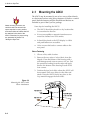
Mounting the ADCU
The ADCU may be mounted in one of two ways: either directly
to a horizontal surface using Velcro fasteners or flush to a control
panel. Both the fasteners and the Flush Mount Bracket are
included as part of the GyroTrac package.
When choosing a location, be
certain to take into account the
space required to route, position,
and strain relieve all cables that will
be attached to the back of the
ADCU. Directions for proper wiring
are presented in Section 2.4,
“Wiring the GyroTrac.”
Some tips for installing the ADCU:
• The ADCU should be placed in a dry location that
is convenient for the user.
• It is not susceptible to magnetic interference nor
must it be situated on a level surface.
• It should be placed so the LCD display is visible
and push buttons are accessible.
• Allow room at the back to connect cables to the
rear panel.
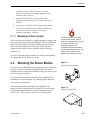
Velcro Fastening
1. Choose a flat, stable location.
2. Remove the two strips of velcro fabric from the
kitpack. Clean the bottom of the housing with a
mild detergent and water to remove oils, etc. Peel
the protective backing from the strips and apply
them to the bottom of the housing at each of the
four corners.
3. Position the four hook disks where the ADCU will
be mounted. Drill screw holes for the disks and
attach. Press the ADCU firmly into place so the
loop material engages the hook disks.
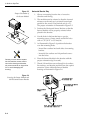
Figure 2-6
Mounting the ADCU with
Velcro Attachments
Place fabric strips
Place ADCU/fabric
on top of hook disks
Attach hook disks
2-6
Installation
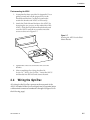
Flush-mounting the ADCU
1. A template has been provided in Appendix D as a
guide to mark and cut the proper hole for the
Flush Mount Bracket. Cut the hole and make
certain the bracket and ADCU will fit easily.
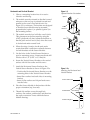
2. Attach the Flush Mount Bracket to the ADCU by
loosening the two screws on the underside of the
ADCU. Slide the Flush Mount Bracket backward
over the ADCU until the two notches meet the
screws as shown in Figure 2-7.
Figure 2-7
Securing the ADCU to the Flush
Mount Bracket
3. Tighten the screws to secure the ADCU to the
bracket.
4. After completing the wiring described in
Section 2.4, “Wiring the GyroTrac,” insert the ADCU
and bracket into the hole and secure the unit.
2.4
Wiring the GyroTrac
All wiring for the GyroTrac connects at the rear panel of the
ADCU. Included in the GyroTrac kitpack are five terminal strips
with terminal connectors numbered 1 through 60 (Figure 2-8 on
the following page).
54-0142 Rev. G
2-7
A Guide to GyroTrac
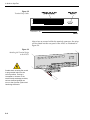
Figure 2-8
Terminal Strip Order
12-Connector Terminal Strips
DB9 Low-speed
(included in kitpack)
Data Port
60 59 58 57 56 55 54 53 52 51 50 49
48 47 46 45 44 43 42 41 40 39 38 37
Connectors 60 - 37
1
2
3
4
5
6
7
8
9
10 11 12
13 14 15 16 17 18 19 20 21 22 23 24
25 26 27 28 29 30 31 32 33 34 35 36
Connectors 1 - 36
REAR
After wires are secured within the terminal connectors, the strips
will be slotted into the rear panel of the ADCU as illustrated in
Figure 2-9.
Figure 2-9
Attaching the Terminal Strips
to the ADCU
23 24
18 19 20 21 22
13 14 15 16 17
Double-check all wiring. Be certain
to plug terminal strips into the
correct positions. If wiring is
incomplete or incorrect or the
terminal strips exchange positions,
serious electrical damage can
occur to the GyroTrac system and
interfacing electronics.
2-8
1
2
3
4
5
6
7
8
9
10 11 12
35 36
30 31 32 33 34
25 26 27 28 29
Installation
Tips for Successful and Safe Wiring
• When inserting a wire into the terminal connector,
make certain wire insulation is not pinched in the
connector.
• After inserting and securing wire, tug gently to
ensure that the connection is solid.
• Position cables behind ADCU so that they connect
neatly to the terminal strips.
• Do not tin (solder) the wire ends.
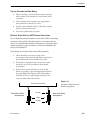
Effective Strain Relief for ADCU Terminal Connections
Due to both the potential number of wires that will be connecting
to the rear of the ADCU and the dynamic environment aboard
ship, it is critical that the terminal connections are properly strain
relieved using tie-wraps (a number of which are included with
the GyroTrac kitpack).
Some things to consider when strain relieving cables:
• There should be no tension on the wires
connecting to the terminal strip. Removing slack is
important but the wires should not be taut.
• If the cable is equipped with a ferrite, the ferrite
should be as close as possible to the terminal
connections.
• Strain relieve wires and cables as close to the
ferrite as possible. A good arrangement includes a
tie-wrap behind the ferrite (on the side furthest
from the ADCU); an ideal design includes a tiewrap on either side of the ferrite.
Terminal Connector Strip
Good Strain Relief
Arrangement
Tie-wrap
Figure 2-10
Examples of Effective Strain
Relief Arrangements
Ideal Strain Relief
Arrangement
Ferrite
Tie-wrap
54-0142 Rev. G
2-9
A Guide to GyroTrac
2.4.1 Connecting the GyroTrac
to External Devices
If the GyroTrac is receiving data
from a ship’s gyro, all compass
outputs are automatically
configured as True North and
cannot be set as Magnetic.
All connections between the GyroTrac and external devices are
made at the connector strips located on the rear of the ADCU.
Follow these guidelines when wiring the GyroTrac to additional
equipment:
• Make certain any additional equipment complies
with NMEA Standard 2.2.
• Data conductor wire should be minimum 18 AWG
(0.75 mm2), twisted pair, stranded, tinned marine
cable.
• Do not use cables with wire diameter larger than
12 AWG (2.5 mm2), as the connector plugs on the
rear of the ADCU accept wire no larger than
12 AWG (2.5 mm2) size.
• Cables provided with optional KVH displays and
Section 3, “Interface Configuration
and Operation,” presents details on
configuring GyroTrac’s serial ports
to meet the output requirements of
a variety of additional equipment.
interface units are fully compatible with GyroTrac
requirements. Note that cables to other external
devices should follow the manufacturer’s
recommendations.
•
For power cable specifications, refer to Table 2-1 at
the beginning of this section.
Appendix B provides instructions on properly wiring optional
KVH equipment to the GyroTrac system.
2.4.2 GyroTrac Wiring Diagram
Figure 2-11 on the following page presents a complete wiring
diagram for each GyroTrac terminal connector strip.
A color GyroTrac wiring quick
reference guide has been provided
on the front cover of this manual.
2-10
Installation
Figure 2-11
Proper Wiring for Connectors
1-36 (GyroTrac)
Green Label
1
SHIPÕS POWER
2
3
4
5
6
7
8
9
10 11 12
Power In (Red)
Sine
(see Table 2-3, GyroTrac
Ground In (Black)
Power Requirements)
Sine (inverted)
SERIAL PORT #1: RS-422
Refer to Section 2.4.4
for complete intructions
Ref
TX1B(-)
4800 baud
(3-wire or 4-wire)
Cosine (inverted)
TX1A(+)
(NMEA, Cetrek, KVH Data)
SINE/COSINE
Cosine
KVH Display Power
Ground
Ground
Blue Label
13 14 15 16 17 18 19 20 21 22 23 24
Ground (White/Green)
GPS A+
GPS or SHIPÕS GYRO
NMEA DATA INPUT
TX(+) (White/Blue)
GPS B-
GYROTRAC
SENSOR
MODULE
Pass-through Duplicate of
SERIAL PORT #1: RS-422
4800 baud
TX1A(+)
RX(-) (White/Orange)
Cable #32-0623-30
(RS-422 @ 4800 bps 8.N.1)
KVH Display Power
TX(-) (Blue/White)
RX(+) (Orange/White)
TX1B(-)
Ground
+12v (Green/White)
White Label
25 26 27 28 29 30 31 32 33 34 35 36
SERIAL PORT #3: RS-422
Ground
Data H
(NMEA, Cetrek, KVH Data)
4800 or 9600 baud
Unavailable with TracVision
To modify, refer to Section 3.5.4
TX3B(-)
Data L
Ground
TX3A(+)
SERIAL PORT #2: RS-422
(NMEA, Cetrek, KVH Data)
4800 or 9600 baud
Shift H
Ground
TX2B(-)
TX2A(+)
DATA
Shift L
Ground
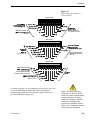
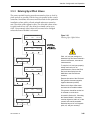
As noted in Figure 2-11, the output for Serial Ports 2 and 3 can
vary from 4800 baud to 9600 baud. This is determined
automatically based upon the selected output. Serial Port 1
provides 4800 baud output only.
54-0142 Rev. G
FURUNO
When a TracVision antenna is
connected to a GyroTrac system,
Serial Port 3 will not provide output
to other equipment. To restore
Serial Port 3 operation, GyroTrac
needs to be reconfigured for
GyroTrac-only operation. Refer to
Section 3.5.5, “Selecting TracVision
or GyroTrac-only Operations.”
2-11
A Guide to GyroTrac
2.4.3 Wiring an Optional GyroTrac-compatible
TracVision System
The GyroTrac-compatible TracVision satellite TV system connects
directly to the ADCU via the top two terminal connector strips.
Refer to the appropriate TracVision user manual for complete
instructions for wiring a GyroTrac-compatible TracVision system
to the ADCU.
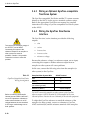
2.4.4 Wiring the GyroTrac Sine/Cosine
Interface
The GyroTrac sine/cosine interface provides the following
outputs:
The sine/cosine reference voltage is
an OUTPUT, not an INPUT.
Connecting this output to the
reference output for an autopilot or
other system can result in
problems. Section 2.4.4 provides
instructions on how to solve this
problem.
•
sine
•
cosine
•
inverse sine
•
inverse cosine
•
reference voltage
Because the reference voltage is a reference output, not an input,
connecting this output to another reference output from an
autopilot or other system will cause problems.
In this case, connect the following wires from the autopilot (or
other system) to the GyroTrac:
Table 2-3
GyroTrac/Autopilot Sine/Cosine
Wiring Arrangement
Before connecting the Autopilot
internal ground to ADCU terminal 7,
use a low impedance voltmeter to
make certain that there is no DC
voltage between the two terminals.
A DC surge could damage one or
both systems.
2-12
Autopilot/Other System Wire
ADCU Terminal
Sine
12
Cosine
10
Internal Power Ground
(not chassis ground!)
7
Reference (INPUT)
8 (KVH Output)
DO NOT connect the autopilot or other system to the GyroTrac
reference output (ADCU terminal 8) if the autopilot has its own
internal reference. Review the user’s manual for the selected equipment.
To adjust the GyroTrac reference to match the reference of the
autopilot (or other system), connect a voltmeter to GyroTrac
ADCU terminal (#8) and the reference terminal of the autopilot
Installation
(or other system). Adjust the GyroTrac reference voltage as
described in Section 3.4.1, Setting the Sine/Cosine Data Output, until
the voltmeter indicates 0 VDC.
The sine/cosine interface should now operate with optimal
precision.
2.4.5 True North Capability
GyroTrac is capable of determining true north that is accurate,
under most conditions, to within ±1.0˚. This information is
obtained by providing GPS data input and reading the magnetic
variance tables.
NMEA sentences from the GPS must contain one or all of the
following sentences: VTG, VHW, or BWC. The sentence structure
must comply with the NMEA 0183 V2.20 standard and run at
4800 bps 8.N.1.
When the vessel is stationary,
certain GPS models may not output
the data required for GyroTrac to
determine true north.
As illustrated in Figure 2-11 and the quick reference guide on the
cover of this manual, GPS interface cables connect to the ADCU
at terminals 23 and 24. Refer to your GPS user manual for the
correct NMEA data out configuration.
2.5
Connecting to Vessel Power
Short circuits may result in severe electrical shock or burns. Turn
off vessel power and test the circuit to ensure that no power is
present before connecting the power cable.
The power needs of the GyroTrac vary based on its use as either
a standalone system or as a component of a GyroTrac-compatible
TracVision system:
GyroTrac Function
Power Requirement
As GyroTrac System
12-32V DC
As Sensor for TracVision
11-16V DC
If a GyroTrac-compatible TracVision
system is connected to GyroTrac,
the power supply to the TracVision
MUST NOT exceed 16V or the
TracVision power supply will suffer
serious damage!
Table 2-4
GyroTrac Power Requirements
The GyroTrac system does not have a dedicated power control
(ON/OFF switch). A quick-tripping circuit breaker or fuse should
be installed between vessel power and the ADCU. Circuit
overload protection should be rated for 5 amperes. For
recommended power cable specifications, refer to Table 2-1 at the
beginning of this section.
54-0142 Rev. G
2-13
A Guide to GyroTrac
If vessel power fluctuates widely or is noisy, a wide-range
DC/DC converter power supply should be installed. Test the
voltage and polarity before making connections to vessel power.
The ADCU is equipped with a
1-amp fuse to protect against highvoltage spikes. If the system is
installed correctly and power is
available, but the system is nonfunctional, refer to Section 4,
“Troubleshooting,” for instructions
on checking and replacing the fuse.
You must compensate the
GyroTrac Sensor Module after
installation so that any errors due
to metal and magnetism in your
vessel are removed!
A complete explanation of the
GyroTrac menus is provided in
Section 3, “Interface Configuration
and Operation.” Specifics regarding
calibration are in Section 3.6,
“Control Compass Mode.”
If the user-supplied power cable has a drain or shielded
wire, do not connect the drain or shield to either the ADCU
or to ground.
2.6
Calibrating the Sensor Module
Although every Sensor Module is calibrated at the factory, hard
and soft iron effects on the host platform can distort the local
magnetic field, causing errors in the reported heading. These
errors are minimized by proper location of the Sensor Module
and are further removed by GyroTrac’s autocompensation
feature, which measures the surrounding magnetic field
distortions and compensates for them, thereby removing the
resulting heading errors and giving you a system with better
than ±1˚ accuracy in most cases.
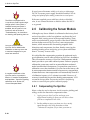
It is critical that the compensation procedure be performed and a
good calibration score be achieved following GyroTrac’s installation.
This will ensure the accuracy of GyroTrac’s measurements and the
data it provides to your other onboard systems. Failure to properly
calibrate the system may result in an autocalibration conducted
under less-than-ideal circumstances. To ensure that some form of
calibration occurs after installation, GyroTrac leaves the factory with
its autocompensation feature turned on because any compensation
is better than none. Autocompensation will automatically shut off if
a Calibration Accuracy of <8˚ or better is recorded. However, <8˚
accuracy is insufficient for precision heading measurements. KVH
recommends that you follow the procedure outlined in the following
sections to ensure that your system is calibrated properly.
2.6.1 Compensating the GyroTrac
Select a calm day and a clear area. Avoid excessive pitching and
rolling, as this can distort the compensation data.
1. Apply power to the GyroTrac and note your
approximate heading so that you will know when
you have completed a full circle.
2. Set the rudder to steer your boat at a slow, steady
speed through a full circle that takes at least
2 minutes to complete. (Try to time your turn so
2-14
Installation
that it takes 30 seconds or more to turn 90º.) After
completing a full circle, continue the process with a
second circle. The circles do not need to be perfectly
round as long as you make a complete 360º turn.
3. Once you have completed two full circles, your
compass should be compensated. Check the
calibration score as described in the next section.
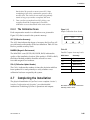
2.6.2 The Calibration Score
Each compensation results in a calibration score, pictured in
Figure 2-12, that is stored in the system’s memory.
Figure 2-12
Sample Calibration Score Screen
ACC
CAL<1°
ACC (Calibration Accuracy)
MagEnv
GOOD
Cal#
3
The ACC data indicates the degree of accuracy the GyroTrac will
provide based on the quality of the last calibration. Table 2-5 lists
the five possible accuracy levels.
MAGENV (Magnetic Environment)
The MAGENV score (GOOD, OK, POOR, BAD) indicates the
quality of the installation location. If the quality is POOR or BAD,
the Sensor Module probably should be moved to a more
favorable magnetic environment.
Table 2-5
Possible Compass Accuracy Levels
ACC Score
Accuracy
<1˚
Better than 1˚
<2˚
Better than 2˚
CAL # (Calibration Update Number)
<4˚
Better than 4˚
The CAL # indicates the number of times the deviation table has
been updated. It is used primarily to verify whether a new
calibration has been accepted by the system.
<8˚
Better than 8˚
BAD CAL
Recalibrate
2.7
Completing the Installation
The physical installation of GyroTrac is now complete. Section 3,
Interface Configuration and Operation,” provides detailed
instructions on defining GyroTrac’s operations and outputs.
54-0142 Rev. G
Be certain to fill out and return the
warranty card to KVH.
2-15
Interface Configuration and Operation
3
Interface Configuration
and Operation
All operations related to TracVision antennas and GyroTrac are
controlled and monitored using the ADCU. An LCD screen
displays navigation and configuration data and three soft keys
enable a user to perform a multitude of menu-driven tasks.
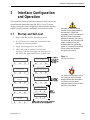
3.1
Startup and Self-test
1. Turn on the IRD and the television receiver.
2. If a GPS receiver is connected, ensure that it has
obtained an accurate position.
3. Apply operating power to the ADCU.
4. Wait while system conducts brief self-test
sequence. Test status messages are displayed on
the ADCU for approximately two seconds each.
KVH Industries Inc.
GyroTrac Rev. #.#.
Only appears
No data from Gyro
System not running
when gyro test
A number of antenna-specific
screens will only be available on
the interface if a GyroTraccompatible system is connected to
the ADCU. Due to operational
differences between TracVision 3,
TracVision G4, and TracVision G6,
certain screens will only be
available when the appropriate
system is connected to the ADCU.
These screens are identified
throughout this section.
Figure 3-1
Startup and Self-test
fails. Blinks
until any button
is pushed.
System Testing
Microcontroller
system Testing
Global Position Sys
system Testing
Memories
No GPS Data while
System powerup
Only appears
when a GPS
is unavailable
system Testing
Sine Cosine Circuit
The absence of valid GPS data is
not a fault; the status message
simply indicates that GPS data is
not present, and that those
navigation functions that use GPS
inputs are not available.
* GyroTrac Config *
As a TV System
Based on
selected
configuration
* GyroTrac Config *
As a GyroTrac System
system Testing
Gyroscope
Enter Main Data Display or TracVision startup tests
(when configured as TracVision component)
54-0142 Rev. G
3-1
A Guide to GyroTrac
Figure 3-2
Startup Error Screen
Errors detected on
XXXXXXX
If the self-testing routine detects faults in any of the first four selftests, the screen pictured in Figure 3-2 is displayed. Operation
halts at this point and the GyroTrac cannot operate. The unit
should be returned to your local authorized KVH dealer,
distributor, or service center.
3.1.1 TracVision Startup and Self-test Screens
Figure 3-3
GyroTrac Startup Screens
When configured as a component of a TracVision system,
GyroTrac conducts a series of startup routines and self-tests to
verify antenna operation. The TracVision self-test status screens
are only displayed when the main data display is set to show the
antenna status information (as described in Section 3.3, “Setup
Display Mode”).
Antenna initializing
Waiting for POS data
TracVision 3 Only
Initial IRD Box
Waiting for POS data
** Search mode 1 **
###.#°
##.#°
####
TracVision G4/TracVision G6 Only
Init RF Controller
Waiting for POS data
** Search mode 2 **
###.#°
##.#°
####
Initial Ext Sensor
Waiting for POS data
** Search mode 3 **
###.#°
##.#°
####
Checking Noise Level
###.#°
##.#°
####
Antenna is Tracking
###.#°
##.#°
####
Initial Antenna
###.#°
##.#°
####
Network ID Check
###.#°
##.#°
####
TracVision 3 Only
TracVision G4/
TracVision G6 Only
Initial Rate Bias
###.#°
##.#°
####
Tracking <SATNAME>
###.#°
##.#°
####
To Main Data Display
3-2
Interface Configuration and Operation
3.2
Data Display and Accessing
the Main Menu
As soon as the self-test routine is completed, the LCD panel
shows one of five data displays selected in the Display Setup
Mode (described in Section 3.3, “Setup Display Mode”). When any
of the primary data displays are on screen, the soft keys allow you
to switch between the two installed satellites (if GyroTrac is
connected to a TracVision G4 or TracVision G6) as well as enter
the Main Menu mode. The key functions and display options are
as follows:
Figure 3-4
Soft Key Functions and
Main Data Displays
Main Data Displays*
Magnetic Heading
###.#°
Pitch
#.#°
Mag/Hdg
#.#°
Lat:
Long:
Roll
#.#°
Yaw
#.#°
Rate/Sec
#.#°
##°
##°
TracVision G4
Tracking <Sat Name>
###.#°
##.#°
####
TracVision 3
Antenna is Tracking
###.#°
##.#°
####
Enter Main
Select Installed Menu Select Installed
Satellite A
Satellite B
(TracVision G4/
(TracVision G4/
TracVision G6 only)
TracVision G6 only)
* Variations on these displays are also presented in Figure 3-11.
54-0142 Rev. G
3-3
A Guide to GyroTrac
3.2.1 Main Menu
Pressing the center key will cycle the Main Menu through the
available functions as follows:
Figure 3-5
Main Menu Functions
Magnetic Heading
###.#°
Decrease brightness
Increase brightness
Setup display type?
Enter
Next
Return
Proceed to Section 3.3
"Setup Display Mode"
(set data displayed on the LCD
during normal operation)
Proceed to Section 3.4
"Set Data Outputs Mode"
(set type and format
of data outputs)
Proceed to Section 3.5
"Set Configuration Mode"
(set heading reference source, enter gyro offsets, reset to factory
defaults, and turn TV comm on/off)
Proceed to Section 3.6
"Control Compass Mode"
(set calibration, read cal score, and
clear compass calibration)
Proceed to Section 3.7
"Get Antenna Status Mode"
(check status and version of antenna,
get antenna serial #, get signal level
& threshold, display skew angle, and
measure bit error rate)
Proceed to Section 3.8
"Control Antenna Mode"
(adjust antenna azimuth and
elevation manually, restart system,
install satellite pairs, set lat/long,
and select active satellite)
3-4
Setup data outputs?
Yes
Next
Return
Setup configuration?
Yes
Next
Return
Control Compass?
Yes
Next
Return
This menu will only appear
if the heading reference is
configured as INTERNAL.
Get Antenna status?
Enter
Next
Return
Control antenna?
Enter
Next
Return
To Factory Default or
Chosen Data Display
These menus will not
appear if GyroTrac is
configured to operate as a
standalone system (e.g.,
COMM OFF).
Interface Configuration and Operation
3.2.2 Alert Screens
Certain operations require GyroTrac to temporarily cease its data
output or alter its configuration so that new parameters or
configurations may be entered. When you enter one of these
functions, a pair of alert screens will appear, informing you of
what will happen. Selecting "Yes" will allow you to continue into
the function. Selecting "No" will return you to the Main Menu.
** WARNING **
Data will be HALTED
Figure 3-6
Sample Alert Screens
ARE YOU SURE?
Yes
No
3.2.3 System Security
To prevent unauthorized adjustments to certain GyroTrac
settings, certain functions require the entry of a customizable
4-digit Personal Identification Number (PIN). PIN entry and
selection procedures are illustrated below. The default setting for
the PIN is four zeros (0000). If an incorrect PIN is entered, the
system automatically returns to the main data display.
Enter pincode = XXXX
Enter
+
New pincode = XXXX
Enter
+
To reset the PIN to four zeros (0000), press and hold the middle
key during power-up until the Erase Pin Code screen pictured in
Figure 3-8 appears.
Figure 3-7
PIN Code Screens
Figure 3-8
Erase PIN Code Screen
Erase Pincode?
Yes
54-0142 Rev. G
No
3-5
A Guide to GyroTrac
3.2.4 The RETURN and CANCEL Keys
Throughout the GyroTrac menus, the right-hand key will often be
designated as either RETURN or CANCEL. These options have
the following functions:
•
RETURN – Returns to the main data display. If no
keys are pressed within 10 seconds, the menu will
automatically default to the main data display.
•
CANCEL – Cancels current action and returns to
the start of the action without making any
changes.
3.2.5 Antenna Error Messages
Figure 3-9
Incorrect Response Error Message
ERROR: Antenna
response incorrect
Figure 3-10
Non-responsive Antenna
Error Message
ERROR: Antenna
not responding
3-6
At times, the ADCU will display error messages alerting you to a
specific problem (e.g., you have selected an invalid satellite pair).
There are also two general antenna error messages that are not
related to a specific action.
“Antenna Response Incorrect” (pictured in Figure 3-9) indicates
that the ADCU received an incorrect answer from the antenna in
response to a request. The solution to this error is simply to carry
out your requested operation again.
“Antenna not Responding” (pictured in Figure 3-10) indicates
that no messages are being received from the antenna. This is
usually the result of the antenna not being powered up or the
antenna being unplugged from the ADCU.
Interface Configuration and Operation
3.3
Setup Display Mode
The Setup Display mode selects the data that will be displayed
on the ADCU LCD after startup and self-test; it does not control
the data sent to remote heading display units, north-up radars,
autopilots, etc.
Setup display type?
Enter
Next
Return
Figure 3-11
Setting Display
Proceed to Sec. 3.4
"Set Data Outputs Mode"
ALERT SCREENS
PIN CODE SCREENS
New Data Display
Yes
compass?
Next
Return
Magnetic Heading
###.#°
Compass screen
determined by
availability of GPS
data for True North.
Mag/HDG
###.#°
Pitch
#.#°
True/HDG
###.#°
Roll
#.#°
Pitch, Roll & Yaw?
Yes
Next
Return
Yaw
#.#°
Yes
Mag/Hdg
#.#°
Rate of turn?
Next
Return
Rate/Sec
#.#°
Latitude Longitude?
Yes
Next
Return
Lat:
Long:
##°
##°
Antenna display?
Yes
Next
Return
Tracking <Sat Name>
###.#°
##.#°
####
Antenna screen
determined by
availability and
This menu will not appear if
GyroTrac is configured to
operate as a standalone
system.
Antenna is Tracking
###.#°
##.#°
####
type of TracVision
system and time
in the startup
sequence
Antenna Initializing
No Data from Antenna
Antenna Initializing
waiting for POS Data
54-0142 Rev. G
3-7
A Guide to GyroTrac
3.4
Set Data Outputs Mode
The Set Data Outputs function is used to select several types of
data formats available in the GyroTrac. The message formats are:
• 1 Sine/cosine (either 3-wire or B&G 4-wire)
• 3 serial message formats:
- NMEA 0183
- KVH pitch, roll, and yaw, and
- Cetrek
• 1 Furuno AD10S
Figure 3-12
Data Outputs Mode
Menu Sequence
These messages are output to displays and external navigation
systems only if selected at the User Interface. Selection
procedures are presented in the following sections.
Setup data outputs?
Enter
Next
Return
ALERT SCREENS
PIN CODE SCREENS
Set sine-cos levels?
Yes
Next
Return
3-8
Set serial outputs?
Yes
Next
Return
Set Furuno outputs?
Yes
Next
Return
Interface Configuration and Operation
3.4.1 Setting the Sine/Cosine Data Output
The sine/cosine setup is done in three stages: first the magnetic
or true heading option is selected, then the reference voltage is
set, and finally the swing voltage is set. The valid range for
reference and swing voltages is between 0 and 6.5 volts. The
default values for reference and swing voltages are 5.0 volts.
Refer to your autopilot manual for correct voltage requirements.
Figure 3-13
Setting Sine/Cosine Data Output
Setup data outputs?
Yes
Next
Return
Proceed to Section 3.5
ALERT SCREENS
"Set Configuration Mode"
PIN CODE SCREENS
Set sine-cos levels?
Yes
Next
Return
Proceed to Section 3.4.2
"Setting the Serial
Outputs"
Sine Cosine is: Mag
Mag
ENTER
True
Setting will blink "Mag" or
"True" based on the
If the GyroTrac is receiving data
from a ship’s gyro, all compass
outputs are automatically
configured as True North and
cannot be set as Magnetic. If this is
the case, the following variation on
the magnetic/true selection screen
will be displayed:
current selection. Pushing
the MAG or TRUE buttons
will toggle between
only True available
selections.
Set Ref:
5.00 Volt
Enter
+
Set Swing:
5.00 Volt
Enter
+
If the system is NOT connected to
a GPS or a ship’s gyro, only
magnetic heading data will be
available and the following variation
on the magnetic/true selection
screen will be displayed:
Only Mag available
The system will then proceed to the
“Set Ref” screens.
54-0142 Rev. G
3-9
A Guide to GyroTrac
3.4.2 Setting the Serial Outputs
The GyroTrac can output up to three serial messages
simultaneously in any combination of NMEA version 2.2,
KVH RS-422, or Cetrek proprietary format. NMEA message
options and the KVH and Cetrek formats are described briefly in
Appendix C. Follow the procedures illustrated below to set the
serial outputs. The factory default speed setting is 10 Hz.
Figure 3-14
Setting Serial Outputs
Set serial outputs?
Yes
Next
Return
Proceed to Sec. 3.4.3
"Setting the Furuno Output"
Select serial port 1
Yes
Next
Cancel
Opens menus for Serial Ports 2 & 3.
All three serial ports have the same
selection options. However, the output
from Port 1 is only 4800 baud.
Serial port 1 config
Output Data: NMEA
Serial Port setting information will be
displayed for 2.5 seconds. Setting can be:
None, NMEA, KVH, or Cetrek
-
Set speed: 10 Hz
Enter
+
If GyroTrac is configured as a
component of a TracVision system,
the following screen will appear when
attempting to configure Serial Port 3:
Resetting outputs?
Yes
No
No Port 3. TV setup
Yes
Next
Cancel
No Action
Return to
"Set Serial Outputs?"
**
Outputs erasing
Please Wait
**
Return to "Select Serial Port 1"
Section 3.5.5, "Selecting
TracVision or GyroTrac-only
Operations" to configure the system
Refer to
as GyroTrac-only and activate Serial
Select output type
NMEA
KVH
Cetrek
Proceed to
Sec. 3.4.2.1
Port 3.
This screen will only
Cetrek data is: Mag
Mag
ENTER
True
appear if GPS is available
"Setting the
to provide True North
NMEA Outputs"
Data, otherwise the
default is "Mag."
3-10
Interface Configuration and Operation
3.4.2.1
Setting the NMEA Outputs
GyroTrac is fully compatible with NMEA input versions 1.5
and 2.2. However, the individual serial ports can only be
programmed to use NMEA version 2.2 as an output.
Custom configurations are not
available on GyroTrac at this time.
Figure 3-15
Setting NMEA Outputs
Select output BWC?
Yes
Next
Cancel
Return to 3.4.2
"Setting the Serial Outputs"
By choosing ÒNextÓ or completing the
configuration for each output, GyroTrac will
cycle through the remaining NMEA outputs in
the following order:
GGA Ð GLL Ð HDG Ð HDM Ð HDT Ð VTG Ð XTE
Each output follows the same sequence of
screens as illustrated in this flow chart.
Select NMEA version
Rev 2.2
Custom
**
**
Selection done
Please Wait
**
**
Customization
not available
Setting set to
NMEA Rev. 2.2
**
**
Selection done
Please Wait
**
**
Setup output GGA?
Yes
Next
Cancel
Return to 3.4.2
"Setting the Serial Outputs"
When Serial Ports 2 or 3 are
By choosing ÒNextÓ or completing the
configuration for each output, GyroTrac will
cycle through the remaining NMEA outputs.
Each output follows the same sequence of
screens as illustrated in this flow chart.
54-0142 Rev. G
selected to provide NMEA output,
the baud rate is automatically
changed to 4800 baud from the
default of 9600 baud. Serial Port 1
and its pass-through duplicate only
provide 4800 baud output.
3-11
A Guide to GyroTrac
3.4.3 Setting the Furuno Output
This option selects two available options for the Furuno
output: magnetic or true heading reference and 25 millisecond
or 200 millisecond data output rate.
Figure 3-16
Setting Furuno Output
Set Furuno Outputs?
Yes
Next
Return
Return to Sec. 3.4.1
"Setting the Sine/Cosine
Furuno data is: MAG
MAG
ENTER
True
If the system is NOT connected to
a GPS or a ship’s gyro, only
magnetic heading data will be
available and the following variation
on the magnetic/true selection
screen will be displayed:
Only Mag available
Data Output"
Setting will blink "Mag" or
"True" based on the
current selection. Pushing
the MAG or TRUE buttons
will toggle between
Set data rate: 200 mS
25mS
ENTER
200mS
selections.
Data rate setting will blink
"25mS" or "200mS" based on
current selection. Pushing the
25mS or 200mS buttons will
toggle between selections.
The system will then proceed to the
“Set Data Rate” screen.
3-12
Interface Configuration and Operation
3.5
Set Configuration Mode
The Set Configuration function is used to select an internal or
external source for heading data, enter offset values that
correct for mechanical mounting alignment errors, reset the
system to its factory defaults, and turn TV communications
on/off.
Figure 3-17
Configuration Mode
Menu Sequence
Setup Configuration?
Enter
Next
Return
ALERT SCREENS
PIN CODE SCREENS
Yes
Set brightness?
Next
Return
Default display box?
Yes
Next
Return
54-0142 Rev. G
Set Heading int/ext?
Yes
Next
Return
Set Gyro offsets?
Yes
Next
Return
Set TV com on/off?
Yes
Next
Return
3-13
A Guide to GyroTrac
3.5.1 Setting Display Brightness
The ADCU display’s brightness may be adjusted to suit your
preferences. Press the right key to make the display brighter, the
left key to make it dimmer. When you are satisfied with the
setting, press the center key to accept the setting.
Figure 3-18
Display Brightness Controls
Yes
Set brightness?
Next
Return
Min
Bright
*****************
Dim Display
Max
Brighten Display
Proceed to Sec. 3.5.2,
"Selecting Heading
Reference Source"
The ADCU display offers 20 levels of brightness, each
of which is indicated by an
asterisk that appears or
disappers when the Dim and
Brighten keys are pressed.
3.5.2 Selecting Heading Reference Source
The Heading Reference Source menu provides the option to
override the GyroTrac’s external sensor module in favor of
another source, such as a ship’s gyro, as follows:
Figure 3-19
Internal/External Reference Menus
•
INTERNAL – GyroTrac will receive and use
heading data from its sensor module. In addition,
the Control Compass menus will be available.
•
EXTERNAL – GyroTrac will receive and use
heading data from an external heading source. As
a result, the Control Compass menus will be
inactive and hidden. Refer to Figure 2-18 for
details on connecting a ship’s gyro to the ADCU.
Set Heading int/ext?
Yes
Next
Return
Proceed to Sec. 3.5.3,
"Entering Gyro Offset
Reference: Internal
Int
ENTER
Ext
Values"
Setting will blink "Internal"
or "External" based on the
current selection. Pushing
the INT or EXT buttons will
toggle between selections.
3-14
Interface Configuration and Operation
3.5.3 Entering Gyro Offset Values
The sensor module housing must be mounted as close to level in
pitch and roll as possible, with its long axis parallel to the vessel’s
centerline. Sometimes allowances must be made for the particular
installation where pitch, roll and azimuth references cannot be
met. The offset values adjust for this. The allowable offset values
for pitch and roll are ±45˚; the offset for azimuth can be up to
±180˚. Once entered, offset values will not need to be changed
unless the Sensor Module is relocated.
Figure 3-20
Entering Gyro Offset Values
Set Gyro offsets?
Yes
Next
Return
Proceed to
Section 3.5.4,
Set offset Pitch?
Yes
Next
Cancel
Set Pitch: +XX.X°
Enter
+
Set offset Roll?
Yes
Next
cancel
-
Set Roll: +XX.X°
Enter
+
Set offset Yaw?
Yes
Next
Cancel
-
Set Yaw: +XXX.X°
Enter
+
54-0142 Rev. G
"Choosing the
Default Display"
Pitch, roll, and yaw settings are
determined by the Sensor Module’s
internal inclinometer, not external
measurements.
To set pitch, roll, and yaw properly,
initially enter zeros for all
measurements. Choose the Pitch,
Roll, and Yaw display from the
Main Menu and record those
numbers.
Reverse the value of the Pitch and
Roll (positive becomes negative,
negative becomes positive).
Return to the Gyro Offset menu
and enter the recorded numbers.
This process should be carried out
in still water or at the dock.
As noted in Section 2.2, “Mounting
the Sensor Module,” the sensor
must be aligned to within ±5˚ of the
vessel’s fore-and-aft centerline.
Deviation beyond ±5˚ will degrade
pitch, roll, and yaw accuracy.
3-15
A Guide to GyroTrac
3.5.4 Choosing the Default Display
This option resets the ADCU display settings to their factory
defaults.
Figure 3-21
Selecting the Default Display
Default display box?
Yes
Next
Return
Proceed to Section 3.5.5,
"Selecting TracVision or
GyroTrac-only Operations"
ALERT SCREENS
Display defaulting
If the main display is set to show
antenna tracking information but
the antenna communications are
OFF, the following display will be
shown:
TV comms is off
No data from antenna
To correct the error, turn antenna
communications ON or change the
main display setting.
Figure 3-22
Selecting TracVision- or
GyroTrac-only Operations
Default display done
3.5.5 Selecting TracVision or GyroTrac-only
Operations
GyroTrac’s factory default configuration is to operate as a
standalone system (Antenna Comm is: OFF). Connecting a
TracVision antenna will reconfigure GyroTrac to function as a
component of a TracVision system (Antenna Comm is: ON).
Set TV com On/Off?
Yes
Next
Return
Return to Section 3.5.1,
"Setting Display Brightness"
Antenna Comm is: ON
On
ENTER
Off
The antenna communication
setting will blink "ON" or "OFF"
based on current selection.
ON allows GyroTrac to
function as a TracVision
system component. Pushing
the ON and OFF buttons will
change the selected setting.
3-16
Interface Configuration and Operation
3.6
Control Compass Mode
These screens are only seen if heading reference is INTERNAL.
The Compass Control function provides control over the
GyroTrac sensor module, including turning autocalibration on
and off, reading the calibration score, and manually clearing the
compass calibration.
Figure 3-23
Compass Control Mode
Menu Sequence
Control Compass?
Enter
Next
Return
ALERT SCREENS
PIN CODE SCREENS
Set Autocal on/off?
Yes
Next
Return
Yes
Read cal score?
Next
Return
Clear COMPASS cal?
Yes
Next
Return
3.6.1 Selecting Autocompensation
These screens are only seen if heading reference is INTERNAL.
GyroTrac is fully capable of autocompensation to ensure that the
navigation data is as accurate as possible.
Figure 3-24
Setting Autocompensation
Set AutoCal On/Off?
Yes
Next
Return
Proceed to Section 3.6.2
"Reading the Calibration Score"
AutoCal is: ON
ON
ENTER
OFF
Autocalibration setting will blink "ON"
or "OFF" based on current selection.
Pushing the ON or OFF buttons will
change the selected setting.
54-0142 Rev. G
As noted in Section 2.6,
“Calibrating the Sensor Module,” a
well-calibrated sensor is crucial to
GyroTrac’s accuracy. If you shift,
remove, or add equipment near the
sensor, KVH suggests turning
autocompensation on so that the
sensor will automatically recalibrate
itself within the surrounding
magnetic field.
3-17
A Guide to GyroTrac
3.6.2 Reading the Calibration Score
These screens are only seen if heading reference is INTERNAL.
The calibration score should be checked during the installation
process and whenever adjustments are made to vessel equipment
that can affect the compass’ accuracy. A complete explanation of
the compass calibration score has been provided in Section 2.6.2,
“The Calibration Score.”
Figure 3-25
Reading the Calibration Score
Yes
Read Cal Score?
Next
Return
Proceed to Section 3.6.3
"Clearing Compass Calibration"
ACC
CAL<#°
MagEnv
XXXX
Cal#
#
3.6.3 Clearing Compass Calibration
These screens are only seen if heading reference is INTERNAL.
Clearing the compass calibration will reset the system to the
factory defaults.
Figure 3-26
Clearing Compass Calibration
Clear COMPASS Cal?
Yes
Next
Return
Return to Section 3.6.1,
ALERT SCREENS
After resetting this autocalibration,
the following screen may appear:
"Selecting Autocompensation"
AutoCal resetting
Please wait
System Halted
Power system Off/On
AutoCal reset done
Turn system Off/On
This may result from a temporary
lack of communication with the
compass. Restart the system to
restore compass data.
Turn off power to GyroTrac for two
seconds then turn it back on to reset.
3-18
Interface Configuration and Operation
3.7
Antenna Status Mode
These screens are only seen if Antenna Comm is turned ON.
This sequence of steps allows a user to scan for system errors,
access antenna type, version, and serial number information,
check the signal and noise levels, indicate the skew angle, and
display the bit error rate.
Figure 3-27
Antenna Status Mode
Menu Sequence
Get Antenna status?
Enter
Next
Return
ALERT SCREENS
PIN CODE SCREENS
54-0142 Rev. G
Get system error?
Yes
Next
Return
Yes
Get version?
Next
Return
Get serial number?
Yes
Next
Return
Get Thres/sig level?
Yes
Next
Return
Yes
Get skew angle?
Next
Return
Get bit error rate?
Yes
Next
Return
3-19
A Guide to GyroTrac
3.7.1 Antenna Status Data Screens
These screens are only seen if Antenna Comm is turned ON.
Figure 3-28 illustrates the information available through the Get
Antenna Status mode. The Skew Angle and Bit Error rates are
only available when the GyroTrac ADCU is connected to a
TracVision G4 or TracVision G6.
Figure 3-28
Antenna Status Data Screens
Get Antenna status?
Enter
Next
Return
Proceed to Section 3.8
"Control Antenna Mode"
ALERT SCREENS
PIN CODE SCREENS
Get system errors?
Yes
Next
Return
Get Thres/sig level?
Yes
Next
Return
(If errors detected)
No errors detected
Testing OK
Test Types
Azimuth Motor
Elevation Motor
Antenna Gyro
External Sensor
IRD Comms
RF Comms
RF Signal
If connected to
TracVision 3
OR
Signal level =
Threshold =
Test <Test Type>
Testing Failure
Push any Button to Proceed
Push any Button to Proceed
Yes
Antenna type =
Antenna Ver =
Get Version?
Next
Return
TVX
X.XX
Push any Button to Proceed
Yes
Get skew angle?
Next
Return
Skew angle
##.#
Push any Button to Proceed
Get bit error rate?
Yes
Next
Return
Get serial number?
Yes
Next
Return
Antenna serial #
########
Bit error rate
###
Push any Button to Proceed
Push any Button to Proceed
TracVision G4/TracVision G6 Only
3-20
Interface Configuration and Operation
3.8
Control Antenna Mode
These screens are only seen if Antenna Comm is turned ON.
This sequence of steps allows a user to adjust the antenna’s
azimuth and elevation manually, restart the antenna, set Sleep
Mode on or off, set Instant On Mode on or off, install a new pair
of active satellites, set the latitude and longitude, and select the
active satellite system.
Figure 3-29
Control Antenna Mode
Menu Sequence
Control antenna?
Enter
Next
Return
ALERT SCREENS
PIN CODE SCREENS
Man control antenna?
Yes
Next
Return
Set instant on/off?
Yes
Next
Return
Restart Antenna?
Yes
Next
Return
Set sleep on/off?
Yes
Next
Return
Install satellite?
Yes
Next
Return
Yes
Set Lat/Long?
Next
Return
select satellite?
Yes
Next
Return
54-0142 Rev. G
3-21
A Guide to GyroTrac
3.8.1 Manually Controlling the Antenna
These screens are only seen if Antenna Comm is turned ON.
In certain circumstances, it may be necessary to control the
azimuth, elevation, and tracking of the TracVision G4 or
TracVision G6 antenna manually, using the process illustrated in
Figure 3-30. Use +/- to manually move the dish. Azimuth
measurements are reported as relative to the bearing of the
vessel’s bow.
Figure 3-30
Manual Antenna
Control Procedure
Man control antenna?
Enter
Next
Return
Proceed to Section 3.8.2,
If the manual adjustment of the
antenna reached the maximum
rotation (720°), the screen will
display:
Antenna cable Unwrap
While this is displayed, the antenna
will rotate 360° and return to the
Manual Antenna Control screens.
YES tells the antenna to begin
actively tracking the set azimuth
and elevation. NO leaves the
antenna halted in its current
position.
3-22
"Restarting the Antenna"
ALERT SCREENS
PIN CODE SCREENS
AZ = XXX.X° EL = XX.X°
Azimuth
+
AZ = XXX.X° EL = XX.X°
Elevation
+
Make antenna track?
Yes
No
Cancel
Interface Configuration and Operation
3.8.2 Restarting the Antenna
These screens are only seen if Antenna Comm is turned ON.
After resetting satellite parameters, it is necessary to restart the
antenna before the new settings take effect.
Figure 3-31
Restart Antenna Menu
Restart antenna?
Yes
Next
Return
Proceed to Section 3.8.3,
"Turning Sleep Mode On/Off"
Antenna Restarted
This screen is displayed for 3 seconds
before returning to startup sequence
and main data display
3.8.3 Turning Sleep Mode On/Off
These screens are only seen if the GyroTrac ADCU is connected
to a GyroTrac-compatible TracVision system.
Only the following systems include the Sleep Mode function:
•
TracVision G6
•
TracVision G4 - Antenna Software Version 3.02 or
later
•
TracVision 3 - Antenna Software Version 4.20 or
later
To find your system’s version
number, use the Get Version
function. Refer to Section 3.7.1,
“Antenna Status Data Screens.”
Sleep Mode turns off conical scan tracking if the antenna holds
the same position for 1 minute. As soon as the vessel moves, the
system will automatically begin tracking the satellite again.
Figure 3-32
Sleep Mode Menu
Set sleep On/Off?
Yes
Next
Return
Proceed to Section 3.8.4,
"Turning Instant On Mode On/Off"
On
54-0142 Rev. G
sLEEP mode: ON
ENTER
Off
The antenna communication setting will
blink "ON" or "OFF" based on current
selection. ON activates Sleep Mode.
Pushing the ON and OFF buttons will
change the selected setting.
As its factory default setting, Sleep
Mode is turned ON.
3-23
A Guide to GyroTrac
3.8.4 Turning Instant On Mode On/Off
These screens are only seen if the GyroTrac ADCU is connected
to a TracVision G4 (antenna software version 3.27 or later) or a
TracVision G6.
To find your system’s version
number, use the Get Version
function. Refer to Section 3.7.1,
“Antenna Status Data Screens.”
Figure 3-33
Instant On Mode Menu
Instant On allows the antenna to immediately receive a TV signal
if the vessel has not moved since the antenna was last shut off. If
the vessel moves after acquiring the satellite via Instant On, the
antenna will undergo its standard initialization process, resulting
in a brief interruption of the TV signal.
Set instant On/Off?
Yes
Next
Return
Proceed to Section 3.8.5,
"Installing a New Satellite Pair"
iNSTANT mode: ON
On
ENTER
Off
As its factory default setting, Instant
On Mode is turned ON.
3-24
The antenna communication setting will
blink "ON" or "OFF" based on current
selection. ON activates Instant On Mode.
Pushing the ON and OFF buttons will
change the selected setting.
Interface Configuration and Operation
3.8.5 Installing a New Satellite Pair
These screens are only seen if the GyroTrac ADCU is connected
to a TracVision G4 or TracVision G6.
TracVision G4 and TracVision G6 permit two satellite services
(Satellites A and B) installed simultaneously. There is also an
option for NONE on satellite B, permitting single satellite
operation.
Figure 3-34
Installing Satellite Pair Process
Install Satellite?
Enter
Next
Return
Proceed to Section 3.8.6,
"Setting Latitude and
Longitude"
Install A <SAT NAME>
Yes
Next
Cancel
Latitude:
Longitude:
##N
####E
Selecting NEXT will cycle
the display through all
available satellites
Restart antenna?
Yes
No
Install B <SAT NAME>
Yes
Next
Cancel
Selecting NEXT will cycle
the display through all
satellites that can be paired
with the selection for
Satellite A. If no satellite is
available for a pair or you
wish a single satellite
configuration, select NONE.
Installing sats
Please wait
Restart
Antenna
System
<SAT Name> and
<SAT NAME> installed
-
-
54-0142 Rev. G
Latitude:
Enter
Longitude:
Enter
##N
+
###E
+
Use the -/+ keys to select each
number and choose between
NORTH and SOUTH. Selecting
ENTER will cycle the display
through each digit and the
direction option and then launch
the LONGITUDE screen.
Use the -/+ keys to select each
number and choose between
EAST and WEST. Selecting
ENTER will cycle the display
through each digit and the
direction option and then display
the selected latitude and
longitude.
3-25
A Guide to GyroTrac
3.8.6 Setting Latitude and Longitude
These screens are only seen if the GyroTrac ADCU is connected
to a TracVision G4 or TracVision G6.
When installing a satellite pair, it is also necessary to enter the
vessel’s latitude and longitude to ensure that the installed
satellites are viewable as well as to permit the system to set
several internal parameters.
Figure 3-35
Set Latitude/Longitude Procedure
Enter
Set Lat/Long?
Next
Return
Proceed to Section 3.8.7,
"Selecting Active Satellite"
-
If the latitude and/or longitude
entered is not valid for the installed
satellite pair, the following screen
will appear:
-
Latitude:
Enter
Longitude:
Enter
##N
+
###E
+
Lat/Long not valid
for sat pair
Latitude:
Longitude:
Recheck and re-enter your latitude
and longitude and verify your
installed satellite pair to resolve this
issue.
3-26
##N
###E
Use the -/+ keys to select each
number and choose between NORTH
and SOUTH. Selecting ENTER will
cycle the display through each digit
and the direction option and then
launch the LONGITUDE screen.
Use the -/+ keys to select each number
and choose between EAST and WEST.
Selecting ENTER will cycle the display
through each digit and the direction
option and then display the selected
latitude and longitude.
This screen is displayed for
3 seconds before returning to
"Set Lat/Long?"
Interface Configuration and Operation
3.8.7 Selecting Active Satellite
These screens are only seen if the GyroTrac ADCU is connected
to a TracVision G4 or TracVision G6.
After installing the active pair of satellites, use the Select Satellite
menu to choose which of the installed satellites will be active.
Figure 3-36
Select Active Satellite
Select Satellite?
Enter
Next
Return
Return to Section 3.8.1,
"Manually Controlling the Antenna"
Sat Name B
Sat Name A
corresponds to the
corresponds to the
first satellite selected
during the Install
Select <SAT NAME A>
Yes
Next
Cancel
Select <SAT NAME B>
Yes
Next
cancel
selected during the
Install Satellite
Satellite process.
process.
<SAT NAME A> selected
54-0142 Rev. G
second satellite
<SAT NAME B> selected
3-27
Troubleshooting
4
Troubleshooting
The KVH GyroTrac is designed for reliable, easy use. This section
provides a brief overview of some potential operational issues
that may arise.
Issue 1:
System fails startup routine and ADCU displays “Errors
Detected.”
TracVision-specific issues are
discussed in Section 4,
“Troubleshooting,” of the
appropriate TracVision manual.
Solution:
GyroTrac will not operate unless the system passes the startup
self-tests. The following actions may be taken in this instance.
• Shut down the system and restore power.
• Shut down the system and verify proper wiring
and dip switch settings (if your ADCU is equipped
with dip switches) as detailed in Section 2.4,
“Wiring the GyroTrac.”
• Contact a KVH dealer or distributor for further
assistance.
Issue 2:
System is installed correctly and power is available, but the
system is non-functional.
Figure 4-1
ADCU Fuse Locations
(Top CutAway)
Solution:
Check the 1-amp fuses within the ADCU. Remove the two screws
securing the top and the base of the ADCU. Remove the top of
the ADCU. The 1-amp fuses are secured in brackets on the upper
and lower printed circuit boards (PCBs) within the unit. Remove
the damaged fuse and replace with a new, functional 1-amp fuse.
Fuse
(Lower PCB)
Fuse
(Upper PCB)
54-0142 Rev. G
4-1
A Guide to GyroTrac
Issue 3:
GyroTrac is connected to a GyroTrac-compatible TracVision
system but there is no communication between GyroTrac and the
antenna and you are unable to access antenna-specific menus on
the ADCU.
Solution:
Verify that GyroTrac is configured as a TracVision component, as
detailed in Section 3.5.5, “Selecting TracVision or GyroTrac-only
Operations.”
Issue 4:
There is no data output through Serial Port #3.
Solution:
Serial Port #3 provides no output when GyroTrac is
configured as a component within a GyroTrac-compatible
TracVision system. To make Serial Port #3 available for use
with other onboard equipment, reconfigure the system as
described in Section 3.5.5, “Selecting TracVision or GyroTrac-only
Operations,” to function as a standalone unit, not as a part of a
TracVision system.
4-2
Maintenance
5
Maintenance
5.1
Warranty/Service Information
KVH Industries, Inc. warrants the GyroTrac against defects in
materials and workmanship for a period of two years and labor
for a period of one year from the date of original retail purchase
by the original purchaser. Labor is only warrantied if the
GyroTrac was installed by an authorized KVH technical dealer. It
is the customer’s responsibility to verify the date of purchase by
returning the warranty card included with the product to KVH
within 30 days of purchase, or by providing a copy of a dated
sales receipt for the KVH product under warranty with the
warranty claim. If this date cannot be verified, the warranty
period will begin 30 days after the date of manufacture of the
original product purchased.
The GyroTrac serial number will be
required for any maintenance or
troubleshooting calls. It can be
found in the front of this manual, on
the Sensor Module end cap, and
on the back of the ADCU.
For additional information on KVH warranty, repair, and
liability policies, please refer to the complete warranty statement
provided at the conclusion of this manual.
5.2
Replaceable Parts
GyroTrac has been designed with durability and low
maintenance in mind. If you are experiencing an operating
problem or otherwise require technical assistance, contact your
local KVH dealer or distributor first. Have the GyroTrac serial
number ready with a list of the trouble symptoms. If an
authorized dealer or distributor is not located nearby, contact
KVH directly at the telephone, facsimile, or e-mail listings inside
the front cover.
54-0142 Rev. G
5-1
A Guide to GyroTrac
Replacement parts for components that can be serviced in the
field are listed in Table 5-1. These parts may be obtained from
any KVH-authorized dealer/installer.
Table 5-1
Field Replaceable Units
FRU
KVH Part No.
Sensor Module
02-0991
ADCU
02-0961
Flush Mount ADCU Panel
20-0667
Horizontal Sensor Bracket
20-0658
Vertical Sensor Bracket
20-0666
Connector Wire Terminal Strip
23-0223-12
Sensor to ADCU Data Cable
32-0623-30
ADCU Fuse
16-0009-1000
Table 5-2 and Figure 5-1 provide the pin assignments for the
Sensor to ADCU Data Cable (Part Number 32-0623-30).
Table 5-2
Data Cable Wiring/Terminal
Assignments
Figure 5-1
Data Cable Terminal
Arrangement
Connector Terminal
Wire Color
Function
1
Wht/Blu Stripe
FE_TXD+
2
Blu/Wht Stripe
FE_TXD-
3
Wht/Org Stripe
FE_RXD-
4
Org/Wht Stripe
FE_RXD+
10
Wht/Grn Stripe
GND
11
Grn/Wht Stripe
+12V
Shield
---
Shell
5-2
System Specifications
Appendix A
System Specifications
The following table presents system specifications and operating
parameters for the GyroTrac system.
Performance Data
Accuracy
±3.0˚ peak; ±1.0˚ typical1
Repeatability
±0.25˚
Resolution
±0.1˚ (gyro ±0.01)
Tilt Angle/Pitch & Roll Range
±45˚
Rate Gyro Drift
0˚/minute (auto-corrected)
Maximum Angular Velocity
45˚/second
Bandwidth
10 Hz
Power/Consumption
12-32VDC/330 mA (stand-alone)
TracVision component: 11-16VDC
3.5 amps nominal, 4.5 amps peak
Data I/O Format
RS-422 (NMEA 0183 Version 2.2)
Zero Point Stability
±0.8˚
Table A-1
System Performance
1. After calibration, free magnetic field to tilt angles of ±20˚; accuracy ±5.0 RMS
to ±45˚ tilt or roll.
Environmental Data
Operating Temperature
-25˚C to +55˚C (-13˚F to +130˚F)
Storage Temperature
-40˚C to +85˚C (-40˚F to +185˚F)
Maximum Shock (Performance)
20G, 11 msec
EMI/RFI
IEC 945; FCC Part 15J, Class B
54-0142 Rev. G
Table A-2
Environmental Specifications
A-1
A Guide to GyroTrac
Table A-3
Interface Assignments
Interface Data
NMEA 0183 ver. 2.2:
BWC
Bearing, distance to waypoint
GGA
GPS fix data
GLL
GPS latitude, longitude
HDG
Stabilized magnetic heading
HDM
Magnetic heading
HDT
True heading
VTG
Course over ground, speed over ground
XTE
Cross-track error (measured)
Cetrek
Proprietary digital output
Sine/Cosine
3-wire
User-selectable reference/swing voltage
4-wire (B&G)
set reference voltage to 3.5v
Furuno
A-2
AD10S standard output
Optional KVH Displays
Appendix B
Optional KVH Displays
Three optional displays are available; each presents true or
magnetic heading in a different way (see Figure B-1). The pointer
analog display has a pointer rotating against a fixed 360˚ dial.
The digital display presents heading numerically; it also displays
the compass calibration score when this option is selected with
the Setup Configuration function. The rotating card display has a
compass card rotating under a fixed lubber line. The pointer
analog and digital displays have five levels of user-selectable
backlighting; the rotating card display has continuously variable
red or green backlighting (the color is user-selectable).
Pointer Analog
HEADING
N
MAG
N
30
Compass
60
NE
120
150
SW
S
SE
210
S
240
W
E
Figure B-1
Display Options
E
W
B.1
Rotating Card
NW
330
300
Digital
Optional Display Specifications
Pointer Analog Display
Dimensions
4.3" (110 mm) x 4.3" (110 mm) x 0.8" (20 mm)
Weight
7.5 oz (210 gm)
Table B-1
Display Specifications
Digital Display
Dimensions
6.5" (165 mm) x 4.3" (110 mm) x 0.8" (20 mm)
Weight
13.4 oz (380 gm)
Card Analog Display
Dimensions
5.6" (142 mm) x 5.6" (142 mm) x 3" (76 mm)
Weight
39 oz (1110 gm)
54-0142 Rev. G
B-1
A Guide to GyroTrac
B.2
Mounting the Pointer Analog
and Digital Displays
The pointer analog and digital displays both include a pigtail
cable coming from inside the display housing. The following
mounting instructions are applicable to both display types.
Ensure the mounting surface is flat and free of excessive
vibration. Do not mount the display housing on a rigid curved
surface, as tightening down the nuts on the threaded studs may
bend the housing and damage the unit. Refer to Figure B-2.
1. Using the template packed with the unit, mark the
centers of the threaded studs.
2. Center-punch and drill 2 holes using a 3/4-inch or
20 mm bit.
3. Feed the pigtail cable through the right hole, then
insert the threaded studs.
4. Attach the lockwashers and nuts provided and
tighten securely.
Figure B-2
Mounting the Analog/Digital
Displays
B-2
Optional KVH Displays
B.2.1 Mounting the Display Backlighting
Control
A backlighting control button is included with the pointer analog
and digital display units. Figure B-3 illustrates the mounting
procedure.
1. Select a location convenient to the display and
drill a mounting hole using a 5/8-inch (16 mm)
bit. The mounting area should be no thicker than
3/8-inch (10 mm).
2. Insert the button and secure it from the rear with
the lockwasher and nut provided.
Mounting Surface
Figure B-3
Mounting the Display Backlighting
Control Switch
B.2.2 Wiring the Pointer Analog
and Digital Displays
Table B-2 details the wiring designations for the pointer analog
and digital displays, including the recommended ADCU terminal
strip connectors.
Wire Color
Signal Function
Recommended Terminal
Connector
White
Lighting level
Backlight Control Button
Blue
RS-422 NMEA Data
TX1A(+) – #4
Green
RS-422 NMEA Ref
TXB(-) – #5
Red
12 Vdc positive
KVH Display Power – #3
Black
12 Vdc negative
Ground – #6
Shield/Drain
Ground
Ground – #6
Brown
54-0142 Rev. G
Not Used
Table B-2
Display Cable Connections
Not Connected
B-3
A Guide to GyroTrac
B.2.3 Wiring the Backlight Control Switch
Figure B-4
Wiring the Backlight
Control Switch
From Display
Cable
#3
1. Run a separate 2-conductor wire between the
ADCU and the backlight control button.
2. Crimp terminal lugs to the two wires that will
connect to the backlight control button.
3. Fasten the lugs to button terminals 3 and 4
(polarity does not matter) with nuts and
lockwashers provided.
4. The other end of the 2-conductor wire will connect
to the display cable and the ADCU as follows:
#4
- Splice one strand of the 2-conductor wire to the
display cable’s white wire.
To ADCU
Ground
- Wire the other strand of the 2-conductor wire
directly to the ADCU ground terminal.
B.3
Mounting the Rotating
Card Display
The Rotating Card Display may be mounted either free standing
on its bracket or flush with the panel. Templates for either
method are found in Appendix E. The unit should be no closer
than 36" (1 m) to any magnetic compass. Before installing,
remove the display unit from its stand by removing the latch
knobs on either side.
B.3.1 Bracket Mounting
1. Select a site with room for the unit to rotate in its
bracket. Cut out or copy Template E-1 and tape in
place. Mark and drill two 1/4" (6 mm) holes as
indicated. Fasten the bracket in place with the
screws provided.
2. Reattach the display unit to the bracket
temporarily until ready to make the power and
data connections described in Section B.3.3,
“Wiring the Rotating Card Display.”
B-4
Optional KVH Displays
B.3.2 Panel Mounting
1. Cut out or copy Template E-2 and mark lines for
the cutout area. Cut away the material inside the
lines and clean up to the lines with a file. Test-fit
the display unit in the cutout opening.
2. Remove the two 6 mm machine screws from the
back of the display unit. Insert the display unit
into the cutout; place the panel mounting bracket
clamp in position behind the display unit. Reverse
the 6 mm screws and reinsert into the case through
the bracket clamp. Tighten the screws securely.
B.3.3 Wiring the Rotating Card Display
1. Refer to Figure B-5. To remove the backplate, undo
8 screws (a) and withdraw the backplate assembly.
Separate the two pigtail plug connectors from the
card assembly.
8 Screws (a)
Figure B-5
Rotating Card Display – Removing
the Backplate
FUSE (1A)
(b)
PACKING GLANDS
(c)
(d)
2. Pass the power supply and data cables through
their packing glands (b,c,d) from the outside and
tighten the gland nuts before connecting wires.
54-0142 Rev. G
B-5
A Guide to GyroTrac
3. Refer to Figure B-6 below; connect the power and
data wires to the terminal block as listed in Table
B-3.
Figure B-6
Rotating Card Display – Terminal
Strip Wiring
1
Table B-3
Rotating Card Display – Terminal
Strip Wiring Details
Term. #
2
3
4
5
6
7
8
Function
1
Output B (linked to term. 5)
2
Output A (linked to term. 6)
3
Shield for output cable
4
Shield for input cable
5
Input B (NMEA 0183 data)
6
Input A (NMEA 0183 data)
7
11-40 Vdc NEG (-)
8
11-40 Vdc POS (+)
4. Set the jumpers as shown in Figure B-7 to select
red or green night illumination.
Figure B-7
Rotating Card Display –
PC Board Jumpers and Connectors
1
Red
2
Black
Power
Supply
Plug
PC BOARD CONNECTORS
4
Red
3
Blue
NMEA
Data
Plug
ILLUMINATION JUMPERS
BACKPLATE GASKET
(Red)
B-6
(Green)
Optional KVH Displays
5. Check that the backplate gasket is in place; return
the power and data pigtail plugs to their
respective PC board connectors.
6. Arrange the internal wiring before replacing and
tightening the backplate screws.
54-0142 Rev. G
B-7
Data Outputs
Appendix C
Data Outputs
The GyroTrac transmits up to five selectable message types
simultaneously to external navigation devices connected to the
User Interface. One output port is dedicated to the sine/cosine
signal format, one is dedicated to the Furuno AD10S signal
format, and three separate serial ports allow outputs of NMEA
0183, KVH RS-422, and Cetrek proprietary signal formats. Each
of these message formats is described below. Step-by-step
instructions for selecting desired message outputs is given in
Section 3, “Initialization and Configuration.”
C.1
Sine/Cosine Output
GyroTrac may be configured to provide either 3-wire or 4-wire
sine/cosine output, but not both. Sine/cosine output message
options are magnetic or true heading and a combination of
reference and swing voltages used to denote the heading value.
The reference and swing voltages are set through the ADCU to
suit the requirements of the device using the data. Default
reference and swing voltages (as shipped) are 5.0 volts. The
allowable range for reference and swing voltages is 0 to
6.5 volts in 0.01 volt increments. The sine/cosine output is
commonly used in ComNav, Robertson, and other autopilots.
Refer to Section 2.4.4, Wiring the
GyroTrac Sine/Cosine Interface, for
complete instructions on properly
configuring GyroTrac and other
navigational systems to use the
sine/cosine output.
B&G 4-wire Sine/Cosine
The B&G 4-wire sine/cosine output (also known as “differential
sine/cosine”) is a substitution of the Halcyon® compass. The
reference voltage should be set at 3.5V.
C.2
Serial Port Outputs
Serial ports #1, #2, and #3 may be individually programmed
to output any of the message formats described below. Up to
eight NMEA 0183 listening devices can be connected to each of
the serial ports. Serial Port #1 also has a pass-through duplicate
port. The NMEA message format conforms to NMEA 0183
version 2.20 standard for message structure. The KVH message
format is an RS-422 message format giving stabilized pitch, roll
and yaw data. Data output from Port 1 will be at 4800 baud while
54-0142 Rev. G
C-1
A Guide to GyroTrac
data from Ports 2 and 3 will be at 9600 baud; this message
may be used in any device capable of receiving this data rate.
The Cetrek proprietary message format is a stabilized heading
output for use with Cetrek autopilots. Each serial port can be
independently programmed to output data at a rate of 1 Hz to
20 Hz, selectable in 1 Hz increments. The default data rate is 10 Hz.
Table C-1
NMEA1 Magnetic
Heading Output
NMEA1 Magnetic Heading (HDM)
Communication:
4800 baud, 1 start bit, 8 data bits, 1 stop bit,
no parity
Update rate:
Selectable at 1 to 20 Hz (10 Hz default)
Sentence type:
$HCHDM,XXX.X,M,* hh <CR> <LF>
Sentence breakdown:
HCHDM
NMEA talker and sentence ID
XXX.X
Stabilized magnetic heading in
degrees and tenths
M
Magnetic heading, ASCII hex
0x4D
*
ASCII hex 0x2A
hh
Checksum
CR
Carriage return, ASCII hex 0x0D
LF
Line feed, ASCII hex 0x0A
NMEA2 Magnetic Heading (HDG)
Table C-2
NMEA2 Magnetic
Heading Output
C-2
Communication:
4800 baud, 1 start bit, 8 data bits, 1 stop bit,
no parity
Update rate:
Selectable at 1 to 20 Hz (10 Hz default)
Sentence type:
$HCHDG,XXX.X, *hh <CR> <LF>
Sentence breakdown:
HCHDG
NMEA talker and sentence ID
XXX.X
Stabilized magnetic heading in
degrees and tenths
*
ASCII hex 0x2A
hh
Checksum
CR
Carriage return, ASCII hex 0x0D
LF
Line feed, ASCII hex 0x0A
Data Outputs
NMEA3 True Heading (HDT)
Communication:
4800 baud, 1 start bit, 8 data bits, 1 stop bit,
no parity
Update rate:
Selectable at 1 to 20 Hz (10 Hz default)
Sentence type:
$HCHDT,XXX.X,T *hh <CR> <LF>
Sentence breakdown:
HCHDT
NMEA talker and sentence ID
XXX.X
Stabilized true heading in
degrees and tenths
T
True heading, ASCII hex 0x54
*
ASCII hex 0x2A
hh
Checksum
CR
Carriage return, ASCII hex 0x0D
LF
Line feed, ASCII hex 0x0A
KVH Format Special Output Sentence (Set at Factory Only)
Communication:
9600 baud, 1 start bit, 8 data bits, 1 stop bit,
no parity
Update rate:
Selectable at 1 to 20 Hz (10 Hz default)
Sentence type:
%AAAA,BBBB,CCCC <CR> <LF>
Sentence breakdown:
%
Sentence identifier
AAAA
Stabilized pitch attitude in tenths
of degrees
BBBB
Stabilized roll attitude in tenths
of degrees
CCCC
Stabilized magnetic azimuth in
tenths of degrees
CR
Carriage return, ASCII hex 0x0D
LF
Line feed, ASCII hex 0x0A
54-0142 Rev. G
Table C-3
NMEA3 True
Heading Output
True Heading is only available
when GPS data input is received
by the ADCU. Section 2.4.5, True
North Capability, provides complete
details.
Table C-4
KVH Output
C-3
KVH GyroTrac
Table C-5
Cetrek Output
Cetrek Output Sentence
Communication:
4800 baud, 1 start bit, 8 data bits, 1 stop bit,
no parity
Update rate:
Selectable at 1 to 20 Hz (10 Hz default)
Sentence type:
$$MSB LSB B C Status D <CR> <LF>
Sentence breakdown:
MSB LSB Binary value 0 to 1023, equal to
0.0 to 359.6 degrees stabilized
magnetic heading
C.3
B
ASCII hex 0x00
C
ASCII hex 0x00
Status
ASCII hex 0x43
D
ASCII hex 0xAA
CR
Carriage return, ASCII hex 0x0D
LF
Line feed, ASCII hex 0x0A
Furuno Output
The Furuno output is a proprietary message format typically
used with Furuno and other brands of radars and autopilots. Two
user-configurable options are available: true or magnetic heading
and 25 millisecond (40 Hz) or 200 millisecond (5 Hz) data rate.
The default rate is 200 millisecond/5 Hz.
C.3.1 Optional Stepper Components
Figure C-1
Stepper Interface
An optional interface unit is available to generate a stepper
output. The stepper interface uses an NMEA HDM or HDT serial
message input to generate the stepper signal format.
The stepper signal replaces traditional gyro outputs used with
satellite communication systems, autopilots, and steering
displays. The Stepper Interface unit is shown in Figure C-1 while
the specifications are presented in Table C-6.
Please refer to the Stepper Interface User Manual for specific
wiring instructions.
C-4
Data Outputs
Stepper Interface
Dimensions
10.5" (267 mm) x 5.8" (147 mm) x 2.3" (58 mm)
Weight
13 oz (370 gm)
Input
NMEA 0183
Stepper Output
3, 6, 12, 24 steps/degree
Output Voltage
5v standard (30-70v option also available: Part
Number 19-0089)
Table C-6
Stepper Interface Specifications
Stepper Voltage Converter
A Stepper Voltage Converter (KVH Part Number 19-0089) is
needed when the receiving stepper device employs a reference
voltage greater than the 5 volt maximum available from the
Stepper Interface. The converter is wired directly between the
Stepper Interface output and the receiving equipment to provide
the necessary reference voltage. An external 6-70v DC power
supply is required to provide the necessary voltage to this device.
Figure C-2 on the following page shows the Stepper Voltage
wiring connections and wiring diagram.
54-0142 Rev. G
C-5
KVH GyroTrac
Figure C-2
Optional 6-70v Stepper Voltage
Converter Wiring Diagram
negative
logic
positive
logic
Interface Box Function
Terminal
Core Color
Interface Connector
Terminal Number
1
2
3
4
Step Line 1
Step Line 2
Step Line 3
OV Common
Red
Yellow
Green
Blue
23
22
21
24
5
6
7
8
9
10
11
12
Step O/P Line 1 -VE Switch Line (Open Drain)
Step O/P Line 2 -VE Switch Line (Open Drain)
Step O/P Line 3 -VE Switch Line (Open Drain)
+VE Supply Out
-VE Supply Out
Step O/P Line 3 +VE Switch Line (Open Drain)
Step O/P Line 2 +VE Switch Line (Open Drain)
Step O/P Line 1 +VE Switch Line (Open Drain)
13
14
Step Supply -VE
Step Supply +VE (15-70v DC)
Load
Load
Load
Load
Load
Load
6-70v DC input from converter power supply
The step supply is internally fused at 1 amp. Step output lines are opto-isolated from step input lines.
Fuse 1A
14
4
13
Fuse 1A
12
3
11
2
10
1
9
8
7
6
5
C-6
8.87
(225 mm)
.63
7.62
(16 mm)
(194 mm)
1.83
(46 mm)
3.08
(78 mm)
.63
ADCU Flush Mount Panel Template
4x .19 (5 mm) Thru
Appendix D
ADCU Flush Mount
Panel Template
4x R. .63 (16 mm)
(Scale 1:1)
(16 mm)
Analog Card Display Mounting Templates
Appendix E
Rotating Card Display
Mounting Templates
Template E-1 Rotating Card Display
Bracket Mounting
2.04˝
(52 mm)
3.43˝ (87 mm)
6.02˝ (153 mm)
0.23˝ (6 mm)
4 places
1.18˝
(30 mm)
54-0142 Rev. G
E-1
Analog Card Display Mounting Templates
Template E-2 Rotating Card Display
Panel Mounting
5.4˝ (137 mm)
54-0142 Rev. G
E-3
KVH Industries Limited Warranty –
GyroTrac™
Limited Warranty on Hardware
KVH Industries, Inc. warrants the KVH product purchased against defects in materials for a period of TWO (2) years
and against labor costs for a period of ONE (1) year from the date of original retail purchase by the original purchaser.
It is the customer’s responsibility to verify the date of purchase by returning the warranty card included with the
product to KVH within 30 days of purchase, or by providing a copy of a dated sales receipt for the KVH product under
warranty with the warranty claim. If this date cannot be verified, the warranty period will begin 30 days after the date of
manufacture of the original product purchased.
If you discover a defect, KVH will, at its option, repair, replace or refund the purchase price of the product at no charge
to you, provided you return it during the warranty period, transportation charges prepaid, to the factory direct. Please
attach your name, address, telephone number, a description of the problem and a copy of the bill of sale or sales
receipt as proof of date of original retail purchase, to each product returned to warranty service. Alternatively, you may
bring the product to an Authorized KVH dealer distributor for repair. If the product was installed by an Authorized KVH
dealer/distributor (identified with the KVH Authorized dealer/distributor list), KVH will cover the dealer’s/distributor’s
labor charges for warranty repairs, provided the dealer/distributor contacts KVH for pre-approval of the charges.
This Limited Warranty does not apply if the product has been damaged by accident, abuse, misuse or misapplication
or has been modified without the written permission of KVH; if any KVH serial number has been removed or defaced;
or if any factory-sealed part of the system has been opened without authorization.
Return Authorization
A Return Material Authorization is required prior to returning the product to KVH Industries. Please call our Technical
Support Department at (401) 847-3327 or send an e-mail to [email protected] to obtain the RMA number. Write the
number in large, clear characters on the outside of the box. To avoid confusion and misunderstandings, shipments
without an RMA number clearly visible on the outside box will be refused and returned to you at your expense. If
possible, use the original box and packing material to protect the equipment from damage in shipment. KVH assumes
no responsibility for warranty shipments from the customer to the factory if not shipped in the manner prescribed
above.
THE EXPRESS WARRANTIES SET FORTH ABOVE ARE THE ONLY WARRANTIES GIVEN BY KVH WITH
RESPECT TO ANY PRODUCT FURNISHED HEREUNDER; KVH MAKES NO OTHER WARRANTIES, EXPRESS,
IMPLIED OR ARISING BY CUSTOM OR TRADE USAGE, AND SPECIFICALLY DISCLAIMS ANY WARRANTY OF
MERCHANTABILITY OR OF FITNESS FOR A PARTICULAR PURPOSE. SAID EXPRESS WARRANTIES SHALL
NOT BE ENLARGED OR OTHERWISE AFFECTED BY TECHNICAL OR OTHER ADVICE OR SERVICE PROVIDED
BY KVH IN CONNECTION WITH ANY PRODUCT.
KVH's liability in contract, tort or otherwise arising out of or in connection with any product shall not exceed the price
paid for the product. IN NO EVENT SHALL KVH BE LIABLE FOR SPECIAL, PUNITIVE, INCIDENTAL, TORT OR
CONSEQUENTIAL DAMAGES OR LOST PROFITS OR GOODWILL (INCLUDING ANY DAMAGES RESULTING
FROM LOSS OF USE, DELAY IN DELIVERY OR OTHERWISE) ARISING OUT OF OR IN CONNECTION WITH THE
PERFORMANCE OR USE OR POSSESSION OF ANY PRODUCT, OR ANY OTHER OBLIGATIONS RELATING TO
THE PRODUCT, EVEN IF KVH HAS BEEN ADVISED OF THE POSSIBILITY OF SUCH DAMAGES.
If any implied warranty, including implied warranties of merchantability and fitness for a particular purpose, cannot be
excluded under applicable law, then such implied warranty shall be limited in duration to ONE (1) YEAR from the date
of the original retail purchase of this product by the original purchaser.
Some states/countries do not allow the exclusion or limitation of implied warranties or liability for incidental or
consequential damages, so the above limitations may not apply to you. This warranty gives you specific legal rights,
and you may also have other rights which vary from state/country to state/country.
®
KVH Industries, Inc.
50 Enterprise Center Middletown, RI 02842 U.S.A.
Phone: +1 401 847-3327 Fax: +1 401 849-0045
E-Mail: [email protected] Internet: http://www.kvh.com
KVH Europe A/S
Ved Klaedebo 12 2970 Hoersholm Denmark
Phone: +45 45 160 180 Fax: +45 45 867 077
E-Mail: [email protected] Internet: http://www.kvh.com