1
T
XBeach-G GUI 1.0, User Manual
6.3
Runup
DR
AF
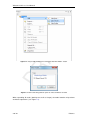
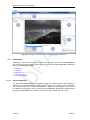
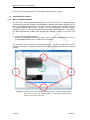
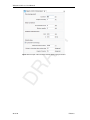
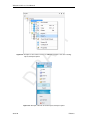
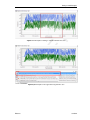
Figure 6.4: Example of the export dialog including selection of the cross-shore position
to export
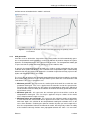
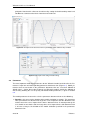
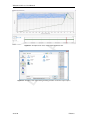
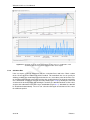
The runup output item and associate runup output document view (Figure 6.5) presents time
series of the absolute vertical position of the waterline at the beach (Z) and the wave runup elevation above the tide and surge level (R) in the runup chart at the top of the runup
output document display. If the duration of the simulation is sufficient to do so, the runup
output document display will display the 2% exceedence of the absolute vertical position of
the waterline (Z2%) and the 2% exceedence of the wave run-up elevation above the tide and
surge level (R2%).
The 2% exceedence values of the vertical position of the waterline (Z2%) and wave run-up
(R2%) are determined by the GUI through an empirical cumulative distribution function of all
waterline elevation maxima that exceed the mean waterline elevation, or are spaced more
than half a period apart from other waterline elevation maxima.
The vertical position of the waterline is determined by the last submerged XBeach-G model
grid point in landward direction. Note that when overtopping occurs, the XBeach-G GUI will
not be able to correctly compute the location of the waterline and wave run-up levels. In these
situations, the results presented in the runup output view should not be considered valid.
The user can modify the variables displayed in the runup time series chart by checking the
tick-boxes in the Chart Toolwindow (Figure 3.5) on the right-hand side of the runup output
document display in a similar manner to the cross-section output document view.
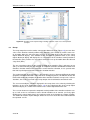
The user can choose to export the computed vertical position of the waterline and wave runup, as well as the 2% exceedence values of both variables to an external .csv file by rightclicking on the runup output item in the project treeview and selecting the "Export" function.
This action will start the export dialogue, where the user can set the file name and location for
the exported .csv file.
34 of 44
Deltares