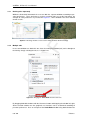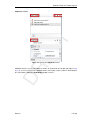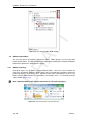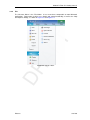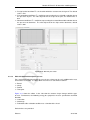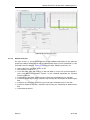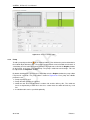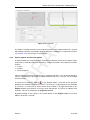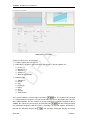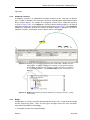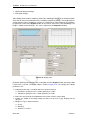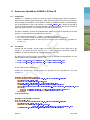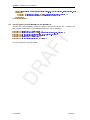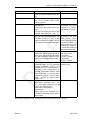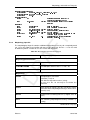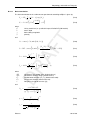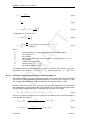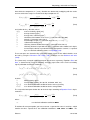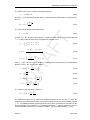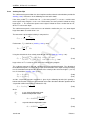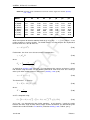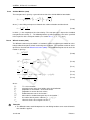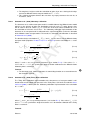
1
1D/2D modelling suite for integral water solutions DR AF T SOBEK Suite D-Flow 1D in Delta Shell User Manual DR AF T T DR AF SOBEK 3, D-Flow 1D D-Flow 1D in Delta Shell User Manual Version: 3.4.0 Revision: 41893 24 September 2015 DR AF T SOBEK 3, D-Flow 1D, User Manual Published and printed by: Deltares Boussinesqweg 1 2629 HV Delft P.O. 177 2600 MH Delft The Netherlands For sales contact: telephone: +31 88 335 81 88 fax: +31 88 335 81 11 e-mail: [email protected] www: http://www.deltaressystems.nl telephone: fax: e-mail: www: +31 88 335 82 73 +31 88 335 85 82 [email protected] https://www.deltares.nl For support contact: telephone: +31 88 335 81 00 fax: +31 88 335 81 11 e-mail: [email protected] www: http://www.deltaressystems.nl Copyright © 2015 Deltares All rights reserved. No part of this document may be reproduced in any form by print, photo print, photo copy, microfilm or any other means, without written permission from the publisher: Deltares. Contents Contents 1 A guide to this manual 1.1 Introduction . . . . . . . . . . . . . . . . 1.2 Overview . . . . . . . . . . . . . . . . . 1.3 Manual version and revisions . . . . . . . 1.4 Typographical conventions . . . . . . . . 1.5 Changes with respect to previous versions . . . . . . . . . . . . . . . . . . . . . . . . . . . . . . . . . . . . . . . . . . . . . . . . . . . . . . . . . . . . . . . . . . . . . . . . . . . . . . . . . . . . . . . . . . 2 Module D-Flow 1D: Overview 3 . . . . . . . . . . . . . . . . . . . . . . . . . . . . . . . . . . . . . . . . . . . . . . . . . . . . . . . . . . . . . . . . . . . . . . . . . . . . . . . . . . . . . . . . . . . . . . . . . . . . . . . . . . . . . . . . . . . . . . . . . . . . . . . . . . . . . . . . . . . . . . . . . . . . . . . . . . . . . . . . . . . . . . . . . . . . . . . 5 5 5 5 6 6 8 8 9 10 10 11 11 12 13 13 14 18 19 21 21 22 22 23 24 24 4 Module D-Flow 1D: All about the modeling process 4.1 Introduction . . . . . . . . . . . . . . . . . . . . . . . . . . . . 4.2 Import . . . . . . . . . . . . . . . . . . . . . . . . . . . . . . 4.2.1 Import modeldata on <Project> level . . . . . . . . . . 4.2.2 Import a network from another model on <network> level 4.2.3 Import a network from GIS . . . . . . . . . . . . . . . . 4.2.3.1 The GIS import wizard . . . . . . . . . . . . . 4.2.3.2 Import from personal geodatabase . . . . . . . 4.2.3.3 Import of culvert (profile) data . . . . . . . . . 4.2.4 Import cross section profiles from <csv> . . . . . . . . . 4.2.5 Import time series from <csv> . . . . . . . . . . . . . . 4.3 Network . . . . . . . . . . . . . . . . . . . . . . . . . . . . . 4.3.1 Setting up a network from scratch . . . . . . . . . . . . . 4.3.2 Nodes and branches . . . . . . . . . . . . . . . . . . . 4.3.2.1 Nodes . . . . . . . . . . . . . . . . . . . . . 4.3.2.2 Branches . . . . . . . . . . . . . . . . . . . . 4.3.2.3 Interpolation across nodes . . . . . . . . . . . . . . . . . . . . . . . . . . . . . . . . . . . . . . . . . . . . . . . . . . . . . . . . . . . . . . . . . . . . . . . . . . . . . . . . . . . . . . . . . . . . . . . . . . . . . . . . . . . 27 27 27 27 28 29 29 32 32 33 34 36 36 37 37 38 39 . . . . . . . . . . . . . . . . . . . . . . . . . . . . . . . . . . . . . . . . . . . . . . . . . . . . . . . . . . . . . . . . . . . . . . . . . . . . . . . . . . . . . . . . . . . . . . . . . . . . . . . . . . . . . . . . . . . . . . . . . . . . . . . . . . . . . . . . . . . . . . . . . . . . . . . . . . . . . . . . . . . . . . . . . . . . . . . . . . . . . . . . . . . . . . . . . . . . . . . . . . . . . . . . . . . . . . . . . . . . . . . . . . . . . . . . . . . . . . . . . . . . . . . . . . . . . . . . . . . . . . . . . . . . . . . . . . . . . . . . . . . . . . . . . . . . . . . . . . . . Deltares . . . . . . . . . . . . . . . . . . . . . . . . . . . . . . . . . . . . . . . . . . . . . . . . . . . . . . . . . . . . . . . . . . . . . . . . . . . T . . . . . . . . . . . . . . . . . . . . . . . . . DR AF 3 Module D-Flow 1D: Getting started 3.1 Introduction . . . . . . . . . . . 3.2 Starting a D-flow 1D model . . . 3.3 Dockable views . . . . . . . . . 3.3.1 Docking tabs separately 3.3.2 Multiple tabs . . . . . . 3.4 Ribbons and toolbars . . . . . . 3.4.1 Ribbons (hot keys) . . . 3.4.2 File . . . . . . . . . . . 3.4.3 Home . . . . . . . . . . 3.4.4 View . . . . . . . . . . 3.4.5 Tools . . . . . . . . . . 3.4.6 Map . . . . . . . . . . 3.4.7 Scripting . . . . . . . . 3.4.8 Shortcuts . . . . . . . . 3.4.9 Quick access toolbar . . 3.5 Schematization . . . . . . . . . 3.6 Generating a computational grid 3.7 Boundary conditions . . . . . . 3.8 Roughness . . . . . . . . . . . 3.9 Initial conditions . . . . . . . . . 3.10 Model parameter settings . . . . 3.11 Set output . . . . . . . . . . . 3.12 Validation . . . . . . . . . . . . 3.13 Running a simulation . . . . . . 3.14 Viewing simulation results . . . . 1 1 1 1 2 2 iii SOBEK 3, D-Flow 1D, User Manual Weir . . . . . . . . . . . . . . . . . . . . . . . . . . . . . . . . . 4.3.3.1 Introduction . . . . . . . . . . . . . . . . . . . . . . . . 4.3.3.2 Simple weir . . . . . . . . . . . . . . . . . . . . . . . . . 4.3.3.3 Gated weir . . . . . . . . . . . . . . . . . . . . . . . . . 4.3.3.4 Weir with piers . . . . . . . . . . . . . . . . . . . . . . . 4.3.3.5 Weir with detailed description of crest . . . . . . . . . . . 4.3.3.6 Free form weir . . . . . . . . . . . . . . . . . . . . . . . 4.3.3.7 General structure . . . . . . . . . . . . . . . . . . . . . . 4.3.4 Pump . . . . . . . . . . . . . . . . . . . . . . . . . . . . . . . . . 4.3.5 Culvert, Syphon and Inverted Syphon . . . . . . . . . . . . . . . . . 4.3.6 Composite structure . . . . . . . . . . . . . . . . . . . . . . . . . 4.3.7 Bridge . . . . . . . . . . . . . . . . . . . . . . . . . . . . . . . . 4.3.8 Extra Resistance . . . . . . . . . . . . . . . . . . . . . . . . . . . 4.3.9 Lateral Source . . . . . . . . . . . . . . . . . . . . . . . . . . . . 4.3.10 Retention area . . . . . . . . . . . . . . . . . . . . . . . . . . . . 4.3.11 Observation point . . . . . . . . . . . . . . . . . . . . . . . . . . . 4.3.12 Cross Section . . . . . . . . . . . . . . . . . . . . . . . . . . . . 4.3.12.1 Adding Cross Sections to the network . . . . . . . . . . . 4.3.12.2 Cross Section YZ . . . . . . . . . . . . . . . . . . . . . . 4.3.12.3 Cross Section XYZ . . . . . . . . . . . . . . . . . . . . . 4.3.12.4 Cross Section ZW . . . . . . . . . . . . . . . . . . . . . 4.3.12.5 Cross Section . . . . . . . . . . . . . . . . . . . . . . . 4.3.12.6 Working with Shared Cross Section definitions . . . . . . . 4.3.12.7 Import and export cross sections from/to <csv>-file . . . . 4.3.12.8 Inspect multiple cross sections in one view . . . . . . . . . 4.3.13 General functions on network objects . . . . . . . . . . . . . . . . . 4.3.13.1 Esc key . . . . . . . . . . . . . . . . . . . . . . . . . . 4.3.13.2 Copy and paste network object . . . . . . . . . . . . . . . 4.3.13.3 Add network object . . . . . . . . . . . . . . . . . . . . . 4.3.13.4 Zoom to network object . . . . . . . . . . . . . . . . . . . 4.3.13.5 Selection of multiple network objects . . . . . . . . . . . . 4.4 Boundary conditions . . . . . . . . . . . . . . . . . . . . . . . . . . . . . 4.4.1 Types of boundary conditions . . . . . . . . . . . . . . . . . . . . . 4.4.2 Editing boundary conditions . . . . . . . . . . . . . . . . . . . . . 4.4.3 Time series for boundary conditions . . . . . . . . . . . . . . . . . 4.4.4 Remarks on discharge boundary conditions in D-Flow 1D . . . . . . . 4.4.4.1 Simulation results corresponding to discharge boundary conditions . . . . . . . . . . . . . . . . . . . . . . . . . . . 4.4.4.2 Discharge-waterlevel-relation . . . . . . . . . . . . . . . . 4.5 Initial conditions . . . . . . . . . . . . . . . . . . . . . . . . . . . . . . . . 4.5.1 Setting the initial conditions . . . . . . . . . . . . . . . . . . . . . . 4.5.2 Initial conditions from restart . . . . . . . . . . . . . . . . . . . . . 4.6 Roughness . . . . . . . . . . . . . . . . . . . . . . . . . . . . . . . . . . 4.6.1 Introduction . . . . . . . . . . . . . . . . . . . . . . . . . . . . . . 4.6.2 Defining roughness . . . . . . . . . . . . . . . . . . . . . . . . . . 4.6.3 Import and export roughness from/to csv-file . . . . . . . . . . . . . 4.7 Wind . . . . . . . . . . . . . . . . . . . . . . . . . . . . . . . . . . . . . 4.8 Salt water intrusion . . . . . . . . . . . . . . . . . . . . . . . . . . . . . . 4.9 Computational grid . . . . . . . . . . . . . . . . . . . . . . . . . . . . . . 4.10 Model properties . . . . . . . . . . . . . . . . . . . . . . . . . . . . . . . 4.10.1 Introduction . . . . . . . . . . . . . . . . . . . . . . . . . . . . . . 4.10.2 General . . . . . . . . . . . . . . . . . . . . . . . . . . . . . . . . 4.10.3 Initial conditions . . . . . . . . . . . . . . . . . . . . . . . . . . . 4.10.4 Model settings . . . . . . . . . . . . . . . . . . . . . . . . . . . . DR AF T 4.3.3 iv 40 40 41 42 42 43 44 45 46 47 49 49 51 51 52 53 53 53 54 55 56 56 57 58 59 59 59 59 59 59 60 61 61 62 63 64 64 65 66 66 67 69 69 69 73 73 74 78 81 81 81 81 81 Deltares Contents . . . . . . . . . . . . . . . . . . . . . . . . . . . . . . . . . . . . . . . . . . . . . . . . . . . . . . . . . . . . . . . . . . . . . . . . . . . . DR AF T 4.10.4.1 Roughness for tidal flow . . . . . . . . . . 4.10.4.2 Salt water intrusion . . . . . . . . . . . . . 4.10.5 Output parameters . . . . . . . . . . . . . . . . . . 4.10.6 Run parameters . . . . . . . . . . . . . . . . . . . 4.10.6.1 Simulation period and timestep . . . . . . . 4.10.6.2 Restart and save State . . . . . . . . . . . 4.10.6.3 Model parameters . . . . . . . . . . . . . 4.10.6.4 Structure Inertia Damping Factor . . . . . . 4.10.6.5 Quasi steady-state . . . . . . . . . . . . . 4.10.6.6 Extra resistance for general structure . . . . 4.10.6.7 Summerdike . . . . . . . . . . . . . . . . 4.10.6.8 Advanced options . . . . . . . . . . . . . 4.10.6.9 Volumes based on waterlevels or discharges 4.10.6.10 Reduction of timestep on large lateral flow . 4.10.6.11 Use timestep reduction on structure . . . . 4.10.6.12 Parameter set for lowland rivers . . . . . . 4.10.7 Default bed roughness . . . . . . . . . . . . . . . . 4.11 Output . . . . . . . . . . . . . . . . . . . . . . . . . . . . 4.12 Validation . . . . . . . . . . . . . . . . . . . . . . . . . . . 5 Module D-Flow 1D: Simulation and model output 5.1 Simulation information . . . . . . . . . . . 5.2 Results in the Map . . . . . . . . . . . . . 5.3 Results in a Graph . . . . . . . . . . . . . 5.4 Results in a Table . . . . . . . . . . . . . . 5.5 Sideviews . . . . . . . . . . . . . . . . . . 5.5.1 Routes . . . . . . . . . . . . . . . 5.5.2 Results in Sideview . . . . . . . . . 5.6 Export . . . . . . . . . . . . . . . . . . . 5.7 Case analysis . . . . . . . . . . . . . . . . . . . . . . . . . . . . . . . . . . . . . . . . . . . . . . . . . . . . . . . . . . . . . . . . . . . . . . . . . . . . . . . . . . . . . . . . . . . . 81 81 82 82 82 82 82 83 84 84 85 85 85 85 86 86 87 87 90 . . . . . . . . . . . . . . . . . . . . . . . . . . . . . . . . . . . . . . . . . . . . . . . . . . . . . . 91 92 93 95 96 96 96 98 98 98 6 Module D-Flow 1D: Morphology and Sediment Transport 6.1 Introduction . . . . . . . . . . . . . . . . . . . . . . . . . . . . . 6.2 Input files . . . . . . . . . . . . . . . . . . . . . . . . . . . . . . 6.3 Output files . . . . . . . . . . . . . . . . . . . . . . . . . . . . . 6.4 Scripting support . . . . . . . . . . . . . . . . . . . . . . . . . . 6.4.1 Generating input files and working with spatially varying input 6.4.2 Dumping and dredging . . . . . . . . . . . . . . . . . . . . . . . . . . . . . . . . . . . . . . . . . . . . . . . . . 101 101 101 102 102 102 103 . . . . . . . . . . . . . . . . . . . . . . . . . . . . . . . . . . . . . . . . . . . . . . . . . . . . . . . . . . . . . . . . . . . . . . . . . . . . . . . . . . . . . . . . . . . . . . . . . . . 7 Module D-Flow 1D: 1D2D-coupled modelling to D-Flow Flexible Mesh 105 7.1 Introduction . . . . . . . . . . . . . . . . . . . . . . . . . . . . . . . . . . 105 7.1.1 Principle of embankments in a 1D2D model . . . . . . . . . . . . . . 105 7.1.2 Principle of the embankment overtopping equations . . . . . . . . . 105 7.2 Integrated 1D2D model . . . . . . . . . . . . . . . . . . . . . . . . . . . . 106 7.3 Creation of embankments . . . . . . . . . . . . . . . . . . . . . . . . . . . 107 7.3.1 Automatic generation . . . . . . . . . . . . . . . . . . . . . . . . . 107 7.3.2 Import from GIS . . . . . . . . . . . . . . . . . . . . . . . . . . . 108 7.3.3 Merging of embankments . . . . . . . . . . . . . . . . . . . . . . . 108 7.3.4 Draw embankments and changing geometry of existing embankments 109 7.3.5 Inspecting the height of embankments . . . . . . . . . . . . . . . . 109 7.4 Grid generation . . . . . . . . . . . . . . . . . . . . . . . . . . . . . . . . 110 7.4.1 Automatic generation based on embankments . . . . . . . . . . . . 110 7.4.2 Grid deletion, modification and manual grid generation . . . . . . . . 111 7.4.2.1 Grid deletion . . . . . . . . . . . . . . . . . . . . . . . . 111 Deltares v SOBEK 3, D-Flow 1D, User Manual 7.5 Simulation output . . . . . . . . . . . . . . . . . . . . . . . . . . . . . . . 111 References 113 A How to use OpenDA for Delta Shell models A.1 Introduction . . . . . . . . . . . . . . . . . . . . . A.2 The Stochastic Model configuration . . . . . . . . . A.2.1 Configuration for calibration . . . . . . . . . A.2.2 Configuration for Ensemble Kalman Filtering A.3 The Model configuration . . . . . . . . . . . . . . A.4 Installing OpenDA for Delta Shell models . . . . . . A.5 Running the OpenDA application . . . . . . . . . . . . . . . . . . . . . . . . . . . . . . . . . . . . . . . . . . . . . . . . . . . . . . . . . . . . . . . . . . . . . . . . . . . . . . . . . . . . . . . . . . . . . . . . . . . . . B How to use SOBEK 3 models in Delft-FEWS 121 T C How to use OpenMI for SOBEK 3, D-Flow 1D C.1 Introduction . . . . . . . . . . . . . . . . . . . . . . C.2 The omi-file . . . . . . . . . . . . . . . . . . . . . . C.3 omi file options (for both OpenMI 1.4 and OpenMI 2.0) C.4 Installing OpenMI for SOBEK 3 models . . . . . . . . . . . . . . . . . . . . DR AF . . . . . . . . . . . . . . . . . . . . . . . . . . . . . . . . D Morphology and Sediment Transport D.1 Input files . . . . . . . . . . . . . . . . . . . . . . . . . . . . . . . . . . D.1.1 Sediment input file . . . . . . . . . . . . . . . . . . . . . . . . . D.1.2 Morphology input file . . . . . . . . . . . . . . . . . . . . . . . . D.1.3 Sediment transport input file . . . . . . . . . . . . . . . . . . . . D.1.4 Sediment transport and morphology boundary condition file . . . . . D.1.5 Nodal Relations Definition file . . . . . . . . . . . . . . . . . . . . D.1.6 Table file . . . . . . . . . . . . . . . . . . . . . . . . . . . . . . D.2 Output files . . . . . . . . . . . . . . . . . . . . . . . . . . . . . . . . . D.3 Bedload sediment transport of non-cohesive sediment . . . . . . . . . . . D.3.1 Basic formulation . . . . . . . . . . . . . . . . . . . . . . . . . . D.3.2 Calculation of bedload transport at open boundaries . . . . . . . . D.4 Transport formulations for non-cohesive sediment . . . . . . . . . . . . . . D.4.1 Van Rijn (1993) . . . . . . . . . . . . . . . . . . . . . . . . . . . D.4.2 Engelund-Hansen (1967) . . . . . . . . . . . . . . . . . . . . . . D.4.3 Meyer-Peter-Muller (1948) . . . . . . . . . . . . . . . . . . . . . D.4.4 General formula . . . . . . . . . . . . . . . . . . . . . . . . . . D.4.5 Bijker (1971) . . . . . . . . . . . . . . . . . . . . . . . . . . . . D.4.5.1 Basic formulation . . . . . . . . . . . . . . . . . . . . . D.4.5.2 Transport in wave propagation direction (Bailard-approach) D.4.6 Van Rijn (1984) . . . . . . . . . . . . . . . . . . . . . . . . . . . D.4.7 Soulsby/Van Rijn . . . . . . . . . . . . . . . . . . . . . . . . . . D.4.8 Soulsby . . . . . . . . . . . . . . . . . . . . . . . . . . . . . . . D.4.9 Ashida–Michiue (1974) . . . . . . . . . . . . . . . . . . . . . . . D.4.10 Wilcock–Crowe (2003) . . . . . . . . . . . . . . . . . . . . . . . D.4.11 Gaeuman et al. (2009) laboratory calibration . . . . . . . . . . . . D.4.12 Gaeuman et al. (2009) Trinity River calibration . . . . . . . . . . . D.5 Morphological updating . . . . . . . . . . . . . . . . . . . . . . . . . . . vi 115 115 115 115 116 117 119 120 123 . 123 . 123 . 124 . 126 . . . . . . . . . . . . . . . . . . . . . . . . . . . 127 127 127 129 131 133 135 136 137 137 137 137 138 138 143 143 144 144 145 146 148 150 151 154 154 155 155 156 Deltares List of Figures List of Figures . . . . . . . . . . . . . . 6 6 7 8 8 9 10 10 10 11 11 12 12 14 . . . . . . . . . . . . . . 15 16 17 17 18 19 20 20 21 22 23 24 25 26 Data Import window . . . . . . . . . . . . . . . . . . . . . . . . . . . . . Data import window for network (features) . . . . . . . . . . . . . . . . . . The GIS import wizard . . . . . . . . . . . . . . . . . . . . . . . . . . . . Example of the mapping table . . . . . . . . . . . . . . . . . . . . . . . . . Import properties window for snapping precision and saving of mapping files Setting of related tables . . . . . . . . . . . . . . . . . . . . . . . . . . . . Example importing YZ Cross Section from <csv>-file . . . . . . . . . . . . Selecting delimiters for a csv file . . . . . . . . . . . . . . . . . . . . . . . Selecting the columns of the <csv>-file . . . . . . . . . . . . . . . . . . . Linking a Timeseries . . . . . . . . . . . . . . . . . . . . . . . . . . . . . Example of boundary nodes . . . . . . . . . . . . . . . . . . . . . . . . . Two branches with different Order number: No interpolation across the connection node . . . . . . . . . . . . . . . . . . . . . . . . . . . . . . . . . Two branches with same Order numbers: Bed level is interpolated across the connection node . . . . . . . . . . . . . . . . . . . . . . . . . . . . . . . Simple weir editor . . . . . . . . . . . . . . . . . . . . . . . . . . . . . . . Gated weir editor . . . . . . . . . . . . . . . . . . . . . . . . . . . . . . . Weir with piers editor . . . . . . . . . . . . . . . . . . . . . . . . . . . . . Weir with detailed description of crest editor, the side-view shows the shape of the crest . . . . . . . . . . . . . . . . . . . . . . . . . . . . . . . . . . . Free form weir editor . . . . . . . . . . . . . . . . . . . . . . . . . . . . . General structure editor . . . . . . . . . . . . . . . . . . . . . . . . . . . . 28 29 30 31 31 32 33 34 35 36 37 DR AF 3.16 3.17 3.18 3.19 3.20 3.21 3.22 3.23 3.24 3.25 3.26 3.27 3.28 Docking windows on two screens within the Delta Shell framework. . . . . . Bringing the Undo/Redo window to the front . . . . . . . . . . . . . . . . Docking the Undo/Redo window. . . . . . . . . . . . . . . . . . . . . . . Auto hide the Undo / Redo window . . . . . . . . . . . . . . . . . . . . . Perform operations using the hot keys . . . . . . . . . . . . . . . . . . . . The File ribbon. . . . . . . . . . . . . . . . . . . . . . . . . . . . . . . . The Delta Shell options dialog. . . . . . . . . . . . . . . . . . . . . . . . The Home ribbon. . . . . . . . . . . . . . . . . . . . . . . . . . . . . . . The View ribbon. . . . . . . . . . . . . . . . . . . . . . . . . . . . . . . The Tools ribbon. . . . . . . . . . . . . . . . . . . . . . . . . . . . . . . The Map ribbon. . . . . . . . . . . . . . . . . . . . . . . . . . . . . . . The ribbon with minimized categories. . . . . . . . . . . . . . . . . . . . The scripting ribbon within Delta Shell. . . . . . . . . . . . . . . . . . . . The quick access toolbar. . . . . . . . . . . . . . . . . . . . . . . . . . . Map view with open street background map and a D-Flow 1D branch generated near the city of Rotterdam . . . . . . . . . . . . . . . . . . . . . . . Example of a cross section . . . . . . . . . . . . . . . . . . . . . . . . . Example of a weir . . . . . . . . . . . . . . . . . . . . . . . . . . . . . . Editor for lateral sources/sinks . . . . . . . . . . . . . . . . . . . . . . . Example of the resulting schematization . . . . . . . . . . . . . . . . . . Computational grid editor . . . . . . . . . . . . . . . . . . . . . . . . . . Boundary nodes in the Central Map . . . . . . . . . . . . . . . . . . . . Constant water level boundary condition . . . . . . . . . . . . . . . . . . Editing the roughness . . . . . . . . . . . . . . . . . . . . . . . . . . . . Output options in the Properties Window . . . . . . . . . . . . . . . . . Output options in the Properties Window . . . . . . . . . . . . . . . . . Map results of water level . . . . . . . . . . . . . . . . . . . . . . . . . . Results of water level for three locations along the branch in Function view . Chart and the corresponding Properties window . . . . . . . . . . . . . . T 3.1 3.2 3.3 3.4 3.5 3.6 3.7 3.8 3.9 3.10 3.11 3.12 3.13 3.14 3.15 4.1 4.2 4.3 4.4 4.5 4.6 4.7 4.8 4.9 4.10 4.11 4.12 4.13 4.14 4.15 4.16 4.17 4.18 4.19 Deltares 39 40 41 42 43 44 45 46 vii SOBEK 3, D-Flow 1D, User Manual 4.33 4.34 4.35 4.36 4.37 4.38 4.39 4.40 4.41 4.42 4.43 4.44 4.45 4.46 4.47 4.48 4.49 4.50 4.51 4.52 4.53 4.54 4.55 5.1 5.2 5.3 5.4 5.5 5.6 5.7 5.8 5.9 5.10 6.1 viii T 4.24 4.25 4.26 4.27 4.28 4.29 4.30 4.31 4.32 Pump editor . . . . . . . . . . . . . . . . . . . . . . . . . . . . . . . . . . Culvert editor . . . . . . . . . . . . . . . . . . . . . . . . . . . . . . . . . Example of a Composite Structure in the Central Map . . . . . . . . . . . . . Region window with a Composite Structure consisting of two weirs, a pump and a culvert . . . . . . . . . . . . . . . . . . . . . . . . . . . . . . . . . Bridge editor . . . . . . . . . . . . . . . . . . . . . . . . . . . . . . . . . Editor for lateral source data . . . . . . . . . . . . . . . . . . . . . . . . . Generate data series . . . . . . . . . . . . . . . . . . . . . . . . . . . . . Cross Section editor for yz Cross Sections . . . . . . . . . . . . . . . . . . Editing window for an XYZ Cross Section . . . . . . . . . . . . . . . . . . . Projection of a xyz-cross- section . . . . . . . . . . . . . . . . . . . . . . . Cross section editor for ZW Cross Sections . . . . . . . . . . . . . . . . . . Cross section editor for Trapezium . . . . . . . . . . . . . . . . . . . . . . Switch between Local Cross Section definition and Shared Cross Section definition in the Cross Section editing window . . . . . . . . . . . . . . . . . . Example importing YZ Cross Section from <csv>-file . . . . . . . . . . . . Example of a network with nodes with or without boundary conditions . . . . . Boundary nodes in the Central Map . . . . . . . . . . . . . . . . . . . . . Timeseries on boundary node . . . . . . . . . . . . . . . . . . . . . . . . Computational grid of a simple network with a discharge boundary condition upstream (water flows from right to left). . . . . . . . . . . . . . . . . . . . Side-view of computed waterlevels . . . . . . . . . . . . . . . . . . . . . . Initial conditions editing window . . . . . . . . . . . . . . . . . . . . . . . . write restart . . . . . . . . . . . . . . . . . . . . . . . . . . . . . . . . . . output states . . . . . . . . . . . . . . . . . . . . . . . . . . . . . . . . . use restart . . . . . . . . . . . . . . . . . . . . . . . . . . . . . . . . . . Roughness editor for a model of the Dutch part of the river Meuse . . . . . . Setting of roughness-sections in the Region window . . . . . . . . . . . . . Cross section editor for an XYZ Cross Section with three Sections . . . . . . Function table for roughness as a function of discharge and the graphical representation of the table content . . . . . . . . . . . . . . . . . . . . . . . . Wind shielding (factors) presented in the Central Map and the table for editing Addition of salt in a flow model in the Properties window . . . . . . . . . . . Project window after setting Use salinity to “True” . . . . . . . . . . . . . . . The use of Thatcher-Harleman dispersion formulation . . . . . . . . . . . . . Boundary node editor for salinity . . . . . . . . . . . . . . . . . . . . . . . Generate Computational Grid window . . . . . . . . . . . . . . . . . . . . Table and map view of the computational grid (note that only waterlevel points are shown in this view) . . . . . . . . . . . . . . . . . . . . . . . . . . . . Set output in the Properties window . . . . . . . . . . . . . . . . . . . . . Validation Report: example . . . . . . . . . . . . . . . . . . . . . . . . . . DR AF 4.20 4.21 4.22 4.23 Output in the Project window . . . . . . . . . . . . . . . . . . . . . . Map results of discharge . . . . . . . . . . . . . . . . . . . . . . . . Layer properties editor . . . . . . . . . . . . . . . . . . . . . . . . . Customised map . . . . . . . . . . . . . . . . . . . . . . . . . . . . Select parameter for graphical representation . . . . . . . . . . . . . . Time results of water level for 3 lcoations along the branch . . . . . . . Example of 3 network routes shown in the network with different colours Example of the use of intermediate locations to specify routes . . . . . Example of sideview with Time Navigator . . . . . . . . . . . . . . . Example of Case analysis . . . . . . . . . . . . . . . . . . . . . . . . How to simulate morfology together with a D-Flow 1D simulation . . . . . . . . . . . . . . . . . . . . . . . . . . . . . . 47 48 49 49 50 51 52 54 55 55 56 57 57 58 61 62 63 64 64 66 67 68 68 69 70 71 72 73 75 76 77 78 79 80 88 90 92 93 94 95 95 96 97 97 98 99 . . . . . . . 101 Deltares List of Figures 7.1 . 105 . . . . . . . 106 106 107 108 109 109 109 . 110 . 111 DR AF T Principle of the horizontal 1D-2D coupling in a top view and a side view. In brown the 1D model is schematised. In black the 2D grid is shown. . . . . . 7.2 The variables which control the flow over the interface between the 1D and the 2D model . . . . . . . . . . . . . . . . . . . . . . . . . . . . . . . . . . 7.3 The workflow for the integrated 1D2D model . . . . . . . . . . . . . . . . 7.4 Generate embankments wizard . . . . . . . . . . . . . . . . . . . . . . . 7.5 Embankments created with automatic generation . . . . . . . . . . . . . . 7.6 Merging of two embankments . . . . . . . . . . . . . . . . . . . . . . . . 7.7 Change geometry of an embankment . . . . . . . . . . . . . . . . . . . . 7.8 Sideview of an embankment . . . . . . . . . . . . . . . . . . . . . . . . 7.9 Automatic grid generation. The button is encircled in the top left, the outer boundary of the grid is drawn in the map view on the right and the final window ‘Generate grid’ is shown on the left . . . . . . . . . . . . . . . . . . . . . 7.10 Different output types within a 1D2D-model . . . . . . . . . . . . . . . . . Deltares ix DR AF T SOBEK 3, D-Flow 1D, User Manual x Deltares List of Tables List of Tables 3.1 3.1 3.2 Functions and their descriptions within the scripting ribbon of Delta Shell. . . 12 Functions and their descriptions within the scripting ribbon of Delta Shell. . . 13 Shortcut keys within the scripting editor of Delta Shell. . . . . . . . . . . . . 13 4.1 Options for roughness types and default values . . . . . . . . . . . . . . . . 87 A.1 A.1 A.1 A.2 Description of XML tags . . . Description of XML tags . . . Description of XML tags . . . OpenDA program arguments . . . . . . . . 117 118 119 120 D.1 D.2 D.3 D.4 D.5 D.6 D.7 D.8 Sediment input file with keywords . . . . . . . . . . . . . . . . . . . . . . Options for sediment diameter characteristics . . . . . . . . . . . . . . . . Morphological input file with keywords . . . . . . . . . . . . . . . . . . . . Additional transport relations . . . . . . . . . . . . . . . . . . . . . . . . Transport formula parameters . . . . . . . . . . . . . . . . . . . . . . . . Nodal relation file with keywords . . . . . . . . . . . . . . . . . . . . . . Additional transport relations . . . . . . . . . . . . . . . . . . . . . . . . Overview of the coefficients used in the various regression models (Soulsby et al., 1993) . . . . . . . . . . . . . . . . . . . . . . . . . . . . . . . . . Overview of the coefficients used in the various regression models, continued (Soulsby et al., 1993) . . . . . . . . . . . . . . . . . . . . . . . . . . . . . . . . . . . 127 128 129 131 131 135 138 . . . . . . . . . . . . . . . . . . . . . . . . . . . . . . . . . . . . . . . . . . . . . . . . . . . . D.9 Deltares . . . . . . . . . . . . . . . . . . . . . . . . T . . . . DR AF . . . . . . . . . . . . . 152 . 153 xi DR AF T SOBEK 3, D-Flow 1D, User Manual xii Deltares 1 A guide to this manual 1.1 Introduction This User Manual concerns the hydrodynamic module D-Flow 1D. This module is part of several Modelling suites, released by Deltares as Deltares Systems or Dutch Delta Systems. These modelling suites are based on the Delta Shell framework. The framework enables to develop a range of modeling suites, each distinguished by the components and — most significantly — the (numerical) modules, which are plugged in. The modules which are compliant with the Delta Shell framework are released as D-Name of the module, for example: D-Flow Flexible Mesh, D-Waves, D-Water Quality, D-Real Time Control, D-Rainfall Run-off. 1.2 DR AF T Therefore, this user manual is shipped with several modelling suites. In the start-up screen links are provided to all relevant User Manuals (and Technical Reference Manuals) for that modelling suite. It will be clear that the Delta Shell User Manual is shipped with all these modelling suites. Other user manuals can be referenced. In that case, you need to open the specific user manual from the start-up screen in the central window. Some texts are shared in different user manuals, in order to improve the readability. Overview To make this manual more accessible we will briefly describe the contents of each chapter. If this is your first time to start working with D-Flow 1D we suggest you to read Chapter 3, Module D-Flow 1D: Getting started. This chapter explains the user interface and guide you through the modeling process resulting in your first simulation. Chapter 2: Module D-Flow 1D: Overview, gives a brief introduction on D-Flow 1D. Chapter 3: Module D-Flow 1D: Getting started, gives an overview of the basic features of the D-Flow 1D GUI and will guide you through the main steps to set up a D-Flow 1D model. Chapter 4: Module D-Flow 1D: All about the modeling process, provides practical information on the GUI, setting up a model with all its parameters, including the output the user wants to inspect (after the model run), and finally validating the model. Chapter 5: Module D-Flow 1D: Simulation and model output, discusses how to execute a model run and explains in short the visualization of results within the GUI. Chapter 6: Module D-Flow 1D: Morphology and Sediment Transport, discusses the modelling of Morphodynamic processes and sediment transport. Chapter 7: Module D-Flow 1D: 1D2D-coupled modelling to D-Flow Flexible Mesh, provides practical information on the GUI, the lateral coupling of 1D network flow with 2D overland flow 1.3 Manual version and revisions This manual applies to SOBEK 3 suite, version 3.4. Deltares 1 of 160 SOBEK 3, D-Flow 1D, User Manual 1.4 Typographical conventions Throughout this manual, the following conventions help you to distinguish between different elements of text. Description Waves Boundaries Title of a window or sub-window. Sub-windows are displayed in the Module window and cannot be moved. Windows can be moved independently from the Module window, such as the Visualisation Area window. Save Item from a menu, title of a push button or the name of a user interface input field. Upon selecting this item (click or in some cases double click with the left mouse button on it) a related action will be executed; in most cases it will result in displaying some other (sub-)window. In case of an input field you are supposed to enter input data of the required format and in the required domain. DR AF T Example <\tutorial\wave\swan-curvi> <siu.mdw> Directory names, filenames, and path names are expressed between angle brackets, <>. For the Linux and UNIX environment a forward slash (/) is used instead of the backward slash (\) for PCs. “27 08 1999” Data to be typed by you into the input fields are displayed between double quotes. Selections of menu items, option boxes etc. are described as such: for instance ‘select Save and go to the next window’. delft3d-menu Commands to be typed by you are given in the font Courier New, 10 points. User actions are indicated with this arrow. [m/s] [-] 1.5 Units are given between square brackets when used next to the formulae. Leaving them out might result in misinterpretation. Changes with respect to previous versions In this edition chapter chapter 7: Module D-Flow 1D: 1D2D-coupled modelling to D-Flow Flexible Mesh is added. 2 of 160 Deltares 2 Module D-Flow 1D: Overview D-Flow 1D is one of the models available in SOBEK 3. D-Flow 1D is the product line designed for the simulation of water flows in open channels. It combines functionality of the former SOBEK-River Estuary and SOBEK-RIVER and is capable of modelling river systems, estuaries, streams and other types of alluvial channel networks. T The software calculates accurately, fast and robust the one-dimensional water flow for shallow water in simple water systems or complex channel networks with more than thousand reaches, cross sections and structures. D-Flow 1D solves the full Saint-Venant equations with the help of the staggered grid numerical scheme (Stelling and Duinmeijer, 2003; Stelling and Verwey, 2006). In order to model one-dimensional salt water intrusion in estuaries D-Flow 1D can also solve the Saint-Venant equation and the advection-dispersion equation conjunctively to account for advective and diffusive/dispersive transport and density driven flow. DR AF D-Flow 1D allows to apply various types of boundary conditions, as well as to define lateral inflow and outflow using time series or standard formulae. The networks can be branched or looped. D-Flow 1D is capable of modelling complex cross-sectional profiles consisting of multiple roughness sub-sections, e. g. left floodplain, right floodplain and main channel. Deltares 3 of 160 DR AF T SOBEK 3, D-Flow 1D, User Manual 4 of 160 Deltares 3 Module D-Flow 1D: Getting started 3.1 Introduction The workflow of setting up a D-Flow 1D model usually consists of the following steps: T Add a D-Flow 1D model to a project Build or import a schematization Generate a computational grid Define roughnesses Set the boundary conditions Set lateral sources and sinks (lateral stations) — if there are any Set initial conditions Set wind and salt values — if applicable Adjust model wide settings Set preferred output Run a simulation View and analyze simulation results Add and combine scenarios or models - if applicable DR AF These working step are explained in the following with the help of a small model without wind data and salt water intrusion. The focus here is on workflow; an overview of the possibilities and options of the different steps and components is provided in Chapter 4. 3.2 Starting a D-flow 1D model When SOBEK 3 is started, it opens with an empty project. To get started, import a model or network that already exists or build a new model from scratch. A new model is added in the Project by a right-mouse-click on <project> and chosing Add → New Model .... A window with all the available models from activated plugins and the corresponding integrated models appears. Selecting Flow1D Model adds a new 1D flow model to the project. The new model is now visible in the Project. Items in the Project are sorted according to the usual workflow for setting up a 1-dimensional flow model as listed above. 3.3 Dockable views The Delta Shell framework offers lots of freedom to customize dockable views, which are discussed in this section. Deltares 5 of 160 SOBEK 3, D-Flow 1D, User Manual 3.3.1 Docking tabs separately T Within the Delta Shell framework the user can dock the separate windows according to personal preferences. These preferences are then saved for future use of the framework. An example of such preferences is presented in Figure 3.1, where windows have been docked on two screens. Figure 3.1: Docking windows on two screens within the Delta Shell framework. Multiple tabs DR AF 3.3.2 In case two windows are docked in one view, the underlying window (tab) can be brought to the front by simply selecting the tab, as is shown here. Figure 3.2: Bringing the Undo/Redo window to the front By dragging dockable windows with the left mouse button and dropping the window left, right, above or below another one the graphical user interface can be customized according to personal preferences. Here an example of the Undo/Redo window being docked above the 6 of 160 Deltares Module D-Flow 1D: Getting started DR AF T Properties window. Figure 3.3: Docking the Undo/Redo window. Additional features are the possibility to remove or (auto) hide the window (top right in Figure 3.3). In case of removal, the window can be retrieved by a mouse-click on Undo/Redo in the View ribbon. Hiding the Undo/Redo window results in: Deltares 7 of 160 DR AF T SOBEK 3, D-Flow 1D, User Manual Figure 3.4: Auto hide the Undo / Redo window 3.4 Ribbons and toolbars The user can access the toolbars arranged in ribbons. Model plug-ins can have their own model specific ribbon. The ribbon may be auto collapsed by activating the Collapse the Ribbon button when right-mouse-clicking on the ribbon. 3.4.1 Ribbons (hot keys) Delta Shell makes use of ribbons, just like Microsoft Office. You can use these ribbons for most of the operations. With the ribbons comes hot key functionality, providing shortcuts to perform operations. If you press “ALT”, you will see the letters and numbers to access the ribbons and the ribbon contents (i.e. operations). For example, “ALT” + “H” will lead you to the “Home”-ribbon (Figure 3.5). Note: Implementation of the hot key functionality is still work in progress. Figure 3.5: Perform operations using the hot keys 8 of 160 Deltares Module D-Flow 1D: Getting started File T The left-most ribbon is the File ribbon. It has menu-items comparable to most Microsoft applications. Furthermore, it offers users import and export functionality, as well as the Help and Options dialogs, as shown in Figure 3.6 and Figure 3.7. DR AF 3.4.2 Figure 3.6: The File ribbon. Deltares 9 of 160 DR AF T SOBEK 3, D-Flow 1D, User Manual Figure 3.7: The Delta Shell options dialog. 3.4.3 Home The second ribbon is the Home ribbon (Figure 3.8). It harbours some general features for clipboard actions, addition of items, running models, finding items within projects or views, and help functionality. Figure 3.8: The Home ribbon. 3.4.4 View The third ribbon is the View ribbon (Figure 3.9). Here, the user can show or hide windows. Figure 3.9: The View ribbon. 10 of 160 Deltares Module D-Flow 1D: Getting started 3.4.5 Tools The fourth ribbon is the Tools ribbon (Figure 3.10). By default, it contains only the Open Case Analysis View tool. Some model plug-ins offer the installation of extra tools that may be installed. These are documented within the user documentation of those model plug-ins. Figure 3.10: The Tools ribbon. DR AF The last ribbon is the Map ribbon (Figure 3.11). T Map Figure 3.11: The Map ribbon. This will be used heavily, while it harbours all Geospatial functions, like: Decorations for the map North arrow Scale bar Legend ... Tools to customize the map view Select a single item Select multiple items by drawing a curve Pan Zoom to Extents Zoom by drawing a rectangle Zoom to Measure distance ... Edit polygons, for example within a network, basin, or waterbody Move geometry point(s) Add geometry point(s) Remove geometry point(s) Creation of a model Network, for example for D-Flow 1D 3.4.6 Add new Branch Split Branch Add Cross section Add Weir Add Pump ... Deltares 11 of 160 SOBEK 3, D-Flow 1D, User Manual Note: The ribbons adjust to the size of the application window. If, for what reason, the user wants to minimize the window, the ribbons might look like as shown in Figure 3.12. Some of the ribbon categories have been condensed into a single drop-down panel. Figure 3.12: The ribbon with minimized categories. Scripting When you open the scripting editor in Delta Shell, a Scripting ribbon category will appear. This ribbon has the following additional options (see also Figure 3.13), which are described in Table 3.1: DR AF 3.4.7 T Still, all functions of the category can be activated as they will appear in the drop-down panel. Figure 3.13: The scripting ribbon within Delta Shell. Table 3.1: Functions and their descriptions within the scripting ribbon of Delta Shell. Function Description Run script Executes the selected text. If no text is selected then it will execute the entire script Clears all variables and loaded libraries from memory Enables/Disables the debug option. When enabled you can add breakpoint to the code (using F9 or clicking in the margin) and the code will stop at this point before executing the statement (use F10 (step over) or F11 (step into) for a more step by step approach) Show or hide python variables (like _var_) in code completion Determines if spaces or tab characters are added when pressing tab Sets the number of spaces that are considered equal to a tab character Saves the changes to the file before running Creates a new region surrounding the selected text Comments out the selected text Converts all tab characters in the script to spaces. The number of spaces is determined by Tab size Converts all x number of space characters (determined by Tab size) in the script to tabs Opens a link to the python website, showing you the python syntax and standard libraries Clear cached variables Debugging Python variables Insert spaces/tabs Tab size Save before run Create region Comment selection Convert to space indenting Convert to tab indenting Python (documentation) 12 of 160 Deltares Module D-Flow 1D: Getting started Table 3.1: Functions and their descriptions within the scripting ribbon of Delta Shell. 3.4.8 Function Description Delta Shell (documentation) Opens a link to the Delta Shell documentation website (generated documentation of the Delta Shell api) Shortcuts The shortcut keys of the scripting editor within Delta Shell are documented in Table 3.2. Table 3.2: Shortcut keys within the scripting editor of Delta Shell. Function Ctrl Ctrl Ctrl Ctrl Ctrl Ctrl Ctrl Ctrl Ctrl Ctrl Ctrl F9 F5 Run selection (or entire script with no selection) Run current region (region where the cursor is in) Cut selection Copy selection Paste selection Save script Collapse all regions Expand all regions Comment or Uncomment current selection Add selection as watch variable Highlight current selection in script (press esc to cancel) Add/remove breakpoint (In debug mode only) Continue running (In debug mode only — when on breakpoint) Stop running (In debug mode only — when on breakpoint) Step over current line and break on next line (In debug mode only - when on breakpoint) Step into current line if possible, otherwise go to next line (In debug mode only — when on breakpoint). This is used to debug functions declared in the same script (that have already runned) Enter Shift + Enter X C V S + " W H DR AF + + + + + + + + + + + Shift + F5 F10 F11 3.4.9 T Shortcut Quick access toolbar Note: The user can make frequently used functions available by a single mouse-click in the Quick Access Toolbar, the top-most part of the application-window. Do this by right-mouseclicking a ribbon item and selecting Add to Quick Access Toolbar. Deltares 13 of 160 SOBEK 3, D-Flow 1D, User Manual Schematization Selecting the Network ribbon will present all icons to add network objects to the schematization. Always start with a channel, but we will come to that shortly. With the Map window, visualization of the network can be adjusted and map layers can be added. A wms-map layer can be added by selecting window. . After selecting “openstreetmap” the map is added to the main DR AF 3.5 T Figure 3.14: The quick access toolbar. The zoom button , the mouse scroll-wheel and the pan zoom button can be used to navigate the map. Panning can also be accomplished by holding down the middle mouse button and moving the mouse. Tip: another way to set for example OpenStreetMap as background is as follows: right-mouse-click on Project in Project, and select Add → New Item ... select “General” and “Map” double click on the map on top of the Map window press select “openstreetmap” and finally right-mouse-click on the map in Project, and select “Use as default background layer” This way OpenStreetmap will stay as background not only while modelling the schematization but also on presenting the Calculation grid or the Output. Now, to follow this tutorial, zoom in on the city of Rotterdam as shown in Figure 3.15. First activate an icon in the Network ribbon, then click in the Central Map (Flow 1D window) to position the activated type of object. Start with a channel Add new branch (Freeform) . Press and hold the left mouse button to place the starting point of the branch. As long as the left mouse button is held down, the branch is drawn following the movement of the mouse pointer. Releasing the mouse button ends the branch. Now, to follow this tutorial, model the river section “Nieuwe Waterweg” as shown in Figure 3.15. In this tutorial one branch is used, but more branches can be added and connected in the same way (see also Section 4.3.2.2). To stop adding branches, press Esc. Note that the order of the mouse clicks defines the normal direction (i.e. the defined direction) of the branch, visualized by an arrow at the end of the branch. 14 of 160 Deltares DR AF T Module D-Flow 1D: Getting started Figure 3.15: Map view with open street background map and a D-Flow 1D branch generated near the city of Rotterdam in the Network ribbon activates the addition mode for YZ Cross Sections. When Selecting moving the mouse over the map the orange dot shows where SOBEK places the Cross Section; with a left-click a single Cross Section is added to the branch. Press Esc to leave the addition mode and double-click on the Cross Section in the map to open the Cross Section Editor (Figure 3.16). In this chapter we only focus on YZ Cross Sections. The geometry of the cross section can be specified in the table. Now, to follow this tutorial, fill in the following values: Y’ Z 0 75 100 150 200 225 300 10 5 -7.5 -10 -7.5 5 10 This will result in the Cross Section View given in Figure 3.16. Deltares 15 of 160 DR AF T SOBEK 3, D-Flow 1D, User Manual Figure 3.16: Example of a cross section Close the Cross Section Editor and select to add a weir. Like for the cross section, move the mouse to a location on the branch and left-click to add a weir to the model. Leave the addition mode by pressing Esc. A double-click on the weir opens the weir editor. Now fill in the following values: property Crest level Crest width 16 of 160 value 5m 200 m Deltares DR AF T Module D-Flow 1D: Getting started Figure 3.17: Example of a weir to add a lateral source/sink. Move the mouse Close the weir-editor window and select to a location on the branch and left-click to add a lateral source/sink. After pressing Esc a double-click on the lateral node in the map or on the corresponding entry in the Project opens the editor for lateral sources/sinks. Now set the type to Q: Constant flow and the value for the flow to 500 m3 /s like shown in Figure 3.18. Figure 3.18: Editor for lateral sources/sinks The schematization now looks like Figure 3.19. Note that the extent of the Cross Section is shown on the map. Note also that the network components are shown in the Region window. For now, we leave the schematization as it is. For a review of all the options for schematizations, see Chapter 4. Deltares 17 of 160 DR AF T SOBEK 3, D-Flow 1D, User Manual Figure 3.19: Example of the resulting schematization 3.6 Generating a computational grid Once a schematization exists a computational grid can be generated. The computational grid is not a part of the network, but a separate layer, which can be re-used for or linked to other models or scenarios and redefined without influencing the network elements. A computational grid is generated by a right-click on <computational grid> in the Project and selecting Generate calculation grid locations. A window pops up (Figure 3.20) with a number of options, which are described in more detail in Section 4.9. For now we focus on maximum length, which determines the distance between calculation points. Select Prefered length and set the value to 1000 meters. After pressing OK the grid is generated and presented. For more information on the computational grid, see Section 4.9. 18 of 160 Deltares DR AF T Module D-Flow 1D: Getting started Figure 3.20: Computational grid editor 3.7 Boundary conditions The boundary conditions are edited by double-clicking <Boundary Data> in the Project. In the Central Map the boundary nodes are presented on the map and listed in a table. Deltares 19 of 160 DR AF T SOBEK 3, D-Flow 1D, User Manual Figure 3.21: Boundary nodes in the Central Map Right-mouse-clicking on one of the nodes in the table and selecting Open View ... opens an editor. The following types of boundary conditions can be selected: None H(t): Waterlevel time series Q(t): discharge time series Q(h): discharge waterevel table Q : constant discharge H : constant waterlevel Now, to follow this tutorial, select a constant flow of 800 m3 /s at the start of the branch (most upstream point), and a constant waterlevel of 1 m at the end of the branch (most downstream point), as shown in Figure 3.22. Figure 3.22: Constant water level boundary condition 20 of 160 Deltares Module D-Flow 1D: Getting started 3.8 Roughness Branch roughness can be defined for different parts of the cross sections, defined as roughness-sections. Open the Cross Section Editor to view the definition of the sections, in the table underneath the graphical representation. The roughness-section is visualized by the block under the cross section in the graphical representation. For the simple model discussed in this chapter, keep a single roughness-section. DR AF T Notice that the model wide roughness-type and -value can be edited in the Properties window after selecting Main under <flow 1d/input/Roughness> (Figure 4.43). Press the "+" in front of <Roughness> to unfold. For now, in this simple model, the default roughness is not changed and no detailed roughness value is defined for the branch. More information on setting roughness is found in Section 4.6. Figure 3.23: Editing the roughness 3.9 Initial conditions There are two basic initial conditions: initial waterlevel or depth; and initial water flow (discharge) Both can be specified. The user can choose between initial waterlevel or depth by selecting the <Flow 1D> model in the Project window and the Initial conditions section in the Properties window. Deltares 21 of 160 DR AF T SOBEK 3, D-Flow 1D, User Manual Figure 3.24: Output options in the Properties Window Now, for this tutorial, change the definition from Depth to Waterlevel, then set its Default value to “1”. Note that in the Project <initial water depth> has now changed to <initial waterlevel>. Leave the initial water flow as it is. 3.10 Model parameter settings Some parameters need to be set before a model run. By selecting Project <Flow 1D>, the simulation settings for the model appear in the Properties window. There are several parameters, which can be edited, but the most important are StartTime, StopTime and TimeStep. The parameters StartTime and StopTime define the simulation period. The parameter TimeStep defines the maximum time step with which the simulation is performed. Whenever and wherever in the schematization the numerical scheme requires a smaller timestep to ensure computational stability, the program will reduce the timestep as necessary. Please note that the automated reduction of timestep is only done to prevent model crashes. Based on the modelled hydrodynamic phenomena, users should select appropriate space-steps as well as an appropriate timestep to ensure that the hydrodynamic phenomena involved are computed with sufficient accuracy. Now, to follow this tutorial, set the simulation period to 3 d by adjusting <Start time> and <Stop time>. Set the <Time step> to 1 h. 3.11 Set output Left-click on Project “Flow 1D/output”. The Properties Window now shows all possible output options, see Figure 3.25. Choose the following output parameters and set the output value on “Current”: Grid points: Water level Reach segments: Discharge Reach segments: Velocity 22 of 160 Deltares Module D-Flow 1D: Getting started Simulation info: Number of iterations Structures: Crest level DR AF T Set the rest of the parameters to “None”. Set both output timesteps to 1 h. Figure 3.25: Output options in the Properties Window 3.12 Validation As a final step in the modelling process, the user can activate the validation tool, by rightmouse-click in the Project on <Flow 1D> and selecting Validate.... The validation tool checks all that is required for a model run. In other words: a validated model will run! Deltares 23 of 160 SOBEK 3, D-Flow 1D, User Manual 3.13 Running a simulation The simulation can now be started by a right-mouse-click on Project <Flow 1D> and selecting Run model. A window pops up in which the progress of the simulation is shown. The window disappears when the simulation is finished. In the Project window the results are added to the model under <Output>. Here the run report can also be found. This is a log with all the messages during the simulation from both Delta Shell and D-Flow 1D. Viewing simulation results T The simulation results can now be examined and analyzed in several ways, described in detail in Chapter 5. Double-clicking on Project <output/water level> will present the water level results on the map together with the network as coloured symbols on the calculation points. The initial values of the water level will be presented first. Now, activate the Time Navigator. You can move through the results as a function of time by moving the slider (Figure 3.26). On the left side of the map view, the results in table are visible for the specified time in the Time Navigator window. DR AF 3.14 Figure 3.26: Map results of water level Press and hold the Ctrl key, then left-click on three locations in the map view of the water level results. The three locations are all selected. Make sure you choose a value upstream of the weir node, downstream of the weir node and downstream of the lateral source/sink node. Now left-click on the Query Time Series icon in the Tools ribbon to get the time series of the results. A window pops up in which you can choose one or more parameters. Select water level and press OK. Note that it is possible to choose a parameter different than water level even though the locations were selected in a water level map view. A new tab now opens with a graphical view (the Function view) of the requested time series on the right and a table with the depicted results on the left (Figure 3.27). 24 of 160 Deltares Module D-Flow 1D: Getting started DR AF T Returning to the map view and selecting new locations and an output parameter adds a new line to the Function view after clicking the Get time series icon. Change the curves in the Function view in the Chart window (Figure 3.28). Figure 3.27: Results of water level for three locations along the branch in Function view Deltares 25 of 160 DR AF T SOBEK 3, D-Flow 1D, User Manual Figure 3.28: Chart and the corresponding Properties window 26 of 160 Deltares 4 Module D-Flow 1D: All about the modeling process 4.1 Introduction 4.2.1 Import DR AF 4.2 Import Network (schematization) Boundary conditions Initial Conditions Roughness Wind data Salinity Computational Grid Parameter settings Validation Output T This chapter describes the functionality of the D-Flow 1D plug-in: Import modeldata on <Project> level On the project level, data from other models or full Delta Shell projects can be imported by a right-mouse-click in the Project window on <Project> and choosing Import. . . . Figure 4.1 shows the resulting pop-up screen. Different data types can be imported: a Project (SOBEK 3) a network from a geographical information system (GIS) a NetCDF regular two-dimensional grid a Raster File a Time series (CSV) a Time-dependent grid a SOBEK model or network (works for SOBEK-RE and SOBEK 2) Deltares 27 of 160 DR AF T SOBEK 3, D-Flow 1D, User Manual Figure 4.1: Data Import window In case of importing a SOBEK model the user can choose between different options. Note that the data will be stored at the Project level. This implies that for example the imported network is not connected to any existing model in the Delta Shell project. At a later stage the network can be linked by dragging the network onto the flow model 1d in the Project window. 4.2.2 Import a network from another model on <network> level In case of an existing D-Flow 1D model, the network, the network objects and cross sections (with profile data) can be imported to complete or update the model on the <network> level. Right-click on <Project/flow model 1d / input / network> on an existing D-Flow 1D model in the Project window. Figure 4.2 shows the resulting pop-up screen. The following options are available: SOBEK data Model features from GIS data in text files (<csv>) for three types of cross sections 28 of 160 Deltares DR AF T Module D-Flow 1D: All about the modeling process Figure 4.2: Data import window for network (features) By selecting the appropriate import a wizard window pops up. After completing the wizard, the data is imported and added to the Project window. Data already existing in the D-Flow 1D model is overwritten with the imported data. 4.2.3 4.2.3.1 Import a network from GIS The GIS import wizard To import a network with its objects a GIS import wizard is available. The wizard can be addressed on a <network> level (Section 4.2.2) or on a <project> level (Section 4.2.1). The wizard imports the network itself or network features from a shapefile <shp> or from a personal geodatabase <mdb>. Always start with the Channels. Figure 4.3 shows the GIS import wizard. Deltares 29 of 160 DR AF T SOBEK 3, D-Flow 1D, User Manual Figure 4.3: The GIS import wizard A complete network consists of a combination of different network features from several shapefiles or tables in a personal geodatabase. Here, the description is limited to the import from shapefiles. In Section 4.2.3.2 the specifics of importing from a personal geodatabase is described. Several network objects can be imported simultaneously by selecting Features with the <shp>-file and adding it ( ) to the (import)list (Figure 4.3). When all the required features are set, click Next. Another window appears with the mapping table (Figure 4.4). 30 of 160 Deltares T Module D-Flow 1D: All about the modeling process DR AF Figure 4.4: Example of the mapping table Here, columns in the shapefiles can be related to D-Flow 1D network objects. After defining the mapping and confirmation with Next the Import properties window appears where the user can set the snapping precision (Figure 4.5). Network objects like weirs or cross sections in the <shp>-file will be snapped to the nearest branch during import, unless they are farther from any branch than the snapping precision specified in the Import properties window. In the latter case, the network objects are discarded during the import. Figure 4.5: Import properties window for snapping precision and saving of mapping files Another important button in this screen is . A mouse-click on this button saves the entire mapping of the different shapefiles. Instead of having to walk through all above-mentioned steps to import a network, the next import from a similar set of shapefiles (or personal geodatabase) can be handled by a mouse-click on Figure 4.3. Deltares in 31 of 160 SOBEK 3, D-Flow 1D, User Manual 4.2.3.2 Import from personal geodatabase To import network objects from a personal geodatabase, the user must activate the GIS import wizard, described in the previous paragraph. Here, the specifics on importing from a personal geodatabases are described. In case the user selects a personal geodatabase in the first screen of the GIS import wizard, the user must also set the correct feature class in Table before adding the feature to the import-list. DR AF T Some features have additional tables which have to be taken into account. For example, cross sections often have separate tables for the profile data. Relating tables can be added by a in the GIS import window. The relations between the base table and a mouse-click on related table are set in another window, an example is given in Figure 4.6. Similarly to joining of tables in ESRI ArcGIS, the related tables and the matching ID-column are set. It is also possible to filter specific columns or values. Figure 4.6: Setting of related tables Mark, that adding features to the import-list, mapping, snapping and import all work the same as for shapefiles. 4.2.3.3 Import of culvert (profile) data In case of an existing D-Flow 1D model network, GIS data for culverts can be imported. The âĂŸAQUO standaardâĂŹ is applied, see http://www.aquo.nl/aquo/lm_aquo/element/ KDUVORM.htm. The following shapes are recognized (dutch): Round - default Rectangle Egg (âĂŸeivormigâĂŹ) Cunette (âĂŸmuilâĂŹ) Ellips Arch (âĂŸheulâĂŹ) –: default The latter type is converted to a round culvert. Of course, to achieve this the âĂŸshapeâĂŹ must be mapped. In addition, the âĂŸheightâĂŹ, âĂŸwidthâĂŹ and âĂŸdiameterâĂŹ of a culvert can be mapped as well. These will be recgnised and imported into the D-Flow 1D 32 of 160 Deltares Module D-Flow 1D: All about the modeling process model network. Import cross section profiles from <csv> T Cross sections (location and profile) can be imported from <csv>-files. This can be done either by a right-mouse-click in the Project window on <Project / Flow 1D / input / network> and selecting Import ... or by a right-mouse-click in the Central Map and selecting Import cross section(s) from .csv. After selecting the <csv>-file, the following window pops-up: DR AF 4.2.4 Figure 4.7: Example importing YZ Cross Section from <csv>-file The screenshot above shows the columns SOBEK 3 requires. An example file can be obtained by exporting some cross sections. By default, cross sections with the same Name will be replaced. By de-selecting Import chainages the location of the original cross section can be left unchanged. In that case, the column can be left empty. By default, the option Create cross section if Name was not found in the network is activated. Note: that the import from <csv>-file described here can be used to replace the (profile)data of present cross sections. This way, the import of cross sections is a two-step process: first import the cross sections (location) by the GIS import wizard (see Section 4.2.3) - a default profile will be added; then import the cross section profiles from <csv> described here. De-select Import chainages. Deltares 33 of 160 SOBEK 3, D-Flow 1D, User Manual Import time series from <csv> T A timeseries of waterlevels or discharges can be imported by a right-mouse-click in the Project window on <Project> and selecting Import... and Time series (CSV). A wizard opens in which a <csv>-file can be selected and the delimiters between the columns can be set (Figure 4.8). DR AF 4.2.5 Figure 4.8: Selecting delimiters for a csv file The columns with the date-time and the data are specified as shown in Figure 4.9. 34 of 160 Deltares DR AF T Module D-Flow 1D: All about the modeling process Figure 4.9: Selecting the columns of the <csv>-file The timeseries is added to the project and can be used as a boundary condition or lateral source. Link the timeseries by selecting and dragging it in the Project window onto a <Boundary Data / Node...> or onto <Lateral Data / LateralSource...>. Deltares 35 of 160 DR AF T SOBEK 3, D-Flow 1D, User Manual Figure 4.10: Linking a Timeseries 4.3 4.3.1 Network Setting up a network from scratch To build a model schematization from scratch, add a new model to the project (right-mouseclick on <project> in the Project window, select Add → Flow 1D) By double-clicking on <network> in the model input in the Project window, the network will be presented in the (central) map. In the Network ribbon there are several buttons to add network objects like branch node cross section structure: weir, pump, culvert, bridge extra resistance retention lateral source/sink 36 of 160 Deltares Module D-Flow 1D: All about the modeling process observation point 4.3.2.1 Nodes and branches DR AF 4.3.2 node cross section weir pump culvert and syphon bridge extra resistance retention lateral source/sink observation point T are activated. Pressing the Esc key ends the editing mode, the selection tool is activated. Double-clicking on a network element either in the Central Map or in the Region window opens the corresponding editor in a new tab. A network consists of point elements and line elements. Branches are the only type of line elements, but there are multiple point elements: Nodes Nodes are the basis of any network. They define the limits of branches and the network itself. If a node forms the boundary of the network, often a boundary conditions is set at the node. therefore changes the length and geometry of branches. The location Moving a node of a node is defined by x-y -coordinates which can be adjusted in the Properties window of the node. Figure 4.11: Example of boundary nodes A node can belong to a single branch - where it will limit the network - or to more branches. Figure 4.11 shows an example of two connected branches. The node connecting the two Deltares 37 of 160 SOBEK 3, D-Flow 1D, User Manual branches is solid green. The connection node works as a boundary between branches. The characteristics of the branches are not interpolated across the connection node. Instead, the waterlevel and discharge are transfered from one branch to the next. When selecting the branch, the curvepoints are shown as green squares. The branch direction is shown by a blue arrow. Most users will use the direction of the flow. The branch direction can be reversed by right-clicking the branch in the map and selecting Reverse direction. The table below the Central Map contains a tab with all nodes in the network. Nodes can be selected in the map and in the Attribute Table. Nodes are added automatically when a new branch is drawn, but can also be added or removed by a right-mouse-click in the Central Map and selecting Insert node or Remove node. Boundary nodes can not be removed. Branches T A branch is a line object between two nodes. With a branch, the course of a river, channel or stream is schematised. A branch always has a geometry and hydraulic characteristics: A start and end location (nodes), which determine the boundaries of the branch and the length Curvepoints (which set the curvature-geometry) Dimensions (cross sections) A resistance (hydraulic roughness) DR AF 4.3.2.2 In addition, there can be additional branch-features, such as structures or lateral sources. For adding branches the Network ribbon of D-Flow 1D provides several tools. Create new branches or by point and click automatic curve points . In this editing mode an additional branch can be connected by re-using a node of the existing branch. Two existing branches can be connected by drawing a new branch using the nodes of the existing branches. These nodes will change to solid green. Reposition an existing branch by adding curve points with moving a single curve point with or moving the branch as a whole from a selected curve point with . These move features can also be used for other network elements. To reverse the branch direction right-click the branch in the map with the mouse and select Reverse direction. 38 of 160 Deltares Module D-Flow 1D: All about the modeling process Interpolation across nodes T By default, the characteristics (cross section, bed level and roughness) of a branch are not interpolated across a connection node. Instead, the waterlevel and discharge are transfered from one branch to the next. In case of a single river or channel this might lead to unrealistic and undesired flow. DR AF 4.3.2.3 Figure 4.12: Two branches with different Order number: No interpolation across the connection node To avoid this the Order number of branches is introduced. Cross sections, bed level and roughnesses are interpolated across a connection node when the branches have the same Order number. By specifying the same Order number for branches of the main river, a tributary can be distinguished by a different Order number. The characteristics of the main river will be interpolated, resulting in a smooth flow. This can be achieved as follows: Press the Esc key Select the first branch by a left-click on the map Hold the Ctrl key while selecting the next one; or Hold the Shift key while selecting another branch: the shortest route will be selected (the selection will be high-lighted) While holding the Ctrl key, a left-click will de-select a branch Now the user can modify the Order number of all selected branches in the Properties window. Deltares 39 of 160 T SOBEK 3, D-Flow 1D, User Manual Figure 4.13: Two branches with same Order numbers: Bed level is interpolated across the connection node DR AF In case the user starts to model from scratch, the Order number of branches is set to "-1" (no interpolation). It is advised to change the Order number, as the application will then apply the Order number for new branches, according to the following rules: a new (continuous) branch gets the same Order number a new branch at a junction gets a higher Order number after splitting a branch the new branch gets the same Order number All branches of an imported SOBEK 2 model will have the default Order number of "-1". For compatability the Order numbers of branches are adjusted in line with the concept of Linkage node. This concept has been discarded in SOBEK 3 3. 4.3.3 4.3.3.1 Weir Introduction A weir is a point object on a branch that limits the flow in that branch by adding a physical blockage with certain dimensions, representing a hydraulic structure in the real world. Weir objects can model three types of flow: free flow submerged flow no flow A weir can be simple or more complicated, which results in the following types (where the term in brackets is the corresponding name in SOBEK 2): Simple weir (Weir) Gated weir (Orifice) Weir with piers (Advanced weir) Weir with detailed description of crest (River weir) Free form weir (Universal structure) General structure Each type of weir has a specific shape and parameters to be set. For a detailed descrip- 40 of 160 Deltares Module D-Flow 1D: All about the modeling process tion of the underlying mathematical model we refer intermediately to the technical reference (Deltares, 2012). in the Network ribbon. Then click on A weir can be added to the network by clicking on the preferred location in the network to position the weir. The weir is snapped to the nearest location on a branch. A second way to add a weir to the network is by right-mouse-click in the Region window, on the branch, and select select Add Weir. The weir is added at zero chainage. This can be adjusted in de Properties window. Double-clicking the weir object in the Central Map or in the Region window opens the weir editor in a new tab. The editor window has the following elements: between structures in the composite structure settings. T a graphical representation of the structure in side view and in cross section view a tab with the structure-ID, which can be used in composite structures to switch easily 4.3.3.2 DR AF Some of the structure properties can also be edited in the Properties window or the Attribute Table. Simple weir The editor for a simple broad-crested weir is shown in Figure 4.14. For a simple weir the following parameters can be adjusted in the editing window: Crest level: the height of the weir crest in meters Crest width: the width of the weir in meters Allowed flow direction, Positive Allowed flow direction, Negative Discharge coefficient Ce (dimensionless): the default value is 0.8. Lateral contraction coefficient Cw (dimensionless): the default is 1.0 Figure 4.14: Simple weir editor Deltares 41 of 160 SOBEK 3, D-Flow 1D, User Manual 4.3.3.3 Gated weir The editor for a gated weir is shown in Figure 4.15. Editable parameters for a gated weir are: T Crest level: the height of the weir in meters Crest width: the width of the weir in meters Lower edge level: the lower edge of the gate in meters Gate opening: distance between weir crest and gate lower edge in meters Allowed flow direction, Positive Allowed flow direction, Negative Max: a maximum discharge [m3 /s] for both the positive and negative allowed flow directions Discharge coefficient Ce : default is 0.8 Lateral contraction coefficient Cw : default is 1.0 DR AF The lower edge gate level is automatically set when the crest level and/or the opening height are adjusted. Similarly, when the lower edge gate level is adjusted, the gate opening is automatically adjusted as well. Figure 4.15: Gated weir editor 4.3.3.4 Weir with piers The editor for a weir with piers is shown in Figure 4.16. Editable parameters for a weir with piers are: Crest level: the height of the weir in meters Crest width: the width of the weir in meters Number of piers Upstream face P : height of the weir relative to the bed level at the upstream side in meters. The default value is 10 m 42 of 160 Deltares Module D-Flow 1D: All about the modeling process Design head of weir flow H0 : the head for which the structure was designed. The default value is 3 m Pier contraction coefficient Kp : coefficient representing the net sill-width reduction due to DR AF T the presence of piers. The value depends on the shape of the piers, the default value is 0.01 Abutment coefficient Ka : coefficient representing the net total flow width reduction due to the presence of abutments. The value depends on the shape of the abutments, default value is 0.01 Figure 4.16: Weir with piers editor 4.3.3.5 Weir with detailed description of crest For a “weir with detailed description of crest” the crest shape can be set in addition to the crest level and the crest width. In a drop-down menu the user can choose between: Broad Sharp Round Triangular. Figure 4.17 shows the editor. In the side-view the structure shape changes with the type of crest. Furthermore, the following energy loss properties must be specified for each flow direction: Correction Submerge Reduction table: reduction coefficient as a function of the head Default values are provided. Deltares 43 of 160 DR AF T SOBEK 3, D-Flow 1D, User Manual Figure 4.17: Weir with detailed description of crest editor, the side-view shows the shape of the crest 4.3.3.6 Free form weir Free form weirs can be defined by a Y-Z profile. The weir consists of rectangular sections having a horizontal bed and triangular sections having a sloping bed. It is assumed that the total discharge over a free from weir is the sum of the discharge over each section, where rectangular weir sections are considered as a simple weir and a triangular weir sections are considered as (the half of) a broad-crested weir with truncated triangular control section. Figure 4.18 shows a typical free from weir, suitable for fish to pass the weir - even at low discharge. The following parameters can be adjusted in the editing window: Y’, Z table (minumum of 2 values) Allowed flow direction, Positive Allowed flow direction, Negative Discharge coefficient Ce (dimensionless): the default value is 0.8. 44 of 160 Deltares DR AF T Module D-Flow 1D: All about the modeling process Figure 4.18: Free form weir editor 4.3.3.7 General structure This type of weir is a special kind of gated weir with additional information on the geometry and the possibility of drowned gate flow and drowned weir flow. For more information see the Technical Reference Manual. Figure 4.19 shows the editor. Editable parameters are Lower edge level: gate lower level in m AD Gate opening: height in m Level and width: table with levels in m AD and widths in meters for upstream location 1 and 2, and downstream locations 1 and 2, see for a detailed explanation the Technical Reference Manual. Coefficient free gate flow: coefficient representing the contraction for free gate flow Coefficient drowned gate flow: coefficient representing the contraction for drowned gate flow Coefficient free weir flow: coefficient representing the contraction for free weir flow Coefficient drowned weir flow: coefficient representing the contraction for drowned weir flow Contraction coefficient Deltares 45 of 160 DR AF T SOBEK 3, D-Flow 1D, User Manual Figure 4.19: General structure editor 4.3.4 Pump To add a pump object click on in the Network ribbon. Then click on the preferred location in the network to position the pump. The pump is snapped to the nearest location on a branch. A second way to select add a pump to the network is by right-mouse-click in the Region window, on the branch, and select select Add Pump. The pump is added at zero chainage. This can be adjusted in de Properties window. By double-clicking on the pump in the Central Map or in the Region window, the pump editor is opened in a new tab. The pump editor is shown in Figure 4.20. For a pump the editable parameters are Pump capacity in m3 /s Pump direction (positive or negative) Switch-on and -off levels for both the suction side and the delivery side. The switch-on levels are depicted by a black line in the cross section view, the switch-off levels by a red line A reduction table can be specified optionally 46 of 160 Deltares T Module D-Flow 1D: All about the modeling process DR AF Figure 4.20: Pump editor In D-Flow 1D a pump can only have one capacity and one set of switch on/off levels. A pump with multiple capacities and multiple switch on/off levels is modelled as a composite structure (see Section 4.3.6) consisting of several pumps. 4.3.5 Culvert, Syphon and Inverted Syphon In order to model pipe-shaped structures that connects two open channels, for example a pipe underneath a road connecting two waterways, D-Flow 1D provides three different structure features: Culvert Syphon Inverted Syphon Culvert, Syphon and Inverted Syphon can be equipped with gates. The discharge through a culvert is affected by the upstream and downstream invert levels, its shape, size and length and the material. in the Network ribbon. Then click on the preferred A Culvert can be added by clicking location in the network to position the Culvert. The Culvert is snapped to the nearest location on a branch. A second way to add a culvert to the network is by right-mouse-click in the Region window, on the branch, and select select Add Culvert. The culvert is added at zero chainage. This can be adjusted in de Properties window. By double-clicking on the culvert in the Central Map or in the Region window, the Culvert Editor is opened in a new tab. Deltares 47 of 160 DR AF T SOBEK 3, D-Flow 1D, User Manual Figure 4.21: Culvert editor Parameters that can be specified are: Length: length of the culvert in m Groundlayer: roughness type and value. For roughness type the options are Chézy (C ) Manning (nm ) Strickler (kn ) Strickler (ks ) White and Colebrook Geometry type Tabulated Round Egg Rectangle Ellipse Arch Cunette SteelCunette In the Culvert editor it is also possible to check the box. The Culvert is then treated as a syphon with an On/Off level. The On level and the Off level are displayed in the side-view of the editing window. The user also has to specify a Bend loss coefficient unequal to 100. In addition, the syphon may be inverted. By unchecking the box but leaving the Bend loss coefficient unequal to 100, the culvert is treated as an Inverted Syphon. And finally, a gate can be added by checking the 48 of 160 , and specifying Initial gate opening and Lower Deltares Module D-Flow 1D: All about the modeling process edge level. 4.3.6 Composite structure DR AF T A composite structure is a combination of multiple structures of the same type or different types. D-Flow 1D distributes the water to the structures according to the mathematical models of the structure objects. An example of a composite structure (also: compound structure) is given in Figure 4.22. In the Region the structure objects forming together a D-Flow 1D Composite Structure are summarized under StructureFeature (Figure 4.23). In the Properties window of a Composite Structure the number of structure objects is displayed. To create a composite structure, add multiple structure objects to the same location. Figure 4.22: Example of a Composite Structure in the Central Map. Multiple structure objects (here: two Weirs, a Pump and a Culvert) are arranged horizontally, the bar below the structure icons indicates that the structures are combined to a Composite Structure. The Attribute Table lists the sub-structures of Weir type Figure 4.23: Region window with a Composite Structure consisting of two weirs, a pump and a culvert 4.3.7 Bridge A bridge forms a resistance for water flow that depends on the cross section under the bridge and the shape of the pillars. There are three types of bridges (where the term in brackets corresponds to SOBEK 2 terminology): Rectangle (fixed-bed and soil-bed bridge) Deltares 49 of 160 SOBEK 3, D-Flow 1D, User Manual Tabulated (abutment bridge) Pillar (pillar bridge) DR AF T in the Network ribbon. Add a Bridge to the model network by clicking the Add Bridge tool Then click on the preferred location in the network to position the Bridge. The Bridge object is snapped to the nearest location on a branch. A second way to add a bridge to the network is by right-mouse-click in the Region window, on the branch, and select select Add Bridge. The bridge is added at zero chainage. This can be adjusted in de Properties window. Figure 4.24: Bridge editor By double-clicking on the Bridge in the Central Map or in the Region window, the bridge editor is opened in a new tab. The bridge editor is shown in Figure 4.24. For a bridge the editable parameters are: Geometry of the (cross sectional) flow-area, choose between Rectangle: specify the cross section geometry in a table Tabulated: specify the cross section geometry in a table Pillar: fill in the fields for the width between the pillars and the shape factor Length: the length of the bridge along the course of the river in [m], displayed in the side-view Roughness Type: choose between Chezy Manning Strickler (kn and ks ) 50 of 160 Deltares Module D-Flow 1D: All about the modeling process 4.3.8 White-Coolebrook the corresponding roughness value (the unit depends on the roughness type) a Ground layer roughness option Allowed flow direction (positive, negative or both) Inlet loss and Outlet loss Extra Resistance An Extra resistance object can be used to model sill beams or other obstacles in the channel not further specified or to to adjust the water distribution in a bifurcation. By clicking in the Network ribbon, the user can add an Extra resistance object. A double-click on the Extra resistance object in the Central Map or in the Region window opens the editor with the following editable parameters: T Choice of two formulas to compute the extra resistance A table that defines the extra resistance parameters depending on the waterlevel 4.3.9 DR AF For a detailed description, see the Technical Reference Manual, the section on the Momentum equation (1D). Lateral Source A lateral source (sink) is a volume of water entering (leaving) the model at a location on a branch within a certain period of time. As a sink can be interpreted as a source with a negative sign, the corresponding object in D-Flow 1D has been named “Lateral Source”. in the Network ribbon. Then click on the preferred location To add a Lateral Source click in the network to position the Lateral Source. The object is snapped to the nearest location on a branch. A second way to add a Lateral Source to the network is by right-mouse-click in the Region window, on the branch, and select select Add Lateral. The Lateral Source object is added at zero chainage. This can be adjusted in de Properties window. Mark the difference between Lateral source on selection in the Region window, and Lateral source boundary data on selection in the Project window. Now that the Lateral Source is positioned on the network, the volume of water can be defined either as constant or as a function of time or waterlevel. Figure 4.25: Editor for lateral source data Deltares 51 of 160 SOBEK 3, D-Flow 1D, User Manual DR AF T A time series can be generated by a right-mouse-click in the Project window on <Lateral Data / LateralSource..> and selecting Generate data in series.... Figure 4.26 shows the popup screen, where Start, End and Interval can be set. By clicking on Generate data a table is generated with a constant discharge. The user can change the discharge values by opening the editor for lateral source data (Figure 4.25). This editor is evoked with a double-click in the Project window on <Lateral Data / Lateral Source...>. A positive value for discharge represents water flowing into the system, a negative value means water flowing out of the system. It is good modeling practice to limit the lateral inflow or outflow to 10 % of the channel flow. Figure 4.26: Generate data series It is also possible to use a Timeseries which is available in the <Project>. Chapter Section 4.2.5 describes how a Timeseries can be imported and linked to a Lateral source. 4.3.10 Retention area By clicking in the Network ribbon the user can add a Retention area object. The Retention area parameters can be edited in the corresponding Properties window. 52 of 160 Deltares Module D-Flow 1D: All about the modeling process 4.3.11 Observation point in the Network ribbon allows to add an Observation Clicking the Add Observation Point Point to the network. At Observation Points the simulated discharge velocity depth waterlevel 4.3.12.1 Cross Section Adding Cross Sections to the network A Cross Section is added in two steps. First, select the type of cross section by activating one of the following tools from the Network ribbon: DR AF 4.3.12 T can be visualized at a smaller time step than for the calculation points (see Chapter 5). Observation Points are often used as input locations for D-RTC flow charts or they represent a gauge in the real-world river system and so become a location of interest. Add Cross Section YZ Add Cross Section ZW Add Cross Section XYZ Add Cross Section with a rectangle, arch, (steel)cunette, ellipsis or trapezium profile for a cross section with a default definition. This default definition must be specified previously in the Region window as described in Section 4.3.12.6. Second, add the Cross Section by clicking on the preferred network location. The Cross Section object snaps to the nearest location on a branch. To leave the network editing mode, press Esc. It is also possible to add a cross section to the network by right-mouse-click in the Region window, on the branch, and selecting Add Cross Section YZ ... or Add Cross Section ZW .... In the pop-up window the chainage and Z Level shift can be specified. The cross sections can now be edited by double-clicking on the Cross Section object in the Central Map or in the Region window, or by selecting the Cross Section in the Attribute Table below the Central Map, right-mouse-clicking and selecting Edit. This is described in more detail in the following parapraphs. Deltares 53 of 160 SOBEK 3, D-Flow 1D, User Manual T Cross Section YZ DR AF 4.3.12.2 Figure 4.27: Cross Section editor for YZ Cross Sections with table (left) and graphical represenation of the cross section geometry. The vertical line indicates where the cross section crosses the branch line. The two highlighted points in the diagram correspond with the selected row in the table. Below the graphical representation is the table the roughness information (see Section 4.6) Figure 4.27 shows the editing window for Cross Sections. On the left there is a table with the yz -coordinates of the cross section. On the right a graphical representation of this table content is given. The cross section geometry can be modified in the table or in the diagram. While navigating in the table the points corresponding with the active row are highlighted in the diagram. Extra storage volume can be created by adding a positive value in the column ∆z Storage of the yz -table or dragging the points in the diagram - upwards only. The storage volume is visualized in the graph as a shaded area. This part of the cross section is not considered as cross sectional flow area. In the diagram the cursor switches automatically from add mode to drag mode. In case of zero storage the Total and Flow profile are equal (double line). Hold the Alt key and drag to modify both profiles. Move the mouse while holding the left mouse button pressed to the right and down to zoom in, and to the left and down to zoom out. Move the dotted vertical line to shift the cross section with respect to the branch line (thalweg). Note that also the roughness sections are defined in the Cross Section editor, for a full description see Section 4.6. 54 of 160 Deltares Module D-Flow 1D: All about the modeling process T Cross Section XYZ DR AF 4.3.12.3 Figure 4.28: Editing window for an XYZ Cross Section Cross Sections of XYZ-type are similar to YZ Cross Sections, but they are usually drawn directly on the map, so the cross section points are not necessarily arranged on a line orthogonal to the branch line. Figure 4.28 shows the editing window for an XYZ Cross Section. The editing window for XYZ Cross Sections is similar to the one for YZ Cross Sections (Section 4.3.12.2), but the table shows y 0 values in the first column. These are the projected values along a straight line as shown in Figure 4.29. As SOBEK is a 1D model, the geometry has to be projected to a single location on the branch. This projection is length-conserving; the total length of the cross section is maintained. The first location has offset 0, the end location has offset L. Figure 4.29: Projection of a xyz-cross- section Deltares 55 of 160 SOBEK 3, D-Flow 1D, User Manual Use the Move Feature tool the table can not be edited. 4.3.12.4 to adjust the points in the horizontal plane. The y 0 values in Cross Section ZW ZW Cross Sections are mainly used in the modeling of rivers. They correspond to the Tabulated River Cross Sections in SOBEK 2. They are usually calculated by external software (for example BASELINE/WAQ2Prof) and imported into a flow schematization. Figure 4.30 shows the editor for ZW Cross Sections. Instead of a location-level relation a ZW Cross Section has a relation between the channel width and the waterlevel. In addition, there is a difference between the flow width (the part of the channel that takes part in the actual flow) and the total width (the flow width with additional storage). As a consequence, ZW Cross Sections are always symmetrical. DR AF T ZW Cross Sections can incorporate a summer dike with additional flow and storage area (Figure 4.30). The part of the floodplain behind the dike does not play a role in the computation until the waterlevel exceeds the crest level of the summer dike. When a summer dike floods the extra area is added to the cross section. To prevent the flow area from taking part in the flow process too easily, D-Flow 1D uses a transition height (see Section 4.10) above the crest level to ’scale’ the flow into the floodplain. When the waterlevel falls below crest level, the extra area is gradually removed again from the cross section, modeling the water behind the summerdike to flow back slowly into the river until the flood plain is dry again. Figure 4.30: Cross section editor for ZW Cross Sections 4.3.12.5 Cross Section Cross Sections allow to specify simple geometries like: Rectangle Arch Cunette SteelCunette Ellips 56 of 160 Deltares Module D-Flow 1D: All about the modeling process DR AF T Trapezium Figure 4.31: Cross section editor for Trapezium In the editing window for Cross Sections these geometries can be defined. Figure 4.31 shows the Cross Section editor with a trapezium cross sectional profile as example. It is not possible to model storage volume with these types of cross sections. 4.3.12.6 Working with Shared Cross Section definitions The geometry (profile) and other parameters can be shared with different Cross Section objects in a network. Modifying a Sshared Cross Section will change the definition, and therefore change the cross section data of all Cross Sections that refer to the Shared Cross Section Definition. Note: that the level-shift is not shared. It is specified for each Cross Section object individually in the Cross Section editor (Figure 4.32). To make an existing cross section sharable, open the Cross Section editor, choose use local definition and press Share this definition. Figure 4.32: Switch between Local Cross Section definition and Shared Cross Section definition in the Cross Section editing window Now, the cross section can be used at different locations in the network. Shared Cross Section Definitions are listed in the Region window. Note: Several options are available, by a right-mouse-click in the Region window, under <Shared Cross Section Definitions>, on a cross section: Deltares 57 of 160 SOBEK 3, D-Flow 1D, User Manual Rename Delete Show usage. . . lists locations where this Shared Cross Section Definition is used. Set as default. Now, the user can add a default cross section by selecting the Add Cross Section from Shared Default Definition in the Network ribbon. Quick fix: Place on empty branches will place the Shared Cross Section Definition on branches which do not yet have any cross section Import and export cross sections from/to <csv>-file T Cross sections (location and profile) can be imported from <csv>-files. This can be done either by a right-mouse-click in the Project window on <Project / Flow 1D / input / network> and selecting Import ... or by a right-mouse-click in the Central Map and selecting Import cross section(s) from .csv. After selecting the /extcsv-file, the following window pops-up: DR AF 4.3.12.7 Figure 4.33: Example importing YZ Cross Section from <csv>-file The picture above shows the columns SOBEK 3 requires. An example file can be obtained by exporting some cross sections. By default, cross sections with the same Name will be replaced. By de-selecting Import chainages the location of the original cross section can be left unchanged. In that case, the column can be left empty. By default, the option Create cross section if Name was not found in the network is activated. The export of cross sections works the same way. The cross sections can be exported, modified outside SOBEK and then be imported again. If a Cross Section with the same name or id already exists, this Cross Section is updated with the values from the imported file. If a Cross Section with the same name or ID is not present in the network, it is added as new. 58 of 160 Deltares Module D-Flow 1D: All about the modeling process 4.3.12.8 Inspect multiple cross sections in one view It is possible to inspect multiple cross sections in one view, as follows: unfold/expand the cross sections which you want to inspect in the Region window; double-click on the first cross section you want to inspect; the Cross Section editor/view is activated; activate the Show/hide last Selected Cross sections ; and scroll through the cross sections in the Region window by using the up/down arrow keys. 4.3.13 4.3.13.1 General functions on network objects Esc key 4.3.13.2 Copy and paste network object T The Esc key is handy to stop the editing mode (Add ...) and switch to selection mode. 4.3.13.3 DR AF To copy and paste network objects (weirs, pumps, extra resistance, etc.) select the object you want to copy. Choose Copy from the context menu (right mouse-click). Select a branch you want to paste the object into by a left-mouse-click. Right-mouse-click the branch to open the context menu and select Paste. Move the mouse until the cursor is on the desired position and click the left mouse-button. Add network object Network objects (weirs, pumps, extra resistance, etc.) can be added to the network in two ways: click on the appropriate button in the Network ribbon. Then click on the preferred location in the network to position the object. The object is snapped to the nearest location on a branch. right-mouse-click in the Region window, on the branch, and select Add object. The object is added at zero chainage. This can be adjusted in the Properties window. 4.3.13.4 Zoom to network object It is possible to zoom in to network objects by right-mouse-click on the object in the Attribute Table the Region window; for Laterals in the Project window and select Zoom to feature. To return to the overall view right-mouse-click on the network in Map window and select Zoom to extend. Deltares 59 of 160 SOBEK 3, D-Flow 1D, User Manual Selection of multiple network objects The simplest way is to select high-lighted. in the Tools ribbon and swipe the map. The selection will be Another way is as follows: Press the Esc key Select the first network object by a left-click on the map Hold the Ctrl or Shift key while selecting the next one (the selection will be high-lighted) While holding the Ctrl or Shift key, a left-click will de-select the network object T Now the user can delete all or modify one of the properties in the Properties window. DR AF 4.3.13.5 60 of 160 Deltares Module D-Flow 1D: All about the modeling process DR AF T Types of boundary conditions Figure 4.34: Example of a network with nodes with or without boundary conditions D-Flow 1D provides different types of boundary conditions: No-flow (no boundary condition) H boundary condition (waterlevel boundary condition, boundary condition of the first kind, Dirichlet boundary condition) 4.4.1 Boundary conditions H: constant waterlevel H(t): waterlevel as a function of time Q boundary condition (discharge boundary condition, boundary condition of the second kind, Neumann boundary condition) 4.4 Q: constant discharge Q(t): discharge as a function of time Q(h): discharge-waterlevel-relation (rating curve) In D-Flow 1D, boundary conditions are a property of a Node (Section 4.3.2.1). Discharge boundary conditions can only be applied on Nodes on a single branch on the model boundary, whereas waterlevel boundary conditions can be applied also on Nodes that connect multiple branches. Deltares 61 of 160 SOBEK 3, D-Flow 1D, User Manual Editing boundary conditions T The boundary conditions are edited by double-clicking <Boundary Data> in the Project. In the Central Map the boundary nodes are presented on the map and listed in a table. DR AF 4.4.2 Figure 4.35: Boundary nodes in the Central Map Right-mouse-clicking on one of the nodes in the table and selecting Open View ... opens an editor. The following types of boundary conditions can be selected: None H(t): waterlevel time series Q(t): discharge time series Q(h): discharge waterlevel relation table Q : constant discharge H : constant waterlevel By default, each Node (Section 4.3.2.1) is a no-flow boundary condition. This means no water enters or leaves the model. 62 of 160 Deltares Module D-Flow 1D: All about the modeling process Time series for boundary conditions DR AF T To generate a time series, right-mouse-click in the Project window on the specific Boundary Node and select Generate data in series (Figure 4.26). Figure 4.36: Timeseries on boundary node Properties of a Timeseries can be adjusted in the Properties window: Extrapolation type for ..., choose: Constant (default) Linear Periodic None Interpolation type for ... 4.4.3 Constant Linear (default) It is also possible to use a Timeseries which is available in the <Project>. Chapter Section 4.2.5 describes how a Timeseries can be imported and linked to a Boundary node. Deltares 63 of 160 SOBEK 3, D-Flow 1D, User Manual Simulation results corresponding to discharge boundary conditions T 4.4.4.1 Remarks on discharge boundary conditions in D-Flow 1D Figure 4.37: Computational grid of a simple network with a discharge boundary condition upstream (water flows from right to left). DR AF 4.4.4 Figure 4.38: Side-view of computed waterlevels corresponding to the model given in Figure 4.37 (water flows from left to right, discharge boundary condition upstream). The distance between Calculation points is 500 m. A waterlevel boundary condition is applied on the first Calculation Point (see Section 4.9) next to the Node with the boundary condition. This Calculation Point usually has the same coordinates as the Boundary Condition Node. However, a discharge boundary condition is 64 of 160 Deltares Module D-Flow 1D: All about the modeling process not applied on a gridpoint, but on a reach segment (see also Section 4.9) because of the staggered grid numerical scheme (Stelling and Duinmeijer, 2003; Stelling and Verwey, 2006). So D-Flow 1D sets a discharge boundary condition on the reach segment that is connected with the Boundary Condition Node. The Calculation Point corresponding with the Boundary Condition Node is not taken into account within the solution of the equation system, and consequently no waterlevel result is assigned to this Calculation Point. As an estimation, the result of the neighboring downstream gridpoint is copied to the Calculation Point at the Boundary Condition Node (see Figure 4.37). This is physically not correct and has to be taken into account in the design of the model and the analysis of simulation results: A Node with a discharge boundary condition should not represent a gauge. Use an Ob- T DR AF servation Point instead and extend the upstream end of the branch in such a way that the observation point is located between two gridpoints that are considered in the solution of the flow equations. In other words: the observation point should not be located within the first and the second gridpoint that follow the Boundary Condition Node on a branch. Simulation results of a SOBEK-RE model that has been imported into D-Flow 1D (or SOBEK 2) will differ from results of the original SOBEK-RE model at nodes with discharge boundary conditions. The upstream end of a side-view will always show a horizontal course of the waterlevel in case of a discharge boundary condition between the two upstream grid points (Figure 4.38). This is physically not correct in most cases. Results related to Nodes with discharge boundary conditions should not be used to produce rating curves. The usage of Discharge Boundary Condition Nodes as exchange items in an OpenMIcomposition can produce unexpected results (Becker and Gao, 2012). Modelers experience the limitations of a discharge boundary condition as a weak point of DFlow 1D. Future releases of D-Flow 1D will provide an improved discharge boundary condition. 4.4.4.2 Discharge-waterlevel-relation In case of a discharge-waterlevel-relation (rating curve, Q(h)), the discharge value is determined with the help of a waterlevel-discharge-relation-table. As input the waterlevel from the previous time step is used. It is also possible to model a waterlevel-discharge-relation (h(Q)). To do so, the user must specify negative discharge values in the waterlevel-discharge-relation-table. Deltares 65 of 160 SOBEK 3, D-Flow 1D, User Manual Setting the initial conditions T 4.5.1 Initial conditions DR AF 4.5 Figure 4.39: Initial conditions editing in a table (below the Central Map) for branchchainage locations and the corresponding initial value For a D-Flow 1D model water depth or waterlevel; and discharge can be set as initial conditions. By double-clicking in the Project window on <Flow 1D / Input / Initial conditions / initial water depth> the initial conditions are presented (as a separate layer) in the Central Map and in a table (Figure 4.39). To define initial conditions with spatial variation, add locations in the table by mouse-clicking in the Network Coverage ribbon. A location can now be added by a mouse-click on the location in the map. The location is added to the table (Figure 4.39), in which the chainage and value can be adjusted. Network locations can also be added by directly adding a new line and providing branch and chainage data in the table. As soon as a network location on a branch is defined, the default value for the schematization is overruled for that branch by the locally defined value. When more network locations are added to the same branch, the values are interpolated linearly between the locations and extrapolated constant towards the nearest node, see also Figure 4.39. The initial conditions for discharge can be specified similarly by double-clicking in the Project window on <Flow 1D / Input / Initial conditions / initial water flow>. Positive discharge values means water flowing in the direction of the branch, a negative value means water flowing opposite of the defined direction. 66 of 160 Deltares Module D-Flow 1D: All about the modeling process Initial conditions from restart Instead of prescribing initial conditions, it is possible to start a model run from a previously calculated model state: a restart. A restart state is a complete model state including the values of all the relevant parameters (waterlevels, velocities, discharges, positions of structures, numerical parameters, etc.) required to reproduce exactly the same simulation results starting from this restart state as from the original simulation that created the restart state. A model can only restart from a previous model run for the same model. For restart options see also Section 4.10. T Of course, the (restart)states must be available in the project. This can be achieved by selecting <flow model 1d(1)> in the Project window and set <Write restart> on <TRUE> in the Properties window (as in Figure 4.40). DR AF 4.5.2 Figure 4.40: Flow model properties window: How to write restart states This way, the state will be stored in the Project window on <flow model 1d(1)/Output/States/...>, see(as in Figure 4.40). Deltares 67 of 160 DR AF T SOBEK 3, D-Flow 1D, User Manual Figure 4.41: States calculated in previous model run In order to use this state, the user must select and drag the state to the <flow model 1d(1)/Intput/Initial conditions/...> in the Project window, and set <Write restart> on <TRUE> in the Properties window (as in Figure 4.40). Figure 4.42: Flow model properties window: How to use a restart state a previous simulation of the same model a simulation in the same project 68 of 160 Deltares Module D-Flow 1D: All about the modeling process The only restriction is that the network has to be the same. 4.6 4.6.1 Roughness Introduction a constant value spatially varying a function of waterlevel or discharge. T The roughness of the bed is defined for the entire width of the branch. The branch can be divided in separate Sections (roughness) with different roughness characteristics, for example main channel (summerbed) and left and right bank (winterbed). The user is free to choose names for the roughness-sections. An exception is the symmetrical Cross Sections ZW (section 4.3.12.4). If this type of Cross Section is used, the roughness-sections have pre-defined names: Main, FloodPlain1 and FloodPlain2. For each roughness-section on a branch the roughness can be specified as DR AF The roughness values themselves can vary along the branch, so roughness can be allocated for any number of locations along a branch. The roughness values per roughness-section can be edited as a separate model feature. This has the advantage that the roughness for all locations is directly visible in one table or map. This gives the user a good overview of the roughness in the network. The roughness is also easier to edit. 4.6.2 Defining roughness Figure 4.43: Roughness editor for a model of the Dutch part of the river Meuse. On the left the roughness table with Branch, Chainage, Function, Roughness Type, Value and Unit (automatically set according to the Roughness Type); on the right the graphical representation of the roughness-table content. Deltares 69 of 160 T SOBEK 3, D-Flow 1D, User Manual Figure 4.44: Setting of roughness-sections in the Region window DR AF Defining roughness is a three-step process: 1 Define the roughness-sections, e.g. main, left bank, right bank and so on. In case of Cross Sections ZW this step can be omitted as the names are pre-defined. 2 Define the geometry of the roughness-sections in the cross-section editor (section 4.3.12, Figure 4.27, Figure 4.28, Figure 4.30). 3 Set the roughness-type and -values in the roughness editor which is accessible by doubleclicking Roughness in the Project window. By adding locations on the branches, the roughness can be specified varying over the network as shown in Figure 4.43. A roughness-section is added in the Region window by a right-mouse-click on and choosing Add Section Type (Figure 4.44). The roughness-section is added to the list and can be renamed by a double mouse-click on the specific roughness-section or by pressing the key “F2”. 70 of 160 Deltares T Module D-Flow 1D: All about the modeling process DR AF Figure 4.45: Cross section editor for an XYZ Cross Section with three Sections (roughness). The roughness-section ‘left bank’ is selected in the table and highlighted in purple. For each Cross Section the roughness-sections need to be set in the cross-section editor (section 4.3.12, Figure 4.27, Figure 4.28, Figure 4.30) in the table (Cross Section ZW: values can be specified for “Main”, “Floodplain1” and “Floodplain2”). Fill in the Start and the End columns with Y -values (or Y 0 -values for Cross Sections XYZ) and chose the Roughness in the drop-down menu. The roughness-sections are visualized as blocks beneath the graphical representation of the cross-section (Figure 4.45). The list of roughness sections is also visible in the Project window. A double click on a specific roughness section opens the roughness editor for this section (Figure 4.43) with a roughness table and its graphical representation. The columns Branch and Chainage in the table define the location in the network. With the Add Network Location tool from the Menu bar, locations can be added to the table by a mouse click in the map. These locations can be moved to a precise location by adjusting the chainage value in the table. Within a branch the roughness values are interpolated between the specified network locations. If no locations are specified for a branch, the default value is used for the entire branch. The roughness can be defined as constant a function of water level h a function of discharge Q. Deltares 71 of 160 DR AF T SOBEK 3, D-Flow 1D, User Manual Figure 4.46: Function table for roughness as a function of discharge and the graphical representation of the table content The following rouhgness parameters (Roughness Type) are available: Chézy Strickler ks Strickler kn Manning White & Colebrook Bos & Bijkerk The choice of Function Type in the roughness table (in our case “FunctionOfQ” is valid for the whole branch, so the corresponding drop-down menu is only accessable for a chainage of 0 m. In case of a constant or spatially varying roughness, the value is set in the column Value. If the roughness depends on water level or discharge, the corresponding function has to be specified in a function table (left mouse-click on the corresponding field in the last column ). For a branch in the Meuse model (Figure 4.43) such of the roughness table a function table is given with Figure 4.46. Here the roughness is defined as a function of discharge Q for the whole branch. The first column in the function table Figure 4.46 contains the discharge levels, the remaining columns refer to the chainage values specified in the roughness-table. If no locations are defined for a branch, the model wide value and type are used, visible and editable in the Properties window after selecting the roughness coverage. 72 of 160 Deltares Module D-Flow 1D: All about the modeling process 4.6.3 Import and export roughness from/to csv-file To export roughness definitions right-mouse-click in the Project window on <Roughness> and select Export. . . . Give a file name in the file selection-window that pops up. In the same way the values for a single roughness-section can be exported as well. Import works the same way. The roughnesses can then be modified using another application and imported again. Wind Wind friction Wind shielding T In channel systems with long stretches of narrow channels and/or large open water surfaces shear stress induced by wind on the water surface can have an impact on the water movement. This leads to locally higher or lower waterlevels than for a situation without wind. In D-Flow 1D there two effects of wind can be taken into account: The wind friction depends on the wind direction and velocity. In D-Flow 1D a spatially uniform, but temporarily varying wind velocity field can be applied. The wind field can be edited after double-clicking in the Project window on <Flow 1D / Input / Initial conditions / wind>. A time series can be generated by a right-mouse-click on <wind> in the Project window and choosing Generate data in series (see also Figure 4.26). DR AF 4.7 Wind shielding is a geometrical effect; parts of a river may be in the lee and in practice feel only part of the wind or no wind at all. Wind shielding is modelled in D-Flow 1D as a factor which determines the fraction of the total wind field actually impacting the channel. The values range from 1 (no shielding) to 0 (complete shielding). Wind shielding in D-Flow 1D is spatially varying, but uniform in time. Figure 4.47: Wind shielding (factors) presented in the Central Map and the table for editing Deltares 73 of 160 SOBEK 3, D-Flow 1D, User Manual The default factor can be adjusted in the Properties window when in the Project window <flow model 1d(1)/Input/Initial conditions/wind shielding> is selected. The wind shielding editor (Figure 4.47) opens on double-clicking in the Project window on <Flow 1D / Input / Initial conditions / wind shielding>. Network locations can be added to the table with the help of the Add Network Location tool in the Network Coverage ribbon. Move the mouse to a location in the map of the wind shielding editor and left-click. The location is added to the table as a value pair of Branch and Chainage. Adjust the value in the table if necessary. Network locations can also be added by adding a new line in the table. Salt water intrusion DR AF 4.8 T If a network location on a branch is defined, the default value for wind shielding is overruled. When more network locations are added to the same branch, the values are interpolated linearly between the locations, or values are extrapolated constantly towards the nearest node. The results of interpolation or extrapolation are visualized in the wind shield editor (Figure 4.47). If no wind data (friction or shielding) is specified, D-Flow 1D assumes no influence of wind on the water flow. Saltwater intrusion means the movement of a salt water wedge into an estuary following Thatcher and Harleman (1972). The term “saltwater intrusion” is also used for the movement of saline water into freshwater aquifers. “Intrusion” is a geological term used for the process of liquids into hard rock (Wikipedia, 2010). Salt transport in estuaries and tidal rivers can be considered as transport of conservative substance in water. The transport of salt is described by the advection-diffusion equation for the salt concentration or the chloride concentration. In this way, density differences are introduced that have to be accounted for in the momentum equation of the D-Flow 1D module. The flow field as computed by the flow model will be used again in the advection-diffusion equation of salt, and so on. The D-Flow 1D module is therefore coupled with the salt intrusion module by the density and the flow field (RIZA, 2005). The process of salt water intrusion can be added to the D-Flow 1D model by selecting <Flow 1D> in the Project window, and setting Use salinity in the Properties window to True, (Figure 4.48, see also Section 4.10). The property Use salt in calculation has been implemented to leave out the salt water intrusion processes in the flow simulation without losing the salt related data in the schematization. When Use salt is set to False, all existing salt data in the schematization is deleted after having warned the user with the help of a message box. 74 of 160 Deltares DR AF T Module D-Flow 1D: All about the modeling process Figure 4.48: Addition of salt in a flow model in the Properties window When salt water intrusion processes are added to the model, the Project window shows two new components (Figure 4.49): Initial salinity concentration Dispersion coefficient Deltares 75 of 160 DR AF T SOBEK 3, D-Flow 1D, User Manual Figure 4.49: Project window after setting Use salinity to “True” By double-clicking <Initial salinity concentration> in the Project window the initial salinity conditions editor is opened. Similarly to other initial conditions a default value for initial salinity can be set in the Properties window when selecting <Initial salinity concentration> in the Project window. To define local initial salinity concentrations, add locations to the network by mouse-clicking the Add Network Location in the Network Coverage ribbon. A location can now be added by a mouse-click on the location in the map in the initial salinity concentration editor. The location is added to the table, in which the chainage and branch value can be adjusted. Network locations can also be added by directly adding a new line and providing branch and chainage information in the table in the initial salinity concentration editor. The dispersion coefficient can be spatially uniform or spatially varying and is constant in time. The dispersion coefficient can be edited similarly to the initial salinity concentration. An advanced option is the use of the Thatcher-Harleman dispersion formulation. In this case a time-dependant dispersion is evaluated and two tuning coefficients are important. This can be activated as follows: double-click on <Dispersion coefficient> in the Project window select Initial Dispersion View check Use Thatcher-Harleman now the following coefficients appear (in stead of Dispersion Coefficient): specify F1 specify F3 76 of 160 Deltares DR AF T Module D-Flow 1D: All about the modeling process Figure 4.50: The use of Thatcher-Harleman dispersion formulation When salt water intrusion processes are taken into account in the D-Flow 1D model, salt is also added in the boundary node editor. By double-clicking on the specific boundary node in the Project window, the boundary node editor is opened in which the user can select the option Edit salinity data. Figure 4.51 shows the resulting screen. The user specifies a salt concentration at the boundary either as a constant or as a function of time. For salinity concentrations as a function of time, a time series can be generated by adding dates to the table. At tidal sea boundaries, the water will be alternately flowing out of the model and into the model. The Thatcher-Harleman time lag defines a transition period in seconds for the boundary condition when the condition changes from low tide to high tide the model (Thatcher and Harleman, 1972; RIZA, 2005). Deltares 77 of 160 DR AF T SOBEK 3, D-Flow 1D, User Manual Figure 4.51: Boundary node editor for salinity 4.9 Computational grid D-Flow 1D uses a staggered grid for the numerical solution of the flow equations (Deltares, 2013). The computational grid is not part of the D-Flow 1D network, but a separate layer which can be opened and viewed in a map by double-clicking in the Project window on <computational grid>. 78 of 160 Deltares DR AF T Module D-Flow 1D: All about the modeling process Figure 4.52: Generate Computational Grid window To generate a computational grid for a network right-mouse-click <computational grid> in the Project window and select Generate calculation grid locations. The grid generator window (Figure 4.52) appears. By default, the grid is generated for the entire network. If one or multiple Branches are selected in the computational grid view and “Selected branches” is activated in the computational grid editor, a computational grid is generated only for selected Branches. There are two general options for the grid generation: Generate new calculation points. This option removes all existing calculation points. A completely new grid is generated. Use existing calculation points. With this option the existing calculation points are reused for the branch where they are already present. For the positioning of the calculation points the following options are available: None. This option removes the grid from a branch, Prefered length. This option defines the prefered distance between calculation points. Special locations. Cross Section. With this option D-Flow 1D generates also a calculation point on each Cross Section the Network/Branch Lateral Sources. A grid point is generated on the location of a Lateral Source. As the continuity equation is computed for grid points, it can be advantageous for water balance studies or water quality modeling studies to set a grid point on Lateral Source locations. Structures. When a structure is present on a reach segment between calculation points, the characteristics of the structure are used for the entire segment. If this option is switched on, D-Flow 1D generates calculation points upstream and downstream a Deltares 79 of 160 SOBEK 3, D-Flow 1D, User Manual structure at a defined distance from the structure to restrict the characteristics of the structure to a specified region (note that this distance should not be too small for stability reasons). D-Flow 1D spreads the calculation points uniformly over the branch. If the length of the branch is not equal to multiple the preferred distance (for example, the length of the branch is 990 m and the preferred distance is 100 m), D-Flow 1D generates a grid which optimizes the number of calculation points and their distance as close to the preferred distance as possible (in the example D-Flow 1D generates calculation points with a uniform distance of 99 m instead of nine times a distance of 100 m and once a distance of 90 m). T With the grid generator functionality it is easy to experiment with different grids to find a suitable one which is fine enough, but not too computationally expensive. A grid can be considered to be fine enough if the simulation results do not change significantly if the grid is further refined. A starting point for the distance between grid points is the width of the cross sections. Keep into account that: the distance between calculation points should not be too large to ensure sufficient accuracy, DR AF the distance between calculation points should not be too small for stability and calculation time. By default, the smallest possible distance in the numerical scheme is set to 10 m, the distance between the calculation points may be non-equidistant. Figure 4.53: Table and map view of the computational grid (note that only waterlevel points are shown in this view) To visualize the computational grid double-click on <computational grid> in the Project window. Figure 4.53 shows the editing window of a computational grid. Note that this layer shows only the waterlevel-points and not the velocity points of the computational grid. In the table the Branch, the chainage, the gridpoint ID and the grid point type of waterlevel points are given. A grid point type of zero represents a non-fixed grid point, one means fixed grid point. To change the grid point type, select a calculation points and select Fixed gridpoint in the context 80 of 160 Deltares Module D-Flow 1D: All about the modeling process menu. The grid point type can also be changed in the table by editing the field in the Grid point type column. Fixed calculation points are not affected when the grid is redefined and are shown on the map in a different color. To add Calculation points use the Add Network Location tool map. 4.10 4.10.1 in the Network Coverage ribbon and click on the preferred locations in the Model properties Introduction General DR AF 4.10.2 T When a flow model in the Project window is selected, in the Properties window the modelwide settings can be specified. These settings are supplied to the calculation core at Run model. The parameters are divided in different categories which are discussed below. The parameters mentioned in this section are present for any D-Flow 1D model. Not all parameters are elaborated here. In addition, there are some parameters which are only used in the Grafical User Interface. In this category the user can only set the Name of the flow model. 4.10.3 Initial conditions As initial conditions the user can specify waterlevel or water depth. For both options a global value can be specified. For lowland areas the waterlevel can be an appropriate option, for hilly modeling areas the water depth option can be the option of choice. The use of previously computed simulation results as initial condition (Restart) is described in Section 4.5.2. 4.10.4 4.10.4.1 Model settings Roughness for tidal flow With regard to tidal / reverse flow, the user can set the following parameters: Use reverse roughness, default: False Use reverse roughness in calculation, default: False Salt water intrusion With regard to salt water intrusion, the user can set the following parameters: UseSalinity, default: false UseSalinityInCalculation, default: false Use Thatcher Harleman, default: False and under /buttonRun parameters / Model parameters: 4.10.4.2 [65] DiffusionAtBoundaries, default: false [69] DispMaxFactor, default: 0.45 The difference between UseSalinity and UseSalinityInCalculation is that the first one is related to salinity data and the second one related to the flow simulation. If UseSalinity is true and UseSalinityInCalculation is false, the simulation is run without salt, but the Deltares 81 of 160 SOBEK 3, D-Flow 1D, User Manual salt-related data in the model are still present, like initial salinity concentration. A next simulation can then be performed with salt without having to set all data again. DiffusionAtBoundaries makes it possible to switch the diffusion term at boundaries on or off. For modeling of salinity a so-called advection-diffusion equation is applied. At open boundaries the user has the possibility to switch on or off the diffusion term. The default option is that the diffusion is switched off at open boundaries. For modeling of salinity SOBEK uses an explicit numerical method. This requires time step limitations in order to ensure stability. For the dispersion term this is of the form ∆t · D ≤ LD 2∆xi 2 (4.1) 4.10.5 DR AF T with the dispersion coefficient D and LD the dispersion limit. ∆xi is the mesh size (of node i) and ∆t denotes the time step. In SOBEK 3 a value of 0.45 is applied for LD , which is slightly smaller than the theoretical maximum of 0.5. It is advised not to change this model parameter. It is foreseen that in a next release of SOBEK 3 this model parameter will be removed, since an implicit scheme will be implemented. Output parameters In this category the user can set the Model output time step. The user can specify which type(s) of output in Section 4.11. 4.10.6 4.10.6.1 Run parameters Simulation period and timestep The user specifies: StartTime: start point in time of simulation period in date format [yyyy-mm-dd hh:mm:ss]. Default: yesterday, 00:00:00 h. StopTime: end of the simulation period in date format [yyyy-mm-dd hh:mm:ss]. Default: today, 00:00:00 h. TimeStep: spatial discretization for the simulation [dd hh:mm:ss]. Default: 0 d, 01:00:00 h. 4.10.6.2 Restart and save State In this category the user writes and uses states to restart a simulation: Use restart: use the State stored in the <Model / Input / Initial conditions / state>. The user will have to copy or link the State from a previous model run (from <Model / Output> to <Model / Input ...>) Use save state time range: copy the StartTime from the saved state Write restart: write the state and store in the <Model / Output> 4.10.6.3 Model parameters Here, the following numerical parameters can be specified. Some of these are explained in detail in the following sections. [31] AccelerationTermFactor: Factor on 1D acceleration term 0.0 and 1.0, default: 1.0 ∂U , ∂t can vary between [32] AccurateVersusSpeed: Accuracy factor, default: 3 [33] CourantNumber: Maximum Courant number, default: 1.0 82 of 160 Deltares Module D-Flow 1D: All about the modeling process [35] EpsilonValueVolume: Convergence criterion for water volume balance, default: DR AF in the channel, default: true T 0.0001 m3 [36] EpsilonValueWaterDepth: Convergence criterion for water depth, default: 0.0001 m [38] MaxIterations: Maximum number of iterations, default: 8 [40] MinimumSurfaceinNode: Minimum surface in node, default: 0.1 m2 [41] MinimumLength: Minimum branch segment length, default: 1.0 m [42] RelaxationFactor: Relaxation factor, default: 1.0 [43] Rho: Density of freshwater, default: 1000 kg/m3 [44] StructureInertiaDampingFactor: Structure inertia damping factor, default: 1.0 [45] Theta: Theta-value, default: 1 [46] ThresholdValueFlooding: Threshold water depth for flooding of channels, default: 0.01 m [47] ThresholdValueFloodingFLS: Threshold water depth for flooding of land surface, default: 0.001 m [48] UseTimeStepReducerStructures: Use timestep reduction on structures (0=false, 1=true), default: 0 [49] ExtraResistanceGeneralStructure: Extra resistance for general structure, default: 0.0 [51] NoNegativeQlatWhenThereIsNoWater: Limit lateral outflow to the water available [52] TransitionHeightSD: Transition height for summerdikes, default: 0.5 m parameters related to quasi steady state mode: [53] [54] [55] [56] [57] [58] ComputeSteadyState Dtsteady EpsMaxU Ntendcontrolsteady Ntintcontrolsteady Ntmaxsteady parameters for debugging a model: [59] Debug, default: false [62] DebugTime numerical parameters, read more in Section 4.10.6.12: 4.10.6.4 [65] Iadvec1D: Advection Type in 1-dimensional flow, default: 1 [66] Limtyphu1D: Limiter type for estimating flow area at velocity point in 1D flow, default: 1 [67] Momdilution1D: Advection control volume based upon flow area or total area in 1D links, default: 1 Structure Inertia Damping Factor The structure equations contain an inertia term. This inertia term acts as a kind of numerical damping. This is done to avoid numerical oscillations in case of unsteady flow conditions. The numerical parameter ’factor for structure dynamics’ is a factor applied to this inertia term. As default value for [44] StructureInertiaDampingFactor 1.0 is suggested. Note that for steady flow conditions the inertia term is set to zero, because in this case the Structure Inertia Damping Factor is not taken into account. The structure inertia damping factor is applied for the River weir, the Advanced weir, the General structure and the Database structure both as single structure or member of a composite Deltares 83 of 160 SOBEK 3, D-Flow 1D, User Manual structure. In the linearization of the concerning structure equation a term α ∂U ∂t (4.2) is added, where α U t structure inertia damping factor [-]; flow velocity [m/s]; and computational time [s]. The structure inertia damping factor can be used for avoiding instabilities during computation. 4.10.6.5 Quasi steady-state DR AF T D-Flow 1D can run a quasi steady-state simulation mode. This means, D-Flow 1D solves the flow equations for each time step in the simulation period repeatedly until a steady-state is reached before continuing with the next time step (see Becker and Prinsen, 2010). Because of these iterations, for small time steps the quasi steady-state mode will be computational more expensive than a transient simulation. In order to model for example seasonal steady states, it can make sense to simulate a whole year with 4 quasi steady-state time steps, one time step for each season. In general it makes sense to apply the quasi steady-state mode if the signal (i.e. the boundary condition) plays on a time scale which is larger than the time the signal needs to reach the opposite end of the modeling area. This can be the case for lowflow conditions, for example. If the dynamics of the boundary conditions play on a smaller time scale than the boundary condition signal needs to reach the other end of the modeling area (e.g. high-water scenarios, tidal waves), a transient simulation should be preferred against the quasi steady-state simulation (Becker and Prinsen, 2010). To run a simulation in quasi steady-state mode, set the following Model paramaters (see Becker and Prinsen, 2010, for details): [53] ComputeSteadyState: switch for quasi steady-state simulation mode (“True” for quasi steady-state simulation mode), default: “False” [54] DtSteady: time step for quasi steady-state simulation [seconds], default: 7200 s [55] EpsMaxU: a convergence criterium to determine that steady-state conditions have been reached based on the velocity difference, default: 1 · 10-6 m/s [56] Ntendcontrolsteady and [57] Ntintcontrolsteady define how often control is applied during the iterations. Default values: [56] Ntendcontrolsteady = 200, [57] Ntintcontrolsteady = 20 [58] Ntmaxsteady: the maximum number of iterations for one quasi steady-state time step, default: 1500 4.10.6.6 Extra resistance for general structure A default value is defined for the so called extra resistance coefficient of the General structure type, both as a single structure and as a member of a structure: [49] ExtraResistanceGeneralStructure (default: 0.0). This default value can be overruled for each individual General structure type. The so called extra resistance refers to a bed shear stress force, that is accounted for in the impuls balance, that is solved in case of drowned gate flow or drowned weir flow. The bed shear stress force reads ρ2 L · W2 · U2 2 g C2 (4.3) or λρ2 · W2 · u2 2 84 of 160 (4.4) Deltares Module D-Flow 1D: All about the modeling process where: λ L g C r2 U W2 = LC·2g , extra resistance coefficient; length of hydraulic jump behind the structure in m; acceleration due to gravity in m2 /s; Chézy coefficient in m1/2 /s; density of water in hydraulic jump in kg/m3 ; downstream flow velocity in m/s; and downstream structure width in m . 4.10.6.7 Summerdike 4.10.6.8 Advanced options T For summerdikes, the user can set the transition height ([52] TransitionHeightSD, default 0.5 m), see also Section 4.3.12. DR AF The user can set the following advanced parameters: [41] MinimumLength: Minimum branch segment length, default: 1.0 m [38] MaxIterations: Maximum number of iterations, default: 8 [51] NoNegativeQlatWhenThereIsNoWater: Limit lateral outflow to the water available in the channel, default: true 4.10.6.9 Volumes based on waterlevels or discharges In SOBEK there are two options for computing the volume of a calculation point (or reach segment) at a specific point-in-time, viz: Volumes based on waterlevels (parameter value is 0) Volumes based on discharges (parameter value is 1) If the option ’Volumes based on waterlevels’ is selected, this means that the volume at each calculation point (or each segment) follows from the computed waterlevel and its corresponding cross sectional cross section. If the option ’Volumes based on discharges’ is selected, this means that the volume at each calculation point (or reach segment) is the summation of its volume in the previous time-step and the resulting net inflow during the computational timestep. In Water Quality computations especially use is made of volumes and discharges. By choosing the option ’Volumes computed based on discharges’ a more coherent set of volumes and discharges is obtained, than in case the option ’Volumes computed based on waterlevels’ is selected. 4.10.6.10 Reduction of timestep on large lateral flow In case the user defines a value for ’Reduction of time step on large lateral inflow’ equal to 1, the computational time step will be reduced in such a way that the maximum lateral inflow volume is not more than the volume stored in the corresponding computational point. In addition the user can define a minimum time step for the ’reduction of time step on large lateral inflow’ procedure by defining a value for the parameter ’minimum time step in time step reduction on large lateral flow’. Whether the ’Time step reduction on large inflow’ is true or false, for lateral outflow always the above procedure applying the actual value for the parameter ’minimum time step in time step reduction on large lateral flow’ is used. Deltares 85 of 160 SOBEK 3, D-Flow 1D, User Manual 4.10.6.11 Use timestep reduction on structure In case the user defines a value for [48] UseTimeStepReducerStructures equal to 1, at the point-in-time of the wetting of the crest of a structure (i.e. for weirs and orifices only) a time step reduction will be applied during a time-span equal to two times the user defined time step. This functionality was implemented to avoid oscillation in specific Urban schematisations with sharp inflow hydrographs, it can be applied in Rural schematisations as well. Unnecessary use of this option might result in a longer computational time needed. Parameter set for lowland rivers Three numerical parameters are specially suited for lowland rivers with strong contraction and/or expansion. The third is new in SOBEK 3. 1: Conservation of Momentum 2: Balanced Average of Conservation of Momentum and Conservation of Energy in Contraction and Expansion 3: Balanced Average of Conservation of Momentum and Conservation of Energy in Contraction Only 4: Balanced Average of Conservation of Momentum and Conservation of Energy in Expansion Only 5: Balanced Average of Conservation of Momentum and Conservation of Energy but no Contraction and Expansion Losses DR AF Venant equation is implemented, default: 1 : T [65] Iadvec1D: This parameter determines the way the advection term in the De Saint [66] Limtyphu1D: This parameter determines the estimation of the waterlevel at the velocity points to calculate the continuity equation, default: 1 : 1: Upwind 2: Central in Cross-sections 3: Central in Water levels [67] Momdilution1D: Advection control volume based upon flow area or total area in 1D links, default: 1 : 4.10.6.12 1: Total area 2: Flow area with account for storage sink term 3: Flow area For lowland rivers choose: [65] Iadvec1D: 2 [66] Limtyphu1D: 2 [67] Momdilution1D: 1 86 of 160 Deltares Module D-Flow 1D: All about the modeling process 4.10.7 Default bed roughness The (factory) defaults for the roughness type and value are: Roughness type (Default: Chézy) Default roughness value (Default for Chézy: 45 m1/2 /s) The user can overrule this default value by defining the roughness locally, see Section 4.6. The options for roughness types and their corresponding default values are given in table 4.1. Table 4.1: Options for roughness types and default values 4.11 45 0,03 33 0,2 33,8 0,2 Unit m1/2 /s s/m1/3 m1/3 /s m m DR AF Chézy C Manning Mn Strickler Ks Strickler Kn Bos & Bijkerk γ White & Colebrook Kn Default value T Roughness type Output Before running a simulation, the user can set which output is required by selecting <output> in the Project window under <Flow 1D>. The Properties window then looks like Figure 4.54. Deltares 87 of 160 DR AF T SOBEK 3, D-Flow 1D, User Manual Figure 4.54: Set output in the Properties window The list in the Properties window contains all possible parameters for which simulation results can be generated. For each parameter, the user can choose between the following types of output: Maximum: the maximum value during the output timestep Minimum: the minimum value during the output timestep Average: the average value during the output timestep 88 of 160 Deltares Module D-Flow 1D: All about the modeling process Current: the values at the precise timestep In addition, two output timesteps can be set: Gridpoints: for gridpoints and reach segments Structures: for structures, lateral sources, retentions and observation points Water depth Waterlevel Water volume Total area Total width Density Salt concentration Salt dispersion T The user can choose the following parameters on gridpoint locations: DR AF For reach segments, the following parameters are available: Chézy values Conveyance Discharge Flow area Froude number Hydraulic radius Subsection parameters Velocity Waterlevel gradient For structures, the following parameters are available: Crest level Crest width Discharge Flow area Gate lower edge level Head difference Opening height Pressure difference Valve opening Velocity Waterlevel at crest Waterlevel down Waterlevel up For lateral sources, the following parameters are available: Discharge Waterlevel For observation points, the following parameters are available: Discharge Deltares 89 of 160 SOBEK 3, D-Flow 1D, User Manual Velocity Water depth Waterlevel For retentions, the following parameters are available: Volume Waterlevel For simulation info, the following parameters are available: Validation As a final step in the modeling process, the user can activate the validation tool, by rightmouse-click in the Project window on <Flow 1D> and selecting Validate.... A validation report is presented in the central window (Figure 4.55). This example shows the validation DR AF 4.12 T Negative depth Number of iterations Timestep estimation Figure 4.55: Validation Report: example report for a simple flow model where the computational grid has not yet been defined. The user can simply double-click to open the appropriate editor. This way the report serves as a todo-list. The validation tool checks all that is required for a model run. In other words: a validated model will run! 90 of 160 Deltares 5 Module D-Flow 1D: Simulation and model output When the schematization is complete, the model is ready for a simulation. A simulation is run by right-mouse clicking the flow model in the Project window and selecting run model. Alternatively, by clicking one of the buttons in the Home ribbon: DR AF T During the simulation a progress bar appears and simulation messages are shown in the Messages window. A logfile (Run report) is added to the model output in the Project window, which can also be exported. In this report all the schematization and simulation messages are logged. During the simulation, output is generated by the model. Besides physical quantities related to flow, such as velocity or water level, also simulation information is provided which contains information on the accuracy and numerical behaviour of the simulation. The output is stored in coverages, which are added to the model output in the Project window, see also Figure 5.1. In addition, States are stored for later use as Restart. Of course, the user has to request to Write restart in the Properties window before running the model. If the network, computational grid or model parameters change, the output is no longer valid and is deleted. Output in a model is therefore always consistent with the model. Deltares 91 of 160 DR AF T SOBEK 3, D-Flow 1D, User Manual Figure 5.1: Output in the Project window 5.1 Simulation information The simulation information is divided in spatial and non-spatial information. The spatial information is generated in output coverages and can be visualized in maps, graphs and tables, just like other output parameters such as waterlevels. The non-spatial information is saved in a textfile and can be found in the Project window under model output. Non-spatial information consists of Version information of the plug-ins (modules) used Total calculation time List of numerical parameters and the values used Smallest and largest timestep Water balance components Balance error Initial conditions This information can be used to assess the model performance and accuracy. It can also be used to solve problems in the schematization. 92 of 160 Deltares Module D-Flow 1D: Simulation and model output The spatial simulation information consists of negative depth Timestep estimation Number of iterations This information can be used to remove errors from the schematization or improve the performance of the model. Results in the Map T By double-clicking a specific output parameter in the Project window the results for that parameter are presented (as a separate layer) in the map with the network, see also Figure 5.2. The map shows for all available calculation points (for that parameter) the value of the specific output parameter for a specific timestep which can be adjusted in the Time Navigator window. By sliding the red bar in the Time Navigator, the user can navigate through the results in time. For each map there is a separate Time Navigator, so that it is possible to view different timeslices of several parameters simultaneously by docking the map windows next to each other. DR AF 5.2 Figure 5.2: Map results of discharge For each map it is possible to add shapefiles as background map and display or hide (parts of) the network by (de)selecting the appropriate layers in the Map window. The Map window can also be used to change the symbols in the map for each layer. By double-clicking on a layer the Layer properties editor opens in which colorscales, symbol sizes, legend classes and symbol style can be adjusted, Figure 5.3. Deltares 93 of 160 DR AF T SOBEK 3, D-Flow 1D, User Manual Figure 5.3: Layer properties editor Alternatively, a map can be customised by adding a new map. A new map may be opened by right-mouse clicking on <Project> in the Project window and selecting New item and Map. Parameters can be dragged from the Project window into the map. In this way maps can be customised by the user. It is possible to combine several parameters from one model, or parameters from different models, add shapefiles, show (parts of) the network etc. A resulting map with both water level and discharge is shown in Figure 5.4. 94 of 160 Deltares DR AF T Module D-Flow 1D: Simulation and model output Figure 5.4: Customised map 5.3 Results in a Graph Simulation results can also be shown in graphs. By double-clicking on an output parameter it will be presented in the map. In the map one or more calculation points can be selected. in the Menu bar, Figure 5.5 appears. The user can now select one or more By clicking parameters, which are then displayed in a graph, Figure 5.6. Figure 5.5: Select parameter for graphical representation Deltares 95 of 160 DR AF T SOBEK 3, D-Flow 1D, User Manual Figure 5.6: Time results of water level for 3 lcoations along the branch 5.4 Results in a Table Next to graphs and maps are tables with the actual values of the parameters shown. For map representations of results, the table shows all locations for one timestep, see also Figure 5.2. For graphical representations the table shows the selected locations and parameters for the entire simulation period, see also Figure 5.6. 5.5 Sideviews To view simulation results along branches a sideview can be opened. First, the user needs to specify a route. 5.5.1 Routes In the map with the network, the user can specify a route by selecting ribbon. A new (empty) route will be added can be stored. in the Network in the Network window - several routes button is activated. By clicking in the map network locations can be Also, the added to the route. The first location marks the starting point of the route, each click on the map marks either an intermediate point along the route or the end point (in case that network location was the last one added). The route can be finalized by pressing Esc. The routes can be altered by moving the network locations by pressing the move-features button in the Edit ribbon and moving the network locations along a route. At any time new network locations can be added to a selected route by clicking on . Note that new network locations are always added to the route, it is not possible to add a network location halfway. It is possible to add a network location and then move the locations according to the users wishes. Each route has a chainage starting from 0 at the starting network location. Figure 5.7 shows an example with three network routes. 96 of 160 Deltares Module D-Flow 1D: Simulation and model output Intermediate points can be used when there are more options to connect two locations. Without using intermediate locations SOBEK will choose the shortest connection between two locations as route. By adding intermediate locations, the user can specify alternative routes, see Figure 5.8. By right-mouse-click on the route in the Network window, the user can: Open or Open with ... to view the route in the map or in Side View (see next paragraph) Zoom to feature Rename Delete or inspect Properties DR AF T Figure 5.7: Example of 3 network routes shown in the network with different colours Figure 5.8: Example of the use of intermediate locations to specify routes Deltares 97 of 160 SOBEK 3, D-Flow 1D, User Manual 5.5.2 Results in Sideview The user can select a route in the Region window and open a sideview by a mouse-click DR AF T on in the An... ribbon. A sideview always shows the waterlevels, structures and cross sections. The user can add all available output parameters (from any model run with the same network route) and the computational grid, the initial conditions and wind. In this way several parameters can be viewed simultaneously, see Figure 5.9 for an example with waterlevel and discharge. Using the Time Navigator, the user can navigate through the results in time. Figure 5.9: Example of sideview with Time Navigator 5.6 Export Output data can be exported by by right-mouse clicking one of the model output parameters in the Project window and selecting export.... The data can be exported in two manners: Coverage file exporter (NetCDF-format) FEWS-PI Longitudinal Profiles (FEWS-PI-format) 5.7 Case analysis Simulation results can be analysed with the Case Analysis (tool) View. This can be activated by clicking in the Tools ribbon. The Case Analysis window pops up (Figure 5.10). 98 of 160 Deltares DR AF T Module D-Flow 1D: Simulation and model output Figure 5.10: Example of Case analysis The user can select one of the available results and one of the following Operation(s): Mean, resulting in the mean value of the simulation period Min, resulting in the minimum value of the simulation period Max, resulting in the maximum value of the simulation period - for the following Operations the user must select a second result or initial conditions: Add Substract Abs(olute) Difference Figure 5.10 shows the result of a Substraction. Deltares 99 of 160 DR AF T SOBEK 3, D-Flow 1D, User Manual 100 of 160 Deltares 6 Module D-Flow 1D: Morphology and Sediment Transport 6.1 Introduction Morphodynamic processes and sediment transport can be simulated with SOBEK 3 as part of the D-Flow 1D module. At the moment Delta Shell (as User Interface) has only limited support for morphology: which means that most pre- and post-processing must be done outside Delta Shell or with the help of Python-scripting. Morphology is activated in the Properties window of <Flow 1D>, see Figure 6.1. The input files must be generated separately, as described in Section 6.2. Morphological output cannot be inspected with Delta Shell, but other tools are available, as described in Section 6.3. DR AF T A morphodynamic run can be activated in the Properties window after selecting <Flow 1D>, as depicted in Figure 6.1. Figure 6.1: How to simulate morfology together with a D-Flow 1D simulation 6.2 Input files Two input files are minimally required for a simulation: The sediment input file (<∗.sed>) contains the characteristics of all sediment fractions. The morphological input file (<∗.mor>) contains additional information necessary for a morphodynamic run. Deltares 101 of 160 SOBEK 3, D-Flow 1D, User Manual Users of D-Flow 1D are familiar with two versions of these files: with or without keywords. DFlow 1D uses the version with keywords. Besides the <∗.sed> and <∗.mor> file SOBEK 3 might require the following files: The sediment layer file (<∗.sdb>) contains information about the thickness of a sediment layer. The sediment diameter file (<∗.d50>) can be used for spatially varying sediment diame T ters. The sediment transport and morphology boundary condition file (<∗.bcm>). The sediment transport file (<∗.tra>). The nodal relation file (<∗.nrd>) is used to define the function governing the sediment distribution on nodal points with two or more outflowing branches (bifurcations, trifurcations,...) and any number of inflowing branches. A table file (<∗.tbl>) can be used for additional control over the sediment distribution at bifurcations. The <∗.sed> and <∗.mor> files can be generated with D-Flow 1D and/or a regular text editor. The details are described in Appendix Section D.1. DR AF Restrictions: SOBEK 3 does not yet support fixed layer modelling SOBEK 3 does not yet support multiple sediment fractions (graded sediment) Before activating a model run, the files must be placed in the directory: <∗.dsproj_data>. The specific path can be specified in the Properties window (see Figure 6.1). 6.3 Output files The output file (<morph-gr.his>) will be placed in the (<∗.dsproj_data/water_flow_1d/output>) directory. This file can be inspected or processed with tools that can handle <∗.his> files, like ODS view or Python Scripting. There are also MatLab functions freely available from the open repository Open Earth (www.openearth.eu). 6.4 Scripting support Delta Shell allows the user to extend the functionality of the modelling suite via Python Scripting. This applies to Morphology and Sediment Transport as well. SOBEK 3 (since version 3.3) comes with several scripts that extend the functionality. The following paragraphs show several examples. 6.4.1 Generating input files and working with spatially varying input The input files for spatially varying input (<∗.d50> and <∗.sdb>) are generally difficult - if not impossible - to generate outside Delta Shell. To help with the setup of a morphological simulation use the <SobekMorphology> class. The following example shows how to quickly setup morphological files for a fictitious model. from SobekMorphology import MorSetup # Create a Sobek morphology helper class SM = MorSetup() #region: Quick setup # This region shows how to quickly setup spatially varying # input for morphology. By default the sediment thickness # is 10 m and the mean sediment diameter is 0.014 m. 102 of 160 Deltares Module D-Flow 1D: Morphology and Sediment Transport # Change the default d50 sediment diameter of branch 'Channel1' to 8 mm. SM.branch["ChannelName1"].set_uniform_d50(0.08) # Create input files for morphology SM.create_input_files() #endregion Dumping and dredging T In reality river managers intervene in the natural system in several ways. Dredging — the removal of sediment from the river bed — is a common channel maintenance intervention. This might be coupled with subsequent dumping, i.e. the reallocation of the dredged sediment to other parts of the river. Dumping and dredging is not (yet) supported in the computational core, in contrast with D-Flow 1D. Alternatively, this functionality is offered via Python scripting via the <SobekDredgeDump> class. Delta Shell comes with several examples of how to work with Dredging and Dumping. The output file (<morph-gr.his>) will be placed in the directory: <∗.dsproj_data/water_flow_1d/output>. This file can be inspected or processed as any SOBEK history (<∗.his>) file. DR AF 6.4.2 Deltares 103 of 160 DR AF T SOBEK 3, D-Flow 1D, User Manual 104 of 160 Deltares 7 Module D-Flow 1D: 1D2D-coupled modelling to D-Flow Flexible Mesh 7.1 Introduction The one dimensional modelling of the module D-Flow 1D can be combined with the two dimensional modelling suite D-Flow FM to achieve 1D2D-coupled modelling. The developed features are mainly aimed at overland flow or river flood modelling. DR AF T The applied coupling is a horizontal lateral coupling, which implies that the direction of the flooding is perpendicular to the flow direction of the 1D model. Strict model separation is applied as shown in Figure 7.1. Figure 7.1: Principle of the horizontal 1D-2D coupling in a top view and a side view. In brown the 1D model is schematised. In black the 2D grid is shown. In contrast to the vertical coupling, where the 1D and 2D model are placed on top of each other (for example the Overland Flow Module of SOBEK 2), the horizontal coupling reduces the double water storage. It also implies a separated handling of the left and the right embankments of the 1D model. 7.1.1 Principle of embankments in a 1D2D model Due the strong separation of the models, the interface between the models becomes one of the import elements of the 1D2D modelling. For a typical river simulation (as also shown in Figure 7.1) the interface between both models will be the river embankments. These embankments need to be created by the modeller in the integrated model with the use of any of the methods described in Section 7.3. The embankments are used in multiple steps within the creation of a 1D2D-coupled model. As the boundary of the 2D model they are used in the creation of the 2D grid (written in Section 7.4). Furthermore they also include a variable crest height which is used by the overtopping equations to initiate the flooding and compute the overtopping discharge (described in Section 7.1.2). 7.1.2 Principle of the embankment overtopping equations The discharge from the 1D to the 2D grid is calculated as a function of the water levels of the 1D cell, the 2D cell and the height of the embankment on the intersection with the 1D2D-link. Deltares 105 of 160 SOBEK 3, D-Flow 1D, User Manual q1D2D = f (ζ1D , ζ2D , ζCrest , crest geometry) For the computing of the discharge weir formulations are applied. Different states of the weir can be distinguished based on the water level in the 1D and the 2D domain. When the water levels on both side are higher than the energy height over the embankment (ζ1D and ζ2D > zs + u2s /(2g)) the weir is called a drowned or submerged weir and Equation 7.1 is applied. q1D2D = ce cw ζ1D − zs − u2s /(2g) p 2g(ζ1D − ζ2D ) . (7.1) p 2g(ζ1D − ζCrest ) . (7.2) DR AF q1D2D = ce cw ζ1D − zs − u2s /(2g) T For lower water levels the equation for free flow ( ζ1D or ζ2D < zs +u2s /(2g) ) is applied. The water level difference in this Equation 7.1 changes to ζ1D − ζCrest resulting in Equation 7.2. The above equations are written for the highest water levels in the 1D network. When water flows from 2D to 1D the ζ1D and ζ2D are interchanged. Figure 7.2: The variables which control the flow over the interface between the 1D and the 2D model 7.2 Integrated 1D2D model The coupled 1D2D-integrated model is automatically available as workflow when the models ‘Flow 1D model’ and ‘Flow Flexible Mesh Model’ are added to the project as shown in Figure 7.3. Figure 7.3: The workflow for the integrated 1D2D model When starting a new model in your project as described in Section 3.2, the preset ‘1D-2D Integrated Model’ can be applied to directly create the model shown in Figure 7.3. 106 of 160 Deltares Module D-Flow 1D: 1D2D-coupled modelling to D-Flow Flexible Mesh A D-Flow 1D model can also be extended with the 2D-module later on by using the ‘Add’ button shown in Figure 7.3 and selecting the ‘Flow Flexible Mesh Model’. If your project is not yet an integrated model, this can be achieved by right clicking your project in the project tree and selecting the option ‘Turn into or move to integrated model’. Selecting the Workflow ‘(FlowFM + Flow1D)’ will also allow the user to modify the number of iterations of the 1D2D-coupling. In the properties window the options ‘Max. Iterations’ and ‘Max. Error’ can be adapted. 7.3 Creation of embankments T Different approaches have been designed for the creation of the embankments. They can be automatically generated based on the existing 1D-network (Section 7.3.1) or they can be imported based on GIS data (Section 7.3.2). After creation or import of the embankments simple changes can be done within the Deltashell editor. Those changes are described in the remaining sections. 7.3.1 DR AF The embankments are stored file-based and can be adjusted manually in the project folder. Automatic generation The automatic generation can be started by clicking the icon ’Generate banks for selected channels’ on the ribbon Map | FM Region (see Figure 7.4). When starting the wizard with no channels selected, it is applied on all channels of the 1D model as shown in the title of the pop-up window. Figure 7.4: Generate embankments wizard The window shown in Figure 7.4 shows two options for the embankment generation. The option Cross-section based uses the available cross sections. It uses the outer points of all cross sections on the channel and draws a line in between based on the geometry of the 1D channel (Figure 7.5). It also uses the Z-value of the outer points as the overtopping height of the embankment. This method is applicable on both ZW- and YZ-crosssections. The former will result in symmetric banks on both sides of the channel, while the latter will create asymmetric banks based on the profile and the thalweg. Deltares 107 of 160 SOBEK 3, D-Flow 1D, User Manual The second option Constant distance to branch only uses the channel geometry and the value given by the user. It creates the embankments with a constant distance to the branch resulting in a total width between the left and right embankments of double the given value. DR AF T Other options in the window allow for generating of the banks on only the left or right side of the channel (looking in downstream direction) and for the performing of an automatic merge. This last feature is required when banks for multiple channels are created. By defaults these are handled as individual banks. By using the automatic merge they are combined. The merge feature can also be used individually as described in Section 7.3.3. Figure 7.5: Embankments created with automatic generation 7.3.2 Import from GIS Embankments can be imported from GIS. This is done in two phases and has some specific requirements of the imported files. The import wizard can be started by browsing in the project tree to the area of the Flexible Mesh model. For a default integrated model this is located within Integrated Model | Region | Area. Right clicking area shows the import wizard. At first the Flood banks are imported. This is a polyline shapefile. As a second step the Flood bank heights are imported. These are point shapefiles with a column “POINT_Z” in which height information is stored. The points of the shapefile have to be on the exact location of the vertices of the earlier imported flood banks. 7.3.3 Merging of embankments For the automatic generation of the 2D grid it is necessary for the flood banks to be merged. This can be achieved by either automatically performing the merge after the automatic generation (Section 7.3.1) or merging banks manually afterwards. This manual merge can be started by selecting two banks, right clicking in the map view and selecting the option ’Merge floodbanks’ (Figure 7.6) (or selecting it in the ribbon Map | FM Region). The algorithm will find which sides of the selected lines are closest together and will merge those to a new embankment line. 108 of 160 Deltares Module D-Flow 1D: 1D2D-coupled modelling to D-Flow Flexible Mesh 7.3.4 T Figure 7.6: Merging of two embankments Draw embankments and changing geometry of existing embankments DR AF It is also possible to draw the embankments by hand and to change existing embankments by adjusting the geometry points. Several buttons on the ribbon can be used for this, shown in Figure 7.7. To apply, first select the embankment. Green squares will appear (the geometry points of the embankment), which can be moved, removed or added. Figure 7.7: Change geometry of an embankment 7.3.5 Inspecting the height of embankments The Z-values can be inspected by double clicking on the embankment. A new tab will open in which a top-view of the selected bank is shown as well as a table including the Z-values. The new tab also has the option to change the view mode to ‘Length-Z’ as shown in Figure 7.8. Figure 7.8: Sideview of an embankment Deltares 109 of 160 SOBEK 3, D-Flow 1D, User Manual 7.4 Grid generation The 2D grid is bound to several requirements in order to generate a correct coupling: it is required to have the grid directly connected to the embankments and it needs to have a direct (one-on-one) relation to the 1D computational grid. For those reasons it is recommended to use the automatic grid generation. Automatic generation based on embankments Before starting the automatic grid generator both the embankments and the 1D computational grid need to be ready. In the area where the grid will be created, the embankment is not allowed to have gaps. T The grid generation can be started by using the button ‘Generate grid based on banks’ on the ribbon Map | FM Region as shown in Figure 7.9. This selects a tool for the drawing of the outer boundaries of the 2D grid. In the figure an example of a correct boundary is given. It crosses the 1D network an even number of times and all embankments on this part of the 1D network are joined to one left bank and one right bank. In order to finish the drawing of the outer boundaries double click when placing the last point. DR AF 7.4.1 This opens a new window which requires two inputs for the setting of the support points. The support points are points generated on the previously drawn (outer boundary) line which will be used for the triangulation of the 2D grid. Support point distance. This is the preferable size of the 2D grid cells on the outer boundary of the 2D grid. In most cases this should be similar to the 1D grid resolution. Minimum support point distance. At the embankment the support points are automatically generated based on the 1D grid. In sharp bends this can result in support points very close to each other. If the distance between two points is closer than the given minimum value, one of the points will be removed. After finishing the settings, the grid generator will start. The RGFGRID software will automatically generate grids in all selected polygons. Figure 7.9: Automatic grid generation. The button is encircled in the top left, the outer boundary of the grid is drawn in the map view on the right and the final window ‘Generate grid’ is shown on the left 110 of 160 Deltares Module D-Flow 1D: 1D2D-coupled modelling to D-Flow Flexible Mesh 7.4.2 Grid deletion, modification and manual grid generation The grid can be deleted, modified or manually created. Although these use features of the RGFGRID software, which are described in more detail in the manual of RGFGRID, simple applications for the use in 1D2D-modelling are described below. The RGFGRID editor can be opened by double clicking ‘Grid’ in the D-Flow FM project in the project tree. 7.4.2.1 Grid deletion Operations > Delete > Grid File > Save Project Close RGFGRID Delete one, or a part of a grid: 7.5 Edit > Polygons > New Draw the polygon around the grid to be deleted Operations > Delete > Grid File > Save Project Close RGFGRID DR AF T Delete the entire grid: Simulation output As shown in Figure 7.10, the 1D2D model has output on the 1D-network the 2D-grid and on the links in between. Figure 7.10: Different output types within a 1D2D-model The method to select the output on the 1D-network can be found in Section 4.11. The discharge from 2D to 1D is only available as the total sum of all links connected the selected 1D cell. This is named ‘lateral discharge from 2d to 1d’. The method to visualise the result on the 2D grid are described in the manual of D-Flow FM. On the 1D2D-links only information for debug purpose is available at this moment. Of interest to the user is the option ‘1d2d_crest_level’ which shows the crest level selected for the selected link. The specific discharge over the link cannot be shown. Deltares 111 of 160 DR AF T SOBEK 3, D-Flow 1D, User Manual 112 of 160 Deltares References Bailard, J. A., 1981. “An Energetics Total Load Sediment Transport Model for Plane Sloping Beaches.” Journal of Geophysical Research 86 (C11): 10938-10954. Becker, B. and Q. Gao, 2012. “Multiple model coupling through OpenMI.” Deltares-memo No. 1205954-003-ZWS-0006. Becker, B. and G. Prinsen, 2010. “Quasi-(in)stationaire berekeningen met Sobek (steady simulation mode).” Deltares-memo No. 1202134-011-ZWS-0002. In Dutch. Deltares, 2012. SOBEK online help. Distributed with SOBEK 2.12. T Deltares, 2013. SOBEK 3 / Hydrodynamics Technical Reference Manual / SOBEK in Delta Shell. Deltares, Delft. Version: 3.0.1.27817. Gaeuman, D., E. Andrews, A. Krause and W. Smith, 2009. “Predicting fractional bed load transport rates: Application of the Wilcock-Crowe equations to a regulated gravel bed river.” Water Resources Research 45. DR AF Grasmeijer, B. and L. Van Rijn, 1998. “Breaker bar formation and migration.” Coastal Engineering pages 2750-2758. Virginia, USA. Isobe, M. and K. Horikawa, 1982. “Study on water particle velocities of shoaling and breaking waves.” Coastal Engineering in Japan 25: 109-123. Nipius, K. G., 1998. Transverse transport modelling using Bailard applied to Grevelingenmouth delta. Delft University of Technology, Delft, The Netherlands. M.Sc. thesis, in Dutch (Dwarstransportmodellering m.b.v. Bailard toegepast op de Voordelta Grevelingenmonding). Rienecker, M. M. and J. D. Fenton, 1981. “A Fourier approximation method for steady water waves.” Journal of Fluid Mechanics 104: 119-137. Rijn, L. C. van, 1984a. “Sediment transport, Part I: bed load transport.” Journal of Hydraulic Engineering 110 (10): 1431-1456. Rijn, L. C. van, 1984b. “Sediment transport, Part II: suspended load transport.” Journal of Hydraulic Engineering 110 (11): 1613-1640. Rijn, L. C. van, 1984c. “Sediment transport, Part III: bed form and alluvial roughness.” Journal of Hydraulic Engineering 110 (12): 1733-1754. Rijn, L. C. van, 1993. Principles of Sediment Transport in Rivers, Estuaries and Coastal Seas. Aqua Publications, The Netherlands. Rijn, L. C. van, 2001. General view on sand transport by currents and waves : data analysis and engineering modelling for uniform and graded sand (TRANSPOR 2000 and CROSMOR 2000 models). Z2899.20 / Z2099.30 / Z2824.30. WL | Delft Hydraulics, Delft, The Netherlands. Rijn, L. C. van, 2003. “Sediment transport by currents and waves; general approximation formulae Coastal Sediments.” In Corpus Christi, USA. Rijn, L. C. van, J. A. Roelvink and W. T. Horst, 2000. Approximation formulae for sand transport by currents and waves and implementation in DELFT-MOR. Tech. Rep. Z3054.40, WL | Delft Hydraulics, Delft, The Netherlands. Deltares 113 of 160 SOBEK 3, D-Flow 1D, User Manual Rijn, L. van, D. Walstra, B. Grasmeijer, J. Sutherland, S. Pan and J. Sierra, 2003. “The predictability of cross-shore bed evolution of sandy beaches at the time scale of storms and seasons using process-based profile models.” Coastal Engineering 47: 295-327. RIZA, 2005. Salt Intrusion Technical Reference. RIZA Institute for Inland Water Management and Waste Water Treatment. Delivered with SOBEK-RE 2.52.005. Roelvink, J. A. and M. J. F. Stive, 1989. “Bar-generating cross-shore flow mechanisms on a beach.” Journal of Geophysical Research 94 (C4): 4785-4800. Soulsby, R., 1997. Dynamics of marine sands, a manual for practical applications. Thomas Telford, London. T Soulsby, R. L., A. G. Davies, J. Fredsøe, D. A. Huntley, I. G. Jonnson, D. Myrhaug, R. R. Simons, A. Temperville and T. J. Zitman, 1993. “Bed shear stresses due to combined waves and currents.” In Abstracts-in-depth of the Marine Science and Technology G8-M overall workshop, Grenoble., pages 2.1-1/2.1-4. DR AF Stelling, G. S. and S. P. A. Duinmeijer, 2003. “A staggered conservative scheme for every Froude number in rapidly varied shallow water flows.” International Journal Numerical Methods In Fluids 43: 1329-1354. Stelling, G. S. and A. Verwey, 2006. “Numerical flood simulation.” In Encyclopedia of Hydrological Sciences. John Wiley & Sons. Stive, M. J. F., 1986. “A model for cross-shore sediment transport.” In Proceedings 20th International Coastal Engineering Conference, pages 1550-1564. American Society of Civil Engineers, New York. Swart, 1974. Offshore sediment transport and equilibrium beach profiles. Ph.D. thesis, Delft University of Technology, Delft, The Netherlands. Delft Hydraulics Publ. 131. Thatcher, M. L. and D. R. F. Harleman, 1972. A mathematical model for the prediction of unsteady salinity intrusion in estuaries. Report no. 144, MIT School of Engineering Massachusetts Institute of Technologie, Department of Civil Engineering. Wikipedia, 2010. “Salt water intrusion.” Saltwater_intrusion. URL http://en.wikipedia.org/wiki/ Wilcock, P. and J. Crowe, 2003. “Surface-based transport model for mixed-size sediment.” Journal of Hydraulic Engineering 129 (2): 120-128. 114 of 160 Deltares A How to use OpenDA for Delta Shell models A.1 Introduction OpenDA is an open-source software tool distributed by the OpenDA Association (see www. openda.org). It enables the user to calibrate and Ensemble Kalman Filter (EnKF) simulation models, such as D-Flow FM and SOBEK 3. This is a generic functionality and as such part of Delta Shell. In this document we will speak of Delta Shell (models). T Both the calibration of Delta Shell models and running them in EnKF-mode is done by using OpenDA. To run an OpenDA calibration or EnKF-simulation, a so called OpenDA application (.oda) file is needed, in which the application to be performed is specified. This oda file is the top of a hierarchy of configuration files that is organized in a directory structure that is usually setup as indicated below. The underlined filenames indicate the files that are related to preparing a Delta Shell model for OpenDA. algorithm contains the configuration file(s) for the calibration algorithm stochObserver contains the configuration file(s) and measurement data for the so called ‘stochastic observer’, the set of measures and the specification of their uncertainty stochModel contains the configuration file(s) for the so called ‘stochastic model factory’, that specify how model instances can be created. For Delta Shell models, this is described in DR AF topDir (containing e.g. <main_calibration_config.oda>) ◦ stochModel.xml describes which items can be calibrated, and specifies the re- lation between the measurement series and the related observation point in the model ◦ modelConfig.xml specifies the Delta Shell model (the <∗.dsproj>-file and the name of the model in that project), and some other optional settings for repeatedly running the model. For the all over structure and the content of the various files, the user is referred to the documentation of OpenDA on www.openda.org. The two underlined files are described in the sections below. A.2 A.2.1 The Stochastic Model configuration Configuration for calibration For calibration, the stochastic model configuration file (<stochModel.xml>) specifies which items can be calibrated, and specifies the relation between the measurement series and the related observation point in the model. Typically the content of this file looks like the example below (the grey lines are standard, i.e. they will always be the same): <?xml version="1.0" encoding="UTF-8"?> <blackBoxStochModel xmlns:oda="http://www.openda.org" xmlns:xsi="http://www.w3.org/2001/XMLSchema-instance" xsi:schemaLocation="http://www.openda.org http://www.openda.org/schemas/blackBoxStochModelConfig.xsd"> <modelFactory className="org.openda.dotnet.ModelFactoryN2J" workingDirectory="."> <arg> OpenDA.DotNet.OpenMI.Bridge.ModelFactory; DeltaShell.OpenDaOnOpenMI2Wrapper.DeltaShellOpenDAModelProvider </arg> </modelFactory> <vectorSpecification> Deltares 115 of 160 SOBEK 3, D-Flow 1D, User Manual DR AF T <parameters> <regularisationConstant> <stdDev value=".1" transformation="ln"/> <vector id="Kalkmas1_A.x0.q200.Chezy"/> <vector id="Kalkmas1_A.x3718.q200.Chezy"/> <vector id="Kalkmas1_B.x0.q200.Chezy"/> </regularisationConstant> <regularisationConstant> <stdDev value=".1" transformation="ln"/> <vector id="Kalkmas2.x0.q200.Chezy"/> <vector id="Kalkmas2.x2203.q200.Chezy"/> <vector id="Grensms1.x0.q200.Chezy"/> </regularisationConstant> .... </parameters> <predictor> <vector id="H\_Eijsden\_grens.waterlevel" sourceVectorId="H\_Eijsden\_grens.h"/> <vector id="H\_Maastricht\_(St.Piet).waterlevel" sourceVectorId="H\_Maastricht\_(St.Piet).h"/> </predictor> </vectorSpecification> </blackBoxStochModel> The ‘regularisationConstant’ blocks indicate which roughness sections can be calibrated. The calibration algorithm treats sections that are grouped in one regularisationConstant block as one parameter, meaning that they are modified in the same way (i.e. multiplied by the same factor) . A.2.2 Configuration for Ensemble Kalman Filtering For EnKF, the stochastic model configuration file (stochModel.xml) specifies the state of the model. This state is a combination of a part of the model’s computational state (for SOBEK 3 models, this is the computed water level) and the so called noise models, the models that impose noise on the boundary conditions and/or the state. The second part of the configuration specifies the relation between the measurement series and the related observation point in the model. Typically the content of this file looks like the example below (the grey lines are standard, i.e. they will always be the same): <?xml version="1.0" encoding="UTF-8"?> <blackBoxStochModel xmlns="http://www.openda.org" xmlns:xsi="http://www.w3.org/2001/XMLSchema-instance" xsi:schemaLocation="http://www.openda.org http://schemas.openda.org/blackBoxStochModelConfig.xsd"> <modelFactory className="org.openda.dotnet.ModelFactoryN2J" workingDirectory="."> <arg> DeltaShell.OpenDaWrapper.DeltaShellOpenDAModelFactory;wrapperConfig.xml </arg> </modelFactory> <vectorSpecification> <state> <noiseModel id="boundaryNoiseModel" className="org.openda.noiseModels.TimeSeriesNoiseModelFactory" workingDirectory="."> <configFile>boundaryNoise.xml</configFile> <exchangeItems> <exchangeItem id="upStreamBoundary.Q" operation="add"> <modelExchangeItem id="QBoundary.Node001.water_discharge"/> </exchangeItem> </exchangeItems> </noiseModel> <vector id="state" /> </state> 116 of 160 Deltares How to use OpenDA for Delta Shell models <predictor> <vector id="ObservationPoint1.waterlevel" sourceVectorId="ObservationPoint.ObservationPoint1.water_level" /> </predictor> </vectorSpecification> </blackBoxStochModel> The Model configuration The <modelConfig.xml> file in the stochModel directory specifies which model in which <∗.dsproj>-file has to be calibrated or to be run in EnKF-mode, and also contains some additional (often optional) info on how to manage the model computations that are repeatedly invoked by the algorithm. The table below describes the fields in the xml file. The file looks like this for calibration: T <?xml version="1.0" encoding="UTF-8"?> <DeltaShellOpenDAModelProviderSettings xmlns:xsi=http://www.w3.org/2001/XMLSchema-instance xmlns:xsd="http://www.w3.org/2001/XMLSchema"> <ProjectPath> d:\deltaShell\openda\j03\_16138_run_v062.dsproj </ProjectPath> <ModelName> Integrated model placeMaas </ModelName> <WorkDirectoryRTC> .\textbackslash WorkRTC </WorkDirectoryRTC> <ModelInstancesCloneDir> .\textbackslash instances </ModelInstancesCloneDir> <KeepEngineDirectories> true </KeepEngineDirectories> </DeltaShellOpenDAModelProviderSettings> DR AF A.3 and like this for EnKF: <?xml version="1.0" encoding="UTF-8"?> <DeltaShellOpenDAWrapperConfig xmlns:xsi=http://www.w3.org/2001/XMLSchema-instance xmlns:xsd="http://www.w3.org/2001/XMLSchema"> <ProjectPath> d:\deltaShell\openda\j03\16138_run_v062.dsproj </ProjectPath> <ModelName> Integrated model Maas </ModelName> </DeltaShellOpenDAWrapperConfig> Table A.1: Description of XML tags Variable Description Remarks ProjectPath The path of the <∗.dsproj> file, either as full path, or specified relative to the modelConfig.xml file Must be present ModelName The name of the model in the <∗.dsproj>-file, i.e. the model’s name in the project explorer Must be present Deltares 117 of 160 SOBEK 3, D-Flow 1D, User Manual Table A.1: Description of XML tags Description Remarks ModelInfoForOpenDaFilePath Output file for providing information for OpenDA on what items can be calibrated, and what observations points are available Optional CalibrationValuesLogFilePath Output file for logging per model evaluation the actual values of the calibrated parameters Optional EnKFLogFilePath Log file for Ensemble Kalman Filtering Prepared for logging, but no additional logging needed yet (OpenDA’s main result file suffices) DR AF T Variable RequestedOutPutItemsFile File specifying which output items (i.e. quantities at result locations) should be provided by the main model (i.e. the ’average’ model of the filtering process) EnKF Optional only. RequestedOutPutItemsResultFile File to which the results mentioned above should be written. EnKF Optional only. WorkDirectoryFlow1D Directory where the D-Flow1D model engine should store it’s temporary files when running a model instance. Subdirectory of one of the model instance directories (see ModelInstancesCloneDir below) Optional but recommended(to avoid too many runs on TEMPdir) WorkDirectoryRTC Directory where the Real Time Control model engine should store it’s temporary files when running a model instance. Subdirectory of one of the model instance directories (see ModelInstancesCloneDir below) Optional but recommended KeepEngineDirectories If set to true, the engine’s working directories mentioned above are not deleted after the run (available for debugging purposes) Optional(default false) KeepStateFiles If set to true, the model state files are not deleted after the run (available for debugging purposes) EnKF only. Optional (default false) 118 of 160 Deltares How to use OpenDA for Delta Shell models Table A.1: Description of XML tags Description Remarks Keep1DStateXyzFiles If set to true, the SOBEK 3-Flow1D state files are not deleted after the run (available for debugging purposes) EnKF only. Optional (default false) UseMemoryClone If set to true, the model is cloned in memory, instead of repeatedly copying the <∗.dsproj>-file and loading the model from the <∗.dsproj>-file Optional(default false) ModelInstancesCloneDir Directory that serves as a parent directory for the instance directories that are created for each copy of the <∗.dsproj>-file (calibration) or ensemble member (EnKF). Has to be set when UseMemoryClone is set to false DR AF T Variable RunnerInstancesCloneDir Directory that serves as a parent directory for the directories that are created for running an ensemble member computations. EnKF only NumProcessors The number of ’runners’ that are available for running the ensemble members. EnKF only. Optional (default 1) CleanupInstances If the model instances are produced by copying the <∗.dsproj>file (i.e. UseMemoryClone is false), this flag indicates whether these copied <∗.dsproj>-file’s should be deleted or not Optional(default false) Both directories and files can be specified as either a full path, or as a path relative to the modelConfig.xml file. Note: For EnKF the <modelConfig.xml>-file may also be named <wrapperConfig.xml>. A.4 Installing OpenDA for Delta Shell models Both the OpenDA calibration application and the OpenDA EnKF application for Delta Shell models are distributed as part of the SOBEK 3 installation. Both executables (<DeltaShell.OpenDaCalApplication.exe> and <DeltaShell.OpenDaEnKFApplication.exe>) are available in the same <bin> directory as where <DeltaShell.Gui.exe> is. Both applications can also be copied out of the zip file <OpenDaApplication.zip>, same <bin> directory as above. See next Section on how to start the application. Deltares 119 of 160 SOBEK 3, D-Flow 1D, User Manual Running the OpenDA application To run the application, go to the directory where <DeltaShell.OpenDaCalApplication.exe> and <DeltaShell.OpenDaEnKFApplication.exe> are, and start DeltaShell.OpenDaCalApplication or DeltaShell.OpenDaEnKFApplication with only one argument, the full path of the OpenDA application file (<*.oda>, see section A.1): > DeltaShell.OpenDaCalApplication.exe ...\myOdaFile.oda DeltaShell.OpenDaCalApplication also has an option to only extract a list of input parameters (roughness sections) and output variables (discharge and water level at observation points). This facilitates setting up the stochModel.xml config file mentioned in section A.2. To achieve this, start the executable with the following arguments: T DeltaShell.OpenDaApplication projectPath modelName [outFile] Table A.2: OpenDA program arguments Argument Description DR AF A.5 Remarks projectPath The full path of the <∗.dsproj> file Must be present modelName The name of the model in the <∗.dsproj> file, i.e. the model’s name in the project explorer Must be present outFile Output file that provides information for OpenDA on what items can be calibrated, and what observations points are available. It this argument is omitted, the file ‘model-info-foropenda.txt’ will be written (in the same directory as the <∗.dsproj>-file). Optional 120 of 160 Deltares B How to use SOBEK 3 models in Delft-FEWS An up-to-date instruction can be found here: DR AF T https://publicwiki.deltares.nl/display/FEWSDOC/How+to+set+up+a+DeltaShell+ Sobek-3+model+in+FEWS Deltares 121 of 160 DR AF T SOBEK 3, D-Flow 1D, User Manual 122 of 160 Deltares C How to use OpenMI for SOBEK 3, D-Flow 1D C.1 Introduction SOBEK 3 is a modelling system based on the newly developed Delta Shell framework, in which various modules can be plugged-in. D-RR, D-Flow 1D and D-RTC are the most characteristic modules for SOBEK 3. The D-Flow 1D module in SOBEK 3 models is OpenMI compliant, for OpenMI 2.0 as well as for OpenMI 1.4 (see www.openmi.org). When the OpenMI is part of an integrated model, the integrated model is OpenMI compliant, but only the D-Flow 1D input and output variables are exchanged as OpenMI exchange items. To couple a SOBEK 3, D-Flow 1D model with other models by means of OpenMI, you need to provide a so called omi-file (OpenMI file) that specifies: The omi-file DR AF C.2 T 1 The Delta Shell project file (<*.dsproj>) containing your model 2 The name of your D-Flow 1D model or your integrated model in that project 3 Various additional options on how to present and run your model in the OpenMI (see Section C.3). OpenMI 2.0 and OpenMI 1.4 both require an omi-file. The two versions differ only in the header, i.e. the start of the main element. The <*.omi> arguments needed to specify the SOBEK 3, D-Flow 1D model are for OpenMI 2.0 and OpenMI 1.4. The differences in the the headers are twofold. First of all, OpenMI 2.0 and OpenMI 1.4. have different XML Schema Definitions (XSD’s), see: 1 http://www.openmi.org/schemas/v1_4/LinkableComponent.xsd 2 http://www.openmi.org/schemas/v2_0/LinkableComponent.xsd for the details of these differences. Second, the header refers, to the ‘wrapper’ for OpenMI 1.4 or for OpenMI 2.0. See also Section C.4. Example of an OpenMI 1.4 omi-file <LinkableComponent xmlns:xsi="http://www.w3.org/2001/XMLSchema-instance" xmlns="http://www.openmi.org" xsi:schemaLocation="http://www.openmi.org http://www.openmi.org/schemas/v1_4/LinkableComponent.xsd" Type="DeltaShell.OpenMIWrapper.DeltaShellOpenMILinkableComponent" Assembly="c:\Program Files (x86)\Deltares\SOBEK-3.4\bin\DeltaShell.OpenMIWrapper.dll"> <Arguments> <Argument Key="DsProjFilePath" Value="./myDeltaShellProject.dsproj" /> <Argument Key="DsProjModelName" Value="integrated model" /> </Arguments> </LinkableComponent> Example of an OpenMI 2.0 omi-file <?xml version="1.0"?> <LinkableComponent xmlns:xsi="http://www.w3.org/2001/XMLSchema-instance" xmlns="http://www.openmi.org/v2_0" xsi:schemaLocation="http://www.openmi.org/v2_0 http://www.openmi.org/schemas/v2_0/LinkableComponent.xsd" Type="DeltaShell.OpenMIWrapper.DeltaShellOpenMILinkableComponent" Deltares 123 of 160 SOBEK 3, D-Flow 1D, User Manual Assembly="c:\Program Files (x86)\Deltares\SOBEK-3.4\bin\DeltaShell.OpenMIWrapper.dll"> <Arguments> <Argument Key="DsProjFilePath" Value="./myDeltaShellProject.dsproj" /> <Argument Key="DsProjModelName" Value="integrated model" /> </Arguments> </LinkableComponent> omi file options (for both OpenMI 1.4 and OpenMI 2.0) Besides of the two mandatory arguments shown in the omi-files above (the <*.dsproj> file path and the model name), a few additional arguments can be specified: Key="ModelId" Value="MyModel" /> Key="DsProjFilePath" Value="./myDeltaShellProject_out.dsproj" /> Key=" SplitSpecificElementSets " Value="grid_point" /> Key=" SeparateProcess " Value="true" /> Key="ModelId" Value="Rhine" /> Key=" ExchangeItemGroups " Value="" /> The are described in the table below. T <Argument <Argument <Argument <Argument <Argument <Argument DR AF C.3 124 of 160 Deltares How to use OpenMI for SOBEK 3, D-Flow 1D Key DsProjFilePath DsProjModelName ModelId Remarks Must be present Must be present Optional. If omitted, the name specified in DsProjModelName is taken. Optional. If omitted, the original *.dsproj (specified in DsProjFilePath will be overwritten, so that project then will contain the model results for the performed OpenMI computation. Optional. Possible values: “grid_point” “reach_segment” “grid_point; reach_segment” Optional. Default: false DR AF T ResultingDsProjFilePath Description of Value The path of the *.dsproj, either as full path, or specified relative to the omifile The name of the model in the dsproj file, i.e. the model’s name in the project explorer Name (identifier) of the model in the OpenMI GUI: Displayed in the model’s box in the GUI Used for specifying the links in the OpenMI composition file (*.opr) Path for the *.dsproj to be saved once the OpenMI computation is finished.The model(s) in this *.dsproj will then contain the model results for the performed OpenMI computation. SplitSpecificElementSets String(s), semi colon separated, containing the names of the computational grid elementSet(s) for which the output quantities also have to be exposed as individual output items. SeparateProcess Boolean indicating whether the computational cores of the \deltashell models (D-Flow 1D, D-RTC, etc.) should be run in a separate process. This flag is only needed when an OpenMI composition contains more than one omi-file (i.e. one than more \sobekthree project). In the second, third, . . . omi-file, the flag has to be set to “true”. To reduce the number of input and output exchange items, one can, semi colon separated, specify groups of exchange items. Currently the only group is: groundwater which exposes the exchange items needed for interaction with a ground water model ExchangeItemGroups Optional Files can be specified as either a full path, or as a path relative to the omi-file. Deltares 125 of 160 SOBEK 3, D-Flow 1D, User Manual Installing OpenMI for SOBEK 3 models The OpenMI wrappers are available as an additional feature in the SOBEK-3.4 installer. After selecting the feature, the wrapper is available at the same location as where the SOBEK 3 user interface is installed. Usually this is in <c:\Program Files (x86)\Deltares\SOBEK-3.4\bin> T As shown in the omi-files. DR AF C.4 126 of 160 Deltares D Morphology and Sediment Transport Sediment input file The sediment input file contains the characteristics of all sediment fractions. In the record description the name of the quantities are given to simplify their reference in the formulas given in section D.3. Remark: Users of D-Flow 1D are familiar with two versions of the <∗.sed> file: with or without keywords. D-Flow 1D uses the keyword based version which is described in Table D.1. Restrictions: SOBEK 3 does not yet support fixed layer modelling SOBEK 3 does not yet support multiple sediment fractions (graded sediment) T D.1.1 Input files Table D.1: Sediment input file with keywords DR AF D.1 Keyword Record description SedimentFileInformation FileCreatedBy contains version number of FLOW-GUI FileCreationDate creation date and time of the <∗.sed> file FileVersion version number SedimentOverall NodeRelations file specifying node relations <∗.nrd> Sediment Name name between # as specified in NamC in mdf-file SedTyp type of sediment; must be “sand” or “bedload”: (1 string) RhoSol specific density of sediment fraction [kg/m3 ] (1 real) SedDxx xx percentile sediment diameter (for sand or bedload) where xx can take on values from 01 to 99 [m] (1 real) SedMinDia minimum sediment diameter (for sand or bedload) [m] (1 real) SedDia median sediment diameter (for sand or bedload) equivalent to SedD50 [m] uniform value (1 real) or file <∗.d50> with spatially varying values at cell centres (1 string) continued on next page Deltares 127 of 160 SOBEK 3 , D-Flow 1D , User Manual Table D.1 – continued from previous page Keyword Record description SedSg geometric standard deviation of sediment diameter (for sand or bedload) [m] (1 real) SedMaxDia maximum sediment diameter (for sand or bedload) [m] (1 real) dry bed density [kg/m3 ] (1 real) CDryB initial sediment mass at bed per unit area [kg/m2 ] initial sediment layer thickness at bed [m] uniform value (1 real) or filename <∗.sdb> with non-uniform values at cell centres (1 string) T SdBUni or IniSedThick Name of fraction specific sediment transport formula (for sand or bedload) DR AF TraFrm Table D.2: Options for sediment diameter characteristics Specified quantities Assumptions SedDia (uniform value) or SedD50 (uniform value) Piecewise log-uniform distribution SedD10 = 0.75 SedD50 SedD90 = 1.5 SedD50 SedDia (filename) SedD50 (filename) or Lognormal distribution (spatially varying grain size) SedSg = 1.34 SedDia (filename) or SedD50 (filename), SedSg Lognormal distribution (spatially varying grain size) SedDxx (any xx), SedSg Lognormal distribution Two SedDxx values Lognormal distribution SedSg computed from xx and SedDxx SedMinDia, SedMaxDia Loguniform distribution SedMinDia or SedMaxDia, One SedDxx value Loguniform distribution More than two SedDxx, SedMinDia, SedMaxDia values Piecewise loguniform distribution Other combinations not allowed Example of a version 2 file, with keywords: 128 of 160 Deltares Morphology and Sediment Transport Morphology input file The morphological input file contains additional information necessary for a morphodynamic run. Users of D-Flow 1D are familiar with two versions of the file, like the <∗.sed> file: with or without keywords. D-Flow 1D uses the version with keywords. DR AF D.1.2 T [SedimentFileInformation] FileCreatedBy = Delft3D-FLOW-GUI, Version: 3.39.14.03 FileCreationDate = Thu Dec 08 2005, 14:47:46 FileVersion = 02.00 [SedimentOverall] IopSus = 0 Suspended sediment size is Y/N calculated dependent on d50 Cref = 1.60e+03 [kg/m3] CSoil Reference density for hindered settling [Sediment] Name = #Sediment1# Name of sediment SedTyp = bedload Must be "sand" or "bedload" RhoSol = 2.6500000e+003 [kg/m3] Specific density SedDia = 2.0000000e-004 [m] Median sediment diameter (D50) CDryB = 1.6000000e+003 [kg/m3] Dry bed density IniSedThick = 0.50e+000 [m] Initial sediment layer thickness at bed (uniform value or file name) FacDSS = 1.0e+0 [-] FacDss*SedDia = Initial suspended sediment diameter. Table D.3: Morphological input file with keywords Keyword Record description MorphologyFileInformation FileCreatedBy contains version number of FLOW-GUI FileCreationDate creation date and time of the <∗.mor> file FileVersion version number Morphology MorFac morphological scale factor constant (1 real) or file with time-dependent values (string) in case of a file: no text may be used after the filename MorStt time interval in minutes after the start of the simulation after which morphological changes will be calculated (1 real) BedUpd update bed level during flow run (1 logical: false or true) BcFil file containing morphological boundary conditions (1 string) continued on next page Deltares 129 of 160 SOBEK 3, D-Flow 1D, User Manual Table D.3 – continued from previous page Keyword Record description Boundary name of boundary node ID (1 string) IBedCond bedload or bed level boundary condition (1 integer in the range 0 to 5) 0 no bed level constraint 1 bed level fixed 2 depth specified as function of time 3 depth change specified as function of time 4 bedload transport rate prescribed (volume rate of bed material) 5 bedload transport rate prescribed (volume rate of stone) DR AF T Name the Boundary block can be repeated for other boundaries For these boundary conditions you need to specify the imposed time-series in the file referred to using the BcFil keyword. File format described in section D.1.4. Example of a version 2 file, with keywords: [MorphologyFileInformation] FileCreatedBy = Delft3D-FLOW-GUI, Version: 3.39.14.03 FileCreationDate = Thu Dec 08 2005, 14:47:50 FileVersion = 02.00 [Morphology] MorFac = 1.0000000e+000 [-] Morphological scale factor MorStt = 7.20e+02 [min] Spin-up interval from TStart till start of morph changes BedUpd = true Update bathymetry during flow run BcFil = #dmor.bcm# Name of morphological boundary condition file [Boundary] Name = #Node001# Boundary node ID IBedCond = 4 0: free none - 1: fixed none - 2: time series depth m 3: depth change prescribed depth change m/s 4: transport incl pores prescribed transport incl pores m3/s 5: transport excl pores prescribed transport excl pores m3/s [Boundary] Name = #Node002# Boundary node ID IBedCond = 0 Remark: The file for specifying bedload, bed level and/or bed composition boundary conditions is described in section D.1.4. Restriction: The values of the parameters are not checked against their domains. 130 of 160 Deltares Morphology and Sediment Transport Table D.4: Additional transport relations Affected by Waves IFORM D.4.1, Van Rijn (1993) D.4.2, Engelund-Hansen (1967) D.4.3, Meyer-Peter-Muller (1948) D.4.4, General formula D.4.5, Bijker (1971) D.4.6, Van Rijn (1984) D.4.7, Soulsby/Van Rijn D.4.8, Soulsby D.4.9, Ashida–Michiue (1974) D.4.10, Wilcock–Crowe (2003) D.4.11, Gaeuman et al. (2009) laboratory calibration D.4.12, Gaeuman et al. (2009) Trinity River calibration User-defined Bedload + suspended Total transport Total transport Total transport Bedload + suspended Bedload + suspended Bedload + suspended Bedload + suspended Total transport Bedload Bedload Yes No No No Yes No Yes Yes Yes No No -1 1 2 4 5 7 11 12 14 16 17 Bedload No 18 Yes — T Bedload Bedload + suspended DR AF D.1.3 Formula Sediment transport input file By default, the formulations of Van Rijn et al. (2000) are applied for the suspended and bedload transport of non-cohesive sediment. In addition this feature offers a number of extra sediment transport relations for non-cohesive sediment; Table D.4 gives an overview of those additional formulae. If you want to use one of these formulae, you must create a sediment transport input file <∗.tra>. The filename of the sediment input file must be specified in the sediment input file (formula used for only the selected non-cohesive sediment fraction) using the keyword TraFrm. In the former case, use the Data Group Addition parameters in the FLOW-GUI with keyword and value: TraFrm=#name.tra#. For these pre-defined alternative transport relations the sediment transport input file should comply with the following specifications: The file may start with an arbitrary number of lines not containing the text IFORM. Then a line starting with sediment transport formula number IFORM and containing text IFORM. Then an arbitrary number of lines starting with an asterisk (∗) may follow. Then a line starting with the number sign (#) followed by a transport formula number optionally followed by text identifying the transport formula for the user. The next lines should contain the parameter values of the transport formula coefficients: one parameter value per line optionally followed by text identifying the parameter. There may be an arbitrary number of blocks starting with # in the file, but exactly one should correspond to the transport formula number IFORM specified above. An example file for transport formula 5 referred to as “Bijker (1971)” is provided below. The following table lists the parameters to be specified in the sediment transport input file for each separate transport formula. Table D.5: Transport formula parameters Formula Parameter D.4.1, Van Rijn (1993) none Deltares Unit 131 of 160 SOBEK 3, D-Flow 1D, User Manual Parameter Unit D.4.2, Engelund-Hansen (1967) calibration coefficient α bed roughness height rk (dummy) m D.4.3, Meyer-Peter-Muller (1948) calibration coefficient α dummy argument NA D.4.4, General formula calibration coefficient α power b power c ripple factor or efficiency factor µ critical mobility factor θc - D.4.5, Bijker (1971) calibration coefficient b for shallow water - BS T Formula calibration coefficient b for deep water BD NA m m/s s D.4.6, Van Rijn (1984) calibration coefficient α1 dummy argument reference level ξc settling velocty ws NA m m/s D.4.7, Soulsby/Van Rijn calibration coefficient Acal D90 /D50 ratio z0 roughness height m D.4.8, Soulsby calibration coefficient Acal model index modind D50 /z0 ratio χ - D.4.9, Ashida–Michiue (1974) calibration coefficient α critical mobility factor θc power m power p power q - D.4.10, Wilcock–Crowe (2003) none - D.4.11, Gaeuman et al. (2009) laboratory calibration calibration coefficient θc0 - calibration coefficient α0 - calibration coefficient θc0 - calibration coefficient α0 none - DR AF shallow water (hw /h) criterion Cs deep water (hw /h) criterion Cd dummy argument bed roughness height rc settling velocity w porosity ε wave period Tuser (used if computed wave period < 10−6 ) D.4.12, Gaeuman et al. (2009) Trinity River calibration User-defined 132 of 160 Deltares Morphology and Sediment Transport Remarks: Van Rijn (1993) does not require any additional parameters. Only the transport formula number (-1) followed by the string IFORM is required. The user-defined transport formula requires a keyword based transport input file as described below. The keyword IFORM must be present in the same line as the formula number. The file should not contain tabs. Example for Engelund-Hansen (1967) formula: Example for Meyer-Peter Mueller (1948) formula: DR AF 2 IFORM #2 MEYER-PETER-MULLER 1.00 0.0 T 1 IFORM #1 ENGELUND-HANSEN 1.00 0.0 Example for Van Rijn 1993 formula: This is an example of a sediment transport input file to be used with the Van Rijn (1993) formulations in which case there is no need for additional parameters. The file could simply read: -1 D.1.4 IFORM Sediment transport and morphology boundary condition file The bcm file contains time-series for sediment transport and morphology boundary conditions. For each open boundary segment that according to the boundary characteristics given in the <∗.mor> file requires boundary data, the data is given in two related blocks: A header block containing a number of compulsory and optional keywords accompanied by their values. A data block containing the time dependent data. Description header block: Deltares 133 of 160 SOBEK 3, D-Flow 1D, User Manual Required Value table-name no arbitrary string location yes ’boundary node ID’ time-function no {’non-equidistant’} or ’equidistant’ time-step yes time step only in case of time-function ’equidistant’ reference-time yes yyyymmdd, yyymmdd hhmmss or ’from model’ time-unit no ’years’, ’decades’, ’days’, ’hours’, {’minutes’}, ’seconds’, ’ddhhmmss’ or ’date’ interpolation no {’linear’} or ’block’ extrapolation no ’periodic’, ’constant’ or {’none’} parameter yes ’parameter name and location’ units ’[ccc]’ DR AF T Text records-in-table no number of times/lines in the data block Remarks: Default parameter values are indicated in braces. Reference-time not required if time-unit equals ’date’. Unit strings are currently not interpreted by SOBEK 3. The ‘parameter name and location’ strings depend on the boundary type chosen, i.e. quantity type to be specified. The following table lists the base parameter names. The full ‘parameter name and location’ string is a concatenation of the indicated base parameter name, optionally followed by a single space character and the user-defined sediment name. Bedload transport should be specified for only the non-mud fractions (i.e. sand and bedload fractions only) whereas bed composition should be specified for all fractions. The parameters for multiple sediment fractions must occur in the same order as in which the sediment fractions have been defined. Boundary type Base name parameter Unit Multiplicity m m/s m3 /s/m m3 /s/m 1 1 #nonmud #nonmud sediment transport and bed level 0: 1: 2: 3: 4: 5: free fixed time series depth change prescribed transport incl pores prescribed transport excl pores prescribed none none depth depth change transport incl pores transport excl pores Description data block: 134 of 160 Deltares Morphology and Sediment Transport Record Record description each record Time in time-units after the reference-time and followed by as many values as parameters have been defined in the description block (all reals). In case of time-function ‘equidistant’, the first (time) column should be dropped. In case of time-unit ‘date’ the date and time should be specified as one string using the format: yyyymmddhhmmss. Remarks: Maximum record length is 512. The morphological boundary conditions will only be used at inflow boundaries. The parameter name of the column should read ‘time’. T Example: D.1.5 DR AF table-name 'Boundary Section : 1' contents 'Uniform' location 'Node001' time-function 'non-equidistant' reference-time 20141217 time-unit 'minutes' interpolation 'linear' parameter 'time' unit '[min]' parameter 'transport incl pores Sediment1' unit '[m3/s/m]' records-in-table 2 0.0000 0.000625 6.7108864e+07 0.000625 Nodal Relations Definition file The nodal relation definition file contains information about the distribution of sediment on nodal points. A nodal point relation is defined for every node to which three or more branches are connected, such as bifurcations. By default a proportional function will be used, identical to Method=function with k=1 and m=0. Table D.6: Nodal relation file with keywords Keyword Record description General TableFile name of the tablefile (e.g. ’table.tbl’) NodalPointRelation Node name of the node Method table or function Table If method is table, define the name of the table in the TableFile to use k If method is function, the value of the ’k’ parameter m If method is function, the value of the ’m’ parameter BranchIn The name of the incoming branch continued on next page Deltares 135 of 160 SOBEK 3, D-Flow 1D, User Manual Table D.6 – continued from previous page Record description BranchOut1 Only necessary of method is table. Name of outcoming branch nr 1 BranchOut2 Only necessary of method is table. Name of outcoming branch nr 2 Table file T The table file is used to define tables for the nodal relation method ’table’. The file format is akin to D-Flow 1D <∗.pol> or <∗.ldb> files. A table is defined by a name. Each table consists of two columns and any number of rows. Comments can be inserted by prefixing a line with an asterix (∗) The first column of a table file is always defined as the ratio of flow distribution between BranchOut1 and BranchOut2. The second column is always defined as the ratio of the sediment distribution. The user should specify in the Nodal Relation File (see D.1.5) which branch is ’BranchOut1’ and which branch is ’BranchOut2’. DR AF D.1.6 Keyword Remark: The table method can not be used for trifurcations or other situations with more than 2 outflowing branches. Example table file * Bifurcation relationship * column 1 = QBranch1/QBranch2 * column 2 = SBranch1/SBranch2 TABL3 4 2 1.0 1.0 2.0 2.0 3.0 2.0 4.0 2.0 * column 1 = QBranch4/QBranch5 * column 2 = SBranch4/SBranch5 TABL6 4 2 1.0 1.0 2.0 2.0 3.0 2.0 4.0 2.0 136 of 160 Deltares Morphology and Sediment Transport D.2 Output files Morphology and Sediment Transport output is written to <morph-gr.his> files, which are located in the dsproj_data/water_flow_1d_output/work directory. Delta Shell offers no tool to read <∗.his> files. Users familiar with SOBEK 2 can use ODS View. The free Open Earth repository has a Matlab scripts available to read <∗.his> files. D.3 Bedload sediment transport of non-cohesive sediment D.3.1 Basic formulation T Bedload (or, for the simpler transport formulae, total load) transport is calculated for all “sand” and “bedload” sediment fractions by broadly according to the following approach: first, the magnitude and direction of the bedload transport at the cell centres is computed using the transport formula selected (See section D.4), subsequently the transport rates at the cell interfaces are determined. DR AF For simulations including waves the magnitude and direction of the bedload transport on a horizontal bed are calculated using the transport formula selected assuming sufficient sediment and ignoring bed composition except for e.g. hiding and exposure effects on the critical shear stresses. The default sediment transport formula is Van Rijn (1993, cf. D.4.1). Some of the sediment transport formulae prescribe the bedload transport direction whereas others predict just the magnitude of the sediment transport. In the latter case the initial transport direction will be assumed to be equal to the direction of the characteristic (near-bed) flow direction. D.3.2 Calculation of bedload transport at open boundaries At open boundaries the user may either prescribe the bed level development or the bedload transport rates. In the latter case the bedload transport rates are known from the model input, whereas in the former case the effective bedload transport rates at the boundary could be derived from the mass balance at the open boundary point. The bed level boundary condition is imposed at the same location where a water level boundary condition is imposed, that is at the grid cell just outside the model domain. A consequence of this approach is that the bed level at the first grid cell inside the model domain will not exactly behave as you imposed, but in general it will follow the imposed behaviour closely. In case of multiple sediment fractions, a boundary condition for the bed composition is also needed at inflow boundaries. See Appendices D.1.2 and D.1.4 for imposing various morphological boundary conditions. Deltares 137 of 160 SOBEK 3, D-Flow 1D, User Manual D.4 Transport formulations for non-cohesive sediment This special feature offers a number of standard sediment transport formulations for noncohesive sediment. Table D.7 gives a summary of the additional formulae. Table D.7: Additional transport relations Waves D.4.1, Van Rijn (1993) D.4.2, Engelund-Hansen (1967) D.4.3, Meyer-Peter-Muller (1948) D.4.4, General formula D.4.5, Bijker (1971) D.4.6, Van Rijn (1984) D.4.7, Soulsby/Van Rijn D.4.8, Soulsby D.4.9, Ashida–Michiue (1974) D.4.10, Wilcock–Crowe (2003) D.4.11, Gaeuman et al. (2009) laboratory calibration D.4.12, Gaeuman et al. (2009) Trinity River calibration Bedload + suspended Total transport Total transport Total transport Bedload + suspended Bedload + suspended Bedload + suspended Bedload + suspended Total transport Bedload Bedload Bedload Yes No No No Yes No Yes Yes No No No No T Bedload DR AF D.4.1 Formula Van Rijn (1993) Van Rijn (1993) distinguishes between sediment transport below the reference height a which is treated as bedload transport and that above the reference height which is treated as suspended-load. Sediment is entrained in the water column by imposing a reference concentration at the reference height. Reference concentration The reference concentration is calculated in accordance with Van Rijn et al. (2000) as: c(`) a where: (`) ca 1.5 (`) (`) D50 Ta = 0.015ρ(`) 0.3 s (`) a D∗ (D.1) mass concentration at reference height a In order to evaluate this expression the following quantities must be calculated: (`) D∗ non-dimensional particle diameter: D∗(`) (`) Ta = (`) D50 (s(`) − 1)g ν2 1/3 (D.2) non-dimensional bed-shear stress: (`) Ta(`) = 138 of 160 (`) (`) (µc τb,cw + µw τb,w ) − τcr (`) (D.3) τcr Deltares Morphology and Sediment Transport (`) µc efficiency factor current: µ(`) c = f 0 (`) c f 0 (`) c fc (D.4) gain related friction factor: " (`) f 0c (`) fc = 0.24 10 12h log !#−2 (D.5) (`) 3D90 total current-related friction factor: = 0.24 10 log 12h ks −2 τb,cw = ρw u2∗ (`) µw (D.7) efficiency factor waves: µ(`) w τb,w 1 = max 0.063, 8 2 ! Hs 1.5 − h (D.8) bed shear stress due to waves: 2 1 bδ τb,w = ρw fw U 4 fw (D.6) bed shear stress due to current in the presence of waves. Note that the bed shear velocity u∗ is calculated in such a way that Van Rijn’s wave-current interaction factor αcw is not required. DR AF τb,cw T fc(`) (D.9) total wave-related friction factor (≡ Equations ??, D.49 and D.90): Âδ ks,w fw = exp −6 + 5.2 !−0.19 (D.10) To avoid the need for excessive user input, the wave related roughness ks,w is related to the estimated ripple height, using the relationship: ks,w = RWAVE · ∆r , with∆r = 0.025 and 0.01 m ≤ ks,w ≤ 0.1 m (D.11) where: RWAVE the user-defined wave roughness adjustment factor. Recommended to be in the range 1–3, default = 2. (`) τcr critical bed shear stress: (`) (`) (`) τcr = (ρ(`) s − ρw )gD50 θcr (`) θcr Deltares (D.12) (`) threshold parameter θcr is calculated according to the classical Shields curve as modelled by Van Rijn (1993) as a function of the non-dimensional grain size D∗ . This avoids the need for iteration. 139 of 160 SOBEK 3, D-Flow 1D, User Manual (`) Note: for clarity, in this expression the symbol D∗ has been used where D∗ would be more correct: (`) θcr a Âδ (`) D50 (`) D90 h ka ks ks,w uz zu ∆r δm δw 1 < D∗ ≤ 4 4 < D∗ ≤ 10 10 < D∗ ≤ 20 20 < D∗ ≤ 150 150 < D∗ (D.13) Van Rijn’s reference height peak orbital excursion at the bed: Âδ = Tp Ûδ . 2π median sediment diameter (`) (`) T 90 % sediment passing size: D90 = 1.5D50 water depth apparent bed roughness felt by the flow when waves are present. user-defined current-related effective roughness height (space varying) wave-related roughness, calculated from ripple height, see Equation D.11 velocity magnitude taken from a near-bed computational layer. In a current-only situation the velocity in the bottom computational layer is used. Otherwise, if waves are active, the velocity is taken from the layer closest to the height of the top of the wave mixing layer δ . √ peak orbital velocity at the bed: 2 × RMS orbital velocity at bed, taken from the wave module. height above bed of the near-bed velocity (uz ) used in the calculation of bottom shear stress due to current estimated ripple height, see Equation D.11 thickness of wave boundary mixing layer following Van Rijn (1993): 3δw (and δm ≥ k a ) wave boundary layer thickness: DR AF bδ U 0.24D∗−1 , 0.14D∗−0.64 , = 0.04D∗−0.1 , 0.013D∗0.29 , 0.055, δw = 0.072Âδ Âδ ks,w −0.25 . We emphasise the following points regarding this implementation: The bottom shear stress due to currents is based on a near-bed velocity taken from the hydrodynamic calculations, rather than the depth-averaged velocity used by Van Rijn. All sediment calculations are based on hydrodynamic calculations from the previous half time-step. We find that this is necessary to prevent unstable oscillations developing. The apparent roughness felt by the flow (ka ) is dependent on the hydrodynamic wave-current interaction model applied. At this time, Van Rijn’s wave-current interaction model is not available in Delft3D-FLOW. This means that it is not possible for a user to exactly reproduce results obtained using Van Rijn’s full formulations for waves and currents. 140 of 160 Deltares Morphology and Sediment Transport Adjustment of the representative diameter of suspended sediment (`) The representative diameter of the suspended sediment Ds generally given by the userdefined sediment diameter SEDDIA (D50 of bed material) multiplied by the user-defined factor FACDSS (see also remarks) can be overruled in case the Van Rijn (1993) transport formula is selected. This achieved by setting IOPSUS=1 the representative diameter of the suspended sediment will then be set to: (`) where Ta (D.14) is given by equation D.3. T Ds(`) (`) (`) 0.64D 50 for TA ≤ 1 (`) (`) (`) D50 1 + 0.015 TA − 25 for 1 < TA ≤ 25 = (`) (`) D50 for 25 < TA Bedload transport rate DR AF For simulations including waves the magnitude and direction of the bedload transport on a horizontal bed are calculated using an approximation method developed by Van Rijn et al. (2003). The method computes the magnitude of the bedload transport as: (`) |Sb | = 0.006ρs ws D50 M 0.5 Me0.7 (D.15) where: Sb M Me bedload transport [kg m-1 s-1 ] sediment mobility number due to waves and currents [-] excess sediment mobility number [-] 2 veff M= (s − 1) gD50 (veff − vcr )2 Me = (s − 1) gD50 q 2 veff = vR2 + Uon (D.16) (D.17) (D.18) in which: vcr vR Uon critical depth averaged velocity for initiation of motion (based on a parameterisation of the Shields curve) [m/s] magnitude of an equivalent depth-averaged velocity computed from the velocity in the bottom computational layer, assuming a logarithmic velocity profile [m/s] near-bed peak orbital velocity [m/s] in onshore direction (in the direction on wave propagation) based on the significant wave height Uon (and Uof f used below) are the high frequency near-bed orbital velocities due to short waves and are computed using a modification of the method of Isobe and Horikawa (1982). This method is a parameterisation of fifth-order Stokes wave theory and third-order cnoidal wave theory which can be used over a wide range of wave conditions and takes into account the non-linear effects that occur as waves propagate in shallow water (Grasmeijer and Van Rijn, 1998). The direction of the bedload transport vector is determined by assuming that it is composed of two parts: part due to current (Sb,c ) which acts in the direction of the near-bed current, and Deltares 141 of 160 SOBEK 3, D-Flow 1D, User Manual part due to waves (Sb,w ) which acts in the direction of wave propagation. These components are determined as follows: Sb Sb,c = p 1 + r2 + 2 |r| cos ϕ (D.19) |Sb,w | = r |Sb,c | (D.20) where: r= (|Uon | − vcr )3 (|vR | − vcr )3 (D.21) Sb,w = 0 if r < 0.01, Sb,c = 0 if r > 100, and ϕ = angle between current and wave T direction for which Van Rijn (2003) suggests a constant value of 90◦ . DR AF Also included in the “bedload” transport vector is an estimation of the suspended sediment transport due to wave asymmetry effects. This is intended to model the effect of asymmetric wave orbital velocities on the transport of suspended material within about 0.5 m of the bed (the bulk of the suspended transport affected by high frequency wave oscillations). This wave-related suspended sediment transport is again modelled using an approximation method proposed by Van Rijn (2001): Ss,w = fSUSW γUA LT where: Ss,w fSUSW γ UA LT (D.22) wave-related suspended transport [kg/(ms)] user-defined tuning parameter phase lag coefficient (= 0.2) velocity asymmetry value [m/s] = 4 −U 4 Uon of f 3 +U 3 Uon of f 2 suspended sediment load [kg/m ] = 0.007ρs D50 Me The three separate transport modes are imposed separately. The direction of the bedload due to currents Sb,c is assumed to be equal to the direction of the current, whereas the two wave related transport components Sb,w and Ss,w take on the wave propagation direction. This results in the following transport components: ub,u |Sb,c | |ub | ub,v = |Sb,c | |ub | Sbc,u = (D.23) Sbc,v (D.24) Sbw,u = Sb,w cos φ Sbw,v = Sb,w sin φ (D.25) Ssw,u = Ss,w cos φ Ssw,v = Ss,w sin φ (D.27) (D.26) (D.28) where φ is the local angle between the direction of wave propagation and the computational grid. The different transport components can be calibrated independently by using the Bed, BedW and SusW keywords in the morphology input file. 142 of 160 Deltares Morphology and Sediment Transport D.4.2 Engelund-Hansen (1967) The Engelund-Hansen sediment transport relation has frequently been used in rivers and estuaries. It reads: 0.05αq 5 S = Sb + Ss,eq = √ 3 2 gC ∆ D50 (D.29) where: q ∆ C α magnitude of flow velocity the relative density (ρs − ρw )/ρw Chézy friction coefficient calibration coefficient (O(1)) T The transport rate is imposed as bedload transport due to currents Sbc . The following formula specific parameters have to be specified in the input files of the Transport module (see Section D.1.3): calibration coefficient α and roughness height rk . D.4.3 DR AF Remarks: The D50 grain size diameter is based on the sediment fraction considered. A second formula specific input parameter (rk ) is required for the Engelund-Hansen formula. This parameter, which represents the roughness height for currents alone in [m], is only used to determine the C value when the Chézy friction in the flow has not been defined. Generally, this parameter can thus be treated as a dummy parameter. Meyer-Peter-Muller (1948) The Meyer-Peter-Muller sediment transport relation is slightly more advanced than the EngelundHansen formula, as it includes a critical shear stress for transport. It reads: S = 8αD50 p ∆gD50 (µθ − ξθcr )3/2 (D.30) where: α ∆ µ θcr ξ calibration coefficient (O(1)) the relative density (ρs − ρw )/ρw ripple factor or efficiency factor critical mobility parameter (= 0.047) hiding and exposure factor for the sediment fraction considered and the Shields mobility parameter θ given by θ= q 2 C 1 ∆D50 (D.31) in which q is the magnitude of the flow velocity [m/s]. The ripple factor µ reads: µ = min C Cg,90 1.5 ! , 1.0 (D.32) where Cg,90 is the Chézy coefficient related to grains, given by: 10 Cg,90 = 18 log Deltares 12(d + ζ) D90 (D.33) 143 of 160 SOBEK 3, D-Flow 1D, User Manual with D90 specified in [m]. The transport rate is imposed as bedload transport due to currents Sbc . The following formula specific parameters have to be specified in the input files of the Transport module (see Section D.1.3): calibration coefficient α and a dummy value. Remark: The D50 is based on the sediment fraction considered, the D90 grain size diameters is based on the composition of the local sediment mixture. D.4.4 General formula S = αD50 p ∆gD50 θb (µθ − ξθcr )c T The general sediment transport relation has the structure of the Meyer-Peter-Muller formula, but all coefficients and powers can be adjusted to fit your requirements. This formula is aimed at experienced users that want to investigate certain parameters settings. In general this formula should not be used. It reads: (D.34) where ξ is the hiding and exposure factor for the sediment fraction considered and q 2 1 ∆D50 DR AF θ= C (D.35) in which q is the magnitude of the flow velocity. The transport rate is imposed as bedload transport due to currents Sbc . The following parameters have to be specified in the input files of the Transport module (see Section D.1.3): calibration coefficient α, powers b and c, ripple factor or efficiency factor µ, critical mobility parameter θcr . D.4.5 Bijker (1971) The Bijker formula sediment transport relation is a popular formula which is often used in coastal areas. It is robust and generally produces sediment transport of the right order of magnitude under the combined action of currents and waves. Bedload and suspended load are treated separately. The near-bed sediment transport (Sb ) and the suspended sediment transport (Ss ) are given by the formulations in the first sub-section. It is possible to include sediment transport in the wave direction due to wave asymmetry and bed slope following the Bailard approach, see Bailard (1981), Stive (1986). Separate expressions for the wave asymmetry and bed slope components are included: ~b = S ~b0 + S ~b,asymm + S ~s,asymm + S ~b,slope + S ~s,slope S ~s = S ~s0 S (D.36) (D.37) where Sb0 and Ss0 are the sediment transport in flow direction as computed according to the formulations of Bijker in the first sub-section, and the asymmetry and bed slope components for bedload and suspended transport are defined in the second sub-section. Both bedload and suspended load terms are incorporated in the bedload transport for further processing. The transport vectors are imposed as bedload transport vector due to currents Sbc and suspended load transport magnitude Ss , from which the equilibrium concentration is derived, respectively. 144 of 160 Deltares Morphology and Sediment Transport Basic formulation The basic formulation of the sediment transport formula according to Bijker is given by: q√ g (1 − φ) exp (Ar ) C 33.0h Ss = 1.83Sb I1 ln + I2 rc Sb = bD50 (D.38) (D.39) where C h q φ T Chézy coefficient (as specified in input of Delft3D-FLOW module) water depth flow velocity magnitude porosity and Ar = max (−50, min (100, Ara )) DR AF D.4.5.1 (hw /h) − Cd b = BD + max 0, min 1, (BS − BD) Cs − Cd I1 = 0.216 I2 = 0.216 rc z∗ −1 h z∗ 1 − rhc rc z∗ −1 h z∗ 1 − rhc Z1 1−y y (D.40) (D.41) z∗ dy (D.42) rc /h Z1 ln y 1−y y z∗ dy (D.43) rc /h where BS BD Cs Cd rc and Coefficient b for shallow water (default value 5) Coefficient b for deep water (default value 2) Shallow water criterion (Hs /h) (default value 0.05) Deep water criterion (default value 0.4) Roughness height for currents [m] Ara = µ= z∗ = Deltares −0.27∆D50 C 2 2 Ub 2 µq 1 + 0.5 ψ q C 10 18 log(12h/D90 ) 1.5 (D.45) w √ κq g C r 1 + 0.5 ψ Uqb (D.44) 2 (D.46) 145 of 160 SOBEK 3, D-Flow 1D, User Manual Ub = ω= ωhw 2 sinh (kw h) (D.47) 2π T (D.48) 5.123 fw = exp −5.977 + 0.194 a0 (D.49) (≡ Equations ??, D.10 and D.90): Ub a0 = max 2, ωrc ( where C hw kw T Ub w ∆ κ q fw 2g if wave effects are included (T > 0) DR AF ψ= C 0 T (D.50) (D.51) otherwise Chézy coefficient (as specified in input of Delft3D-FLOW module) wave height (Hrms ) wave number wave period computed by the waves model or specified by you as T user. wave velocity sediment fall velocity [m/s] relative density (ρs − ρw )/ρw Von Kármán constant (0.41) The following formula specific parameters have to be specified in the input files of the Transport module (see Section D.1.3): BS , BD , Cs , Cd , dummy argument, rc , w , ε and T user. D.4.5.2 Transport in wave propagation direction (Bailard-approach) If the Bijker formula is selected it is possible to include sediment transport in the wave direction due to wave asymmetry following the Bailard approach, see Bailard (1981) and Stive (1986). For a detailed description of the implementation you are referred to Nipius (1998). Separate expressions for the wave asymmetry and bed slope components are included for both bedload and suspended load. Both extra bedload and suspended load transport vectors are added to the bedload transport as computed in the previous sub-section: ~b = S ~b0 + S ~b,asymm + S ~s,asymm + S ~b,slope + S ~s,slope S (D.52) where the asymmetry components for respectively the bedload and suspended transport in wave direction are written as: Sb;asymm (t) = ρcf εb |u(t)|2 u(t) (ρs − ρ) g (1 − φ) tan ϕ (D.53) Ss;asymm (t) = ρcf εs |u(t)|3 u(t) (ρs − ρ) g (1 − φ) w (D.54) 146 of 160 Deltares Morphology and Sediment Transport from which the components in ξ and η direction are obtained by multiplying with the cosine and sine of the wave angle θ w and the bed slope components as: Sb;slope,ξ (t) = ρcf εb 1 ∂zb |u(t)|3 (ρs − ρ) g (1 − φ) tan ϕ tan ϕ ∂ξ (D.55) Ss;slope,ξ (t) = ρcf εs εs ∂zb |u(t)|5 (ρs − ρ) g (1 − φ) w w ∂ξ (D.56) and similar for the η direction, where: u(t) ρ ρs cf φ ϕ w εb εs DR AF T near bed velocity signal [m/s] density of water [kg/m3 ] density of the sediment [kg/m3 ] coefficient of the bottom shear stress [-] (constant value of 0.005) porosity [-] (constant value of 0.4) natural angle of repose [-] (constant value of tan ϕ = 0.63) sediment fall velocity [m/s] efficiency factor of bedload transport [-] (constant value of 0.10) efficiency factor of suspended transport [-] (constant value of 0.02, but in implemented expression for suspended bed slope transport the second εs is replaced by a user-defined calibration factor; see Equation D.59). These transports are determined by generating velocity signals of the orbital velocities near the bed by using the Rienecker and Fenton (1981) method, see also Roelvink and Stive (1989). The (short wave) averaged sediment transport due to wave asymmetry, Equations D.53 and D.54, is determined by using the following averaging expressions of the near bed velocity signal (calibration coefficients included): u |u|2 = F acA ũ |ũ|2 + 3F acU ū |ũ|2 (D.57) u |u|3 = F acA ũ |ũ|3 + 4F acU ū |ũ|3 (D.58) in which: ũ ū F acA F acU orbital velocity signal averaged flow velocity (due to tide, undertow, wind, etc.) user-defined calibration coefficient for the wave asymmetry user-defined calibration coefficient for the averaged flow The suspended transport relation due to the bed slope according to Equation D.56 is implemented as: Ss;slope,ξ (t) = εsl ∂zb ρcf εs |u(t)|5 (ρs − ρ) g (1 − φ) w w ∂ξ (D.59) where: εsl user-defined calibration coefficient EpsSL To activate this transport option, you have to create a separate file named <coef.inp> which contains on three separate lines the calibration coefficients: FacA, FacU and EpsSL. The Deltares 147 of 160 SOBEK 3, D-Flow 1D, User Manual other parameters are read from the transport input file or are specified as general sediment characteristics. Note: the user-defined FacU value is currently treated as a dummy value, FacU = 0.0 will always be used. A validation study (Nipius, 1998) showed that the following coefficient settings yielded the best results for the Dutch coast: FacA = 0.4 FacU = 0.0 EpsSL = 0.11 T If a relatively straight coast is considered the effect of the parameters is: The wave asymmetry causes onshore directed sediment transport (i.e. in the wave propa- D.4.6 DR AF gation direction). An increased FacA results in an increased onshore transport and hence steepening of the cross-shore bottom profile. The bed slope transport is in general offshore directed. By increasing EpsSL an increased flattening of the bottom profile occurs (i.e. increased offshore transports). The ratio between these parameters determines the balance between onshore and offshore transport and hence the shape and slope of the cross-shore bottom profile. The associated response time of the cross-shore morphology can be influenced by modifying the values of the two parameters, but maintaining a constant ratio. Increased values result in increased gross transports and consequently a reduced morphological response time (and vice versa). Van Rijn (1984) The Van Rijn (1984a,b,c) sediment transport relation is a transport formula commonly used for fine sediments in situations without waves. Separate expressions for bedload and suspended load are given. The bedload transport rate is given by: q 0.053 ∆gD3 D−0.3 T 2.1 for T < 3.0 50 ∗ q Sb = 0.1 ∆gD3 D−0.3 T 1.5 for T ≥ 3.0 50 ∗ (D.60) where T is a dimensionless bed shear parameter, written as: T = µc τbc − τbcr τbcr (D.61) It is normalised with the critical bed shear stress according to Shields (τbcr ), the term µc τbc is the effective shear stress. The formulas of the shear stresses are 1 τbc = ρw fcb q 2 8 0.24 fcb = 10 ( log (12h/ξc ))2 10 2 18 log (12h/ξc ) µc = Cg,90 (D.62) (D.63) (D.64) where Cg,90 is the grain related Chézy coefficient 10 Cg,90 = 18 log 148 of 160 12h 3D90 (D.65) Deltares Morphology and Sediment Transport The critical shear stress is written according to Shields: τbcr = ρw ∆gD50 θcr (D.66) in which θcr is the Shields parameter which is a function of the dimensionless particle parameter D∗ : D∗ = D50 ∆g ν2 13 (D.67) The suspended transport formulation reads: Ss = fcs qhCa T (D.68) DR AF In which Ca is the reference concentration, q depth averaged velocity, h the water depth and fcs is a shape factor of which only an approximate solution exists: f0 (zc ) if zc 6= 1.2 fcs = (D.69) f1 (zc ) if zc = 1.2 (ξc /h)zc − (ξc /h)1.2 f0 (zc ) = (1 − ξc /h)zc (1.2 − zc ) f1 (zc ) = ξc /h 1 − ξc /h (D.70) 1.2 ln (ξc /h) (D.71) where ξc is the reference level or roughness height (can be interpreted as the bedload layer thickness) and zc the suspension number: ws +φ zc = min 20, βκu∗ r fcb u∗ = q 8 2 ! ws β = min 1.5, 1 + 2 u∗ 0.8 0.4 ws Ca φ = 2.5 u∗ 0.65 (D.72) (D.73) (D.74) (D.75) The reference concentration is written as: Ca = 0.015α1 D50 T 1.5 ξc D∗0.3 (D.76) The bedload transport rate is imposed as bedload transport due to currents Sbc ,while the computed suspended load transport rate is converted into a reference concentration equal to fcs Ca . The following formula specific parameters have to be specified in the input files of the Transport module (see Section D.1.3): calibration coefficient α1 , dummy argument, reference level (bedload layer thickness) or roughness height ξc [m] and settling velocity ws [m/s]. Deltares 149 of 160 SOBEK 3, D-Flow 1D, User Manual Soulsby/Van Rijn The sediment transport relation has been implemented based on the formulations provided in Soulsby (1997). References in the following text refer to this book. If the wave period Tp is smaller than 10−6 s, the wave period Tp is set to 5 s and the rootmean-square wave height is set to 1 cm. Furthermore, the wave period is limited to values larger than 1 s. The root-mean-square wave height is limited to values smaller than 0.4 H , where H is the water depth. The sediment transport is set to zero in case of velocities smaller than 10−6 m/s, water depth larger than 200 m or smaller than 1 cm. Urms = √ 2 πHrms Tp sinh (kH) Furthermore, D∗ is defined as (Soulsby, 1997, p.104): 1/3 T The root-mean-square orbital velocity is computed as: DR AF D.4.7 D∗ = g∆ ν2 D50 (D.77) (D.78) Using the critical bed shear velocity according to Van Rijn (Soulsby, 1997, p.176): Ucr = 0.1 10 0.19D50 log (4H/D90 ) if D50 ≤ 0.5 mm 0.6 10 8.5D50 log (4H/D90 ) if 0.5 mm < D50 ≤ 2 mm (D.79) larger values of D50 lead to an error and to the halting of the program. The sediment transport is split into a bedload and suspended load fraction. The direction of the bedload transport is assumed to be equal to the direction of the depth-averaged velocity in a 2D simulation and equal to the direction of the velocity at the reference height a (see ??) in a 3D simulation (Soulsby, 1997, p.183): Sbx = Acal Asb uξ Sby = Acal Asb vξ (D.80) (D.81) and the suspended transport magnitude is given by the following formula (this quantity is lateron converted to a reference concentration to feed the advection-diffusion equation for the suspended sediment transport as indicated in ??): √ Ss = Acal Ass ξ u2 + v 2 (D.82) where Acal Asb a user-defined calibration factor bedload multiplication factor Asb = 0.005H Ass 1.2 (D.83) suspended load multiplication factor Ass = 0.012D50 150 of 160 D50 /H ∆gD50 D∗−0.6 (∆gD50 )1.2 (D.84) Deltares Morphology and Sediment Transport ξ a general multiplication factor r 2.4 0.018 ξ= U 2 − Ucr U2 + CD rms (D.85) where U is the total depth-averaged velocity and CD is the drag coefficient due to currents, defined by: CD = κ ln (H/z0 ) − 1 2 (D.86) where z0 equals 6 mm and the Von Kármán constant κ is set to 0.4. T The bedslope correction factor is not explicitly included in this formula as it is a standard correction factor available in the online morphology module. The method is intended for conditions in which the bed is rippled. D.4.8 DR AF The following formula specific parameters have to be specified in the input files of the Transport module (See Section D.1.3): the calibration factor Acal , the ratio of the two characteristic grain sizes D90 /D50 and the z0 roughness height. Soulsby The sediment transport relation has been implemented based on the formulations provided in Soulsby (1997). References in the following text refer to this book. If the wave period Tp is smaller than 10−6 s, the wave period Tp is set to 5 s and the rootmean-square wave height is set to 1 cm. Furthermore, the wave period is limited to values larger than 1 s. The root-mean-square wave height is limited to values smaller than 0.4 H , where H is the water depth. The sediment transport is set to zero in case of velocities smaller than 10−6 m/s, water depth larger than 200 m or smaller than 1 cm. The root-mean-square orbital velocity Urms and the orbital velocity Uorb are computed as Urms = √ 2Uorb = √ 2 πHrms Tp sinh (kH) (D.87) For a flat, non-rippled bed of sand the z0 roughness length is related to the grain size as (Soulsby, 1997, eq.25, p.48) where χ is a user-defined constant: z0 = D50 χ (D.88) The relative roughness is characterised using a∗ : a∗ = Uorb Tp z0 (D.89) which is subsequently used to determine the friction factor of the rough bed according to Swart (1974) (≡ Equations ??, D.10 and D.49): fw = Deltares 0.3 if a∗ ≤ 30π 2 −0.19 0.00251 exp (14.1a∗ ) if a∗ > 30π 2 (D.90) 151 of 160 SOBEK 3, D-Flow 1D, User Manual Table D.8: Overview of the coefficients used in the various regression models (Soulsby et al., 1993) b1 b2 b3 b4 p1 p2 p3 p4 1 (FR84) 2 (MS90) 3 (HT91) 4 (GM79) 5 (DS88) 6 (BK67) 7 (CJ85) 8 (OY88) 0.29 0.65 0.27 0.73 0.22 0.32 0.47 -0.06 0.55 0.29 0.51 0.40 0.73 0.55 0.29 0.26 -0.10 -0.30 -0.10 -0.23 -0.05 0.00 -0.09 0.08 -0.14 -0.21 -0.24 -0.24 -0.35 0.00 -0.12 -0.03 -0.77 -0.60 -0.75 -0.68 -0.86 -0.63 -0.70 -1.00 0.10 0.10 0.13 0.13 0.26 0.05 0.13 0.31 0.27 0.27 0.12 0.24 0.34 0.00 0.28 0.25 0.14 -0.06 0.02 -0.07 -0.07 0.00 -0.04 -0.26 T Model DR AF which corresponds to formulae 60a/b of Soulsby (p.77) using r = a∗ /(60π) where r is the relative roughness used by Soulsby. The friction factor is used to compute the amplitude of the bed shear-stress due to waves as: 2 τw = 0.5ρfw Uorb (D.91) Furthermore, the shear stress due to currents is computed as: τc = ρCD U 2 where CD = κ 1 + ln (z0 /H) (D.92) 2 (D.93) as defined on Soulsby (1997, p.53–55). The interaction of the currents and waves is taken into account using the factor Y in the following formula for mean bed shear stress during a wave cycle under combined waves and currents (Soulsby, 1997, p.94): τm = Y (τw + τc ) (D.94) The formula for Y is given by: Y = X [1 + bX p (1 − X)q ] where: X= τc τc + τw (D.95) (D.96) and b is computed using: b = b1 + b2 |cos φ|J + b3 + b4 |cos φ|J 10 log (fw /CD ) (D.97) and p and q are determined using similar equations. In this formula φ equals the angle between the wave angle and the current angle, and the coefficients are determined by the model index modind and tables D.8 and D.9 (related to Soulsby (1997, Table 9, p.91)): 152 of 160 Deltares Morphology and Sediment Transport Table D.9: Overview of the coefficients used in the various regression models, continued (Soulsby et al., 1993) q1 q2 q3 q4 J 1 (FR84) 2 (MS90) 3 (HT91) 4 (GM79) 5 (DS88) 6 (BK67) 7 (CJ85) 8 (OY88) 0.91 1.19 0.89 1.04 -0.89 1.14 1.65 0.38 0.25 -0.68 0.40 -0.56 2.33 0.18 -1.19 1.19 0.50 0.22 0.50 0.34 2.60 0.00 -0.42 0.25 0.45 -0.21 -0.28 -0.27 -2.50 0.00 0.49 -0.66 3.0 0.50 2.7 0.50 2.7 3.0 0.60 1.50 T Model Using the shear stresses given above, the following two Shields parameters are computed: τw τm and θw = ρg∆D50 ρg∆D50 DR AF θm = (D.98) Furthermore, D∗ is defined as (Soulsby, 1997, p.104): D∗ = g∆ ν2 1/3 D50 (D.99) with which a critical Shields parameter is computed (Soulsby, 1997, eq.77, p.106): θcr = 0.30 + 0.055 (1 − exp (−0.02D∗ )) 1 + 1.2D∗ (D.100) The sediment transport rates are computed using the following formulations for normalised transport in current direction and normal direction (Soulsby, 1997, eq.129, p.166/167): Φx1 = 12 (θm − θcr ) p θm + ε p Φx2 = 12 (0.95 + 0.19 cos (2φ)) θm θw + ε Φx = max (Φx1 , Φx2 ) 12 (0.19θm θw2 sin (2φ)) Φy = (θw + ε)1.5 + 1.5 (θm + ε)1.5 (D.101) (D.102) (D.103) (D.104) where ε is a small constant (10−4 ) to prevent numerical complications. From these expression are finally the actual bedload transport rates obtained: p 3 g∆D50 (Φx u − Φy v) p U 3 g∆D50 = (Φx v − Φy u) U Sb,x = (D.105) Sb,y (D.106) The transport vector is imposed as bedload transport due to currents. The following formula specific parameters have to be specified in the input files of the Transport module (see Section D.1.3): calibration coefficient Acal , the model index for the interaction of wave and current forces modind (integer number 1 to 8) and the D50 /z0 ratio χ (about 12). Deltares 153 of 160 SOBEK 3, D-Flow 1D, User Manual D.4.9 Ashida–Michiue (1974) The transport rate is given by a generalised version of the Ashida-Michiue formulation: p q θc 3 m Sbc = α ∆gD50 θ 1−ξ θ r 1− θc ξ θ !q (D.107) where ξ is the hiding and exposure factor for the sediment fraction considered and: θ= q 2 C 1 ∆D50 (D.108) Wilcock–Crowe (2003) The Wilcock-Crowe transport model is a fractional surface based transport model for calculating bedload transport of mixed sand and gravel sediment. The equations and their development are described in Wilcock and Crowe (2003). The bedload transport rate of each size fraction is given by: DR AF D.4.10 T in which q is the magnitude of the flow velocity. The transport rate is imposed as bedload transport due to currents Sbc . The following formula specific parameters have to be specified in the input files of the Transport module (see Section D.1.3): α, θc , m, p and q . Sbi = Wi∗ Fi U∗3 ∆g ( 0.002φ7.5 for φ < 1.35 ∗ 4.5 Wi = 14 1 − 0.894 for φ ≥ 1.35 φ0.5 τ φ= τri b Di τri = τrm Dm τrm = (0.021 + 0.015 exp (−20Fs )) (ρs − ρw ) gDg 0.67 b= Di 1 + exp 1.5 − D g where: Di Dg Fi Fs Sbi Wi∗ ∆ τri τrm (D.109) (D.110) (D.111) (D.112) (D.113) (D.114) D50 of size fraction i geometric mean grain size of whole grain size distribution proportion of size fraction i on the bed surface proportion of sand on the bed surface bedload transort rate of size fraction i dimensionless bedload transport rate of size fraction i the relative density of the sediment (ρs − ρw ) /ρw reference shear stress of grains of size Di reference shear stress of grains of size Dg Remarks: The Wilcock-Crowe model incorporates its own hiding function so no external formulation should be applied. 154 of 160 Deltares Morphology and Sediment Transport The roughness height used for the calculation of grain shear stress during the development of the Wilcock-Crowe transport model was ks = 2D65 . This sediment transport formula does not have any input parameters that can be, or need to be, tuned. D.4.11 Gaeuman et al. (2009) laboratory calibration T The Gaeuman et al. sediment transport model is a modified form of the Wilcock-Crowe model which uses the variance of grain size distribution on the phi scale (σφ2 ) rather than the fraction of sand on the bed surface (Fs ) as a measure of the bed surface condition for use in the calculation of reference shear stress. The ’laboratory calibration’ implementation of the Gaeuman et al. transport model is calibrated to the experimental data used in the derivation of the Wilcock-Crowe transport model. The model, it’s derivation and calibration is described in Gaeuman et al. (2009). The formulae for the calculation of Sbi , Wi∗ , φ and τri are the same as for the Wilcock-Crowe transport model (Equations D.109, D.110, D.111 and D.112) but the calculation of τrm and b differs. ! (ρs − ρw ) gDg DR AF 0.015 τrm = θc0 + 1 + exp 10.1σφ2 − 14.14 1 − α0 b= Di 1 + exp 1.5 − D g n 2 X Di 2 2 log σφ = Fi Dg i=1 (D.115) (D.116) (D.117) where θc0 and α0 are user specified parameters (See Section D.1.3). If the values θc0 = 0.021 and α0 = 0.33 are specified the original relation calibrated to the Wilcock-Crowe laboratory data is recovered. Remark: The Gaeuman et al. model incorporates its own hiding function so no external formulation should be applied. D.4.12 Gaeuman et al. (2009) Trinity River calibration The ’Trinity River calibration’ implementation of the Gaeuman et al. transport model is calibrated to observed bedload transport rates in the Trinity River, USA and is described in Gaeuman et al. (2009). It differs from the ’laboratory calibration’ implementation in the calculation of τrm and b. 0.022 τrm = θc0 + 1 + exp 7.1σφ2 − 11.786 1 − α0 b= Di 1 + exp 1.9 − 3D g ! (ρs − ρw ) gDg (D.118) (D.119) where θc0 and α0 are user specified parameters (see Section D.1.3). If the values θc0 = 0.03 and α0 = 0.3 are specified the original Gaeuman et al. formulation calibrated to the Trinity River is recovered. Remark: Deltares 155 of 160 SOBEK 3, D-Flow 1D, User Manual The Gaeuman et al. model incorporates its own hiding function so no external formulation should be applied. Morphological updating The elevation of the bed is dynamically updated at each computational time-step. This is one of the distinct advantages over an offline morphological computation as it means that the hydrodynamic flow calculations are always carried out using the correct bathymetry. At each time-step, the change in the mass of bed material that has occurred as a result of the sediment sink and source terms and transport gradients is calculated. This change in mass is then translated into a bed level change based on the dry bed densities of the various sediment fractions. Both the bed levels at the cell centres and cell interfaces are updated. T Remark: The depths stored at the depth points (which are read directly from the bathymetry specified as input) are only updated for writing to the communication file and the result files. A number of additional features have been included in the morphological updating routine in order to increase the flexibility. These are discussed below. DR AF D.5 Morphological “switch” You can specify whether or not to update the calculated depths to the bed by setting the BedUpd flag in the morphology input file. It may be useful to turn bottom updating off if only the initial patterns of erosion and deposition are required, or an investigation of sediment transport patterns with a constant bathymetry is required. Remark: The use of BedUpd only affects the updating of the depth values (at ζ and velocity points); the amount of sediment available in the bed will still be updated. If you wish to prevent any change in both the bottom sediments and flow depths from the initial condition then this may also be achieved by either setting the morphological delay interval MorStt to a value larger than the simulation period, or by setting the morphological factor MorFac to 0. See below for a description of these two user variables. Morphological delay Frequently, a hydrodynamic simulation will take some time to stabilise after transitioning from the initial conditions to the (dynamic) boundary conditions. It is likely that during this stabilisation period the patterns of erosion and accretion that take place do not accurately reflect the true morphological development and should be ignored. This is made possible by use of MorStt whereby you can specify a time interval (in minutes after the start time) after which the morphological bottom updating will begin. During the MorStt time interval all other calculations will proceed as normal (sediment will be available for suspension for example) however the effect of the sediment fluxes on the available bottom sediments will not be taken into account. 156 of 160 Deltares Morphology and Sediment Transport Morphological time scale factor One of the complications inherent in carrying out morphological projections on the basis of hydrodynamic flows is that morphological developments take place on a time scale several times longer than typical flow changes (for example, tidal flows change significantly in a period of hours, whereas the morphology of a coastline will usually take weeks, months, or years to change significantly). One technique for approaching this problem is to use a “morphological time scale factor” whereby the speed of the changes in the morphology is scaled up to a rate that it begins to have a significant impact on the hydrodynamic flows. This can be achieved by specifying a non-unity value for the variable MorFac in the morphology input file. T The implementation of the morphological time scale factor is achieved by simply multiplying the erosion and deposition fluxes from the bed to the flow and vice-versa by the MorFacfactor, at each computational time-step. This allows accelerated bed-level changes to be incorporated dynamically into the hydrodynamic flow calculations. DR AF While the maximum morphological time scale factor that can be included in a morphodynamic model without affecting the accuracy of the model will depend on the particular situation being modelled, and will remain a matter of judgement, tests have shown that the computations remain stable in moderately morphologically active situations even with MorFac-factors in excess of 1 000. We also note that setting MorFac=0 is often a convenient method of preventing both the flow depth and the quantity of sediment available at the bottom from updating, if an investigation of a steady state solution is required. Remarks: Verify that the morphological factor that you use in your simulation is appropriate by varying it (e.g. reducing it by a factor of 2) and verify that such changes do not affect the overall simulation results. The interpretation of the morphological factor differs for coastal and river applications. For coastal applications with tidal motion, the morphological variations during a tidal cycle are often small and the hydrodynamics is not significantly affected by the bed level changes. By increasing the morphological factor to for instance 10, the morphological changes during one simulated tidal cycle are increased by this factor. From a hydrodynamical point of view this increase in morphological development rate is allowed if the hydrodynamics is not significantly influenced. In that case the morphological development after one tidal cycle can be assumed to represent the morphological development that would in real life only have occurred after 10 tidal cycles. In this example the number of hydrodynamic time steps required to simulate a certain period is reduced by a factor of 10 compared to a full 1:1 simulation. This leads to a significant reduction in simulation time. However, one should note that by following this approach the order of events is changed, possible conflicts may arise in combination with limited sediment availability and bed stratigraphy simulations. In river applications there is no such periodicity as a tidal cycle. For such applications, the morphological factor should be interpreted as a speed-up factor for morphological development without changing the order of events. Effectively, it means that the morphological development is simulated using a, for instance 10 times, larger time step than the hydrodynamics, or phrased more correctly the hydrodynamics is simulated at a 10 times faster rate. This means that in case of time-varying boundary conditions (e.g. river hydrograph) the time-scale of these forcings should be sped up: a 20 day flood peak will be compressed in 2 days. However, one should take care that by speeding up the hydrodynamic forcings one does not substantially change the nature of the overall hydrodynamic and morphological development: a quasi-steady flood period should not become a short, dynamic flash flood. For river applications, changing the morphological factor must be associated with changing all external time-varying forcings. For coastal applications only the overall Deltares 157 of 160 SOBEK 3, D-Flow 1D, User Manual DR AF T simulation time should be adjusted. Note that the combination of a river-like flood peak and a tidal motion will cause problems when interpreting morphological factor not equal to 1. The effect of the morphological factor is different for bed and suspended load. At each time step bedload is picked-up from the bed and deposited on the bed: only the transports are increased by the morphological factor used for the time step considered. However, in case of suspended load there is a time-delay between the time of erosion and the time of deposition. The erosion and deposition fluxes are increased by the morphological factor, but the suspended concentrations are not (since that would influence the density effects). It is possible to vary the morphological factor during a simulation to speed up relatively quiet periods more than relatively active periods. Such changes in the morphological factor will not influence the mass balance of a bed or total load simulation since pickup and deposition are combined into one time step. However, in case of suspended load the entrainment and deposition may occur at time-steps governed by different morphological factors. In such cases the entrainment flux that generated a certain suspended sediment concentration will differ from the deposition flux that was caused by the settling of the same suspended sediment. A change in morphological factor during a period of non-zero suspended sediment concentrations, will thus lead to a mass-balance error in the order of the suspended sediment volume times the change in morphological factor. The error may kept to a minimum by appropriately choosing the transition times. 158 of 160 Deltares DR AF T T DR AF Photo’s by: BeeldbankVenW.nl, Rijkswaterstaat / Joop van Houdt. PO Box 177 2600 MH Delft Rotterdamseweg 185 2629 HD Delft The Netherlands T+31 (0)88 335 81 88 F +31 (0)88 335 81 11 [email protected] www.deltaressystems.nl