1
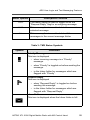
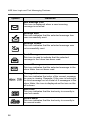
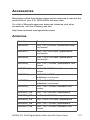
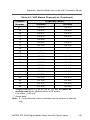
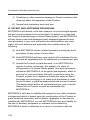
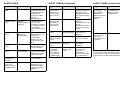
ALERT TONES
Type of Tone
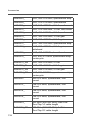
ALERT TONES (Continued)
Name
Explanation
1 Low-Pitched
Tone
Invalid Key Alert Feature button
pressed is not valid
in selected mode, or
a Call Alert or
emergency alarm
was not
acknowledged.
1 High-Pitched
Tone
Central
Acknowledge or
Valid Key
Central controller
has received
request for Call Alert
or emergency alarm
transmission.
You pressed a valid
key.
4 High-Pitched
Tones
Dispatcher or
Mobile Unit
Acknowledge
Dispatcher is
acknowledging your
emergency
transmission.
Mobile unit has
received your Call
Alert.
5 High-Pitched
Tones
The above two
acknowledge tones,
heard in tandem.
2 High-Pitched
Tones
Private
Conversation
You have an
incoming call. Press
Call, then the PTT
button, then talk.
4 High-Pitched
Tones every 6
seconds
Call Alert Page
Call Alert page has
been received.
Phone-Type
Busy Tone
(when pressing
the PTT button)
System Busy
All system radio
channels in use.
Release the PTT
button, and wait for
callback.
Type of Tone
Name
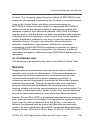
ALERT TONES (Continued)
Explanation
Type of Tone
Name
Explanation
A series of lowpitched tones
followed by a
series of highpitched tones.
Scan Alert On
Indicates that Scan
feature is activated
through the preprogrammed button
or 3-Position Rotary
Switch.
Talk Prohibit/
Out-of-Range or
Time-Out Timer
or Illegal Mode
A series of highpitched tones
followed by a
series of lowpitched tones.
Scan Alert Off
Indicates that Scan
feature is
deactivated through
the preprogrammed button
or 3-Position Rotary
Switch.
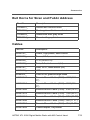
Low-Pitched
Tone (upon
pressing the
PTT button
during Transmit)
(Operation
Error)
Unique chirping
sound
Dynamic
Reprogramming
Indicates that a
dynamic ID is
assigned.
Out of trunked radio
system range or
system is out of
service.
Present
transmission will
soon be disabled.
You have entered a
mode where normal
system traffic will be
missed, or you
attempted
something that is
not allowed. (See
examples below.)
Failsoft
Unique, lowpitched chirping
sound
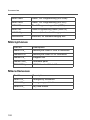
New Message
Indicates the arrival
of a new mesage.
High-Pitched
Tone every 10
seconds in
unmuted receive
condition
Unique, highpitched chirping
sound
Priority
Message
Indicates the arrival
of a priority
message.
2 Short HighTones (after
requesting a
busy channel)
upon pressing
the PTT button)
Automatic Call
Back or Talk
Permit
Channel is available
for previously
requested
transmission.
System is accepting
your transmission.
System central
controller failure.
The radio reverts
from trunked
operation to
operation similar to
a conventional
repeater.
Others may share
the channel.
Examples: Not exiting phone mode after a call (radio
cannot receive fleet or subfleet calls), transmitting in
receive-only conventional mode, trying to select a dynamic
mode when no dynamic ID assignment has been made.