1
Section 4 – Firmware Updates
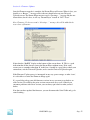
Once the Firmware upgrade is complete, the Dream Player will restart. When it does, you
should see a “Booter…” message such as the one shown below on your Universal
Uploader screen. The Dream Player may not send a “Greetings…” message like the one
shown below, but if it does, it will say “Dream Player” instead of “DCC Tester”.
Note: Firmware 1.2 does not send a “Greetings…” message, this will be added in the
next release of firmware.
Notice that the “BadRX” display on the bottom of the screen shows ‘0’. This is a good
indication that all the data was sent to the Dream Player without errors. If for some
reason you see a number other than ‘0’ in this box, it would be a good idea to check your
connections, exit the Universal Uploader, and re-start the Universal Uploader again.
If the Firmware Update process is interrupted in any way, power outage, or other ‘issue’,
it is advisable to re-write the Firmware Image again.
It’s a good idea to keep your old firmware versions in case you want to go-back to an
older version. We will keep the prior-versions on our web site as well so that if you
encounter problems with a new version, you can always put it back to what you had
before.
Now that you have updated the firmware, you can disconnect the Serial Cable and go do
some listening…
PRICOM Design
Page 22