1
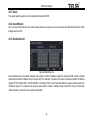
DVR User Manual Step 2: Select fps, resolution, quality, encode and max bit rate Step 3: Select “All” to setup all channels with the same parameters. Parameter FPS Resolution Quality Encode Max Bitrate Meaning Range from: 1-6 (PAL) Support CIF The higher the value is, the clearer the record image. Six options: lowest, lower, low, medium, higher and highest. VBR and CBR Range from: 32kbps~728kbps Fig 4-30 Network Sub-stream 4.6.3 Email Step 1: Enter into MenuSetupNetworkEmail tab. Refer to Fig 4-31: SMTP Server/Port: The name and port number of SMTP server. Check the SSL checkbox if the server requires a secure connection (SSL); user can setup mail servers (such as Gmail) as required. Send address/password: Sender‟s email address/password Receive address: Receiver‟s email address. Here user can add at least three mail addresses. Click TEST button to test the validity of the mailbox. Attaching image: After selecting it, the system will attach images when sending the emails. Fig 4-31 Network Configuration-Email 34