1
AKD Installation | 9 Setup
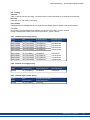
9.5 Troubleshooting the AKD
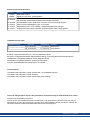
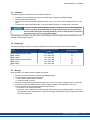
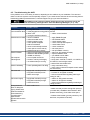
Drive problems occur for a variety of reasons, depending on the conditions in your installation. The causes of
faults in multi-axis systems can be especially complex. If you cannot resolve a fault or other issue using the troubleshooting guidance presented below, customer support can give you further assistance.
More details on the removal of faults can be found in the online help and in the
fault and warning messages table "Fault and Warning Messages" (=> p. 133) .
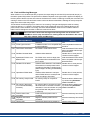
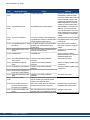
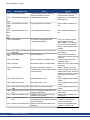
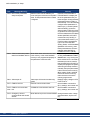
Problem
Possible Causes
HMI message:
— wrong cable used
Communication fault — cable plugged into wrong position
on drive or PC
— wrong PC interface selected
Motor does not rotate — drive not enabled
— software enable not set
— break in setpoint cable
— motor phases swapped
— brake not released
— drive is mechanically blocked
— motor pole no. set incorrectly
— feedback set up incorrectly
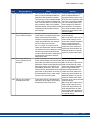
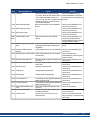
Motor oscillates
— gain is too high (speed controller)
— feedback cable shielding broken
— AGND not wired up
Drive reports
— Irms or Ipeak set too low
following error
—current or velocity limits apply
— accel/decel ramp is too long
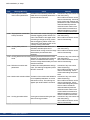
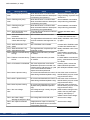
Motor overheating
— motor operating above its rating
Drive too soft
—Kp (speed controller) too low
—Ki (speed controller) too low
—filters set too high
Drive runs roughly
—Kp (speed controller) too high
—Ki (speed controller) too high
— filters set too low
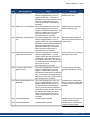
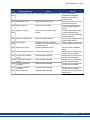
During the instal—MSI installer issue.
lation, a dialog box
saying “Please wait
while the installer finishes determining
your disk space
requirements”
appears and never disappears.
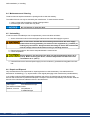
Remedy
— plug cable into the correct sockets on the drive
and PC
— select correct interface
— apply ENABLE signal
— set software enable
— check setpoint cable
— correct motor phase sequence
— check brake control
— check mechanism
— set motor pole no.
— set up feedback correctly
— reduce VL.KP (speed controller)
— replace feedback cable
— join AGND to CNC-GND
—verify motor/drive sizing
—verify that IL.LIMITN, IL.LIMITP, VL.LIMITN, or
VL.LIMITP is not limiting the drive
—reduce DRV.ACC/DRV.DEC
—verify motor/drive sizing
—verify motor continuous and peak current values
are set correctly
—increase VL.KP (speed controller)
—increase VL.KI (speed controller)
—refer to documentation regarding reducing filtering (VL.AR*)
—reduce VL.KP (speed controller)
—reduce VL.KI (speed controller)
—refer to documentation regarding increasing filtering (VL.AR*)
—Cancel the installation.
—Make sure that you have enough disk space on
your hard disk (~500MB to allow Windows .NET
update if necessary), if not make some space.
—Relaunch the installer (you may need to try several times, the problem is random).
Kollmorgen™ | April 2011
143