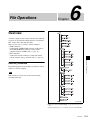
1
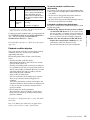
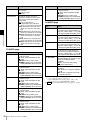
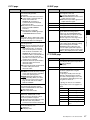
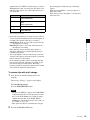
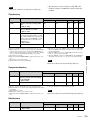
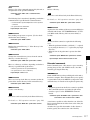
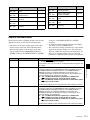
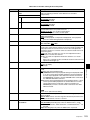
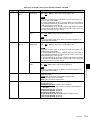
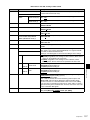
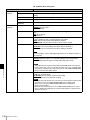
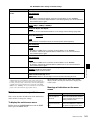
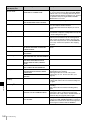
Menu items in the 900s, relating to digital process
Item number Item name
Settings
965
Set up the operation of the up converter image enhancer for SD input,
separately from the settings for playback (menu items 950 to 959).
IMAGE ENHANCER (INPUT UP
CONVERTER)
Sub-Item
ENH SETTING a)
pb: While SD signals are input, make the behavior of the image
enhancer of the up-converter follow the settings for playback (menu
items 950 to 959) (Settings for sub-items 2 to 11 under menu item
965 become invalid).
input: While SD signals are input, make the behavior of the image
enhancer of the up-converter follow the settings for sub-items 2 to 11
under menu item 965 (separate settings during input of SD signals
from those during playback).
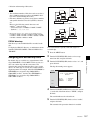
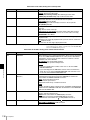
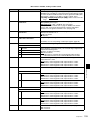
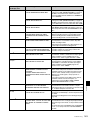
2
CONVERT
Select the up-converter mode.
CROP: Select the edge-crop mode.
L-BOX: Select the letter box mode.
SQUEZ: Select the squeeze mode.
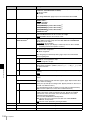
3
H CROP P
When sub-item UP CONVERTER MODE of menu item 965 is set to
“crop”, adjust the H-crop (horizontal crop) position for up converter output
in edge crop mode.
–120 to 0 to 120
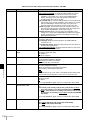
4
L BOX P
When sub-item UP CONVERTER MODE of menu item 965 is set to “lbox”, adjust the vertical location of the position where the picture is cut
out for up converter output in letter box mode.
–120 to 0 to 120
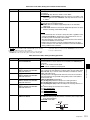
5
CNV PROC
Select the source picture to use in converting SD to HD.
FIELD: Use field pictures.
ADAPT: Frame or field is selected automatically.
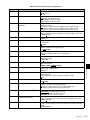
6
DETAIL
Adjust the up-converter image enhancer. Set the sharpness of edge
enhancement.
0 to 40H to 7FH
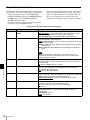
7
LIMITER
Adjust the up-converter image enhancer. Set the maximum detail level
added to emphasize the original signal.
0 to 20H to 3FH
8
CRISP
Adjust the up-converter image enhancer. Set the threshold amplitude at
which low amplitude signals are not emphasized.
0 to 8 to FH
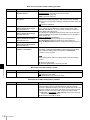
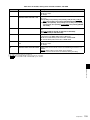
9
DEPEND
Adjust the up-converter image enhancer. Set the luminance range for
edge enhancement.
0 to 8 to FH
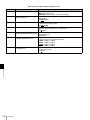
10
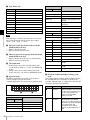
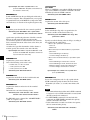
H DETL F
Adjust the up converter image enhancer. Set the center frequency and
frequency properties for edge enhancement.
3.2MHz: 3.2 MHz ±1.1 MHz
4.5MHz: 4.5 MHz ±1.4 MHz
5.0MHz: 5.0 MHz ±0.7 MHz
4.0MHz: 4.0 MHz ±2.0 MHz
11
HV RATIO
Adjust the up-converter image enhancer. Set the horizontal/vertical ratio
for edge enhancement.
0 to 3 to 7
a) HD1500 When the PDBK-S1500 or PDBK-F1500 option is installed.
Chapter 7 Menus
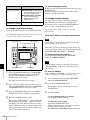
1
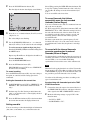
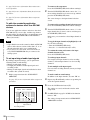
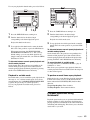
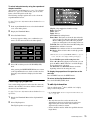
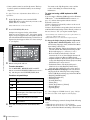
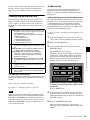
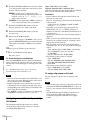
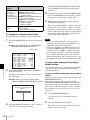
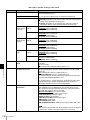
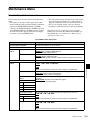
To enable display of the extended menu
Proceed as follows to use the maintenance menu.
Extended menu operations
The extended menu can be used with the same procedures
as in the basic menu.
However, since with the factory default settings the
extended menu is not displayed, it is first necessary to
enable display of the extended menu.
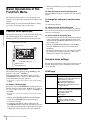
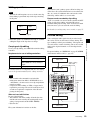
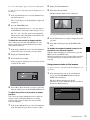
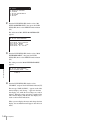
1
Holding down the PAGE/HOME button and the
SHIFT button, press the MENU button.
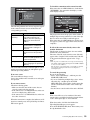
The maintenance menu appears on the video monitor
display.
Setup Menu
143