1
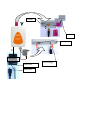
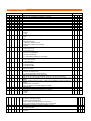
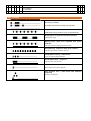
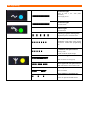
Quality of GSM signal The sound quality depends on BTS setting where you are connected by the Gate. To find best place for antenna mounting you can use either mobile phone or feature 29 (table of programming). The suitable signal power is 3 scales of mobile graduation. To check and find best position from GSM signal point of view you can use also GG SET (configuration sw). Connection of antenna MENU SETWhen you connect magnetic antenna keep on mounting at bigger iron subject. This subject makes “against-weight” at its depends the power of radiated signal When you inserted SIM card as same as all cables are connected (do not forget that Link Gate A Premium is connected on external line not on extension) connect device to main 230V. The blue LED of “power supply” is light up within 10 sec. After a while will flash a few times irregularly yellow LED (GSM network registration). Tle CPU then waiting for communication to GSM module (via LED table – communication off). After 30 seconds the yellow LED start flashing up GSM signal strength (via LED table).When pick up connected analogue phone or call to Link Gate A Premium from PBX the LED of analogue line lights up (green LED). In the phone is hearing dial tone of Link Gate A Premium. It is ready to use. The most often problems during Link Gate A Premium compact installation: Ø All LED is not lighting. There is a problem with the power supply. Check connection to main 230V as same as connection of adapter to Link Gate A Premium. Ø The LED “power supply” lights. When you make connection to Gate green LED is ON and in handset you hear busy tone. Yellow LED flashing in period “GSM module doesn’t communicate with CPU“. During work with USB could be programmed fix communication rate for GSM module. Use USB to program rate on “autobauding“. Ø The yellow LED flashing in period “PIN unreadable“. After calling to Link Gate A Premium you get busy tone. The SIM card requires PIN, which is not pre-programmed or is pre-programmed wrongly. Ø The LED „communication to GSM„ is flash shortly one for 2 sec. After calling to Link Gate A Premium you are hearing busy tone. Link Gate A Premium is not log into GSM network – bad signal. Ø The yellow LED “communication to GSM” is flashing up signal strength. After calling to Link Gate A Premium is not light up green LED is not light up and in analogue phone is quiet. It interrupted conduction of analogue line or so much big resistance in current loop (for example: (longer cable between PBX and Link Gate A Premium). Ø The yellow LED „communication to GSM„ is flashing up signal strength“ as same as green LED lights up. The PBX hold “pick up“ line of GSM Gate. By incoming call you can remove this issue. In other cases check PBX manual. Ø The Link Gate A Premium works but call is disturbed by interference. Incorrect position of antenna against telephone line . Change antenna position. Note: Default you make by parameter 99 in programming mode (via programming table at page 11). All LEDs flashing as same as tone types are mentioned in tables at the end of manual. USB You can purchase USB tool for PC configuration of the unit. It is optional. This tool is connected by a 6 wire cable to the units in middle of phone line. (see picture on page 2). You can control the GSM modul direcly by virtual COM port. The Gate you can further uses ordinary GSM modem for data transmission, internet connection or for SMS messages.