1
Authorizing Your McDSP Plug-Ins
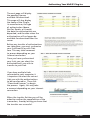
The next page will display
the pending licenses
available for download.
This page will also display
the name of the Plug-In,
its manufacturer, the type
of authorization (demo,
Not For Resale, or License),
the date the authorization was
deposited, and the date when the
authorization will no longer be
available for download from the
server.
Before any transfer of authorizations
can take place, you must synchonize
your iLok Smart Key with iLok.
com. This may take a moment
to process depending on your
internet connection.
Once you have synchronized
your iLok, you can select the
authorization(s) you wish to
transfer to your iLok.
If you have multiple iLoks
connected to your computer, it
is important to select the correct
iLok you wish the authorizations
to be transferred to. Then click
“Download Licenses” to begin
the process. Again, this may take
a moment depending on your internet
connection.
When the transfer finishes you will be
asked to confirm the completition of the
transaction, thereby letting you know that
the transfer was successful.
mcdsp.com
Page xxi