1
6
Photoshop 7 Basic: User Manual
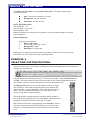
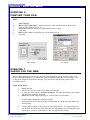
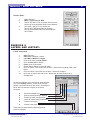
What you just pasted is separate from other parts, it can be
moved, rotated, etc., separately from the others, just like in
the Collage example. Also note that you cannot affect that
layer unless you single click on it in the Layer window.
(Menu > Window > Layer).
EXERCISE 5
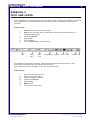
SAVE DOCUMENT AND THE FORMAT:
Formats:
♦
♦
♦
♦
♦
.PSD This is the PhotoShop format and it preserves layers.
.JPG This is for the web and is used for graphics on the web.
.GIF This is also for the web but is best for text.
.TFF A great cross platform format that preserves all quality for printing.
.PCT Another good format for print and cross platform.
Steps:
1.
First lets open Collage.psd located in the workshop folder on the desktop.
2.
Menu > File > Open navigate to document, click once on it, click OK.
3.
Next let’s save it as Work.psd in the Test folder in the workshop folder on the desktop.
4.
Next save it as Work.jpg in the FindMe folder in the workshop folder on the desktop.
5.
Menu > File > Save As Change name, Navigate to desired save location, Click OK.
File name: Photoshop7_User.pmd
Last modified: 08/14/02
Copyright Arizona Board of Regents, 2002
University of Arizona