1
Web Interface
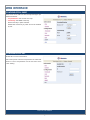
Configuration: Network
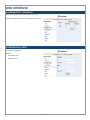
PDU network information
• Enable DHCP: Change the way to get IP address for PDU.
Configuration: Mail
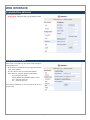
When event occurs, PDU can send out an email message to
pre-defined account.
• Email Server: The Email Server only supports the domain
name, not IP address.
• Sender’s Email: Input the sender email address.
• Email Address: Input the recipient email address.
The message in the email:
Indicate OutletA~H-XXXXXXXX status in order
X=0 : means the power off.
X=1 : means the power on.
Note: Make sure DNS server can resolve the Email Server’s
domain name.
7