1
Appendix F. Scripting plugin
1. Introduction
OmegaT-Scripting allows to run scripts written in different scripting languages in OmegaT.
2. Installation and Use
The Scripting plugin for OmegaT can be downloaded from the OmegaT plugins download
site [http://sourceforge.net/projects/omegat-plugins/files]. Unzip the files, and put them all in
the "plugins" folder located in OmegaT installation folder, that is the folder that contains the
OmegaT.jar. Create the "plugins" folder first, if it does not exist.
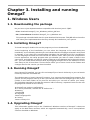
This adds a new submenu Tools > Scripting. Below the Scripting submenu , there's five place
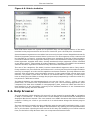
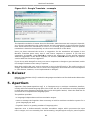
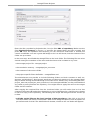
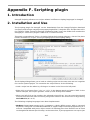
holders available for scripts. Clicking Scripting opens the Scripting dialog:
The Scripting dialog allows you to load an existing script into the text area and run it against
the current opened project. To customize the script feature, do the following:
• Load a script into the editor by clicking on its name in the list on the left panel.
• Right-click on a button from "<1>" to "<5>" in the bottom panel and select "Add". In the
above example, two scripts (position 1 and 2) have already been added.
• When you left-click on the number, the selected script will run. You can start the selected
macros from the main menu as well by using their entries in the Tools menu or by pressing
Ctrl+Alt+F# (# 1 to 5).
The following scripting languages have been implemented:
• NetRexx (http://www.netrexx.org/): it supports a classic REXX syntax, with no reserved
keywords, along with considerable additions to support object-oriented programming in a
manner compatible with Java's object model. All existing Java class libraries can be used
unchanged and without special setup; at the same time, a Java programmer can opt to just
105