1
2-10
Cabling the Modem to the Console
The modem allows the station staff and Avid Customer Support
personnel to remotely control, diagnose, and troubleshoot server and
database problems.
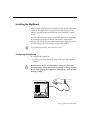
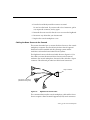
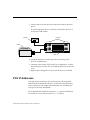
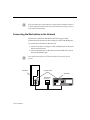
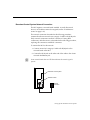
Connect the external modem into the P4 connector of the DigiBoard
console multiplexor cable. The P4 connector is a DB-25 serial
connection. The modem must also plug into an analog telephone line.
n
If the AvidNews site happens to have four News Servers, all four connectors
on the DigiBoard cable are used by the servers. Connect the external modem
into the serial port of the console multiplexor. For more information, see the
Avid Console Multiplexor UserÕs Manual.
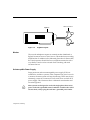
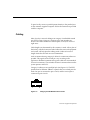
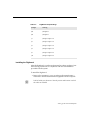
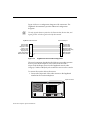
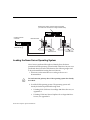
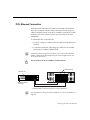
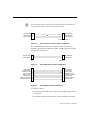
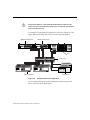
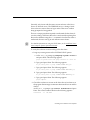
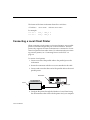
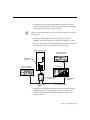
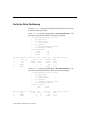
The connection is a Data Communication Equipment (DCE) serial
connection. A DCE is a straight connection between the connectors.
Transmit data
Receive data
Request to send
Clear to send
Data set ready
Signal ground
Data carrier detect
Data terminal ready
2
3
4
5
6
7
8
20
2
3
4
5
6
7
8
20
DigiBoard cable
Figure 2-4
Receive data
Transmit data
Clear to send
Request to send
Data terminal ready
Signal ground
Data carrier detect
Data set ready
Modem
DigiBoard-to-Modem Cable Configuration
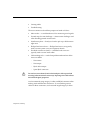
The modem is conÞgured through the console multiplexor software.
Instructions are provided in the Avid Console Multiplexor UserÕs
Manual. Set up the modem for:
¥
¥
¥
¥
¥
¥
Auto-answer
Fixed serial port speed of 9600 baud
8 bits, no parity, 1 stop bit
X-on/X-off ßow control
No answer-mode messages displayed
No command echo
Newsroom Computer System Installation