1
Basic operations (continued)
Freeze function
This function is used to freeze the image being displayed.
(refer to page 10)
1
1
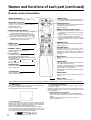
Press the FREEZE button.
• The image being displayed will freeze.
• The [ ] mark appears in the lower right corner of the screen when the Freeze function is on.
Cancelling the FREEZE function
1
Press the FREEZE button.
• The FREEZE function will be cancelled.
• The [ ] mark will be displayed for approximately 3 sec. when the FREEZE function is cancelled.
• When there is no input signal, the Freeze function is not effective when the input signal is
outside the sync range.
• Pressing the FREEZE button alternately turns the freeze function on and off.
• The FREEZE function will be cancelled when the input select button is pressed or the display
mode of the PC being used for display is changed.
• When a still image signal is input when the FREEZE function is on, make sure not to forget to
cancel the FREEZE function.
• FREEZE function will be cancelled after the operations such as “FOCUS + , –”, “TIMER”,
“P in P”, “AUTO”, “BLANK”, “VOLUME
”,“MENU”, “MUTE” and “POSITION”.
15