1
Installation
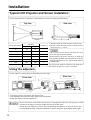
Typical LCD Projector and Screen Installation
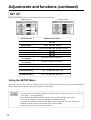
Use the diagram below as reference to determine the screen size and projection distnace.
Side view
Top view
Screen
Lens center
a
a (inches)
Screen size (inches)
b (inches)
Minimum
Maximum
40
55
73
1
60
85
114
2
80
114
151
2
100
144
191
3
120
176
231
3
150
220
282
4
200
291
386
6
a. Distance from the LCD projector to the screen
b.Distance from the lens center to the bottom of
the screen (a,b : +/-10%).
The LCD projector should normally be used
level (the legs can point upward).
Positioning the projector sideways, or with the
lens pointing upward or downward can cause the
internal temperature to rise, which could result in
a malfunction.
The projection distances shown in the diagram to
the left are for full size (1,024 x 768 dots).
Using the adjusters
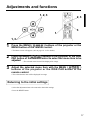
Use the adjusters on the bottom to adjust the projection angle.
Front view
Adjuster
Side view
Variable within the range of approximately 0° - 9°
1. Lift up the projector and release the adjuster lock.
2. After adjusting the projection angle, firmly lock the adjusters.
3. Rotate the adjusters for fine adjustment.
• Do not release the locks unless the projector is being held; otherwise, the projector could
overturn or the fingers could get caught and cause personal injury.
• Do not force the adjusters to rotate. This could damage the adjusters or cause the lock to fail.
• Lock the adjusters firmly. If the lock is difficult to operate, change the angle slightly and try again.
12