1
SRS for mS-cube
Version 1.0
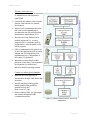
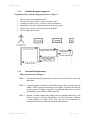
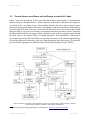
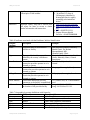
Figure 7: Sequence of functions to define a working facility (location)
3.3.3
Functional Requirements
Refer to the use cases in Figure 4.
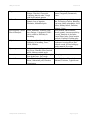
REQ-1:
Execute mS-cube and click on setup menu item and then the facilities sub
menu item
REQ-2:
Invoke facilities class and present a GUI to select the health jurisdiction
(administrative area) like PHI area, MOH division, or Health District and
enter the jurisdiction name (area name), typically the town's name.
REQ-3:
Execute the submit button to send the data to the server. If mandatory
fields are null or inappropriately entered then alert user to retry.
REQ-4:
Connection object is invoked to link with the server side controller through
GPRS or SMS, using the technology set as default. If default fails then try
the next option. If neither connection is established, alert user to try after
establishing a good GPRS or SMS connection.
REQ-5:
Send the data across to the server controller. The controller will filter the
facilities by the jurisdiction type and jurisdiction name from database to
create a data set with facility name and identifiers. Thereafter, return the
dataset to mS-cube. If the query returns no results from the database, then
return an error message indicating server failed to retrieve working
facilities.
Waidyanatha (LIRNEasia)
Page 19 of 32