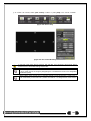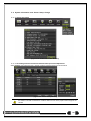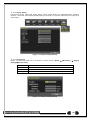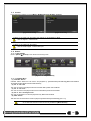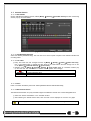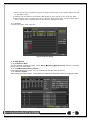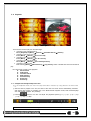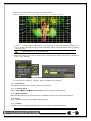
1
FCC Compliance Statement
Model Name:
EH1-04
This device complies with Part 15 of the FCC Rules. Operation is Subject to the following two conductions: (1)
this device may not cause harmful interference, and (2) this device must accept any interference received,
including interference that may cause undesired operations.
WARNING
Unauthorized reproduction of all or part of this manual is strictly prohibited.
The figures in this manual are for illustration purposes only (may differ from the actual product).
The specifications and design of the product are subject to change without prior notice for purposes of quality
improvement.
CAUTIONS
To get the best use out of the product, be sure to read the cautions before using the product. For safety, please
take note of the following.
Instructions before using the product
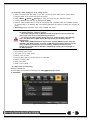
1 To prevent electric shock when installing, moving, or opening the DVR and peripheral devices, connect
and disconnect the cables as instructed. All cables must be connected to grounded power outlets.
2 If the product is installed near a power outlet, make sure it can be unplugged easily.
3 Do not use the DVR in water or in wet places.
4 Keep the plastic packing materials used for the DVR or other peripheral devices out of reach of children
(may cause suffocation).
1
2
3
4
5
Installation Environment of the DVR
Maintain the following conditions: operating temperature of 5˚C ~ 40˚C; operating humidity of 10% ~ 80%.
Install the DVR in a safe place that is free from external vibration.
Install the DVR in a well-ventilated place.
To protect the hard disk from data loss and breakdown, install the DVR away from magnetic materials.
When using a rack other than the standard one, use a separate table with sufficient spacing, i.e., 60cm
from the floor, 50cm from the ceiling, and 20cm from the side and back walls and other objects.
Safety Notes on the DVR
1 When installing additional boards and HDD, separate the power cable and turn OFF power supplied to the
DVR completely..
2 Keep the product away from heat-generating devices such as heaters.
3 Do not use a damaged power cord.
4 To prevent problems due to magnetic interference and electric surge, use only grounded cables and
power outlets.
5 If the power cord is connected, do not touch the power unit. If the power cord is connected, electric current
is still flowing internally even after the switch is turned OFF.
6 Do not place a heavy object on top of the product.
7 Do not drop a conductive object in the ventilation holes.
8 Allot sufficient space for system cabling.
9 Use only the parts indicated in the manual. Do not disassemble, repair, or modify the product without
permission.
10 Incorrect system setup may cause malfunction.
11 Shut down the system normally as instructed in the manual.
1
Safety Notes on the Lithium Battery
1 Replace lithium batteries as instructed to avoid danger.
2 Dispose used lithium batteries properly.
【Warning and Caution are indicated as follows.】
Possible injury or product damage.
Risk of minor injury or product damage.
Cautions for the usage of the product.
Information for the usage of the product.
2
Chapter 1. Introduction .............................................................. 7
1-1 EH1-04 Major Features ......................................................................... 7
1-2 Components ........................................................................................ 8
1-3 Product Introduction ............................................................................. 8
Chapter 2. Installation and connection ........................................ 10
2-1 EH1-04 Names and Features of Each Part ............................................. 10
2-1-1 EH1-04 Rear Panel ................................................................................. 10
2-2 Installation and Connection .................................................................. 11
2-2-1 Basic Connection ................................................................................... 11
2-3 Connection of Other Devices................................................................ 11
Chapter 3. Operation and Setup Tools......................................... 13
3-1 EH1-04 Front Panel Button .................................................................. 13
3-2 EH1-04 Remote Controller ................................................................... 14
3-3 Mouse ............................................................................................... 14
Chapter 4. DVR Operation Setup ................................................ 15
4-1 Lite Series Storage Installation .............................................................. 15
4-2 Power ON. ......................................................................................... 15
4-3 Storage Setup .................................................................................... 16
4-4 Recording Setup................................................................................. 16
4-5 Date/Time Setup................................................................................. 16
4-6 Camera / TV Setup ............................................................................. 17
4-7 Display Setting and Other Setup ........................................................... 17
4-8 External Device Setup ......................................................................... 17
4-9 Search .............................................................................................. 17
4-10 Backup........................................................................................... 17
4-11 DVR Info......................................................................................... 17
Chapter 5. System Operation .................................................... 18
5-1 Real Time Monitoring Mode and Icon ..................................................... 18
5-2 System Login ..................................................................................... 19
5-2-1 User Account and Authorization ................................................................. 19
5-2-2 Login ................................................................................................... 20
5-2-3 Logout ................................................................................................. 20
5-3 Monitoring ......................................................................................... 20
5-3-1
5-3-2
5-3-3
5-3-4
Screen Division and Auto Sequence ............................................................ 20
Menu in Monitoring Mode ......................................................................... 21
Zoom .................................................................................................. 22
Screen Control by using PTZ ..................................................................... 23
5-4 System Information and Screen Setup Change ....................................... 25
5-4-1
5-4-2
5-4-3
5-4-4
System Information ................................................................................. 25
Screen Brightness/Contrast/Color/Saturation/Sharpen/Camera Adjustment ........... 25
Display Setting....................................................................................... 26
Screen Saver ........................................................................................ 26
5-5 Control .............................................................................................. 27
5-6 Search .............................................................................................. 27
5-6-1 Search Mode......................................................................................... 27
5-6-2 Playback Menu ...................................................................................... 27
5-7 Calendar Search ................................................................................. 28
5-7-1 Search Mode......................................................................................... 28
5-7-2 Year/Month/Day Selection ........................................................................ 28
5-7-3 Time Index............................................................................................ 28
3
5-7-4 Event .................................................................................................. 28
5-7-5 Multi-Channel Search .............................................................................. 28
5-7-6 List All ................................................................................................. 29
5-8 POS Search ....................................................................................... 29
5-8-1 POS Search Mode .................................................................................. 29
5-8-2 Year/Month/Day/Text/Time Selection ........................................................... 29
5-8-3 Search / Playback................................................................................... 29
5-9 Playback ........................................................................................... 30
5-9-1
5-9-2
5-9-3
5-9-4
5-9-5
5-9-6
5-9-7
5-9-8
Playback and Playback Speed Control ......................................................... 30
Smart Search ........................................................................................ 31
POS Search .......................................................................................... 32
Calendar Search .................................................................................... 32
MULTI CHANNEL................................................................................... 32
Event .................................................................................................. 32
Backup ................................................................................................ 32
Screen Mode ......................................................................................... 33
5-10 Log Viewer...................................................................................... 33
5-10-1 Log Type ........................................................................................... 33
5-10-2 System Log Viewer .............................................................................. 34
5-11 Recording ....................................................................................... 34
5-11-1 Recording Types ................................................................................. 34
5-11-2 Recording Setup ................................................................................. 34
5-11-3 Recording Status View .......................................................................... 35
5-12 Backup........................................................................................... 35
5-12-1
5-12-2
5-12-3
5-12-4
5-12-5
Backup in The Real-Time Monitoring Mode ................................................ 35
Backup in Search Mode ........................................................................ 35
Backup in Log Mode............................................................................. 35
Backup in Playback Mode ...................................................................... 35
Common Backup Procedure ................................................................... 36
5-13 Setup Backup.................................................................................. 37
5-14 Log Backup .................................................................................... 37
5-15 Capture .......................................................................................... 38
Chapter 6. Setup.................................................................... 39
6-1 Time ................................................................................................. 39
6-1-1
6-1-2
6-1-3
6-1-4
Time Sync ............................................................................................ 40
Date and Time ....................................................................................... 40
Standard Time Zone................................................................................ 40
Auto Reboot .......................................................................................... 41
6-2 Camera ............................................................................................. 41
6-2-1
6-2-2
6-2-3
6-2-4
Camera................................................................................................ 41
PTZ .................................................................................................... 42
POS .................................................................................................... 42
Event Source......................................................................................... 42
6-3 Recording .......................................................................................... 43
6-3-1
6-3-2
6-3-3
6-3-4
6-3-5
6-3-6
Schedule Selection (Schedule1 ~ Schedule4) ................................................ 43
Event .................................................................................................. 43
Recording............................................................................................. 43
Alarm .................................................................................................. 44
Duration ............................................................................................... 44
Log ..................................................................................................... 44
6-4 Schedule ........................................................................................... 44
6-4-1 Schedule Setup ..................................................................................... 45
6-5 Storage ............................................................................................. 45
6-5-1 Max. Recording Days .............................................................................. 45
6-5-2 HDD Overwrite ...................................................................................... 45
6-5-3 Local Storage Management ...................................................................... 46
4
6-6 Network............................................................................................. 47
6-6-1
6-6-2
6-6-3
6-6-4
6-6-5
Ethernet ............................................................................................... 48
DDNS.................................................................................................. 48
Port..................................................................................................... 48
E-mail .................................................................................................. 49
Bandwidth ............................................................................................ 50
6-7 System .............................................................................................. 50
6-7-1
6-7-2
6-7-3
6-7-4
6-7-5
6-7-6
6-7-7
6-7-8
6-7-9
DVR Name ........................................................................................... 51
User Registration.................................................................................... 51
Upgrade ............................................................................................... 51
Factory Setupt ....................................................................................... 52
Error Alarm ........................................................................................... 52
Error Alarm Duration ............................................................................... 52
Menu Time Out ...................................................................................... 52
Language ............................................................................................. 53
Video Loss Event Delay time ..................................................................... 53
A/P/P/E/N/D/I/X ....................................................................... 54
Recommended PTZ Camera Protocol ........................................... 54
[Figure 2-1. EH1-4 Basic Connection and Device Connection] ................................................. 11
[Figure 4-11. Menu Window] ........................................................................................... 15
[Figure 5-12. Recording Status Window] ............................................................................ 18
[Figure 5-13. Login Window]............................................................................................ 20
[Figure 5-16. 960H Model 4CH Channel Mode] .................................................................... 20
[Figure 5-18. Zoom Control Screen] .................................................................................. 22
[Figure 5-19. PTZ Setup] ................................................................................................ 23
[Figure 5-20. PTZ Control] .............................................................................................. 24
[Figure 5-21. PTZ Control Mini/Full]................................................................................... 24
[Figure 5-22. Product Information Window] ......................................................................... 25
[Figure 5-23. Screen Setup Window] ................................................................................. 25
[Figure 5-24. Display Setting Window] ............................................................................... 26
[Figure 5-25. Display Setting Window] ............................................................................... 26
[Figure 5-26. Audio]
[Figure 5-27. Text] ...................................... 27
[Figure 5-29. Playback Menu] .......................................................................................... 27
[Figure 5-30. Search Window] ......................................................................................... 28
[Figure 5-31. Time Index] ............................................................................................... 29
[Figure 5-32. POS Search] ............................................................................................ 29
[Figure 5-33. Playback Screen] ........................................................................................ 30
[Figure 5-34. Playback Status and Control Window] .............................................................. 30
5
[Figure 5-35. Playback Menu] .......................................................................................... 31
[Figure 5-36. Smart Search Area Designation] ..................................................................... 32
[Figure 5-37. Smart Search Motion Detection Window]........................................................... 32
[Figure 5-39. Display Mode] ............................................................................................ 33
[Figure 5-40. Log View] .................................................................................................. 33
[Figure 5-41 . Move to the log list of the certain time zone in Log View] ...................................... 34
[Figure 5-42. Backup Window] ......................................................................................... 36
[Figure 5-43. Backup and Sub-menu Setup Backup].............................................................. 37
[Figure 5-44. Setup Upgrade] .......................................................................................... 37
[Figure 5-45. Log Backup] .............................................................................................. 37
[Figure 6-46. Setup / Time Menu] ..................................................................................... 39
[Figure 6-47. Setup / Auto Reboot Menu] ............................................................................ 41
[Figure 6-48. Setup Camera Menu] ................................................................................... 41
[Figure 6-49. Motion Area Setup] ...................................................................................... 42
[Figure 6-50. Setup / Recording]....................................................................................... 43
[Figure 6-51. Schedule Window]....................................................................................... 44
[Figure 6-52. Storage Window (Local)] ............................................................................... 45
[Figure 6-53. Setup Network Window] ................................................................................ 47
[Figure 6-54. Network Port Window] .................................................................................. 48
[Figure 6-55. Setup Network Ethernet Window] .................................................................... 49
[Figure 6-57. Setup Network E-Mail Window2] ..................................................................... 49
[Figure 6-60. System Setup Window]................................................................................. 50
[Figure 6-61. Firmware Upgrade Progressing Window]........................................................... 51
6
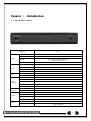
Chapter 1. Introduction
1-1 EH1-04 Major Features
Model Name
OS
Access
System
EH1-04
Embedded Linux - Built in flash memory
Front button, Mouse, Remote Controller, Network, Key controller
Hexaplex
Live monitoring, Recording, Playback,
Backup, Network, Setup
Upgrade
USB2.0 Memory stick, Network
System
NTSC / PAL - Config switch
Input
Video
Output
4 BNC
1 HDMI, 1 VGA, 1 BNC
Loop
N/A
Input
1 RCA
Audio
Output
Compression
Speed
Video
Recording
Resolution
Event
Bit Rate
Audio
Recording
Compression
Audio Sampling Rate
Interface
Compression
HDMI, RCA
H.264
960H real-time
★ 960H (960x480/576)
Motion
1 ~ 5Mbps/Ch, Adjustable
G.711U
8KHz
Ethernet 10/100/1G
H.264
Network
Speed
Resolution
Interface
Backup
Format
Max. Q960H 8fps/ch
Max. 960H
USB2.0, Network
Video clip (Backup viewer), JPEG Still Image
Log list, Setup data
7
Model Name
Alarm
Pre/Post-Alarm
5sec / 5sec~5min
Alarm Action
E-mail, Channel Popup, Buzzer, Relay,
PTZ Preset, Spot, Remote RMS, Front LED
HDMI
★ Full HD, XGA
VGA
Full HD, XGA
Display
External
Interface
TV
SDTV(720x480/576)
Mode
4/1/SEQ - LIVE, 4/1 - P.B
PTZ / Keyboard
★ RS485 - Terminal Block
ATM / POS
Ethernet PoS
Primary
1 HDD
External
N/A
Storage
Features
General
EH1-04
DDNS, DHCP, UPNP
Yes
VMS, RMS
Windows
Smart Phone (3G)
Android, iPhone, iPad
Mac Viewer
★ Apple Mac OS
Power Supply
12V/2A
Consumption
24 Watts
Dimension
260 x45 x 240 mm
1-2 Components
After unpacking the product, check whether following accessories are included.
- Remote Controller
- CD (VMS, VMS Manual, User Manual)
- AAA 1.5V Batteries 2ea
- Quick Service Guide
- Rack Mount Handle (Only for Deluxe, Blue series)
1-3 Product Introduction
8
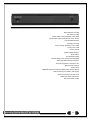
960H real-time recording
1Ch audio recording
Various video output port (HDMI, VGA, BNC)
Various video output mode (Full HD, XGA, SDTV)
1Ch POS/ATM interface
Pre-alarm recording
Auto e-mailing notification max. 5 users
Privacy zone mask
Covert channel
Digital single/multi-zoom
Smart search
Text detection/search
Multi-time/day, Index (event) search/playback
Still image capture Full HD resolution
Firmware upgrade at a remote PC site
Remote setup, backup,
Screen Saver
USB/DVD backup with self-executable player (backup player)
Web monitoring in PC (Built in web server)
Smart Phone viewer (Android, iOS)
Mobile web viewer (3G viewer)
NTP, DST, DDNS, DHCP
9
Chapter 2. Installation and connection
2-1 EH1-04 Names and Features of Each Part
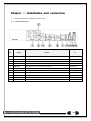
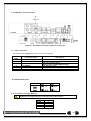
2-1-1 EH1-04 Rear Panel
No.
Name
Feature
D
1
CAMERA IN
Video Camera Connection
BNC
2
AUDIO OUT
Audio Output Connection(Line Only Output)
RCA
3
AUDIO IN
Audio Input Connection
RCA
4
TV
CVBS Output
BNC
5
VGA-OUT
VGA Monitor or LCD Monitor Connection
D-SUB 15P
6
HDMI
HDMI Output
HDMI type-C
7
Ethernet
Cable Modem, Ethernet 10/100 Base-T, Network Connection
RJ-45
8
USB
USB 2.0
USB Type-A
9
Terminal Block
RS-485 / SENSOR IN / RELAY OUT / POS
Terminal Block
10
CONFIG
NTSC/PAL , HD / XGA
DIP S/W, 2-pin
11
Power
90 ~ 250V, 50/60Hz
DC Inlet
10
2-2Installation and Connection
[Figure 2-1. EH1-4 Basic Connection and Device Connection]
2-2-1Basic Connection
※ By referring to above [Figure 2-1], make a connection accordingly.
Connection
Order
1
2
Connection Device
CCTV Camera
CCTV Audio
2
CONFIG SWITCH Setup
3
4
5
CCTV Monitor
VGA Monitor / LCD Monitor
HDMI Monitor
DVR Terminal
Rear Panel Video IN
Rear Panel Audio IN / OUT
Rear Panel Left 2ea Switch
(Refer to below; CONFIG SWITCH Setup)
Rear Panel TV / SPOT
Rear Panel VGA-OUT
Rear Panel HDMI
CONFIG SWITCH Setup
Switch 1
Switch 2
2-3 Connection of Other Devices
960H Series has different features as described below. Be cautious.
Item
Audio
Sensor
Relay
POS
EH1-04
1
N/A
N/A
1
11
Connect the PTZ controller cable, audio input/output, network, and sensors as shown below.
1
2
3
Connecting Device
Mike / Speaker
LAN Cable
PTZ Camera
DVR Terminal
Rear Panel Audio Input / Audio Output
Rear Panel Ethernet
Rear Panel Terminal Block
1) Audio Input/Output
HD1-16CH supports 16ea audio inputs.
MH1-16CH supports 16ea audio inputs and MH1-08CH supports 8ea audio inputs.
SH1-04 supports 4ea audio inputs, SH1-08 supports 8ea audio inputs & SH1-16 supports 16ea audio inputs.
2) Terminal Block
[Figure 2-2. EH1-04 Terminal Block and Description]
The terminal blocks in the rear of the product are for the connection of PTZ / Sensor / Relay / POS Connection.
The number of the terminal block may be different depending on the model.
① PTZ Camera/Keyboard Controller
Connect PTZ control cable; TRX+, TRX- and GND to Terminal Block(TB1);No.4 TRXD+, No.5 TRXD- and No.10
GND in the rear of DVR. You may refer to APPENDIX for supported PTZ cameras in this manual. Keyboard
controller has the same connection as PTZ camera.
PTZ Camera may not be working properly if GND is not connected.
12
Chapter 3. Operation and Setup Tools
960H Series can be controlled easily by using the front panel buttons, front panel, remote controller, jogshuttle
and mouse.
3-1 EH1-04 Front Panel Button
No.
1
2
Name
POWER LED
RECORD LED
3
ALARM LED
4
IR Sensor
5
USB port
Function
Power LED On/Off
Green LED turned on upon HDD operation
Red LED turned on upon the occurrence of event or
motion.
Remote controller input sensor
Connection port to the USB mouse and USB memory
stick
13
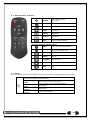
3-2 EH1-04 Remote Controller
POWER
Turn the system power
ON or OFF.
MODE
FULL
1CH Mode
QUAD
4CH Mode
9 SPLIT
9CH Mode
16 SPLIT
16CH Mode
SEQ.
Sequence Mode ON/OFF
B) System Operation and Setup Button
MENU
ESC
Data, Schedule, System Set up
Exit the current menu
or Move to the upper menu.
PREV
Move back (Reverse)
PAUSE
Pause
FORWARD
Move forward
BACKWARD
Playback
PLAY
Play
3-3 Mouse
The mouse pointer as shown below appears if a mouse is connected to the USB terminal at the front panel.
Mouse Control functions are shown below.
Click on the right
button
Click on the left
button
Double click on the
left button
Click the left button
and drag
Monitoring Mode / Move from Play Mode to Monitoring
Menu / Pop up or remove Play Menu.
Show sub-folder of the certain Menu window.
Select Menu.
Select Menu.
Move a certain window.
14
Chapter 4. DVR Operation Setup
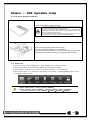
4-1Lite Series Storage Installation
1) 1) Open the top case by using screw driver.
1) Normal termination of the system and fully unplugged power code
are required before conducting HDD installation.
2) Touch a grounded metal substance or ground yourself before
installing HDD in order to reduce static electricity. Static electricity may
cause a malfunction of the product.
3) After installing HDD, Do not connect to power supply with the top
case opened. The top case must be covered before usage.
2) Unscrew and separate the HDD bay from body.
3) Screw the additional HDD bay to current HDD bay
4) Connect HDD to HDD connector on the main board directly without cable.
Reassemble the top case by reversing 1) to finalizing HDD installation.
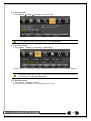
4-2 Power ON.
①
②
③
④
Check the Power, HD1-16 Model (90 ~ 250V, 50/60Hz) and connect the power.
Once Power cable is connected (found in Rear Side), booting will be enabled. .
After booting is finished, the live screen and channel indication / clock are shown.
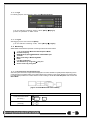
Menu window pops up by clicking the right button of the mouse or pressing [MENU] button in the f
ront panel as shown below.
[Figure 4-2. Menu Window]
ID and Password are required for initial installation. Default ID and Password are shown below.
[ admin : 00000 ] [ User1 : 1111111 ] [ User2 : 2222222 ]
[ User3 : 3333333 ] [ User4 : 4444444 ].... [ User10 : aaaaaaa ] [ User11 : bbbbbbb ]....
※ Password is available to change at {Menu} {Setup} {System} {Modify}.
15
4-3 Storage Setup
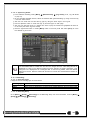
① Select {Menu} {Setup} {Storage} and configure HDD.
For more detail about HDD and external devices, check [6-5 Storage].
4-4 Recording Setup
① Select {Menu} {Setup} {Recording} {Recording}
② Setup [Recording Resolution]/[Recording Quality]/[Continuous Speed]/ [Event Speed]/[Audio]/[Text].
The initial recording setup is [Recording Resolution: 960H] [Recording Quality: High]
[Continuous Speed: Off]. An image of the connected cameras is recorded with above setting.
For more detail, check [6-3 Recording Setup].
4-5 Date/Time Setup
① Select {Menu} {Setup} {Time}.
② Configure [Time Sever]/[Date and Time]/[Standard Time Zone].
16
4-6 Camera / TV Setup
① Select {Menu} {Setup} {Camera} {Adjust}.
② Set up for [Brightness/Contrast/Color/Hue/Camera Adjustment/TV OUT Adjustment] are available.
4-7 Display Setting and Other Setup
① Select and set up {Menu} {Miscellaneous} {Display Setting}.
4-8 External Device Setup
① Configure external devices. For more information, check [2-3 Connection of other devices], [Chapter
5. System Operation], [6-2 Definition], [6-6 Network], [6-7 System].
4-9 Search
① For more information, check [5-6 Search], [5-7 Calendar Search], [5-8 Playback], [5-10 Recording].
4-10 Backup
① Backup is available in Monitoring, Search, Log and Playback Mode.
② For more information, check [5-11 Backup].
4-11 DVR Info.
① Move to {Menu} {Miscellaneous} {DVR Info}.
Detail information for product functions are described below in this manual.
17
Chapter 5. System Operation
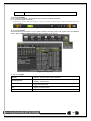
5-1 Real Time Monitoring Mode and Icon
After booting is finished, Audio/Recording Status/Channel Title/Connection Status/Time/HDD Status are displayed
as shown below.
[Figure 5-3. Recording Status Window]
※ Recording Event / Recording Mode Icon ※
Motion Detection Recording
Sensor Recording
Recording
Event
Audio Recording
Text Recording
Video Recording
Recording
Mode
Audio Recording
Text Recording
※ Recording Event Icons are still displayed despite of the recording stop. Recording Mode Icon
distinguish recording status.
※ Live Screen Icon ※
Video is not connected
Audio is activated.
Audio is mute
No Signal
Camera has been disconnected.
18
※ Control Bar ※
①
②
③
④
⑤
⑥
⑦
Full Screen
4 Channel Screen
ZOOM function
Auto Sequence Mode
Date / Time
HDD Status
Playback
5-2 System Login
5-2-1 User Account and Authorization
System users are divided into local administrators and general users and the local administrator can use all
functions.
Local Admin
User
The local administrator can use all functions: System Power On/Off, Setup,
Monitoring, and Playback .(remote access is not available, however)
Up to 15 users are allowed. Each user can access the functions depending on the
given authorities.
For Authorization Setup, Move to {Menu} {Setup} {System} {4. User
Registration}.
※ Functions available for Authorization Setup
Network Live
View the real-time image by network access.
Playback
View the recorded image.
Copy (Download)
Copy and download the image from the network.
PTZ Control
Network Upgrade
PTZ camera control
Recording, Recording Schedule, System, Storage, Time, PTZ, Network Setup,
Screen Setup
Remote network upgrade
View Covert Channels
Enable viewing covert channels.
Setup
19
5-2-2 Login
For security purpose, user must log in first to use {Monitoring Menu}.
[Figure 5-4. Login Window]
① On the real-time monitoring window, select {Menu} {Login}.
② Enter the password or select cancel.
5-2-3 Logout
After logging out, the user cannot use {Menu}.
① On the real-time monitoring screen, select {Menu} {Logout}.
5-3 Monitoring
960H Model Series features powerful monitoring functions as shown below.
1 / 4 / 9 / 16 Division Mode and Auto Sequence Mode
Channel Grouping
960H Model (4) Spot 960H Model 1/4/9/16 Multi spot
TV mode
Menu Controlling in Monitoring Mode
Zoom
Live Event Indication
Text Detection by using POS Only 1ch
Screen Control by using PTZ.
5-3-1 Screen Division and Auto Sequence
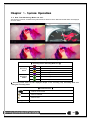
After the system is booted, images will be displayed on a screen divided into [16/9] division depending on the
model. Except for the basic setting, the system follows user’s setting on the screen division from next booting.
H-model series provides the 7 screen division mode including 1 / 4 / 9 / 16 / Auto Sequence and 1/4/9/16 are
Basic Mode.
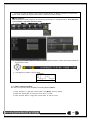
[Figure 5-5. 960H Model 4CH Channel Mode]
※ In Basic Mode;1/4/9/16, pressing the same mode button leads to screens as shown below.
1 Channel Division Mode
(16 Group )
●●●
1
2
3
16
4 Channel Division Mode
( 4 Group )
20
※ The user can view an image on full screen by double-clicking a desired channel in the 4/9/16 SubScreen mode. Double-click any part of the screen to return to the previous mode.
※ Auto Sequence
Auto Sequence is to rotate images at an interval of the certain time in 1/4/9 Basic Division. Auto Sequence
is not available in the Basic 16 Division mode.
① Move to {Menu} {Miscellaneous} {Display Setup }.
② Pressing Front {SELECT} Button / Remote Controller {SELECT} Button / Mouse Arrow Button initiate the
Auto Sequence mode.
.
③ Auto Sequence in Basic 1 Division Mode
1 Channel Mode Sequence
5-3-2Menu in Monitoring Mode
The user can control all functions available in Monitoring Mode in {Menu}.
① Press the Menu or right-click mouse button. The {Menu} will then appear.
② Select the desired item by using the arrow keys or mouse.
③ Press the ESC button or right-click mouse button to end the menu.
21
5-3-3 Zoom
Zoom is to zoom in or out the 1 channel division image in the real time monitoring mode.
① Move to {Menu} {Zoom} or press the zoom icon from the control bar in the real time
monitoring mode.
② After selecting a channel, it becomes the 1 channel mode and the zoom control screen shows at
bottom-right.
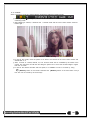
[Figure 5-6. Zoom Control Screen]
③ In case of the mouse, move the pointer to an area to be zoomed in the zoom control screen and
double-click on it.
④ Then, it zooms in 3 levels; Normal, x4, x16. Those 3 levels can be controlled by the wheel of the
mouse. The user also can left-click and drag the yellow box to move the focused image in higher
than the x4 mode.
⑤ In case of the remote controller and front panel, it is available to move to 3 levels by using
{SELECT} button in the remote controller and {SELECT} button of the front button. The ye
llow box can be moved by the arrow keys.
22
5-3-4 Screen Control by using PTZ
This enables the user the real-time monitoring by using PTZ camera.
The PTZ camera must be connected to the system. For external connection, refer to [2-3 Connection
of Other Devices] [3) Terminal block]. Select {Menu} {Setup} {Camera} {PTZ}.
① Configure Protocol / ID / Baud Rate / Duration / Tour.
[Figure 5-7. PTZ Setup]
※ Baud rate can be selected at 2400/4800/9600/19200/38400.
※ Duration can be selected at 5/10/15/20/5-60(User setting) seconds.
※ Tour consists of Tour 1/ Tour 2 and each tour can be set with 8 Preset.
※ EH1-04 Model supports 26 protocols for PTZ control. For supported protocols,
refer to APPENDIX.
23
② To control PTZ camera, select {PTZ Control} in Menu or press {PTZ} in the remote controller.
[Figure 5-8. PTZ Control]
[Figure 5-9. PTZ Control Mini/Full]
In the PTZ mode, there are two function; Full and Mini. Tour has [Tour1] and [Tour2]. Home
Position Time is 1/5/10/User setting(1-60)minutes.
Preset? Using horizontal/vertical/Zoom/Focus/Iris movement of PTZ Camera, zoom or focus
or Iris a certain spot of the image by designating the coordinates and move to the designated
coordinates quickly.
Home Position Time? If there are no controlling signals to PTZ camera after a certain time, it
goes automatically to the Preset No.1 position as Preset No. 1 is designated as Home Position
24
5-4 System Information and Screen Setup Change
5-4-1 System Information
[Figure 5-10. Product Information Window]
5-4-2 Screen Brightness/Contrast/Color/Saturation/Sharpen/Camera Adjustment
Select {Adjust}, then it becomes the 1 channel mode and a window pops up as shown below.
[Figure 5-11. Screen Setup Window]
Moving the camera, down, right, or left excessively may cause black or gray areas to appear on
the screen. The level at which such condition does not occur is the proper control range for the
camera.
25
5-4-3 Display Setting
Camera Title On/Off, Control Bar On/Off, Button Sound On/Off, Border Line Draw/Width/Color, Sequence
Duration 1-10seconds. After selecting Display Setting, it becomes the 1 channel mode and a menu pops up as
shown below.
[Figure 5-12. Display Setting Window]
5-4-4 Screen Saver
Monitor connected with DVR can be shut down to protect monitor. {Menu} {Miscellane..} {Display
Setting} {Screen Saver}
Name
Duration
Starting
Waiting Time
Function
Screen Save duration setting
Screen Save starting setting, 0 to 24
Screen Save activating term when there is no input
[Figure 5-13. Display Setting Window]
26
5-5 Control
In the real-time monitoring, move to {Menu} {Miscellaneous} {Misc. Control}.
[Figure 5-14. Audio]
[Figure 5-15. Text]
① Move to the Audio tab and select the channel to be activated or Mute.
EH1-04 support 1 channel audio.
② Move to the TEXT tab and select.
EH1-04 model support 1 channel text input.
5-6 Search
5-6-1 Search Mode
Move to {Menu} {Search} in the real-time monitoring mode.
[Figure 5-16. Playback Menu]
5-6-2 Playback Menu
(1) Calendar Search
Calendar Search allows the user search and playback by [Year/Month/Day/Hour/Minute],[Multi-Channel/MultiTime/Multi-Day]and [Motion/Sensor/Audio/Pattern].
(2) Go To The Last
The user can search and playback the last recorded data by Multi-Channel Mode.
(3) Go To The First
The user can search and playback the first recorded data by Multi-Channel Mode.
(4) Go to The Last Played Time
The user can playback from the last played time by Multi-Channel Mode.
(5) POS Search
Text Data can be searched and used for playback [Year/Month/Day/Hour/Minute],[Text 1~3]
※ Go To The First and Go To The Last are only available in {Multi-Channel}.
27
5-7 Calendar Search
5-7-1 Search Mode
On the real-time monitoring screen, select {Menu} {Search} {Calendar Search} and then a searching
window pops up as shown below.
[Figure 5-17. Search Window]
5-7-2 Year/Month/Day Selection
Select the desired [Year/Month/Day]. The color of the icon at the top-left of square in the calendar indicates the
recording status.
5-7-3 Time Index
① Every time when the user changes the time at {Menu} {Setup} {Time} {Date and Time}
tab, a new folder(Index) is created and files saved in the folder before the time change can be fou
nd at {Menu} {Calendar Search} {Time Index}.
② Selecting a file at {Menu} {Calendar Search} {Time Index} leads to a selection window pop
up and the user can select a file in different folders (before time change).
Start Time
End Time
The Recorded Start Time
The Recorded End Time
5-7-4 Event
Event is to search the data by the events. Select [All/Motion/Sensor/Audio/Pattern/Text].
5-7-5 Multi-Channel Search
The Multi-Channel Search is to play recorded images of the different channel over a certain designated time.
① Select the desired Year/Month in the calendar window.
② After selecting the desired search date, each channel is then displayed in the hour bar graph.
The bar graph color in the real-time monitoring mode is same with recording event functionally.
28
③ Move the time line to a specific time point by using the arrow keys or the numeric buttons and pre
ss the Search button.
④ Selecting the time leads to the recorded video display of each channel in the minute bar graph.
⑤ Move the time line to a certain time point by using the arrow keys and the numeric buttons and pr
ess the Select button. Playback will then start from the specified time point.
5-7-6List All
To check Time index in order of time line.
[Figure 5-18. Time Index]
5-8 POS Search
5-8-1POS Search Mode
On the real-time monitoring screen, select {Menu} {Search} {POS Search} and then a searching
window pops up as shown below.
5-8-2Year/Month/Day/Text/Time Selection
Please select date/time, Time index, Text 1~3, and select the start time within the channel..
5-8-3Search / Playback
After selecting the ‘Start’ Button, ‘1 searched item’ needs to be selected in order for ‘playback’ to start.
[Figure 5-19. POS Search]
29
5-9 Playback
[Figure 5-20. Playback Screen]
※ There are five routes to play the recorded image.
Playback in the Calendar Search
Select {Playback} in {Menu} {Search} {Calendar Search} {Search}.
Playback in the Go To The Last
Select {Menu} {Search} {Go to The Last}.
Playback in the Go To The First
Select {Menu} {Search} {Go To The First}.
Playback in the Last Played Time
Select {Menu} {Search} {The Last Played Time}.
Playback in the Log View
After selecting {Menu} {Miscellaneous} {Log Viewer}, select or double-click the time line listed to
play.
※ EH1-04 provide a variety of the playback.
Smart Search
POS Search
Calendar Search
Multi-Channel
Panorama Play
Event Play
Zoom Play
5-9-1Playback and Playback Speed Control
① In the Playback mode, the user can play back video contents by using buttons as shown belo
w.
② After the data is played to the end, the data of the next time zone will be automatically searched
and played (this function is possible only in the Multi-channel Playback mode; both backward playb
ack and forward playback are possible).
③ Pressing
buttons, the user can adjust the playback speed by(ⅹ1) / (ⅹ2) / (ⅹ4) / (ⅹ8) /
(ⅹ16) / (ⅹ32) / (ⅹ300).
[Figure 5-21. Playback Status and Control Window]
Description of the Search Buttons
30
Button
Name
Channel Mode Change
Features
Switch the channel mode.
Zoom Mode
Switch to the Zoom mode.
Forward Play / Fast Forward
Forward Frame by Frame
Pause
Pause
Reverse Frame by Frame
Reverse Play / Fast Reverse
ESC
Press one time - Playback forward (ⅹ1)
Press two times - Fast forward (ⅹ2)
Press three times - Fast forward (ⅹ4)
Press four times - Fast forward (ⅹ8)
Press five times - Fast forward (ⅹ16)
Press six times - Fast forward (ⅹ32)
Press seven times - Fast forward (ⅹ300)
Pressing one more time in x300 leads to x1
back.
Playback frame-by-frame
Pause
Reverse playback frame by frame
Pause
Press one time - Playback reverse (ⅹ1)
Press two times - Fast reverse (ⅹ2)
Press three times - Fast reverse (ⅹ4)
Press four times - Fast reverse (ⅹ8)
Press five times - Fast reverse (ⅹ16)
Press six times - Fast reverse (ⅹ32)
Press seven times - Fast reverse (ⅹ300)
Pressing one more time in x300 leads to x1
back.
Exit out of Playback Mode.
Status bar indicating information of the hourly
recorded image data and the speed.
Selecting the right-mouse button or menu button in the Playback Mode pops up the {Playback Menu} as shown
below.
[Figure 5-22. Playback Menu]
5-9-2 Smart Search
This function is used to search an image with the object movement at a specific zone quickly. Searching by each
channel and a detail control are available.
Type
Sensitivity
Minimum
Quick Search
Detail Search
Content
5 levels; Lowest / Low / Middle / High / Highest
Mosaic pixel control available between 1- 10
In the NTSC mode, search 30 frames once.
In the PAL mode, search 25 frames once.
Search all frames.
31
① Move to the Smart Search and select the desired channel.
② After shifting to the 1 channel mode, select areas to be smart searched.
[Figure 5-23. Smart Search Area Designation]
③ The 14 * 15 pixel mosaic mode appears. In the beginning, all pixels are selected. Designate an a
rea by left-click and drag the pixel mosaic pointer(deep yellow). Designate another area by repeatin
g the same way.
It detects motions in non-designated blocks.
④ Right-click brings up the menu as shown below. Configure each category and press the Playback b
utton to start searching.
[Figure 5-24. Smart Search Motion Detection Window]
⑤ It may take time during the searching. Start the playback after searching.
5-9-3 POS Search
The Text Data recorded needs to be searched in order to Playback
5-9-4 Calendar Search
Move to {Menu} {Search} {Calendar Search} and then a searching window pops up.
5-9-5MULTI CHANNEL
Multi-Channel Search is to play recorded images of the different channel over a certain designated time.
5-9-6Event
Event is to search and play events [ All/Motion/Sensor/Audio ].
5-9-7 Backup
The user can save the backup image data and capture the image into [CD/External Device].
Backup
Save the recorded data into [CD/External Device].
32
Snapshot
Capture and save the current displaying screen.
5-9-8 Screen Mode
Screen division is available in the Playback mode as same in the Monitoring Mode.
[1 / 4 / 9 / 16 Mode] can be selected.
① Select the screen division mode by using the mouse or arrow keys in the front panel and remo
te controller.
[Figure 5-25. Display Mode]
5-10 Log Viewer
DVR records all Log information over the system operation including Power on/off, System Setup and Network
Access. Move to {Menu} {Miscellaneous} {Log Viewer} to see the logs.
[Figure 5-26. Log View]
5-10-1 Log Type
General
Recording Event
Network
Fail
All
Logs related to power ON/OFF, file copy/backup failure, setup start/end,
playback, and other basic system operations
Logs related to the recording including motion detection and sensor
detection, Audio detection
Logs related to network operations including network login, network
logout, and network live
Logs related to system operation failures including signal loss and
network connection failure
Logs related to all system operations
33
5-10-2 System Log Viewer
① In the real-time monitoring mode, {Menu} {Miscellaneous} {Log Viewer}, then, Log List Windo
w pops up.
② On the activated calendar window, select the desired date (year/month/day) by using the arrow key
s and the Select button.
③ The user can check the time and the log type by using the arrow keys in the log list.
④ Use the Up/Down button to check the logs by time and type on each page.
⑤ The user can shift the focus to a certain time zone to play the certain time (playback will start fro
m the time point when logs are saved)
⑥ Click the right-mouse button or select {Menu} button in the front panel and select {Hour} to move
the desired log time zone.
[Figure 5-27 . Move to the log list of the certain time zone in Log View]
Time Changed Log Data View
The stored data folder is created each time the user changes the time. A blue triangular icon is
displayed at a date in the calendar window that time changes are made. Otherwise, a red
triangular icon is displayed at an unchanged date. To view the log details, select the desired
date with a red icon. Selecting a date with the blue icon causes the changed date list window to
appear.
5-11 Recording
5-11-1 Recording Types
It supports various recording types as shown below.
Recording Type
Continuous
Motion
Text
Description
The Continuous recording will be initiated based on the general frame rate.
When motion is detected, the recording will be initiated based on the event frame value.
When a text is received from POS device, the text will be recorded.
5-11-2 Recording Setup
Go to {Menu} {Setup} {Recording} for the Recording Setup. For more information, move to {Menu}
{Setup} {Recording}} {Recording}.
34
5-11-3 Recording Status View
(1) Recording Status by Color
※ Recording Event / Recording Mode Icon ※
Recording
Event
Motion Detection Recording
Text Recording
Video Recording
Recording
Mode
Audio Recording
Text Recording
5-12 Backup
In order to backup the data, make sure to check that either internal or external storage devices (CD, DVD or
HDD) supports USB 2.0 is connected. For supported external devices, refer to Appendix. The user can back up
data in the real-time monitoring, search, log, or the playback mode.
5-12-1 Backup in The Real-Time Monitoring Mode
① In the real-time monitoring mode, select {Menu} {Backup} {Backup}. The backup menus will
then appear.
② The automatic backup time is set to 5 minutes before the Copy (Backup) button is pressed, and
the end time, to the time the Copy (Backup) button is pressed.
③ All channels containing data at the time of backup are backed up automatically. Depending on the
divided screen mode, however, only those channels that can be viewed may be selected.
④ For the remaining backup procedures, see [5-33 Common Backup Procedure].
5-12-2 Backup in Search Mode
① Select {Menu} {Search} {Calendar Search}.
② Click the right-mouse button or select {MENU} button in the front panel.
③ The automatic backup start time is set to the year/month/date/hour/minute set in the search mode,
and the end time, to the last minute/second of the data existing at the selected time.
④ All channels with existing data at the time of backup are backed up automatically.
⑤ For the remaining backup procedures, see [5-33 Common Backup Procedure].
5-12-3 Backup in Log Mode
① Select a date in {Menu} {Miscellaneous} {Log Viewer} and select a log related to the data
to be backed up.
② Click the right-mouse button or select {MENU} button in the front panel.
③ The automatic backup time is set to 5 minutes before the selected log is generated, and the end ti
me, to the time the selected log is generated.
④ All channels with existing data at the time of backup are backed up automatically. If a log has
been generated for a specific channel, however, then only that channel is selected.
⑤ For the remaining backup procedures, see [5-33 Common Backup Procedure].
5-12-4 Backup in Playback Mode
① In the Playback mode, select {Menu} {Backup}. Any playback in progress at this time will stop.
② The automatic backup time is set to 5 minutes before the Copy (Backup) button is pressed, and th
e end time, to the time the Copy (Backup) button is pressed.
③ All channels containing data at the time of backup are backed up automatically. Depending on the
divided screen mode, however, only those channels that can be viewed may be selected.
④ For the remaining backup procedures, see [5-33 Common Backup Procedure].
35
5-12-5 Common Backup Procedure
[Figure 5-28. Backup Window]
① [Figure 5-34] shows the initial backup window menus.
② A list of the devices that can be selected is outputted with simple information of the currently selec
ted devices
③ Selecting a device by pressing the Select button causes the free space and total capacity for the s
elected device to be displayed.
④ Selecting a device causes the directory name based on the initial values for the time and channel
to be displayed and the size of the file to be backed up to be calculated.
⑤ The directory is named as same with the backup time. The first 12 digits are determined by the ye
ar/month/day/hour/minute/second for From, and the 12 digits in the middle, by the year/month/day/h
our/minute/second for To. The last 2 digits are determined by the number of folders in the selected
device.
⑥ Selecting a device enables selecting the backup time as well. As a rule, the From time cannot be l
ater than the To time, and the To time cannot be earlier than the From time.
⑦ To change the start and end time, press the Select button after choosing the start and end time.
Change year/month/day/hour/minute/second by using arrow keys and press the ESC button.
⑧ Changing the backup time causes the name of the directory to be backed up to be changed as w
ell.
⑨ If the file to be backed up exceeds the free space, its size is displayed in a yellow box in case th
e selected device is capable of rerecording and in a red box if not.
If the backup storage device is not formatted, in case the box displaying the size of the
file to be backed up is displayed in yellow, and if backup is executed by pressing the
Copy (Backup) button, a prompt asking(Yes/No) whether to erase the device will appear.
Selecting {YES} causes the storage medium for the selected device to be erased.
⑩ Press the Copy (Backup) button. A prompt asking(Yes/No) whether to proceed with the backup.
※ Select [Yes] to back up the data or [No] to stop the backup. Otherwise, press the [Cancel]
button to return to the device selection mode on the backup window.
⑪ Select {Yes} to continue the backup.
\
36
5-13 Setup Backup
The Setup Backup is to back all setup values of the current menu up. This function enables the user to copy the
setups and apply them into other devices.
[Figure 5-29. Backup and Sub-menu Setup Backup]
① For the Setup Backup, a device for backup must be connected.
② Move to {Menu} {Backup} {Setup Backup} and a window shown below appears. The setup
is copied by the name shown below.
[Figure 5-30. Setup Upgrade]
Saved as the name below.
①Model ② DVR name ③ Version ④ Date ⑤ Time
③ Move to {Menu} {Setup} {System} {6. Upgrade} ->{Setup} after insert the backup device.
④ With this way, the user can upgrade a new device with the current setup values in easy way.
5-14 Log Backup
This is to back logs up including General/ Recording Event / Network / Fail.
① Move to {Menu} {Backup} {Log backup} and start the backup process after selection of the
events.
[Figure 5-31. Log Backup]
37
.Log files are created at a folder shown below.
565645348945_20100303.log
.log file is the text file.
5-15 Capture
The Capture function lets the user create a JPG file in the real-time monitoring, playback, search, or log mode
and back up the image data.
① To back up the currently displayed image, select {Menu} {Backup} {Capture} in real-time
monitoring, Playback and Log mode.
② When only one USB2.0 backup device (excluding ODD devices) is searched, the JPG file is stored
in the same device.
③ If there are no or more than two USB2.0 storage devices (excluding ODD devices), a window for
selecting the device will be displayed.
④ If the selected device is an ODD device, a prompt asking whether to back up in the ODD device.
38
Chapter 6. Setup
6-1 Time
※ Function Description
1. Time Synchronization
1) Synchronization with the NTP server
The time is synchronized once every hour with the NTP Server.
A. Automatic Setup
The nearest server from the user’s zone will be selected for connection. If the connection fails, the next
nearest server will be chosen.
B. User Setting
The user sets the URL or IP for the NTP server. If connection is not established, a message will be sent to
the user, and the related log, saved.
If synchronization with the NTP server fails, synchronization with RTC will be established.
2) Synchronization with the DVR Time Server
The DTS server is executed in the DVR system and the time is synchronized every hour. DTS clients of
DVR series referring to the DTS synchronize the time of the DVR system with DTS.
When the DTS time or a zone is changed, the change is reflected on DVR series belonging to the network
(the synchronization signals are broadcasted without passing through the router or gateway). The DVR time
server does not support automatic connection.
2. Daylight Saving Time (DST) Setup
Regardless of whether NTP server or DST server is referred to, DST is automatically processed according
to the time.
3. Time Setup by User
The user can set the time directly.
For the NTP client setup, the user can read the time but not change it.
※ Move to {Menu} {Setup} {Time} to set up time functions.
[Figure 6-32. Setup / Time Menu]
39
6-1-1 Time Sync
① Select Time Sever / Sever Type / Sever URL.
Off
The time server is not used.
NTP
NTP is used to set the time for the time DVR.
{NTP} setup is available when {Time Sync} is set as NTP.
The user can enter the IP only when the server type is DVR. For
the NTP server, Automatic, IP, or URL should be selected.
6-1-2 Date and Time
(1) Date and Time
Only available when Time Server is off.
The system date and time format is Year/Month/Day Hour/Minute/Second.
① By using the arrow keys and the Select button, move the focus onto the desired field; Year/Month/
Day Hour/Minute/Second and press the Select button.
② Select a field you want to change by using the arrow buttons and press the Select button.
(2)Time Display Format
Select Time Display Format among [Day/Month/Year] / [Month/Day/Year] / [Year/Month/Day].
6-1-3 Standard Time Zone
(1) Standard Time Zone
① Select {Standard Time Zone}.
② On the selection window, select the standard time zone you want to set.
(2) DST
① By using the arrow keys and the Select button, select {Summer Time}.
② On the selection window, select On/Off by using the arrow keys and the Select button.
(3) Start Time
① By using the arrow keys and the Select button, select {Start Time}.
② On the selection window, set up Start Time by using the arrow keys and the Select button.
(4) End Time
① By using the arrow keys and the Select button, select {End Time}.
② On the selection window, set up End Time by using the arrow keys and the Select button.
※ For a weekly setting in the {Start Time} and {End Time} fields, set Day to 0.
※ After the Daylight Saving Time is selected, the existing data will be displayed
as “OLD_” in the search and log list.
40
6-1-4 Auto Reboot
Auto Reboot is for system stability, rebooting itself regularly.
[Figure 6-33. Setup / Auto Reboot Menu]
6-2 Camera
[Figure 6-34. Setup Camera Menu]
6-2-1 Camera
① Connection
Used to set whether to connect or disconnect each camera channel.
※ When the camera channel is set to disconnected, the video contents will not be
displayed even if the camera is actually connected.
② Title
Name each camera. Max. 20 letters are available.
③ PZ Mask
Used to hide a certain area of the real-time monitoring screen. After selecting PZ Mask over each channel, it
becomes the 1 channel division mode and designate sections where you don’t want to monitor.
41
④ Adjust
Adjust Brightness/Contrast/Color/Saturation/Sharpen/Camera.
6-2-2 PTZ
Setup the protocol and baud rate of the PTZ Camera.
6-2-3 POS
Setup the protocol and baud rate of the POS device.
6-2-4 Event Source
Select {Menu} {Setup} {Camera} {Event Source}.
(1) Motion Area
The user can setup the motion detection area. Area setup related to motion can be decided.
[Figure 6-35. Motion Area Setup]
① Select Motion Area of each channel.
② It becomes the 1 channel division mode and rectangular boxes appear where motions occur. Drag
the yellow pixel cursor by using the mouse or the front button/remote controller and select pixels w
here motion detection doesn’t applied. The selected area turns brown.
③ Select Exit to finish.
(2) Motion Sensitivity : Lowest/Low/Middle/High/Highest.
.
42
6-3 Recording
The Main setup is to configure the environment of record and system and major functions.
In the real-time monitoring, move to {Menu} {Setup} {Recording}
[Figure 6-36. Setup / Recording]
6-3-1 Schedule Selection (Schedule1 ~ Schedule4)
① Each channel can be scheduled in 4 different schedules. This schedule can be set as the
recording schedule and each time can be 4 different schedules.
6-3-2 Event
This is to set the events On/Off of Motion / Sensor / Sound / Text Input / Text Search.
Recording
Type
Continuous
Motion
Sensor
Sound
Text Input
Text
Search
Description
Continuous recording based on the Normal Speed frame rate.
When motion is detected, recording will be initiated based on the event frame rate.
When input signal from an external sensor is generated, recording will be initiated based on
the event frame value.
When audio is detected, recording will be initiated based on the event frame value.
When a text is received from POS device, recording will be initiated based on the event frame
value.
When searching Text, can select to receive email regarding the ‘Word’ that is set..
6-3-3 Recording
(1) Recording Resolution
Used to set the resolution of the recorded channel.
Resolution by Video Type
Type
Resolution
CIF
D1
960H
NTSC
PAL
352ⅹ240
704ⅹ480
960ⅹ480
352ⅹ288
704ⅹ576
960ⅹ576
43
(2)Recording Quality
Used to set the quality of the recorded video. Select among five levels {Lowest} / {Low} / {Middle} / {High} /
{Highest}.
※ The higher picture quality, the bigger file size.
(3) Frame Rate
If the user configures Normal Speed and Event Speed at the same time, the continuous recording follows Normal
Speed frame rate and the event recording follows Event Speed frame rate.
Normal Speed
Set the recording frame rate for Continuous recording.
Event Speed
Set the recording frame rate for Motion, Sensor, Audio, Text
Maximum Recording Frame by Resolution
Resolution
Model
4CH
CIF
(NTSC/PAL)
D1
(NTSC/PAL)
960H
(NTSC/PAL)
120/100fps
120/100fps
120/100fps
(4) Audio
Used to set the recording of the external audio input linked to the system.
6-3-4 Alarm
※ This function is used to generate alarms through the Buzzer / PTZ Preset / e-mail / Relay / Spot / Popup in
case of an event. PTZ preset can be configured between 1-16.
※ Popup function is to inform event occurrence to the user through a warning window in the
real-time monitoring mode.
6-3-5Duration
Setup Pre-Recording( On / OFF ), Post-Recording(5 / 10 / 15 / 20 / 60 / 150 / 300 seconds).
※in Pre-Recording, images of the last 7 seconds before the event occurrence are recorded.
6-3-6 Log
Setup On / Off for Motion / Sensor / Sound / Text Input.
6-4 Schedule
H-model series provide 4 different recording mode configurations. Each schedule mode can be set one week/24
hours and the recording follows the setting automatically.
[Figure 6-37. Schedule Window]
44
6-4-1 Schedule Setup
Select one schedule among Schedule1, Schedule2, Schedule3 and Schedule4.
(1) Selection Tip
① Select the day and time to be set by using the arrow keys.
② Select after moving the cursor onto Time(0-23) or Day(Sun. – Holiday) then the user can configure
the whole line at once.
③ Using the mouse can be easier.
(2) Holiday Registration
This feature is used to enable the user to set the holidays and schedule independently.
① Move to {Schedule} {Holiday}.
※ If the date for the holiday and day of the week are the same in the {Schedule} menu,
the holiday setup will have priority over the date setup.
※ Designated holidays are marked with a red tag.
② On the Holiday Registration Window, select the date by using the arrow keys and the Select button
and press the Select button.
③ After setting the holiday, move to {Save} at the bottom of the menu. Afterward, press the Select b
utton.
6-5 Storage
[Figure 6-38. Storage Window (Local)]
In the Storage menu, To apply the new setting, save the new setting after changing the setting.
Reset: Initialize the menu to the basic setting.
6-5-1 Max. Recording Days
This is to limit the recording days. You can set None/1day/7days/30days/User setting(1-31).
6-5-2 HDD Overwrite
① Select On/Off for HDD Overwrite.
If there is no more hard disk space left, the existing files will be overwritten by starting with
On
the oldest.
Off
If there is no more hard disk space left, the further recording will not be executed.
45
6-5-3 Local Storage Management
(1) Local Storage Management Function
Local Storage refers to the internal hard disk and storages connected to the system via USB. Local Storage is
classified and managed as {Recording}, {Backup}, {New}, {iSCSI} and functions are described below.
① Recording
The Recording storage is managed in Direct. The Recording storage stores data on the hard disk in the real time.
Five commands can be executed. Depending on the S/W status, however, some commands cannot be executed.
Returns the status of the selected storage device to New; if this command is executed,
New
the selected storage device will be moved to the {New} storage device manager.
※ Physical states supporting the execution of the commands above includes Healthy and
Warning. In fault state, however, no command can be executed.
② Backup
The backup storage is managed in Backup. Backup storages are not used to store data; rather, they a
re only used to back up the data. The user can execute only the {New} command.
Depending on the storage type, the storage is used only for (Recording) or (Backup) purposes.
③ New
All storages, initially detected are managed in {New}. All initially detected storages are displayed as N
ew and can be changed into Recording storage or Backup Storage.
Recording-Format
Backup-Format
Changes the selected storage into a dedicated recording storage.
Changes the selected storage into a backup storage.
In {New}, At least, one storage shall be selected as a dedicated storage. Otherwise, the data
cannot be stored in the real time.
(2) Composition of the local storage device
※ There are three software status types.
Active
Connected to storage or backup device; currently saving the data.
Online
Only connected to storage or backup device.
Offline
Not connected to storage or backup device.
Healthy
Connected to storage or backup device; functions normally.
Warning
Connected to storage or backup device, but error was detected; in this case, data
storing or backup cannot be made (for more information, see the description below).
Fault
Not connected to storage or backup device; cannot perform data saving or backup.
※ There are three hardware status types.
1. Fault State : The storage device is completely damaged, and none of the S/W operations
can be performed. The fault state is not related to a DVR problem. The DVR has detected the
fault and stopped the recording.
2. Warning State : The storage device has a physical error that can be corrected by the storage
device or by the DVR. If the error is not taken care of, however, the storage device is likely to
be damaged (and shift to fault state). Backing up data in the corresponding storage device
and replacing the device with a normal one are strongly recommended.
3. If there is an active storage device with a warning or a fault, a message is displayed on the
upper left part of the screen.
46
(3) Instruction when adding the local storage device
① Open the system body and install a new disk (connect the data cable and the power cable)
②
③
④
⑤
Connect power to the system and boot the system.
Select {Menu} {Setup} {Storage} by using the arrow keys and the Select button.
A newly displayed disk will then be displayed as {New}.
Select a newly installed disk by using the arrow keys and the Select button and initialize the disk
as a {Recording} or a {Backup} disk. The following describes the method of setting the recording st
orage.
⑥ {Recording} shows the status of the newly installed disk online.
※ Selecting {Recording-Format} or {Backup-Format} causes all data in the device to
be erased. Therefore, caution is required.
※ While {Recording-Format} or {Backup-Format} is being set up, do not remove the
device (may cause an error when detecting the device).
※ To use the external or portable storage device for system upgrade, set to {BackupInit} in the {New} item for {Main Setup} {Storage Device} {Local Storage Device
Management}.
※When used in DVR equipment for the first time, a backup USB device will always be
detected in the {New} category. Therefore, a USB device in the {New} category must be
set up as {Backup-Format} prior to use for backup. A USB device that has gone
through this procedure will be detected in the {Backup} category when used again in
the DVR equipment.
(1) How to changed FAULT HDD
① Check Faulty HDD number
② Turn OFF unit by power button.
③ Detach cover of DVR
④
⑤
⑥
⑦
Find the faulty HDD by number printed on mainboard
Detach the faulty HDD
Attach new HDD.
Attach cover of DVR
(2) HDD Format for Recording
Select the model first.
As shown below, proceed with the following order {New} {Recording-Format}.
6-6Network
[Figure 6-39. Setup Network Window]
47
6-6-1 Ethernet
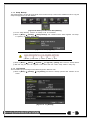
(1) DHCP
This is to use a dynamic IP in the Local Area Network environment.
(2) Static
This is to use a fixed IP in the Local Area Network environment.
① Select {Ethernet} in {Menu} {Setup} {Network}.
② Select {TCP/IP}.
③ Save after filling in IP Address, Subnet Mask, Default Gateway, Primary DNS, and Secondary DNS.
6-6-2 DDNS
As part of the DNS system, the Dynamic Domain Name System (DDNS) service updates IP addresses of the
host name in the real time and allocates fixed domain names to systems linked to dynamic IP addresses to allow
users to use the same DNS name regardless of the change of in the IP address.
It provides dynamic DNS to ensure URL access in the dynamic IP environment.
User can monitor the remote place thru internet with web server functions which is equipped in DVR.
① Select On/Off of DDNS or a domain name to use by using arrow keys and the selection button.
② In case of DDNS On, enter the host name and save it then, the registration procedure of the host
name proceeds automatically. You can enter the host name with 4-20 letters.
③ The host name to enter must not be pre-registered in DDNS sever. Otherwise it won’t work.
④ The basic host name is the MAC address of appertaining DVR.
⑤ In case the host name have entered starts with “000c28”, none of MAC address will work
excepting for appertaining DVR’s.
⑥ In case of DynDNS On, enter the host name, user name registered in DynDNS and password then,
save them.
※ Access to DynDDNS sever(http://www.dyndns.org) and apply for the user account then,
register the domain name to use and enter URL.
※ For more information, please access to the site.
6-6-3Port
Move to {Menu} {Setup} {Network} {Port}.
This feature is used to set the network port.
The default value is 50100; a randomly chosen value can be used depending on the network environment. The
Web Server Port is used to connect the DVR remote monitoring. The Web Port Default is 80, but can be set
between 2000 ~ 65527.
[Figure 6-40. Network Port Window]
48
6-6-4 E-mail
① Move to {Menu} {Setup} {Network} {E-mail}. To use the e-mail function, DNS or sub
DNS in {Menu} {Setup} {Network} {Ethernet} need to be configured.
[Figure 6-41. Setup Network Ethernet Window]
This is to set automatic E-mail transmission service when an event occurs.
To use the e-mail function, {E-mail} in {Menu} {Setup} {System} {9. Alarm} or {E-mail} in {Menu}
{Setup} {Action} { Alarm} need to be configured.
[Figure 6-42. Setup Network E-Mail Window2]
②
③
④
Relay SMTP is set on ‘Gmail’ as default, but when ‘Default’ (in menu tab) is selected, this will changed
to [email protected].
Receiver Email can be set up to 5 users (emails).
Email Interval settings are as follows [5 sec / 1 min / 3 min / 5 min /10 min].
49
6-6-5 Bandwidth
Move to {Menu} {Setup} {Network} {Bandwidth}.
This sets up the limit of the bandwidth to be used when bringing the live image, adjust resolution/quality and
transmitting the data by using the network.
Image Resolution
Image Quality
Bandwidth Limit
Transmission
Codec
CIF / D1 / 960H
Adjust quality of the image, as the value increases, the
compression rate gets higher and image quality gets low.
However the transmission rate gets higher.
You can set the network bandwidth between 40 ~ 4000kbps.
As the value increases, the network transmission speed gets
faster.
Select Off if you do not wish to limit the network bandwidth.
JPEG / H.264
6-7System
[Figure 6-43. System Setup Window]
1. DVR Name
2. User Registration
3. Upgrade
8. Language
Used to name the DVR device.
Used to register, add, or delete users.
Upgrades the system firmware/system setup
Initialize Setup.(Factory default value, except for the network
value)
Set the alarm On/Off and alarm format.
Set the alarm time by continuous/5/10/15/User setting
Used to set the time for exiting the System Setup menu
automatically and displaying the real-time monitoring screen.
System OSD language setting
9. Video Loss Event Delay time
Set the delay time between Video Loss event and next event
4. Factory Setup
5. Error Alarm Action
6. Error Alarm Duration
7. Menu Time Out
50
6-7-1 DVR Name
. The initial value is the Mac address. (It supports up to 20 letters for the system name.))
6-7-2User Registration
※ Add, edit, or delete the users who will operate the system and give authorities to users as shown below.
System Access Authorization
View the real-time images upon network access.
View the recorded images.
Copy and download files.
PTZ camera control
Recording, schedule, system, storage, Time, PTZ,
Setup
network, Screen setup
Network Upgrade
Remote network upgrade
Covert channel monitoring
View the covert channel in the network.
Network Live
Playback
Copy (download)
PTZ camera
Up to 15 users can be registered. Letters for ID and Password can be entered up
to 30.
6-7-3Upgrade
The firmware and menu setting of the product can be easily upgraded through the use of the external storage
devices or portable storage devices with USB 2.0 port.
※ Find and copy the upgrade file to the highest folder in the external storage device or portable
storage device supporting USB 2.0.
※ Connect the storage device with an upgrade file stored to USB 2.0 port at Right front panel.
1) After copying the upgrade file, be advised to get rid of the USB device with
safety removal mode from PC.
2) If the USB device is disconnected from the USB port while the upgrade file
is being copied, the DVR system may not automatically detect the file.
Removing USB during the upgrade in progress may cause damage on the
system.
The system starts over when the upgrade is completed.
(3) Firmware Upgrade
① Select {Firmware} and the upgrade file list stored in the selected device and simple version info of
the selected file are then displayed. Select a file and Firmware Upgrade window appears.
[Figure 6-44. Firmware Upgrade Progressing Window]
※ Downgrading to a previous version is not supported.
※ The upgrade information window will then appear within 15 seconds.
51
② Read the information and select {Yes} to start the upgrade gradually. Select {No} to return to the
{System} mode.
③ After the upgrade is completed, the system reboots.
④ Move to {Menu} {Miscellaneous} {DVR Information} {3. Software Version} to check the
version.
(4) Setup Upgrade
① Select {Setup} and the upgrade file list stored in the selected device and simple version info of
the selected file are then displayed.
② Select a file and then the upgrade starts immediately.
Select a file and then the upgrade starts immediately. All setting values of the
current menu will be changed to the upgrade setting values.
6-7-4 Factory Setupt
① Move to {Menu} {Setup} {System} {7. Factory Setup}.
② Select {Yes} when Initialization (Yes/No) Window appears.
Note that all setting data will be initialized.
※ All values go back to Factory Default Value.
6-7-5 Error Alarm
Alarm is to notify system incidents [Video Signal loss/ HDD full/ FAN fail/ HDD fail/ HDD warning] through
[Buzzer/ E-mail/ Relay01/ System check].
Select each [Off/Buzzer/E-mail/Relay01/Popup Window] by ticking.
※ Popup Window
Setup at {Menu} {Setup} {System} {9. Alarm}.
Popup Window is to pop up the system check window in the
monitoring screen as shown. it indicates [Video Signal loss/ HDD
full/ HDD Not Detect / FAN fail/ Storage Fail/ Storage Warning /
Sensor Connection Tamper].
6-7-6 Error Alarm Duration
① It sets the duration of the alarm triggered by the recording and system event.
② Move to {Menu} {Setup} {System} {10. Alarm Duration}.
③ In the selection window, set Alarm Duration by using the arrow keys and the Select button.
6-7-7 Menu Time Out
If no input is made in the System Setup menu from the front buttons, remote controller and mouse, the system
automatically shifts to the real-time monitoring mode.
① Move to {Menu} {Setup} {System} {11. Menu time Out}.
② In the selection window, select the time zone you want to set by using the arrow keys and the
select button.
Off
1/2/3 MIN
The Automatic Menu Exit is not used.
※ The user can exit the menu by pressing the [ESC] button in the System
menu.
If there is no input from the front button, remote controller, or mouse, the
system will shift to the real-time monitoring mode.
52
User Setting
The user can enter the time directly.
※ The time can be set to 1 ~ 60 minutes.
③ Selecting the User Setting causes the input window to appear.
④ Enter the time by using the numeric buttons or the arrow keys and the Select button.
6-7-8 Language
This feature is used to select the language for the On Screen Display (OSD) menu of the system. 18 languages
are supported.
6-7-9 Video Loss Event Delay time
This feature is used to setup the delay time between events before display the “Video signal loss” event.
53
APPENDIX
A/P/P/E/N/D/I/X
Recommended PTZ Camera Protocol
NO
Vendor
1
A.D.
2
CHOU
Model
ULTRA_7
ULTRA_8
COHU3925
Protocol
SENSORMATIC
COHU
3
Dongyang
Dongyang
4
DYNACOLOR
DSCP
DRX-500
DY-255
DSCP
5
ERNITEC
ERNITEC
ERNITEC
6
EYE VIEW
EYE VIEW
EYE VIEW
7
FINE SYSTEM
CRR-1600i/s
CRR-1600i/s
8
GE
GE
GE_KARATEL
9
GSP
GSP
CYBERSCAN_1
10
HITRON
FASTRAX2
FASTRAX2
11
HONEYWELL
SCANDOME2
HSDN-251
12
LG
LG
13
LINLIN
LINLIN
LG_MULTIX,
LG_OLD
LINLIN
14
MIKAMI
MIKAMI
MIKAMI
15
ORIENTAL
ORX-1000
ORX-1000
16
PANASONIC
WVCS854
WVCS854
17
PELCO
PELCO
18
PHILIPS
PHILIPS
PELCO – D
PELCO - P
PHILIPS
19
PROLINE
PROLINE
PROLINE_UK
20
RIFATRON
RIFATRON-1
RIFATRON
21
SAMSUNG TECHWIN
SAMSUNG
22
SUNJIN
SUNJIN
SPD-1600
SCC641
SUNJIN
23
VICON
VICON
VICON
24
VISION_HI_TECH
VISION_HI_TECH
VISION_HI_TECH
25
YOKO
YOKO
YOKO
54
55