1
Oracle® Big Data Connectors
User's Guide
Release 4 (4.3)
E65668-02
October 2015
Describes installation and use of Oracle Big Data Connectors:
Oracle SQL Connector for Hadoop Distributed File System,
Oracle Loader for Hadoop, Oracle Data Integrator, Oracle
XQuery for Hadoop, and Oracle R Advanced Analytics for
Hadoop.
Oracle Big Data Connectors User's Guide, Release 4 (4.3)
E65668-02
Copyright © 2011, 2015, Oracle and/or its affiliates. All rights reserved.
This software and related documentation are provided under a license agreement containing restrictions on
use and disclosure and are protected by intellectual property laws. Except as expressly permitted in your
license agreement or allowed by law, you may not use, copy, reproduce, translate, broadcast, modify, license,
transmit, distribute, exhibit, perform, publish, or display any part, in any form, or by any means. Reverse
engineering, disassembly, or decompilation of this software, unless required by law for interoperability, is
prohibited.
The information contained herein is subject to change without notice and is not warranted to be error-free. If
you find any errors, please report them to us in writing.
If this is software or related documentation that is delivered to the U.S. Government or anyone licensing it on
behalf of the U.S. Government, the following notice is applicable:
U.S. GOVERNMENT END USERS: Oracle programs, including any operating system, integrated software,
any programs installed on the hardware, and/or documentation, delivered to U.S. Government end users are
"commercial computer software" pursuant to the applicable Federal Acquisition Regulation and agencyspecific supplemental regulations. As such, use, duplication, disclosure, modification, and adaptation of the
programs, including any operating system, integrated software, any programs installed on the hardware,
and/or documentation, shall be subject to license terms and license restrictions applicable to the programs.
No other rights are granted to the U.S. Government.
This software or hardware is developed for general use in a variety of information management applications.
It is not developed or intended for use in any inherently dangerous applications, including applications that
may create a risk of personal injury. If you use this software or hardware in dangerous applications, then you
shall be responsible to take all appropriate fail-safe, backup, redundancy, and other measures to ensure its
safe use. Oracle Corporation and its affiliates disclaim any liability for any damages caused by use of this
software or hardware in dangerous applications.
Oracle and Java are registered trademarks of Oracle and/or its affiliates. Other names may be trademarks of
their respective owners.
Intel and Intel Xeon are trademarks or registered trademarks of Intel Corporation. All SPARC trademarks are
used under license and are trademarks or registered trademarks of SPARC International, Inc. AMD, Opteron,
the AMD logo, and the AMD Opteron logo are trademarks or registered trademarks of Advanced Micro
Devices. UNIX is a registered trademark of The Open Group.
This software or hardware and documentation may provide access to or information about content, products,
and services from third parties. Oracle Corporation and its affiliates are not responsible for and expressly
disclaim all warranties of any kind with respect to third-party content, products, and services unless
otherwise set forth in an applicable agreement between you and Oracle. Oracle Corporation and its affiliates
will not be responsible for any loss, costs, or damages incurred due to your access to or use of third-party
content, products, or services, except as set forth in an applicable agreement between you and Oracle.
Contents
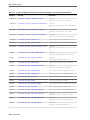
Preface ................................................................................................................................................................ xi
Audience ....................................................................................................................................................... xi
Related Documents...................................................................................................................................... xi
Text Conventions ......................................................................................................................................... xi
Syntax Conventions....................................................................................................................................
xii
Changes in This Release for Oracle Big Data Connectors User's Guide ........................ xiii
Changes in Oracle Big Data Connectors Release 4 (4.3).......................................................................
xiii
Changes in Oracle Big Data Connectors Release 4 (4.2).......................................................................
xiii
Changes in Oracle Big Data Connectors Release 4 (4.1)....................................................................... xiv
Changes in Oracle Big Data Connectors Release 4 (4.0)....................................................................... xiv
Part I
1
Setup
Getting Started with Oracle Big Data Connectors
1.1
About Oracle Big Data Connectors ...............................................................................................
1-1
1.2
Big Data Concepts and Technologies............................................................................................
1-2
1.2.1
What is MapReduce? ...........................................................................................................
1-2
1.2.2
What is Apache Hadoop?....................................................................................................
1-3
1.3
Downloading the Oracle Big Data Connectors Software...........................................................
1-3
1.4
Oracle SQL Connector for Hadoop Distributed File System Setup .........................................
1-4
1.4.1
Software Requirements .......................................................................................................
1-4
1.4.2
Installing and Configuring a Hadoop Client on the Oracle Database System............
1-5
1.4.3
Installing Oracle SQL Connector for HDFS......................................................................
1-7
1.4.4
Granting User Privileges in Oracle Database................................................................. 1-10
1.4.5
Setting Up User Accounts on the Oracle Database System.......................................... 1-11
1.4.6
Using Oracle SQL Connector for HDFS on a Secure Hadoop Cluster ....................... 1-11
1.5
Oracle Loader for Hadoop Setup ................................................................................................ 1-12
1.5.1
Software Requirements ..................................................................................................... 1-12
1.5.2
Installing Oracle Loader for Hadoop .............................................................................. 1-12
1.5.3
Providing Support for Offline Database Mode.............................................................. 1-13
iii
1.5.4
1.6
1.7
Software Requirements ..................................................................................................... 1-14
1.6.2
Installing Oracle XQuery for Hadoop ............................................................................. 1-15
1.6.3
Troubleshooting the File Paths......................................................................................... 1-16
1.6.4
Configuring Oozie for the Oracle XQuery for Hadoop Action ................................... 1-17
1.7.1
Installing the Software on Hadoop.................................................................................. 1-18
1.7.2
Installing Additional R Packages ..................................................................................... 1-21
1.7.3
Providing Remote Client Access to R Users................................................................... 1-23
Oracle Data Integrator................................................................................................................... 1-24
Part II
Oracle Database Connectors
Oracle SQL Connector for Hadoop Distributed File System
2.1
About Oracle SQL Connector for HDFS.......................................................................................
2-1
2.2
Getting Started With Oracle SQL Connector for HDFS .............................................................
2-2
2.3
2.4
Configuring Your System for Oracle SQL Connector for HDFS ..............................................
Using Oracle SQL Connector for HDFS with Oracle Big Data Appliance and Oracle
2-6
Exadata .................................................................................................................................................
2-7
Using the ExternalTable Command-Line Tool............................................................................
2-7
2.5.1
About ExternalTable ............................................................................................................
2-7
2.5.2
ExternalTable Command-Line Tool Syntax .....................................................................
2-7
Creating External Tables.................................................................................................................
2-9
2.6.1
Creating External Tables with the ExternalTable Tool ...................................................
2-9
2.6.2
Creating External Tables from Data Pump Format Files.............................................. 2-10
2.6.3
Creating External Tables from Hive Tables.................................................................... 2-12
2.6.4
Creating External Tables from Delimited Text Files ..................................................... 2-20
2.6.5
Creating External Tables in SQL ...................................................................................... 2-23
2.5
2.6
2.7
2.8
2.9
2.10
iv
1.6.1
Oracle R Advanced Analytics for Hadoop Setup ..................................................................... 1-17
1.8
2
Using Oracle Loader for Hadoop on a Secure Hadoop Cluster .................................. 1-14
Oracle XQuery for Hadoop Setup ............................................................................................... 1-14
Publishing the HDFS Data Paths................................................................................................. 2-23
2.7.1
ExternalTable Syntax for Publish..................................................................................... 2-24
2.7.2
ExternalTable Example for Publish ................................................................................. 2-24
Exploring External Tables and Location Files ........................................................................... 2-24
2.8.1
ExternalTable Syntax for Describe................................................................................... 2-25
2.8.2
ExternalTable Example for Describe ............................................................................... 2-25
Dropping Database Objects Created by Oracle SQL Connector for HDFS........................... 2-25
2.9.1
ExternalTable Syntax for Drop ......................................................................................... 2-25
2.9.2
ExternalTable Example for Drop ..................................................................................... 2-26
More About External Tables Generated by the ExternalTable Tool .................................... 2-26
2.10.1
About Configurable Column Mappings....................................................................... 2-26
2.10.2
What Are Location Files? ................................................................................................ 2-28
2.10.3
Enabling Parallel Processing........................................................................................... 2-28
2.10.4
Location File Management.............................................................................................. 2-29
2.10.5
2.11
2.12
3
Location File Names......................................................................................................... 2-30
Configuring Oracle SQL Connector for HDFS ........................................................................ 2-30
2.11.1
Creating a Configuration File ......................................................................................... 2-30
2.11.2
Oracle SQL Connector for HDFS Configuration Property Reference ...................... 2-31
Performance Tips for Querying Data in HDFS ....................................................................... 2-44
Oracle Loader for Hadoop
3.1
What Is Oracle Loader for Hadoop? .............................................................................................
3-1
3.2
About the Modes of Operation ......................................................................................................
3-2
3.2.1
Online Database Mode ........................................................................................................
3-2
3.2.2
Offline Database Mode ........................................................................................................
3-3
Getting Started With Oracle Loader for Hadoop........................................................................
3-3
3.3
3.4
Creating the Target Table ...............................................................................................................
3-5
3.4.1
Supported Data Types for Target Tables ..........................................................................
3-5
3.4.2
Supported Partitioning Strategies for Target Tables.......................................................
3-6
3.4.3
Compression .........................................................................................................................
3-6
3.5
Creating a Job Configuration File..................................................................................................
3-6
3.6
About the Target Table Metadata..................................................................................................
3-8
3.6.1
Providing the Connection Details for Online Database Mode ......................................
3-9
3.6.2
Generating the Target Table Metadata for Offline Database Mode..............................
3-9
3.7
3.8
3.9
3.10
3.11
About Input Formats..................................................................................................................... 3-11
3.7.1
Delimited Text Input Format............................................................................................ 3-11
3.7.2
Complex Text Input Formats............................................................................................ 3-12
3.7.3
Hive Table Input Format................................................................................................... 3-13
3.7.4
Avro Input Format ............................................................................................................. 3-14
3.7.5
Oracle NoSQL Database Input Format ........................................................................... 3-14
3.7.6
Custom Input Formats....................................................................................................... 3-15
Mapping Input Fields to Target Table Columns ...................................................................... 3-16
3.8.1
Automatic Mapping........................................................................................................... 3-16
3.8.2
Manual Mapping ................................................................................................................ 3-16
3.8.3
Converting a Loader Map File.......................................................................................... 3-17
About Output Formats.................................................................................................................. 3-18
3.9.1
JDBC Output Format ......................................................................................................... 3-19
3.9.2
Oracle OCI Direct Path Output Format .......................................................................... 3-19
3.9.3
Delimited Text Output Format......................................................................................... 3-20
3.9.4
Oracle Data Pump Output Format .................................................................................. 3-21
Running a Loader Job.................................................................................................................. 3-22
3.10.1
Specifying Hive Input Format JAR Files....................................................................... 3-23
3.10.2
Specifying Oracle NoSQL Database Input Format JAR Files .................................... 3-24
3.10.3
Job Reporting .................................................................................................................... 3-24
Handling Rejected Records ........................................................................................................ 3-24
3.11.1
Logging Rejected Records in Bad Files ......................................................................... 3-24
3.11.2
Setting a Job Reject Limit................................................................................................. 3-24
v
3.12
Tuning Load Balancing ................................................................................................... 3-25
3.12.3
Tuning Sampling Behavior ............................................................................................. 3-25
3.12.4
When Does Oracle Loader for Hadoop Use the Sampler's Partitioning Scheme?.. 3-26
3.12.5
Resolving Memory Issues ............................................................................................... 3-26
3.12.6
What Happens When a Sampling Feature Property Has an Invalid Value?........... 3-26
3.14
Oracle Loader for Hadoop Configuration Property Reference............................................. 3-27
3.15
Third-Party Licenses for Bundled Software............................................................................. 3-50
Oracle XQuery for Hadoop
Using Oracle XQuery for Hadoop
4.1
What Is Oracle XQuery for Hadoop?............................................................................................
4-1
4.2
Getting Started With Oracle XQuery for Hadoop ......................................................................
4-3
4.2.1
Basic Steps .............................................................................................................................
4-3
4.2.2
Example: Hello World! ........................................................................................................
4-3
About the Oracle XQuery for Hadoop Functions .......................................................................
4-4
4.3.1
About the Adapters..............................................................................................................
4-4
4.3.2
About Other Modules for Use With Oracle XQuery for Hadoop .................................
4-6
Creating an XQuery Transformation ............................................................................................
4-6
4.4.1
XQuery Transformation Requirements.............................................................................
4-6
4.4.2
About XQuery Language Support.....................................................................................
4-7
4.4.3
Accessing Data in the Hadoop Distributed Cache ..........................................................
4-8
4.4.4
Calling Custom Java Functions from XQuery .................................................................
4-9
4.4.5
Accessing User-Defined XQuery Library Modules and XML Schemas.......................
4-9
4.4.6
XQuery Transformation Examples .................................................................................. 4-10
4.4
4.5
4.6
Running Queries ............................................................................................................................ 4-14
4.5.1
Oracle XQuery for Hadoop Options................................................................................ 4-14
4.5.2
Generic Options .................................................................................................................. 4-15
4.5.3
About Running Queries Locally ...................................................................................... 4-16
Running Queries from Apache Oozie ........................................................................................ 4-16
4.6.1
Getting Started Using the Oracle XQuery for Hadoop Oozie Action ........................ 4-16
4.6.2
Supported XML Elements ................................................................................................. 4-17
4.6.3
Example: Hello World ....................................................................................................... 4-18
4.7
Oracle XQuery for Hadoop Configuration Properties ............................................................. 4-19
4.8
Third-Party Licenses for Bundled Software............................................................................... 4-22
Oracle XQuery for Hadoop Reference
5.1.1
vi
3.12.2
Optimizing Communications Between Oracle Engineered Systems .................................. 3-26
4.3
5
Using the Sampling Feature............................................................................................ 3-25
3.13
Part III
4
Balancing Loads When Loading Data into Partitioned Tables ............................................. 3-25
3.12.1
Avro File Adapter .........................................................................................................................
5-1
5.1.1.1
Built-in Functions for Reading Avro Files .....................................................................
5-1
5.1.1.2
Custom Functions for Reading Avro Container Files..................................................
5-3
5.1.2
5.1.3
5.1.1.3
Custom Functions for Writing Avro Files .....................................................................
5-4
5.1.1.4
Examples of Avro File Adapter Functions ....................................................................
5-6
5.1.1.5
About Converting Values Between Avro and XML.....................................................
5-7
JSON File Adapter ...................................................................................................................... 5-16
5.1.2.1
Built-in Functions for Reading JSON ........................................................................... 5-16
5.1.2.2
Custom Functions for Reading JSON Files.................................................................. 5-18
5.1.2.3
Examples of JSON Functions......................................................................................... 5-19
5.1.2.4
JSON File Adapter Configuration Properties.............................................................. 5-20
5.1.2.5
About Converting JSON Data Formats to XML ......................................................... 5-21
Oracle Database Adapter........................................................................................................... 5-22
5.1.3.1
Custom Functions for Writing to Oracle Database .................................................... 5-23
5.1.3.2
Examples of Oracle Database Adapter Functions ...................................................... 5-26
5.1.3.3
Oracle Loader for Hadoop Configuration Properties and Corresponding
%oracle-property Annotations .............................................................................................. 5-28
5.1.4
Oracle NoSQL Database Adapter............................................................................................. 5-31
5.1.4.1
Prerequisites for Using the Oracle NoSQL Database Adapter ................................. 5-32
5.1.4.2
5.1.4.3
Built-in Functions for Reading from and Writing to Oracle NoSQL Database...... 5-33
Built-in Functions for Reading from and Writing to Oracle NoSQL Database
using Table API......................................................................................................................... 5-37
5.1.4.4 Built-in Functions for Reading from and Writing to Oracle NoSQL Database
using Large Object API ............................................................................................................ 5-39
5.1.4.5
Custom Functions for Reading Values from Oracle NoSQL Database ................... 5-41
5.1.4.6
5.1.4.7
Custom Functions for Retrieving Single Values from Oracle NoSQL Database ... 5-44
Custom Functions for Reading Values from Oracle NoSQL Database using Table
API .............................................................................................................................................. 5-45
5.1.4.8 Custom Functions for Reading Single Row from Oracle NoSQL Database using
Table API.................................................................................................................................... 5-46
5.1.4.9 Custom Functions for Retrieving Single Values from Oracle NoSQL Database
using Large Object API ............................................................................................................ 5-47
5.1.4.10
5.1.4.11
Custom Functions for Writing to Oracle NoSQL Database .................................... 5-47
Custom Functions for Writing Values to Oracle NoSQL Database using Table
API .............................................................................................................................................. 5-49
5.1.4.12 Custom Functions for Writing Values to Oracle NoSQL Database using Large
Object API .................................................................................................................................. 5-49
5.1.5
5.1.6
5.1.4.13
Examples of Oracle NoSQL Database Adapter Functions ...................................... 5-50
5.1.4.14
Oracle NoSQL Database Adapter Configuration Properties .................................. 5-55
Sequence File Adapter ............................................................................................................... 5-60
5.1.5.1
Built-in Functions for Reading and Writing Sequence Files ..................................... 5-60
5.1.5.2
Custom Functions for Reading Sequence Files ........................................................... 5-64
5.1.5.3
Custom Functions for Writing Sequence Files............................................................ 5-66
5.1.5.4
Examples of Sequence File Adapter Functions ........................................................... 5-68
Solr Adapter................................................................................................................................. 5-70
5.1.6.1
Prerequisites for Using the Solr Adapter ..................................................................... 5-70
vii
5.1.6.2
Built-in Functions for Loading Data into Solr Servers............................................... 5-71
5.1.6.3
Custom Functions for Loading Data into Solr Servers .............................................. 5-71
5.1.6.4
Examples of Solr Adapter Functions ............................................................................ 5-72
5.1.6.5
Solr Adapter Configuration Properties ........................................................................ 5-73
5.1.7
Text File Adapter ........................................................................................................................ 5-75
5.1.7.1
Built-in Functions for Reading and Writing Text Files.............................................. 5-75
5.1.7.2
Custom Functions for Reading Text Files.................................................................... 5-78
5.1.7.3
Custom Functions for Writing Text Files..................................................................... 5-80
5.1.7.4
Examples of Text File Adapter Functions ................................................................... 5-81
5.1.8
Tika File Adapter ........................................................................................................................ 5-84
5.1.8.1
Built-in Library Functions for Parsing Files with Tika .............................................. 5-84
5.1.8.2
Custom Functions for Parsing Files with Tika............................................................ 5-85
5.1.8.3
Tika Parser Output Format ............................................................................................ 5-86
5.1.8.4
Tika Adapter Configuration Properties ....................................................................... 5-86
5.1.8.5
Examples of Tika File Adapter Functions ................................................................... 5-87
5.1.9
XML File Adapter ....................................................................................................................... 5-88
5.1.9.1
Built-in Functions for Reading XML Files ................................................................... 5-88
5.1.9.2
Custom Functions for Reading XML Files................................................................... 5-90
5.1.9.3
Examples of XML File Adapter Functions................................................................... 5-93
5.1.10
Utility Module ........................................................................................................................... 5-95
5.1.10.1
Duration, Date, and Time Functions .......................................................................... 5-95
5.1.10.2
String Functions............................................................................................................. 5-99
5.1.11
Hadoop Module...................................................................................................................... 5-102
5.1.11.1
5.1.12
6
Oracle XML Extensions for Hive
6.1
What are the XML Extensions for Hive? ......................................................................................
6-1
6.2
Using the Hive Extensions .............................................................................................................
6-2
6.3
About the Hive Functions ..............................................................................................................
6-3
6.4
6.5.1
viii
Built-in Functions for Using Hadoop ....................................................................... 5-102
Serialization Annotations ...................................................................................................... 5-104
Creating XML Tables.......................................................................................................................
6-3
6.4.1
Hive CREATE TABLE Syntax for XML Tables ................................................................
6-3
6.4.2
CREATE TABLE Configuration Properties......................................................................
6-4
6.4.3
CREATE TABLE Examples.................................................................................................
6-5
Oracle XML Functions for Hive Reference ............................................................................. 6-11
6.5.1.1
Data Type Conversions .................................................................................................. 6-11
6.5.1.2
Hive Access to External Files......................................................................................... 6-11
6.5.2
Online Documentation of Functions........................................................................................ 6-12
6.5.3
xml_exists..................................................................................................................................... 6-13
6.5.4
xml_query .................................................................................................................................... 6-14
6.5.5
xml_query_as_primitive ............................................................................................................ 6-16
6.5.6
xml_table ...................................................................................................................................... 6-20
Part IV
7
Oracle R Advanced Analytics for Hadoop
Using Oracle R Advanced Analytics for Hadoop
7.1
About Oracle R Advanced Analytics for Hadoop ......................................................................
7-1
7.1.1
Oracle R Advanced Analytics for Hadoop Architecture................................................
7-1
7.1.2
Oracle R Advanced Analytics for Hadoop packages and functions ............................
7-2
7.1.3
Oracle R Advanced Analytics for Hadoop APIs .............................................................
7-3
7.1.4
Inputs to Oracle R Advanced Analytics for Hadoop ......................................................
7-3
7.2
Access to HDFS Files .......................................................................................................................
7-4
7.3
Access to Apache Hive....................................................................................................................
7-5
7.3.1
ORCH Functions for Hive...................................................................................................
7-5
7.3.2
ORE Functions for Hive ......................................................................................................
7-5
7.3.3
Generic R Functions Supported in Hive ...........................................................................
7-5
7.3.4
Support for Hive Data Types..............................................................................................
7-7
7.3.5
Usage Notes for Hive Access..............................................................................................
7-9
7.3.6
Example: Loading Hive Tables into Oracle R Advanced Analytics for Hadoop........
7-9
7.4
Access to Oracle Database ............................................................................................................ 7-10
7.4.1
7.4.2
Usage Notes for Oracle Database Access........................................................................ 7-10
Scenario for Using Oracle R Advanced Analytics for Hadoop with Oracle R
Enterprise ................................................................................................................................... 7-11
7.5
Oracle R Advanced Analytics for Hadoop Functions .............................................................. 7-11
7.5.1
Native Analytical Functions ............................................................................................. 7-11
7.5.2
Using the Hadoop Distributed File System (HDFS) ..................................................... 7-12
7.5.3
Using Apache Hive ............................................................................................................ 7-13
7.5.4
Using Aggregate Functions in Hive ................................................................................ 7-14
7.5.5
Making Database Connections ......................................................................................... 7-14
7.5.6
Copying Data and Working with HDFS Files................................................................ 7-15
7.5.7
Converting to R Data Types.............................................................................................. 7-15
7.5.8
Using MapReduce .............................................................................................................. 7-17
7.5.9
Debugging Scripts .............................................................................................................. 7-17
7.6
Demos of Oracle R Advanced Analytics for Hadoop Functions ............................................ 7-18
7.7
Security Notes for Oracle R Advanced Analytics for Hadoop ............................................... 7-19
Index
ix
x
Preface
The Oracle Big Data Connectors User's Guide describes how to install and use Oracle Big
Data Connectors:
• Oracle Loader for Hadoop
• Oracle SQL Connector for Hadoop Distributed File System
• Oracle XQuery for Hadoop
• Oracle R Advanced Analytics for Hadoop
• Oracle Data Integrator1
Audience
This document is intended for users of Oracle Big Data Connectors, including the
following:
• Application developers
• Java programmers
• XQuery programmers
• System administrators
• Database administrators
Related Documents
For more information, see the following documents:
• Oracle Loader for Hadoop Java API Reference
• Oracle Fusion Middleware Application Adapters Guide for Oracle Data Integrator
• Oracle Big Data Appliance Software User's Guide.
Text Conventions
The following text conventions are used in this document:
1
Oracle Big Data Connectors includes a restricted use license for the Oracle Data Integrator when licensed on an
Oracle Big Data Appliance. However, additional licensing is required for using it on other Hadoop clusters.
xi
Convention
Meaning
boldface
Boldface type indicates graphical user interface elements associated
with an action, or terms defined in text or the glossary.
italic
Italic type indicates book titles, emphasis, or placeholder variables for
which you supply particular values.
monospace
Monospace type indicates commands within a paragraph, URLs, code
in examples, text that appears on the screen, or text that you enter.
Syntax Conventions
The syntax is presented in a simple variation of Backus-Naur Form (BNF) that uses the
following symbols and conventions:
xii
Symbol or Convention
Description
[]
Brackets enclose optional items.
{}
Braces enclose a choice of items, only one of which is required.
|
A vertical bar separates alternatives within brackets or braces.
...
Ellipses indicate that the preceding syntactic element can be
repeated.
delimiters
Delimiters other than brackets, braces, and vertical bars must be
entered as shown.
Changes in This Release for Oracle Big
Data Connectors User's Guide
This preface contains:
• Changes in Oracle Big Data Connectors Release 4 (4.3)
• Changes in Oracle Big Data Connectors Release 4 (4.2)
• Changes in Oracle Big Data Connectors Release 4 (4.1)
• Changes in Oracle Big Data Connectors Release 4 (4.0)
Changes in Oracle Big Data Connectors Release 4 (4.3)
The following are changes in Oracle Big Data Connectors User's Guide for Oracle Big
Data Connectors Release 4 (4.3).
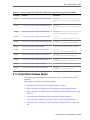
This table shows the software versions installed with Oracle Big Data Connectors 4.3:
Connector
Version
Oracle SQL Connector for HDFS
3.4.0
Oracle Loader for Hadoop 1
3.5.0
Oracle XQuery for Hadoop
4.2.1
Oracle R Advanced Analytics for Hadoop
2.4.0
Oracle Data Integrator2
12.1.3.0
1
2
Oracle Loader for Hadoop 3.5 supports filtering of data loaded from Hive tables at the individual record
level. Previously Hive data could only be filtered at the partition level.
For information about requirements and instructions to set up and use Oracle Data Integrator, refer to
Hadoop chapter of Oracle Fusion Middleware Application Adapters Guide for Oracle Data Integrator.
New Features
Changes in Oracle Big Data Connectors Release 4 (4.2)
The following are changes in Oracle Big Data Connectors User's Guide for Oracle Big
Data Connectors Release 4 (4.2).
This table shows the software versions installed with Oracle Big Data Connectors 4.2:
xiii
Connector
Version
Oracle SQL Connector for HDFS
3.3.0
Oracle Loader for Hadoop
3.4.0
Oracle XQuery for Hadoop1
4.2.0
Oracle R Advanced Analytics for Hadoop
2.4.0
Oracle Data Integrator2
12.1.3.0
1
2
Added support for Oracle NoSQL Database Table API and Oracle NoSQL Database Large Object API.
For working with Oracle NoSQL Database Table API functions, you must have Oracle NoSQL Database
3.1 or above.
For information about requirements and instructions to set up and use Oracle Data Integrator, refer to
Hadoop chapter of Oracle Fusion Middleware Application Adapters Guide for Oracle Data Integrator.
Changes in Oracle Big Data Connectors Release 4 (4.1)
The following are changes in Oracle Big Data Connectors User's Guide for Oracle Big
Data Connectors Release 4 (4.1).
This table shows the software versions installed with Oracle Big Data Connectors 4.1:
1
Connector
Version
Oracle SQL Connector for HDFS
3.3.0
Oracle Loader for Hadoop
3.3.0
Oracle XQuery for Hadoop
4.2.0
Oracle R Advanced Analytics for Hadoop
2.4.0
Oracle Data Integrator1
12.1.3.0
For information about requirements and instructions to set up and use Oracle Data Integrator, refer to
Hadoop chapter of Oracle Fusion Middleware Application Adapters Guide for Oracle Data Integrator.
Changes in Oracle Big Data Connectors Release 4 (4.0)
The following are changes in Oracle Big Data Connectors User's Guide for Oracle Big
Data Connectors Release 4 (4.0).
This table shows the software versions installed with Oracle Big Data Connectors 4.0:
xiv
Connector
Version
Oracle SQL Connector for HDFS
3.1
Oracle Loader for Hadoop
3.2
Oracle Data Integrator Application Adapter for Hadoop1
12.1.3.0
Oracle XQuery for Hadoop
4.0.1
Oracle R Advanced Analytics for Hadoop
2.4
1
For information about requirements and instructions to set up and use Oracle Data Integrator
Application Adapter for Hadoop, refer to Hadoop chapter of Oracle Fusion Middleware Application Adapters
Guide for Oracle Data Integrator.
xv
Part I
Setup
Part I contains the following chapter:
• Getting Started with Oracle Big Data Connectors
1
Getting Started with Oracle Big Data
Connectors
This chapter describes the Oracle Big Data Connectors and provides installation
instructions.
This chapter contains the following sections:
• About Oracle Big Data Connectors
• Big Data Concepts and Technologies
• Downloading the Oracle Big Data Connectors Software
• Oracle SQL Connector for Hadoop Distributed File System Setup
• Oracle Loader for Hadoop Setup
• Oracle XQuery for Hadoop Setup
• Oracle R Advanced Analytics for Hadoop Setup
• Oracle Data Integrator
1.1 About Oracle Big Data Connectors
Oracle Big Data Connectors facilitate access to data stored in an Apache Hadoop
cluster. It can be licensed for use on either Oracle Big Data Appliance or a Hadoop
cluster running on commodity hardware.
These are the connectors:
• Oracle SQL Connector for Hadoop Distributed File System (previously Oracle
Direct Connector for HDFS): Enables an Oracle external table to access data stored
in Hadoop Distributed File System (HDFS) files or a table in Apache Hive. The data
can remain in HDFS or the Hive table, or it can be loaded into an Oracle database.
• Oracle Loader for Hadoop: Provides an efficient and high-performance loader for
fast movement of data from a Hadoop cluster into a table in an Oracle database.
Oracle Loader for Hadoop prepartitions the data if necessary and transforms it into
a database-ready format. It optionally sorts records by primary key or user-defined
columns before loading the data or creating output files.
• Oracle XQuery for Hadoop: Runs transformations expressed in the XQuery
language by translating them into a series of MapReduce jobs, which are executed
in parallel on the Hadoop cluster. The input data can be located in a file system
accessible through the Hadoop File System API, such as the Hadoop Distributed
File System (HDFS), or stored in Oracle NoSQL Database. Oracle XQuery for
Hadoop can write the transformation results to HDFS, Oracle NoSQL Database,
Getting Started with Oracle Big Data Connectors 1-1
Big Data Concepts and Technologies
Apache Solr, or Oracle Database. An additional XML processing capability is
through XML Extensions for Hive.
• Oracle R Advanced Analytics for Hadoop: Provides a general computation
framework, in which you can use the R language to write your custom logic as
mappers or reducers. A collection of R packages provides predictive analytic
techniques that run as MapReduce jobs. The code executes in a distributed, parallel
manner using the available compute and storage resources on the Hadoop cluster.
Oracle R Advanced Analytics for Hadoop includes interfaces to work with Apache
Hive tables, the Apache Hadoop compute infrastructure, the local R environment,
and Oracle database tables.
• Oracle Data Integrator: Extracts, loads, and transforms data from sources such as
files and databases into Hadoop and from Hadoop into Oracle or third-party
databases. Oracle Data Integrator provides a graphical user interface to utilize the
native Hadoop tools and transformation engines such as Hive, HBase, Sqoop,
Oracle Loader for Hadoop, and Oracle SQL Connector for Hadoop Distributed File
System.
Individual connectors may require that software components be installed in Oracle
Database and either the Hadoop cluster or an external system set up as a Hadoop
client for the cluster. Users may also need additional access privileges in Oracle
Database. For details on integrating Oracle Database and Apache Hadoop visit the
Certification Matrix.
See Also:
My Oracle Support Information Center: Big Data Connectors (ID 1487399.2)
and its related information centers.
1.2 Big Data Concepts and Technologies
Enterprises are seeing large amounts of data coming from multiple sources. Clickstream data in web logs, GPS tracking information, data from retail operations, sensor
data, and multimedia streams are just a few examples of vast amounts of data that can
be of tremendous value to an enterprise if analyzed. The unstructured and semistructured information provided by raw data feeds is of little value in and of itself. The
data must be processed to extract information of real value, which can then be stored
and managed in the database. Analytics of this data along with the structured data in
the database can provide new insights into the data and lead to substantial business
benefits.
1.2.1 What is MapReduce?
MapReduce is a parallel programming model for processing data on a distributed
system. It can process vast amounts of data quickly and can scale linearly. It is
particularly effective as a mechanism for batch processing of unstructured and semistructured data. MapReduce abstracts lower level operations into computations over a
set of keys and values.
A simplified definition of a MapReduce job is the successive alternation of two phases,
the map phase and the reduce phase. Each map phase applies a transform function
over each record in the input data to produce a set of records expressed as key-value
pairs. The output from the map phase is input to the reduce phase. In the reduce
phase, the map output records are sorted into key-value sets so that all records in a set
1-2 User's Guide
Downloading the Oracle Big Data Connectors Software
have the same key value. A reducer function is applied to all the records in a set and a
set of output records are produced as key-value pairs. The map phase is logically run
in parallel over each record while the reduce phase is run in parallel over all key
values.
Note:
Oracle Big Data Connectors 3.0 and later supports the Yet Another Resource
Negotiator (YARN) implementation of MapReduce.
1.2.2 What is Apache Hadoop?
Apache Hadoop is the software framework for the development and deployment of
data processing jobs based on the MapReduce programming model. At the core,
Hadoop provides a reliable shared storage and analysis system1. Analysis is provided
by MapReduce. Storage is provided by the Hadoop Distributed File System (HDFS), a
shared storage system designed for MapReduce jobs.
The Hadoop ecosystem includes several other projects including Apache Avro, a data
serialization system that is used by Oracle Loader for Hadoop.
Cloudera's Distribution including Apache Hadoop (CDH) is installed on Oracle Big
Data Appliance. You can use Oracle Big Data Connectors on a Hadoop cluster running
CDH or the equivalent Apache Hadoop components, as described in the setup
instructions in this chapter.
See Also:
• For conceptual information about the Hadoop technologies, the following
third-party publication:
Hadoop: The Definitive Guide, Third Edition by Tom White (O'Reilly Media
Inc., 2012, ISBN: 978-1449311520).
• For information about Cloudera's Distribution including Apache Hadoop
(CDH5), the Oracle Cloudera website at
http://oracle.cloudera.com/
• For information about Apache Hadoop, the website at
http://hadoop.apache.org/
1.3 Downloading the Oracle Big Data Connectors Software
You can download Oracle Big Data Connectors from Oracle Technology Network or
Oracle Software Delivery Cloud.
To download from Oracle Technology Network:
1.
Use any browser to visit this website at
http://www.oracle.com/technetwork/bdc/big-data-connectors/
downloads/index.html
1
Hadoop: The Definitive Guide, Third Edition by Tom White (O'Reilly Media Inc., 2012, 978-1449311520).
Getting Started with Oracle Big Data Connectors 1-3
Oracle SQL Connector for Hadoop Distributed File System Setup
2.
Click the name of each connector to download a zip file containing the installation
files.
To download from Oracle Software Delivery Cloud:
1. Use any browser to visit this website at
https://edelivery.oracle.com/
2. Accept the Terms and Restrictions to see the Media Pack Search page.
3. Select the search terms:
Select a Product Pack: Oracle Database
Platform: Linux x86-64
4. Click Go to display a list of product packs.
5. Select Oracle Big Data Connectors Media Pack for Linux x86-64 (B65965-0x), and
then click Continue.
6. Click Download for each connector to download a zip file containing the
installation files.
1.4 Oracle SQL Connector for Hadoop Distributed File System Setup
You install and configure Oracle SQL Connector for Hadoop Distributed File System
(HDFS) on the system where Oracle Database runs. If Hive tables are used as the data
source, then you must also install and run Oracle SQL Connector for HDFS on a
Hadoop client where users access Hive.
Oracle SQL Connector for HDFS is installed already on Oracle Big Data Appliance if it
was configured for Oracle Big Data Connectors. This installation supports users who
connect directly to Oracle Big Data Appliance to run their jobs.
This section contains the following topics:
• Software Requirements
• Installing and Configuring a Hadoop Client on the Oracle Database System
• Installing Oracle SQL Connector for HDFS
• Granting User Privileges in Oracle Database
• Setting Up User Accounts on the Oracle Database System
• Using Oracle SQL Connector for HDFS on a Secure Hadoop Cluster
1.4.1 Software Requirements
Oracle SQL Connector for HDFS requires the following software:
On the Hadoop cluster:
• Cloudera's Distribution including Apache Hadoop version 5 (CDH5), or Apache
Hadoop 2.2.0 to 2.6.0.
• Java Development Kit (JDK). Consult the distributor of your Hadoop software
(Cloudera or Apache) for the recommended version.
1-4 User's Guide
Oracle SQL Connector for Hadoop Distributed File System Setup
• Hive 0.12.0, 0.13.0, 0.13.1 or 1.1.0 (required for Hive table access, otherwise
optional)
This software is already installed on Oracle Big Data Appliance.
On the Oracle Database system and Hadoop client systems:
• Oracle Database 12c (12.1.0.2) , Oracle Database 11g release 2 (11.2.0.4 or later) for
Linux.
• The same version of Hadoop as your Hadoop cluster: CDH5, or Apache Hadoop
2.2.0 - 2.6.0.
If you have a secure Hadoop cluster configured with Kerberos, then the Hadoop
client on the database system must be set up to access a secure cluster. See “Using
Oracle SQL Connector for HDFS on a Secure Hadoop Cluster.”
• The same version of JDK as your Hadoop cluster.
1.4.2 Installing and Configuring a Hadoop Client on the Oracle Database System
Oracle SQL Connector for HDFS requires a Hadoop client on the Oracle Database
System.The Hadoop installation can be minimally configured for Hadoop client use
only. A complete installation of Hadoop is not required. The only parts of Hadoop
needed for Oracle SQL Connector for HDFS are the Hadoop JAR files and the
configuration files from the Hadoop installation.
Note: Even if there is a complete Hadoop installation on the Oracle Database
system, do not start Hadoop on this system at any time. If Hadoop is running
locally, then Oracle SQL Connector for HDFS attempts to connect to it instead
of to the Hadoop cluster.
For Oracle RAC systems including Oracle Exadata Database Machine, you must install
and configure Oracle SQL Connector for HDFS using identical paths on all systems
running Oracle instances.
Adding a Hadoop Client for use with Oracle Big Data Appliance
Oracle Big Data Appliance requires that you follow its own system-supported
procedures for installing a Hadoop client. If your Hadoop system is an Oracle Big
Data Appliance, see “Providing Remote Client Access to CDH” in the Oracle Big Data
Appliance Software User's GuideOracle Big Data Appliance Software User's Guide. This
section describes how to install the CDH client, configure it for use in a Kerberossecured or non-secured environment, and verify HDFS access.
Adding a Hadoop Client for use with Other Hadoop Systems
For connections to Hadoop systems other than Oracle Big Data Appliance, download
and install the Hadoop client provided by the distributor (Cloudera or Apache). For
example, if the Oracle Database system requires a Hadoop client that can connect to a
CDH system (one that is not an Oracle Big Data Appliance), you can use these steps to
install the appropriate CDH client, configure it for use in either a Kerberos-secured or
non-secured environment, and verify access to HDFS on the Hadoop cluster.
1.
Log in to the database system running Oracle Database.
Getting Started with Oracle Big Data Connectors 1-5
Oracle SQL Connector for Hadoop Distributed File System Setup
The account must have write privileges to the chosen installation path. Typically,
an admin user account is sufficient. The account must also have login access to
Cloudera Manager.
2.
Install the CDH files and configure the client:
a.
Download the tarball from the Cloudera tarball downloads page.
Note: The CDH client version must be compatible with CDH version on the
Hadoop system. Check that the version number segment in the filename (as in
hadoop-2.6.0-cdh5.4.7.tar.gz) matches the version of the Hadoop cluster.
b.
Copy the tarball to a permanent path of your choice on the database system
and extract the files from the tarball.
$ tar xzf hadoop-<version>.tar.gz
c.
Set the HADOOP_PREFIX environment variable to this path and add
HADOOP_PREFIX/bin to the PATH variable.
$ export HADOOP_PREFIX=<install location>
$ export PATH=${HADOOP_PREFIX}/bin:${PATH}
d.
Click on the ‘hdfs’ service in Cloudera Manager, and select the action
‘Download Client Configuration’ to download the configuration files.
e.
Extract the client configuration files to HADOOP_PREFIX/conf.
$mkdir ${HADOOP_PREFIX}/conf
unzip hdfs-clientconfig.zip -d /tmp
cp /tmp/hadoop-conf/* ${HADOOP_PREFIX}/conf
f.
You may set the HADOOP_CONF_DIR environment variable to the path
where you installed the client configuration files. (This is optional.)
export HADOOP_CONF_DIR=${HADOOP_PREFIX}/conf
3.
Ensure that JAVA_HOME points to a JDK installation with the version required
by the Hadoop installation.
4.
If your cluster is secured with Kerberos, then configure the Oracle system to
permit Kerberos authentication. (See Using Oracle SQL Connector for HDFS on a
Secure Hadoop Cluster.)
5.
Test HDFS access from the Oracle Database system:
a.
Use the Oracle Database account to log on to the system where Oracle
Database is running.
b.
Open a Bash shell and enter this command:
hdfs dfs -ls /user
You should see the same list of directories that you see when you run the
command directly on the Hadoop cluster. If not, then first ensure that the
Hadoop cluster is up and running. If the problem persists, then you must
correct the Hadoop client configuration so that Oracle Database has access to
the Hadoop cluster file system.
1-6 User's Guide
Oracle SQL Connector for Hadoop Distributed File System Setup
6.
For an Oracle RAC system, repeat this procedure for every Oracle Database
instance.
1.4.3 Installing Oracle SQL Connector for HDFS
Follow this procedure to install Oracle SQL Connector for HDFS on the Oracle
Database system. In addition, you can install Oracle SQL Connector for HDFS on any
system configured as a Hadoop client.
To install Oracle SQL Connector for HDFS:
1.
Download the zip file to a directory on the system where Oracle Database runs.
2.
Unpack the content of oraosch-version.zip.
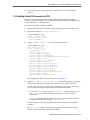
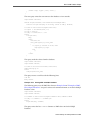
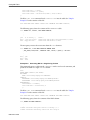
$ unzip oraosch-3.4.0.zip
Archive: oraosch-3.4.0.zip
extracting: orahdfs-3.4.0.zip
inflating: README.txt
3.
Unpack orahdfs-version.zip into a permanent directory:
$ unzip orahdfs-3.4.0.zip
unzip orahdfs-3.4.0.zip
Archive: orahdfs-3.4.0.zip
creating: orahdfs-3.4.0/
creating: orahdfs-3.4.0/log/
creating: orahdfs-3.4.0/examples/
creating: orahdfs-3.4.0/examples/sql/
inflating: orahdfs-3.4.0/examples/sql/mkhive_unionall_view.sql
creating: orahdfs-3.4.0/doc/
inflating: orahdfs-3.4.0/doc/README.txt
creating: orahdfs-3.4.0/jlib/
inflating: orahdfs-3.4.0/jlib/osdt_cert.jar
inflating: orahdfs-3.4.0/jlib/oraclepki.jar
inflating: orahdfs-3.4.0/jlib/osdt_core.jar
inflating: orahdfs-3.4.0/jlib/ojdbc7.jar
inflating: orahdfs-3.4.0/jlib/orahdfs.jar
inflating: orahdfs-3.4.0/jlib/ora-hadoop-common.jar
creating: orahdfs-3.4.0/bin/
inflating: orahdfs-3.4.0/bin/hdfs_stream
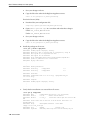
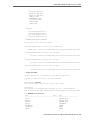
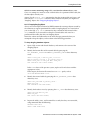
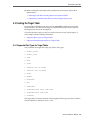
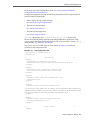
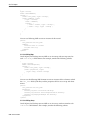
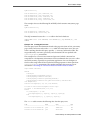
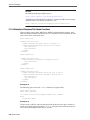
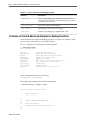
The unzipped files have the structure shown in Example 1-1.
4.
Open the orahdfs-3.4.0/bin/hdfs_stream Bash shell script in a text editor,
and make the changes indicated by the comments in the script, if necessary
The hdfs_stream script does not inherit any environment variable settings, and so they
are set in the script if Oracle SQL Connector for HDFS needs them:
• PATH: If the hadoop script is not in /usr/bin:bin (the path initially set in
hdfs_stream), then add the Hadoop bin directory, such as /usr/lib/
hadoop/bin.
• JAVA_HOME: If Hadoop does not detect Java, then set this variable to the Java
installation directory. For example, /usr/bin/java.
See the comments in the script for more information about these environment
variables.
The hdfs_stream script is the preprocessor for the Oracle Database external
table created by Oracle SQL Connector for HDFS.
Getting Started with Oracle Big Data Connectors 1-7
Oracle SQL Connector for Hadoop Distributed File System Setup
5.
If your cluster is secured with Kerberos, then obtain a Kerberos ticket:
> kinit
> password
6.
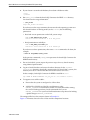
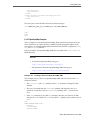
Run hdfs_stream from the Oracle SQL Connector for HDFS /bin directory.
You should see this usage information:
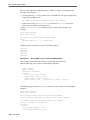
$ ./hdfs_stream
Usage: hdfs_stream locationFile
If you do not see the usage statement, then ensure that the operating system user
that Oracle Database is running under (such as oracle) has the following
permissions:
• Read and execute permissions on the hdfs_stream script:
$ ls -l OSCH_HOME/bin/hdfs_stream
-rwxr-xr-x 1 oracle oinstall Nov 27 15:51 hdfs_stream
• Read permission on orahdfs.jar.
$ ls -l OSCH_HOME/jlib/orahdfs.jar
-rwxr-xr-x 1 oracle oinstall Nov 27 15:51 orahdfs.jar
If you do not see these permissions, then enter a chmod command to fix them, for
example:
$ chmod 755 OSCH_HOME/bin/hdfs_stream
In the previous commands, OSCH_HOME represents the Oracle SQL Connector for
HDFS home directory.
7.
For an Oracle RAC system, repeat the previous steps for every Oracle instance,
using identical path locations.
8.
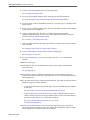
Log in to Oracle Database and create a database directory for the orahdfsversion/bin directory where hdfs_stream resides. For Oracle RAC systems, this
directory must be on a shared disk that all Oracle instances can access.
In this example, Oracle SQL Connector for HDFS is installed in /etc:
SQL> CREATE OR REPLACE DIRECTORY osch_bin_path AS '/etc/orahdfs-3.4.0/bin';
9.
To support access to Hive tables:
a.
Ensure that the system is configured as a Hive client.
b.
Add the Hive JAR files and the Hive conf directory to the
HADOOP_CLASSPATH environment variable. To avoid JAR conflicts among
the various Hadoop products, Oracle recommends that you set
HADOOP_CLASSPATH in your local shell initialization script instead of making
a global change to HADOOP_CLASSPATH.
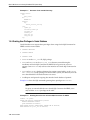
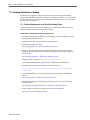
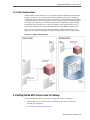
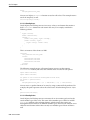
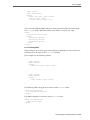
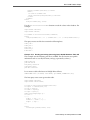
The unzipped files have the structure shown in Example 1-1.
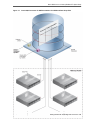
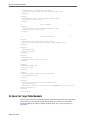
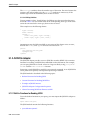
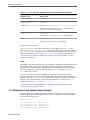
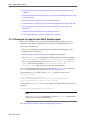
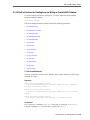
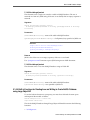
Figure 1-1 illustrates shows the flow of data and the components locations.
1-8 User's Guide
Oracle SQL Connector for Hadoop Distributed File System Setup
Figure 1-1
Oracle SQL Connector for HDFS Installation for HDFS and Data Pump Files
Getting Started with Oracle Big Data Connectors 1-9
Oracle SQL Connector for Hadoop Distributed File System Setup
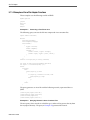
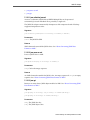
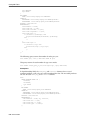
Example 1-1
Structure of the orahdfs Directory
orahdfs-version
bin/
hdfs_stream
doc/
README.txt
examples/
sql/
mkhive_unionall_view.sql
jlib/
ojdbc6.jar
ora-hadoop-common.jar
oraclepki.jar
orahdfs.jar
osdt_cert.jar
osdt_core.jar
log/
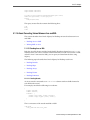
1.4.4 Granting User Privileges in Oracle Database
Oracle Database users require these privileges when using Oracle SQL Connector for
HDFS to create external tables:
• CREATE SESSION
• CREATE TABLE
• CREATE VIEW
• EXECUTE on the UTL_FILE PL/SQL package
• READ and EXECUTE on the OSCH_BIN_PATH directory created during the
installation of Oracle SQL Connector for HDFS. Do not grant write access to
anyone. Grant EXECUTE only to those who intend to use Oracle SQL Connector for
HDFS.
• READ and WRITE on a database directory for storing external tables, or the CREATE
ANY DIRECTORY system privilege. For Oracle RAC systems, this directory must be
on a shared disk that all Oracle instances can access.
• A tablespace and quota for copying data into the Oracle database. Optional.
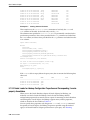
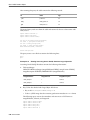
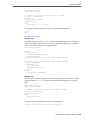
Example 1-2 shows the SQL commands granting these privileges to HDFSUSER.
Note:
To query an external table that uses Oracle SQL Connector for HDFS, users
only need the SELECT privilege on the table.
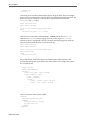
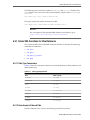
Example 1-2
Granting Users Access to Oracle SQL Connector for HDFS
CONNECT / AS sysdba;
CREATE USER hdfsuser IDENTIFIED BY password
DEFAULT TABLESPACE hdfsdata
QUOTA UNLIMITED ON hdfsdata;
GRANT CREATE SESSION, CREATE TABLE, CREATE VIEW TO hdfsuser;
GRANT EXECUTE ON sys.utl_file TO hdfsuser;
1-10 User's Guide
Oracle SQL Connector for Hadoop Distributed File System Setup
GRANT READ, EXECUTE ON DIRECTORY osch_bin_path TO hdfsuser;
GRANT READ, WRITE ON DIRECTORY external_table_dir TO hdfsuser;
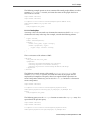
1.4.5 Setting Up User Accounts on the Oracle Database System
To create external tables for HDFS and Data Pump format files, users can log in to
either the Oracle Database system or another system set up as a Hadoop client.
You can set up an account on these systems the same as you would for any other
operating system user. HADOOP_CLASSPATH must include path/orahdfs-3.4.0/
jlib/*. You can add this setting to the shell profile as part of this installation
procedure, or users can set it themselves. The following example alters
HADOOP_CLASSPATH in the Bash shell where Oracle SQL Connector for HDFS is
installed in /usr/bin:
export HADOOP_CLASSPATH="$HADOOP_CLASSPATH:/etc/orahdfs-3.4.0/jlib/*"
1.4.6 Using Oracle SQL Connector for HDFS on a Secure Hadoop Cluster
When users access an external table that was created using Oracle SQL Connector for
HDFS, the external table acts like a Hadoop client running on the system where the
Oracle database is running. It uses the identity of the operating system user where
Oracle is installed.
A secure Hadoop cluster has Kerberos installed and configured to authenticate client
activity. You must configure Oracle SQL Connector for HDFS for use with a Hadoop
cluster secured by Kerberos.
For a user to authenticate using kinit:
• A Hadoop administrator must register the operating system user (such as oracle)
and password in the Key Distribution Center (KDC) for the cluster.
• A system administrator for the Oracle Database system must configure /etc/
krb5.conf and add a domain definition that refers to the KDC managed by the
secure cluster.
These steps enable the operating system user to authenticate with the kinit utility
before submitting Oracle SQL Connector for HDFS jobs. The kinit utility typically
uses a Kerberos keytab file for authentication without an interactive prompt for a
password.
The system should run kinit on a regular basis, before letting the Kerberos ticket
expire, to enable Oracle SQL Connector for HDFS to authenticate transparently. Use
cron or a similar utility to run kinit. For example, if Kerberos tickets expire every
two weeks, then set up a cron job to renew the ticket weekly.
Be sure to schedule the cron job to run when Oracle SQL Connector for HDFS is not
actively being used.
Do not call kinit within the Oracle SQL Connector for HDFS preprocessor script
(hdfs_stream), because it could trigger a high volume of concurrent calls to kinit
and create internal Kerberos caching errors.
Getting Started with Oracle Big Data Connectors 1-11
Oracle Loader for Hadoop Setup
Note:
Oracle Big Data Appliance configures Kerberos security automatically as a
configuration option. For details about setting up client systems for a secure
Oracle Big Data Appliance cluster, see Oracle Big Data Appliance Software User's
Guide.
1.5 Oracle Loader for Hadoop Setup
Follow the instructions in these sections for setting up Oracle Loader for Hadoop:
• Software Requirements
• Installing Oracle Loader for Hadoop
• Providing Support for Offline Database Mode
• Using Oracle Loader for Hadoop on a Secure Hadoop Cluster
1.5.1 Software Requirements
Oracle Loader for Hadoop requires the following software:
• A target database system running one of the following:
– Oracle Database 12c (12.1.0.2)
– Oracle Database 11g release 2 (11.2.0.4)
• Cloudera's Distribution including Apache Hadoop version 5 (CDH5), or Apache
Hadoop 2.2.0 to 2.6.0.
• Apache Hive 0.12.0, 0.13.0, 0.13.1 or 1.1.0 if you are loading data from Hive tables.
1.5.2 Installing Oracle Loader for Hadoop
Oracle Loader for Hadoop is packaged with the Oracle Database 12c (12.1.0.2) client
libraries and Oracle Instant Client libraries for connecting to Oracle Database 11.2.0.4
or 12.1.0.2.
Note:
The system where you install Oracle Loader for Hadoop requires the same
resources that an Oracle Client requires. For information about Oracle Client
requirements included with Oracle Database 12c Release 1 (12.1), refer to
Oracle Database Client Installation Guide for Linux.
To install Oracle Loader for Hadoop:
1. Unpack the content of oraloader-version.x86_64.zip into a directory on
your Hadoop cluster or on a system configured as a Hadoop client.
2. Unzip oraloader-version-h2.x86_64.zip into a directory on your Hadoop
cluster.
1-12 User's Guide
Oracle Loader for Hadoop Setup
A directory named oraloader-version-h2 is created with the following
subdirectories:
doc
jlib
lib
examples
3. Create a variable named OLH_HOME and set it to the installation directory.
4. Add the following paths to the HADOOP_CLASSPATH variable:
• For all installations:
$OLH_HOME/jlib/*
• To support data loads from Hive tables:
/usr/lib/hive/lib/*
/etc/hive/conf
See “oracle.hadoop.xquery.lib.share.”
• To read data from Oracle NoSQL Database Release 2:
$KVHOME/lib/kvstore.jar
1.5.3 Providing Support for Offline Database Mode
In a typical installation, Oracle Loader for Hadoop can connect to the Oracle Database
system from the Hadoop cluster or a Hadoop client. If this connection is impossible—
for example, the systems are located on distinct networks—then you can use Oracle
Loader for Hadoop in offline database mode. See “About the Modes of Operation.”
To support offline database mode, you must install Oracle Loader for Hadoop on two
systems:
• The Hadoop cluster or a system set up as a Hadoop client, as described in
“Installing Oracle Loader for Hadoop.”
• The Oracle Database system or a system with network access to Oracle Database, as
described in the following procedure.
To support Oracle Loader for Hadoop in offline database mode:
1. Unpack the content of oraloader-version.zip into a directory on the Oracle
Database system or a system with network access to Oracle Database. You must
use the same version of the software as you installed on the Hadoop cluster.
2. Unzip oraloader-version-h2.x86_64.zip.
3. Create a variable named OLH_HOME and set it to the installation directory. This
example uses the Bash shell syntax:
$ export OLH_HOME="/usr/bin/oraloader-version-h2/"
4. Add the Oracle Loader for Hadoop JAR files to the HADOOP_CLASSPATH
environment variable. This example uses the Bash shell syntax:
$ export HADOOP_CLASSPATH=$HADOOP_CLASSPATH:$OLH_HOME/jlib/*
Getting Started with Oracle Big Data Connectors 1-13
Oracle XQuery for Hadoop Setup
1.5.4 Using Oracle Loader for Hadoop on a Secure Hadoop Cluster
A secure Hadoop cluster has Kerberos installed and configured to authenticate client
activity. An operating system user must be authenticated before initiating an Oracle
Loader for Hadoop job to run on a secure Hadoop cluster. For authentication, the user
must log in to the operating system where the job will be submitted and use the
standard Kerberos kinit utility.
For a user to authenticate using kinit:
• A Hadoop administrator must register the operating system user and password in
the Key Distribution Center (KDC) for the cluster.
• A system administrator for the client system, where the operating system user will
initiate an Oracle Loader for Hadoop job, must configure /etc/krb5.conf and
add a domain definition that refers to the KDC managed by the secure cluster.
Typically, the kinit utility obtains an authentication ticket that lasts several days.
Subsequent Oracle Loader for Hadoop jobs authenticate transparently using the
unexpired ticket.
Note:
Oracle Big Data Appliance configures Kerberos security automatically as a
configuration option. For details about setting up client systems for a secure
Oracle Big Data Appliance cluster, see Oracle Big Data Appliance Software User's
Guide.
1.6 Oracle XQuery for Hadoop Setup
You install and configure Oracle XQuery for Hadoop on the Hadoop cluster. If you are
using Oracle Big Data Appliance, then the software is already installed.
The following topics describe the software installation:
• Software Requirements
• Installing Oracle XQuery for Hadoop
• Troubleshooting the File Paths
• Configuring Oozie for the Oracle XQuery for Hadoop Action
1.6.1 Software Requirements
Oracle Big Data Appliance 4.3 meets the following software requirements. However, if
you are installing Oracle XQuery for Hadoop on a third-party cluster, then you must
ensure that these components are installed.
• Java 7.x or 6.x
• Cloudera's Distribution including Apache Hadoop Version 4.1.2 and above
(including CDH 5.x)
• Oracle NoSQL Database 3.x or 2.x to support reading and writing to Oracle NoSQL
Database
1-14 User's Guide
Oracle XQuery for Hadoop Setup
• Oracle Loader for Hadoop 3.5.0 to support writing tables in Oracle databases
1.6.2 Installing Oracle XQuery for Hadoop
Take the following steps to install Oracle XQuery for Hadoop.
To install Oracle XQuery for Hadoop:
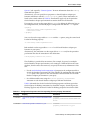
1.
Unpack the contents of oxh-version.zip into the installation directory:
$ unzip oxh-4.2.0-cdh-5.0.0.zip
Archive: oxh-4.2.0-cdh-5.0.0.zip
creating: oxh-4.2.0-cdh5.0.0/
creating: oxh-4.2.0-cdh5.0.0/lib/
creating: oxh-4.2.0-cdh5.0.0/oozie/
creating: oxh-4.2.0-cdh5.0.0/oozie/lib/
inflating: oxh-4.2.0-cdh5.0.0/lib/ant-launcher.jar
inflating: oxh-4.2.0-cdh5.0.0/lib/ant.jar
.
.
.
You can now run Oracle XQuery for Hadoop.
2.
For the fastest execution time, copy the libraries into the Hadoop distributed
cache:
a.
Copy all Oracle XQuery for Hadoop and third-party libraries into an HDFS
directory. To use the -exportliboozie option to copy the files, see “Oracle
XQuery for Hadoop Options”. Alternatively, you can copy the libraries
manually using the HDFS command line interface.
If you use Oozie, then use the same folder for all files. See “Configuring Oozie
for the Oracle XQuery for Hadoop Action”
b.
3.
Set the oracle.hadoop.xquery.lib.share property or use the -sharelib
option on the command line to identify the directory for the Hadoop
distributed cache.
To support data loads into Oracle Database, install Oracle Loader for Hadoop:
a.
Unpack the content of oraloader-version.x86_64.zip into a directory
on your Hadoop cluster or on a system configured as a Hadoop client. This
archive contains an archive and a README file.
b.
Unzip the archive into a directory on your Hadoop cluster:
unzip oraloader-version-h2.x86_64.zip
A directory named oraloader-version-h2 is created with the following
subdirectories:
doc
jlib
lib
examples
c.
Create an environment variable named OLH_HOME and set it to the
installation directory. Do not set HADOOP_CLASSPATH.
Getting Started with Oracle Big Data Connectors 1-15
Oracle XQuery for Hadoop Setup
4.
To support data loads into Oracle NoSQL Database, install it, and then set an
environment variable named KVHOMEto the Oracle NoSQL Database installation
directory.
Note:
Do not add NoSQL Database jar files to a HADOOP_CLASSPATH.
5.
To support indexing by Apache Solr:
a.
Ensure that Solr is installed and configured in your Hadoop cluster. Solr is
included in Cloudera Search, which is installed automatically on Oracle Big
Data Appliance.
b.
Create a collection in your Solr installation into which you will load
documents. To create a collection, use the solrctl utility.
See Also:
For the solrctl utility, Cloudera Search User Guide at
http://www.cloudera.com/content/cloudera-content/clouderadocs/Search/latest/Cloudera-Search-User-Guide/
csug_solrctl_ref.html
c.
Configure Oracle XQuery for Hadoop to use your Solr installation by setting
the OXH_SOLR_MR_HOME environment variable to the local directory
containing search-mr-version.jar and search-mr-versionjob.jar. For example:
$ export OXH_SOLR_MR_HOME="/usr/lib/solr/contrib/mr"
Note:
Configure Oracle XQuery for Hadoop and set the OXH_SOLR_MR_HOME
environment variable to the local directory before using Apache Tika adapter
as well.
1.6.3 Troubleshooting the File Paths
If Oracle XQuery for Hadoop fails to find its own or third-party libraries when
running queries, then first ensure that the environment variables are set, as described
in “Installing Oracle XQuery for Hadoop.”
Note:
The HADOOP_CLASSPATH environment variable or -libjars command line
option must not contain either an OXH or third-party library.
If they are set correctly, then you may need to edit lib/oxh-lib.xml. This file
identifies the location of Oracle XQuery for Hadoop system JAR files and other
libraries, such as Avro, Oracle Loader for Hadoop, and Oracle NoSQL Database.
1-16 User's Guide
Oracle R Advanced Analytics for Hadoop Setup
If necessary, you can reference environment variables in this file as $
{env.variable}, such as ${env.OLH_HOME}. You can also reference Hadoop
properties as ${property}, such as ${mapred.output.dir}.
1.6.4 Configuring Oozie for the Oracle XQuery for Hadoop Action
You can use Apache Oozie workflows to run your queries, as described in “Running
Queries from Apache Oozie”. The software is already installed and configured on
Oracle Big Data Appliance.
For other Hadoop clusters, you must first configure Oozie to use the Oracle XQuery
for Hadoop action. These are the general steps to install the Oracle XQuery for
Hadoop action:
1. Modify the Oozie configuration. If you run CDH on third-party hardware, then use
Cloudera Manager to change the Oozie server configuration. For other Hadoop
installations, edit oozie-site.htm.
• Add oracle.hadoop.xquery.oozie.OXHActionExecutor to the value of
the oozie.service.ActionService.executor.ext.classes property.
• Add oxh-action-v1.xsd to the value of the
oozie.service.SchemaService.wf.ext.schemas property.
2. Add oxh-oozie.jar to the Oozie server class path. For example, in a CDH5
installation, copy oxh-oozie.jar to /var/lib/oozie on the server.
3. Add all Oracle XQuery for Hadoop dependencies to the Oozie shared library in a
subdirectory named oxh. You can use the CLI -exportliboozie option. See
“Oracle XQuery for Hadoop Options”.
4. Restart Oozie for the changes to take effect.
The specific steps depend on your Oozie installation, such as whether Oozie is already
installed and which version you are using.
1.7 Oracle R Advanced Analytics for Hadoop Setup
Oracle R Advanced Analytics for Hadoop requires the installation of a software
environment on the Hadoop side and on a client Linux system. These topics describe
the installation:
• Installing the Software on Hadoop
• Installing Additional R Packages
• Providing Remote Client Access to R Users
See Also:
Oracle R Advanced Analytics for Hadoop Release Notes at
http://www.oracle.com/technetwork/database/databasetechnologies/bdc/r-advanalytics-for-hadoop/documentation/
index.html
Getting Started with Oracle Big Data Connectors 1-17
Oracle R Advanced Analytics for Hadoop Setup
1.7.1 Installing the Software on Hadoop
Oracle Big Data Appliance supports Oracle R Advanced Analytics for Hadoop
without any additional software installation or configuration. However, to use Oracle
R Advanced Analytics for Hadoop on a third-party Hadoop cluster, you must create
the necessary environment.
1.7.1.1 Software Requirements for a Third-Party Hadoop Cluster
You must install several software components on a third-party Hadoop cluster to
support Oracle R Advanced Analytics for Hadoop.
Install these components on third-party servers:
• Cloudera's Distribution including Apache Hadoop version 4 (CDH5) or Apache
Hadoop 0.20.2+923.479 or later.
Complete the instructions provided by the distributor.
• Apache Hive 0.10.0+67 or later
See “Installing Hive on a Third-Party Hadoop Cluster.”
• Sqoop 1.3.0+5.95 or later for the execution of functions that connect to Oracle
Database. Oracle R Advanced Analytics for Hadoop does not require Sqoop to
install or load.
See “Installing Sqoop on a Third-Party Hadoop Cluster.”
• Mahout for the execution of (orch_lmf_mahout_als.R).
• Java Virtual Machine (JVM), preferably Java HotSpot Virtual Machine 6.
Complete the instructions provided at the download site at
http://www.oracle.com/technetwork/java/javase/downloads/
index.html
• Oracle R Distribution 3.0.1 with all base libraries on all nodes in the Hadoop
cluster.
See “Installing R on a Third-Party Hadoop Cluster.”
• The ORCH package on each R engine, which must exist on every node of the
Hadoop cluster.
See “Installing the ORCH Package on a Third-Party Hadoop Cluster”.
• Oracle Loader for Hadoop to support the OLH driver (optional).
See “Oracle Loader for Hadoop Setup.”
1-18 User's Guide
Oracle R Advanced Analytics for Hadoop Setup
Note:
Do not set HADOOP_HOME on the Hadoop cluster. CDH5 does not need it, and
it interferes with Oracle R Advanced Analytics for Hadoop. If you must set
HADOOP_HOME for another application, then also set HADOOP_LIBEXEC_DIR
in the /etc/bashrc file. For example:
export HADOOP_LIBEXEC_DIR=/usr/lib/hadoop/libexec
1.7.1.2 Installing Sqoop on a Third-Party Hadoop Cluster
Sqoop provides a SQL-like interface to Hadoop, which is a Java-based environment.
Oracle R Advanced Analytics for Hadoop uses Sqoop for access to Oracle Database.
Note:
Sqoop is required even when using Oracle Loader for Hadoop as a driver for
loading data into Oracle Database. Sqoop performs additional functions, such
as copying data from a database to HDFS and sending free-form queries to a
database. The driver also uses Sqoop to perform operations that Oracle Loader
for Hadoop does not support.
To install and configure Sqoop for use with Oracle Database:
1. Install Sqoop if it is not already installed on the server.
For Cloudera's Distribution including Apache Hadoop, see the Sqoop installation
instructions in the CDH Installation Guide at
http://oracle.cloudera.com/
2. Download the appropriate Java Database Connectivity (JDBC) driver for Oracle
Database from Oracle Technology Network at
http://www.oracle.com/technetwork/database/features/jdbc/
index-091264.html
3. Copy the driver JAR file to $SQOOP_HOME/lib, which is a directory such
as /usr/lib/sqoop/lib.
4. Provide Sqoop with the connection string to Oracle Database.
$ sqoop import --connect jdbc_connection_string
For example, sqoop import --connect jdbc:oracle:thin@myhost:
1521/orcl.
1.7.1.3 Installing Hive on a Third-Party Hadoop Cluster
Hive provides an alternative storage and retrieval mechanism to HDFS files through a
querying language called HiveQL. Oracle R Advanced Analytics for Hadoop uses the
data preparation and analysis features of HiveQL, while enabling you to use R
language constructs.
To install Hive:
Getting Started with Oracle Big Data Connectors 1-19
Oracle R Advanced Analytics for Hadoop Setup
1. Follow the instructions provided by the distributor (Cloudera or Apache) for
installing Hive.
2. Verify that the installation is working correctly:
3. $ hive -H usage: hive -d,--define <key=value> Variable subsitution to apply to hive
commands. e.g. -d A=B or --define A=B . . .
4. If the command fails or you see warnings in the output, then fix the Hive
installation.
1.7.1.4 Installing R on a Third-Party Hadoop Cluster
You can download Oracle R Distribution 3.0.1 and get the installation instructions
from the website at
http://www.oracle.com/technetwork/database/databasetechnologies/r/r-distribution/downloads/index.html
1.7.1.5 Installing the ORCH Package on a Third-Party Hadoop Cluster
ORCH is the name of the Oracle R Advanced Analytics for Hadoop package.
To install the ORCH package:
1. Log in as root to the first node of the cluster.
2. Set the environment variables for the supporting software:
$ export JAVA_HOME="/usr/lib/jdk7"
$ export R_HOME="/usr/lib64/R"
$ export SQOOP_HOME "/usr/lib/sqoop"
3. Unzip the downloaded file:
$ unzip orch-version.zip
$ unzip orch-linux-x86_64-2.4.0.zip
Archive: orch-linux-x86_64-2.4.0.zip
creating: ORCH2.4.0/
extracting: ORCH2.4.0/ORCH_2.4.0_R_x86_64-unknown-linux-gnu.tar.gz
inflating: ORCH2.4.0/ORCHcore_2.4.0_R_x86_64-unknown-linux-gnu.tar.gz
.
.
.
4. Change to the new directory:
$ cd ORCH2.4.0
5. Install the packages in the exact order shown here:
R
R
R
R
R
R
R
--vanilla
--vanilla
--vanilla
--vanilla
--vanilla
--vanilla
--vanilla
CMD
CMD
CMD
CMD
CMD
CMD
CMD
INSTALL
INSTALL
INSTALL
INSTALL
INSTALL
INSTALL
INSTALL
OREbase_1.4_R_x86_64-unknown-linux-gnu.tar.gz
OREstats_1.4_R_x86_64-unknown-linux-gnu.tar.gz
OREmodels_1.4_R_x86_64-unknown-linux-gnu.tar.gz
OREserver_1.4_R_x86_64-unknown-linux-gnu.tar.gz
ORCHcore_2.4.0_R_x86_64-unknown-linux-gnu.tar.gz
ORCHstats_2.4.0_R_x86_64-unknown-linux-gnu.tar.gz
ORCH_2.4.0_R_x86_64-unknown-linux-gnu.tar.gz
6. You must also install these packages on all other nodes of the cluster:
• OREbase
1-20 User's Guide
Oracle R Advanced Analytics for Hadoop Setup
• OREmodels
• OREserver
• OREstats
The following examples use the dcli utility, which is available on Oracle Big Data
Appliance but not on third-party clusters, to copy and install the OREserver
package:
$ dcli -C -f OREserver_1.4_R_x86_64-unknown-linux-gnu.tar.gz -d /tmp/
OREserver_1.4_R_x86_64-unknown-linux-gnu.tar.gz
$ dcli -C " R --vanilla CMD INSTALL /tmp/OREserver_1.4_R_x86_64-unknown-linuxgnu.tar.gz"
1.7.2 Installing Additional R Packages
Your Hadoop cluster must have libpng-devel installed on every node. If you are
using a cluster running on commodity hardware, then you can follow the same basic
procedures. However, you cannot use the dcli utility to replicate the commands
across all nodes. See Oracle Big Data Appliance Owner's Guide for the syntax of the dcli
utility.
To install libpng-devel:
1.
Log in as root to any node in your Hadoop cluster.
2.
Check whether libpng-devel is already installed:
# dcli rpm -qi libpng-devel
bda1node01: package libpng-devel is not installed
bda1node02: package libpng-devel is not installed
.
.
.
If the package is already installed on all servers, then you can skip this procedure.
3.
If you need a proxy server to go outside a firewall, then set the HTTP_PROXY
environment variable. This example uses dcli, which is available only on Oracle
Big Data Appliance:
# dcli export HTTP_PROXY="http://proxy.example.com"
4.
Change to the yum directory:
# cd /etc/yum.repos.d
5.
Download and configure the appropriate configuration file for your version of
Linux:
For Enterprise Linux 5 (EL5):
a.
Download the yum configuration file:
# wget http://public-yum.oracle.com/public-yum-el5.repo
b.
Open public-yum-el5.repo in a text editor and make these changes:
Under el5_latest, set enabled=1
Under el5_addons, set enabled=1
Getting Started with Oracle Big Data Connectors 1-21
Oracle R Advanced Analytics for Hadoop Setup
c.
Save your changes and exit.
d.
Copy the file to the other Oracle Big Data Appliance servers:
# dcli -d /etc/yum.repos.d -f public-yum-el5.repo
For Oracle Linux 6 (OL6):
a.
Download the yum configuration file:
# wget http://public-yum.oracle.com/public-yum-ol6.repo
b.
Open public-yum-ol6.repo in a text editor and make these changes:
Under ol6_latest, set enabled=1
Under ol6_addons, set enabled=1
c.
Save your changes and exit.
d.
Copy the file to the other Oracle Big Data Appliance servers:
# dcli -d /etc/yum.repos.d -f public-yum-ol6.repo
6.
Install the package on all servers:
# dcli yum -y install libpng-devel
bda1node01: Loaded plugins: rhnplugin, security
bda1node01: Repository 'bda' is missing name in configuration, using id
bda1node01: This system is not registered with ULN.
bda1node01: ULN support will be disabled.
bda1node01: http://bda1node01-master.abcd.com/bda/repodata/repomd.xml:
bda1node01: [Errno 14] HTTP Error 502: notresolvable
bda1node01: Trying other mirror.
.
.
.
bda1node01: Running Transaction
bda1node01: Installing
: libpng-devel
1/2
bda1node01: Installing
: libpng-devel
2/2
bda1node01: Installed:
bda1node01: libpng-devel.i386 2:1.2.10-17.el5_8 ibpng-devel.x86_64
2:1.2.10-17.el5_8
bda1node01: Complete!
bda1node02: Loaded plugins: rhnplugin, security
.
.
.
7.
Verify that the installation was successful on all servers:
# dcli rpm -qi libpng-devel
bda1node01: Name
: libpng-devel Relocations: (not relocatable)
bda1node01: Version
: 1.2.10
Vendor: Oracle America
bda1node01: Release
: 17.el5_8
Build Date: Wed 25 Apr 2012 06:51:15 AM
PDT
bda1node01: Install Date: Tue 05 Feb 2013 11:41:14 AM PST Build Host: cabuild56.abcd.com
bda1node01: Group
: Development/Libraries Source RPM:
libpng-1.2.10-17.el5_8.src.rpm
bda1node01: Size
: 482483
License: zlib
bda1node01: Signature : DSA/SHA1, Wed 25 Apr 2012 06:51:41 AM PDT, Key ID
1-22 User's Guide
Oracle R Advanced Analytics for Hadoop Setup
66ced3de1e5e0159
bda1node01: URL
: http://www.libpng.org/pub/png/
bda1node01: Summary
: Development tools for programs to manipulate PNG image
format files.
bda1node01: Description :
bda1node01: The libpng-devel package contains the header files and static
bda1node01: libraries necessary for developing programs using the PNG (Portable
bda1node01: Network Graphics) library.
.
.
.
1.7.3 Providing Remote Client Access to R Users
Whereas R users will run their programs as MapReduce jobs on the Hadoop cluster,
they do not typically have individual accounts on that platform. Instead, an external
Linux server provides remote access.
1.7.3.1 Software Requirements for Remote Client Access
To provide access to a Hadoop cluster to R users, install these components on a Linux
server:
• The same version of Hadoop as your Hadoop cluster; otherwise, unexpected issues
and failures can occur
• The same version of Sqoop as your Hadoop cluster; required only to support
copying data in and out of Oracle databases
• Mahout; required only for the orch.ls function with the Mahout ALS-WS
algorithm
• The same version of the Java Development Kit (JDK) as your Hadoop cluster
• Oracle R distribution 3.0.1 with all base libraries
• ORCH R package
To provide access to database objects, you must have the Oracle Advanced Analytics
option to Oracle Database. Then you can install this additional component on the
Hadoop client:
• Oracle R Enterprise Client Packages
1.7.3.2 Configuring the Server as a Hadoop Client
You must install Hadoop on the client and minimally configure it for HDFS client use.
To install and configure Hadoop on the client system:
1. Install and configure CDH5 or Apache Hadoop 0.20.2 on the client system. This
system can be the host for Oracle Database. If you are using Oracle Big Data
Appliance, then complete the procedures for providing remote client access in the
Oracle Big Data Appliance Software User's Guide. Otherwise, follow the installation
instructions provided by the distributor (Cloudera or Apache).
2. Log in to the client system as an R user.
3. Open a Bash shell and enter this Hadoop file system command:
$HADOOP_HOME/bin/hdfs dfs -ls /user
Getting Started with Oracle Big Data Connectors 1-23
Oracle Data Integrator
4. If you see a list of files, then you are done. If not, then ensure that the Hadoop
cluster is up and running. If that does not fix the problem, then you must debug
your client Hadoop installation.
1.7.3.3 Installing Sqoop on a Hadoop Client
Complete the same procedures on the client system for installing and configuring
Sqoop as those provided in “Installing Sqoop on a Third-Party Hadoop Cluster”.
1.7.3.4 Installing R on a Hadoop Client
You can download R 2.13.2 and get the installation instructions from the Oracle R
Distribution website at
http://oss.oracle.com/ORD/
When you are done, ensure that users have the necessary permissions to connect to the
Linux server and run R.
You may also want to install RStudio Server to facilitate access by R users. See the
RStudio website at
http://rstudio.org/
1.7.3.5 Installing the ORCH Package on a Hadoop Client
To install ORCH on your Hadoop client system:
1. Download the ORCH package and unzip it on the client system.
2. Change to the installation directory.
3. Run the client script:
# ./install-client.sh
1.7.3.6 Installing the Oracle R Enterprise Client Packages (Optional)
To support full access to Oracle Database using R, install the Oracle R Enterprise
Release 1.4 client packages. Without them, Oracle R Advanced Analytics for Hadoop
does not have access to the advanced statistical algorithms provided by Oracle R
Enterprise.
See Also:
Oracle R Enterprise User's Guide for information about installing R and Oracle
R Enterprise
1.8 Oracle Data Integrator
For the instructions to set up and use Oracle Data Integrator refer to Hadoop chapter of
Oracle Fusion Middleware Application Adapters Guide for Oracle Data Integrator.
1-24 User's Guide
Part II
Oracle Database Connectors
This part contains the following chapters:
• Oracle SQL Connector for Hadoop Distributed File System
• Oracle Loader for Hadoop
2
Oracle SQL Connector for Hadoop
Distributed File System
This chapter describes how to use Oracle SQL Connector for Hadoop Distributed File
System (HDFS) to facilitate data access between Hadoop and Oracle Database.
This chapter contains the following sections:
• About Oracle SQL Connector for HDFS
• Getting Started With Oracle SQL Connector for HDFS
• Configuring Your System for Oracle SQL Connector for HDFS
• Using the ExternalTable Command-Line Tool
• Creating External Tables
• Publishing the HDFS Data Paths
• Exploring External Tables and Location Files
• Dropping Database Objects Created by Oracle SQL Connector for HDFS
• More About External Tables Generated by the ExternalTable Tool
• Configuring Oracle SQL Connector for HDFS
• Performance Tips for Querying Data in HDFS
2.1 About Oracle SQL Connector for HDFS
Using Oracle SQL Connector for HDFS, you can use Oracle Database to access and
analyze data residing in Apache Hadoop in these formats:
• Data Pump files in HDFS
• Delimited text files in HDFS
• Delimited text files in Apache Hive tables
For other file formats, such as JSON files, you can stage the input as delimited text in a
new Hive table and then use Oracle SQL Connector for HDFS. Partitioned Hive tables
are supported, enabling you to represent a subset of Hive table partitions in Oracle
Database, instead of the entire Hive table.
Oracle SQL Connector for HDFS uses external tables and database views to provide
Oracle Database with read access to Hive tables, and to delimited text files and Data
Pump files in HDFS. An external table is an Oracle Database object that identifies the
location of data outside of a database. Oracle Database accesses the data by using the
Oracle SQL Connector for Hadoop Distributed File System 2-1
Getting Started With Oracle SQL Connector for HDFS
metadata provided when the external table was created. Oracle SQL Connector for
HDFS creates database views over external tables to support access to partitioned
Hive tables. By querying the external tables or views, you can access data stored in
HDFS and Hive tables as if that data were stored in tables in an Oracle database.
To create these objects in Oracle Database, you use the ExternalTable commandline tool provided with Oracle SQL Connector for HDFS. You provide
ExternalTable with information about the data source in Hadoop and about your
schema in an Oracle Database. You provide this information either as options to the
ExternalTable command or in an XML file.
When the external table is ready, you can query the data the same as any other
database table. You can query and join data in HDFS or a Hive table with other
database-resident data.
You can also perform bulk loads of data into Oracle database tables using SQL.You
may prefer that the data resides in an Oracle database—all of it or just a selection—if it
is queried routinely. Oracle SQL Connector for HDFS functions as a Hadoop client
running on the Oracle database and uses the external table preprocessor
hdfs_stream to access data in HDFS.
2.2 Getting Started With Oracle SQL Connector for HDFS
The following list identifies the basic steps that you take when using Oracle SQL
Connector for HDFS.
1. Log in to a system where Oracle SQL Connector for HDFS is installed, which can
be the Oracle Database system, a node in the Hadoop cluster, or a system set up as
a remote client for the Hadoop cluster.
See “Installing and Configuring a Hadoop Client on the Oracle Database System.”
2. The first time you use Oracle SQL Connector for HDFS, ensure that the software is
configured.
See “Configuring Your System for Oracle SQL Connector for HDFS.” You might
also need to edit hdfs_stream if your environment is unique. See “Installing
Oracle SQL Connector for HDFS”.
3. If you are connecting to a secure cluster, then run kinit to authenticate yourself.
See “Using Oracle SQL Connector for HDFS on a Secure Hadoop Cluster.”
4. Create an XML document describing the connections and the data source, unless
you are providing these properties in the ExternalTable command.
See “Exploring External Tables and Location Files.”
5. Create a shell script containing an ExternalTable command.
See “Using the ExternalTable Command-Line Tool.”
6. Run the shell script.
7. If the job fails, then use the diagnostic messages in the output to identify and
correct the error. Depending on how far the job progressed before failing, you may
need to delete the table definition from the Oracle database before rerunning the
script.
2-2 User's Guide
Getting Started With Oracle SQL Connector for HDFS
8. After the job succeeds, connect to Oracle Database as the owner of the external
table. Query the table to ensure that the data is accessible.
9. If the data will be queried frequently, then you may want to load it into a database
table to improve querying performance. External tables do not have indexes or
partitions.
If you want the data to be compressed as it loads into the table, then create the table
with the COMPRESS option.
10. To delete the Oracle Database objects created by Oracle SQL Connector for HDFS,
use the -drop command.
See “Dropping Database Objects Created by Oracle SQL Connector for HDFS”.
Example 2-1
Accessing HDFS Data Files from Oracle Database
$ cat moviefact_hdfs.sh
# Add environment variables
export OSCH_HOME="/u01/connectors/orahdfs-3.4.0"
hadoop jar $OSCH_HOME/jlib/orahdfs.jar \
oracle.hadoop.exttab.ExternalTable \
-conf /home/oracle/movies/moviefact_hdfs.xml \
-createTable
$ cat moviefact_hdfs.xml
<?xml version="1.0"?>
<configuration>
<property>
<name>oracle.hadoop.exttab.tableName</name>
<value>MOVIE_FACTS_EXT</value>
</property>
<property>
<name>oracle.hadoop.exttab.locationFileCount</name>
<value>4</value>
</property>
<property>
<name>oracle.hadoop.exttab.dataPaths</name>
<value>/user/oracle/moviework/data/part*</value>
</property>
<property>
<name>oracle.hadoop.exttab.fieldTerminator</name>
<value>\u0009</value>
</property>
<property>
<name>oracle.hadoop.exttab.defaultDirectory</name>
<value>MOVIEDEMO_DIR</value>
</property>
<property>
<name>oracle.hadoop.exttab.columnNames</name>
<value>CUST_ID,MOVIE_ID,GENRE_ID,TIME_ID,RECOMMENDED,ACTIVITY_ID,RATING,SALES</
value>
</property>
<property>
<name>oracle.hadoop.exttab.colMap.TIME_ID.columnType</name>
<value>TIMESTAMP</value>
</property>
<property>
<name>oracle.hadoop.exttab.colMap.timestampMask</name>
<value>YYYY-MM-DD:HH:MI:SS</value>
Oracle SQL Connector for Hadoop Distributed File System 2-3
Getting Started With Oracle SQL Connector for HDFS
</property>
<property>
<name>oracle.hadoop.exttab.colMap.RECOMMENDED.columnType</name>
<value>NUMBER</value>
</property>
<property>
<name>oracle.hadoop.exttab.colMap.ACTIVITY_ID.columnType</name>
<value>NUMBER</value>
</property>
<property>
<name>oracle.hadoop.exttab.colMap.RATING.columnType</name>
<value>NUMBER</value>
</property>
<property>
<name>oracle.hadoop.exttab.colMap.SALES.columnType</name>
<value>NUMBER</value>
</property>
<property>
<name>oracle.hadoop.exttab.sourceType</name>
<value>text</value>
</property>
<property>
<name>oracle.hadoop.connection.url</name>
<value>jdbc:oracle:thin:@localhost:1521:orcl</value>
</property>
<property>
<name>oracle.hadoop.connection.user</name>
<value>MOVIEDEMO</value>
</property>
</configuration>
$ sh moviefact_hdfs.sh
Oracle SQL Connector for HDFS Release 3.4.0 - Production
Copyright (c) 2011, 2015, Oracle and/or its affiliates. All rights reserved.
[Enter Database Password: password]
The create table command succeeded.
CREATE TABLE "MOVIEDEMO"."MOVIE_FACTS_EXT"
(
"CUST_ID"
VARCHAR2(4000),
"MOVIE_ID"
VARCHAR2(4000),
"GENRE_ID"
VARCHAR2(4000),
"TIME_ID"
TIMESTAMP(9),
"RECOMMENDED"
NUMBER,
"ACTIVITY_ID"
NUMBER,
"RATING"
NUMBER,
"SALES"
NUMBER
)
ORGANIZATION EXTERNAL
(
TYPE ORACLE_LOADER
DEFAULT DIRECTORY "MOVIEDEMO_DIR"
ACCESS PARAMETERS
(
RECORDS DELIMITED BY 0X'0A'
CHARACTERSET AL32UTF8
PREPROCESSOR "OSCH_BIN_PATH":'hdfs_stream'
FIELDS TERMINATED BY 0X'09'
MISSING FIELD VALUES ARE NULL
2-4 User's Guide
Getting Started With Oracle SQL Connector for HDFS
(
"CUST_ID" CHAR(4000),
"MOVIE_ID" CHAR(4000),
"GENRE_ID" CHAR(4000),
"TIME_ID" CHAR,
"RECOMMENDED" CHAR,
"ACTIVITY_ID" CHAR,
"RATING" CHAR,
"SALES" CHAR
)
)
LOCATION
(
'osch-20141114064206-5250-1',
'osch-20141114064206-5250-2',
'osch-20141114064206-5250-3',
'osch-20141114064206-5250-4'
)
) PARALLEL REJECT LIMIT UNLIMITED;
The following location files were created.
osch-20141114064206-5250-1 contains 1 URI, 12754882 bytes
12754882 hdfs://localhost.localdomain:8020/user/oracle/moviework/data/part-00001
osch-20141114064206-5250-2 contains 1 URI, 438 bytes
438 hdfs://localhost.localdomain:8020/user/oracle/moviework/data/part-00002
osch-20141114064206-5250-3 contains 1 URI, 432 bytes
432 hdfs://localhost.localdomain:8020/user/oracle/moviework/data/part-00003
osch-20141114064206-5250-4 contains 1 URI, 202 bytes
202 hdfs://localhost.localdomain:8020/user/oracle/moviework/data/part-00004
$ sqlplus moviedemo
SQL*Plus: Release 12.1.0.1.0 Production on Fri Apr 18 09:24:18 2014
Copyright (c) 1982, 2013, Oracle. All rights reserved.
Enter password: password
Last Successful login time: Thu Apr 17 2014 18:42:01 -05:00
Connected to:
Oracle Database 12c Enterprise Edition Release 12.1.0.1.0 - 64bit Production
With the Partitioning, OLAP, Advanced Analytics and Real Application Testing options
SQL> DESCRIBE movie_facts_ext;
Name
Null?
----------------------------------------- -------CUST_ID
MOVIE_ID
GENRE_ID
TIME_ID
RECOMMENDED
ACTIVITY_ID
RATING
Type
---------------------------VARCHAR2(4000)
VARCHAR2(4000)
VARCHAR2(4000)
TIMESTAMP(9)
NUMBER
NUMBER
NUMBER
Oracle SQL Connector for Hadoop Distributed File System 2-5
Configuring Your System for Oracle SQL Connector for HDFS
SALES
NUMBER
SQL> CREATE TABLE movie_facts AS SELECT * FROM movie_facts_ext;
Table created.
SQL> SELECT movie_id, time_id, recommended, rating FROM movie_facts WHERE rownum < 5;
MOVIE_ID
-------205
77
116
141
TIME_ID
RECOMMENDED
RATING
-------------------------------- ----------- ---------03-DEC-10 03.14.54.000000000 AM
1
1
14-AUG-11 10.46.55.000000000 AM
1
3
24-NOV-11 05.43.00.000000000 AM
1
5
01-JAN-11 05.17.57.000000000 AM
1
4
Example 2-1 illustrates these steps.
2.3 Configuring Your System for Oracle SQL Connector for HDFS
You can run the ExternalTable command-line tool provided with Oracle SQL
Connector for HDFS on either the Oracle Database system or the Hadoop cluster:
• For Hive sources, log in to either a node in the Hadoop cluster or a system set up as
a Hadoop client for the cluster.
• For text and Data Pump format files, log in to either the Oracle Database system or
a node in the Hadoop cluster.
Oracle SQL Connector for HDFS requires additions to the HADOOP_CLASSPATH
environment variable on the system where you log in to run the tool. Your system
administrator may have set them up for you when creating your account, or may have
left that task for you. See “Setting Up User Accounts on the Oracle Database System”.
Setting up the environment variables:
• Verify that HADOOP_CLASSPATH includes the path to the JAR files for Oracle SQL
Connector for HDFS:
path/orahdfs-3.4.0/jlib/*
• If you are logged in to a Hadoop cluster with Hive data sources, then verify that
HADOOP_CLASSPATH also includes the Hive JAR files and conf directory. For
example:
/usr/lib/hive/lib/*
/etc/hive/conf
• For your convenience, you can create an OSCH_HOME environment variable. The
following is the Bash command for setting it on Oracle Big Data Appliance:
$ export OSCH_HOME="/opt/oracle/orahdfs-3.4.0"
2-6 User's Guide
Using Oracle SQL Connector for HDFS with Oracle Big Data Appliance and Oracle Exadata
See Also:
• “Oracle SQL Connector for Hadoop Distributed File System Setup” for
instructions for installing the software and setting up user accounts on
both systems.
• OSCH_HOME/doc/README.txt for information about known problems
with Oracle SQL Connector for HDFS.
2.4 Using Oracle SQL Connector for HDFS with Oracle Big Data Appliance
and Oracle Exadata
Oracle SQL Connector for HDFS is a command-line utility that accepts generic
command line arguments supported by the org.apache.hadoop.util.Tool interface. It
also provides a preprocessor for Oracle external tables. See Oracle Big Data Appliance
Software User's Guide for instructions on configuring Oracle Exadata Database Machine
for Use with Oracle Big Data Appliance.
2.5 Using the ExternalTable Command-Line Tool
Oracle SQL Connector for HDFS provides a command-line tool named
ExternalTable. This section describes the basic use of this tool. See “Creating
External Tables” for the command syntax that is specific to your data source format.
2.5.1 About ExternalTable
The ExternalTable tool uses the values of several properties to do the following
tasks:
• Create an external table
• Populate the location files
• Publish location files to an existing external table
• List the location files
• Describe an external table
You can specify these property values in an XML document or individually on the
command line. See “Configuring Oracle SQL Connector for HDFS.”.
2.5.2 ExternalTable Command-Line Tool Syntax
This is the full syntax of the ExternalTable command-line tool, which is run using
the hadoop command:
hadoop jar OSCH_HOME/jlib/orahdfs.jar \
oracle.hadoop.exttab.ExternalTable \
[-conf config_file]... \
[-D property=value]... \
-createTable [--noexecute [--output filename.sql]]
| -drop [--noexecute]
| -describe
| -publish [--noexecute]
Oracle SQL Connector for Hadoop Distributed File System 2-7
Using the ExternalTable Command-Line Tool
| -listlocations [--details]
| -getDDL
You can either create the OSCH_HOME environment variable or replace OSCH_HOME in
the command syntax with the full path to the installation directory for Oracle SQL
Connector for HDFS. On Oracle Big Data Appliance, this directory is:
/opt/oracle/orahdfs-version
For example, you might run the ExternalTable command-line tool with a
command like this:
hadoop jar /opt/oracle/orahdfs-3.4.0/jlib/orahdfs.jar \
oracle.hadoop.exttab.ExternalTable \
.
.
.
Generic Options and User Commands
-conf config_file
Identifies the name of an XML configuration file containing properties needed by the
command being executed. See “Configuring Oracle SQL Connector for HDFS.”
-D property=value
Assigns a value to a specific property.
-createTable [--noexecute [--output filename]]
Creates an external table definition and publishes the data URIs to the location files of
the external table. The output report shows the DDL used to create the external table
and lists the contents of the location files. Oracle SQL Connector for HDFS also checks
the database to ensure that the required database directories exist and that you have
the necessary permissions.
For partitioned Hive tables, Oracle SQL Connector for HDFS creates external tables,
views, and a metadata table. See Table 2-2.
Specify the metadata table name for partitioned Hive tables, or the external table
name for all other data sources.
Use the --noexecute option to see the execution plan of the command. The
operation is not executed, but the report includes the details of the execution plan and
any errors. The --output option writes the table DDL from the -createTable
command to a file. Oracle recommends that you first execute a -createTable
command with --noexecute.
-drop [--noexecute]
Deletes one or more Oracle Database objects created by Oracle SQL Connector for
HDFS to support a particular data source. Specify the metadata table name for
partitioned Hive tables, or the external table name for all other data sources. An error
occurs if you attempt to drop a table or view that Oracle SQL Connector for HDFS did
not create.
Use the --noexecute option to list the objects to be deleted.
-describe
Provides information about the Oracle Database objects created by Oracle SQL
Connector for HDFS. Use this command instead of -getDDL or -listLocations.
2-8 User's Guide
Creating External Tables
-publish [--noexecute]
Publishes the data URIs to the location files of an existing external table. Use this
command after adding new data files, so that the existing external table can access
them.
Use the --noexecute option to see the execution plan of the command. The
operation is not executed, but the report shows the planned SQL ALTER TABLE
command and location files. The report also shows any errors.
Oracle recommends that you first execute a -publish command with -noexecute.
See “Publishing the HDFS Data Paths.”
-listLocations [--details]
Shows the location file content as text. With the --details option, this command
provides a detailed listing. This command is deprecated in release 3.0. Use “describe” instead.
-getDDL
Prints the table definition of an existing external table. This command is deprecated in
release 3.0. Use “-describe” instead.
See Also:
“Syntax Conventions”
2.6 Creating External Tables
You can create external tables automatically using the ExternalTable tool provided
in Oracle SQL Connector for HDFS.
2.6.1 Creating External Tables with the ExternalTable Tool
To create an external table using the ExternalTable tool, follow the instructions for
your data source:
• Creating External Tables from Data Pump Format Files
• Creating External Tables from Hive Tables
• Creating External Tables from Delimited Text Files
When the ExternalTable -createTable command finishes executing, the
external table is ready for use. ExternalTable also manages the location files for the
external table. See “Location File Management.”
To create external tables manually, follow the instructions in “Creating External Tables
in SQL.”
ExternalTable Syntax for -createTable
Use the following syntax to create an external table and populate its location files:
hadoop jar OSCH_HOME/jlib/orahdfs.jar oracle.hadoop.exttab.ExternalTable \
[-conf config_file]... \
[-D property=value]... \
-createTable [--noexecute]
Oracle SQL Connector for Hadoop Distributed File System 2-9
Creating External Tables
See Also:
“ExternalTable Command-Line Tool Syntax”
2.6.2 Creating External Tables from Data Pump Format Files
Oracle SQL Connector for HDFS supports only Data Pump files produced by Oracle
Loader for Hadoop, and does not support generic Data Pump files produced by Oracle
Utilities.
Oracle SQL Connector for HDFS creates the external table definition for Data Pump
files by using the metadata from the Data Pump file header. It uses the
ORACLE_LOADER access driver with the preprocessor access parameter. It also uses
a special access parameter named EXTERNAL VARIABLE DATA, which enables
ORACLE_LOADER to read the Data Pump format files generated by Oracle Loader for
Hadoop.
To delete the external tables and location files created by Oracle SQL Connector for
HDFS, use the -drop command. See “Dropping Database Objects Created by Oracle
SQL Connector for HDFS”.
Note:
Oracle SQL Connector for HDFS requires a patch to Oracle Database 11.2.0.2
before the connector can access Data Pump files produced by Oracle Loader
for Hadoop. To download this patch, go to http://support.oracle.com
and search for bug 14557588.
Release 11.2.0.3 and later releases do not require this patch.
2.6.2.1 Required Properties
These properties are required:
• oracle.hadoop.exttab.tableName
• oracle.hadoop.exttab.defaultDirectory
• oracle.hadoop.exttab.dataPaths
• oracle.hadoop.exttab.sourceType=datapump
• oracle.hadoop.connection.url
• oracle.hadoop.connection.user
See “Configuring Oracle SQL Connector for HDFS” for descriptions of the properties
used for this data source.
2.6.2.2 Optional Properties
This property is optional:
• oracle.hadoop.exttab.logDirectory
• oracle.hadoop.exttab.createLogFiles
• oracle.hadoop.exttab.createBadFiles
2-10 User's Guide
Creating External Tables
2.6.2.3 Defining Properties in XML Files for Data Pump Format Files
Example 2-2 is an XML template containing the properties that describe a Data Pump
file. To use the template, cut and paste it into a text file, enter the appropriate values to
describe your Data Pump file, and delete any optional properties that you do not need.
For more information about using XML templates, see “Creating a Configuration
File.”
Example 2-2
XML Template with Properties for a Data Pump Format File
<?xml version="1.0"?>
<!-- Required Properties -->
<configuration>
<property>
<name>oracle.hadoop.exttab.tableName</name>
<value>value</value>
</property>
<property>
<name>oracle.hadoop.exttab.defaultDirectory</name>
<value>value</value>
</property>
<property>
<name>oracle.hadoop.exttab.dataPaths</name>
<value>value</value>
</property>
<property>
<name>oracle.hadoop.exttab.sourceType</name>
<value>datapump</value>
</property>
<property>
<name>oracle.hadoop.connection.url</name>
<value>value</value>
</property>
<property>
<name>oracle.hadoop.connection.user</name>
<value>value</value>
</property>
<!-- Optional Properties -->
<property>
<name>oracle.hadoop.exttab.logDirectory</name>
<value>value</value>
</property>
</configuration>
2.6.2.4 Example
Example 2-3 creates an external table named SALES_DP_XTAB to read Data Pump
files.
Example 2-3
Defining an External Table for Data Pump Format Files
Log in as the operating system user that Oracle Database runs under (typically the
oracle user), and create a file-system directory. For Oracle RAC, you must create a
clusterwide directory on a distributed file system.
$ mkdir /data/sales_dp_dir
Oracle SQL Connector for Hadoop Distributed File System 2-11
Creating External Tables
Create a database directory and grant read and write access to it:
$ sqlplus / as sysdba
SQL> CREATE OR REPLACE DIRECTORY sales_dp_dir AS '/data/sales_dp_dir'
SQL> GRANT READ, WRITE ON DIRECTORY sales_dp_dir TO scott;
Create the external table:
$ export OSCH_HOME="/opt/oracle/orahdfs-3.4.0"
$ export HADOOP_CLASSPATH="$HADOOP_CLASSPATH:$OSCH_HOME/jlib/*"
$ hadoop jar OSCH_HOME/jlib/orahdfs.jar \
oracle.hadoop.exttab.ExternalTable \
-D oracle.hadoop.exttab.tableName=SALES_DP_XTAB \
-D oracle.hadoop.exttab.sourceType=datapump \
-D oracle.hadoop.exttab.dataPaths=hdfs:///user/scott/olh_sales_dpoutput/ \
-D oracle.hadoop.exttab.defaultDirectory=SALES_DP_DIR \
-D oracle.hadoop.connection.url=jdbc:oracle:thin:@//myhost:1521/myservicename \
-D oracle.hadoop.connection.user=SCOTT \
-createTable
2.6.3 Creating External Tables from Hive Tables
Oracle SQL Connector for HDFS creates the external table definition from a Hive table
by contacting the Hive metastore client to retrieve information about the table
columns and the location of the table data. In addition, the Hive table data paths are
published to the location files of the Oracle external table.
To read Hive table metadata, Oracle SQL Connector for HDFS requires that the Hive
JAR files are included in the HADOOP_CLASSPATH variable. Oracle SQL Connector for
HDFS must be installed and running on a computer with a working Hive client.
Ensure that you add the Hive configuration directory to the HADOOP_CLASSPATH
environment variable. You must have a correctly functioning Hive client.
For Hive managed tables, the data paths come from the warehouse directory.
For Hive external tables, the data paths from an external location in HDFS are
published to the location files of the Oracle external table. Hive external tables can
have no data, because Hive does not check if the external location is defined when the
table is created. If the Hive table is empty, then one location file is published with just
a header and no data URIs.
The Oracle external table is not a "live" Hive table. After changes are made to a Hive
table, you must use the ExternalTable tool to drop the existing external table and
create a new one.
To delete the external tables and location files created by Oracle SQL Connector for
HDFS, use the -drop command. See “Dropping Database Objects Created by Oracle
SQL Connector for HDFS”.
2.6.3.1 Hive Table Requirements
Oracle SQL Connector for HDFS supports Hive tables that are defined using ROW
FORMAT DELIMITED and FILE FORMAT TEXTFILE clauses. Both Hive-managed
tables and Hive external tables are supported.
Oracle SQL Connector for HDFS also supports partitioned Hive tables. In this case
Oracle SQL Connector for HDFS creates one or more external tables and database
views. See “Creating External Tables from Partitioned Hive Tables”.
Hive tables can be either bucketed or not bucketed. All primitive types from Hive
0.10.0 are supported.
2-12 User's Guide
Creating External Tables
2.6.3.2 Data Type Mappings
Table 2-1 shows the default data-type mappings between Hive and Oracle. To change
the data type of the target columns created in the Oracle external table, set the
oracle.hadoop.exttab.hive.columnType.* properties listed under “Optional
Properties.”.
Table 2-1
Hive Data Type Mappings
Data Type of Source Hive Column
Default Data Type of Target Oracle Column
INT, BIGINT, SMALLINT, TINYINT
INTEGER
DECIMAL
NUMBER
DECIMAL(p,s)
NUMBER(p,s)
DOUBLE, FLOAT
NUMBER
DATE
DATE with format mask YYYY-MM-DD
TIMESTAMP
TIMESTAMP with format mask YYYY-MMDD HH24:MI:SS.FF
BOOLEAN
VARCHAR2(5)
CHAR(size)
CHAR(size)
STRING
VARCHAR2(4000)
VARCHAR
VARCHAR2(4000)
VARCHAR(size)
VARCHAR2(size)
2.6.3.3 Required Properties
These properties are required for Hive table sources:
• oracle.hadoop.exttab.tableName
• oracle.hadoop.exttab.defaultDirectory
• oracle.hadoop.exttab.sourceType=hive
• oracle.hadoop.exttab.hive.tableName
• oracle.hadoop.exttab.hive.databaseName
• oracle.hadoop.connection.url
• oracle.hadoop.connection.user
See “Configuring Oracle SQL Connector for HDFS” for descriptions of the properties
used for this data source.
2.6.3.4 Optional Properties
These properties are optional for Hive table sources:
• oracle.hadoop.exttab.hive.columnType.*
Oracle SQL Connector for Hadoop Distributed File System 2-13
Creating External Tables
• oracle.hadoop.exttab.hive.partitionFilter
• oracle.hadoop.exttab.locationFileCount
• oracle.hadoop.exttab.colMap.columnLength
• oracle.hadoop.exttab.colMap.column_name.columnLength
• oracle.hadoop.exttab.colMap.columnType
• oracle.hadoop.exttab.colMap.column_name.columnType
• oracle.hadoop.exttab.colMap.dateMask
• oracle.hadoop.exttab.colMap.column_name.dateMask
• oracle.hadoop.exttab.colMap.fieldLength
• oracle.hadoop.exttab.colMap.column_name.fieldLength
• oracle.hadoop.exttab.colMap.timestampMask
• oracle.hadoop.exttab.colMap.column_name.timestampMask
• oracle.hadoop.exttab.colMap.timestampTZMask
• oracle.hadoop.exttab.colMap.column_name.timestampTZMask
• oracle.hadoop.exttab.createLogFiles
• oracle.hadoop.exttab.createBadFiles
• oracle.hadoop.exttab.logDirectory
2.6.3.5 Defining Properties in XML Files for Hive Tables
Example 2-4 is an XML template containing the properties that describe a Hive table.
To use the template, cut and paste it into a text file, enter the appropriate values to
describe your Hive table, and delete any optional properties that you do not need. For
more information about using XML templates, see “Creating a Configuration File.”
Example 2-4
XML Template with Properties for a Hive Table
<?xml version="1.0"?>
<!-- Required Properties -->
<configuration>
<property>
<name>oracle.hadoop.exttab.tableName</name>
<value>value</value>
</property>
<property>
<name>oracle.hadoop.exttab.defaultDirectory</name>
<value>value</value>
</property>
<property>
<name>oracle.hadoop.exttab.sourceType</name>
<value>hive</value>
</property>
<property>
<name>oracle.hadoop.exttab.hive.partitionFilter</name>
2-14 User's Guide
Creating External Tables
<value>value</value>
</property>
<property>
<name>oracle.hadoop.exttab.hive.tableName</name>
<value>value</value>
</property>
<property>
<name>oracle.hadoop.exttab.hive.databaseName</name>
<value>value</value>
</property>
<property>
<name>oracle.hadoop.connection.url</name>
<value>value</value>
</property>
<property>
<name>oracle.hadoop.connection.user</name>
<value>value</value>
</property>
<!-- Optional Properties -->
<property>
<name>oracle.hadoop.exttab.locationFileCount</name>
<value>value</value>
</property>
<property>
<name>oracle.hadoop.exttab.hive.columnType.TYPE</name>
<value>value</value>
</property>
</configuration>
2.6.3.6 Example
Example 2-5 creates an external table named SALES_HIVE_XTAB to read data from a
Hive table. The example defines all the properties on the command line instead of in
an XML file.
Example 2-5
Defining an External Table for a nonpartitioned Hive Table
Log in as the operating system user that Oracle Database runs under (typically the
oracle user), and create a file-system directory:
$ mkdir /data/sales_hive_dir
Create a database directory and grant read and write access to it:
$ sqlplus / as sysdba
SQL> CREATE OR REPLACE DIRECTORY sales_hive_dir AS '/data/sales_hive_dir'
SQL> GRANT READ, WRITE ON DIRECTORY sales_hive_dir TO scott;
Create the external table:
$ export OSCH_HOME="/opt/oracle/orahdfs-3.4.0"
$ export HADOOP_CLASSPATH="$HADOOP_CLASSPATH:$OSCH_HOME/jlib/*:/usr/lib/
hive/lib/*:/etc/hive/conf"
$ hadoop jar OSCH_HOME/jlib/orahdfs.jar \
oracle.hadoop.exttab.ExternalTable \
-D oracle.hadoop.exttab.tableName=SALES_HIVE_XTAB \
-D oracle.hadoop.exttab.sourceType=hive \
-D oracle.hadoop.exttab.locationFileCount=2 \
-D oracle.hadoop.exttab.hive.tableName=sales_country_us \
Oracle SQL Connector for Hadoop Distributed File System 2-15
Creating External Tables
-D oracle.hadoop.exttab.hive.databaseName=salesdb \
-D oracle.hadoop.exttab.defaultDirectory=SALES_HIVE_DIR \
-D oracle.hadoop.connection.url=jdbc:oracle:thin:@//myhost:1521/myservicename \
-D oracle.hadoop.connection.user=SCOTT \
-createTable
Note:
For nonpartitioned Hive tables and other data sources the value for property
oracle.hadoop.exttab.tableName is the name of the external table.
2.6.3.7 Creating External Tables from Partitioned Hive Tables
Oracle SQL Connector for HDFS supports partitioned Hive tables, enabling you to
query a single partition, a range of partitions, or all partitions. You can represent all
Hive partitions or a subset of them in Oracle Database.
See Also:
“Creating External Tables from Hive Tables” for required properties, data
type mappings, and other details applicable to all Hive table access using
Oracle SQL Connector for HDFS.
2.6.3.7.1 Database Objects that Support Access to Partitioned Hive Tables
To support a partitioned Hive table, Oracle SQL Connector for HDFS creates the
objects described in Table 2-2.
Table 2-2
Oracle Database Objects for Supporting a Partitioned Hive Table
Database Object Description
Naming Convention1
External Tables
OSCHtable_name_n
One for each Hive partition
For example, OSCHDAILY_1
and OSCHDAILY_2
Views
Metadata Table
1
One for each external table. Used for
querying the Hive data.
table_name_n
One for the Hive table. Identifies all
external tables and views associated
with a particular Hive table. Specify
this table when creating, describing, or
dropping these database objects.
table_name
For example, DAILY_1 and
DAILY_2
For example, DAILY
The "_n" suffixed with table name indicates a numeric value.
For example, if a Hive table comprises five partitions, then Oracle SQL Connector for
HDFS creates five external tables, five views, and one metadata table in Oracle
Database.
To drop the objects described in Table 2-2 and the location files, use the -drop
command. See “Dropping Database Objects Created by Oracle SQL Connector for
HDFS”.
2-16 User's Guide
Creating External Tables
Note:
For partitioned Hive tables and other data sources the value for property
oracle.hadoop.exttab.tableName is the name of the metadata table.
2.6.3.7.2 Querying the Metadata Table
The metadata table provides critical information about how to query the Hive table.
Table 2-3 describes the columns of a metadata table.
Table 2-3
Metadata Table Columns
Column
Description
VIEW_NAME
The Oracle Database view used to access a single Hive table
partition. The view contains both Hive table and partition
columns.
EXT_TABLE_NAME
An Oracle external table that represents a Hive table partition.
The external table contains only the Hive table columns and
not the Hive partition columns.
To access all the data in a Hive partition, use the
corresponding Oracle Database view.
HIVE_TABLE_NAME
The partitioned Hive table being accessed through Oracle
Database.
HIVE_DB_NAME
The Hive database where the table resides.
HIVE_PART_FILTER
The Hive partition filter used to select a subset of partitions
for access by Oracle Database. A NULL value indicates that all
partitions are accessed.
Partition Columns
Each column used to partition the Hive table has a separate
column in the metadata table. For example, the metadata
table has columns for COUNTRY, STATE, and CITY for a Hive
table partitioned by a combination of COUNTRY, STATE, and
CITY values.
The following SELECT statement queries a metadata table named
HIVE_SALES_DATA:
SQL> SELECT view_name, ext_table_name, Hive_table_name, \
hive_db_name, country, city \
FROM hive_sales_data \
WHERE state = 'TEXAS';
The results of the query identify three views with data from cities in Texas:
VIEW_NAME
EXT_TABLE_NAME
HIVE_TABLE_NAME HIVE_DB_NAME COUNTRY CITY
-----------------------------------------------------------------------------------------HIVE_SALES_DATA_1 OSCHHIVE_SALES_DATA_1 hive_sales_data db_sales
US
AUSTIN
HIVE_SALES_DATA_2 OSCHHIVE_SALES_DATA_2 hive_sales_data db_sales
US
HOUSTON
HIVE_SALES_DATA_3 OSCHHIVE_SALES_DATA_3 hive_sales_data db_sales
US
DALLAS
The views include partition column values. Oracle recommends that you use the
views while querying a partitioned Hive table, as the external tables do not include the
partition column values.
Oracle SQL Connector for Hadoop Distributed File System 2-17
Creating External Tables
2.6.3.7.3 Creating UNION ALL Views for Querying
To facilitate querying, you can create UNION ALL views over the individual partition
views. Use the mkhive_unionall_view.sql script, which is provided in the
OSCH_HOME/example/sql directory. To maintain performance, do not create UNION
ALL views over more than 50 to 100 views (depending on their size).
To use mkhive_unionall_view.sql, use the following syntax:
@mkhive_unionall_view[.sql] table schema view predicate
MKHIVE_UNIONALL_VIEW Script Parameters
table
The name of the metadata table in Oracle Database that represents a partitioned Hive
table. Required.
schema
The owner of the metadata table. Optional; defaults to your schema.
view
The name of the UNION ALL view created by the script. Optional; defaults to
table_ua.
predicate
A WHERE condition used to select the partitions in the Hive table to include in the
UNION ALL view. Optional; defaults to all partitions.
Example 2-6
Union All Views for Partitioned Hive Tables
The following example creates a UNION ALL view named HIVE_SALES_DATA_UA,
which accesses all partitions listed in the HIVE_SALES_DATA metadata table:
SQL> @mkhive_unionall_view.sql HIVE_SALES_DATA null null null
This example creates a UNION ALL view named ALL_SALES, which accesses all
partitions listed in the HIVE_SALES_DATA metadata table:
SQL> @mkhive_unionall_view.sql HIVE_SALES_DATA null ALL_SALES null
The next example creates a UNION ALL view named TEXAS_SALES_DATA, which
accesses the rows of all partitions where STATE = 'TEXAS'.
SQL> @mkhive_unionallview.sql HIVE_SALES_DATA null TEXAS_SALES_DATA '(STATE =
''''TEXAS'''')'
2.6.3.7.4 Error Messages
table name too long, max limit length
Cause: The names generated for the database objects exceed 30 characters.
Action: Specify a name that does not exceed 24 characters in the
oracle.hadoop.exttab.tableName property. Oracle SQL Connector for HDFS generates
external table names using the convention OSCHtable_name_n. See Table 2-2.
2-18 User's Guide
Creating External Tables
table/view names containing string table_name found in schema schema_name
Cause: An attempt was made to create external tables for a partitioned Hive table, but
the data objects already exist.
Action: Use the hadoop -drop command to drop the existing tables and views, and
then retry the -createTable command. If this solution fails, then you might have
"dangling" objects. See “Dropping Dangling Objects”.
2.6.3.7.5 Dropping Dangling Objects
Always use Oracle SQL Connector for HDFS commands to manage objects created by
the connector to support partitioned Hive tables. Dangling objects are caused when
you use the SQL drop table command to drop a metadata table instead of the drop command. If you are unable to drop the external tables and views for a
partitioned Hive table, then they are dangling objects.
Notice the schema and table names in the error message generated when you
attempted to drop the objects, and use them in the following procedure.
To drop dangling database objects:
1.
Open a SQL session with Oracle Database, and connect as the owner of the
dangling objects.
2.
Identify the location files of the external table by querying the
ALL_EXTERNAL_LOCATIONS and ALL_EXTERNAL_TABLES data dictionary
views:
SELECT a.table_name, a.directory_name, a.location \
FROM all_external_locations a, all_external_tables b \
WHERE a.table_name = b.table_name AND a.table_name \
LIKE 'OSCHtable%' AND a.owner='schema';
In the LIKE clause of the previous syntax, replace table and schema with the
appropriate values.
In the output, the location file names have an osch- prefix, such as
osch-20140408014604-175-1.
3.
Identify the external tables by querying the ALL_EXTERNAL_TABLES data
dictionary view:
SELECT table_name FROM all_external_tables \
WHERE table_name \
LIKE 'OSCHtable%' AND owner=schema;
4.
Identify the database views by querying the ALL_VIEWS data dictionary view:
SELECT view_name FROM all_views
WHERE view_name
LIKE 'table%' AND owner='schema';
5.
Inspect the tables, views, and location files to verify that they are not needed,
using commands like the following:
DESCRIBE schema.table;
SELECT * FROM schema.table;
Oracle SQL Connector for Hadoop Distributed File System 2-19
Creating External Tables
DESCRIBE schema.view;
SELECT * FROM schema.view;
6.
Delete the location files, tables, and views that are not needed, using commands
like the following:
EXECUTE utl_file.fremove('directory', 'location_file');
DROP TABLE schema.table;
DROP VIEW schema.view;
See Also:
• Oracle Database Reference
• Oracle Database PL/SQL Packages and Types Reference
2.6.4 Creating External Tables from Delimited Text Files
Oracle SQL Connector for HDFS creates the external table definition for delimited text
files using configuration properties that specify the number of columns, the text
delimiter, and optionally, the external table column names. By default, all text
columns in the external table are VARCHAR2. If column names are not provided, they
default to C1 to Cn, where n is the number of columns specified by the
oracle.hadoop.exttab.columnCount property.
2.6.4.1 Data Type Mappings
All text data sources are automatically mapped to VARCHAR2(4000). To change the
data type of the target columns created in the Oracle external table, set the
oracle.hadoop.exttab.colMap.* properties listed under “Optional Properties.”
2.6.4.2 Required Properties
These properties are required for delimited text sources:
• oracle.hadoop.exttab.tableName
• oracle.hadoop.exttab.defaultDirectory
• oracle.hadoop.exttab.dataPaths
• oracle.hadoop.exttab.columnCount or oracle.hadoop.exttab.columnNames
• oracle.hadoop.connection.url
• oracle.hadoop.connection.user
See “Configuring Oracle SQL Connector for HDFS” for descriptions of the properties
used for this data source.
2.6.4.3 Optional Properties
These properties are optional for delimited text sources:
• oracle.hadoop.exttab.recordDelimiter
• oracle.hadoop.exttab.fieldTerminator
2-20 User's Guide
Creating External Tables
• oracle.hadoop.exttab.initialFieldEncloser
• oracle.hadoop.exttab.trailingFieldEncloser
• oracle.hadoop.exttab.locationFileCount
• oracle.hadoop.exttab.colMap.columnLength
• oracle.hadoop.exttab.colMap.column_name.columnLength
• oracle.hadoop.exttab.colMap.columnType
• oracle.hadoop.exttab.colMap.column_name.columnType
• oracle.hadoop.exttab.colMap.dateMask
• oracle.hadoop.exttab.colMap.column_name.dateMask
• oracle.hadoop.exttab.colMap.fieldLength
• oracle.hadoop.exttab.colMap.column_name.fieldLength
• oracle.hadoop.exttab.colMap.timestampMask
• oracle.hadoop.exttab.colMap.column_name.timestampMask
• oracle.hadoop.exttab.colMap.timestampTZMask
• oracle.hadoop.exttab.colMap.column_name.timestampTZMask
• oracle.hadoop.exttab.createLogFiles
• oracle.hadoop.exttab.createBadFiles
• oracle.hadoop.exttab.logDirectory
2.6.4.4 Defining Properties in XML Files for Delimited Text Files
Example 2-7 is an XML template containing all the properties that describe a delimited
text file. To use the template, cut and paste it into a text file, enter the appropriate
values to describe your data files, and delete any optional properties that you do not
need. For more information about using XML templates, see “Creating a
Configuration File.”
Example 2-7
XML Template with Properties for a Delimited Text File
<?xml version="1.0"?>
<!-- Required Properties -->
<configuration>
<property>
<name>oracle.hadoop.exttab.tableName</name>
<value>value</value>
</property>
<property>
<name>oracle.hadoop.exttab.defaultDirectory</name>
<value>value</value>
</property>
<property>
<name>oracle.hadoop.exttab.dataPaths</name>
<value>value</value>
Oracle SQL Connector for Hadoop Distributed File System 2-21
Creating External Tables
</property>
<!-- Use either columnCount or columnNames -->
<property>
<name>oracle.hadoop.exttab.columnCount</name>
<value>value</value>
</property>
<property>
<name>oracle.hadoop.exttab.columnNames</name>
<value>value</value>
</property>
<property>
<name>oracle.hadoop.connection.url</name>
<value>value</value>
</property>
<property>
<name>oracle.hadoop.connection.user</name>
<value>value</value>
</property>
<!-- Optional Properties -->
<property>
<name>oracle.hadoop.exttab.colMap.TYPE</name>
<value>value</value>
</property>
<property>
<name>oracle.hadoop.exttab.recordDelimiter</name>
<value>value</value>
</property>
<property>
<name>oracle.hadoop.exttab.fieldTerminator</name>
<value>value</value>
</property>
<property>
<name>oracle.hadoop.exttab.initialFieldEncloser</name>
<value>value</value>
</property>
<property>
<name>oracle.hadoop.exttab.trailingFieldEncloser</name>
<value>value</value>
</property>
<property>
<name>oracle.hadoop.exttab.locationFileCount</name>
<value>value</value>
</property>
</configuration>
2.6.4.5 Example
Example 2-8 creates an external table named SALES_DT_XTAB from delimited text
files.
Example 2-8
Defining an External Table for Delimited Text Files
Log in as the operating system user that Oracle Database runs under (typically the
oracle user), and create a file-system directory:
$ mkdir /data/sales_dt_dir
2-22 User's Guide
Publishing the HDFS Data Paths
Create a database directory and grant read and write access to it:
$ sqlplus / as sysdba
SQL> CREATE OR REPLACE DIRECTORY sales_dt_dir AS '/data/sales_dt_dir'
SQL> GRANT READ, WRITE ON DIRECTORY sales_dt_dir TO scott;
Create the external table:
$ export OSCH_HOME="/opt/oracle/orahdfs-3.4.0"
$ export HADOOP_CLASSPATH="$HADOOP_CLASSPATH:$OSCH_HOME/jlib/*"
$ hadoop jar OSCH_HOME/jlib/orahdfs.jar \
oracle.hadoop.exttab.ExternalTable \
-D oracle.hadoop.exttab.tableName=SALES_DT_XTAB \
-D oracle.hadoop.exttab.locationFileCount=2 \
-D oracle.hadoop.exttab.dataPaths="hdfs:///user/scott/olh_sales/*.dat" \
-D oracle.hadoop.exttab.columnCount=10 \
-D oracle.hadoop.exttab.defaultDirectory=SALES_DT_DIR \
-D oracle.hadoop.connection.url=jdbc:oracle:thin:@//myhost:1521/myservicename \
-D oracle.hadoop.connection.user=SCOTT \
-createTable
2.6.5 Creating External Tables in SQL
You can create an external table manually for Oracle SQL Connector for HDFS. For
example, the following procedure enables you to use external table syntax that is not
exposed by the ExternalTable -createTable command.
Additional syntax might not be supported for Data Pump format files.
To create an external table manually:
1.
Use the -createTable --noexecute command to generate the external table
DDL.
2.
Make whatever changes are needed to the DDL.
3.
Run the DDL from Step 2 to create the table definition in the Oracle database.
4.
Use the ExternalTable -publish command to publish the data URIs to the
location files of the external table.
2.7 Publishing the HDFS Data Paths
The -createTable command creates the metadata in Oracle Database for delimited
text and Data Pump sources, and populates the location files with the Universal
Resource Identifiers (URIs) of the data files in HDFS.You might publish the URIs as a
separate step from creating the external table in cases like these:
• You want to publish new data into an already existing external table.
• You created the external table manually instead of using the ExternalTable tool.
In both cases, you can use ExternalTable with the -publish command to
populate the external table location files with the URIs of the data files in HDFS. See
“Location File Management”.
Oracle SQL Connector for Hadoop Distributed File System 2-23
Exploring External Tables and Location Files
Note:
The publish option is supported for all sources except partitioned Hive
tables. Use the -drop and -createTable commands of the
ExternalTable tool for partitioned Hive tables.
2.7.1 ExternalTable Syntax for Publish
hadoop jar OSCH_HOME/jlib/orahdfs.jar \
oracle.hadoop.exttab.ExternalTable \
[-conf config_file]... \
[-D property=value]... \
-publish [--noexecute]
See Also:
“ExternalTable Command-Line Tool Syntax”
2.7.2 ExternalTable Example for Publish
Example 2-9 sets HADOOP_CLASSPATH and publishes the HDFS data paths to the
external table created in Example 2-3. See “Configuring Your System for Oracle SQL
Connector for HDFS” for more information about setting this environment variable.
Example 2-9
Format Files
Publishing HDFS Data Paths to an External Table for Data Pump
This example uses the Bash shell.
$ export HADOOP_CLASSPATH="OSCH_HOME/jlib/*"
$ hadoop jar OSCH_HOME/jlib/orahdfs.jar oracle.hadoop.exttab.ExternalTable \
-D oracle.hadoop.exttab.tableName=SALES_DP_XTAB \
-D oracle.hadoop.exttab.sourceType=datapump \
-D oracle.hadoop.exttab.dataPaths=hdfs:/user/scott/data/ \
-D oracle.hadoop.connection.url=jdbc:oracle:thin:@//myhost:1521/myservicename \
-D oracle.hadoop.connection.user=scott -publish
In this example:
• OSCH_HOME is the full path to the Oracle SQL Connector for HDFS installation
directory.
• SALES_DP_XTAB is the external table created in Example 2-3.
• hdfs:/user/scott/data/ is the location of the HDFS data.
• @myhost:1521 is the database connection string.
2.8 Exploring External Tables and Location Files
The -describe command is a debugging and diagnostic utility that prints the
definition of an existing external table. It also enables you to see the location file
metadata and contents. You can use this command to verify the integrity of the
location files of an Oracle external table.
These properties are required to use this command:
2-24 User's Guide
Dropping Database Objects Created by Oracle SQL Connector for HDFS
• oracle.hadoop.exttab.tableName
• The JDBC connection properties; see “Connection Properties.”
2.8.1 ExternalTable Syntax for Describe
hadoop jar OSCH_HOME/jlib/orahdfs.jar \
oracle.hadoop.exttab.ExternalTable \
[-conf config_file]... \
[-D property=value]... \
-describe
See Also:
“ExternalTable Command-Line Tool Syntax”
2.8.2 ExternalTable Example for Describe
Example 2-10 shows the command syntax to describe the external tables and location
files associated with SALES_DP_XTAB.
Example 2-10
Exploring External Tables and Location Files
$ export HADOOP_CLASSPATH="OSCH_HOME/jlib/*"
$ hadoop jar OSCH_HOME/jlib/orahdfs.jar oracle.hadoop.exttab.ExternalTable \
-D oracle.hadoop.exttab.tableName=SALES_DP_XTAB \
-D oracle.hadoop.connection.url=jdbc:oracle:thin:@//myhost:1521/myservicename \
-D oracle.hadoop.connection.user=scott -describe
2.9 Dropping Database Objects Created by Oracle SQL Connector for
HDFS
The -drop command deletes the database objects created by Oracle SQL Connector
for HDFS. These objects include external tables, location files, and views. If you delete
objects manually, problems can arise as described in “Dropping Dangling Objects”.
The -drop command only deletes objects created by Oracle SQL Connector for HDFS.
Oracle recommends that you always use the -drop command to drop objects created
by Oracle SQL Connector for HDFS.
These properties are required to use this command:
• oracle.hadoop.exttab.tableName. For partitioned Hive tables, this is the name of the
metadata table. For other data source types, this is the name of the external table.
• The JDBC connection properties; see “Connection Properties.”
2.9.1 ExternalTable Syntax for Drop
hadoop jar OSCH_HOME/jlib/orahdfs.jar \
oracle.hadoop.exttab.ExternalTable \
[-conf config_file]... \
[-D property=value]... \
-drop
Oracle SQL Connector for Hadoop Distributed File System 2-25
More About External Tables Generated by the ExternalTable Tool
See Also:
“ExternalTable Command-Line Tool Syntax”
2.9.2 ExternalTable Example for Drop
Example 2-10 shows the command syntax to drop the database objects associated with
SALES_DP_XTAB.
Example 2-11
Dropping Database Objects
$ export HADOOP_CLASSPATH="OSCH_HOME/jlib/*"
$ hadoop jar OSCH_HOME/jlib/orahdfs.jar oracle.hadoop.exttab.ExternalTable \
-D oracle.hadoop.exttab.tableName=SALES_DP_XTAB \
-D oracle.hadoop.connection.url=jdbc:oracle:thin:@//myhost:1521/myservicename \
-D oracle.hadoop.connection.user=scott -drop
2.10 More About External Tables Generated by the ExternalTable Tool
Because external tables are used to access data, all of the features and limitations of
external tables apply. Queries are executed in parallel with automatic load balancing.
However, update, insert, and delete operations are not allowed and indexes cannot be
created on external tables. When an external table is accessed, a full table scan is
always performed.
Oracle SQL Connector for HDFS uses the ORACLE_LOADER access driver. The
hdfs_stream preprocessor script (provided with Oracle SQL Connector for HDFS)
modifies the input data to a format that ORACLE_LOADER can process.
See Also:
• Oracle Database Administrator's Guide for information about external tables
• Oracle Database Utilities for more information about external tables,
performance hints, and restrictions when you are using the
ORACLE_LOADER access driver.
2.10.1 About Configurable Column Mappings
Oracle SQL Connector for HDFS uses default data type mappings to create columns in
an Oracle external table with the appropriate data types for the Hive and text sources.
You can override these defaults by setting various configuration properties, for either
all columns or a specific column.
For example, a field in a text file might contain a timestamp. By default, the field is
mapped to a VARCHAR2 column. However, you can specify a TIMESTAMP column and
provide a datetime mask to cast the values correctly into the TIMESTAMP data type.
The TIMESTAMP data type supports time-based queries and analysis that are
unavailable when the data is presented as text.
2.10.1.1 Default Column Mappings
Text sources are mapped to VARCHAR2 columns, and Hive columns are mapped to
columns with the closest equivalent Oracle data type. Table 2-1 shows the default
mappings.
2-26 User's Guide
More About External Tables Generated by the ExternalTable Tool
2.10.1.2 All Column Overrides
The following properties apply to all columns in the external table. For Hive sources,
these property settings override the oracle.hadoop.exttab.hive.* property
settings.
• oracle.hadoop.exttab.colMap.columnLength
• oracle.hadoop.exttab.colMap.columnType
• oracle.hadoop.exttab.colMap.dateMask
• oracle.hadoop.exttab.colMap.fieldLength
• oracle.hadoop.exttab.colMap.timestampMask
• oracle.hadoop.exttab.colMap.timestampTZMask
2.10.1.3 One Column Overrides
The following properties apply to only one column, whose name is the column_name
part of the property name. These property settings override all other settings.
• oracle.hadoop.exttab.colMap.column_name.columnLength
• oracle.hadoop.exttab.colMap.column_name.columnType
• oracle.hadoop.exttab.colMap.column_name.dateMask
• oracle.hadoop.exttab.colMap.column_name.fieldLength
• oracle.hadoop.exttab.colMap.column_name.timestampMask
• oracle.hadoop.exttab.colMap.column_name.timestampTZMask
2.10.1.4 Mapping Override Examples
The following properties create an external table in which all columns are the default
VARCHAR2 data type:
oracle.hadoop.exttab.tableName=MOVIE_FACT_EXT_TAB_TXT
oracle.hadoop.exttab.columnNames=CUST_ID,MOVIE_ID,GENRE_ID,TIME_ID,RECOMMENDED,ACTIVI
TY_ID,RATING,SALES
In this example, the following properties are set to override the data type of several
columns:
oracle.hadoop.exttab.colMap.TIME_ID.columnType=TIMESTAMP
oracle.hadoop.exttab.colMap.RECOMMENDED.columnType=NUMBER
oracle.hadoop.exttab.colMap.ACTIVITY_ID.columnType=NUMBER
oracle.hadoop.exttab.colMap.RATING.columnType=NUMBER
oracle.hadoop.exttab.colMap.SALES.columnType=NUMBER
Oracle SQL Connector for HDFS creates an external table with the specified data
types:
SQL> DESCRIBE movie_facts_ext
Name
Null?
----------------------------------------- -------CUST_ID
MOVIE_ID
Type
---------------------------VARCHAR2(4000)
VARCHAR2(4000)
Oracle SQL Connector for Hadoop Distributed File System 2-27
More About External Tables Generated by the ExternalTable Tool
GENRE_ID
TIME_ID
RECOMMENDED
ACTIVITY_ID
RATINGS
SALES
VARCHAR2(4000)
TIMESTAMP(9)
NUMBER
NUMBER
NUMBER
NUMBER
The next example adds the following property settings to change the length of the
VARCHAR2 columns:
oracle.hadoop.exttab.colMap.CUST_ID.columnLength=12
oracle.hadoop.exttab.colMap.MOVIE_ID.columnLength=12
oracle.hadoop.exttab.colMap.GENRE_ID.columnLength=12
All columns now have custom data types:
SQL> DESCRIBE movie_facts_ext
Name
Null?
----------------------------------------- -------CUST_ID
MOVIE_ID
GENRE_ID
TIME_ID
RECOMMENDED
ACTIVITY_ID
RATINGS
SALES
Type
---------------------------VARCHAR2(12)
VARCHAR2(12)
VARCHAR2(12)
TIMESTAMP(9)
NUMBER
NUMBER
NUMBER
NUMBER
2.10.2 What Are Location Files?
A location file is a file specified in the location clause of the external table. Oracle SQL
Connector for HDFS creates location files that contain only the Universal Resource
Identifiers (URIs) of the data files. A data file contains the data stored in HDFS.
2.10.3 Enabling Parallel Processing
To enable parallel processing with external tables, you must specify multiple files in
the location clause of the external table. The number of files determines the number of
child processes started by the external table during a table read, which is known as the
degree of parallelism or DOP.
2.10.3.1 Setting Up the Degree of Parallelism
Ideally, you can decide to run at a particular degree of parallelism and create a
number of location files that are a multiple of the degree of parallelism, as described in
the following procedure.
To set up parallel processing for maximum performance:
1.
Identify the maximum DOP that your Oracle DBA will permit you to use when
running Oracle SQL Connector for HDFS.
When loading a huge amount of data into an Oracle database, you should also
work with the DBA to identify a time when the maximum resources are available.
2-28 User's Guide
2.
Create a number of location files that is a small multiple of the DOP. For example,
if the DOP is 8, then you might create 8, 16, 24, or 32 location files.
3.
Create a number of HDFS files that are about the same size and a multiple of the
number of location files. For example, if you have 32 location files, then you might
More About External Tables Generated by the ExternalTable Tool
create 128, 1280, or more HDFS files, depending on the amount of data and the
minimum HDFS file size.
4.
Set the DOP for the data load, using either the ALTER SESSION command or
hints in the SQL SELECT statement.
This example sets the DOP to 8 using ALTER SESSION:
ALTER SESSION FORCE PARALLEL DML PARALLEL 8;
ALTER SESSION FORCE PARALLEL QUERY PARALLEL 8;
The next example sets the DOP to 8 using the PARALLEL hint:
INSERT /*+ parallel(my_db_table,8) */ INTO my_db_table \
SELECT /*+ parallel(my_hdfs_external_table,8) */ * \
FROM my_hdfs_external_table;
An APPEND hint in the SQL INSERT statement can also help improve
performance.
2.10.4 Location File Management
The Oracle SQL Connector for HDFS command-line tool, ExternalTable, creates an
external table and publishes the HDFS URI information to location files. The external
table location files are stored in the directory specified by the
oracle.hadoop.exttab.defaultDirectory property. For an Oracle RAC database, this
directory must reside on a distributed file system that is accessible to each database
server.
ExternalTable manages the location files of the external table, which involves the
following operations:
• Generating new location files in the database directory after checking for name
conflicts
• Deleting existing location files in the database directory as necessary
• Publishing data URIs to new location files
• Altering the LOCATION clause of the external table to match the new location files
Location file management for the supported data sources is described in the following
topics.
Data Pump File Format
The ORACLE_LOADER access driver is required to access Data Pump files. The driver
requires that each location file corresponds to a single Data Pump file in HDFS.
Empty location files are not allowed, and so the number of location files in the
external table must exactly match the number of data files in HDFS.
Oracle SQL Connector for HDFS automatically takes over location file management
and ensures that the number of location files in the external table equals the number
of Data Pump files in HDFS.
Delimited Files in HDFS and Hive Tables
The ORACLE_LOADER access driver has no limitation on the number of location files.
Each location file can correspond to one or more data files in HDFS. The number of
location files for the external table is suggested by the
oracle.hadoop.exttab.locationFileCount configuration property.
Oracle SQL Connector for Hadoop Distributed File System 2-29
Configuring Oracle SQL Connector for HDFS
See “Connection Properties”.
2.10.5 Location File Names
This is the format of a location file name:
osch-timestamp-number-n
In this syntax:
• timestamp has the format yyyyMMddhhmmss, for example, 20121017103941 for
October 17, 2012, at 10:39:41.
• number is a random number used to prevent location file name conflicts among
different tables.
• n is an index used to prevent name conflicts between location files for the same
table.
For example, osch-20121017103941-6807-1.
2.11 Configuring Oracle SQL Connector for HDFS
You can pass configuration properties to the ExternalTable tool on the command
line with the -D option, or you can create a configuration file and pass it on the
command line with the -conf option. These options must precede the command to be
executed.
For example, this command uses a configuration file named example.xml:
hadoop jar OSCH_HOME/jlib/orahdfs.jar \
oracle.hadoop.exttab.ExternalTable \
-conf /home/oracle/example.xml \
-createTable
See “ExternalTable Command-Line Tool Syntax”.
2.11.1 Creating a Configuration File
A configuration file is an XML document with a very simple structure as follows:
<?xml version="1.0"?>
<configuration>
<property>
<name>property</name>
<value>value</value>
</property>
.
.
.
</configuration>
Example 2-12 shows a configuration file. See “Oracle SQL Connector for HDFS
Configuration Property Reference” for descriptions of these properties.
Example 2-12
Configuration File for Oracle SQL Connector for HDFS
<?xml version="1.0"?>
<configuration>
<property>
<name>oracle.hadoop.exttab.tableName</name>
<value>SH.SALES_EXT_DIR</value>
2-30 User's Guide
Configuring Oracle SQL Connector for HDFS
</property>
<property>
<name>oracle.hadoop.exttab.dataPaths</name>
<value>/data/s1/*.csv,/data/s2/*.csv</value>
</property>
<property>
<name>oracle.hadoop.exttab.dataCompressionCodec</name>
<value>org.apache.hadoop.io.compress.DefaultCodec</value>
</property>
<property>
<name>oracle.hadoop.connection.url</name>
<value>jdbc:oracle:thin:@//myhost:1521/myservicename</value>
</property>
<property>
<name>oracle.hadoop.connection.user</name>
<value>SH</value>
</property>
</configuration>
2.11.2 Oracle SQL Connector for HDFS Configuration Property Reference
The following is a complete list of the configuration properties used by the
ExternalTable command-line tool. The properties are organized into these
categories:
• General Properties
• Connection Properties
General Properties
oracle.hadoop.exttab.colMap.columnLength
Specifies the length of all external table columns of type
CHAR, VARCHAR2, NCHAR, NVARCHAR2, and RAW.
Optional.
Default Value: The maximum length allowed by the
column type
For Oracle Database 12c, Oracle SQL Connector for
HDFS sets the length of VARCHAR2, NVARCHAR2, and
RAW columns depending on whether the database
MAX_STRING_SIZE option is set to STANDARD or
EXTENDED.
Valid values: Integer
Oracle SQL Connector for Hadoop Distributed File System 2-31
Configuring Oracle SQL Connector for HDFS
oracle.hadoop.exttab.colMap.columnType
Specifies the data type mapping of all columns for Hive
and text sources. Optional.
You can override this setting for specific columns by
setting
oracle.hadoop.exttab.colMap.column_name.columnTy
pe.
Default value: VARCHAR2 for text; see Table 2-1 for
Hive
Valid values: The following Oracle data types are
supported:
VARCHAR2
NVARCHAR2
CHAR
NCHAR
CLOB
NCLOB
NUMBER
INTEGER
FLOAT
BINARY_DOUBLE
BINARY_FLOAT
RAW*
DATE
TIMESTAMP
TIMESTAMP WITH TIME ZONE
TIMESTAMP WITH LOCAL TIME ZONE
INTERVAL DAY TO SECOND
INTERVAL YEAR TO MONTH
* RAW binary data in delimited text files must be
encoded in hexadecimal.
oracle.hadoop.exttab.colMap.dateMask
Specifies the format mask used in the date_format_spec
clause of the external table for all DATE columns. This
clause indicates that a character data field contains a
date in the specified format.
Default value: The default globalization format mask,
which is set by the NLS_DATE_FORMAT database
parameter
Valid values: A datetime format model as described in
Oracle Database SQL Language Reference. However, it
cannot contain quotation marks.
oracle.hadoop.exttab.colMap.fieldLength
Sets the character buffer length used by the
ORACLE_LOADER access driver for all CLOB columns.
The value is used in the field_list clause of the external
table definition, which identifies the fields in the data
file and their data types.
Default value: 4000 bytes
Valid values: Integer
2-32 User's Guide
Configuring Oracle SQL Connector for HDFS
Specifies the format mask used in the date_format_spec
clause of the external table for all TIMESTAMP and
TIMESTAMP WITH LOCAL TIME ZONE columns. This
clause indicates that a character data field contains a
timestamp in the specified format.
oracle.hadoop.exttab.colMap.timestampMask
Default value: The default globalization format mask,
which is set by the NLS_TIMESTAMP_FORMAT database
parameter
Valid values: A datetime format model as described in
Oracle Database SQL Language Reference. However, it
cannot contain quotation marks.
oracle.hadoop.exttab.colMap.timestampTZMask
Specifies the format mask used in the date_format_spec
clause of the external table for all TIMESTAMP WITH
TIME ZONE columns. This clause indicates that a
character data field contains a timestamp in the
specified format.
Default value: The default globalization format mask,
which is set by the NLS_TIMESTAMP_TZ_FORMAT
database parameter
Valid values: A datetime format model as described in
the Oracle Database SQL Language Reference. However, it
cannot contain quotation marks.
oracle.hadoop.exttab.colMap.column_name.columnLe
ngth
Specifies the length of all external table columns of type
CHAR, VARCHAR2, NCHAR, NVARCHAR2, and RAW.
Optional.
Default Value: The value of
oracle.hadoop.exttab.colMap.columnLength; if that
property is not set, then the maximum length allowed
by the data type
Valid values: Integer
oracle.hadoop.exttab.colMap.column_name.columnTy
pe
Overrides the data type mapping for column_name.
Optional.
The column_name is case-sensitive. It must exactly
match the name of a column in a Hive table or a
column listed in oracle.hadoop.exttab.columnNames.
Default value: The value of
oracle.hadoop.exttab.colMap.columnType; if that
property is not set, then the default data type identified
in Table 2-1
Valid values: See
oracle.hadoop.exttab.colMap.columnType
Oracle SQL Connector for Hadoop Distributed File System 2-33
Configuring Oracle SQL Connector for HDFS
oracle.hadoop.exttab.colMap.column_name.dateMask
Overrides the format mask for column_name. Optional.
The column_name is case-sensitive. It must exactly
match the name of a column in a Hive table or a
column listed in oracle.hadoop.exttab.columnNames.
Default value: The value of
oracle.hadoop.exttab.colMap.dateMask.
Valid values: A datetime format model as described in
the Oracle Database SQL Language Reference. However, it
cannot contain quotation marks.
oracle.hadoop.exttab.colMap.column_name.fieldLengt
h
Overrides the character buffer length used by the
ORACLE_LOADER access driver for column_name. This
property is especially useful for CLOB and extended
data type columns. Optional.
The column_name is case-sensitive. It must exactly
match the name of a column in a Hive table or a
column listed in oracle.hadoop.exttab.columnNames.
Default value: Oracle SQL Connector for HDFS sets
the default field lengths as shown in Table 2-4.
Table 2-4
Field Length Calculations
Data Type of Target
Column
Field Length
VARCHAR2,
NVARCHAR2,
CHAR, NCHAR
Value of
RAW
2 * columnLength property
CLOB, NCLOB
Value of
oracle.hadoop.exttab.colMap.
column_name.columnLength
oracle.hadoop.exttab.colMap.
fieldLength
All other types
255 (default size for external
tables)
Valid values: Integer
oracle.hadoop.exttab.colMap.column_name.timestamp
Mask
Overrides the format mask for column_name. Optional.
The column_name is case-sensitive. It must exactly
match the name of a column in a Hive table or a
column listed in oracle.hadoop.exttab.columnNames.
Default value: The value of
oracle.hadoop.exttab.colMap.timestampMask.
Valid values: A datetime format model as described in
the Oracle Database SQL Language Reference. However, it
cannot contain quotation marks.
2-34 User's Guide
Configuring Oracle SQL Connector for HDFS
oracle.hadoop.exttab.colMap.column_name.timestamp
TZMask
Overrides the format mask for column_name. Optional.
The column_name is case-sensitive. It must exactly
match the name of a column in a Hive table or a
column listed in oracle.hadoop.exttab.columnNames.
Default value: The value of
oracle.hadoop.exttab.colMap.timestampTZMask.
Valid values: A datetime format model as described in
Oracle Database SQL Language Reference. However, it
cannot contain quotation marks.
oracle.hadoop.exttab.columnCount
Specifies the number of columns for the external table
created from delimited text files. The column names are
set to C1, C2,... Cn, where n is value of this property.
This property is ignored if
oracle.hadoop.exttab.columnNames is set.
The -createTable command uses this property
when oracle.hadoop.exttab.sourceType=text.
You must set either this property or
oracle.hadoop.exttab.columnNames when creating an
external table from delimited text files.
oracle.hadoop.exttab.columnNames
Specifies a comma-separated list of column names for
an external table created from delimited text files. If
this property is not set, then the column names are set
to C1, C2,... Cn, where n is the value of the
oracle.hadoop.exttab.columnCount property.
The column names are read as SQL identifiers:
unquoted values are capitalized, and double-quoted
values stay exactly as entered.
The -createTable command uses this property
when oracle.hadoop.exttab.sourceType=text.
You must set either this property or
oracle.hadoop.exttab.columnCount when creating an
external table from delimited text files.
Oracle SQL Connector for Hadoop Distributed File System 2-35
Configuring Oracle SQL Connector for HDFS
oracle.hadoop.exttab.dataCompressionCodec
Specifies the name of the compression codec class used
to decompress the data files. Specify this property
when the data files are compressed. Optional.
This property specifies the class name of any
compression codec that implements the
org.apache.hadoop.io.compress.Compression
Codec interface. This codec applies to all data files.
Several standard codecs are available in Hadoop,
including the following:
• bzip2:
org.apache.hadoop.io.compress.BZip2Cod
ec
• gzip:
org.apache.hadoop.io.compress.GzipCode
c
To use codecs that may not be available on your
Hadoop cluster (such as Snappy), you must first
download, install, and configure them individually on
your system.
Default value: None
2-36 User's Guide
Configuring Oracle SQL Connector for HDFS
oracle.hadoop.exttab.dataPaths
Specifies a comma-separated list of fully qualified
HDFS paths. This property enables you to restrict the
input by using special pattern-matching characters in
the path specification. See Table 2-5. This property is
required for the -createTable and -publish
commands using Data Pump or delimited text files.
The property is ignored for Hive data sources.
For example, to select all files in /data/s2/, and only
the CSV files in /data/s7/, /data/s8/, and /data/
s9/, enter this expression:
/data/s2/,/data/s[7-9]/*.csv
The external table accesses the data contained in all
listed files and all files in listed directories. These files
compose a single data set.
The data set can contain compressed files or
uncompressed files, but not both.
Table 2-5
Pattern-Matching Characters
Character
Description
?
Matches any single character
*
Matches zero or more characters
[abc]
Matches a single character from the
character set {a, b, c}
[a-b]
Matches a single character from the
character range {a...b}. The character a must
be less than or equal to b.
[^a]
Matches a single character that is not from
character set or range {a}. The carat (^) must
immediately follow the left bracket.
\c
Removes any special meaning of character
c. The backslash is the escape character.
{ab\,cd}
Matches a string from the string set {ab, cd}.
Precede the comma with an escape
character (\) to remove the meaning of the
comma as a path separator.
{ab
Matches a string from the string set {ab, cde,
cfh}. Precede the comma with an escape
character (\) to remove the meaning of the
comma as a path separator.
\,c{de
\,fh}}
Oracle SQL Connector for Hadoop Distributed File System 2-37
Configuring Oracle SQL Connector for HDFS
oracle.hadoop.exttab.dataPathFilter
Specifies the path filter class. This property is ignored
for Hive data sources.
Oracle SQL Connector for HDFS uses a default filter to
exclude hidden files, which begin with a dot or an
underscore. If you specify another path filter class
using the this property, then your filter acts in addition
to the default filter. Thus, only visible files accepted by
your filter are considered.
oracle.hadoop.exttab.defaultDirectory
Specifies the default directory for the Oracle external
table. This directory is used for all input and output
files that do not explicitly name a directory object.
Valid value: The name of an existing database
directory
Unquoted names are changed to upper case. Doublequoted names are not changed; use them when casesensitivity is desired. Single-quoted names are not
allowed for default directory names.
The -createTable command requires this property.
oracle.hadoop.exttab.fieldTerminator
Specifies the field terminator for an external table when
oracle.hadoop.exttab.sourceType=text.
Optional.
Default value: , (comma)
Valid values: A string in one of the following formats:
• One or more regular printable characters; it cannot
start with \u. For example, \t represents a tab.
• One or more encoded characters in the format
\uHHHH, where HHHH is a big-endian hexadecimal
representation of the character in UTF-16. For
example, \u0009 represents a tab. The hexadecimal
digits are case insensitive.
Do not mix the two formats.
2-38 User's Guide
Configuring Oracle SQL Connector for HDFS
oracle.hadoop.exttab.hive.columnType.*
Maps a Hive data type to an Oracle data type. The
property name identifies the Hive data type, and its
value is an Oracle data type. The target columns in the
external table are created with the Oracle data type
indicated by this property.
When Hive TIMESTAMP column is mapped to an
Oracle TIMESTAMP column, then the format mask is
YYYY-MM-DD H24:MI:SS.FF. When a Hive STRING
column is mapped to an Oracle TIMESTAMP column,
then the NLS parameter settings for the database are
used by default. You can override these defaults by
using either the
oracle.hadoop.exttab.colMap.timestampMask or
oracle.hadoop.exttab.colMap.timestampTZMask
properties.
Default values: Table 2-6 lists the Hive column type
properties and their default values.
Valid values: See the valid values for
oracle.hadoop.exttab.colMap.columnType.
Table 2-6 Hive Column Type Mapping
Properties
Property
Default
Value
oracle.hadoop.exttab.hive.co
lumnType.BIGINT
INTEGER
oracle.hadoop.exttab.hive.co
lumnType.BOOLEAN
VARCHAR
2
oracle.hadoop.exttab.hive.co
lumnType.DECIMAL
NUMBER
oracle.hadoop.exttab.hive.co
lumnType.DOUBLE
NUMBER
oracle.hadoop.exttab.hive.co
lumnType.FLOAT
NUMBER
oracle.hadoop.exttab.hive.co
lumnType.INT
INTEGER
oracle.hadoop.exttab.hive.co
lumnType.SMALLINT
INTEGER
oracle.hadoop.exttab.hive.co
lumnType.STRING
VARCHAR
2
oracle.hadoop.exttab.hive.co
lumnType.TIMESTAMP
TIMESTA
MP
oracle.hadoop.exttab.hive.co
lumnType.TINYINT
INTEGER
Oracle SQL Connector for Hadoop Distributed File System 2-39
Configuring Oracle SQL Connector for HDFS
oracle.hadoop.exttab.hive.databaseName
Specifies the name of a Hive database that contains the
input data table.
The -createTable command requires this property
when oracle.hadoop.exttab.sourceType=hive.
oracle.hadoop.exttab.hive.partitionFilter
Specifies a valid HiveQL expression that is used to
filter the source Hive table partitions. This property is
ignored if the table is not partitioned. For additional
information, see
oracle.hadoop.loader.input.hive.partitionFilter. The
two properties are identical.
Default value: None. All partitions of the Hive table
are mapped to external tables.
Valid values: A valid HiveQL expression.
Hive user-defined functions (UDFs) and Hive variables
are not supported. This property is not supported for
Hive tables using quoted identifiers for column names
(HIVE-6013).
oracle.hadoop.exttab.hive.tableName
Specifies the name of an existing Hive table.
The -createTable command requires this property
when oracle.hadoop.exttab.sourceType=hive.
oracle.hadoop.exttab.initialFieldEncloser
Specifies the initial field encloser for an external table
created from delimited text files. Optional.
Default value: null; no enclosers are specified for the
external table definition.
The -createTable command uses this property
when oracle.hadoop.exttab.sourceType=text.
Valid values: A string in one of the following formats:
• One or more regular printable characters; it cannot
start with \u.
• One or more encoded characters in the format
\uHHHH, where HHHH is a big-endian hexadecimal
representation of the character in UTF-16. The
hexadecimal digits are case insensitive.
Do not mix the two formats.
oracle.hadoop.exttab.locationFileCount
Specifies the desired number of location files for the
external table. Applicable only to non-Data-Pump files.
Default value: 4
This property is ignored if the data files are in Data
Pump format. Otherwise, the number of location files is
the lesser of:
• The number of data files
• The value of this property
At least one location file is created.
See “Enabling Parallel Processing” for more
information about the number of location files.
2-40 User's Guide
Configuring Oracle SQL Connector for HDFS
oracle.hadoop.exttab.logDirectory
Specifies a database directory where log files and bad
files are stored. The file names are the default values
used by external tables. For example, the name of a log
file is the table name followed by _%p.log.
This is an optional property for the -createTable
command.
These are the default file name extensions:
• Log files: log
• Bad files: bad
Valid values: An existing Oracle directory object name.
Unquoted names are changed to uppercase. Quoted
names are not changed. Table 2-7 provides examples of
how values are transformed.
Table 2-7
Values
oracle.hadoop.exttab.preprocessorDirectory
Examples of Quoted and Unquoted
Specified Value
Interpreted Value
my_log_dir:'sales_
tab_%p.log '
MY_LOG_DIR/
sales_tab_%p.log
'my_log_dir':'sale
s_tab_%p.log'
my_log_dir/
sales_tab_%p.log
"my_log_dir":"sale
s_tab_%p.log"
my_log_dir/
sales_tab_%p.log
Specifies the database directory for the preprocessor.
The file-system directory must contain the
hdfs_stream script.
Default value: OSCH_BIN_PATH
The preprocessor directory is used in the
PREPROCESSOR clause of the external table.
oracle.hadoop.exttab.recordDelimiter
Specifies the record delimiter for an external table
created from delimited text files. Optional.
Default value: \n
The -createTable command uses this property
when oracle.hadoop.exttab.sourceType=text.
Valid values: A string in one of the following formats:
• One or more regular printable characters; it cannot
start with \u.
• One or more encoded characters in the format
\uHHHH, where HHHH is a big-endian hexadecimal
representation of the character in UTF-16. The
hexadecimal digits are case insensitive.
Do not mix the two formats.
Oracle SQL Connector for Hadoop Distributed File System 2-41
Configuring Oracle SQL Connector for HDFS
oracle.hadoop.exttab.sourceType
Specifies the type of source files. The -createTable
and -publish operations require the value of this
property.
Default value: text
Valid values: datapump, hive, or text
oracle.hadoop.exttab.stringSizes
Indicates whether the lengths specified for character
strings are bytes or characters. This value is used in the
STRING SIZES ARE IN clause of the external table.
Use characters when loading multibyte character sets.
See Oracle Database Utilities.
Default value: BYTES
Valid values: BYTES or CHARACTERS
oracle.hadoop.exttab.createLogFiles
Specifies whether the log files should be created when
the external tables are queried. Oracle recommends
enabling log file creation during development and
disabling log file creation during production for best
performance.
Default value: TRUE
Log files are created by default. To stop creating log
files you must drop the table, set this property to
FALSE, and then recreate the table. Use the -drop and createTable commands to drop and recreate the table.
oracle.hadoop.exttab.createBadFiles
Specifies whether bad files should be created when the
external tables are queried. Bad files contain
information on rows with bad data. Bad files are
created only when there is bad data. Oracle
recommends creating bad files.
Default value: TRUE
Bad files are created by default. To stop creating bad
files you must drop the table, set this property to
FALSE, and then recreate the table. Use the -drop and createTable commands to drop and recreate the table.
This property applies only to Hive and Delimited Text
sources.
oracle.hadoop.exttab.tableName
Specifies the metadata table for partitioned Hive tables
or schema-qualified name of the external table for all
other data sources, in this format:
schemaName.tableName
If you omit schemaName, then the schema name defaults
to the connection user name.
Default value: none
Required property for all operations.
2-42 User's Guide
Configuring Oracle SQL Connector for HDFS
oracle.hadoop.exttab.trailingFieldEncloser
Specifies the trailing field encloser for an external table
created from delimited text files. Optional.
Default value: null; defaults to the value of
oracle.hadoop.exttab.initialFieldEncloser
The -createTable command uses this property
when oracle.hadoop.exttab.sourceType=text.
Valid values: A string in one of the following formats:
• One or more regular printable characters; it cannot
start with \u.
• One or more encoded characters in the format
\uHHHH, where HHHH is a big-endian hexadecimal
representation of the character in UTF-16. The
hexadecimal digits are case insensitive.
Do not mix the two formats.
Connection Properties
oracle.hadoop.connection.url
Specifies the database connection string in the thinstyle service name format:
jdbc:oracle:thin:@//host_name:port/service_name
If you are unsure of the service name, then enter this
SQL command as a privileged user:
SQL> show parameter service
If an Oracle wallet is configured as an external
password store, then the property value must start
with the driver prefix jdbc:oracle:thin:@ and
db_connect_string must exactly match the
credentials defined in the wallet.
This property takes precedence over all other
connection properties.
Default value: Not defined
Valid values: A string
oracle.hadoop.connection.user
Specifies an Oracle database log-in name. The
externalTable tool prompts for a password. This
property is required unless you are using Oracle wallet
as an external password store.
Default value: Not defined
Valid values: A string
oracle.hadoop.connection.tnsEntryName
Specifies a TNS entry name defined in the tnsnames.ora
file.
This property is used with the
oracle.hadoop.connection.tns_admin property.
Default value: Not defined
Valid values: A string
Oracle SQL Connector for Hadoop Distributed File System 2-43
Performance Tips for Querying Data in HDFS
oracle.hadoop.connection.tns_admin
Specifies the directory that contains the tnsnames.ora
file. Define this property to use transparent network
substrate (TNS) entry names in database connection
strings. When using TNSNames with the JDBC thin
driver, you must set either this property or the Java
oracle.net.tns_admin property. When both are
set, this property takes precedence over
oracle.net.tns_admin.
This property must be set when using Oracle Wallet as
an external password store. See
oracle.hadoop.connection.wallet_location.
Default value: The value of the Java
oracle.net.tns_admin system property
Valid values: A string
oracle.hadoop.connection.wallet_location
Specifies a file path to an Oracle wallet directory where
the connection credential is stored.
Default value: Not defined
Valid values: A string
When using Oracle Wallet as an external password
store, set these properties:
• oracle.hadoop.connection.wallet_location
• oracle.hadoop.connection.url or
oracle.hadoop.connection.tnsEntryName
• oracle.hadoop.connection.tns_admin
2.12 Performance Tips for Querying Data in HDFS
Parallel processing is extremely important when you are working with large volumes
of data. When you use external tables, always enable parallel query with this SQL
command:
ALTER SESSION ENABLE PARALLEL QUERY;
Before loading the data into an Oracle database from the external files created by
Oracle SQL Connector for HDFS, enable parallel DDL:
ALTER SESSION ENABLE PARALLEL DDL;
Before inserting data into an existing database table, enable parallel DML with this
SQL command:
ALTER SESSION ENABLE PARALLEL DML;
Hints such as APPEND and PQ_DISTRIBUTE also improve performance when you are
inserting data.
2-44 User's Guide
3
Oracle Loader for Hadoop
This chapter explains how to use Oracle Loader for Hadoop to load data from Apache
Hadoop into tables in an Oracle database. It contains the following sections:
• What Is Oracle Loader for Hadoop?
• About the Modes of Operation
• Getting Started With Oracle Loader for Hadoop
• Creating the Target Table
• Creating a Job Configuration File
• About the Target Table Metadata
• About Input Formats
• Mapping Input Fields to Target Table Columns
• About Output Formats
• Running a Loader Job
• Handling Rejected Records
• Balancing Loads When Loading Data into Partitioned Tables
• Optimizing Communications Between Oracle Engineered Systems
• Oracle Loader for Hadoop Configuration Property Reference
Third-party licenses for bundled software are documented in Oracle Big Data Appliance
Licensing Information User Manual
3.1 What Is Oracle Loader for Hadoop?
Oracle Loader for Hadoop is an efficient and high-performance loader for fast loading
of data from a Hadoop cluster into a table in an Oracle database. It prepartitions the
data if necessary and transforms it into a database-ready format. It can also sort
records by primary key or user-specified columns before loading the data or creating
output files. Oracle Loader for Hadoop uses the parallel processing framework of
Hadoop to perform these preprocessing operations, which other loaders typically
perform on the database server as part of the load process. Offloading these operations
to Hadoop reduces the CPU requirements on the database server, thereby lessening
the performance impact on other database tasks.
Oracle Loader for Hadoop is a Java MapReduce application that balances the data
across reducers to help maximize performance. It works with a range of input data
formats that present the data as records with fields. It can read from sources that have
Oracle Loader for Hadoop 3-1
About the Modes of Operation
the data already in a record format (such as Avro files or Apache Hive tables), or it can
split the lines of a text file into fields.
You run Oracle Loader for Hadoop using the hadoop command-line utility. In the
command line, you provide configuration settings with the details of the job. You
typically provide these settings in a job configuration file.
If you have Java programming skills, you can extend the types of data that the loader
can handle by defining custom input formats. Then Oracle Loader for Hadoop uses
your code to extract the fields and records.
3.2 About the Modes of Operation
Oracle Loader for Hadoop operates in two modes:
• Online Database Mode
• Offline Database Mode
3.2.1 Online Database Mode
In online database mode, Oracle Loader for Hadoop can connect to the target database
using the credentials provided in the job configuration file or in an Oracle wallet. The
loader obtains the table metadata from the database. It can insert new records directly
into the target table or write them to a file in the Hadoop cluster. You can load records
from an output file when the data is needed in the database, or when the database
system is less busy.
Figure 3-1 shows the relationships among elements in online database mode.
Figure 3-1
3-2 User's Guide
Online Database Mode
Getting Started With Oracle Loader for Hadoop
3.2.2 Offline Database Mode
Offline database mode enables you to use Oracle Loader for Hadoop when the Oracle
Database system is on a separate network from the Hadoop cluster, or is otherwise
inaccessible. In this mode, Oracle Loader for Hadoop uses the information supplied in
a table metadata file, which you generate using a separate utility. The loader job stores
the output data in binary or text format output files on the Hadoop cluster. Loading
the data into Oracle Database is a separate procedure using another utility, such as
Oracle SQL Connector for Hadoop Distributed File System (HDFS) or SQL*Loader.
Figure 3-2 shows the relationships among elements in offline database mode. The
figure does not show the separate procedure of loading the data into the target table.
Figure 3-2
Offline Database Mode
3.3 Getting Started With Oracle Loader for Hadoop
You take the following basic steps when using Oracle Loader for Hadoop:
1. The first time you use Oracle Loader for Hadoop, ensure that the software is
installed and configured.
See “Oracle Loader for Hadoop Setup.”
Oracle Loader for Hadoop 3-3
Getting Started With Oracle Loader for Hadoop
2. Connect to Oracle Database and create the target table.
See “Creating the Target Table.”
3. If you are using offline database mode, then generate the table metadata.
See “Generating the Target Table Metadata for Offline Database Mode.”
4. Log in to either a node in the Hadoop cluster or a system set up as a Hadoop client
for the cluster.
5. If you are using offline database mode, then copy the table metadata to the Hadoop
system where you are logged in.
6. Create a configuration file. This file is an XML document that describes
configuration information, such as access to the target table metadata, the input
format of the data, and the output format.
See “Creating a Job Configuration File.”
7. Create an XML document that maps input fields to columns in the Oracle database
table. Optional.
See “Mapping Input Fields to Target Table Columns .”
8. Create a shell script to run the Oracle Loader for Hadoop job.
See “Running a Loader Job.”
9. If you are connecting to a secure cluster, then you run kinit to authenticate
yourself.
10. Run the shell script.
11. If the job fails, then use the diagnostic messages in the output to identify and
correct the error.
See “Job Reporting.”
12. After the job succeeds, check the command output for the number of rejected
records. If too many records were rejected, then you may need to modify the input
format properties.
13. If you generated text files or Data Pump-format files, then load the data into Oracle
Database using one of these methods:
• Create an external table using Oracle SQL Connector for HDFS (online database
mode only).
See Oracle SQL Connector for Hadoop Distributed File System .
• Copy the files to the Oracle Database system and use SQL*Loader or external
tables to load the data into the target database table. Oracle Loader for Hadoop
generates scripts that you can use for these methods.
See “About DelimitedTextOutputFormat” or “About
DataPumpOutputFormat.”
14. Connect to Oracle Database as the owner of the target table. Query the table to
ensure that the data loaded correctly. If it did not, then modify the input or output
format properties as needed to correct the problem.
3-4 User's Guide
Creating the Target Table
15. Before running the OraLoader job in a production environment, employ these
optimizations:
• Balancing Loads When Loading Data into Partitioned Tables
• Optimizing Communications Between Oracle Engineered Systems
3.4 Creating the Target Table
Oracle Loader for Hadoop loads data into one target table, which must exist in the
Oracle database. The table can be empty or contain data already. Oracle Loader for
Hadoop does not overwrite existing data.
Create the table the same way that you would create one for any other purpose. It
must comply with the following restrictions:
• Supported Data Types for Target Tables
• Supported Partitioning Strategies for Target Tables
3.4.1 Supported Data Types for Target Tables
You can define the target table using any of these data types:
• BINARY_DOUBLE
• BINARY_FLOAT
• CHAR
• DATE
• FLOAT
• INTERVAL DAY TO SECOND
• INTERVAL YEAR TO MONTH
• NCHAR
• NUMBER
• NVARCHAR2
• RAW
• TIMESTAMP
• TIMESTAMP WITH LOCAL TIME ZONE
• TIMESTAMP WITH TIME ZONE
• VARCHAR2
The target table can contain columns with unsupported data types, but these columns
must be nullable, or otherwise set to a value.
Oracle Loader for Hadoop 3-5
Creating a Job Configuration File
3.4.2 Supported Partitioning Strategies for Target Tables
Partitioning is a database feature for managing and efficiently querying very large
tables. It provides a way to decompose a large table into smaller and more manageable
pieces called partitions, in a manner entirely transparent to applications.
You can define the target table using any of the following single-level and compositelevel partitioning strategies.
• Hash
• Hash-Hash
• Hash-List
• Hash-Range
• Interval
• Interval-Hash
• Interval-List
• Interval-Range
• List
• List-Hash
• List-List
• List-Range
• Range
• Range-Hash
• Range-List
• Range-Range
Oracle Loader for Hadoop does not support reference partitioning or virtual columnbased partitioning.
See Also:
Oracle Database VLDB and Partitioning Guide
3.4.3 Compression
Oracle Loader for Hadoop does not compress data. Compressing data during load is
defined by the table and database properties. To load data into a compressed table
define the table and database properties accordingly.
3.5 Creating a Job Configuration File
A configuration file is an XML document that provides Hadoop with all the
information it needs to run a MapReduce job. This file can also provide Oracle Loader
3-6 User's Guide
Creating a Job Configuration File
for Hadoop with all the information it needs. See “Oracle Loader for Hadoop
Configuration Property Reference”.
Configuration properties provide the following information, which is required for all
Oracle Loader for Hadoop jobs:
• How to obtain the target table metadata.
See “About the Target Table Metadata.”
• The format of the input data.
See “About Input Formats.”
• The format of the output data.
See “About Output Formats.”
OraLoader implements the org.apache.hadoop.util.Tool interface and
follows the standard Hadoop methods for building MapReduce applications. Thus,
you can supply the configuration properties in a file (as shown here) or on the hadoop
command line. See “Running a Loader Job.”
You can use any text or XML editor to create the file. Example 3-1 provides an
example of a job configuration file.
Example 3-1
Job Configuration File
<?xml version="1.0" encoding="UTF-8" ?>
<configuration>
<!-Input settings
-->
<property>
<name>mapreduce.job.inputformat.class</name>
<value>oracle.hadoop.loader.lib.input.DelimitedTextInputFormat</value>
</property>
<property>
<name>mapreduce.input.fileinputformat.inputdir</name>
<value>/user/oracle/moviedemo/session/*00000</value>
</property>
<property>
<name>oracle.hadoop.loader.input.fieldTerminator</name>
<value>\u0009</value>
</property>
<property>
<name>oracle.hadoop.loader.input.fieldNames</name>
<value>SESSION_ID,TIME_IDDATE,CUST_ID,DURATION_SESSION,NUM_RATED,DURATION_RATED,NUM_C
OMPLETED,DURATION_COMPLETED,TIME_TO_FIRST_START,NUM_STARTED,NUM_BROWSED,DURATION_BROW
SED,NUM_LISTED,DURATION_LISTED,NUM_INCOMPLETE,NUM_SEARCHED</value>
</property>
<property>
<name>oracle.hadoop.loader.defaultDateFormat</name>
<value>yyyy-MM-dd:HH:mm:ss</value>
</property>
<!-<property>
Output settings
-->
Oracle Loader for Hadoop 3-7
About the Target Table Metadata
<name>mapreduce.job.outputformat.class</name>
<value>oracle.hadoop.loader.lib.output.OCIOutputFormat</value>
</property>
<property>
<name>mapreduce.output.fileoutputformat.outputdir</name>
<value>temp_out_session</value>
</property>
<!-Table information
<property>
<name>oracle.hadoop.loader.loaderMap.targetTable</name>
<value>movie_sessions_tab</value>
</property>
-->
<!--
-->
Connection information
<property>
<name>oracle.hadoop.loader.connection.url</name>
<value>jdbc:oracle:thin:@${HOST}:${TCPPORT}/${SERVICE_NAME}</value>
</property>
<property>
<name>TCPPORT</name>
<value>1521</value>
</property>
<property>
<name>HOST</name>
<value>myoraclehost.example.com</value>
</property>
<property>
<name>SERVICE_NAME</name>
<value>orcl</value>
</property>
<property>
<name>oracle.hadoop.loader.connection.user</name>
<value>MOVIEDEMO</value>
</property>
<property>
<name>oracle.hadoop.loader.connection.password</name>
<value>oracle</value>
<description> A password in clear text is NOT RECOMMENDED. Use an Oracle wallet
instead.</description>
</property>
</configuration>
3.6 About the Target Table Metadata
You must provide Oracle Loader for Hadoop with information about the target table.
The way that you provide this information depends on whether you run Oracle
Loader for Hadoop in online or offline database mode. See “About the Modes of
Operation.”
3-8 User's Guide
About the Target Table Metadata
3.6.1 Providing the Connection Details for Online Database Mode
Oracle Loader for Hadoop uses table metadata from the Oracle database to identify
the column names, data types, partitions, and so forth. The loader automatically
fetches the metadata whenever a JDBC connection can be established.
Oracle recommends that you use a wallet to provide your credentials. To use an
Oracle wallet, enter the following properties in the job configuration file:
• oracle.hadoop.loader.connection.wallet_location
• oracle.hadoop.loader.connection.tns_admin
• oracle.hadoop.loader.connection.url or
oracle.hadoop.loader.connection.tnsEntryName
Oracle recommends that you do not store passwords in clear text; use an Oracle wallet
instead to safeguard your credentials. However, if you are not using an Oracle wallet,
then enter these properties:
• oracle.hadoop.loader.connection.url
• oracle.hadoop.loader.connection.user
• oracle.hadoop.loader.connection.password
3.6.2 Generating the Target Table Metadata for Offline Database Mode
Under some circumstances, the loader job cannot access the database, such as when
the Hadoop cluster is on a different network than Oracle Database. In such cases, you
can use the OraLoaderMetadata utility to extract and store the target table metadata in
a file.
To provide target table metadata in offline database mode:
1.
Log in to the Oracle Database system.
2.
The first time you use offline database mode, ensure that the software is installed
and configured on the database system.
See “Providing Support for Offline Database Mode.”
3.
Export the table metadata by running the OraLoaderMetadata utility program.
See “OraLoaderMetadata Utility.”
4.
Copy the generated XML file containing the table metadata to the Hadoop cluster.
5.
Use the oracle.hadoop.loader.tableMetadataFile property in the job configuration
file to specify the location of the XML metadata file on the Hadoop cluster.
When the loader job runs, it accesses this XML document to discover the target
table metadata.
3.6.2.1 OraLoaderMetadata Utility
Use the following syntax to run the OraLoaderMetadata utility on the Oracle
Database system. You must enter the java command on a single line, although it is
shown here on multiple lines for clarity:
Oracle Loader for Hadoop 3-9
About the Target Table Metadata
java oracle.hadoop.loader.metadata.OraLoaderMetadata
-user userName
-connection_url connection
[-schema schemaName]
-table tableName
-output fileName.xml
To see the OraLoaderMetadata Help file, use the command with no options.
Options
-user userName
The Oracle Database user who owns the target table. The utility prompts you for the
password.
-connection_url connection
The database connection string in the thin-style service name format:
jdbc:oracle:thin:@//hostName:port/serviceName
If you are unsure of the service name, then enter this SQL command as a privileged
user:
show parameter service
NAME
TYPE
VALUE
------------------ ----------- ---------service_names
string
orcl
-schema schemaName
The name of the schema containing the target table. Unquoted values are capitalized,
and unquoted values are used exactly as entered. If you omit this option, then the
utility looks for the target table in the schema specified in the -user option.
-table tableName
The name of the target table. Unquoted values are capitalized, and unquoted values
are used exactly as entered.
-output fileName.xml
The output file name used to store the metadata document.
Example 3-2 shows how to store the target table metadata in an XML file.
Example 3-2
Generating Table Metadata
Run the OraLoaderMetadata utility:
$ java -cp '/tmp/oraloader-3.5.0-h2/jlib/*'
oracle.hadoop.loader.metadata.OraLoaderMetadata -user HR -connection_url
jdbc:oracle:thin://@localhost:1521/orcl.example.com -table EMPLOYEES -output
employee_metadata.xml
The OraLoaderMetadata utility prompts for the database password.
Oracle Loader for Hadoop Release 3.5.0 - Production
Copyright (c) 2011, 2015, Oracle and/or its affiliates. All rights reserved.
[Enter Database Password:] password
OraLoaderMetadata creates the XML file in the same directory as the script.
3-10 User's Guide
About Input Formats
$ more employee_metadata.xml
<?xml version="1.0" encoding="UTF-8"?>
<!-Oracle Loader for Hadoop Release 3.5.0 - Production
Copyright (c) 2011, 2015, Oracle and/or its affiliates. All rights reserved.
-->
<DATABASE>
<ROWSET><ROW>
<TABLE_T>
<VERS_MAJOR>2</VERS_MAJOR>
<VERS_MINOR>5 </VERS_MINOR>
<OBJ_NUM>78610</OBJ_NUM>
<SCHEMA_OBJ>
<OBJ_NUM>78610</OBJ_NUM>
<DATAOBJ_NUM>78610</DATAOBJ_NUM>
<OWNER_NUM>87</OWNER_NUM>
<OWNER_NAME>HR</OWNER_NAME>
<NAME>EMPLOYEES</NAME>
.
.
.
3.7 About Input Formats
An input format reads a specific type of data stored in Hadoop. Several input formats
are available, which can read the data formats most commonly found in Hadoop:
• Delimited Text Input Format
• Complex Text Input Formats
• Hive Table Input Format
• Avro Input Format
• Oracle NoSQL Database Input Format
You can also use your own custom input formats. The descriptions of the built-in
formats provide information that may help you develop custom Java InputFormat
classes. See “Custom Input Formats.”
You specify a particular input format for the data that you want to load into a
database table, by using the mapreduce.job.inputformat.class configuration property
in the job configuration file.
Note:
The built-in text formats do not handle header rows or newline characters (\n)
embedded in quoted values.
3.7.1 Delimited Text Input Format
To load data from a delimited text file, set mapreduce.job.inputformat.class to
oracle.hadoop.loader.lib.input.DelimitedTextInputFormat
Oracle Loader for Hadoop 3-11
About Input Formats
3.7.1.1 About DelimitedTextInputFormat
The input file must comply with these requirements:
• Records must be separated by newline characters.
• Fields must be delimited using single-character markers, such as commas or tabs.
A null replaces any empty-string token, whether enclosed or unenclosed.
DelimitedTextInputFormat emulates the tokenization method of SQL*Loader:
Terminated by t, and optionally enclosed by ie, or by ie and te.
DelimitedTextInputFormat uses the following syntax rules, where t is the field
terminator, ie is the initial field encloser, te is the trailing field encloser, and c is one
character.
• Line = Token t Line | Token\n
• Token = EnclosedToken | UnenclosedToken
• EnclosedToken = (white-space)* ie [(non-te)* te te]* (non-te)* te (white-space)*
• UnenclosedToken = (white-space)* (non-t)*
• white-space = {c | Character.isWhitespace(c) and c!=t}
White space around enclosed tokens (data values) is discarded. For unenclosed tokens,
the leading white space is discarded, but not the trailing white space (if any).
This implementation enables you to define custom enclosers and terminator
characters, but it hard codes the record terminator as a newline, and white space as
Java Character.isWhitespace. A white space can be defined as the field
terminator, but then that character is removed from the class of white space characters
to prevent ambiguity.
Hadoop automatically decompresses compressed text files when they are read.
3.7.1.2 Required Configuration Properties
None. The default format separates fields with commas and has no field enclosures.
3.7.1.3 Optional Configuration Properties
Use one or more of the following properties to define the field delimiters for
DelimitedTextInputFormat:
• oracle.hadoop.loader.input.fieldTerminator
• oracle.hadoop.loader.input.initialFieldEncloser
• oracle.hadoop.loader.input.trailingFieldEncloser
Use the following property to provide names for the input fields:
• oracle.hadoop.loader.input.fieldNames
3.7.2 Complex Text Input Formats
To load data from text files that are more complex than
DelimitedTextInputFormat can handle, set mapreduce.job.inputformat.class to
oracle.hadoop.loader.lib.input.RegexInputFormat
3-12 User's Guide
About Input Formats
For example, a web log might delimit one field with quotes and another field with
square brackets.
3.7.2.1 About RegexInputFormat
RegexInputFormat requires that records be separated by newline characters. It
identifies fields in each text line by matching a regular expression:
• The regular expression must match the entire text line.
• The fields are identified using the capturing groups in the regular expression.
RegexInputFormat uses the java.util.regex regular expression-based pattern
matching engine. Hadoop automatically decompresses compressed files when they
are read.
See Also:
Java Platform Standard Edition 6 Java Reference for more information about
java.util.regex at
http://docs.oracle.com/javase/6/docs/api/java/util/regex/
package-summary.html
3.7.2.2 Required Configuration Properties
Use the following property to describe the data input file:
• oracle.hadoop.loader.input.regexPattern
3.7.2.3 Optional Configuration Properties
Use the following property to identify the names of all input fields:
• oracle.hadoop.loader.input.fieldNames
Use this property to enable case-insensitive matches:
• oracle.hadoop.loader.input.regexCaseInsensitive
3.7.3 Hive Table Input Format
To load data from a Hive table, set mapreduce.job.inputformat.class to
oracle.hadoop.loader.lib.input.HiveToAvroInputFormat
3.7.3.1 About HiveToAvroInputFormat
For nonpartitioned tables, HiveToAvroInputFormat imports the entire table, which
is all files in the Hive table directory.
For partitioned tables, HiveToAvroInputFormat imports one or more of the
partitions. You can either load or skip a partition. However, you cannot partially load
a partition.
Oracle Loader for Hadoop rejects all rows with complex (non-primitive) column
values. UNIONTYPE fields that resolve to primitive values are supported. See
“Handling Rejected Records.”
Oracle Loader for Hadoop 3-13
About Input Formats
HiveToAvroInputFormat transforms rows in the Hive table into Avro records, and
capitalizes the Hive table column names to form the field names. This automatic
capitalization improves the likelihood that the field names match the target table
column names. See “Mapping Input Fields to Target Table Columns ”.
Note:
This input format does not support Hive tables using quoted identifiers for
column names. See HIVE-6013
Also note that HiveToAvroInputFormat does not enforce the SQL Standard
Based Hive Authorization. For more information, see https://
cwiki.apache.org/confluence/display/Hive/SQL+Standard
+Based+Hive+Authorization.
3.7.3.2 Required Configuration Properties
You must specify the Hive database and table names using the following
configuration properties:
• oracle.hadoop.loader.input.hive.databaseName
• oracle.hadoop.loader.input.hive.tableName
3.7.3.3 Optional Configuration Properties
To specify a subset of rows in the input Hive table to load, use the following property:
• oracle.hadoop.loader.input.hive.rowFilter
3.7.4 Avro Input Format
To load data from binary Avro data files containing standard Avro-format records, set
mapreduce.job.inputformat.class to
oracle.hadoop.loader.lib.input.AvroInputFormat
To process only files with the .avro extension, append *.avro to directories listed in
the mapreduce.input.fileinputformat.inputdir configuration property.
3.7.4.1 Configuration Properties
None
3.7.5 Oracle NoSQL Database Input Format
To load data from Oracle NoSQL Database, set mapreduce.job.inputformat.class to
oracle.kv.hadoop.KVAvroInputFormat
This input format is defined in Oracle NoSQL Database 11g, Release 2 and later
releases.
3.7.5.1 About KVAvroInputFormat
Oracle Loader for Hadoop uses KVAvroInputFormat to read data directly from
Oracle NoSQL Database.
KVAvroInputFormat passes the value but not the key from the key-value pairs in
Oracle NoSQL Database. If you must access the Oracle NoSQL Database keys as Avro
3-14 User's Guide
About Input Formats
data values, such as storing them in the target table, then you must create a Java
InputFormat class that implements oracle.kv.hadoop.AvroFormatter. Then
you can specify the oracle.kv.formatterClass property in the Oracle Loader for
Hadoop configuration file.
The KVAvroInputFormat class is a subclass of
org.apache.hadoop.mapreduce.InputFormat<oracle.kv.Key,
org.apache.avro.generic.IndexedRecord>
See Also:
Javadoc for the KVInputFormatBase class at
http://docs.oracle.com/cd/NOSQL/html/javadoc/index.html
3.7.5.2 Required Configuration Properties
You must specify the name and location of the key-value store using the following
configuration properties:
• oracle.kv.hosts
• oracle.kv.kvstore
See “Oracle NoSQL Database Configuration Properties.”
3.7.6 Custom Input Formats
If the built-in input formats do not meet your needs, then you can write a Java class for
a custom input format. The following information describes the framework in which
an input format works in Oracle Loader for Hadoop.
3.7.6.1 About Implementing a Custom Input Format
Oracle Loader for Hadoop gets its input from a class extending
org.apache.hadoop.mapreduce.InputFormat. You must specify the name of
that class in the mapreduce.job.inputformat.class configuration property.
The input format must create RecordReader instances that return an Avro
IndexedRecord input object from the getCurrentValue method. Use this method
signature:
public org.apache.avro.generic.IndexedRecord getCurrentValue()
throws IOException, InterruptedException;
Oracle Loader for Hadoop uses the schema of the IndexedRecord input object to
discover the names of the input fields and map them to the columns of the target table.
3.7.6.2 About Error Handling
If processing an IndexedRecord value results in an error, Oracle Loader for Hadoop
uses the object returned by the getCurrentKey method of the RecordReader to
provide feedback. It calls the toString method of the key and formats the result in
an error message. InputFormat developers can assist users in identifying the rejected
records by returning one of the following:
• Data file URI
• InputSplit information
Oracle Loader for Hadoop 3-15
Mapping Input Fields to Target Table Columns
• Data file name and the record offset in that file
Oracle recommends that you do not return the record in clear text, because it might
contain sensitive information; the returned values can appear in Hadoop logs
throughout the cluster. See “Logging Rejected Records in Bad Files.”
If a record fails and the key is null, then the loader generates no identifying
information.
3.7.6.3 Supporting Data Sampling
Oracle Loader for Hadoop uses a sampler to improve performance of its MapReduce
job. The sampler is multithreaded, and each sampler thread instantiates its own copy
of the supplied InputFormat class. When implementing a new InputFormat,
ensure that it is thread-safe. See “Balancing Loads When Loading Data into
Partitioned Tables.”
3.7.6.4 InputFormat Source Code Example
Oracle Loader for Hadoop provides the source code for an InputFormat example,
which is located in the examples/jsrc/ directory.
The sample format loads data from a simple, comma-separated value (CSV) file. To
use this input format, specify
oracle.hadoop.loader.examples.CSVInputFormat as the value of
mapreduce.job.inputformat.class in the job configuration file.
This input format automatically assigns field names of F0, F1, F2, and so forth. It does
not have configuration properties.
3.8 Mapping Input Fields to Target Table Columns
Mapping identifies which input fields are loaded into which columns of the target
table. You may be able to use the automatic mapping facilities, or you can always
manually map the input fields to the target columns.
3.8.1 Automatic Mapping
Oracle Loader for Hadoop can automatically map the fields to the appropriate
columns when the input data complies with these requirements:
• All columns of the target table are loaded.
• The input data field names in the IndexedRecord input object exactly match the
column names.
• All input fields that are mapped to DATE columns can be parsed using the same
Java date format.
Use these configuration properties for automatic mappings:
• oracle.hadoop.loader.loaderMap.targetTable: Identifies the target table.
• oracle.hadoop.loader.defaultDateFormat: Specifies a default date format that
applies to all DATE fields.
3.8.2 Manual Mapping
For loads that do not comply with the requirements for automatic mapping, you must
define additional properties. These properties enable you to:
3-16 User's Guide
Mapping Input Fields to Target Table Columns
• Load data into a subset of the target table columns.
• Create explicit mappings when the input field names are not identical to the
database column names.
• Specify different date formats for different input fields.
Use these properties for manual mappings:
• oracle.hadoop.loader.loaderMap.targetTable configuration property to identify the
target table. Required.
• oracle.hadoop.loader.loaderMap.columnNames: Lists the columns to be loaded.
• oracle.hadoop.loader.defaultDateFormat: Specifies a default date format that
applies to all DATE fields.
• oracle.hadoop.loader.loaderMap.column_name.format: Specifies the data format
for a particular column.
• oracle.hadoop.loader.loaderMap.column_name.field: Identifies the name of an
Avro record field mapped to a particular column.
3.8.3 Converting a Loader Map File
The following utility converts a loader map file from earlier releases to a configuration
file:
hadoop oracle.hadoop.loader.metadata.LoaderMap -convert map_file conf_file
Options
map_file
The name of the input loader map file on the local file system (not HDFS).
conf_file
The name of the output configuration file on the local file system (not HDFS).
Example 3-3 shows a sample conversion.
Example 3-3
Converting a Loader File to Configuration Properties
$ HADOOP_CLASSPATH="$HADOOP_CLASSPATH:$OLH_HOME/jlib/*"
$ hadoop oracle.hadoop.loader.metadata.LoaderMap -convert loadermap.xml conf.xml
Oracle Loader for Hadoop Release 3.5.0 - Production
Copyright (c) 2011, 2015, Oracle and/or its affiliates. All rights reserved.
Input Loader Map File loadermap.xml
<?xml version="1.0" encoding="UTF-8"?>
<LOADER_MAP>
<SCHEMA>HR</SCHEMA>
<TABLE>EMPLOYEES</TABLE>
<COLUMN field="F0">EMPLOYEE_ID</COLUMN>
<COLUMN field="F1">LAST_NAME</COLUMN>
<COLUMN field="F2">EMAIL</COLUMN>
<COLUMN field="F3" format="MM-dd-yyyy">HIRE_DATE</COLUMN>
<COLUMN field="F4">JOB_ID</COLUMN>
</LOADER_MAP>
Oracle Loader for Hadoop 3-17
About Output Formats
Output Configuration File conf.xml
<?xml version="1.0" encoding="UTF-8" standalone="yes"?>
<configuration>
<property>
<name>oracle.hadoop.loader.loaderMap.targetTable</name>
<value>HR.EMPLOYEES</value>
</property>
<property>
<name>oracle.hadoop.loader.loaderMap.columnNames</name>
<value>EMPLOYEE_ID,LAST_NAME,EMAIL,HIRE_DATE,JOB_ID</value>
</property>
<property>
<name>oracle.hadoop.loader.loaderMap.EMPLOYEE_ID.field</name>
<value>F0</value>
</property>
<property>
<name>oracle.hadoop.loader.loaderMap.EMPLOYEE_ID.format</name>
<value></value>
</property>
<property>
<name>oracle.hadoop.loader.loaderMap.LAST_NAME.field</name>
<value>F1</value>
</property>
<property>
<name>oracle.hadoop.loader.loaderMap.LAST_NAME.format</name>
<value></value>
</property>
<property>
<name>oracle.hadoop.loader.loaderMap.EMAIL.field</name>
<value>F2</value>
</property>
<property>
<name>oracle.hadoop.loader.loaderMap.EMAIL.format</name>
<value></value>
</property>
<property>
<name>oracle.hadoop.loader.loaderMap.HIRE_DATE.field</name>
<value>F3</value>
</property>
<property>
<name>oracle.hadoop.loader.loaderMap.HIRE_DATE.format</name>
<value>MM-dd-yyyy</value>
</property>
<property>
<name>oracle.hadoop.loader.loaderMap.JOB_ID.field</name>
<value>F4</value>
</property>
<property>
<name>oracle.hadoop.loader.loaderMap.JOB_ID.format</name>
<value></value>
</property>
</configuration>
3.9 About Output Formats
In online database mode, you can choose between loading the data directly into an
Oracle database table or storing it in a file. In offline database mode, you are restricted
to storing the output data in a file, which you can load into the target table as a
3-18 User's Guide
About Output Formats
separate procedure. You specify the output format in the job configuration file using
the mapreduce.job.outputformat.class property.
Choose from these output formats:
• JDBC Output Format: Loads the data directly into the target table.
• Oracle OCI Direct Path Output Format: Loads the data directly into the target table.
• Delimited Text Output Format: Stores the data in a local file.
• Oracle Data Pump Output Format: Stores the data in a local file.
3.9.1 JDBC Output Format
You can use a JDBC connection between the Hadoop system and Oracle Database to
load the data. The output records of the loader job are loaded directly into the target
table by map or reduce tasks as part of the OraLoader process, in online database
mode. No additional steps are required to load the data.
A JDBC connection must be open between the Hadoop cluster and the Oracle
Database system for the duration of the job.
To use this output format, set mapreduce.job.outputformat.class to
oracle.hadoop.loader.lib.output.JDBCOutputFormat
3.9.1.1 About JDBCOutputFormat
JDBCOutputFormat uses standard JDBC batching to optimize performance and
efficiency. If an error occurs during batch execution, such as a constraint violation, the
JDBC driver stops execution immediately. Thus, if there are 100 rows in a batch and
the tenth row causes an error, then nine rows are inserted and 91 rows are not.
The JDBC driver does not identify the row that caused the error, and so Oracle Loader
for Hadoop does not know the insert status of any of the rows in the batch. It counts
all rows in a batch with errors as "in question," that is, the rows may or may not be
inserted in the target table. The loader then continues loading the next batch. It
generates a load report at the end of the job that details the number of batch errors and
the number of rows in question.
One way that you can handle this problem is by defining a unique key in the target
table. For example, the HR.EMPLOYEES table has a primary key named
EMPLOYEE_ID. After loading the data into HR.EMPLOYEES, you can query it by
EMPLOYEE_ID to discover the missing employee IDs.Then you can locate the missing
employee IDs in the input data, determine why they failed to load, and try again to
load them.
3.9.1.2 Configuration Properties
To control the batch size, set this property:
oracle.hadoop.loader.connection.defaultExecuteBatch
3.9.2 Oracle OCI Direct Path Output Format
You can use the direct path interface of Oracle Call Interface (OCI) to load data into
the target table. Each reducer loads into a distinct database partition in online database
mode, enabling the performance gains of a parallel load. No additional steps are
required to load the data.
Oracle Loader for Hadoop 3-19
About Output Formats
The OCI connection must be open between the Hadoop cluster and the Oracle
Database system for the duration of the job.
To use this output format, set mapreduce.job.outputformat.class to
oracle.hadoop.loader.lib.output.OCIOutputFormat
3.9.2.1 About OCIOutputFormat
OCIOutputFormat has the following restrictions:
• It is available only on the Linux x86.64 platform.
• The MapReduce job must create one or more reducers.
• The target table must be partitioned.
• For Oracle Database 11g (11.2.0.3), apply the patch for bug 13498646 if the target
table is a composite interval partitioned table in which the subpartition key
contains a CHAR, VARCHAR2, NCHAR, or NVARCHAR2 column. Later versions of
Oracle Database do not require this patch.
3.9.2.2 Configuration Properties
To control the size of the direct path stream buffer, set this property:
oracle.hadoop.loader.output.dirpathBufsize
3.9.3 Delimited Text Output Format
You can create delimited text output files on the Hadoop cluster. The map or reduce
tasks generate delimited text files, using the field delimiters and enclosers that you
specify in the job configuration properties. Afterward, you can load the data into an
Oracle database as a separate procedure. See “About DelimitedTextOutputFormat.”
This output format can use either an open connection to the Oracle Database system to
retrieve the table metadata in online database mode, or a table metadata file generated
by the OraloaderMetadata utility in offline database mode.
To use this output format, set mapreduce.job.outputformat.class to
oracle.hadoop.loader.lib.output.DelimitedTextOutputFormat
3.9.3.1 About DelimitedTextOutputFormat
Output tasks generate delimited text format files, and one or more corresponding
SQL*Loader control files, and SQL scripts for loading with external tables.
If the target table is not partitioned or if oracle.hadoop.loader.loadByPartition is
false, then DelimitedTextOutputFormat generates the following files:
• A data file named oraloader-taskId-csv-0.dat.
• A SQL*Loader control file named oraloader-csv.ctl for the entire job.
• A SQL script named oraloader-csv.sql to load the delimited text file into the
target table.
For partitioned tables, multiple output files are created with the following names:
• Data files: oraloader-taskId-csv-partitionId.dat
• SQL*Loader control files: oraloader-taskId-csv-partitionId.ctl
3-20 User's Guide
About Output Formats
• SQL script: oraloader-csv.sql
In the generated file names, taskId is the mapper or reducer identifier, and partitionId is
the partition identifier.
If the Hadoop cluster is connected to the Oracle Database system, then you can use
Oracle SQL Connector for HDFS to load the delimited text data into an Oracle
database. See Oracle SQL Connector for Hadoop Distributed File System .
Alternatively, you can copy the delimited text files to the database system and load the
data into the target table in one of the following ways:
• Use the generated control files to run SQL*Loader and load the data from the
delimited text files.
• Use the generated SQL scripts to perform external table loads.
The files are located in the $
{mapreduce.output.fileoutputformat.outputdir}/_olh directory.
3.9.3.2 Configuration Properties
The following properties control the formatting of records and fields in the output
files:
• oracle.hadoop.loader.output.escapeEnclosers
• oracle.hadoop.loader.output.fieldTerminator
• oracle.hadoop.loader.output.initialFieldEncloser
• oracle.hadoop.loader.output.trailingFieldEncloser
Example 3-4 shows a sample SQL*Loader control file that might be generated by an
output task.
Example 3-4
Sample SQL*Loader Control File
LOAD DATA CHARACTERSET AL32UTF8
INFILE 'oraloader-csv-1-0.dat'
BADFILE 'oraloader-csv-1-0.bad'
DISCARDFILE 'oraloader-csv-1-0.dsc'
INTO TABLE "SCOTT"."CSV_PART" PARTITION(10) APPEND
FIELDS TERMINATED BY ',' OPTIONALLY ENCLOSED BY '"'
(
"ID"
DECIMAL EXTERNAL,
"NAME"
CHAR,
"DOB"
DATE 'SYYYY-MM-DD HH24:MI:SS'
)
3.9.4 Oracle Data Pump Output Format
You can create Data Pump format files on the Hadoop cluster. The map or reduce
tasks generate Data Pump files. Afterward, you can load the data into an Oracle
database as a separate procedure. See “About DataPumpOutputFormat.”
This output format can use either an open connection to the Oracle Database system in
online database mode, or a table metadata file generated by the OraloaderMetadata
utility in offline database mode.
To use this output format, set mapreduce.job.outputformat.class to
oracle.hadoop.loader.lib.output.DataPumpOutputFormat
Oracle Loader for Hadoop 3-21
Running a Loader Job
3.9.4.1 About DataPumpOutputFormat
DataPumpOutputFormat generates data files with names in this format:
oraloader-taskId-dp-partitionId.dat
In the generated file names, taskId is the mapper or reducer identifier, and partitionId is
the partition identifier.
If the Hadoop cluster is connected to the Oracle Database system, then you can use
Oracle SQL Connector for HDFS to load the Data Pump files into an Oracle database.
See Oracle SQL Connector for Hadoop Distributed File System .
Alternatively, you can copy the Data Pump files to the database system and load them
using a SQL script generated by Oracle Loader for Hadoop. The script performs the
following tasks:
1.
Creates an external table definition using the ORACLE_DATAPUMP access driver.
The binary format Oracle Data Pump output files are listed in the LOCATION
clause of the external table.
2.
Creates a directory object that is used by the external table. You must uncomment
this command before running the script. To specify the directory name used in the
script, set the oracle.hadoop.loader.extTabDirectoryName property in the job
configuration file.
3.
Insert the rows from the external table into the target table. You must uncomment
this command before running the script.
The SQL script is located in the $
{mapreduce.output.fileoutputformat.outputdir}/_olh directory.
See Also:
• Oracle Database Administrator's Guide for more information about creating
and managing external tables
• Oracle Database Utilities for more information about the
ORACLE_DATAPUMP access driver
3.10 Running a Loader Job
To run a job using Oracle Loader for Hadoop, you use the OraLoader utility in a
hadoop command.
The following is the basic syntax:
hadoop jar $OLH_HOME/jlib/oraloader.jar oracle.hadoop.loader.OraLoader \
-conf job_config.xml \
-libjars input_file_format1.jar[,input_file_format2.jar...]
You can include any generic hadoop command-line option. OraLoader implements
the org.apache.hadoop.util.Tool interface and follows the standard Hadoop
methods for building MapReduce applications.
Basic Options
3-22 User's Guide
Running a Loader Job
-conf job_config.xml
Identifies the job configuration file. See “Creating a Job Configuration File.”
-libjars
Identifies the JAR files for the input format.
• When using the example input format, specify $OLH_HOME/jlib/oraloaderexamples.jar.
• When using the Hive or Oracle NoSQL Database input formats, you must specify
additional JAR files, as described later in this section.
• When using a custom input format, specify its JAR file. (Also remember to add it
to HADOOP_CLASSPATH.)
Separate multiple file names with commas, and list each one explicitly. Wildcard
characters and spaces are not allowed.
Oracle Loader for Hadoop prepares internal configuration information for the
MapReduce tasks. It stores table metadata information and the dependent Java
libraries in the distributed cache, so that they are available to the MapReduce tasks
throughout the cluster.
Example of Running OraLoader
The following example uses a built-in input format and a job configuration file named
MyConf.xml:
HADOOP_CLASSPATH="$HADOOP_CLASSPATH:$OLH_HOME/jlib/*"
hadoop jar $OLH_HOME/jlib/oraloader.jar oracle.hadoop.loader.OraLoader \
-conf MyConf.xml -libjars $OLH_HOME/jlib/oraloader-examples.jar
See Also:
• For the full hadoop command syntax and generic options, go to
http://hadoop.apache.org/docs/current/hadoop-projectdist/hadoop-common/CommandsManual.html
3.10.1 Specifying Hive Input Format JAR Files
When using HiveToAvroInputFormat, you must add the Hive configuration
directory to the HADOOP_CLASSPATH environment variable:
HADOOP_CLASSPATH="$HADOOP_CLASSPATH:$OLH_HOME/jlib/*:hive_home/lib/*:hive_conf_dir"
You must also add the following Hive JAR files, in a comma-separated list, to the libjars option of the hadoop command. Replace the stars (*) with the complete file
names on your system:
• hive-exec-*.jar
• hive-metastore-*.jar
• libfb303*.jar
Oracle Loader for Hadoop 3-23
Handling Rejected Records
This example shows the full file names in Cloudera's Distribution including Apache
Hadoop (CDH) 4.4:
# hadoop jar $OLH_HOME/jlib/oraloader.jar oracle.hadoop.loader.OraLoader \
-conf MyConf.xml \
-libjars hive-exec-0.10.0-cdh4.4.0.jar,hive-metastore-0.10.0cdh4.4.0.jar,libfb303-0.9.0.jar
3.10.2 Specifying Oracle NoSQL Database Input Format JAR Files
When using KVAvroInputFormat from Oracle NoSQL Database 11g, Release 2, you
must include $KVHOME/lib/kvstore.jar in your HADOOP_CLASSPATH and you
must include the -libjars option in the hadoop command:
hadoop jar $OLH_HOME/jlib/oraloader.jar oracle.hadoop.loader.OraLoader \
-conf MyConf.xml \
-libjars $KVHOME/lib/kvstore.jar
3.10.3 Job Reporting
Oracle Loader for Hadoop consolidates reporting information from individual tasks
into a file named ${mapreduce.output.fileoutputformat.outputdir}/
_olh/oraloader-report.txt. Among other statistics, the report shows the
number of errors, broken out by type and task, for each mapper and reducer.
3.11 Handling Rejected Records
Oracle Loader for Hadoop may reject input records for a variety of reasons, such as:
• Errors in the mapping properties
• Missing fields in the input data
• Records mapped to invalid table partitions
• Badly formed records, such as dates that do not match the date format or records
that do not match regular expression patterns
3.11.1 Logging Rejected Records in Bad Files
By default, Oracle Loader for Hadoop does not log the rejected records into Hadoop
logs; it only logs information on how to identify the rejected records. This practice
prevents user-sensitive information from being stored in Hadoop logs across the
cluster.
You can direct Oracle Loader for Hadoop to log rejected records by setting the
oracle.hadoop.loader.logBadRecords configuration property to true. Then Oracle
Loader for Hadoop logs bad records into one or more "bad" files in the _olh/
directory under the job output directory.
3.11.2 Setting a Job Reject Limit
Some problems can cause Oracle Loader for Hadoop to reject every record in the
input. To mitigate the loss of time and resources, Oracle Loader for Hadoop aborts the
job after rejecting 1000 records.
You can change the maximum number of rejected records allowed by setting the
oracle.hadoop.loader.rejectLimit configuration property. A negative value turns off
3-24 User's Guide
Balancing Loads When Loading Data into Partitioned Tables
the reject limit and allows the job to run to completion regardless of the number of
rejected records.
3.12 Balancing Loads When Loading Data into Partitioned Tables
The goal of load balancing is to generate a MapReduce partitioning scheme that
assigns approximately the same amount of work to all reducers.
The sampling feature of Oracle Loader for Hadoop balances loads across reducers
when data is loaded into a partitioned database table. It generates an efficient
MapReduce partitioning scheme that assigns database partitions to the reducers.
The execution time of a reducer is usually proportional to the number of records that it
processes—the more records, the longer the execution time. When sampling is
disabled, all records from a given database partition are sent to one reducer. This can
result in unbalanced reducer loads, because some database partitions may have more
records than others. Because the execution time of a Hadoop job is usually dominated
by the execution time of its slowest reducer, unbalanced reducer loads slow down the
entire job.
3.12.1 Using the Sampling Feature
You can turn the sampling feature on or off by setting the
oracle.hadoop.loader.sampler.enableSampling configuration property. Sampling is
turned on by default.
3.12.2 Tuning Load Balancing
These job configuration properties control the quality of load balancing:
• oracle.hadoop.loader.sampler.maxLoadFactor
• oracle.hadoop.loader.sampler.loadCI
The sampler uses the expected reducer load factor to evaluate the quality of its
partitioning scheme. The load factor is the relative overload for each reducer,
calculated as (assigned_load - ideal_load)/ideal_load. This metric indicates how much a
reducer's load deviates from a perfectly balanced reducer load. A load factor of 1.0
indicates a perfectly balanced load (no overload).
Small load factors indicate better load balancing. The maxLoadFactor default of 0.05
means that no reducer is ever overloaded by more than 5%. The sampler guarantees
this maxLoadFactor with a statistical confidence level determined by the value of
loadCI. The default value of loadCI is 0.95, which means that any reducer's load
factor exceeds maxLoadFactor in only 5% of the cases.
There is a trade-off between the execution time of the sampler and the quality of load
balancing. Lower values of maxLoadFactor and higher values of loadCI achieve
more balanced reducer loads at the expense of longer sampling times. The default
values of maxLoadFactor=0.05 and loadCI=0.95 are a good trade-off between
load balancing quality and execution time.
3.12.3 Tuning Sampling Behavior
By default, the sampler runs until it collects just enough samples to generate a
partitioning scheme that satisfies the maxLoadFactor and loadCI criteria.
Oracle Loader for Hadoop 3-25
Optimizing Communications Between Oracle Engineered Systems
However, you can limit the sampler running time by setting the
oracle.hadoop.loader.sampler.maxSamplesPct property, which specifies the maximum
number of sampled records.
3.12.4 When Does Oracle Loader for Hadoop Use the Sampler's Partitioning Scheme?
Oracle Loader for Hadoop uses the generated partitioning scheme only if sampling is
successful. A sampling is successful if it generates a partitioning scheme with a
maximum reducer load factor of (1+ maxLoadFactor) guaranteed at a statistical
confidence level of loadCI.
Partition report identifies the keys that are assigned to the various mappers. This
report is saved in XML for the sampler to use; it does not contain information of use to
you. The report is named $
{mapreduce.output.fileoutputformat.outputdir}/_balancer/
orabalancer_report.xml. It is only generated for sampled jobs. This xml file
contains the information about how to assign map output to different reducers, as well
as the sampling statistics.
The default values of maxLoadFactor, loadCI, and maxSamplesPct allow the
sampler to successfully generate high-quality partitioning schemes for a variety of
different input data distributions. However, the sampler might be unsuccessful in
generating a partitioning scheme using custom property values, such as when the
constraints are too rigid or the number of required samples exceeds the user-specified
maximum of maxSamplesPct. In these cases, Oracle Loader for Hadoop generates a
log message identifying the problem, partitions the records using the database
partitioning scheme, and does not guarantee load balancing.
Alternatively, you can reset the configuration properties to less rigid values. Either
increase maxSamplesPct, or decrease maxLoadFactor or loadCI, or both.
3.12.5 Resolving Memory Issues
A custom input format may return input splits that do not fit in memory. If this
happens, the sampler returns an out-of-memory error on the client node where the
loader job is submitted.
To resolve this problem:
• Increase the heap size of the JVM where the job is submitted.
• Adjust the following properties:
– oracle.hadoop.loader.sampler.hintMaxSplitSize
– oracle.hadoop.loader.sampler.hintNumMapTasks
If you are developing a custom input format, then see “Custom Input Formats.”
3.12.6 What Happens When a Sampling Feature Property Has an Invalid Value?
If any configuration properties of the sampling feature are set to values outside the
accepted range, an exception is not returned. Instead, the sampler prints a warning
message, resets the property to its default value, and continues executing.
3.13 Optimizing Communications Between Oracle Engineered Systems
If you are using Oracle Loader for Hadoop to load data from Oracle Big Data
Appliance to Oracle Exadata Database Machine, then you can increase throughput by
3-26 User's Guide
Oracle Loader for Hadoop Configuration Property Reference
configuring the systems to use Sockets Direct Protocol (SDP) over the InfiniBand
private network. This setup provides an additional connection attribute whose sole
purpose is serving connections to Oracle Database to load data.
To specify SDP protocol:
1.
Add JVM options to the HADOOP_OPTS environment variable to enable JDBC SDP
export:
HADOOP_OPTS="-Doracle.net.SDP=true -Djava.net.preferIPv4Stack=true"
2.
Set this Hadoop configuration property for the child task JVMs:
-D mapred.child.java.opts="-Doracle.net.SDP=true -Djava.net.preferIPv4Stack=true"
Note:
This Hadoop configuration property can be either added to the OLH
command line or set in the configuration file.
3.
Configure standard Ethernet communications. In the job configuration file, set
oracle.hadoop.loader.connection.url using this syntax:
jdbc:oracle:thin:@(DESCRIPTION=(ADDRESS_LIST=
(ADDRESS=(PROTOCOL=TCP)(HOST=hostName)(PORT=portNumber)))
(CONNECT_DATA=(SERVICE_NAME=serviceName)))
4.
Configure the Oracle listener on Exadata to support the SDP protocol and bind it
to a specific port address (such as 1522). In the job configuration file, specify the
listener address as the value of oracle.hadoop.loader.connection.oci_url using this
syntax:
(DESCRIPTION=(ADDRESS=(PROTOCOL=SDP)
(HOST=hostName) (PORT=portNumber))
(CONNECT_DATA=(SERVICE_NAME=serviceName)))
Replace hostName, portNumber, and serviceName with the appropriate values to
identify the SDP listener on your Oracle Exadata Database Machine.
See Also:
Oracle Big Data Appliance Software User's Guide for more information about
configuring communications over InfiniBand
3.14 Oracle Loader for Hadoop Configuration Property Reference
OraLoader uses the standard methods of specifying configuration properties in the
hadoop command. You can use the -conf option to identify configuration files, and
the -D option to specify individual properties. See “Running a Loader Job.”
This section describes the OraLoader configuration properties, the Oracle NoSQL
Database configuration properties, and a few generic Hadoop MapReduce properties
that you typically must set for an OraLoader job:
• MapReduce Configuration Properties
• OraLoader Configuration Properties
Oracle Loader for Hadoop 3-27
Oracle Loader for Hadoop Configuration Property Reference
• Oracle NoSQL Database Configuration Properties
A configuration file showing all OraLoader properties is in $OLH_HOME/doc/
oraloader-conf.xml.
See Also:
Hadoop documentation for job configuration files at
http://wiki.apache.org/hadoop/JobConfFile
MapReduce Configuration Properties
mapreduce.job.name
Type: String
Default Value: OraLoader
Description: The Hadoop job name. A unique name
can help you monitor the job using tools such as the
Hadoop JobTracker web interface and Cloudera
Manager.
mapreduce.input.fileinputformat.inputdir
Type: String
Default Value: Not defined
Description: A comma-separated list of input
directories.
mapreduce.job.inputformat.class
Type: String
Default Value: Not defined
Description: Identifies the format of the input data.
You can enter one of the following built-in input
formats, or the name of a custom InputFormat class:
• oracle.hadoop.loader.lib.input.AvroInp
utFormat
• oracle.hadoop.loader.lib.input.Delimit
edTextInputFormat
• oracle.hadoop.loader.lib.input.HiveToA
vroInputFormat
• oracle.hadoop.loader.lib.input.RegexIn
putFormat
• oracle.kv.hadoop.KVAvroInputFormat
See “About Input Formats” for descriptions of the
built-in input formats.
mapreduce.output.fileoutputformat.outputdir
Type: String
Default Value: Not defined
Description: A comma-separated list of output
directories, which cannot exist before the job runs.
Required.
3-28 User's Guide
Oracle Loader for Hadoop Configuration Property Reference
mapreduce.job.outputformat.class
Type: String
Default Value: Not defined
Description: Identifies the output type. The values can
be:
• oracle.hadoop.loader.lib.output.DataPu
mpOutputFormat
Writes data records into binary format files that can
be loaded into the target table using an external
table.
• oracle.hadoop.loader.lib.output.Delimi
tedTextOutputFormat
Writes data records to delimited text format files
such as comma-separated values (CSV) format files.
• oracle.hadoop.loader.lib.output.JDBCOu
tputFormat
Inserts rows into the target table using a JDBC
connection.
• oracle.hadoop.loader.lib.output.OCIOut
putFormat
Inserts rows into the target table using the Oracle
OCI Direct Path interface.
See “About Output Formats.”
mapreduce.job.reduces
Type: Integer
Default Value: 1
Description: The number of reduce tasks used by the
Oracle Loader for Hadoop job. The default value of 1
does not support parallel processing, therefore
performance improves when the value is increased to
support multiple parallel data loads. Choose a value
that provides an ample, but not excessive, number of
reduce tasks for the job. At a point dictated by the
available resources, an excessive increase in the
number of reduce tasks result in diminishing
improvements, while potentially degrading the
performance of other jobs.
Oracle Loader for Hadoop 3-29
Oracle Loader for Hadoop Configuration Property Reference
OraLoader Configuration Properties
oracle.hadoop.loader.badRecordFlushInterval
Type: Integer
Default Value: 500
Description: Sets the maximum number of records that
a task attempt can log before flushing the log file. This
setting limits the number of records that can be lost
when the record reject limit
(oracle.hadoop.loader.rejectLimit) is reached and the
job stops running.
The oracle.hadoop.loader.logBadRecords property
must be set to true for a flush interval to take effect.
oracle.hadoop.loader.compressionFactors
Type: Decimal
Default Value:
BASIC=5.0,OLTP=5.0,QUERY_LOW=10.0,QUERY_H
IGH=10.0,ARCHIVE_LOW=10.0,ARCHIVE_HIGH=10
.0
Description: These values are used by Oracle Loader
for Hadoop when sampling is enabled and the target
table is compressed. They are the compression factors
of the target table. For best performance, the values of
this property should match the compression factors of
the target table. The values are a comma-delimited list
of name=value pairs. The names must be one of the
following keywords:
ARCHIVE_HIGH
ARCHIVE_LOW
BASIC
OLTP
QUERY_HIGH
QUERY_LOW
oracle.hadoop.loader.connection.defaultExecuteBatch
Type: Integer
Default Value: 100
Description: The number of records inserted in one trip
to the database. It applies only to JDBCOutputFormat
and OCIOutputFormat.
Specify a value greater than or equal to 1. Although the
maximum value is unlimited, very large batch sizes are
not recommended because they result in a large
memory footprint without much increase in
performance.
A value less than 1 sets the property to the default
value.
3-30 User's Guide
Oracle Loader for Hadoop Configuration Property Reference
oracle.hadoop.loader.connection.oci_url
Type: String
Default Value: Value of
oracle.hadoop.loader.connection.url
Description: The database connection string used by
OCIOutputFormat. This property enables the OCI
client to connect to the database using different
connection parameters than the JDBC connection URL.
The following example specifies Socket Direct Protocol
(SDP) for OCI connections.
(DESCRIPTION=(ADDRESS_LIST=
(ADDRESS=(PROTOCOL=SDP)(HOST=myhost)
(PORT=1521)))
(CONNECT_DATA=(SERVICE_NAME=my_db_service
_name)))
This connection string does not require a
"jdbc:oracle:thin:@" prefix. All characters up to and
including the first at-sign (@) are removed.
oracle.hadoop.loader.connection.password
Type: String
Default Value: Not defined
Description: Password for the connecting user. Oracle
recommends that you do not store your password in
clear text. Use an Oracle wallet instead.
oracle.hadoop.loader.connection.sessionTimeZone
Type: String
Default Value: LOCAL
Description: Alters the session time zone for database
connections. Valid values are:
• [+|-]hh:mm: Hours and minutes before or after
Coordinated Universal Time (UTC), such as -5:00
for Eastern Standard Time
• LOCAL: The default time zone of the JVM
• time_zone_region: A valid JVM time zone region,
such as EST (for Eastern Standard Time) or
America/New_York
This property also determines the default time zone for
input data that is loaded into TIMESTAMP WITH TIME
ZONE and TIMESTAMP WITH LOCAL TIME ZONE
database column types.
Oracle Loader for Hadoop 3-31
Oracle Loader for Hadoop Configuration Property Reference
oracle.hadoop.loader.connection.tns_admin
Type: String
Default Value: Not defined
Description: File path to a directory on each node of
the Hadoop cluster, which contains SQL*Net
configuration files such as sqlnet.ora and
tnsnames.ora. Set this property so that you can use
TNS entry names in database connection strings.
You must set this property when using an Oracle
wallet as an external password store (as Oracle
recommends). See
oracle.hadoop.loader.connection.wallet_location.
oracle.hadoop.loader.connection.tnsEntryName
Type: String
Default Value: Not defined
Description: A TNS entry name defined in the
tnsnames.ora file. Use this property with
oracle.hadoop.loader.connection.tns_admin.
oracle.hadoop.loader.connection.url
Type: String
Default Value: Not defined
Description: The URL of the database connection. This
property overrides all other connection properties.
If an Oracle wallet is configured as an external
password store (as Oracle recommends), then the
property value must start with the
jdbc:oracle:thin:@ driver prefix, and the database
connection string must exactly match the credential in
the wallet. See
oracle.hadoop.loader.connection.wallet_location.
The following examples show valid values of
connection URLs:
• Oracle Net Format:
jdbc:oracle:thin:@(DESCRIPTION=(ADDRESS_LIST=
(ADDRESS=(PROTOCOL=TCP)(HOST=myhost)
(PORT=1521)))
(CONNECT_DATA=(SERVICE_NAME=example_service_na
me)))
• TNS Entry Format:
jdbc:oracle:thin:@myTNSEntryName
• Thin Style:
jdbc:oracle:thin:@//myhost:1521/
my_db_service_name
3-32 User's Guide
Oracle Loader for Hadoop Configuration Property Reference
oracle.hadoop.loader.connection.user
Type: String
Default Value: Not defined
Description: A database user name. This property
requires that you also set
oracle.hadoop.loader.connection.password. However,
Oracle recommends that you use an Oracle wallet to
store your password. Do not store it in clear text.
When using online database mode, you must set either
this property or
oracle.hadoop.loader.connection.wallet_location.
oracle.hadoop.loader.connection.wallet_location
Type: String
Default Value: Not defined
Description: File path to an Oracle wallet directory on
each node of the Hadoop cluster, where the connection
credentials are stored.
When using an Oracle wallet, you must also set the
following properties:
• oracle.hadoop.loader.connection.tns_admin
• oracle.hadoop.loader.connection.url or
oracle.hadoop.loader.connection.tnsEntryName
oracle.hadoop.loader.defaultDateFormat
Type: String
Default Value: yyyy-MM-dd HH:mm:ss
Description: Parses an input field into a DATE column
using a java.text.SimpleDateformat pattern and
the default locale. If the input file requires different
patterns for different fields, then use the manual
mapping properties. See “Manual Mapping.”
oracle.hadoop.loader.enableSorting
Type: Boolean
Default Value: true
Description: Controls whether output records within
each reducer group are sorted. Use the
oracle.hadoop.loader.sortKey property to identify the
columns of the target table to sort by. Otherwise,
Oracle Loader for Hadoop sorts the records by the
primary key.
oracle.hadoop.loader.extTabDirectoryName
Type: String
Default Value: OLH_EXTTAB_DIR
Description: The name of the database directory object
for the external table LOCATION data files. Oracle
Loader for Hadoop does not copy data files into this
directory; the file output formats generate a SQL file
containing external table DDL, where the directory
name appears.
This property applies only to
DelimitedTextOutputFormat and
DataPumpOutputFormat.
Oracle Loader for Hadoop 3-33
Oracle Loader for Hadoop Configuration Property Reference
oracle.hadoop.loader.input.fieldNames
Type: String
Default Value: F0,F1,F2,...
Description: A comma-delimited list of names for the
input fields.
For the built-in input formats, specify names for all
fields in the data, not just the fields of interest. If an
input line has more fields than this property has field
names, then the extra fields are discarded. If a line has
fewer fields than this property has field names, then
the extra fields are set to null. See “Mapping Input
Fields to Target Table Columns ” for loading only
selected fields.
The names are used to create the Avro schema for the
record, so they must be valid JSON name strings.
oracle.hadoop.loader.input.fieldTerminator
Type: String
Default Value: , (comma)
Description: A character that indicates the end of an
input field for DelimitedTextInputFormat. The
value can be either a single character or \uHHHH, where
HHHH is the character's UTF-16 encoding.
oracle.hadoop.loader.input.hive.databaseName
Type: String
Default Value: Not defined
Description: The name of the Hive database where the
input table is stored
3-34 User's Guide
Oracle Loader for Hadoop Configuration Property Reference
oracle.hadoop.loader.input.hive.partitionFilter
Note: This property is
deprecated. Use
oracle.hadoop.loader
.hive.rowFilter
instead.
Type: String
Default Value: Not defined
Description: A valid HiveQL expression that is used to
filter the source Hive table partitions for
HiveToAvroInputFormat. The expression must
contain only partition columns. Including other
columns does not raise an error, but unintended
consequences can result. Oracle recommends that you
not include other columns. If the value is not set, then
Oracle Loader for Hadoop loads the data from all
partitions of the source Hive table. This property is
ignored if the table is not partitioned. It is also ignored
if oracle.hadoop.loader.hive.rowFilter is set.
The expression must conform to the following
restrictions:
• Selects partitions and not individual records inside
the partitions.
• Does not include columns that are not used to
partition the table, because they might cause
unintended consequences.
• Does not include subqueries.
• Does not include user-defined functions (UDFs),
which are not supported; built-in functions are
supported.
• Resolves all variable expansions at the Hadoop
level. Hive variable name spaces (such as env:,
system:, hiveconf:, and hivevar:) have no
meaning. Oracle Loader for Hadoop sets
hive.variable.substitute to false, which
disables Hive variable expansion. You can choose
between these expansion methods:
Expand all variables before setting this property:
In the Hive CLI, use the following commands:
CREATE VIEW view_name AS SELECT * from
database.table_name WHERE expression;
DESCRIBE FORMATTED view_name;
The View Original Text field contains the query
with all variables expanded. Copy the where
clause, starting after where.
Define all variables in Oracle Loader for Hadoop:
In the hadoop command to run Oracle Loader for
Hadoop, use the generic options (-D and -conf).
You can use the Hive CLI to test the expression and
ensure that it returns the expected results.
The following examples Oracle
assumeLoader
a source
defined
fortable
Hadoop
3-35
with this command:
Oracle Loader for Hadoop Configuration Property Reference
oracle.hadoop.loader.input.hive.rowFilter
Type: String
Default Value: Not defined
Description: A valid HiveQL expression that is used to
filter the rows of the source Hive table for
HiveToAvroInputFormat. If this value is not set
(default), Oracle Loader for Hadoop attempts to use the
value of oracle.hadoop.loader.input.hive.partitionFilter
(provided the table is partitioned). Otherwise, Oracle
Loader for Hadoop loads the entire source hive table.
The expression must conform to the following
restrictions:
• Does not include subqueries.
• Does not include user-defined functions (UDFs),
which are not supported; built-in functions are
supported.
• Resolves all variable expansions at the Hadoop
level. Hive variable name spaces (such as env:,
system:, hiveconf:, and hivevar:) have no meaning.
Oracle Loader for Hadoop sets
hive.variable.substitute to false, which disables
Hive variable expansion. You can choose between
these expansion methods:
–
Expand all variables before setting this
property: In the Hive CLI, use the following
commands:
CREATE VIEW view_name AS SELECT * from
database.table_name WHERE expression;
DESCRIBE FORMATTED view_name;
The View Original Text field contains the query
with all variables expanded. Copy the
expression within the WHERE clause. (Do not
include the WHERE keyword itself.)
–
Define all variables in Oracle Loader for
Hadoop. In the Hadoop command to run Oracle
Loader for Hadoop, use the generic options (Dand -conf).
In both cases you can use the Hive CLI to test the
expression and ensure that it returns the expected
results. The following examples assume a source table
defined with this command:
CREATE TABLE t(c string)
PARTITIONED BY (p1 string, p2 int, p3
boolean, p4 string, p5 timestamp);
Example #1: nested expressions
c like 'abc%' and (p5 <= '2010-06-20' and p5 <=
'2010-07-03')
Example #2: built-in functions
year(p5) = 2013)
3-36 User's Guide
Oracle recommends that you turn on
hive.optimize.index.filter when importing a
subset of rows from a native Hive table (a table that is
not managed by a storage handler). This is known to
Oracle Loader for Hadoop Configuration Property Reference
oracle.hadoop.loader.input.hive.tableName
Type: String
Default Value: Not defined
Description: The name of the Hive table where the
input data is stored.
oracle.hadoop.loader.input.initialFieldEncloser
Type: String
Default Value: Not defined
Description: A character that indicates the beginning of
a field. The value can be either a single character or
\uHHHH, where HHHH is the character's UTF-16
encoding. To restore the default setting (no encloser),
enter a zero-length value. A field encloser cannot equal
the terminator or white-space character defined for the
input format.
When this property is set, the parser attempts to read
each field as an enclosed token (value) before reading it
as an unenclosed token. If the field enclosers are not
set, then the parser reads each field as an unenclosed
token.
If you set this property but not
oracle.hadoop.loader.input.trailingFieldEncloser, then
the same value is used for both properties.
oracle.hadoop.loader.input.regexCaseInsensitive
Type: Boolean
Default Value: false
Description: Controls whether pattern matching is
case-sensitive. Set to true to ignore case, so that
"string" matches "String", "STRING", "string", "StRiNg",
and so forth. By default, "string" matches only "string".
This property is the same as
theinput.regex.case.insensitive property of
org.apache.hadoop.hive.contrib.serde2.Reg
exSerDe.
Oracle Loader for Hadoop 3-37
Oracle Loader for Hadoop Configuration Property Reference
oracle.hadoop.loader.input.regexPattern
Type: Text
Default Value: Not defined
Description: The pattern string for a regular
expression.
The regular expression must match each text line in its
entirety. For example, a correct regex pattern for input
line "a,b,c," is "([^,]*),([^,]*),([^,]*),".
However, "([^,]*)," is invalid, because the
expression is not applied repeatedly to a line of input
text.
RegexInputFormat uses the capturing groups of
regular expression matching as fields. The special
group zero is ignored because it stands for the entire
input line.
This property is the same as the input.regex
property of
org.apache.hadoop.hive.contrib.serde2.Reg
exSerDe.
See Also:
For descriptions of regular
expressions and capturing
groups, the entry for
java.util.regex in the
Java Platform Standard
Edition 6 API Specification at
http://
docs.oracle.com/
javase/6/docs/api/
java/util/regex/
Pattern.html
3-38 User's Guide
Oracle Loader for Hadoop Configuration Property Reference
oracle.hadoop.loader.input.trailingFieldEncloser
Type: String
Default Value: The value of
oracle.hadoop.loader.input.initialFieldEncloser
Description: Identifies a character that marks the end
of a field. The value can be either a single character or
\uHHHH, where HHHH is the character's UTF-16
encoding. For no trailing encloser, enter a zero-length
value.
A field encloser cannot be the terminator or a whitespace character defined for the input format.
If the trailing field encloser character is embedded in an
input field, then the character must be doubled up to be
parsed as literal text. For example, an input field must
have '' (two single quotes) to load ' (one single
quote).
If you set this property, then you must also set
oracle.hadoop.loader.input.initialFieldEncloser.
oracle.hadoop.loader.loadByPartition
Type: Boolean
Default Value: true
Description: Specifies a partition-aware load. Oracle
Loader for Hadoop organizes the output by partition
for all output formats on the Hadoop cluster; this task
does not impact the resources of the database system.
DelimitedTextOutputFormat and
DataPumpOutputFormat generate multiple files, and
each file contains the records from one partition. For
DelimitedTextOutputFormat, this property also
controls whether the PARTITION keyword appears in
the generated control files for SQL*Loader.
OCIOutputFormat requires partitioned tables. If you
set this property to false, then OCIOutputFormat
turns it back on. For the other output formats, you can
set loadByPartition to false, so that Oracle
Loader for Hadoop handles a partitioned table as if it
were nonpartitioned.
oracle.hadoop.loader.loaderMap.columnNames
Type: String
Default Value: Not defined
Description: A comma-separated list of column names
in the target table, in any order. The names can be
quoted or unquoted. Quoted names begin and end
with double quotes (") and are used exactly as entered.
Unquoted names are converted to upper case.
You must set
oracle.hadoop.loader.loaderMap.targetTable, or this
property is ignored. You can optionally set
oracle.hadoop.loader.loaderMap.column_name.field
and
oracle.hadoop.loader.loaderMap.column_name.format.
Oracle Loader for Hadoop 3-39
Oracle Loader for Hadoop Configuration Property Reference
oracle.hadoop.loader.loaderMap.column_name.field
Type: String
Default Value: Normalized column name
Description: The name of a field that contains Avro
records, which is mapped to the column identified in
the property name. The column name can be quoted or
unquoted. A quoted name begins and ends with
double quotes (") and is used exactly as entered. An
unquoted name is converted to upper case. Optional.
You must set
oracle.hadoop.loader.loaderMap.columnNames, or this
property is ignored.
oracle.hadoop.loader.loaderMap.column_name.format
Type: String
Default Value: Not defined
Description: Specifies the data format of the data being
loaded into the column identified in the property name.
Use a java.text.SimpleDateformat pattern for a
date format or regular expression patterns for text.
Optional.
You must set
oracle.hadoop.loader.loaderMap.columnNames, or this
property is ignored.
oracle.hadoop.loader.loaderMap.targetTable
Type: String
Default Value: Not defined
Description: A schema-qualified name for the table to
be loaded. This property takes precedence over
oracle.hadoop.loader.loaderMapFile.
To load a subset of columns, set the
oracle.hadoop.loader.loaderMap.columnNames
property. With columnNames, you can optionally set
oracle.hadoop.loader.loaderMap.column_name.field to
specify the names of the fields that are mapped to the
columns, and
oracle.hadoop.loader.loaderMap.column_name.format
to specify the format of the data in those fields. If all the
columns of a table will be loaded, and the input field
names match the database column names, then you do
not need to set columnNames.
oracle.hadoop.loader.loaderMapFile
3-40 User's Guide
Loader maps are deprecated starting with Release 2.3.
The oracle.hadoop.loader.loaderMap.*
configuration properties replace loader map files. See
“Manual Mapping.”
Oracle Loader for Hadoop Configuration Property Reference
oracle.hadoop.loader.logBadRecords
Type: Boolean
Default Value: false
Description: Controls whether Oracle Loader for
Hadoop logs bad records to a file.
This property applies only to records rejected by input
formats and mappers. It does not apply to errors
encountered by the output formats or by the sampling
feature.
oracle.hadoop.loader.log4j.propertyPrefix
Type: String
Default Value:
log4j.logger.oracle.hadoop.loader
Description: Identifies the prefix used in Apache
log4j properties loaded from its configuration file.
Oracle Loader for Hadoop enables you to specify
log4j properties in the hadoop command using the conf and -D options. For example:
-D
log4j.logger.oracle.hadoop.loader.OraLoader=DEBUG
-D
log4j.logger.oracle.hadoop.loader.metadata=INFO
All configuration properties starting with this prefix
are loaded into log4j. They override the settings for
the same properties that log4j loaded from $
{log4j.configuration}. The overrides apply to
the Oracle Loader for Hadoop job driver, and its map
and reduce tasks.
The configuration properties are copied to log4j with
RAW values; any variable expansion is done for log4j.
Any configuration variables to be used in the
expansion must also start with this prefix.
oracle.hadoop.loader.olh_home
Type: String
Default Value: Value of the OLH_HOME environment
variable
Description: The path of the Oracle Loader for Hadoop
home directory on the node where you start the
OraLoader job. This path identifies the location of the
required libraries.
Oracle Loader for Hadoop 3-41
Oracle Loader for Hadoop Configuration Property Reference
oracle.hadoop.loader.olhcachePath
Type: String
Default Value: $
{mapreduce.output.fileoutputformat.output
dir}/../olhcache
Description: Identifies the full path to an HDFS
directory where Oracle Loader for Hadoop can create
files that are loaded into the MapReduce distributed
cache.
The distributed cache is a facility for caching large,
application-specific files and distributing them
efficiently across the nodes in a cluster.
See Also:
The description of
org.apache.hadoop.fi
lecache.DistributedC
ache in the Java
documentation at
http://
hadoop.apache.org/
oracle.hadoop.loader.output.dirpathBufsize
Type: Integer
Default Value: 131072 (128 KB)
Description: Sets the size in bytes of the direct path
stream buffer for OCIOutputFormat. Values are
rounded up to the next multiple of 8 KB.
oracle.hadoop.loader.output.escapeEnclosers
Type: Boolean
Default Value: false
Description: Controls whether the embedded trailing
encloser character is handled as literal text (that is,
escaped). Set this property to true when a field may
contain the trailing enclosure character as part of the
data value. See
oracle.hadoop.loader.output.trailingFieldEncloser.
oracle.hadoop.loader.output.fieldTerminator
Type: String
Default Value: , (comma)
Description: A character that indicates the end of an
output field for DelimitedTextInputFormat. The
value can be either a single character or \uHHHH, where
HHHH is the character's UTF-16 encoding.
3-42 User's Guide
Oracle Loader for Hadoop Configuration Property Reference
oracle.hadoop.loader.output.granuleSize
Type: Integer
Default Value: 10240000
Description: The granule size in bytes for generated
Data Pump files.
A granule determines the work load for a parallel
process (PQ slave) when loading a file through the
ORACLE_DATAPUMP access driver.
See Also:
Oracle Database Utilities for
more information about the
ORACLE_DATAPUMP access
driver.
oracle.hadoop.loader.output.initialFieldEncloser
Type: String
Default Value: Not defined
Description: A character generated in the output to
identify the beginning of a field. The value must be
either a single character or \uHHHH, where HHHH is the
character's UTF-16 encoding. A zero-length value
means that no enclosers are generated in the output
(default value).
Use this property when a field may contain the value of
oracle.hadoop.loader.output.fieldTerminator. If a field
may also contain the value of
oracle.hadoop.loader.output.trailingFieldEncloser, then
set oracle.hadoop.loader.output.escapeEnclosers to
true.
If you set this property, then you must also set
oracle.hadoop.loader.output.trailingFieldEncloser.
oracle.hadoop.loader.output.trailingFieldEncloser
Type: String
Default Value: Value of
oracle.hadoop.loader.output.initialFieldEncloser
Description: A character generated in the output to
identify the end of a field. The value must be either a
single character or \uHHHH, where HHHH is the
character's UTF-16 encoding. A zero-length value
means that there are no enclosers (default value).
Use this property when a field may contain the value of
oracle.hadoop.loader.output.fieldTerminator. If a field
may also contain the value of
oracle.hadoop.loader.output.trailingFieldEncloser, then
set oracle.hadoop.loader.output.escapeEnclosers to
true.
If you set this property, then you must also set
oracle.hadoop.loader.output.initialFieldEncloser.
Oracle Loader for Hadoop 3-43
Oracle Loader for Hadoop Configuration Property Reference
oracle.hadoop.loader.rejectLimit
Type: Integer
Default Value: 1000
Description: The maximum number of rejected or
skipped records allowed before the job stops running.
A negative value turns off the reject limit and allows
the job to run to completion.
If mapreduce.map.speculative is true (the
default), then the number of rejected records may be
inflated temporarily, causing the job to stop
prematurely.
Input format errors do not count toward the reject limit
because they are irrecoverable and cause the map task
to stop. Errors encountered by the sampling feature or
the online output formats do not count toward the
reject limit either.
oracle.hadoop.loader.sampler.enableSampling
Type: Boolean
Default Value: true
Description: Controls whether the sampling feature is
enabled. Set this property to false to disable
sampling.
Even when enableSampling is set to true, the
loader automatically disables sampling if it is
unnecessary, or if the loader determines that a good
sample cannot be made. For example, the loader
disables sampling if the table is not partitioned, the
number of reducer tasks is less than two, or there is too
little input data to compute a good load balance. In
these cases, the loader returns an informational
message.
3-44 User's Guide
Oracle Loader for Hadoop Configuration Property Reference
oracle.hadoop.loader.sampler.hintMaxSplitSize
Type: Integer
Default Value: 1048576 (1 MB)
Description: Sets the Hadoop
mapred.max.split.size property for the sampling
process; the value of mapred.max.split.size does
not change for the job configuration. A value less than
1 is ignored.
Some input formats (such as FileInputFormat) use
this property as a hint to determine the number of
splits returned by getSplits. Smaller values imply
that more chunks of data are sampled at random,
which results in a better sample.
Increase this value for data sets with tens of terabytes
of data, or if the input format getSplits method
throws an out-of-memory error.
Although large splits are better for I/O performance,
they are not necessarily better for sampling. Set this
value small enough for good sampling performance,
but no smaller. Extremely small values can cause
inefficient I/O performance, and can cause getSplits
to run out of memory by returning too many splits.
The
org.apache.hadoop.mapreduce.lib.input.Fil
eInputFormat method always returns splits at least
as large as the minimum split size setting, regardless of
the value of this property.
oracle.hadoop.loader.sampler.hintNumMapTasks
Type: Integer
Default Value: 100
Description: Sets the value of the Hadoop
mapred.map.tasks configuration property for the
sampling process; the value of mapred.map.tasks
does not change for the job configuration. A value less
than 1 is ignored.
Some input formats (such as DBInputFormat) use this
property as a hint to determine the number of splits
returned by the getSplits method. Higher values
imply that more chunks of data are sampled at
random, which results in a better sample.
Increase this value for data sets with more than a
million rows, but remember that extremely large values
can cause getSplits to run out of memory by
returning too many splits.
Oracle Loader for Hadoop 3-45
Oracle Loader for Hadoop Configuration Property Reference
oracle.hadoop.loader.sampler.loadCI
Type: Decimal
Default Value: 0.95
Description: The statistical confidence indicator for the
maximum reducer load factor.
This property accepts values greater than or equal to
0.5 and less than 1 (0.5 <= value < 1). A value less
than 0.5 resets the property to the default value.
Typical values are 0.90, 0.95, and 0.99.
See oracle.hadoop.loader.sampler.maxLoadFactor.
oracle.hadoop.loader.sampler.maxHeapBytes
Type: Integer
Default Value: -1
Description: Specifies in bytes the maximum amount
of memory available to the sampler.
Sampling stops when one of these conditions is true:
• The sampler has collected the minimum number of
samples required for load balancing.
• The percent of sampled data exceeds
oracle.hadoop.loader.sampler.maxSamplesPct.
• The number of sampled bytes exceeds
oracle.hadoop.loader.sampler.maxHeapBytes. This
condition is not imposed when the property is set to
a negative value.
oracle.hadoop.loader.sampler.maxLoadFactor
Type: Float
Default Value: 0.05 (5%)
Description: The maximum acceptable load factor for a
reducer. A value of 0.05 indicates that reducers can be
assigned up to 5% more data than their ideal load.
This property accepts values greater than 0. A value
less than or equal to 0 resets the property to the default
value. Typical values are 0.05 and 0.1.
In a perfectly balanced load, every reducer is assigned
an equal amount of work (or load). The load factor is
the relative overload for each reducer, calculated as
(assigned_load - ideal_load)/ideal_load. If load balancing
is successful, the job runs within the maximum load
factor at the specified confidence.
See oracle.hadoop.loader.sampler.loadCI.
3-46 User's Guide
Oracle Loader for Hadoop Configuration Property Reference
oracle.hadoop.loader.sampler.maxSamplesPct
Type: Float
Default Value: 0.01 (1%)
Description: Sets the maximum sample size as a
fraction of the number of records in the input data. A
value of 0.05 indicates that the sampler never samples
more than 5% of the total number of records.
This property accepts a range of 0 to 1 (0% to 100%). A
negative value disables it.
Sampling stops when one of these conditions is true:
• The sampler has collected the minimum number of
samples required for load balancing, which can be
fewer than the number set by this property.
• The percent of sampled data exceeds
oracle.hadoop.loader.sampler.maxSamplesPct.
• The number of sampled bytes exceeds
oracle.hadoop.loader.sampler.maxHeapBytes. This
condition is not imposed when the property is set to
a negative value.
oracle.hadoop.loader.sampler.minSplits
Type: Integer
Default Value: 5
Description: The minimum number of input splits that
the sampler reads from before it makes any evaluation
of the stopping condition. If the total number of input
splits is less than minSplits, then the sampler reads
from all the input splits.
A number less than or equal to 0 is the same as a value
of 1.
oracle.hadoop.loader.sampler.numThreads
Type: Integer
Default Value: 5
Description: The number of sampler threads. A higher
number of threads allows higher concurrency in
sampling. A value of 1 disables multithreading for the
sampler.
Set the value based on the processor and memory
resources available on the node where you start the
Oracle Loader for Hadoop job.
Oracle Loader for Hadoop 3-47
Oracle Loader for Hadoop Configuration Property Reference
oracle.hadoop.loader.sortKey
Type: String
Default Value: Not defined
Description: A comma-delimited list of column names
that forms a key for sorting output records within a
reducer group.
The column names can be quoted or unquoted
identifiers:
• A quoted identifier begins and ends with double
quotation marks (").
• An unquoted identifier is converted to uppercase
before use.
oracle.hadoop.loader.tableMetadataFile
Type: String
Default Value: Not defined
Description: Path to the target table metadata file. Set
this property when running in offline database mode.
Use the file:// syntax to specify a local file, for
example:
file:///home/jdoe/metadata.xml
To create the table metadata file, run the
OraLoaderMetadata utility. See
“OraLoaderMetadata Utility.”
oracle.hadoop.loader.targetTable
Deprecated. Use
oracle.hadoop.loader.loaderMap.targetTable.
Oracle NoSQL Database Configuration Properties
oracle.kv.kvstore
Type: String
Default Value: Not defined
Description: The name of the KV store with the source
data.
oracle.kv.hosts
Type: String
Default Value: Not defined
Description: An array of one or more hostname:port
pairs that identify the hosts in the KV store with the
source data. Separate multiple pairs with commas.
oracle.kv.batchSize
Type: Key
Default Value: Not defined
Description: The desired number of keys for
KVAvroInputFormatto fetch during each network
round trip. A value of zero (0) sets the property to a
default value.
3-48 User's Guide
Oracle Loader for Hadoop Configuration Property Reference
oracle.kv.parentKey
Type: String
Default Value: Not defined
Description: Restricts the returned values to only the
child key-value pairs of the specified key. A major key
path must be a partial path, and a minor key path must
be empty. A null value (the default) does not restrict
the output, and so KVAvroInputFormat returns all
keys in the store.
oracle.kv.subRange
Type: KeyRange
Default Value: Not defined
Description: Further restricts the returned values to a
particular child under the parent key specified by
oracle.kv.parentKey.
oracle.kv.depth
Type: Depth
Default Value: PARENT_AND_DESCENDENTS
Description: Restricts the returned values to a
particular hierarchical depth under the value of
oracle.kv.parentKey. The following keywords are valid
values:
• CHILDREN_ONLY: Returns the children, but not the
specified parent.
• DESCENDANTS_ONLY: Returns all descendants, but
not the specified parent.
• PARENT_AND_CHILDREN: Returns the children and
the parent.
• PARENT_AND_DESCENDANTS: Returns all
descendants and the parent.
oracle.kv.consistency
Type: Consistency
Default Value: NONE_REQUIRED
Description: The consistency guarantee for reading
child key-value pairs. The following keywords are
valid values:
• ABSOLUTE: Requires the master to service the
transaction so that consistency is absolute.
• NONE_REQUIRED: Allows replicas to service the
transaction, regardless of the state of the replicas
relative to the master.
oracle.kv.timeout
Type: Long
Default Value:
Description: Sets a maximum time interval in
milliseconds for retrieving a selection of key-value
pairs. A value of zero (0) sets the property to its default
value.
Oracle Loader for Hadoop 3-49
Third-Party Licenses for Bundled Software
oracle.kv.formatterClass
Type: String
Default Value: Not defined
Description: Specifies the name of a class that
implements the AvroFormatter interface to format
KeyValueVersion instances into Avro
IndexedRecord strings.
Because the Avro records from Oracle NoSQL Database
pass directly to Oracle Loader for Hadoop, the NoSQL
keys are not available for mapping into the target
Oracle Database table. However, the formatter class
receives both the NoSQL key and value, enabling the
class to create and return a new Avro record that
contains both the value and key, which can be passed
to Oracle Loader for Hadoop.
3.15 Third-Party Licenses for Bundled Software
Oracle Loader for Hadoop installs the following third-party products:
• Apache Avro 1.7.3
• Apache Commons Mathematics Library 2.2
• Jackson JSON 1.8.8
Refer to Oracle Big Data Appliance Licensing Information User Manual for these thirdparty product licenses.
Oracle Loader for Hadoop includes Oracle 12c Release 1(12.1) client libraries. For
information about third party products included with Oracle Database 12c Release 1
(12.1), refer to Oracle Database Licensing Information.
Oracle Loader for Hadoop builds and tests with Hadoop 0.20.2.
Unless otherwise specifically noted, or as required under the terms of the third
party license (e.g., LGPL), the licenses and statements herein, including all
statements regarding Apache-licensed code, are intended as notices only.
3-50 User's Guide
Part III
Oracle XQuery for Hadoop
This part contains the following chapters:
• Using Oracle XQuery for Hadoop
• Oracle XQuery for Hadoop Reference
• Oracle XML Extensions for Hive
4
Using Oracle XQuery for Hadoop
This chapter explains how to use Oracle XQuery for Hadoop to extract and transform
large volumes of semistructured data. It contains the following sections:
• What Is Oracle XQuery for Hadoop?
• Getting Started With Oracle XQuery for Hadoop
• About the Oracle XQuery for Hadoop Functions
• Creating an XQuery Transformation
• Running Queries
• Running Queries from Apache Oozie
• Oracle XQuery for Hadoop Configuration Properties
• Third-Party Licenses for Bundled Software
4.1 What Is Oracle XQuery for Hadoop?
Oracle XQuery for Hadoop is a transformation engine for semistructured big data.
Oracle XQuery for Hadoop runs transformations expressed in the XQuery language
by translating them into a series of MapReduce jobs, which are executed in parallel on
an Apache Hadoop cluster. You can focus on data movement and transformation
logic, instead of the complexities of Java and MapReduce, without sacrificing
scalability or performance.
The input data can be located in a file system accessible through the Hadoop File
System API, such as the Hadoop Distributed File System (HDFS), or stored in Oracle
NoSQL Database. Oracle XQuery for Hadoop can write the transformation results to
Hadoop files, Oracle NoSQL Database, or Oracle Database.
Oracle XQuery for Hadoop also provides extensions to Apache Hive to support
massive XML files.
Oracle XQuery for Hadoop is based on mature industry standards including XPath,
XQuery, and XQuery Update Facility. It is fully integrated with other Oracle products,
which enables Oracle XQuery for Hadoop to:
• Load data efficiently into Oracle Database using Oracle Loader for Hadoop.
• Provide read and write support to Oracle NoSQL Database.
Figure 4-1 provides an overview of the data flow using Oracle XQuery for Hadoop.
Using Oracle XQuery for Hadoop 4-1
What Is Oracle XQuery for Hadoop?
Figure 4-1
Oracle XQuery for Hadoop Data Flow
4-2 User's Guide
Getting Started With Oracle XQuery for Hadoop
4.2 Getting Started With Oracle XQuery for Hadoop
Oracle XQuery for Hadoop is designed for use by XQuery developers. If you are
already familiar with XQuery, then you are ready to begin. However, if you are new to
XQuery, then you must first acquire the basics of the language. This guide does not
attempt to cover this information.
See Also:
• "XQuery Tutorial" by W3Schools at
http://www.w3schools.com/xquery/
• XQuery 3.0: An XML Query Language at
http://www.w3.org/TR/xquery-30
4.2.1 Basic Steps
Take the following basic steps when using Oracle XQuery for Hadoop:
1. The first time you use Oracle XQuery for Hadoop, ensure that the software is
installed and configured.
See “Oracle XQuery for Hadoop Setup.”
2. Log in to either a node in the Hadoop cluster or a system set up as a Hadoop client
for the cluster.
3. Create an XQuery transformation that uses the Oracle XQuery for Hadoop
functions. It can use various adapters for input and output.
See “About the Oracle XQuery for Hadoop Functions” and “Creating an XQuery
Transformation.”
4. Execute the XQuery transformation.
See “Running Queries.”
4.2.2 Example: Hello World!
Follow these steps to create and run a simple query using Oracle XQuery for Hadoop:
1.
Create a text file named hello.txt in the current directory that contains the line
Hello.
$ echo "Hello" > hello.txt
2.
Copy the file to HDFS:
$ hdfs dfs -copyFromLocal hello.txt
3.
Create a query file named hello.xq in the current directory with the following
content:
import module "oxh:text";
for $line in text:collection("hello.txt")
Using Oracle XQuery for Hadoop 4-3
About the Oracle XQuery for Hadoop Functions
return text:put($line || " World!")
4.
Run the query:
$ hadoop jar $OXH_HOME/lib/oxh.jar hello.xq -output ./myout -print
13/11/21 02:41:57 INFO hadoop.xquery: OXH: Oracle XQuery for Hadoop 4.2.0
((build 4.2.0-cdh5.0.0-mr1 @mr2). Copyright (c) 2014, Oracle. All rights
reserved.
13/11/21 02:42:01 INFO hadoop.xquery: Submitting map-reduce job "oxh:hello.xq#0"
id="3593921f-c50c-4bb8-88c0-6b63b439572b.0", inputs=[hdfs://
bigdatalite.localdomain:8020/user/oracle/hello.txt], output=myout
.
.
.
5.
Check the output file:
$ hdfs dfs -cat ./myout/part-m-00000
Hello World!
4.3 About the Oracle XQuery for Hadoop Functions
Oracle XQuery for Hadoop reads from and writes to big data sets using collection and
put functions:
• A collection function reads data from Hadoop files or Oracle NoSQL Database as a
collection of items. A Hadoop file is one that is accessible through the Hadoop File
System API. On Oracle Big Data Appliance and most Hadoop clusters, this file
system is Hadoop Distributed File System (HDFS).
• A put function adds a single item to a data set stored in Oracle Database, Oracle
NoSQL Database, or a Hadoop file.
The following is a simple example of an Oracle XQuery for Hadoop query that reads
items from one source and writes to another:
for $x in collection(...)
return put($x)
Oracle XQuery for Hadoop comes with a set of adapters that you can use to define put
and collection functions for specific formats and sources. Each adapter has two
components:
• A set of built-in put and collection functions that are predefined for your
convenience.
• A set of XQuery function annotations that you can use to define custom put and
collection functions.
Other commonly used functions are also included in Oracle XQuery for Hadoop.
4.3.1 About the Adapters
Following are brief descriptions of the Oracle XQuery for Hadoop adapters.
4-4 User's Guide
About the Oracle XQuery for Hadoop Functions
Avro File Adapter
The Avro file adapter provides access to Avro container files stored in HDFS. It
includes collection and put functions for reading from and writing to Avro container
files.
See “Avro File Adapter.”
JSON File Adapter
The JSON file adapter provides access to JSON files stored in HDFS. It contains a
collection function for reading JSON files, and a group of helper functions for parsing
JSON data directly. You must use another adapter to write the output.
See “JSON File Adapter.”
Oracle Database Adapter
The Oracle Database adapter loads data into Oracle Database. This adapter supports a
custom put function for direct output to a table in an Oracle database using JDBC or
OCI. If a live connection to the database is not available, the adapter also supports
output to Data Pump or delimited text files in HDFS; the files can be loaded into the
Oracle database with a different utility, such as SQL*Loader, or using external tables.
This adapter does not move data out of the database, and therefore does not have
collection or get functions.
See “Software Requirements” for the supported versions of Oracle Database, and
“Oracle Database Adapter”.
Oracle NoSQL Database Adapter
The Oracle NoSQL Database adapter provides access to data stored in Oracle NoSQL
Database. The data can be read from or written as Table, Avro, XML, binary XML, or
text. This adapter includes collection, get, and put functions.
See “Oracle NoSQL Database Adapter.”
Sequence File Adapter
The sequence file adapter provides access to Hadoop sequence files. A sequence file is
a Hadoop format composed of key-value pairs.
This adapter includes collection and put functions for reading from and writing to
HDFS sequence files that contain text, XML, or binary XML.
See “Sequence File Adapter.”
Solr Adapter
The Solr adapter provides functions to create full-text indexes and load them into
Apache Solr servers.
See “Solr Adapter”.
Text File Adapter
The text file adapter provides access to text files, such as CSV files. It contains
collection and put functions for reading from and writing to text files.
The JSON file adapter extends the support for JSON objects stored in text files.
See “Text File Adapter” and “JSON File Adapter”.
XML File Adapter
The XML file adapter provides access to XML files stored in HDFS. It contains
collection functions for reading large XML files. You must use another adapter to
write the output.
Using Oracle XQuery for Hadoop 4-5
Creating an XQuery Transformation
See “XML File Adapter.”
4.3.2 About Other Modules for Use With Oracle XQuery for Hadoop
You can use functions from these additional modules in your queries:
Standard XQuery Functions
The standard XQuery math functions are available.
See “About XQuery Language Support.”
Hadoop Functions
The Hadoop module is a group of functions that are specific to Hadoop.
See “Hadoop Module.”
Duration, Date, and Time Functions
This group of functions parse duration, date, and time values.
See “Duration, Date, and Time Functions.”
String-Processing Functions
These functions add and remove white space that surrounds data values.
See “String Functions.”
4.4 Creating an XQuery Transformation
This chapter describes how to create XQuery transformations using Oracle XQuery for
Hadoop. It contains the following topics:
• XQuery Transformation Requirements
• About XQuery Language Support
• Accessing Data in the Hadoop Distributed Cache
• Calling Custom Java Functions from XQuery
• Accessing User-Defined XQuery Library Modules and XML Schemas
• XQuery Transformation Examples
4.4.1 XQuery Transformation Requirements
You create a transformation for Oracle XQuery for Hadoop the same way as any other
XQuery transformation, except that you must comply with these additional
requirements:
• The main XQuery expression (the query body) must be in one of the following
forms:
FLWOR1
or
(FLWOR1, FLWOR2,... , FLWORN)
4-6 User's Guide
Creating an XQuery Transformation
In this syntax FLWOR is a top-level XQuery FLWOR expression "For, Let, Where,
Order by, Return" expression.
See Also:
"FLWOR Expressions" in W3C XQuery 3.0: An XML Query Language at
http://www.w3.org/TR/xquery-30/#id-flwor-expressions
• Each top-level FLWOR expression must have a for clause that iterates over an
Oracle XQuery for Hadoop collection function. This for clause cannot have a
positional variable.
See Oracle XQuery for Hadoop Reference for the collection functions.
• Each top-level FLWOR expression can have optional let, where, and group by
clauses. Other types of clauses are invalid, such as order by, count, and window
clauses.
• Each top-level FLWOR expression must return one or more results from calling an
Oracle XQuery for Hadoop put function. See Oracle XQuery for Hadoop Reference
for the put functions.
• The query body must be an updating expression. Because all put functions are
classified as updating functions, all Oracle XQuery for Hadoop queries are
updating queries.
In Oracle XQuery for Hadoop, a %*:put annotation indicates that the function is
updating. The %updating annotation or updating keyword is not required with
it.
See Also:
For a description of updating expressions, "Extensions to XQuery 1.0" in W3C
XQuery Update Facility 1.0 at
http://www.w3.org/TR/xquery-update-10/#dt-updatingexpression
4.4.2 About XQuery Language Support
Oracle XQuery for Hadoop supports the XQuery 1.0 specification:
• For the language, see W3C XQuery 1.0: An XML Query Language at
http://www.w3.org/TR/xquery/
• For the functions, see W3C XQuery 1.0 and XPath 2.0 Functions and Operators at
http://www.w3.org/TR/xpath-functions/
In addition, Oracle XQuery for Hadoop supports the following XQuery 3.0 features.
The links are to the relevant sections of W3C XQuery 3.0: An XML Query Language.
• group by clause
See http://www.w3.org/TR/xquery-30/#id-group-by
• for clause with the allowing empty modifier
Using Oracle XQuery for Hadoop 4-7
Creating an XQuery Transformation
See http://www.w3.org/TR/xquery-30/#id-xquery-for-clause
• Annotations
See http://www.w3.org/TR/xquery-30/#id-annotations
• String concatenation expressions
See http://www.w3.org/TR/xquery-30/#id-string-concat-expr
• Switch expression
See http://www.w3.org/TR/xquery-30/#id-switch
• Simple map operator
See http://www.w3.org/TR/xquery-30/#id-map-operator
• Private functions and variables
See http://www.w3.org/TR/xquery-30/#FunctionDeclns
See http://www.w3.org/TR/xquery-30/#id-variable-declarations
• Casting to a union or list type
See http://www.w3.org/TR/xquery-30/#casting-to-union
See http://www.w3.org/TR/xquery-30/#casting-to-list
• Support pure union types
See http://www.w3.org/TR/xquery-30/#dt-pure-union-type
• Support validate type
See http://www.w3.org/TR/xquery-30/#id-validate
• Standard functions:
fn:analyze-string
fn:unparsed-text
fn:unparsed-text-lines
fn:unparsed-text-available
fn:serialize
fn:parse-xml
fn:parse-xml-fragment
fn:generate-id
fn:tail
fn:head
fn:has-children
fn:innermost
fn:outermost
See http://www.w3.org/TR/xpath-functions-30/
• Trigonometric and exponential functions
See http://www.w3.org/TR/xpath-functions-30/#trigonometry
4.4.3 Accessing Data in the Hadoop Distributed Cache
You can use the Hadoop distributed cache facility to access auxiliary job data. This
mechanism can be useful in a join query when one side is a relatively small file. The
query might execute faster if the smaller file is accessed from the distributed cache.
4-8 User's Guide
Creating an XQuery Transformation
To place a file into the distributed cache, use the -files Hadoop command line
option when calling Oracle XQuery for Hadoop. For a query to read a file from the
distributed cache, it must call the fn:doc function for XML, and either
fn:unparsed-text or fn:unparsed-text-lines for text files. See Example 4-7.
4.4.4 Calling Custom Java Functions from XQuery
Oracle XQuery for Hadoop is extensible with custom external functions implemented
in the Java language. A Java implementation must be a static method with the
parameter and return types as defined by the XQuery API for Java (XQJ) specification.
A custom Java function binding is defined in Oracle XQuery for Hadoop by
annotating an external function definition with the %ora-java:binding annotation.
This annotation has the following syntax:
%ora-java:binding("java.class.name[#method]")
java.class.name
The fully qualified name of a Java class that contains the implementation method.
method
A Java method name. It defaults to the XQuery function name. Optional.
See Example 4-8 for an example of %ora-java:binding.
All JAR files that contain custom Java functions must be listed in the -libjars
command line option. For example:
hadoop jar $OXH_HOME/lib/oxh.jar -libjars myfunctions.jar query.xq
See Also:
"XQuery API for Java (XQJ)" at
http://www.jcp.org/en/jsr/detail?id=225
4.4.5 Accessing User-Defined XQuery Library Modules and XML Schemas
Oracle XQuery for Hadoop supports user-defined XQuery library modules and XML
schemas when you comply with these criteria:
• Locate the library module or XML schema file in the same directory where the
main query resides on the client calling Oracle XQuery for Hadoop.
• Import the library module or XML schema from the main query using the location
URI parameter of the import module or import schema statement.
• Specify the library module or XML schema file in the -files command line option
when calling Oracle XQuery for Hadoop.
For an example of using user-defined XQuery library modules and XML schemas, see
Example 4-9.
Using Oracle XQuery for Hadoop 4-9
Creating an XQuery Transformation
See Also:
"Location URIs" in XQuery 3.0: An XML Query Language at
http://www.w3.org/TR/xquery-30/#id-module-handlinglocation-uris
4.4.6 XQuery Transformation Examples
For these examples, the following text files are in HDFS. The files contain a log of visits
to different web pages. Each line represents a visit to a web page and contains the
time, user name, page visited, and the status code.
mydata/visits1.log
2013-10-28T06:00:00,
2013-10-28T08:30:02,
2013-10-28T08:32:50,
2013-10-30T10:00:10,
john, index.html, 200
kelly, index.html, 200
kelly, about.html, 200
mike, index.html, 401
mydata/visits2.log
2013-10-30T10:00:01,
2013-10-30T10:05:20,
2013-11-01T08:00:08,
2013-11-04T06:12:51,
2013-11-04T06:12:40,
Example 4-1
john, index.html, 200
john, about.html, 200
laura, index.html, 200
kelly, index.html, 200
kelly, contact.html, 200
Basic Filtering
This query filters out pages visited by user kelly and writes those files into a text file:
import module "oxh:text";
for $line in text:collection("mydata/visits*.log")
let $split := fn:tokenize($line, "\s*,\s*")
where $split[2] eq "kelly"
return text:put($line)
The query creates text files in the output directory that contain the following lines:
2013-11-04T06:12:51,
2013-11-04T06:12:40,
2013-10-28T08:30:02,
2013-10-28T08:32:50,
Example 4-2
kelly,
kelly,
kelly,
kelly,
index.html, 200
contact.html, 200
index.html, 200
about.html, 200
Group By and Aggregation
The next query computes the number of page visits per day:
import module "oxh:text";
for $line in text:collection("mydata/visits*.log")
let $split := fn:tokenize($line, "\s*,\s*")
let $time := xs:dateTime($split[1])
let $day := xs:date($time)
group by $day
return text:put($day || " => " || fn:count($line))
4-10 User's Guide
Creating an XQuery Transformation
The query creates text files that contain the following lines:
2013-10-28
2013-10-30
2013-11-01
2013-11-04
=>
=>
=>
=>
Example 4-3
3
3
1
2
Inner Joins
This example queries the following text file in HDFS, in addition to the other files. The
file contains user profile information such as user ID, full name, and age, separated by
colons (:).
mydata/users.txt
john:John Doe:45
kelly:Kelly Johnson:32
laura:Laura Smith:
phil:Phil Johnson:27
The following query performs a join between users.txt and the log files. It
computes how many times users older than 30 visited each page.
import module "oxh:text";
for
let
let
let
$userLine in text:collection("mydata/users.txt")
$userSplit := fn:tokenize($userLine, "\s*:\s*")
$userId := $userSplit[1]
$userAge := xs:integer($userSplit[3][. castable as xs:integer])
for $visitLine in text:collection("mydata/visits*.log")
let $visitSplit := fn:tokenize($visitLine, "\s*,\s*")
let $visitUserId := $visitSplit[2]
where $userId eq $visitUserId and $userAge gt 30
group by $page := $visitSplit[3]
return text:put($page || " " || fn:count($userLine))
The query creates text files that contain the following lines:
about.html 2
contact.html 1
index.html 4
The next query computes the number of visits for each user who visited any page; it
omits users who never visited any page.
import module "oxh:text";
for $userLine in text:collection("mydata/users.txt")
let $userSplit := fn:tokenize($userLine, "\s*:\s*")
let $userId := $userSplit[1]
for $visitLine in text:collection("mydata/visits*.log")
[$userId eq fn:tokenize(., "\s*,\s*")[2]]
group by $userId
return text:put($userId || " " || fn:count($visitLine))
The query creates text files that contain the following lines:
Using Oracle XQuery for Hadoop 4-11
Creating an XQuery Transformation
john 3
kelly 4
laura 1
Note:
When the results of two collection functions are joined, only equijoins are
supported. If one or both sources are not from a collection function, then
any join condition is allowed.
Example 4-4
Left Outer Joins
This example is similar to the second query in Example 4-3, but also counts users who
did not visit any page.
import module "oxh:text";
for $userLine in text:collection("mydata/users.txt")
let $userSplit := fn:tokenize($userLine, "\s*:\s*")
let $userId := $userSplit[1]
for $visitLine allowing empty in text:collection("mydata/visits*.log")
[$userId eq fn:tokenize(., "\s*,\s*")[2]]
group by $userId
return text:put($userId || " " || fn:count($visitLine))
The query creates text files that contain the following lines:
john 3
kelly 4
laura 1
phil 0
Example 4-5
Semijoins
The next query finds users who have ever visited a page:
import module "oxh:text";
for $userLine in text:collection("mydata/users.txt")
let $userId := fn:tokenize($userLine, "\s*:\s*")[1]
where some $visitLine in text:collection("mydata/visits*.log")
satisfies $userId eq fn:tokenize($visitLine, "\s*,\s*")[2]
return text:put($userId)
The query creates text files that contain the following lines:
john
kelly
laura
Example 4-6
Multiple Outputs
The next query finds web page visits with a 401 code and writes them to trace* files
using the XQuery text:trace() function. It writes the remaining visit records into
the default output files.
4-12 User's Guide
Creating an XQuery Transformation
import module "oxh:text";
for $visitLine in text:collection("mydata/visits*.log")
let $visitCode := xs:integer(fn:tokenize($visitLine, "\s*,\s*")[4])
return if ($visitCode eq 401) then text:trace($visitLine) else text:put($visitLine)
The query generates a trace* text file that contains the following line:
2013-10-30T10:00:10, mike, index.html, 401
The query also generates default output files that contain the following lines:
2013-10-30T10:00:01,
2013-10-30T10:05:20,
2013-11-01T08:00:08,
2013-11-04T06:12:51,
2013-11-04T06:12:40,
2013-10-28T06:00:00,
2013-10-28T08:30:02,
2013-10-28T08:32:50,
Example 4-7
john, index.html, 200
john, about.html, 200
laura, index.html, 200
kelly, index.html, 200
kelly, contact.html, 200
john, index.html, 200
kelly, index.html, 200
kelly, about.html, 200
Accessing Auxiliary Input Data
The next query is an alternative version of the second query in Example 4-3, but it uses
the fn:unparsed-text-lines function to access a file in the Hadoop distributed
cache:
import module "oxh:text";
for $visitLine in text:collection("mydata/visits*.log")
let $visitUserId := fn:tokenize($visitLine, "\s*,\s*")[2]
for $userLine in fn:unparsed-text-lines("users.txt")
let $userSplit := fn:tokenize($userLine, "\s*:\s*")
let $userId := $userSplit[1]
where $userId eq $visitUserId
group by $userId
return text:put($userId || " " || fn:count($visitLine))
The hadoop command to run the query must use the Hadoop -files option. See
“Accessing Data in the Hadoop Distributed Cache.”
hadoop jar $OXH_HOME/lib/oxh.jar -files users.txt query.xq
The query creates text files that contain the following lines:
john 3
kelly 4
laura 1
Example 4-8
Calling a Custom Java Function from XQuery
The next query formats input data using the java.lang.String#format method.
import module "oxh:text";
declare %ora-java:binding("java.lang.String#format")
function local:string-format($pattern as xs:string, $data as xs:anyAtomicType*)
as xs:string external;
Using Oracle XQuery for Hadoop 4-13
Running Queries
for $line in text:collection("mydata/users*.txt")
let $split := fn:tokenize($line, "\s*:\s*")
return text:put(local:string-format("%s,%s,%s", $split))
The query creates text files that contain the following lines:
john,John Doe,45
kelly,Kelly Johnson,32
laura,Laura Smith,
phil,Phil Johnson,27
See Also:
Java Platform Standard Edition 7 API Specification for Class String at
http://docs.oracle.com/javase/7/docs/api/java/lang/
String.html#format(java.lang.String, java.lang.Object...)
Example 4-9
Using User-defined XQuery Library Modules and XML Schemas
This example uses a library module named mytools.xq:
module namespace mytools = "urn:mytools";
declare %ora-java:binding("java.lang.String#format")
function mytools:string-format($pattern as xs:string, $data as xs:anyAtomicType*)
as xs:string external;
The next query is equivalent to the previous one, but it calls a string-format function
from the mytools.xq library module:
import module namespace mytools = "urn:mytools" at "mytools.xq";
import module "oxh:text";
for $line in text:collection("mydata/users*.txt")
let $split := fn:tokenize($line, "\s*:\s*")
return text:put(mytools:string-format("%s,%s,%s", $split))
The query creates text files that contain the following lines:
john,John Doe,45
kelly,Kelly Johnson,32
laura,Laura Smith,
phil,Phil Johnson,27
4.5 Running Queries
To run a query, call the oxh utility using the hadoop jar command. The following is
the basic syntax:
hadoop jar $OXH_HOME/lib/oxh.jar [generic options] query.xq -output directory [clean] [-ls] [-print] [-sharelib hdfs_dir][-skiperrors] [-version]
4.5.1 Oracle XQuery for Hadoop Options
4-14 User's Guide
Running Queries
query.xq
Identifies the XQuery file. See “Creating an XQuery Transformation.”
-clean
Deletes all files from the output directory before running the query. If you use the
default directory, Oracle XQuery for Hadoop always cleans the directory, even when
this option is omitted.
-exportliboozie directory
Copies Oracle XQuery for Hadoop dependencies to the specified directory. Use this
option to add Oracle XQuery for Hadoop to the Hadoop distributed cache and the
Oozie shared library. External dependencies are also copied, so ensure that
environment variables such as KVHOME, OLH_HOME, and OXH_SOLR_MR_HOME are set
for use by the related adapters (Oracle NoSQL Database, Oracle Database, and Solr).
-ls
Lists the contents of the output directory after the query executes.
-output directory
Specifies the output directory of the query. The put functions of the file adapters
create files in this directory. Written values are spread across one or more files. The
number of files created depends on how the query is distributed among tasks. The
default output directory is /tmp/oxh-user_name/output.
See “About the Oracle XQuery for Hadoop Functions” for a description of put
functions.
-print
Prints the contents of all files in the output directory to the standard output (your
screen). When printing Avro files, each record prints as JSON text.
-sharelib hdfs_dir
Specifies the HDFS folder location containing Oracle XQuery for Hadoop and thirdparty libraries.
-skiperrors
Turns on error recovery, so that an error does not halt processing.
All errors that occur during query processing are counted, and the total is logged at
the end of the query. The error messages of the first 20 errors per task are also logged.
See these configuration properties:
oracle.hadoop.xquery.skiperrors.counters
oracle.hadoop.xquery.skiperrors.max
oracle.hadoop.xquery.skiperrors.log.max
-version
Displays the Oracle XQuery for Hadoop version and exits without running a query.
4.5.2 Generic Options
You can include any generic hadoop command-line option. Oracle XQuery for
Hadoop implements the org.apache.hadoop.util.Tool interface and follows the
standard Hadoop methods for building MapReduce applications.
The following generic options are commonly used with Oracle XQuery for Hadoop:
Using Oracle XQuery for Hadoop 4-15
Running Queries from Apache Oozie
-conf job_config.xml
Identifies the job configuration file. See “Oracle XQuery for Hadoop Configuration
Properties.”
When you work with the Oracle Database or Oracle NoSQL Database adapters, you
can set various job properties in this file. See “Oracle Loader for Hadoop
Configuration Properties and Corresponding %oracle-property Annotations ” and
“Oracle NoSQL Database Adapter Configuration Properties”.
-D property=value
Identifies a configuration property. See “Oracle XQuery for Hadoop Configuration
Properties.”
-files
Specifies a comma-delimited list of files that are added to the distributed cache. See
“Accessing Data in the Hadoop Distributed Cache.”
See Also:
For full descriptions of the generic options, go to
http://hadoop.apache.org/docs/current/hadoop-project-dist/
hadoop-common/CommandsManual.html#Generic_Options
4.5.3 About Running Queries Locally
When developing queries, you can run them locally before submitting them to the
cluster. A local run enables you to see how the query behaves on small data sets and
diagnose potential problems quickly.
In local mode, relative URIs resolve against the local file system instead of HDFS, and
the query runs in a single process.
To run a query in local mode:
1.
Set the Hadoop -jt and -fs generic arguments to local. This example runs the
query described in “Example: Hello World!” in local mode:
$ hadoop jar $OXH_HOME/lib/oxh.jar -jt local -fs local ./hello.xq -output ./
myoutput -print
2.
Check the result file in the local output directory of the query, as shown in this
example:
$ cat ./myoutput/part-m-00000
Hello World!
4.6 Running Queries from Apache Oozie
Apache Oozie is a workflow tool that enables you to run multiple MapReduce jobs in
a specified order and, optionally, at a scheduled time. Oracle XQuery for Hadoop
provides an Oozie action node that you can use to run Oracle XQuery for Hadoop
queries from an Oozie workflow.
4.6.1 Getting Started Using the Oracle XQuery for Hadoop Oozie Action
Follow these steps to execute your queries in an Oozie workflow:
4-16 User's Guide
Running Queries from Apache Oozie
1. The first time you use Oozie with Oracle XQuery for Hadoop, ensure that Oozie is
configured correctly. See “Configuring Oozie for the Oracle XQuery for Hadoop
Action”.
2. Develop your queries in Oracle XQuery for Hadoop the same as always.
3. Create a workflow XML file like the one shown in Example 4-10. You can use the
XML elements listed in “Supported XML Elements”.
4. Set the Oozie job parameters. The following parameter is required:
oozie.use.system.libpath=true
See Example 4-12.
5. Run the job using syntax like the following:
oozie job -name http://example.com:11000/oozie -config filename -run
See Also:
"Oozie Command Line Usage" in the Apache Oozie Command Line Interface
Utilities at
https://oozie.apache.org/docs/4.0.0/
DG_CommandLineTool.html#Oozie_Command_Line_Usage
4.6.2 Supported XML Elements
The Oracle XQuery for Hadoop action extends Oozie's Java action. It supports the
following optional child XML elements with the same syntax and semantics as the
Java action:
• archive
• configuration
• file
• job-tracker
• job-xml
• name-node
• prepare
See Also:
The Java action description in the Oozie Specification at
https://oozie.apache.org/docs/4.0.0/
WorkflowFunctionalSpec.html#a3.2.7_Java_Action
In addition, the Oracle XQuery for Hadoop action supports the following elements:
• script: The location of the Oracle XQuery for Hadoop query file. Required.
Using Oracle XQuery for Hadoop 4-17
Running Queries from Apache Oozie
The query file must be in the workflow application directory. A relative path is
resolved against the application directory.
Example: <script>myquery.xq</script>
• output: The output directory of the query. Required.
The output element has an optional clean attribute. Set this attribute to true to
delete the output directory before the query is run. If the output directory already
exists and the clean attribute is either not set or set to false, an error occurs. The
output directory cannot exist when the job runs.
Example: <output clean="true">/user/jdoe/myoutput</output>
Any error raised while running the query causes Oozie to perform the error transition
for the action.
4.6.3 Example: Hello World
This example uses the following files:
• workflow.xml: Describes an Oozie action that sets two configuration values for
the query in hello.xq: an HDFS file and the string World!
The HDFS input file is /user/jdoe/data/hello.txt and contains this string:
Hello
See Example 4-10.
• hello.xq: Runs a query using Oracle XQuery for Hadoop.
See Example 4-11.
• job.properties: Lists the job properties for Oozie. See Example 4-12.
To run the example, use this command:
oozie job -oozie http://example.com:11000/oozie -config job.properties -run
After the job runs, the /user/jdoe/myoutput output directory contains a file with
the text "Hello World!"
Example 4-10
The workflow.xml File for Hello World
This file is named /user/jdoe/hello-oozie-oxh/workflow.xml. It uses
variables that are defined in the job.properties file.
<workflow-app xmlns="uri:oozie:workflow:0.4" name="oxh-helloworld-wf">
<start to="hello-node"/>
<action name="hello-node">
<oxh xmlns="oxh:oozie-action:v1">
<job-tracker>${jobTracker}</job-tracker>
<name-node>${nameNode}</name-node>
<!-The configuration can be used to parameterize the query.
-->
<configuration>
<property>
<name>myinput</name>
<value>${nameNode}/user/jdoe/data/src.txt</value>
</property>
<property>
4-18 User's Guide
Oracle XQuery for Hadoop Configuration Properties
<name>mysuffix</name>
<value> World!</value>
</property>
</configuration>
<script>hello.xq</script>
<output clean="true">${nameNode}/user/jdoe/myoutput</output>
</oxh>
<ok to="end"/>
<error to="fail"/>
</action>
<kill name="fail">
<message>OXH failed: [${wf:errorMessage(wf:lastErrorNode())}]</message>
</kill>
<end name="end"/>
</workflow-app>
Example 4-11
The hello.xq File for Hello World
This file is named /user/jdoe/hello-oozie-oxh/hello.xq.
import module "oxh:text";
declare variable $input := oxh:property("myinput");
declare variable $suffix := oxh:property("mysuffix");
for $line in text:collection($input)
return
text:put($line || $suffix)
Example 4-12
The job.properties File for Hello World
oozie.wf.application.path=hdfs://example.com:8020/user/jdoe/hello-oozie-oxh
nameNode=hdfs://example.com:8020
jobTracker=hdfs://example.com:8032
oozie.use.system.libpath=true
4.7 Oracle XQuery for Hadoop Configuration Properties
Oracle XQuery for Hadoop uses the generic methods of specifying configuration
properties in the hadoop command. You can use the -conf option to identify
configuration files, and the -D option to specify individual properties. See “Running
Queries.”
See Also:
Hadoop documentation for job configuration files at
http://wiki.apache.org/hadoop/JobConfFile
Using Oracle XQuery for Hadoop 4-19
Oracle XQuery for Hadoop Configuration Properties
oracle.hadoop.xquery.lib.share
Type: String
Default Value: Not defined.
Description: Identifies an HDFS directory that contains
the libraries for Oracle XQuery for Hadoop and thirdparty software. For example:
http://path/to/shared/folder
All HDFS files must be in the same directory.
Alternatively, use the -sharelib option on the
command line.
Pattern Matching: You can use pattern matching
characters in a directory name. If multiple directories
match the pattern, then the directory with the most
recent modification timestamp is used.
To specify a directory name, use alphanumeric
characters and, optionally, any of the following special,
pattern matching characters:
?
Matches any one character.
*
Matches zero or more characters.
[abc]
Matches one character from character set
{a,b,c}.
[a-b]
Matches one character from the character
range from a to b. Character a must be less
than or equal to character b.
[^a]
Matches one character that is not from the
a character set or range. The carat (^) must
follow the opening bracket immediately
(no spaces).
\c
Removes (escapes) any special meaning of
character c.
{ab,cd}
Matches a string from the string set {ab,
cd}.
{ab,c{de,fh}}
Matches a string from the string set {ab,
cde, cfh}.
Oozie libraries: The value oxh:oozie expands
automatically to /user/{oozie,user}/
share/lib/{oxh,*/oxh*}, which is a common
search path for supported Oozie versions. The user is
the current user name. However, the Oracle XQuery for
Hadoop Oozie action ignores this setting when running
queries, because all libraries are preinstalled in HDFS.
4-20 User's Guide
Oracle XQuery for Hadoop Configuration Properties
oracle.hadoop.xquery.output
Type: String
Default Value: /tmp/oxh-user_name/output. The
user_name is the name of the user running Oracle
XQuery for Hadoop.
Description: Sets the output directory for the query.
This property is equivalent to the -output command
line option. See “Oracle XQuery for Hadoop Options.”
oracle.hadoop.xquery.scratch
Type: String
Default Value: /tmp/oxh-user_name/scratch.
The user_name is the name of the user running Oracle
XQuery for Hadoop.
Description: Sets the HDFS temp directory for Oracle
XQuery for Hadoop to store temporary files.
oracle.hadoop.xquery.timezone
Type: String
Default Value: Client system time zone
Description: The XQuery implicit time zone, which is
used in a comparison or arithmetic operation when a
date, time, or datetime value does not have a time zone.
The value must be in the format described by the Java
TimeZone class. See the TimeZone class description in
Java 7 API Specification at
http://docs.oracle.com/javase/7/docs/api/
java/util/TimeZone.html
oracle.hadoop.xquery.skiperrors
Type: Boolean
Default Value: false
Description: Set to true to turn on error recovery, or
set to false to stop processing when an error occurs.
This property is equivalent to the -skiperrors
command line option.
oracle.hadoop.xquery.skiperrors.counters
Type: Boolean
Default Value: true
Description: Set to true to group errors by error code,
or set to false to report all errors in a single counter.
oracle.hadoop.xquery.skiperrors.max
Type: Integer
Default Value: Unlimited
Description: Sets the maximum number of errors that a
single MapReduce task can recover from.
oracle.hadoop.xquery.skiperrors.log.max
Type: Integer
Default Value: 20
Description: Sets the maximum number of errors that a
single MapReduce task logs.
Using Oracle XQuery for Hadoop 4-21
Third-Party Licenses for Bundled Software
log4j.logger.oracle.hadoop.xquery
Type: String
Default Value: Not defined
Description: Configures the log4j logger for each task
with the specified threshold level. Set the property to
one of these values: OFF, FATAL, ERROR, WARN, INFO,
DEBUG, or ALL. If this property is not set, then Oracle
XQuery for Hadoop does not configure log4j.
4.8 Third-Party Licenses for Bundled Software
Oracle XQuery for Hadoop installs the following third-party products:
• ANTLR 3.2
• Apache Ant 1.7.1
• Apache Xerces 2.9.1
• Apache XMLBeans 2.3, 2.5
• Jackson 1.8.8
• Woodstox XML Parser 4.2.0
Refer to Oracle Big Data Appliance Licensing Information User Manual for these thirdparty product licenses.
Unless otherwise specifically noted, or as required under the terms of the third
party license (e.g., LGPL), the licenses and statements herein, including all
statements regarding Apache-licensed code, are intended as notices only.
4-22 User's Guide
5
Oracle XQuery for Hadoop Reference
This chapter describes the adapters available in Oracle XQuery for Hadoop:
• Avro File Adapter
• JSON File Adapter
• Oracle Database Adapter
• Oracle NoSQL Database Adapter
• Sequence File Adapter
• Solr Adapter
• Text File Adapter
• Tika File Adapter
• XML File Adapter
• Serialization Annotations
This chapter also describes several other library modules:
• Hadoop Module
• Utility Module
5.1.1 Avro File Adapter
The Avro file adapter provides functions to read and write Avro container files in
HDFS. It is described in the following topics:
• Built-in Functions for Reading Avro Files
• Custom Functions for Reading Avro Container Files
• Custom Functions for Writing Avro Files
• Examples of Avro File Adapter Functions
• About Converting Values Between Avro and XML
5.1.1.1 Built-in Functions for Reading Avro Files
To use the built-in functions in your query, you must import the Avro file module as
follows:
import module "oxh:avro";
Oracle XQuery for Hadoop Reference 5-1
Avro File Adapter
The Avro file module contains the following functions:
• avro:collection-avroxml
• avro:get
There are no built-in functions for writing Avro container files. To write Avro files,
you must use a custom function that specifies the Avro writer schema.
5.1.1.1.1 avro:collection-avroxml
Accesses a collection of Avro files in HDFS. The files might be split up and processed
in parallel by multiple tasks. The function returns an XML element for each object. See
“About Converting Values Between Avro and XML.”
Signature
declare %avro:collection("avroxml") function
avro:collection-avroxml($uris as xs:string*) as element()* external;
Parameters
$uris: The Avro file URIs
Returns
One XML element for each Avro object.
5.1.1.1.2 avro:get
Retrieves an entry from an Avro map modeled as XML
If you omit the $map parameter, then the behavior is identical to calling the twoargument function and using the context item for $map.
Signature
avro:get($key as xs:string?, $map as node()?) as element(oxh:entry)?
avro:get($key as xs:string?) as element(oxh:entry)?
Returns
The value of this XPath expression:
$map/oxh:entry[@key eq $key]
Example
These function calls are equivalent:
$var/avro:get("key")
avro:get("key", $var)
$var/oxh:entry[@key eq "key"]
In this example, $var is an Avro map modeled as XML. See “Reading Maps.”
5-2 User's Guide
Avro File Adapter
5.1.1.2 Custom Functions for Reading Avro Container Files
You can use the following annotations to define functions that read collections of Avro
container files in HDFS. These annotations provide additional functionality that is not
available using the built-in functions.
Signature
Custom functions for reading Avro files must have the following signature:
declare %avro:collection("avroxml") [additional annotations]
function local:myFunctionName($uris as xs:string*) as element()* external;
Annotations
%avro:collection("avroxml")
Declares the avroxml collection function. Required.
A collection function accesses Avro files in HDFS. The files might be split up and
processed in parallel by multiple tasks. The function returns an XML element for each
object. See “About Converting Values Between Avro and XML.”
%avro:schema("avro-schema")
Provides the Avro reader schema as the value of the annotation. Optional.
The objects in the file are mapped to the reader schema when it is specified. For
example:
%avro:schema('
{
"type": "record",
"name": "Person",
"fields" : [
{"name": "full_name", "type": "string"},
{"name": "age", "type": ["int", "null"] }
]
}
')
You cannot combine this annotation with %avro:schema-file or %avro:schemakv.
See Also:
"Schema Resolution" in the Apache Avro Specification at
http://avro.apache.org/docs/current/spec.html#Schema
+Resolution
%avro:schema-file("avro-schema-uri")
Like %avro:schema, but the annotation value is a file URI that contains the Avro
reader schema. Relative URIs are resolved against the current working directory of
the client's local file system. Optional.
For example, %avro:schema-file("schemas/person.avsc").
You cannot combine this annotation with %avro:schema or %avro:schema-kv.
Oracle XQuery for Hadoop Reference 5-3
Avro File Adapter
%avro:schema-kv("schema-name")
Like %avro:schema, but the annotation value is a fully qualified record name. The
record schema is retrieved from the Oracle NoSQL Database catalog. Optional.
For example, %avro:schema-kv("org.example.PersonRecord").
You must specify the connection parameters to Oracle NoSQL Database when you
use this annotation. See “Oracle NoSQL Database Adapter Configuration Properties.”
You cannot combine this annotation with %avro:schema or %avro:schema-file.
%avro:split-max("split-size")
Specifies the maximum split size as either an integer or a string value. The split size
controls how the input file is divided into tasks. Hadoop calculates the split size as
max($split-min, min($split-max, $block-size)). Optional.
In a string value, you can append K, k, M, m, G, or g to the value to indicate kilobytes,
megabytes, or gigabytes instead of bytes (the default unit). These qualifiers are not
case sensitive. The following examples are equivalent:
%avro:split-max(1024)
%avro:split-max("1024")
%avro:split-max("1K")
%avro:split-min("split-size")
Specifies the minimum split size as either an integer or a string value. The split size
controls how the input file is divided into tasks. Hadoop calculates the split size as
max($split-min, min($split-max, $block-size)). Optional.
In a string value, you can append K, k, M, m, G, or g to the value to indicate kilobytes,
megabytes, or gigabytes instead of bytes (the default unit). These qualifiers are not
case sensitive. The following examples are equivalent:
%avro:split-min(1024)
%avro:split-min("1024")
%avro:split-min("1K")
5.1.1.3 Custom Functions for Writing Avro Files
You can use the following annotations to define functions that write Avro files.
Signature
Custom functions for writing Avro files must have the following signature:
declare %avro:put("avroxml") [additional annotations]
local:myFunctionName($value as item()) external;
Annotations
%avro:put("avroxml")
Declares the avroxml put function. Required.
An Avro schema must be specified using one of the following annotations:
• %avro:schema
• %avro:schema-file
• %avro:schema-kv
5-4 User's Guide
Avro File Adapter
The input XML value is converted to an instance of the schema. See “Writing XML as
Avro.”
%avro:schema("avro-schema")
Specifies the schema of the files. For example:
%avro:schema('
{
"type": "record",
"name": "Person",
"fields" : [
{"name": "full_name", "type": "string"},
{"name": "age", "type": ["int", "null"] }
]
}
')
You cannot combine this annotation with %avro:schema-file or %avro:schemakv.
%avro:schema-file("avro-schema-uri")
Like %avro:schema, but the annotation value is a file URI that contains the Avro
reader schema. Relative URIs are resolved against the current working directory of
the client's local file system.
For example: %avro:schema-file("schemas/person.avsc")
You cannot combine this annotation with %avro:schema or %avro:schema-kv.
%avro:schema-kv("schema-name")
Like %avro:schema, but the annotation value is a fully qualified record name. The
record schema is retrieved from the Oracle NoSQL Database catalog.
For example: %avro:schema-kv("org.example.PersonRecord")
You must specify the connection parameters to Oracle NoSQL Database when you
use this annotation. See “Oracle NoSQL Database Adapter Configuration Properties.”
You cannot combine this annotation with %avro:schema or %avro:schema-file.
%avro:compress("method", [level]?)
Specifies the compression format used on the output.
The codec is one of the following string literal values:
• deflate: The level controls the trade-off between speed and compression. Valid
values are 1 to 9, where 1 is the fastest and 9 is the most compressed.
• snappy: This algorithm is designed for high speed and moderate compression.
The default is no compression.
The level is an integer value. It is optional and only supported when codec is deflate.
For example:
%avro:compress("snappy")
%avro:compress("deflate")
%avro:compress("deflate", 3)
%avro:file("name")
Specifies the output file name prefix. The default prefix is part.
Oracle XQuery for Hadoop Reference 5-5
Avro File Adapter
5.1.1.4 Examples of Avro File Adapter Functions
These examples use the following text file in HDFS:
mydata/ages.txt
john,45
kelly,36
laura,
mike,27
Example 5-1
Converting a Text File to Avro
The following query converts the file into compressed Avro container files:
import module "oxh:text";
declare
%avro:put("avroxml")
%avro:compress("snappy")
%avro:schema('
{
"type": "record",
"name": "AgeRec",
"fields" : [
{"name": "user", "type": "string"},
{"name": "age", "type": ["int", "null"] }
]
}
')
function local:put($arg as item()) external;
for $line in text:collection("mydata/ages.txt")
let $split := fn:tokenize($line, ",")
return
local:put(
<rec>
<user>{$split[1]}</user>
{
if ($split[2] castable as xs:int) then
<age>{$split[2]}</age>
else
()
}
</rec>
)
The query generates an Avro file with the following records, represented here as
JSON:
{"user":"john","age":{"int":45}}
{"user":"kelly","age":{"int":36}}
{"user":"laura","age":null}
{"user":"mike","age":{"int":27}}
Example 5-2
Querying Records in Avro Container Files
The next query selects records in which the age is either null or greater than 30, from
the myoutput directory. The query in Example 5-1generated the records.
5-6 User's Guide
Avro File Adapter
import module "oxh:text";
import module "oxh:avro";
for $rec in avro:collection-avroxml("myoutput/part*.avro")
where $rec/age/nilled() or $rec/age gt 30
return
text:put($rec/user)
This query creates files that contain the following lines:
john
kelly
laura
5.1.1.5 About Converting Values Between Avro and XML
This section describes how Oracle XQuery for Hadoop converts data between Avro
and XML:
• Reading Avro as XML
• Writing XML as Avro
5.1.1.5.1 Reading Avro as XML
Both the Avro file adapter and the Oracle NoSQL Database adapter have an avroxml
method, which you can use with the collection functions to read Avro records as XML.
After the Avro is converted to XML, you can query and transform the data using
XQuery.
The following topics describe how Oracle XQuery for Hadoop reads Avro:
• Reading Records
• Reading Maps
• Reading Arrays
• Reading Unions
• Reading Primitives
5.1.1.5.1.1 Reading Records
An Avro record is converted to an <oxh:item> element with one child element for
each field in the record.
For example, consider the following Avro schema:
{
"type": "record",
"name": "Person",
"fields" : [
{"name": "full_name", "type": "string"},
{"name": "age", "type": ["int", "null"] }
]
}
This is an instance of the record modeled as XML:
<oxh:item>
<full_name>John Doe</full_name>
Oracle XQuery for Hadoop Reference 5-7
Avro File Adapter
<age>46</age>
</oxh:item>
Converting Avro records to XML enables XQuery to query them. The next example
queries an Avro container file named person.avro, which contains Person records. The
query converts the records to a CSV text file in which each line contains the
full_name and age values:
import module "oxh:avro";
import module "oxh:text";
for $x in avro:collection-avroxml("person.avro")
return
text:put($x/full_name || "," || $x/age)
Null values are converted to nilled elements. A nilled element has an xsi:nil
attribute set to true; it is always empty. You can use the XQuery fn:nilled
function to test if a record field is null. For example, the following query writes the
name of Person records that have a null value for age:
import module "oxh:avro";
import module "oxh:text";
for $x in avro:collection-avroxml("person.avro")
where $x/age/nilled()
return
text:put($x/full_name)
For nested records, the fields of the inner schema become child elements of the
element that corresponds to the field in the outer schema. For example, this schema
has a nested record:
{
"type": "record",
"name": "PersonAddress",
"fields" : [
{"name": "full_name", "type": "string"},
{"name": "address", "type":
{ "type" : "record",
"name" : "Address",
"fields" : [
{ "name" : "street", "type" : "string" },
{ "name" : "city", "type" : "string" }
]
}
}
]
}
This is an instance of the record as XML:
<oxh:item>
<full_name>John Doe</full_name>
<address>
<street>123 First St.</street>
<city>New York</city>
</address>
</oxh:item>
5-8 User's Guide
Avro File Adapter
The following example queries an Avro container file named people-address.avro that
contains PersonAddress records, and writes the names of the people that live in
New York to a text file:
import module "oxh:avro";
import module "oxh:text";
for $person in avro:collection-avroxml("examples/person-address.avro")
where $person/address/city eq "New York"
return
text:put($person/full_name)
5.1.1.5.1.2 Reading Maps
Avro map values are converted to an element that contains one child <oxh:entry>
element for each entry in the map. For example, consider the following schema:
{
"type": "record",
"name": "PersonProperties",
"fields" : [
{"name": "full_name", "type": "string"},
{"name": "properties", "type":
{"type": "map", "values": "string"}
}
]
}
This is an instance of the schema as XML:
<oxh:item>
<full_name>John Doe</full_name>
<properties>
<oxh:entry key="employer">Example Inc</oxh:entry>
<oxh:entry key="hair color">brown</oxh:entry>
<oxh:entry key="favorite author">George RR Martin</oxh:entry>
</properties>
</oxh:item>
The following example queries a file named person-properties.avro that
contains PersonAddress records, and writes the names of the people that are
employed by Example Inc. The query shows how regular XPath expressions can
retrieve map entries. Moreover, you can use the avro:get function as a shortcut to
retrieve map entries.
import module "oxh:avro";
import module "oxh:text";
for $person in avro:collection-avroxml("person-properties.avro")
where $person/properties/oxh:entry[@key eq "employer"] eq "Example Inc"
return
text:put($person/full_name)
The following query uses the avro:get function to retrieve the employer entry. It is
equivalent to the previous query.
import module "oxh:avro";
import module "oxh:text";
for $person in avro:collection-avroxml("person-properties.avro")
where $person/properties/avro:get("employer") eq "Example Inc"
Oracle XQuery for Hadoop Reference 5-9
Avro File Adapter
return
text:put($person/full_name)
You can use XQuery fn:nilled function to test for null values. This example returns
true if the map entry is null:
$var/avro:get("key")/nilled()
5.1.1.5.1.3 Reading Arrays
Oracle XQuery for Hadoop converts Avro array values to an element that contains a
child <oxh:item> element for each item in the array. For example, consider the
following schema:
{
"type": "record",
"name": "PersonScores",
"fields" : [
{"name": "full_name", "type": "string"},
{"name": "scores", "type":
{"type": "array", "items": "int"}
}
]
}
This is an instance of the schema as XML:
<oxh:item>
<full_name>John Doe</full_name>
<scores>
<oxh:item>128</oxh:item>
<oxh:item>151</oxh:item>
<oxh:item>110</oxh:item>
</scores>
</oxh:item>
The following example queries a file named person-scores.avro that contains
PersonScores records, and writes the sum and count of scores for each person:
import module "oxh:avro";
import module "oxh:text";
for $person in avro:collection-avroxml("person-scores.avro")
let $scores := $person/scores/*
return
text:put($person/full_name || "," || sum($scores) || "," || count($scores))
You can access a specific element of an array by using a numeric XPath predicate. For
example, this path expression selects the second score. XPath indexing starts at 1 (not
0).
$person/scores/oxh:item[2]
5.1.1.5.1.4 Reading Unions
Oracle XQuery for Hadoop converts an instance of an Avro union type based on the
actual member type of the value. The name of the member type is added as an XML
avro:type attribute to the enclosing element, which ensures that queries can
distinguish between instances of different member types. However, the attribute is not
added for trivial unions where there are only two member types and one of them is
null.
5-10 User's Guide
Avro File Adapter
For example, consider the following union of two records:
[
{
"type": "record",
"name": "Person1",
"fields" : [
{"name": "full_name", "type": "string"}
]
}
,
{
"type": "record",
"name": "Person2",
"fields" : [
{"name": "fname", "type": "string"}
]
}
]
This is an instance of the schema as XML:
<oxh:item avro:type="Person2">
<fname>John Doe</fname>
</oxh:item>
The following example queries a file named person-union.avro that contains instances
of the previous union schema, and writes the names of the people from both record
types to a text file:
import module "oxh:avro";
import module "oxh:text";
for $person in avro:collection-avroxml("examples/person-union.avro")
return
if ($person/@avro:type eq "Person1") then
text:put($person/full_name)
else if ($person/@avro:type eq "Person2") then
text:put($person/fname)
else
error(xs:QName("UNEXPECTED"), "Unexpected record type:" || $person/@avro:type)
5.1.1.5.1.5 Reading Primitives
Table 5-1 shows how Oracle XQuery for Hadoop maps Avro primitive types to
XQuery atomic types.
Table 5-1
Mapping Avro Primitive Types to XQuery Atomic Types
Avro
XQuery
boolean
xs:boolean
int
xs:int
long
xs:long
float
xs:float
double
xs:double
Oracle XQuery for Hadoop Reference 5-11
Avro File Adapter
Table 5-1
(Cont.) Mapping Avro Primitive Types to XQuery Atomic Types
Avro
XQuery
bytes
xs:hexBinary
string
xs:string
Avro null values are mapped to empty nilled elements. To distinguish between a null
string value and an empty string value, use the XQuery nilled function. This path
expression only returns true if the field value is null:
$record/field/fn:nilled()
Avro fixed values are mapped to xs:hexBinary, and enums are mapped to
xs:string.
5.1.1.5.2 Writing XML as Avro
Both the Avro file adapter and the Oracle NoSQL Database adapter have an avroxml
method, which you can use with the put functions to write XML as Avro. The
following topics describe how the XML is converted to an Avro instance:
• Writing Records
• Writing Maps
• Writing Arrays
• Writing Unions
• Writing Primitives
5.1.1.5.2.1 Writing Records
Oracle XQuery for Hadoop maps the XML to an Avro record schema by matching the
child element names to the field names of the record. For example, consider the
following Avro schema:
{
"type": "record",
"name": "Person",
"fields" : [
{"name": "full_name", "type": "string"},
{"name": "age", "type": ["int", "null"] }
]
}
You can use the following XML element to write an instance of this record in which
the full_name field is John Doe and the age field is 46. The name of the root element
(Person) is inconsequential. Only the names of the child elements are used to map to
the Avro record fields (full_name and age).
<person>
<full_name>John Doe</full_name>
<age>46</age>
</person>
The next example uses the following CSV file named people.csv:
5-12 User's Guide
Avro File Adapter
John Doe,46
Jane Doe,37
.
.
.
This query converts values from the CSV file to Avro Person records:
import module "oxh:avro";
import module "oxh:text";
declare
%avro:put("avroxml")
%avro:schema('
{
"type": "record",
"name": "Person",
"fields" : [
{"name": "full_name", "type": "string"},
{"name": "age", "type": ["int", "null"] }
]
}
')
function local:put-person($person as element()) external;
for $line in text:collection("people.csv")
let $split := tokenize($line, ",")
return
local:put-person(
<person>
<full_name>{$split[1]}</full_name>
<age>{$split[2]}</age>
</person>
)
For null values, you can omit the element or set the xsi:nil="true" attribute. For
example, this modified query sets age to null when the value is not numeric:
.
.
.
for $line in text:collection("people.csv")
let $split := tokenize($line, ",")
return
local:put-person(
<person>
<full_name>{$split[1]}</full_name>
{
if ($split[2] castable as xs:int) then
<age>{$split[2]}</age>
else
()
}
</person>
)
In the case of nested records, the values are obtained from nested elements. The next
example uses the following schema:
Oracle XQuery for Hadoop Reference 5-13
Avro File Adapter
{
"type": "record",
"name": "PersonAddress",
"fields" : [
{"name": "full_name", "type": "string"},
{"name": "address", "type":
{ "type" : "record",
"name" : "Address",
"fields" : [
{ "name" : "street", "type" : "string" },
{ "name" : "city", "type" : "string" }
]
}
}
]
}
You can use following XML to write an instance of this record:
<person>
<full_name>John Doe</full_name>
<address>
<street>123 First St.</street>
<city>New York</city>
</address>
</person>
5.1.1.5.2.2 Writing Maps
Oracle XQuery for Hadoop converts XML to an Avro map with one map entry for
each <oxh:entry> child element. For example, consider the following schema:
{
"type": "record",
"name": "PersonProperties",
"fields" : [
{"name": "full_name", "type": "string"},
{"name": "properties", "type":
{"type": "map", "values": "string"}
}
]
}
You can use the following XML element to write an instance of this schema in which
the full_name field is John Doe, and the properties field is set to a map with three
entries:
<person>
<full_name>John Doe</full_name>
<properties>
<oxh:entry key="hair color">brown</oxh:entry>
<oxh:entry key="favorite author">George RR Martin</oxh:entry>
<oxh:entry key="employer">Example Inc</oxh:entry>
</properties>
</person>
5.1.1.5.2.3 Writing Arrays
Oracle XQuery for Hadoop converts XML to an Avro array with one item for each
<oxh:item> child element. For example, consider the following schema:
5-14 User's Guide
Avro File Adapter
{
"type": "record",
"name": "PersonScores",
"fields" : [
{"name": "full_name", "type": "string"},
{"name": "scores", "type":
{"type": "array", "items": "int"}
}
]
}
You can use the following XML element to write an instance of this schema in which
the full_name field is John Doe and the scores field is set to [128, 151, 110]:
<person>
<full_name>John Doe</full_name>
<scores>
<oxh:item>128</oxh:item>
<oxh:item>151</oxh:item>
<oxh:item>110</oxh:item>
</scores>
</person>
5.1.1.5.2.4 Writing Unions
When writing an Avro union type, Oracle XQuery for Hadoop bases the selection of a
member type on the value of the avro:type attribute.
This example uses the following schema:
[
{
"type": "record",
"name": "Person1",
"fields" : [
{"name": "full_name", "type": "string"}
]
}
,
{
"type": "record",
"name": "Person2",
"fields" : [
{"name": "fname", "type": "string"}
]
}
]
The following XML is mapped to an instance of the Person1 record:
<person avro:type="Person1">
<full_name>John Doe</full_name>
</person>
This XML is mapped to an instance of the Person2 record:
<person avro:type="Person2">
<fname>John Doe</fname>
</person>
Oracle XQuery for Hadoop Reference 5-15
JSON File Adapter
The avro:type attribute selects the member type of the union. For trivial unions that
contain a null and one other type, the avro:type attribute is unnecessary. If the
member type cannot be determined, then an error is raised.
5.1.1.5.2.5 Writing Primitives
To map primitive values, Oracle XQuery for Hadoop uses the equivalent data types
shown in Table 5-1 to cast an XML value to the corresponding Avro type. If the value
cannot be converted to the Avro type, then an error is raised.
This example uses the following schema:
{
"type": "record",
"name": "Person",
"fields" : [
{"name": "full_name", "type": "string"},
{"name": "age", "type": ["int", "null"] }
]
}
Attempting to map the following XML to an instance of this schema raises an error,
because the string value apple cannot be converted to an int:
<person>
<full_name>John Doe</full_name>
<age>apple</age>
</person>
5.1.2 JSON File Adapter
The JSON file adapter provides access to JSON files stored in HDFS. It also contains
functions for working with JSON data embedded in other file formats. For example,
you can query JSON that is stored as lines in a large text file by using json:parseas-xml with the text:collection function.
Processing a single JSON file in parallel is not currently supported. A set of JSON files
can be processes in parallel, with sequential processing of each file.
The JSON module is described in the following topics:
• Built-in Functions for Reading JSON
• Custom Functions for Reading JSON Files
• Examples of JSON Functions
• JSON File Adapter Configuration Properties
• About Converting JSON Data Formats to XML
5.1.2.1 Built-in Functions for Reading JSON
To use the built-in functions in your query, you must import the JSON file adapter as
follows:
import module "oxh:json";
The JSON module contains the following functions:
• json:collection-jsonxml
5-16 User's Guide
JSON File Adapter
• json:parse-as-xml
• json:get
5.1.2.1.1 json:collection-jsonxml
Accesses a collection of JSON files in HDFS. Multiple files can be processed
concurrently, but each individual file is parsed by a single task.
The JSON file adapter automatically decompresses files compressed with a Hadoopsupported compression codec.
Signature
json:collection-jsonxml($uris as xs:string*) as element()* external;
Parameters
$uris: The JSON file URIs
Returns
XML elements that model the JSON values. See “About Converting JSON Data
Formats to XML.”
5.1.2.1.2 json:parse-as-xml
Parses a JSON value as XML.
Signature
json:parse-as-xml($arg as xs:string?) as element(*)?
Parameters
$arg: Can be the empty sequence.
Returns
An XML element that models the JSON value. An empty sequence if $arg is an empty
sequence. See “About Converting JSON Data Formats to XML.”
5.1.2.1.3 json:get
Retrieves an entry from a JSON object modeled as XML. See “About Converting JSON
Data Formats to XML.”
Signature
json:get($key as xs:string?, $obj as node()?) as element(oxh:entry)?
json:get($key as xs:string?) as element(oxh:entry)?
Parameters
$key: The JSON data key
$obj: The JSON object value
Oracle XQuery for Hadoop Reference 5-17
JSON File Adapter
Returns
The value of the following XPath expression:
$obj/oxh:entry[@key eq $key]
If $input not present, then the behavior is identical to calling the two-argument
function using the context item for $obj. See the Notes.
Notes
These function calls are equivalent:
$var/json:get("key")
json:get("key", $var)
$var/oxh:entry[@key eq "key"]
$var is a JSON object modeled as XML. See “Reading Maps.”
5.1.2.2 Custom Functions for Reading JSON Files
You can use the following annotations to define functions that read collections of
JSON files in HDFS. These annotations provide additional functionality that is not
available using the built-in functions.
Signature
Custom functions for reading JSON files must have the following signature:
declare %json:collection("jsonxml") [additional annotations]
function local:myFunctionName($uris as xs:string*) as element()* external;
Annotations
%json:collection("jsonxml")
Declares the collection function. The annotation parameter must be jsonxml.
%output:encoding("charset")
Identifies the text encoding of the input files.
The valid encodings are those supported by the JVM. If this annotation is omitted,
then the encoding is automatically detected from the JSON file as UTF-8, UTF-16 bigendian serialization (BE) or little-endian serialization (LE), or UTF-32 (BE or LE).
For better performance, omit the encoding annotation if the actual file encoding is
specified by JSON Request for Comment 4627, Section 3 "Encoding," on the Internet
Engineering Task Force (IETF) website at
http://www.ietf.org/rfc/rfc4627.txt
Parameters
$uris as xs:string*
Lists the JSON file URIs. Required.
5-18 User's Guide
JSON File Adapter
Returns
A collection of XML elements. Each element models the corresponding JSON value.
See “About Converting JSON Data Formats to XML.”
5.1.2.3 Examples of JSON Functions
Example 5-3 uses the following JSON text files stored in HDFS:
mydata/users1.json
[
{ "user" : "john", "full name" : "John Doe", "age" : 45 },
{ "user" : "kelly", "full name" : "Kelly Johnson", "age" : 32 }
]
mydata/users2.json
[
{ "user" : "laura", "full name" : "Laura Smith", "age" : null },
{ "user" : "phil", "full name" : "Phil Johnson", "age" : 27 }
]
The remaining examples query the following text file in HDFS:
mydata/users-json.txt
{
{
{
{
"user"
"user"
"user"
"user"
:
:
:
:
"john", "full name" : "John Doe", "age" : 45 }
"kelly", "full name" : "Kelly Johnson", "age" : 32 }
"laura", "full name" : "Laura Smith", "age" : null }
"phil", "full name" : "Phil Johnson", "age" : 27 }
Example 5-3
The following query selects names of users whose last name is Johnson from
users1.json and users2.json:
import module "oxh:text";
import module "oxh:json";
for $user in json:collection-jsonxml("mydata/users*.json")/oxh:item
let $fullname := $user/json:get("full name")
where tokenize($fullname, "\s+")[2] eq "Johnson"
return
text:put-text($fullname)
This query generates text files that contain the following lines:
Phil Johnson
Kelly Johnson
Example 5-4
The following query selects the names of users that are older than 30 from usersjson.txt:
import module "oxh:text";
import module "oxh:json";
for $line in text:collection("mydata/users-json.txt")
let $user := json:parse-as-xml($line)
where $user/json:get("age") gt 30
return
text:put($user/json:get("full name"))
Oracle XQuery for Hadoop Reference 5-19
JSON File Adapter
This query generates text files that contain the following lines:
John Doe
Kelly Johnson
Example 5-5
The next query selects the names of employees that have a null value for age from
users-json.txt:
import module "oxh:text";
import module "oxh:json";
for $line in text:collection("mydata/users-json.txt")
let $user := json:parse-as-xml($line)
where $user/json:get("age")/nilled()
return
text:put($user/json:get("full name"))
This query generates a text file that contains the following line:
Laura Smith
5.1.2.4 JSON File Adapter Configuration Properties
Oracle XQuery for Hadoop uses the generic options for specifying configuration
properties in the hadoop command. You can use the -conf option to identify
configuration files, and the -D option to specify individual properties. See “Running
Queries.”
The following configuration properties are equivalent to the Jackson parser options
with the same names. You can enter the option name in either upper or lower case. For
example,
oracle.hadoop.xquery.json.parser.ALLOW_BACKSLASH_ESCAPING_ANY_CH
ARACTER and
oracle.hadoop.xquery.json.parser.allow_backslash_escaping_any_ch
aracter are equal.
oracle.hadoop.xquery.json.parser.ALLOW_BACKSLASH_ESCAPING_ANY_CHA
RACTER
Type: Boolean
Default Value: false
Description: Enables any character to be escaped with a backslash (\). Otherwise,
only the following characters can be escaped: quotation mark("), slash (/), backslash
(\), backspace, form feed (f), new line (n), carriage return (r), horizontal tab (t), and
hexadecimal representations (unnnn)
oracle.hadoop.xquery.json.parser.ALLOW_COMMENTS
Type: Boolean
Default Value: false
Description: Allows Java and C++ comments (/* and //) within the parsed text.
oracle.hadoop.xquery.json.parser.ALLOW_NON_NUMERIC_NUMBERS
Type: Boolean
Default Value: false
5-20 User's Guide
JSON File Adapter
Description: Allows Not a Number (NaN) tokens to be parsed as floating number
values.
oracle.hadoop.xquery.json.parser.ALLOW_NUMERIC_LEADING_ZEROS
Type: Boolean
Default Value: false
Description: Allows integral numbers to start with zeroes, such as 00001. The zeros
do not change the value and can be ignored.
oracle.hadoop.xquery.json.parser.ALLOW_SINGLE_QUOTES
Type: Boolean
Default Value: false
Description: Allow single quotes (') to delimit string values.
oracle.hadoop.xquery.json.parser.ALLOW_UNQUOTED_CONTROL_CHARS
Type: Boolean
Default Value: false
Description: Allows JSON strings to contain unquoted control characters (that is,
ASCII characters with a decimal value less than 32, including the tab and line feed).
oracle.hadoop.xquery.json.parser.ALLOW_UNQUOTED_FIELD_NAMES
Type: Boolean
Default Value: false
Description: Allows unquoted field names, which are allowed by Javascript but not
the JSON specification.
5.1.2.5 About Converting JSON Data Formats to XML
This section describes how JSON data formats are converted to XML. It contains the
following topics:
• About Converting JSON Objects to XML
• About Converting JSON Arrays to XML
• About Converting Other JSON Types
5.1.2.5.1 About Converting JSON Objects to XML
JSON objects are similar to Avro maps and are converted to the same XML structure.
See “Reading Maps.”
For example, the following JSON object is converted to an XML element:
{
"user" : "john",
"full_name" : "John Doe",
"age" : 45
}
The object is modeled as the following element:
<oxh:item>
<oxh:entry key="user">john</oxh:entry>
<oxh:entry key="full_name">John Doe</oxh:entry>
Oracle XQuery for Hadoop Reference 5-21
Oracle Database Adapter
<oxh:entry key="age">45</oxh:entry>
</oxh:item>
5.1.2.5.2 About Converting JSON Arrays to XML
JSON arrays are similar to Avro arrays and are converted to the same XML structure.
See “Reading Arrays.”
For example, the following JSON array is converted to an XML element:
[ "red", "blue", "green" ]
The array is modeled as the following element:
<oxh:item>
<oxh:item>red</oxh:item>
<oxh:item>blue</oxh:item>
<oxh:item>green</oxh:item>
</oxh:item>
5.1.2.5.3 About Converting Other JSON Types
The other JSON values are mapped as shown in Table 5-2.
Table 5-2
JSON Type Conversions
JSON
XML
null
An empty (nilled) element
true/false
xs:boolean
number
xs:decimal
string
xs:string
5.1.3 Oracle Database Adapter
The Oracle Database adapter provides custom functions for loading data into tables in
Oracle Database.
A custom put function supported by this adapter automatically calls Oracle Loader for
Hadoop at run time, either to load the data immediately or to output it to HDFS. You
can declare and use multiple custom Oracle Database adapter put functions within a
single query. For example, you might load data into different tables or into different
Oracle databases with a single query.
Ensure that Oracle Loader for Hadoop is installed on your system, and that the
OLH_HOME environment variable is set to the installation directory. See Step 3 of
“Installing Oracle XQuery for Hadoop.” Although not required, you might find it
helpful to familiarize yourself with Oracle Loader for Hadoop before using this
adapter.
The Oracle Database adapter is described in the following topics:
• Custom Functions for Writing to Oracle Database
• Examples of Oracle Database Adapter Functions
• Oracle Loader for Hadoop Configuration Properties and Corresponding %oracleproperty Annotations
5-22 User's Guide
Oracle Database Adapter
See Also:
• “Software Requirements” for the versions of Oracle Database that Oracle
Loader for Hadoop supports
• Oracle Loader for Hadoop
5.1.3.1 Custom Functions for Writing to Oracle Database
You can use the following annotations to define functions that write to tables in an
Oracle database either directly or by generating binary or text files for subsequent
loading with another utility, such as SQL*Loader.
Signature
Custom functions for writing to Oracle database tables must have the following
signature:
declare %oracle:put(["jdbc" | "oci" | "text" | "datapump"])
[%oracle:columns(col1 [, col2...])] [%oracle-property annotations]
function local:myPut($column1 [as xs:allowed_type_name[?]], [$column2 [as
xs:allowed_type_name[?]], ...]) external;
Annotations
%oracle:put("output_mode"?)
Declares the put function and the output mode. Required.
The optional output_mode parameter can be one of the following string literal values:
• jdbc: Writes to an Oracle database table using a JDBC connection. Default.
See “JDBC Output Format.”
• oci: Writes to an Oracle database table using an Oracle Call Interface (OCI)
connection.
See “Oracle OCI Direct Path Output Format.”
• datapump: Creates Data Pump files and associated scripts in HDFS for
subsequent loading by another utility.
See “Oracle Data Pump Output Format.”
• text: Creates delimited text files and associated scripts in HDFS.
See “Delimited Text Output Format.”
For Oracle XQuery for Hadoop to write directly to an Oracle database table using
either JDBC or OCI, all systems involved in processing the query must be able to
connect to the Oracle Database system. See “About the Modes of Operation.”
%oracle:columns(col1 [, col2...])
Identifies a selection of one or more column names in the target table. The order of
column names corresponds to the order of the function parameters. See “Parameters.”
Optional.
This annotation enables loading a subset of the table columns. If omitted, the put
function attempts to load all columns of the target table.
Oracle XQuery for Hadoop Reference 5-23
Oracle Database Adapter
%oracle-property:property_name (value)
Controls various aspects of connecting to the database and writing data. You can
specify multiple %oracle-property annotations. These annotations correspond to
the Oracle Loader for Hadoop configuration properties. Every %oracle-property
annotation has an equivalent Oracle Loader for Hadoop configuration property.
“Oracle Loader for Hadoop Configuration Properties and Corresponding %oracleproperty Annotations ” explains this relationship in detail.
The %oracle-property annotations are optional. However, the various loading
scenarios require you to specify some of them or their equivalent configuration
properties. For example, to load data into an Oracle database using JDBC or OCI, you
must specify the target table and the connection information.
The following example specifies a target table named VISITS, a user name of db, a
password of password, and the URL connection string:
%oracle-property:targetTable('visits')
%oracle-property:connection.user('db')
%oracle-property:connection.password('password')
%oracle-property:connection.url('jdbc:oracle:thin:@//localhost:1521/
orcl.example.com')
Parameters
$column1 [as xs:allowed_type_name[?]], [$column2 [as
xs:allowed_type_name[?]],...]
Enter a parameter for each column in the same order as the Oracle table columns to
load all columns, or use the %oracle:columns annotation to load selected columns.
Because the correlation between parameters and database columns is positional, the
name of the parameter (column1 in the parameter syntax) is not required to match the
name of the database column.
You can omit the explicit as xs:allowed_type_name type declaration for any
parameter. For example, you can declare the parameter corresponding to a NUMBER
column simply as $column1. In this case, the parameter is automatically assigned an
XQuery type of item()*. At run time, the input value is cast to the allowed XQuery
type for the corresponding table column type, as described in Table 5-3. For example,
data values that are mapped to a column with a NUMBER data type are automatically
cast as xs:decimal. An error is raised if the cast fails.
Alternatively, you can specify the type or its subtype for any parameter. In this case,
compile-time type checking is performed. For example, you can declare a parameter
corresponding to a NUMBER column as $column as xs:decimal. You can also
declare it as any subtype of xs:decimal, such as xs:integer.
You can include the ? optional occurrence indicator for each specified parameter
type. This indicator allows the empty sequence to be passed as a parameter value at
run time, so that a null is inserted into the database table. Any occurrence indicator
other than ? raises a compile-time error.
Table 5-3 describes the appropriate mappings of XQuery data types with the
supported Oracle Database data types. In addition to the listed XQuery data types,
you can also use the subtypes, such as xs:integer instead of xs:decimal. Oracle
data types are more restrictive than XQuery data types, and these restrictions are
identified in the table.
Table 5-3
5-24 User's Guide
Data Type Mappings Between Oracle Database and XQuery
Oracle Database Adapter
Table 5-3
(Cont.) Data Type Mappings Between Oracle Database and XQuery
Database Type
XQuery Type
VARCHAR2
xs:string
Limited by the VARCHAR2 maximum size of 4000 bytes.
CHAR
xs:string
Limited by the CHAR maximum size of 2000 bytes.
NVARCHAR2
xs:string
Limited by the NVARCHAR2 maximum size of 4000 bytes.
NCHAR
xs:string
Limited by the NCHAR maximum size of 2000 bytes.
DATE
xs:dateTime
Limited to the range of January 1, 4712 BC, to December 31,
9999 CE. If a time zone is specified in the xs:dateTime
value, then the time zone information is dropped. Fractional
seconds are also dropped. A time value of 24:00:00 is not
valid.
TIMESTAMP
xs:dateTime
Limited to the range of January 1, 4712 BC, to December 31,
9999 CE. If a time zone is specified in the xs:dateTime
value, then the time zone information is dropped. Fractional
seconds are limited to a precision of 0 to 9 digits. A time
value of 24:00:00 is not valid.
TIMESTAMP W LOCAL TIME
ZONE
xs:dateTime
Limited to the range of January 1, 4712 BC, to December 31,
9999 CE. In the offset from UTC, the time-zone hour field is
limited to -12:00 to 14:00. Fractional seconds are limited to a
precision of 0 to 9 digits.
See “About Session Time Zones.”
TIMESTAMP W TIME ZONE
xs:dateTime
Limited to the range of January 1, 4712 BC, to December 31,
9999 CE. In the offset from UTC, the time-zone hour field is
limited to -12:00 to 14:00. Fractional seconds are limited to a
precision of 0 to 9 digits.
See “About Session Time Zones.”
INTERVAL DAY TO SECOND
xs:dateTimeDuration
The day and fractional seconds are limited by a precision of 0
to 9 digits each. The hour is limited to a range of 0 to 23, and
minutes and seconds are limited to a range of 0 to 59.
INTERVAL YEAR TO MONTH
xs:yearMonthDuration
The year is limited by a precision of 0 to 9 digits, and the
month is limited to a range of 0 to 11.
Oracle XQuery for Hadoop Reference 5-25
Oracle Database Adapter
Table 5-3
(Cont.) Data Type Mappings Between Oracle Database and XQuery
Database Type
XQuery Type
BINARY_FLOAT
xs:float
BINARY_DOUBLE
xs:double
NUMBER
xs:decimal
Limited by the NUMBER precision of 1 to 38 decimal digits
and scale of -84 to 127 decimal digits.
FLOAT
xs:decimal
Limited by the FLOAT precision of 1 to 126 binary digits.
RAW
xs:hexBinary
Limit by the RAW maximum size of 2000 bytes.
About Session Time Zones
If an xs:dateTime value with no time zone is loaded into TIMESTAMP W TIME
ZONE or TIMESTAMP W LOCAL TIME ZONE, then the time zone is set to the value of
the sessionTimeZone parameter, which defaults to the JVM time zone. Using Oracle
XQuery for Hadoop, you can set the sessionTimeZone property, as described in
“Oracle Loader for Hadoop Configuration Properties and Corresponding %oracleproperty Annotations .”
Notes
With JDBC or OCI output modes, the Oracle Database Adapter loads data directly into
the database table. It also creates a directory with the same name as the custom put
function name, under the query output directory. For example, if your query output
directory is myoutput, and your custom function is myPut, then the myoutput/
myPut directory is created.
For every custom Oracle Database Adapter put function, a separate directory is
created. This directory contains output produced by the Oracle Loader for Hadoop
job. When you use datapump or text output modes, the data files are written to this
directory. The control and SQL scripts for loading the files are written to the _olh
subdirectory, such as myoutput/myPut/_olh.
For descriptions of the generated files, see “Delimited Text Output Format” and
“Oracle Data Pump Output Format.”
5.1.3.2 Examples of Oracle Database Adapter Functions
These examples use the following text files in HDFS. The files contain a log of visits to
different web pages. Each line represents a visit to a web page and contains the time,
user name, and page visited:
mydata/visits1.log
2013-10-28T06:00:00,
2013-10-28T08:30:02,
2013-10-28T08:32:50,
2013-10-30T10:00:10,
5-26 User's Guide
john, index.html, 200
kelly, index.html, 200
kelly, about.html, 200
mike, index.html, 401
Oracle Database Adapter
mydata/visits2.log
2013-10-30T10:00:01,
2013-10-30T10:05:20,
2013-11-01T08:00:08,
2013-11-04T06:12:51,
2013-11-04T06:12:40,
john, index.html, 200
john, about.html, 200
laura, index.html, 200
kelly, index.html, 200
kelly, contact.html, 200
The examples also use the following file in HDFS, which contains anonymous page
visits:
mydata/anonvisits.log
2011-10-30T10:01:01, index.html, 401
2011-11-04T06:15:40, contact.html, 401
This SQL command creates the VISITS table in the Oracle database:
CREATE TABLE visits (time TIMESTAMP, name VARCHAR2(15), page VARCHAR2(15), code
NUMBER)
Example 5-6
Loading All Columns
The first query loads all information related to the page visit (time of visit, user name,
page visited, and status code) to the VISITS table. For anonymous access, the user
name is missing, therefore the query specifies () to insert a null into the table. The
target table name, user name, password, and connection URL are specified with
%oracle-property annotations.
The example uses a clear-text user name and password, which is insecure but
acceptable in a development environment. Oracle recommends that you use a wallet
instead for security, especially in a production application. You can configure an
Oracle wallet using either Oracle Loader for Hadoop properties or their equivalent
%oracle-property annotations. The specific properties that you must set are
described in “Providing the Connection Details for Online Database Mode.”
import module "oxh:text";
declare
%oracle:put
%oracle-property:targetTable('visits')
%oracle-property:connection.user('db')
%oracle-property:connection.password('password')
%oracle-property:connection.url('jdbc:oracle:thin:@//localhost:1521/
orcl.example.com')
function local:myPut($c1, $c2, $c3, $c4) external;
for $line in text:collection("mydata/*visits*.log")
let $split := fn:tokenize($line, "\s*,\s*")
return
if (count($split) > 3) then
local:myPut($split[1], $split[2], $split[3], $split[4])
else
local:myPut($split[1], (), $split[2], $split[3])
The VISITS table contains the following data after the query runs:
TIME
-----------------------------30-OCT-13 10.00.01.000000 AM
30-OCT-13 10.05.20.000000 AM
NAME
--------------john
john
PAGE
CODE
--------------- ---------index.html
200
about.html
200
Oracle XQuery for Hadoop Reference 5-27
Oracle Database Adapter
01-NOV-13
04-NOV-13
04-NOV-13
28-OCT-13
28-OCT-13
28-OCT-13
30-OCT-13
30-OCT-11
04-NOV-11
08.00.08.000000
06.12.51.000000
06.12.40.000000
06.00.00.000000
08.30.02.000000
08.32.50.000000
10.00.10.000000
10.01.01.000000
06.15.40.000000
Example 5-7
AM
AM
AM
AM
AM
AM
AM
AM
AM
laura
kelly
kelly
john
kelly
kelly
mike
index.html
index.html
contact.html
index.html
index.html
about.html
index.html
index.html
contact.html
200
200
200
200
200
200
401
401
401
Loading Selected Columns
This example uses the %oracle:columns annotation to load only the time and
name columns of the table. It also loads only visits by john.
The column names specified in %oracle:columns are positionally correlated to the
put function parameters. Data values provided for the $c1 parameter are loaded into
the TIME column, and data values provided for the $c2 parameter are loaded into the
NAME column.
import module "oxh:text";
declare
%oracle:put
%oracle:columns('time', 'name')
%oracle-property:targetTable('visits')
%oracle-property:connection.user('db')
%oracle-property:connection.password('password')
%oracle-property:connection.url('jdbc:oracle:thin:@//localhost:1521/
orcl.example.com')
function local:myPut($c1, $c2) external;
for $line in text:collection("mydata/*visits*.log")
let $split := fn:tokenize($line, "\s*,\s*")
where $split[2] eq 'john'
return
local:myPut($split[1], $split[2])
If the VISITS table is empty before the query runs, then it contains the following data
afterward:
TIME
-----------------------------30-OCT-13 10.00.01.000000 AM
30-OCT-13 10.05.20.000000 AM
28-OCT-13 06.00.00.000000 AM
NAME
PAGE
CODE
--------------- --------------- ---------john
john
john
5.1.3.3 Oracle Loader for Hadoop Configuration Properties and Corresponding %oracleproperty Annotations
When you use the Oracle Database adapter of Oracle XQuery for Hadoop, you
indirectly use Oracle Loader for Hadoop. Oracle Loader for Hadoop defines
configuration properties that control various aspects of connecting to Oracle Database
and writing data. Oracle XQuery for Hadoop supports many of these properties,
which are listed in the last column of Table 5-4.
You can specify these properties with the generic -conf and -D hadoop commandline options in Oracle XQuery for Hadoop. Properties specified using this method
apply to all Oracle Database adapter put functions in your query. See “Running
5-28 User's Guide
Oracle Database Adapter
Queries” and especially “Generic Options” for more information about the hadoop
command-line options.
Alternatively, you can specify these properties as Oracle Database adapter put
function annotations with the %oracle-property prefix. These annotations are
listed in the second column of Table 5-4. Annotations apply only to the particular
Oracle Database adapter put function that contains them in its declaration.
For example, you can set the target table to VISITS by adding the following lines to
the configuration file, and identifying the configuration file with the -conf option:
<property>
<name>oracle.hadoop.loader.targetTable</name>
<value>visits</value>
</property>
You can also set the target table to VISITS with the -D option, using the same Oracle
Loader for Hadoop property:
-D oracle.hadoop.loader.targetTable=visits
Both methods set the target table to VISITS for all Oracle Database adapter put
functions in your query.
Alternatively, this annotation sets the target table to VISITS only for the particular
put function that has the annotation in the declaration:
%oracle-property:connection.url('visits')
This flexibility is provided for convenience. For example, if a query has multiple
Oracle Database adapter put functions, each writing to a different table in the same
database, then the most convenient way to specify the necessary information is like
this:
• Use the oracle.hadoop.loader.connection.url property in the configuration file to
specify the database connection URL. Then identify the configuration file using the
-conf option. This option sets the same database connection URL for all Oracle
Database adapter put functions in your query.
• Set a different table name using the %oracle-property:targetTable
annotation in each Oracle Database adapter put function declaration.
Table 5-4 identifies the Oracle Loader for Hadoop properties and their equivalent
Oracle XQuery for Hadoop annotations by functional category. Oracle XQuery for
Hadoop supports only the Oracle Loader for Hadoop properties listed in this table.
Table 5-4
Configuration Properties and Corresponding %oracle-property Annotations
Category
Property
Annotation
Connection
oracle.hadoop.loader.connection.defaultExecuteB
atch
%oracleproperty:connection.defaultExecute
Batch
Connection
oracle.hadoop.loader.connection.oci_url
%oracleproperty:connection.oci_url
Oracle XQuery for Hadoop Reference 5-29
Oracle Database Adapter
Table 5-4
(Cont.) Configuration Properties and Corresponding %oracle-property Annotations
Category
Property
Annotation
Connection
oracle.hadoop.loader.connection.password
%oracleproperty:connection.password
Connection
oracle.hadoop.loader.connection.sessionTimeZon
e
%oracleproperty:connection.sessionTimeZon
e
Connection
oracle.hadoop.loader.connection.tns_admin
%oracleproperty:connection.tns_admin
Connection
oracle.hadoop.loader.connection.tnsEntryName
%oracleproperty:connection.tnsEntryName
Connection
oracle.hadoop.loader.connection.url
%oracle-property:connection.url
Connection
oracle.hadoop.loader.connection.user
%oracle-property:connection.user
Connection
oracle.hadoop.loader.connection.wallet_location
%oracleproperty:connection.wallet_locatio
n
General
oracle.hadoop.loader.badRecordFlushInterval
%oracleproperty:badRecordFlushInterval
General
oracle.hadoop.loader.compressionFactors
%oracleproperty:compressionFactors
General
oracle.hadoop.loader.enableSorting
%oracle-property:enableSorting
General
oracle.hadoop.loader.extTabDirectoryName
%oracleproperty:extTabDirectoryName
General
oracle.hadoop.loader.loadByPartition
%oracle-property:loadByPartition
General
oracle.hadoop.loader.logBadRecords
%oracle-property:logBadRecords
General
oracle.hadoop.loader.rejectLimit
%oracle-property:rejectLimit
General
oracle.hadoop.loader.sortKey
%oracle-property:sortKey
General
oracle.hadoop.loader.tableMetadataFile
%oracle-property:tableMetadataFile
General
oracle.hadoop.loader.targetTable
%oracle-property:targetTable
Output
oracle.hadoop.loader.output.dirpathBufsize
%oracle-property:dirpathBufsize
Output
oracle.hadoop.loader.output.escapeEnclosers
%oracleproperty:output.escapeEnclosers
Output
oracle.hadoop.loader.output.fieldTerminator
%oracleproperty:output.fieldTerminator
Output
oracle.hadoop.loader.output.granuleSize
%oracleproperty:output.granuleSize
5-30 User's Guide
Oracle NoSQL Database Adapter
Table 5-4
(Cont.) Configuration Properties and Corresponding %oracle-property Annotations
Category
Property
Annotation
Output
oracle.hadoop.loader.output.initialFieldEncloser
%oracleproperty:output.initialFieldEnclos
er
Output
oracle.hadoop.loader.output.trailingFieldEncloser
%oracleproperty:output.trailingFieldEnclo
ser
Sampler
oracle.hadoop.loader.sampler.enableSampling
%oracleproperty:sampler.enableSampling
Sampler
oracle.hadoop.loader.sampler.hintMaxSplitSize
%oracleproperty:sampler.hintMaxSplitSize
Sampler
oracle.hadoop.loader.sampler.hintNumMapTasks
%oracleproperty:sampler.hintNumMapTask
Sampler
oracle.hadoop.loader.sampler.loadCI
%oracle-property:sampler.loadCI
Sampler
oracle.hadoop.loader.sampler.maxHeapBytes
%oracleproperty:sampler.maxHeapBytes
Sampler
oracle.hadoop.loader.sampler.maxLoadFactor
%oracleproperty:sampler.maxLoadFactor
Sampler
oracle.hadoop.loader.sampler.maxSamplesPct
%oracleproperty:sampler.maxSamplesPct
Sampler
oracle.hadoop.loader.sampler.minSplits
%oracle-property:sampler.minSplits
Sampler
oracle.hadoop.loader.sampler.numThreads
%oracleproperty:sampler.numThreads
5.1.4 Oracle NoSQL Database Adapter
This adapter provides functions to read and write values stored in Oracle NoSQL
Database.
This adapter is described in the following topics:
• Prerequisites for Using the Oracle NoSQL Database Adapter
• Built-in Functions for Reading from and Writing to Oracle NoSQL Database
• Built-in Functions for Reading from and Writing to Oracle NoSQL Database using
Table API
• Custom Functions for Reading Values from Oracle NoSQL Database
• Custom Functions for Retrieving Single Values from Oracle NoSQL Database
• Custom Functions for Reading Values from Oracle NoSQL Database using Table
API
Oracle XQuery for Hadoop Reference 5-31
Oracle NoSQL Database Adapter
• Custom Functions for Reading Single Row from Oracle NoSQL Database using
Table API
• Custom Functions for Retrieving Single Values from Oracle NoSQL Database using
Large Object API
• Custom Functions for Writing to Oracle NoSQL Database
• Custom Functions for Writing Values to Oracle NoSQL Database using Table API
• Custom Functions for Writing Values to Oracle NoSQL Database using Large
Object API
• Examples of Oracle NoSQL Database Adapter Functions
• Oracle NoSQL Database Adapter Configuration Properties
5.1.4.1 Prerequisites for Using the Oracle NoSQL Database Adapter
Before you write queries that use the Oracle NoSQL Database adapter, you must
configure Oracle XQuery for Hadoop to use your Oracle NoSQL Database server.
You must set the following:
• The KVHOME environment variable to the local directory containing the Oracle
NoSQL database lib directory.
• The oracle.kv.hosts and oracle.kv.kvstore configuration properties.
• The OXH_SOLR_MR_HOME environment variable to the local directory containing
search-mr-version.jar and search-mr-version-job.jar, only when
Tika parser is invoked. That is, only when kv:collection-tika() or kv:gettika() functions are invoked or, %kv:collection('tika') or
%kv:get('tika') annotations are used with external functions.
You can set the configuration properties using either the -D or -conf options in the
hadoop command when you run the query. See “Running Queries.”
This example sets KVHOME and uses the hadoop -D option in a query to set
oracle.kv.kvstore:
$ export KVHOME=/local/path/to/kvstore/
$ hadoop jar $OXH_HOME/lib/oxh.jar -D oracle.kv.hosts=example.com:5000 -D
oracle.kv.kvstore=kvstore ./myquery.xq -output ./myoutput
This example sets OXH_SOLR_MR_HOME environment variable when the Tika parser is
invoked:
$ export OXH_SOLR_MR_HOME=/usr/lib/solr/contrib/mr
Note:
The HADOOP_CLASSPATH environment variable or -libjars command line
option must not contain NoSQL DB jars.
See “Oracle NoSQL Database Adapter Configuration Properties.”
5-32 User's Guide
Oracle NoSQL Database Adapter
5.1.4.2 Built-in Functions for Reading from and Writing to Oracle NoSQL Database
To use the built-in functions in your query, you must import the Oracle NoSQL
Database module as follows
import module "oxh:kv";
The Oracle NoSQL Database module contains the following functions:
• kv:collection-text
• kv:collection-avroxml
• kv:collection-xml
• kv:collection-binxml
• kv:collection-tika
• kv:put-text
• kv:put-xml
• kv:put-binxml
• kv:get-text
• kv:get-avroxml
• kv:get-xml
• kv:get-binxml
• kv:get-tika
• kv:key-range
5.1.4.2.1 kv:collection-text
Accesses a collection of values in the database. Each value is decoded as UTF-8 and
returned as a string.
Signature
declare %kv:collection("text") function
kv:collection-text($parent-key as xs:string?, $depth as xs:int?, $subrange as
xs:string?) as xs:string* external;
declare %kv:collection("text") function
kv:collection-text($parent-key as xs:string?, $depth as xs:int?) as xs:string*
external;
declare %kv:collection("text") function
kv:collection-text($parent-key as xs:string?) as xs:string* external;
Parameters
See “Parameters.” Omitting $subrange is the same as specifying $subrange().
Likewise, omitting $depth is the same as specifying $depth().
Oracle XQuery for Hadoop Reference 5-33
Oracle NoSQL Database Adapter
Returns
One string for each value
5.1.4.2.2 kv:collection-avroxml
Accesses a collection of values in the database. Each value is read as an Avro record
and returned as an XML element. The records are converted to XML as described in
“Reading Records .”
Signature
declare %kv:collection("avroxml") function
kv:collection-avroxml($parent-key as xs:string?, $depth as xs:int?, $subrange as
xs:string?) as element()* external;
declare %kv:collection("avroxml") function
kv:collection-avroxml($parent-key as xs:string?, $depth as xs:int?) as element()*
external;
declare %kv:collection("avroxml") function
kv:collection-avroxml($parent-key as xs:string?) as element()* external;
Parameters
See “Parameters.” Omitting $subrange is the same as specifying $subrange().
Likewise, omitting $depth is the same as specifying $depth().
Returns
One XML element for each Avro record
5.1.4.2.3 kv:collection-xml
Accesses a collection of values in the database. Each value is read as a sequence of
bytes and parsed as XML.
Signature
declare %kv:collection("xml") function
kv:collection-xml($parent-key as xs:string?, $depth as xs:int?, $subrange as
xs:string?) as document-node()* external;
declare %kv:collection("xml") function
kv:collection-xml($parent-key as xs:string?, $depth as xs:int?) as documentnode()* external;
declare %kv:collection("xml") function
kv:collection-xml($parent-key as xs:string?) as document-node()* external;
Parameters
See “Parameters.” Omitting $subrange is the same as specifying $subrange().
Likewise, omitting $depth is the same as specifying $depth().
Returns
One XML document for each value.
5-34 User's Guide
Oracle NoSQL Database Adapter
5.1.4.2.4 kv:collection-binxml
Accesses a collection of values in the database. Each value is read as XDK binary XML
and returned as an XML document.
Signature
declare %kv:collection("binxml") function
kv:collection-binxml($parent-key as xs:string?, $depth as xs:int?, $subrange as
xs:string?) as document-node()* external;
declare %kv:collection("binxml") function
kv:collection-binxml($parent-key as xs:string?, $depth as xs:int?) as documentnode()* external;
declare %kv:collection("binxml") function
kv:collection-binxml($parent-key as xs:string?) as document-node()* external;
Parameters
See “Parameters.” Omitting $subrange is the same as specifying $subrange().
Likewise, omitting $depth is the same as specifying $depth().
Returns
One XML document for each value.
See Also
Oracle XML Developer's Kit Programmer's Guide
5.1.4.2.5 kv:collection-tika
Uses Tika to parse the specified value when invoked and returns as a document node.
Signature
declare %kv:collection("tika") function
kv:collection-tika($parent-key as xs:string?, $depth as xs:int?, $subrange as
xs:string?) $contentType as xs:string?) as document-node()* external;
Parameters
See “Parameters.” Omitting $subrange is the same as specifying $subrange().
Likewise, omitting $depth is the same as specifying $depth().
Returns
One document node for each value.
5.1.4.2.6 kv:put-text
Writes a key-value pair. The $value is encoded as UTF-8.
Signature
declare %kv:put("text") function
kv:put-text($key as xs:string, $value as xs:string) external;
Oracle XQuery for Hadoop Reference 5-35
Oracle NoSQL Database Adapter
5.1.4.2.7 kv:put-xml
Writes a key/value pair. The $xml is serialized and encoded as UTF-8.
Signature
declare %kv:put("xml") function
kv:put-xml($key as xs:string, $xml as node()) external;
5.1.4.2.8 kv:put-binxml
Puts a key/value pair. The $xml is encoded as XDK binary XML. See Oracle XML
Developer's Kit Programmer's Guide.
Signature
declare %kv:putkv:put-binxml("binxml") function
($key as xs:string, $xml as node()) external;
5.1.4.2.9 kv:get-text
Obtains the value associated with the key. The value is decoded as UTF-8 and
returned as a string.
Signature
declare %kv:get("text") function
kv:get-text($key as xs:string) as xs:string? external;
5.1.4.2.10 kv:get-avroxml
Obtains the value associated with the key. The value is read as an Avro record and
returned as an XML element. The records are converted to XML as described in
“Reading Records .”.
Signature
declare %kv:get("avroxml") function
kv:get-avroxml($key as xs:string) as element()? external;
5.1.4.2.11 kv:get-xml
Obtains the value associated with the key. The value is read as a sequence of bytes and
parsed as XML.
Signature
declare %kv:get("xml") function
kv:get-xml($key as xs:string) as document-node()? external;
5.1.4.2.12 kv:get-binxml
Obtains the value associated with the key. The value is read as XDK binary XML and
returned as an XML document.
Signature
declare %kv:get("binxml") function
kv:get-binxml($key as xs:string) as document-node()? external;
5-36 User's Guide
Oracle NoSQL Database Adapter
See Also
Oracle XML Developer's Kit Programmer's Guide
5.1.4.2.13 kv:get-tika
Obtains the value associated with the key. The value is parsed as byte array and
returned as a document node.
Signature
declare %kv:get("tika") function
kv:get-tika($key as xs:string, $contentType as xs:string?) as document-node()?
external;
See Also
Oracle XML Developer's Kit Programmer's Guide
5.1.4.2.14 kv:key-range
Defines a prefix range. The prefix defines both the lower and upper inclusive
boundaries.
Use this function as the subrange argument of a kv:collection function.
Signature
kv:key-range($prefix as xs:string) as xs:string;
5.1.4.2.15 kv:key-range
Specifies a key range.
Use this function as the subrange argument of a kv:collection function.
Signature
kv:key-range($start as xs:string, $start-inclusive as xs:boolean, $end as xs:string,
$end-inclusive as xs:boolean) as xs:string;
Parameters
$start: Defines the lower boundary of the key range.
$start-inclusive: A value of true includes $start in the range, or false omits
it.
$end: Defines the upper boundary of the key range. It must be greater than $start.
$end-inclusive: A value of true includes $end in the range, or false omits it.
5.1.4.3 Built-in Functions for Reading from and Writing to Oracle NoSQL Database
using Table API
To use the built-in functions in your query, you must have declared the name space
and imported the module as follows:
declare namespace kv-table = "oxh:kv-table";
import module "oxh:kv-table";
Oracle XQuery for Hadoop Reference 5-37
Oracle NoSQL Database Adapter
The Oracle NoSQL Database through Table API module contains the following
functions:
• kv-table:collection-jsontext
• kv-table:get-jsontext
• kv-table:put-jsontext
5.1.4.3.1 kv-table:collection-jsontext
These functions iterate over all or a subset of rows stored in a single table in the
NoSQL Database. Each row is returned in a form of a JSON string.
Signature
declare %kv-table:collection-jsontext("jsontext") function
kv-table:collection-jsontext($tableName as xs:string) as xs:string*
declare %kv-table:collection(“jsontext") function
kv-table:collection-jsontext($tableName as xs:string, $primaryKeyJsonValue as
xs:string?) as xs:string*
declare %kv-table:collection(“jsontext") function
kv-table:collection-jsontext($tableName as xs:string, $primaryKeyJsonValue as
xs:string?, $fieldRangeJsonValue as xs:string?) as xs:string*
Parameters
$tableName as xs:string – name of the table in NoSQL Database
$primaryKeyJsonValue as xs:string? – a partial primary key specified as JSON
text
See Also:
http://docs.oracle.com/cd/NOSQL/html/
GettingStartedGuideTables/
primaryshardkeys.html#partialprimarykeys
$fieldRangeJsonValue as xs:string? – field range for a remaining field of the
given primary key specified as JSON text
{
"name": “fieldname",
"start": “startVal",
"startInclusive": true|false,
"end" : "endVal",
"endInclusive": true|false
}
Returns
JSON value of each row
Use “json:parse-as-xml” function to parse JSON string into an XML document
5-38 User's Guide
Oracle NoSQL Database Adapter
5.1.4.3.2 kv-table:get-jsontext
This function reads a single row stored in a table in NoSQL Database. The row is
returned in a form of a JSON string. If the row is not found, then an empty sequence is
returned.
Signature
declare %kv-table:get(“jsontext") function
kv-table:get-jsontext($tableName as xs:string, $primaryKeyJsonValue as xs:string)
as xs:string?
Parameters
$tableName as xs:string – name of the table in NoSQL Database
$primaryKeyJsonValue as xs:string? – a full primary key specified as JSON text
See Also:
http://docs.oracle.com/cd/NOSQL/html/
GettingStartedGuideTables/
primaryshardkeys.html#primarykeys
Returns
JSON value of the row or an empty sequence, if the row is not found.
Use “json:parse-as-xml” function to parse JSON string into an XML document
5.1.4.3.3 kv-table:put-jsontext
This function writes a row into NoSQL Database using its Table API
Signature
declare %kv-table:put(“jsontext") function
kv-table:put-jsontext($tableName as xs:string, $jsonValue as xs:string);
Parameters
$tableName as xs:string – name of the table in NoSQL Database
$jsonValue as xs:string – row specified as JSON text
5.1.4.4 Built-in Functions for Reading from and Writing to Oracle NoSQL Database
using Large Object API
To use the built-in functions in your query you must have declared the name space
and imported the module as follows:
declare namespace kv-lob = "oxh:kv-lob";
import module "oxh:kv-lob";
The Oracle NoSQL Database through Large Object API module contains the following
functions:
• kv-lob:get-text
Oracle XQuery for Hadoop Reference 5-39
Oracle NoSQL Database Adapter
• kv-lob:get-xml
• kv-lob:get-binxml
• kv-lob:get-tika
• kv-lob:put-text
• kv-lob:put-xml
• kv-lob:put-binxml
5.1.4.4.1 kv-lob:get-text
Obtains the value associated with the key. The value is decoded as UTF-8 and
returned as a string.
Signature
declare %kv-lob:get("text")
function kv-lob:get-text($key as xs:string) as xs:string?
5.1.4.4.2 kv-lob:get-xml
Obtains the value associated with the key. The value is read as a sequence of bytes and
parsed as XML.
Signature
declare %kv-lob:get("xml")
function kv-lob:get-xml($key as xs:string) as document-node()?
5.1.4.4.3 kv-lob:get-binxml
Obtains the value associated with the key. The value is read as XDK binary XML and
returned as an XML document. See Oracle XML Developer's Kit Programmer's Guide.
Signature
declare %kv-lob:get("binxml")
function kv-lob:get-binxml($key as xs:string) as document-node()?
5.1.4.4.4 kv-lob:get-tika
Obtains the value associated with the key. The value is parsed as byte array and
returned as a document node.
Signature
declare %kv-lob:get("tika")
function kv-lob:get-tika($key as xs:string) as document-node()?
declare %kv-lob:get("tika")
function kv-lob:get-tika($key as xs:string, $contentType as xs:string?) as documentnode()?
5.1.4.4.5 kv-lob:put-text
Writes a key-value pair. The $value is encoded as UTF-8.
5-40 User's Guide
Oracle NoSQL Database Adapter
Signature
declare %kv-lob:put("text")
function kv-lob:put-text($key as xs:string, $value as xs:string)
5.1.4.4.6 kv-lob:put-xml
Writes a key/value pair. The $xml is serialized and encoded as UTF-8.
Signature
declare %kv-lob:put("xml")
function kv-lob:put-xml($key as xs:string, $document as node())
5.1.4.4.7 kv-lob:put-binxml
Puts a key/value pair. The $xml is encoded as XDK binary XML. See Oracle XML
Developer's Kit Programmer's Guide.
Signature
declare %kv-lob:put("binxml")
function kv-lob:put-binxml($key as xs:string, $document as node()
5.1.4.5 Custom Functions for Reading Values from Oracle NoSQL Database
You can use the following functions to read values from Oracle NoSQL Database.
These annotations provide additional functionality that is not available using the builtin functions.
Signature
Custom functions for reading collections of NoSQL values must have one of the
following signatures:
declare %kv:collection("text") [additional annotations]
function local:myFunctionName($parent-key as xs:string?, $depth as xs:int?,
$subrange as xs:string?) as xs:string* external;
declare %kv:collection(["xml"|"binxml"|"tika"]) [additional annotations]
function local:myFunctionName($parent-key as xs:string?, $depth as xs:int?,
$subrange as xs:string?) as document-node()* external;
declare %kv:collection("tika") [additional annotations]
function local:myFunctionName($parent-key as xs:string?, $depth as xs:int?,
$subrange as xs:string?, $contentType as xs:string?) as document-node()* external;
Annotations
%kv:collection("method")
Declares the NoSQL Database collection function. Required.
The method parameter is one of the following values:
• avroxml: Each value is read as an Avro record and returned as an XML element.
The records are converted to XML as described in “Reading Records .”
• binxml: Each value is read as XDK binary XML and returned as an XML
document.
Oracle XQuery for Hadoop Reference 5-41
Oracle NoSQL Database Adapter
• text: Each value is decoded using the character set specified by the
%output:encoding annotation.
• tika: Each value is parsed by Tika, and returned as a document node.
• xml: Each value is parsed as XML, and returned as an XML document.
%kv:key("true" | "false")
Controls whether the key of a key-value pair is set as the document-uri of the
returned value. Specify true to return the key.
The default setting is true when method is xml, avroxml, or binxml, and false
when it is text. Text functions with this annotation set to true must be declared to
return text()? instead of xs:string?. Atomic xs:string values are not
associated with a document node, but text nodes are. For example:
declare %kv:collection("text") %kv:key("true")
function local:col($parent-key as xs:string?) as text()* external;
When the key is returned, you can obtain its string representation by using the
kv:key() function. For example:
for $value in local:col(...)
let $key := $value/kv:key()
return ...
%avro:schema-kv("schema-name")
Specifies the Avro reader schema. This annotation is valid only when method is
avroxml. Optional.
The schema-name is a fully qualified record name. The record schema is retrieved from
the Oracle NoSQL Database catalog. The record value is mapped to the reader
schema. For example, %avro:schema-kv("org.example.PersonRecord").
See Also:
For information about Avro schemas, the Oracle NoSQL Database Getting
Started Guide at
http://docs.oracle.com/cd/NOSQL/html/GettingStartedGuide/
schemaevolution.html
%output:encoding
Specifies the character encoding of text values. UTF-8 is assumed when this
annotation is not used. The valid encodings are those supported by the JVM.
This annotation currently only applies to the text method. For XML files, the
document's encoding declaration is used if it is available.
See Also:
"Supported Encodings" in the Oracle Java SE documentation at
http://docs.oracle.com/javase/7/docs/technotes/guides/
intl/encoding.doc.html
Parameters
5-42 User's Guide
Oracle NoSQL Database Adapter
Parameter 1: $parent-key as xs:string?
Specifies the parent key whose child KV pairs are returned by the function. The major
key path must be a partial path and the minor key path must be empty. An empty
sequence results in fetching all keys in the store.
See Also:
For the format of the key, Oracle NoSQL Database Java Reference at
http://docs.oracle.com/cd/NOSQL/html/javadoc/oracle/kv/
Key.html#toString
Parameter 2: $depth as xs:int?
Specifies whether parents, children, descendants, or a combination are returned. The
following values are valid:
• kv:depth-parent-and-descendants(): Selects the parents and all
descendants.
• kv:depth-children-only(): Selects only the immediately children, but not
the parent.
• kv:depth-descendants-only(): Selects all descendants, but not the parent.
• kv:depth-parent-and-children(): Selects the parent and the immediate
children.
An empty sequence implies kv:depth-parent-and-descendants().
This example selects all the descendants, but not the parent:
kv:collection-text("/parent/key", kv:depth-descendants-only(), ...
Parameter 3: $subRange as xs:string?
Specifies a subrange to further restrict the range under parentKey to the major path
components. The format of the string is:
<startType>/<start>/<end>/<endType>
The startType and endType are either I for inclusive or E for exclusive.
The start and end are the starting and ending key strings.
If the range does not have a lower boundary, then omit the leading startType/
start specification from the string representation. Similarly, if the range does not
have an upper boundary, then omit the trailing end/endType specification. A
KeyRange requires at least one boundary, thus at least one specification must appear
in the string representation.
The kv:key-range function provides a convenient way to create a range string.
The value can also be the empty sequence.
The following examples are valid subrange specifications:
Example
Description
I/alpha/
beta/E
From alpha inclusive to beta exclusive
E//0123/I
From "" exclusive to 0123 inclusive
Oracle XQuery for Hadoop Reference 5-43
Oracle NoSQL Database Adapter
Example
Description
I/chi/
From chi inclusive to infinity
E//
From "" exclusive to infinity
/chi/E
From negative infinity to chi exclusive
//I
From negative infinity to "" inclusive
5.1.4.6 Custom Functions for Retrieving Single Values from Oracle NoSQL Database
The Oracle NoSQL Database adapter has get functions, which enable you to retrieve a
single value from the database. Unlike collection functions, calls to get functions are
not distributed across the cluster. When a get function is called, the value is retrieved
by a single task.
Signature
Custom get functions must have one of the following signatures:
declare %kv:get("text") [additional annotations]
function local:myFunctionName($key as xs:string) as xs:string? external;
declare %kv:get("avroxml") [additional annotations]
function local:myFunctionName($key as xs:string) as element()? external;
declare %kv:get(["xml"|"binxml"|"tika"]) [additional annotations]
function local:myFunctionName($key as xs:string) as document-node()?
declare %kv:get(["tika"]) [additional annotations]
function local:myFunctionName($key as xs:string $contentType as xs:string?) as
document-node()?
Annotations
%kv:get("method")
Declares the NoSQL Database get function. Required.
The method parameter is one of the following values:
• avroxml: The value is read as an Avro record and returned as an XML element.
The records are converted to XML as described in “Reading Records .”
• binxml: The value is read as XDK binary XML and returned as an XML
document.
• text: The value is decoded using the character set specified by the
%output:encoding annotation.
• tika: Each value is parsed by Tika, and returned as a document node.
• xml: The value is parsed as XML and returned as an XML document.
%kv:key("true" | "false")
Controls whether the key of a key-value pair is set as the document-uri of the
returned value. Specify true to return the key.
5-44 User's Guide
Oracle NoSQL Database Adapter
The default setting is true when method is xml, avroxml, or binxml, and false
when it is text. Text functions with this annotation set to true must be declared to
return text()? instead of xs:string?. Atomic xs:string values are not
associated with a document node, but text nodes are.
When the key is returned, you can obtain its string representation by using the
kv:key() function.
%avro:schema-kv("schema-name")
Specifies the Avro reader schema. This annotation is valid only when method is
avroxml. Optional.
The schema-name is a fully qualified record name. The record schema is retrieved from
the Oracle NoSQL Database catalog. The record value is mapped to the reader
schema. For example, %avro:schema-kv("org.example.PersonRecord").
See Also:
For information about Avro schemas, the Oracle NoSQL Database Getting
Started Guide at
http://docs.oracle.com/cd/NOSQL/html/GettingStartedGuide/
schemaevolution.html
%output:encoding
Specifies the character encoding of text values. UTF-8 is assumed when this
annotation is not used. The valid encodings are those supported by the JVM.
This annotation currently only applies to the text method. For XML files, the
document encoding declaration is used, if it is available.
See Also:
"Supported Encodings" in the Oracle Java SE documentation at
http://docs.oracle.com/javase/7/docs/technotes/guides/
intl/encoding.doc.html
5.1.4.7 Custom Functions for Reading Values from Oracle NoSQL Database using Table
API
You can use the following functions to read values from Oracle NoSQL Database
using Table API. These annotations provide additional functionality that is not
available using the built-in functions.
Signature
Custom functions for reading collections of NoSQL values using Table API must have
one of the following signatures:
declare %kv-table:collection(“jsontext")
function local:myFunctionName($tableName as xs:string) as xs:string* external;
declare %kv-table:collection(“jsontext")
function local:myFunctionName($tableName as xs:string, $primaryKeyJsonValue as
xs:string?) as xs:string* external;
Oracle XQuery for Hadoop Reference 5-45
Oracle NoSQL Database Adapter
declare %kv-table:collection(“jsontext")
function local:myFunctionName($tableName as xs:string, $primaryKeyJsonValue as
xs:string?, $fieldRangeJsonValue as xs:string?) as xs:string* external;
Annotations
%kv-table:collection(“jsontext")
Declares the collection function that uses Table API.
Note:
jsontext is the only supported and required annotation value.
Parameters
Same as “Parameters.”
Returns
Same as “Returns.”
5.1.4.8 Custom Functions for Reading Single Row from Oracle NoSQL Database using
Table API
You can use the following functions to read single row from Oracle NoSQL Database
using Table API. These annotations provide additional functionality that is not
available using the built-in functions.
Signature
Custom functions to read single row from Oracle NoSQL Database using Table API
must have one of the following signatures:
declare %kv-table:get(“jsontext")
function local:myFunctionName($tableName as xs:string, $primaryKeyJsonValue as
xs:string?) as xs:string? external;
Annotations
%kv-table:get(“jsontext")
Declares the get function that uses Table API.
Note:
jsontext is the only supported and required annotation value.
Parameters
Same as “Parameters.”
Returns
Same as “Returns.”
5-46 User's Guide
Oracle NoSQL Database Adapter
5.1.4.9 Custom Functions for Retrieving Single Values from Oracle NoSQL Database
using Large Object API
You can use the following functions to read values from Oracle NoSQL Database
using Large Object API. These annotations provide additional functionality that is not
available using the built-in functions.
Signature
Custom functions for reading single values using Large Object API must have one of
the following signatures:
declare %kv-lob:get("text") [additional annotations]
function local:myFunctionName($key as xs:string) as xs:string? external;
declare %kv-lob:get(["xml"|"binxml"|"tika"]) [additional annotations]
function local:myFunctionName($key as xs:string) as document-node()?
declare %kv-lob:get(["tika"]) [additional annotations]
function local:myFunctionName($key as xs:string $contentType as xs:string?) as
document-node()?
Annotations
%kv-lob:get(“method")
Declares the NoSQL Database get function that uses Large Object API. Required.
Supported method parameters are binxml, text, tika, and xml – same as in
%kv:get(“method").
Note:
avroxml method is not supported with Large Object API.
%kv-lob:key("true" | "false")
Controls whether the key of a key-value pair is set as the document-uri of the
returned value. Specify true to return the key. Same as %kv:key().
%output:encoding
Specifies the character encoding of text values. UTF-8 is assumed when this
annotation is not used. The valid encodings are those supported by the JVM. This
annotation currently only applies to the text method. For XML files, the document
encoding declaration is used, if it is available.
5.1.4.10 Custom Functions for Writing to Oracle NoSQL Database
You can use the following annotations to define functions that write to Oracle NoSQL
Database.
Signature
Custom functions for writing to Oracle NoSQL Database must have one of the
following signatures:
declare %kv:put("text") function
local:myFunctionName($key as xs:string, $value as xs:string) external;
Oracle XQuery for Hadoop Reference 5-47
Oracle NoSQL Database Adapter
declare %kv:put(["xml"|"binxml"|"avroxml"]) function
local:myFunctionName($key as xs:string, $xml as node()) external;
Annotations
%kv:put("method")
Declares the NoSQL Database module put
function. Required.
The method determines how the value is
stored. It must be one of the following values:
• text: $value is serialized and encoded
using the character set specified by the
%output:encoding annotation.
• avroxml: $xml is mapped to an instance
of the Avro record specified by the
%avro:schema-kv annotation. See
“Writing XML as Avro.”
• binxml: $xml is encoded as XDK binary
XML.
• xml: $xml is serialized and encoded
using the character set specified by the
%output:encoding annotation. You can
specify other XML serialization
parameters using %output:*.
%avro:schema-kv("schema-name")
Specifies the record schema of the values to
be written. The annotation value is a fully
qualified record name. The record schema is
retrieved from the Oracle NoSQL Database
catalog.
For example: %avro:schemakv("org.example.PersonRecord")
%output:*
A standard XQuery serialization parameter
for the output method (text or XML) specified
in %kv:put. See “Serialization Annotations.”
See Also:
"The Influence of
Serialization
Parameters"
sections for XML
and text output
methods in XSLT
and XQuery
Serialization 3.0 at
http://
www.w3.org/TR
/xslt-xqueryserialization
-30/
5-48 User's Guide
Oracle NoSQL Database Adapter
5.1.4.11 Custom Functions for Writing Values to Oracle NoSQL Database using Table
API
You can use the following annotations to define functions that write to Oracle NoSQL
Database using Table API.
Signature
Custom functions for writing rows using Table API must have one of the following
signatures:
declare %kv-table:put(“jsontext")
function local:myFunctionName($tableName as xs:string, $jsonValue as xs:string?)
external;
Annotations
%kv-table:put(“jsontext")
Declares the put function that uses Table API.
Note:
jsontext is the only supported and required annotation value.
Parameters
Same as “Parameters.”
5.1.4.12 Custom Functions for Writing Values to Oracle NoSQL Database using Large
Object API
You can use the following annotations to define functions that write to Oracle NoSQL
Database using Large Object API.
Signature
Custom functions for writing values using Large Object API must have one of the
following signatures:
declare %kv-lob:put("text")
function local:myFunctionName($key as xs:string, $value as xs:string) external;
declare %kv-lob:put(["xml"|"binxml"])
function local:myFunctionName($key as xs:string, $xml as node()) external;
Annotations
%kv-lob:put("method")
Declares the NoSQL Database put function. Required. Supported method parameters
are binxml, text, and xml – same as in “%kv:put("method")”
Oracle XQuery for Hadoop Reference 5-49
Oracle NoSQL Database Adapter
Note:
avroxml method is not supported with Large Object API.
%output:*
A standard XQuery serialization parameter for the output method (text or XML)
specified in %kv-lob:put. See “Serialization Annotations.”
5.1.4.13 Examples of Oracle NoSQL Database Adapter Functions
Example 5-8
Writing and Reading Text in Oracle NoSQL Database
This example uses the following text file is in HDFS. The file contains user profile
information such as user ID, full name, and age, separated by colons (:).
mydata/users.txt
john:John Doe:45
kelly:Kelly Johnson:32
laura:Laura Smith:
phil:Phil Johnson:27
The first query stores the lines of this text file in Oracle NoSQL Database as text
values.
import module "oxh:text";
import module "oxh:kv";
for $line in text:collection("mydata/users.txt")
let $split := fn:tokenize($line, ":")
let $key := "/users/text/" || $split[1]
return
kv:put-text($key, $line)
The next query reads the values from the database:
import module "oxh:text";
import module "oxh:kv";
for $value in kv:collection-text("/users/text")
let $split := fn:tokenize($value, ":")
where $split[2] eq "Phil Johnson"
return
text:put($value)
The query creates a text file that contains the following line:
phil:Phil Johnson:27
Example 5-9
Writing and Reading Avro in Oracle NoSQL Database
In this example, the following Avro schema is registered with Oracle NoSQL
Database:
{
"type": "record",
"name": "User",
"namespace": "com.example",
"fields" : [
{"name": "id", "type": "string"},
{"name": "full_name", "type": "string"},
5-50 User's Guide
Oracle NoSQL Database Adapter
{"name": "age", "type": ["int", "null"] }
]
}
The next query writes the user names to the database as Avro records.
import module "oxh:text";
declare %kv:put("avroxml") %avro:schema-kv("com.example.User")
function local:put-user($key as xs:string, $value as node()) external;
for $line in text:collection("mydata/users.txt")
let $split := fn:tokenize($line, ":")
let $id := $split[1]
let $key := "/users/avro/" || $id
return
local:put-user(
$key,
<user>
<id>{$id}</id>
<full_name>{$split[2]}</full_name>
{
if ($split[3] castable as xs:int) then
<age>{$split[3]}</age>
else
()
}
</user>
)
This query reads the values from the database:
import module "oxh:text";
import module "oxh:kv";
for $user in kv:collection-avroxml("/users/avro")
where $user/age gt 30
return
text:put($user/full_name)
The query creates a text files with the following lines:
John Doe
Kelly Johnson
Example 5-10
Storing XML in NoSQL Database
The following query uses the XML files shown in Example 5-24 of “Examples of XML
File Adapter Functions” as input. It writes each comment element as an Oracle NoSQL
Database value:
import module "oxh:xmlf";
import module "oxh:kv";
for $comment in xmlf:collection("mydata/comments*.xml")/comments/comment
let $key := "/comments/" || $comment/@id
return
kv:put-xml($key, $comment)
The query writes the five comment elements as XML values in Oracle NoSQL
Database.
Oracle XQuery for Hadoop Reference 5-51
Oracle NoSQL Database Adapter
For very large XML files, modify the query as follows to improve performance and
disk space consumption:
• Use the following for clause, which causes each XML file to be split and processed
in parallel by multiple tasks:
for $comment in xmlf:collection("mydata/comments*.xml", "comment")
• In the return clause, use kv:put-binxml instead of kv:put-xml to store the
values as binary XML instead of plain text.
Use the kv:collection-xml function to read the values in the database. For
example:
import module "oxh:text";
import module "oxh:kv";
for $comment in kv:collection-xml("/comments")/comment
return
text:put($comment/@id || " " || $comment/@user)
The query creates text files that contain the following lines:
12345
23456
54321
56789
87654
john
john
mike
kelly
mike
Example 5-11
Storing XML as Avro in Oracle NoSQL Database
This example converts the XML values to Avro before they are stored.
Add the following Avro schema to Oracle NoSQL Database:
{
"type": "record",
"name": "Comment",
"namespace": "com.example",
"fields" : [
{"name": "cid", "type": "string"},
{"name": "user", "type": "string"},
{"name": "content", "type": "string"},
{"name": "likes", "type" : { "type" : "array", "items" : "string" } }
]
}
The following query writes five comment elements as Avro values in Oracle NoSQL
Database:
import module "oxh:xmlf";
import module "oxh:kv";
declare %kv:put("avroxml") %avro:schema-kv("com.example.Comment")
function local:put-comment($key as xs:string, $value as node()) external;
for $comment in xmlf:collection("mydata/comments*.xml", "comment")
let $key := "/comments/" || $comment/@id
let $value :=
<comment>
<cid>{$comment/@id/data()}</cid>
<user>{$comment/@user/data()}</user>
5-52 User's Guide
Oracle NoSQL Database Adapter
<content>{$comment/@text/data()}</content>
<likes>{
for $like in $comment/like
return <oxh:item>{$like/@user/data()}</oxh:item>
}</likes>
</comment>
return
local:put-comment($key, $value)
Use the kv:collection-avroxml function to read the values in the database. For
example:
import module "oxh:text";
import module "oxh:kv";
for $comment in kv:collection-avroxml("/comments")
return
text:put($comment/cid || " " || $comment/user || " " || count($comment/likes/*))
The query creates text files that contain the following lines:
12345
23456
54321
56789
87654
john 0
john 2
mike 1
kelly 2
mike 0
Example 5-12
Reading and writing data using Oracle NoSQL Database Table API
This example uses the following text file is in HDFS. The file contains user profile
information such as user ID, full name, and age, separated by colons (:).
mydata/users.txt
john:John Doe:45
kelly:Kelly Johnson:32
laura:Laura Smith:
phil:Phil Johnson:27
Let us create a table called users in NoSQL DB as follows:
CREATE TABLE users (id STRING, name STRING, age INTEGER, PRIMARY KEY (id));
The first query stores users age into this table.
import module "oxh:text";
import module "oxh:kv-table";
for $line in text:collection("mydata/users.txt")
let $split := tokenize($line, ":")
let $id := $split[1]
let $name := $split[2]
let $age := $split[3]
where string-length($age) gt 0
let $row :=
'{' ||
'"id":"' || $id || '",' ||
'"name":"' || $name || '",' ||
'"age":' || $age ||
'}'
return
kv-table:put-jsontext(“users", $row)
Oracle XQuery for Hadoop Reference 5-53
Oracle NoSQL Database Adapter
After running this query the table contains the following records:
Id
name
age
john
John Doe
45
kelly
Kelly Johnson
32
phil
Phil Johnson
27
The second query reads row from the table and returns ids of users whose name ends
with Johnson.
import module "oxh:text ";
import module "oxh:json";
import module "oxh:kv-table";
for $row in kv-table:collection("users")
let $user := json:parse-as-xml($row)
let $id := $user/json:get(“id")
let $name := $user/json:get(“name")
where ends-with($name, “Johnson")
return text:put($id)
The query creates a text file that contains the following lines:
kelly
phil
Example 5-13
Reading data using Oracle NoSQL Database Large Object API
Assuming Oracle NoSQL Database contains the following information:
1.
Table userImages
CREATE TABLE userImages (imageFileName STRING, imageVersion STRING,
imageDescription INTEGER, PRIMARY KEY (imageFileName))
2.
imageFileName
imageVersion
imageDescription
IMG_001.JPG
1
Sunrise
IMG_002.JPG
1
Sunrise
Key/Value data loaded with Large Object API where:
• Key is the lob/imageFileName/image.lob
• Value is a JPEG image data that contains geolocation metadata in EXIF format
The following query extracts that metadata and converts it to CSV format as
imageFileName, latitude, and longitude.
import
import
import
import
import
5-54 User's Guide
module
module
module
module
module
“oxh:kv-table";
“oxh:kv-lob";
"oxh:tika";
"oxh:json";
"oxh:text ";
Oracle NoSQL Database Adapter
for $row in kv-table:collection("userImages")
let $imageFileName := json:parse-as-xml($row)/json:get(“imageFileName")
let $imageKey := “lob/" || $imageFileName || “/image.lob"
let $doc := kv-lob:get-tika($imageKey, “image/jpeg")
let $lat := $doc/tika:metadata/tika:property[@name eq "GPS Latitude"]
let $lon := $doc/tika:metadata/tika:property[@name eq "GPS Longitude"]
where exists($lat) and exists($lon)
return text:put($imageFileName || "," || $lat || "," || $lon)
5.1.4.14 Oracle NoSQL Database Adapter Configuration Properties
Oracle XQuery for Hadoop uses the generic options for specifying configuration
properties in the Hadoop command. You can use the -conf option to identify
configuration files, and the -D option to specify individual properties. See “Running
Queries.”
You can set various configuration properties for the Oracle NoSQL Database adapter
that control the durability characteristics and timeout periods. You must set
oracle.kv.hosts and oracle.kv.kvstore.The following properties configure the Oracle
NoSQL Database adapter.
Oracle XQuery for Hadoop Reference 5-55
Oracle NoSQL Database Adapter
oracle.hadoop.xquery.kv.config.durability
Type: String
Default Value: NO_SYNC, NO_SYNC,
SIMPLE_MAJORITY
Description: Defines the durability characteristics
associated with %kv:put operations. The value
consists of three parts, which you specify in order and
separate with commas (,):
MasterPolicy, ReplicaPolicy, ReplicaAck
• MasterPolicy: The synchronization policy used when
committing a transaction to the master database. Set
this part to one of the following constants:
NO_SYNC: Do not write or synchronously flush the
log on a transaction commit.
SYNC: Write and synchronously flush the log on a
transaction commit.
WRITE_NO_SYNC: Write but do not synchronously
flush the log on a transaction commit.
• ReplicaPolicy: The synchronization policy used
when committing a transaction to the replica
databases. Set this part to NO_SYNC, SYNC, or
WRITE_NO_SYNC, as described under MasterPolicy.
• ReplicaAck: The acknowledgment policy used to
obtain transaction acknowledgments from the
replica databases. Set this part to one of the
following constants:
ALL: All replicas must acknowledge that they have
committed the transaction.
NONE: No transaction commit acknowledgments are
required, and the master does not wait for them.
SIMPLE_MAJORITY: A simple majority of replicas
(such as 3 of 5) must acknowledge that they have
committed the transaction.
See Also:
"Durability Guarantees" in
Getting Started with Oracle
NoSQL Database at
http://
docs.oracle.com/cd/
NOSQL/html/
GettingStartedGuide/
durability.html
5-56 User's Guide
Oracle NoSQL Database Adapter
oracle.hadoop.xquery.kv.config.requestLimit
Type: Comma-separated list of integers
Default Value: 100, 90, 80
Description: Limits the number of simultaneous
requests to prevent nodes with long service times from
consuming all threads in the KV store client. The value
consists of three integers, which you specify in order
and separate with commas:
maxActiveRequests, requestThresholdPercent,
nodeLimitPercent
• maxActiveRequests: The maximum number of active
requests permitted by the KV client. This number is
typically derived from the maximum number of
threads that the client has set aside for processing
requests.
• requestThresholdPercent: The percentage of
maxActiveRequests at which requests are limited.
• nodeLimitPercent: The maximum number of active
requests that can be associated with a node when
the number of active requests exceeds the threshold
specified by requestThresholdPercent.
oracle.hadoop.xquery.kv.config.requestTimeout
Type: Long
Default Value: 5000 ms
Description: Configures the request timeout period in
milliseconds. The value must be greater than zero (0).
oracle.hadoop.xquery.kv.config.socketOpenTimeout
Type: Long
Default Value: 5000 ms
Description: Configures the open timeout used when
establishing sockets for client requests, in milliseconds.
Shorter timeouts result in more rapid failure detection
and recovery. The default open timeout is adequate for
most applications. The value must be greater than zero
(0).
oracle.hadoop.xquery.kv.config.socketReadTimeout
Type: Long
Default Value: 30000 ms
Description: Configures the read timeout period
associated with the sockets that make client requests, in
milliseconds. Shorter timeouts result in more rapid
failure detection and recovery. Nonetheless, the
timeout period should be sufficient to allow the longest
timeout associated with a request.
oracle.kv.batchSize
Type: Key
Default Value: Not defined
Description: The desired number of keys for the
InputFormat to fetch during each network round trip.
A value of zero (0) sets the property to a default value.
Oracle XQuery for Hadoop Reference 5-57
Oracle NoSQL Database Adapter
oracle.kv.consistency
Type: Consistency
Default Value: NONE_REQUIRED
Description: The consistency guarantee for reading
child key-value pairs. The following keywords are
valid values:
• ABSOLUTE: Requires the master to service the
transaction so that consistency is absolute.
• NONE_REQUIRED: Allows replicas to service the
transaction, regardless of the state of the replicas
relative to the master.
oracle.kv.hosts
Type: String
Default Value: Not defined
Description: An array of one or more hostname:port
pairs that identify the hosts in the KV store with the
source data. Separate multiple pairs with commas.
oracle.kv.kvstore
Type: String
Default Value: Not defined
Description: The name of the KV store with the source
data.
oracle.kv.timeout
Type: Long
Default Value: Not defined
Description: Sets a maximum time interval in
milliseconds for retrieving a selection of key-value
pairs. A value of zero (0) sets the property to its default
value.
See Also:
Oracle NoSQL Database Java
API Reference at
http://
docs.oracle.com/cd/
NOSQL/html/javadoc/
oracle/kv/hadoop/
KVInputFormatBase.ht
ml
5-58 User's Guide
Oracle NoSQL Database Adapter
oracle.hadoop.xquery.kv.config.LOBSuffix
Type: String
Default Value: .lob
Description: Configures the default suffix associated
with LOB keys.
See Also:
Oracle NoSQL Database Java
API Reference at
http://
docs.oracle.com/cd/
NOSQL/html/javadoc/
oracle/kv/
KVStoreConfig.html#s
etLOBSuffix(java.lan
g.String)
oracle.hadoop.xquery.kv.config.LOBTimeout
Type: Long
Default Value: Not defined
Description: Configures default timeout value
associated with chunk access during operations on
LOBs.
See Also:
Oracle NoSQL Database Java
API Reference at
http://
docs.oracle.com/cd/
NOSQL/html/javadoc/
oracle/kv/
KVStoreConfig.html#s
etLOBTimeout(long,
%20java.util.concurr
ent.TimeUnit)
oracle.hadoop.xquery.kv.config.readZones
Type: Comma separated list of strings
Default Value: Not defined
Description: Sets the zones in which nodes must be
located to be used for read operations.
See Also:
Oracle NoSQL Database Java
API Reference at
http://
docs.oracle.com/cd/
NOSQL/html/javadoc/
oracle/kv/
KVStoreConfig.html#s
etReadZones(java.lan
g.String...)
Oracle XQuery for Hadoop Reference 5-59
Sequence File Adapter
oracle.hadoop.xquery.kv.config.security
Type: String
Default Value: Not defined
Description: Configures security properties for the
client.
See Also:
Oracle NoSQL Database Java
API Reference at
http://
docs.oracle.com/cd/
NOSQL/html/javadoc/
oracle/kv/
KVSecurityConstants.
html
http://
docs.oracle.com/cd/
NOSQL/html/javadoc/
oracle/kv/
KVStoreConfig.html#s
etSecurityPropertie
s(java.util.Properti
es)
5.1.5 Sequence File Adapter
The sequence file adapter provides functions to read and write Hadoop sequence files.
A sequence file is a Hadoop-specific file format composed of key-value pairs.
The functions are described in the following topics:
• Built-in Functions for Reading and Writing Sequence Files
• Custom Functions for Reading Sequence Files
• Custom Functions for Writing Sequence Files
• Examples of Sequence File Adapter Functions
See Also:
The Hadoop wiki for a description of Hadoop sequence files at
http://wiki.apache.org/hadoop/SequenceFile
5.1.5.1 Built-in Functions for Reading and Writing Sequence Files
To use the built-in functions in your query, you must import the sequence file module
as follows:
import module "oxh:seq";
The sequence file module contains the following functions:
5-60 User's Guide
Sequence File Adapter
• seq:collection
• seq:collection-xml
• seq:collection-binxml
• seq:collection-tika
• seq:put
• seq:put-xml
• seq:put-binxml
For examples, see “Examples of Sequence File Adapter Functions.”
5.1.5.1.1 seq:collection
Accesses a collection of sequence files in HDFS and returns the values as strings. The
files may be split up and processed in parallel by multiple tasks.
Signature
declare %seq:collection("text") function
seq:collection($uris as xs:string*) as xs:string* external;
Parameters
$uris: The sequence file URIs. The values in the sequence files must be either
org.apache.hadoop.io.Text or org.apache.hadoop.io.BytesWritable.
For BytesWritable values, the bytes are converted to a string using a UTF-8 decoder.
Returns
One string for each value in each file.
5.1.5.1.2 seq:collection-xml
Accesses a collection of sequence files in HDFS, parses each value as XML, and returns
it. Each file may be split up and processed in parallel by multiple tasks.
Signature
declare %seq:collection("xml") function
seq:collection-xml($uris as xs:string*) as document-node()* external;
Parameters
$uris: The sequence file URIs. The values in the sequence files must be either
org.apache.hadoop.io.Text or org.apache.hadoop.io.BytesWritable.
For BytesWritable values, the XML document encoding declaration is used, if it is
available.
Returns
One XML document for each value in each file. See “Tika Parser Output Format.”
Oracle XQuery for Hadoop Reference 5-61
Sequence File Adapter
5.1.5.1.3 seq:collection-binxml
Accesses a collection of sequence files in the HDFS, reads each value as binary XML,
and returns it. Each file may be split up and processed in parallel by multiple tasks.
Signature
declare %seq:collection("binxml") function
seq:collection-binxml($uris as xs:string*) as document-node()* external;
Parameters
$uris: The sequence file URIs. The values in the sequence files must be
org.apache.hadoop.io.BytesWritable. The bytes are decoded as binary XML.
Returns
One XML document for each value in each file.
Notes
You can use this function to read files that were created by seq:put-binxml in a
previous query. See “seq:put-binxml.”
See Also
Oracle XML Developer's Kit Programmer's Guide
5.1.5.1.4 seq:collection-tika
Uses Tika to parse the sequence files in the HDFS. The values in the sequence files
must be either org.apache.hadoop.io.Text or
org.apache.hadoop.io.BytesWritable. For each value a document node
returned produced by Tika.
Signature
declare %seq:collection("tika")
seq:collection-tika($uris as
declare %seq:collection("tika")
seq:collection-tika($uris as
node()* external;
function
xs:string*) as document-node()* external;
function
xs:string*, $contentType as xs:string?) as document-
Parameters
$uris: The sequence file URIs. The values in the sequence files must be either
org.apache.hadoop.io.Text or org.apache.hadoop.io.BytesWritable.
Tika library automatically detects character encoding. Alternatively, the encoding can
be passed in $contentType parameter as charset attribute.
$contentType: Specifies the media type of the content to parse, and may have the
charset attribute.
Returns
One document node for each value in each file.
5-62 User's Guide
Sequence File Adapter
5.1.5.1.5 seq:put
Writes either the string value or both the key and string value of a key-value pair to a
sequence file in the output directory of the query.
This function writes the keys and values as org.apache.hadoop.io.Text.
When the function is called without the $key parameter, it writes the values as
org.apache.hadoop.io.Text and sets the key class to
org.apache.hadoop.io.NullWritable, because there are no key values.
Signature
declare %seq:put("text") function
seq:put($key as xs:string, $value as xs:string) external;
declare %seq:put("text") function
seq:put($value as xs:string) external;
Parameters
$key: The key of a key-value pair
$value: The value of a key-value pair
Returns
empty-sequence()
Notes
The values are spread across one or more sequence files. The number of files created
depends on how the query is distributed among tasks. Each file has a name that starts
with part, such as part-m-00000. You specify the output directory when the query
executes. See “Running Queries.”
5.1.5.1.6 seq:put-xml
Writes either an XML value or a key and XML value to a sequence file in the output
directory of the query.
This function writes the keys and values as org.apache.hadoop.io.Text.
When the function is called without the $key parameter, it writes the values as
org.apache.hadoop.io.Text and sets the key class to
org.apache.hadoop.io.NullWritable, because there are no key values.
Signature
declare %seq:put("xml") function
seq:put-xml($key as xs:string, $xml as node()) external;
declare %seq:put("xml") function
seq:put-xml($xml as node()) external;
Parameters
$key: The key of a key-value pair
$value: The value of a key-value pair
Oracle XQuery for Hadoop Reference 5-63
Sequence File Adapter
Returns
empty-sequence()
Notes
The values are spread across one or more sequence files. The number of files created
depends on how the query is distributed among tasks. Each file has a name that starts
with "part," such as part-m-00000. You specify the output directory when the query
executes. See “Running Queries.”
5.1.5.1.7 seq:put-binxml
Encodes an XML value as binary XML and writes the resulting bytes to a sequence file
in the output directory of the query. The values are spread across one or more
sequence files.
This function writes the keys as org.apache.hadoop.io.Text and the values as
org.apache.hadoop.io.BytesWritable.
When the function is called without the $key parameter, it writes the values as
org.apache.hadoop.io.BytesWritable and sets the key class to
org.apache.hadoop.io.NullWritable, because there are no key values.
Signature
declare %seq:put("binxml") function
seq:put-binxml($key as xs:string, $xml as node()) external;
declare %seq:put("binxml") function
seq:put-binxml($xml as node()) external;
Parameters
$key: The key of a key-value pair
$value: The value of a key-value pair
Returns
empty-sequence()
Notes
The number of files created depends on how the query is distributed among tasks.
Each file has a name that starts with part, such as part-m-00000. You specify the
output directory when the query executes. See “Running Queries.”
You can use the seq:collection-binxml function to read the files created by this
function. See “seq:collection-binxml.”
See Also
Oracle XML Developer's Kit Programmer's Guide
5.1.5.2 Custom Functions for Reading Sequence Files
You can use the following annotations to define functions that read collections of
sequence files. These annotations provide additional functionality that is not available
using the built-in functions.
5-64 User's Guide
Sequence File Adapter
Signature
Custom functions for reading sequence files must have one of the following
signatures:
declare %seq:collection("text") [additional annotations]
function local:myFunctionName($uris as xs:string*) as xs:string* external;
declare %seq:collection(["xml"|"binxml"|"tika"]) [additional annotations]
function local:myFunctionName($uris as xs:string*) as document-node()* external;
declare %seq:collection(["tika"]) [additional annotations]
function local:myFunctionName($uris as xs:string*, $contentType as xs:string?) as
document-node()* external;
Annotations
%seq:collection(["method"])
Declares the sequence file collection function, which reads sequence files. Required.
The optional method parameter can be one of the following values:
• text: The values in the sequence files must be either
org.apache.hadoop.io.Text or
org.apache.hadoop.io.BytesWritable. Bytes are decoded using the
character set specified by the %output:encoding annotation. They are returned
as xs:string. Default.
• xml: The values in the sequence files must be either
org.apache.hadoop.io.Text or
org.apache.hadoop.io.BytesWritable. The values are parsed as XML and
returned by the function.
• binxml: The values in the sequence files must be
org.apache.hadoop.io.BytesWritable. The values are read as XDK binary
XML and returned by the function. See Oracle XML Developer's Kit Programmer's
Guide.
• tika: The values in the sequence files must be either
org.apache.hadoop.io.Text or
org.apache.hadoop.io.BytesWritable. The values are parsed by Tika and
returned by the function.
%output:encoding("charset")
Specifies the character encoding of the input values. The valid encodings are those
supported by the JVM. UTF-8 is the default encoding.
See Also:
"Supported Encodings" in the Oracle Java SE documentation at
http://docs.oracle.com/javase/7/docs/technotes/guides/
intl/encoding.doc.html
%seq:key("true" | "false")
Controls whether the key of a key-value pair is set as the document-uri of the
returned value. Specify true to return the keys. The default setting is true when
method is binxml or xml, and false when it is text.
Oracle XQuery for Hadoop Reference 5-65
Sequence File Adapter
Text functions with this annotation set to true must return text()* instead of
xs:string* because atomic xs:string is not associated with a document.
When the keys are returned, you can obtain their string representations by using
seq:key function.
This example returns text instead of string values because %seq:key is set to true.
declare %seq:collection("text") %seq:key("true")
function local:col($uris as xs:string*) as text()* external;
The next example uses the seq:key function to obtain the string representations of
the keys:
for $value in local:col(...)
let $key := $value/seq:key()
return
.
.
.
%seq:split-max("split-size")
Specifies the maximum split size as either an integer or a string value. The split size
controls how the input file is divided into tasks. Hadoop calculates the split size as
max($split-min, min($split-max, $block-size)). Optional.
In a string value, you can append K, k, M, m, G, or g to the value to indicate kilobytes,
megabytes, or gigabytes instead of bytes (the default unit). These qualifiers are not
case sensitive. The following examples are equivalent:
%seq:split-max(1024)
%seq:split-max("1024")
%seq:split-max("1K")
%seq:split-min("split-size")
Specifies the minimum split size as either an integer or a string value. The split size
controls how the input file is divided into tasks. Hadoop calculates the split size as
max($split-min, min($split-max, $block-size)). Optional.
In a string value, you can append K, k, M, m, G, or g to the value to indicate kilobytes,
megabytes, or gigabytes instead of bytes (the default unit). These qualifiers are not
case sensitive. The following examples are equivalent:
%seq:split-min(1024)
%seq:split-min("1024")
%seq:split-min("1K")
5.1.5.3 Custom Functions for Writing Sequence Files
You can use the following annotations to define functions that write collections of
sequence files in HDFS.
Signature
Custom functions for writing sequence files must have one of the following signatures.
You can omit the $key argument when you are not writing a key value.
declare %seq:put("text") [additional annotations]
function local:myFunctionName($key as xs:string, $value as xs:string) external;
declare %seq:put(["xml"|"binxml"]) [additional annotations]
function local:myFunctionName($key as xs:string, $xml as node()) external;
5-66 User's Guide
Sequence File Adapter
Annotations
%seq:put("method")
Declares the sequence file put function, which writes key-value pairs to a sequence
file. Required.
If you use the $key argument in the signature, then the key is written as
org.apache.hadoop.io.Text. If you omit the $key argument, then the key class
is set to org.apache.hadoop.io.NullWritable.
Set the method parameter to text, xml, or binxml. The method determines the type
used to write the value:
• text: String written as org.apache.hadoop.io.Text
• xml: XML written as org.apache.hadoop.io.Text
• binxml: XML encoded as XDK binary XML and written as
org.apache.hadoop.io.BytesWritable
%seq:compress("codec", "compressionType")
Specifies the compression format used on the output. The default is no compression.
Optional.
The codec parameter identifies a compression codec. The first registered compression
codec that matches the value is used. The value matches a codec if it equals one of the
following:
1.
The fully qualified class name of the codec
2.
The unqualified class name of the codec
3.
The prefix of the unqualified class name before Codec (case insensitive)
Set the compressionType parameter to one of these values:
• block: Keys and values are collected in groups and compressed together. Block
compression is generally more compact, because the compression algorithm can
take advantage of similarities among different values.
• record: Only the values in the sequence file are compressed.
All of these examples use the default codec and block compression:
%seq:compress("org.apache.hadoop.io.compress.DefaultCodec", "block")
%seq:compress("DefaultCodec", "block")
%seq:compress("default", "block")
%seq:file("name")
Specifies the output file name prefix. The default prefix is part.
%output:parameter
A standard XQuery serialization parameter for the output method (text or XML)
specified in %seq:put. See “Serialization Annotations.”
Oracle XQuery for Hadoop Reference 5-67
Sequence File Adapter
See Also:
The Hadoop Wiki SequenceFile topic at
http://wiki.apache.org/hadoop/SequenceFile
"The Influence of Serialization Parameters" sections for XML and text output
methods in XSLT and XQuery Serialization 3.0 at
http://www.w3.org/TR/xslt-xquery-serialization-30/
5.1.5.4 Examples of Sequence File Adapter Functions
These examples queries three XML files in HDFS with the following contents. Each
XML file contains comments made by users on a specific day. Each comment can have
zero or more "likes" from other users.
mydata/comments1.xml
<comments date="2013-12-30">
<comment id="12345" user="john" text="It is raining :( "/>
<comment id="56789" user="kelly" text="I won the lottery!">
<like user="john"/>
<like user="mike"/>
</comment>
</comments>
mydata/comments2.xml
<comments date="2013-12-31">
<comment id="54321" user="mike" text="Happy New Year!">
<like user="laura"/>
</comment>
</comments>
mydata/comments3.xml
<comments date="2014-01-01">
<comment id="87654" user="mike" text="I don't feel so good."/>
<comment id="23456" user="john" text="What a beautiful day!">
<like user="kelly"/>
<like user="phil"/>
</comment>
</comments>
Example 5-14
The following query stores the comment elements in sequence files.
import module "oxh:seq";
import module "oxh:xmlf";
for $comment in xmlf:collection("mydata/comments*.xml", "comment")
return
seq:put-xml($comment)
Example 5-15
The next query reads the sequence files generated by the previous query, which are
stored in an output directory named myoutput. The query then writes the names of
users who made multiple comments to a text file.
5-68 User's Guide
Sequence File Adapter
import module "oxh:seq";
import module "oxh:text";
for $comment in seq:collection-xml("myoutput/part*")/comment
let $user := $comment/@user
group by $user
let $count := count($comment)
where $count gt 1
return
text:put($user || " " || $count)
The text file created by the previous query contain the following lines:
john 2
mike 2
See “XML File Adapter.”
Example 5-16
The following query extracts comment elements from XML files and stores them in
compressed sequence files. Before storing each comment, it deletes the id attribute
and uses the value as the key in the sequence files.
import module "oxh:xmlf";
declare
%seq:put("xml")
%seq:compress("default", "block")
%seq:file("comments")
function local:myPut($key as xs:string, $value as node()) external;
for $comment in xmlf:collection("mydata/comments*.xml", "comment")
let $id := $comment/@id
let $newComment :=
copy $c := $comment
modify delete node $c/@id
return $c
return
local:myPut($id, $newComment)
Example 5-17
The next query reads the sequence files that the previous query created in an output
directory named myoutput. The query automatically decompresses the sequence
files.
import module "oxh:text";
import module "oxh:seq";
for $comment in seq:collection-xml("myoutput/comments*")/comment
let $id := $comment/seq:key()
where $id eq "12345"
return
text:put-xml($comment)
The query creates a text file that contains the following line:
<comment id="12345" user="john" text="It is raining :( "/>
Oracle XQuery for Hadoop Reference 5-69
Solr Adapter
5.1.6 Solr Adapter
This adapter provides functions to create full-text indexes and load them into Apache
Solr servers. These functions call the Solr
org.apache.solr.hadoop.MapReduceIndexerTool at run time to generate a
full-text index on HDFS and optionally merge it into Solr servers. You can declare and
use multiple custom put functions supplied by this adapter and the built-in put
function within a single query. For example, you can load data into different Solr
collections or into different Solr clusters.
This adapter is described in the following topics:
• Prerequisites for Using the Solr Adapter
• Built-in Functions for Loading Data into Solr Servers
• Custom Functions for Loading Data into Solr Servers
• Examples of Solr Adapter Functions
• Solr Adapter Configuration Properties
5.1.6.1 Prerequisites for Using the Solr Adapter
The first time that you use the Solr adapter, ensure that Solr is installed and
configured on your Hadoop cluster as described in “Installing Oracle XQuery for
Hadoop”.
5.1.6.1.1 Configuration Settings
Your Oracle XQuery for Hadoop query must use the following configuration
properties or the equivalent annotation:
• oracle.hadoop.xquery.solr.loader.zk-host
• oracle.hadoop.xquery.solr.loader.collection
If the index is loaded into a live set of Solr servers, then this configuration property or
the equivalent annotation is also required:
• oracle.hadoop.xquery.solr.loader.go-live
You can set the configuration properties using either the -D or -conf options in the
hadoop command when you run the query. See “Running Queries” and “Solr
Adapter Configuration Properties”
5.1.6.1.2 Example Query Using the Solr Adapter
This example sets OXH_SOLR_MR_HOME and uses the hadoop -D option in a query to
set the configuration properties:
$ export OXH_SOLR_MR_HOME=/usr/lib/solr/contrib/mr
$ hadoop jar $OXH_HOME/lib/oxh.jar -D oracle.hadoop.xquery.solr.loader.zk-host=/solr
-D oracle.hadoop.xquery.solr.loader.collection=collection1 -D
oracle.hadoop.xquery.solr.loader.go-live=true ./myquery.xq -output ./myoutput
5-70 User's Guide
Solr Adapter
5.1.6.2 Built-in Functions for Loading Data into Solr Servers
To use the built-in functions in your query, you must import the Solr module as
follows:
import module "oxh:solr";
The Solr module contains the following functions:
• solr:put
The solr prefix is bound to the oxh:solr namespace by default.
5.1.6.2.1 solr:put
Writes a single document to the Solr index.
This document XML format is specified by Solr at
https://wiki.apache.org/solr/UpdateXmlMessages
Signature
declare %solr:put function
solr:put($value as element(doc)) external;
Parameters
$value: A single XML element named doc, which contains one or more field
elements, as shown here:
<doc>
<field name="field_name_1">field_value_1</field>
.
.
.
<field name="field_name_N">field_value_N</field>
</doc>
Returns
A generated index that is written into the output_dir/solr-put directory, where
output_dir is the query output directory
5.1.6.3 Custom Functions for Loading Data into Solr Servers
You can use the following annotations to define functions that generate full-text
indexes and load them into Solr.
Signature
Custom functions for generating Solr indexes must have the following signature:
declare %solr:put [additional annotations]
function local:myFunctionName($value as node()) external;
Annotations
Oracle XQuery for Hadoop Reference 5-71
Solr Adapter
%solr:put
Declares the solr put function. Required.
%solr:file(directory_name)
Name of the subdirectory under the query output directory where the index files will
be written. Optional, the default value is the function local name.
%solr-property:property_name(value)
Controls various aspects of index generation. You can specify multiple %solrproperty annotations.
These annotations correspond to the command-line options of
org.apache.solr.hadoop.MapReduceIndexerTool. Each
MapReduceIndexerTool? option has an equivalent Oracle XQuery for Hadoop
configuration property and a %solr-property annotation. Annotations take
precedence over configuration properties. See “Solr Adapter Configuration
Properties” for more information about supported configuration properties and the
corresponding annotations.
See Also:
For more information about MapReduceIndexerTool? command line
options, see Cloudera Search User Guide at
http://www.cloudera.com/content/cloudera-content/
cloudera-docs/Search/latest/Cloudera-Search-User-Guide/
csug_mapreduceindexertool.html
Parameters
$value: An element or a document node conforming to the Solr XML syntax. See
“solr:put” for details.
5.1.6.4 Examples of Solr Adapter Functions
Example 5-18
Using the Built-in solr:put Function
This example uses the following HDFS text file. The file contains user profile
information such as user ID, full name, and age, separated by colons (:).
mydata/users.txt
john:John Doe:45
kelly:Kelly Johnson:32
laura:Laura Smith:
phil:Phil Johnson:27
The first query creates a full-text index searchable by name.
import module "oxh:text";
import module "oxh:solr";
for $line in text:collection("mydata/users.txt")
let $split := fn:tokenize($line, ":")
let $id := $split[1]
let $name := $split[2]
return solr:put(
<doc>
<field name="id">{ $id }</field>
<field name="name">{ $name }</field>
5-72 User's Guide
Solr Adapter
</doc>
)
The second query accomplishes the same result, but uses a custom put function. It also
defines all configuration parameters by using function annotations. Thus, setting
configuration properties is not required when running this query.
import module "oxh:text";
declare %solr:put %solr-property:go-live %solr-property:zk-host("/solr") %solrproperty:collection("collection1")
function local:my-solr-put($doc as element(doc)) external;
for $line in text:collection("mydata/users.txt")
let $split := fn:tokenize($line, ":")
let $id := $split[1]
let $name := $split[2]
return local:my-solr-put(
<doc>
<field name="id">{ $id }</field>
<field name="name">{ $name }</field>
</doc>
)
5.1.6.5 Solr Adapter Configuration Properties
The Solr adapter configuration properties correspond to the Solr
MapReduceIndexerTool options.
MapReduceIndexerTool is a MapReduce batch job driver that creates Solr index
shards from input files, and writes the indexes into HDFS. It also supports merging
the output shards into live Solr servers, typically a SolrCloud.
You can specify these properties with the generic -conf and -D hadoop commandline options in Oracle XQuery for Hadoop. Properties specified using this method
apply to all Solr adapter put functions in your query. See “Running Queries” and
especially “Generic Options” for more information about the hadoop command-line
options.
Alternatively, you can specify these properties as Solr adapter put function
annotations with the %solr-property prefix. These annotations are identified in the
property descriptions. Annotations apply only to the particular Solr adapter put
function that contains them in its declaration.
See Also:
For discussions about how Solr uses the MapReduceIndexerTool options,
see the Cloudera Search User Guide at
http://www.cloudera.com/content/cloudera-content/clouderadocs/Search/latest/Cloudera-Search-User-Guide/
csug_mapreduceindexertool.html
Oracle XQuery for Hadoop Reference 5-73
Solr Adapter
oracle.hadoop.xquery.solr.loader.collection
Type: String
Default Value: Not defined
Equivalent Annotation: %solrproperty:collection
Description: The SolrCloud collection for merging the
index, such as mycollection. Use this property with
oracle.hadoop.xquery.solr.loader.go-live and
oracle.hadoop.xquery.solr.loader.zk-host. Required as
either a property or an annotation.
oracle.hadoop.xquery.solr.loader.fair-scheduler-pool
Type: String
Default Value: Not defined
Equivalent Annotation:%solr-property:fairscheduler-pool
Description: The name of the fair scheduler pool for
submitting jobs. The job runs using fair scheduling
instead of the default Hadoop scheduling method.
Optional.
oracle.hadoop.xquery.solr.loader.go-live
Type: String values true or false
Default Value: false
Equivalent Annotation: %solr-property:go-live
Description: Set to true to enable the final index to
merge into a live Solr cluster. Use this property with
oracle.hadoop.xquery.solr.loader.collection and
oracle.hadoop.xquery.solr.loader.zk-host. Optional.
oracle.hadoop.xquery.solr.loader.go-live-threads
Type: Integer
Default Value: 1000
Equivalent Annotation: %solr-property:golive-threads
Description: The maximum number of live merges that
can run in parallel. Optional.
oracle.hadoop.xquery.solr.loader.log4j
Type: String
Default Value:
Equivalent Annotation: %solr-property:log4j
Description: The relative or absolute path to the
log4j.properties configuration file on the local file
system For example, /path/to/log4j.properties.
Optional.
This file is uploaded for each MapReduce task.
oracle.hadoop.xquery.solr.loader.mappers
Type: String
Default Value: -1
Equivalent Annotation: %solr-property:mappers
Description: The maximum number of mapper tasks
that Solr uses. A value of -1 enables the use of all map
slots available on the cluster.
5-74 User's Guide
Text File Adapter
oracle.hadoop.xquery.solr.loader.max-segments
Type: String
Default Value: 1
Equivalent Annotation: %solr-property:maxsegments
Description: The maximum number of segments in the
index generated by each reducer.
oracle.hadoop.xquery.solr.loader.reducers
Type: String
Default Value: -1
Equivalent Annotation: %solrproperty:reducers
Description: The number of reducers to use:
• -1: Uses all reduce slots available on the cluster.
• -2: Uses one reducer for each Solr output shard.
This setting disables the MapReduce M-tree merge
algorithm, which typically improves scalability.
oracle.hadoop.xquery.solr.loader.zk-host
Type: String
Default Value: Not defined
Equivalent Annotation: %solr-property:zk-host
Description: The address of a ZooKeeper ensemble
used by the SolrCloud cluster. Specify the address as a
list of comma-separated host:port pairs, each
corresponding to a ZooKeeper server. For example,
127.0.0.1:2181,127.0.0.1:2182,127.0.0.1:2
183/solr. Optional.
If the address starts with a slash (/), such as /solr,
then Oracle XQuery for Hadoop automatically prefixes
the address with the ZooKeeper connection string.
This property enables Solr to determine the number of
output shards to create and the Solr URLs in which to
merge them. Use this property with
oracle.hadoop.xquery.solr.loader.collection and
oracle.hadoop.xquery.solr.loader.golive. Required as
either a property or an annotation.
5.1.7 Text File Adapter
The text file adapter provides functions to read and write text files stored in HDFS. It
is described in the following topics:
• Built-in Functions for Reading and Writing Text Files
• Custom Functions for Reading Text Files
• Custom Functions for Writing Text Files
• Examples of Text File Adapter Functions
5.1.7.1 Built-in Functions for Reading and Writing Text Files
To use the built-in functions in your query, you must import the text file module as
follows:
import module "oxh:text";
Oracle XQuery for Hadoop Reference 5-75
Text File Adapter
The text file module contains the following functions:
• text:collection
• text:collection-xml
• text:put
• text:put-xml
• text:trace
For examples, see “Examples of Text File Adapter Functions .”
5.1.7.1.1 text:collection
Accesses a collection of text files in HDFS. The files can be compressed using a
Hadoop-supported compression codec. They are automatically decompressed when
read.
The files might be split up and processed in parallel by multiple tasks.
Signature
declare %text:collection("text") function
text:collection($uris as xs:string*) as xs:string* external;
declare %text:collection("text") function
function text:collection($uris as xs:string*, $delimiter as xs:string?) as
xs:string* external;
Parameters
$uris: The text file URIs.
$delimiter: A custom delimiter on which the file is split. The default is the newline
character.
Returns
One string value for each file segment identified by the delimiter; for the default
delimiter, a string value for each line in each file
5.1.7.1.2 text:collection-xml
Accesses a collection of text files in HDFS. The files can be compressed using a
Hadoop-supported compression codec. They are automatically decompressed when
read.
The files might be split up and processed in parallel by multiple tasks. Each delimited
section of each file is parsed as an XML document and returned by the function.
Therefore, each segment must fully contain a single XML document, and any delimit
characters in the XML must be escaped with XML character references. By default, the
delimiter is a new line.
Signature
declare %text:collection("xml") function
text:collection-xml($uris as xs:string*) as document-node()* external;
declare %text:collection("xml") function
5-76 User's Guide
Text File Adapter
text:collection-xml($uris as xs:string*, $delimiter as xs:string?) as documentnode()* external;
Parameters
$uris: The text file URIs.
$delimiter: A custom delimiter on which the file is split. The default is the newline
character.
Returns
One string value for each file segment identified by the delimiter; for the default
delimiter, a string value for each line in each file
5.1.7.1.3 text:put
Writes a line to a text file in the output directory of the query. The lines are spread
across one or more files.
Signature
declare %text:put("text") function
text:put($value as xs:string) external;
Parameters
$value: The text to write
Returns
empty-sequence()
Notes
The number of files created depends on how the query is distributed among tasks.
Each file has a name that starts with part, such as part-m-00000. You specify the
output directory when the query executes. See “Running Queries.”
5.1.7.1.4 text:put-xml
Writes XML to a line in a text file. The lines are spread across one or more files in the
output directory of the query.
Newline characters in the serialized XML are replaced with character references to
ensure that the XML does not span multiple lines. For example, 
 replaces the
linefeed character (\n).
Signature
declare %text:put("xml") function
text:put-xml($value as node()) external;
Parameters
$value: The XML to write
Returns
empty-sequence()
Oracle XQuery for Hadoop Reference 5-77
Text File Adapter
Notes
The number of files created depends on how the query is distributed among tasks.
Each file has a name that starts with part, such as part-m-00000. You specify the
output directory when the query executes. See “Running Queries.”
5.1.7.1.5 text:trace
Writes a line to a text file named trace-* in the output directory of the query. The
lines are spread across one or more files.
This function provides you with a quick way to write to an alternate output. For
example, you might create a trace file to identify invalid rows within a query, while
loading the data into an Oracle database table.
Signature
declare %text:put("text") %text:file("trace") function
text:trace($value as xs:string) external;
Parameters
$value: The text to write
Returns
empty-sequence()
5.1.7.2 Custom Functions for Reading Text Files
You can use the following annotations to define functions that read collections of text
files in HDFS. These annotations provide additional functionality that is not available
using the built-in functions.
The input files can be compressed with a Hadoop-supported compression codec. They
are automatically decompressed when read.
Signature
Custom functions for reading text files must have one of the following signatures:
declare %text:collection("text") [additional annotations]
function local:myFunctionName($uris as xs:string*, $delimiter as xs:string?) as
xs:string* external;
declare %text:collection("text") [additional annotations]
function local:myFunctionName($uris as xs:string*) as xs:string* external;
declare %text:collection("xml") [additional annotations]
function local:myFunctionName($uris as xs:string*, $delimiter as xs:string?) as
document-node()* external
declare %text:collection("xml") [additional annotations]
function local:myFunctionName($uris as xs:string*) as document-node()* external;
Annotations
%text:collection(["method"])
Declares the text collection function. Required.
5-78 User's Guide
Text File Adapter
The optional method parameter can be one of the following values:
• text: Each line in the text file is returned as xs:string. Default.
• xml: Each line in the text file is parsed as XML and returned as document-node.
Each XML document must be fully contained on a single line. Newline characters
inside the document must be represented by a numeric character reference.
%text:split("delimiter")
Specifies a custom delimiter for splitting the input files. The default delimiter is the
newline character.
Do not combine this annotation with the $delimiter parameter. To specify a
custom delimiter, use either this annotation or the $delimiter parameter.
%text:split-max("split-size")
Specifies the maximum split size as either an integer or a string value. The split size
controls how the input file is divided into tasks. Hadoop calculates the split size as
max($split-min, min($split-max, $block-size)). Optional.
In a string value, you can append K, k, M, m, G, or g to the value to indicate kilobytes,
megabytes, or gigabytes instead of bytes (the default unit). These qualifiers are not
case sensitive. The following examples are equivalent:
%text:split-max(1024)
%text:split-max("1024")
%text:split-max("1K")
%text:split-min("split-size")
Specifies the minimum split size as either an integer or a string value. The split size
controls how the input file is divided into tasks. Hadoop calculates the split size as
max($split-min, min($split-max, $block-size)). Optional.
In a string value, you can append K, k, M, m, G, or g to the value to indicate kilobytes,
megabytes, or gigabytes instead of bytes (the default unit). These qualifiers are not
case sensitive. The following examples are equivalent:
%text:split-min(1024)
%text:split-min("1024")
%text:split-min("1K")
Parameters
$uris as xs:string*
Lists the HDFS file URIs. The files can be uncompressed or compressed with a
Hadoop-supported codec. Required.
$delimiter as xs:string?
A custom delimiter on which the input text files are split. The default delimiter is a
new line. Do not combine this parameter with the %text:split annotation.
Returns
xs:string* for the text method
document-node()* for the xml method
Oracle XQuery for Hadoop Reference 5-79
Text File Adapter
5.1.7.3 Custom Functions for Writing Text Files
You can use the following annotations to define functions that write text files in HDFS.
Signature
Custom functions for writing text files must have one of the following signatures:
declare %text:put("text") [additional annotations] function
text:myFunctionName($value as xs:string) external;
declare %text:put("xml") [additional annotations] function
text:myFunctionName($value as node()) external;
Annotations
%text:put(["method"])
Declares the text put function. Required.
The optional method parameter can be one of the following values:
• text: Writes data to a text file. Default.
• xml: Writes data to an XML file. The XML is serialized and newline characters are
replaced with character references. This process ensures that the resulting XML
document is one text line with no line breaks.
%text:compress("codec")
Specifies the compression format used on the output. The default is no compression.
Optional.
The codec parameter identifies a compression codec. The first registered compression
codec that matches the value is used. The value matches a codec if it equals one of the
following:
1.
The fully qualified class name of the codec
2.
The unqualified class name of the codec
3.
The prefix of the unqualified class name before "Codec" (case insensitive)
All of these examples use the default codec and block compression:
%text:compress("org.apache.hadoop.io.compress.DefaultCodec", "block")
%text:compress("DefaultCodec", "block")
%text:compress("default", "block")
%text:file("name")
Specifies the output file name prefix. The default prefix is part.
%output:parameter
A standard XQuery serialization parameter for the output method (text or XML)
specified in %text:put. See “Serialization Annotations.”
UTF-8 is currently the only supported character encoding.
5-80 User's Guide
Text File Adapter
5.1.7.4 Examples of Text File Adapter Functions
Example 5-19
Using Built-in Functions to Query Text Files
This example uses following text files in HDFS. The files contain a log of visits to
different web pages. Each line represents a visit to a web page and contains the time,
user name, and page visited.
mydata/visits1.log
2013-10-28T06:00:00,
2013-10-28T08:30:02,
2013-10-28T08:32:50,
2013-10-30T10:00:10,
john, index.html, 200
kelly, index.html, 200
kelly, about.html, 200
mike, index.html, 401
mydata/visits2.log
2013-10-30T10:00:01,
2013-10-30T10:05:20,
2013-11-01T08:00:08,
2013-11-04T06:12:51,
2013-11-04T06:12:40,
john, index.html, 200
john, about.html, 200
laura, index.html, 200
kelly, index.html, 200
kelly, contact.html, 200
The following query filters out the pages visited by john and writes only the date and
page visited to a new text file:
import module "oxh:text";
for $line in text:collection("mydata/visits*.log")
let $split := fn:tokenize($line, "\s*,\s*")
where $split[2] eq "john"
return
text:put($split[1] || " " || $split[3])
This query creates a text file that contains the following lines:
2013-10-28T06:00:00 index.html
2013-10-30T10:00:01 index.html
2013-10-30T10:05:20 about.html
The next query computes the number of page visits per day:
import module "oxh:text";
for $line in text:collection("mydata/visits*.log")
let $split := fn:tokenize($line, "\s*,\s*")
let $time := xs:dateTime($split[1])
let $day := xs:date($time)
group by $day
return
text:put($day || " => " || count($line))
The query creates text files that contain the following lines:
2013-10-28
2013-10-30
2013-11-01
2013-11-04
=>
=>
=>
=>
3
3
1
2
Oracle XQuery for Hadoop Reference 5-81
Text File Adapter
Example 5-20
Querying Simple Delimited Formats
This example uses the fn:tokenize function to parse the lines of a text file. This
technique works well for simple delimited formats.
The following query declares custom put and collection functions. It computes the
number of hits and the number of unique users for each page in the logs.
import module "oxh:text";
declare
%text:collection("text")
%text:split-max("32m")
function local:col($uris as xs:string*) as xs:string* external;
declare
%text:put("xml")
%text:compress("gzip")
%text:file("pages")
function local:out($arg as node()) external;
for $line in local:col("mydata/visits*.log")
let $split := fn:tokenize($line, "\s*,\s*")
let $user := $split[2]
let $page := $split[3]
group by $page
return
local:out(
<page>
<name>{$page}</name>
<hits>{count($line)}</hits>
<users>{fn:count(fn:distinct-values($user))}</users>
</page>
)
The output directory of the previous query is named myoutput. The following lines
are written to myoutput/pages-r-*.gz.
<page><name>about.html</name><hits>2</hits><users>2</users></page>
<page><name>contact.html</name><hits>1</hits><users>1</users></page>
<page><name>index.html</name><hits>6</hits><users>4</users></page>
The files are compressed with the gzip codec. The following query reads the output
files, and writes the page name and total hits as plain text. The collection function
automatically decodes the compressed files.
import module "oxh:text";
for $page in text:collection-xml("myoutput/page*.gz")/page
return
text:put($page/name || "," || $page/hits)
This query creates text files that contain the following lines:
about.html,2
contact.html,1
index.html,6
5-82 User's Guide
Text File Adapter
Example 5-21
Querying Complex Text Formats
The fn:tokenize function might not be adequate for complex formats that contain
variety of data types and delimiters. This example uses the fn:analyze-string
function to process a log file in the Apache Common Log format.
A text file named mydata/access.log in HDFS contains the following lines:
192.0.2.0
192.0.2.0
192.0.2.4
192.0.2.4
192.0.2.1
192.0.2.1
192.0.2.1
-
-
[30/Sep/2013:16:39:38
[30/Sep/2013:16:40:54
[01/Oct/2013:12:10:54
[01/Oct/2013:12:12:12
[02/Oct/2013:08:39:38
[02/Oct/2013:08:40:54
[02/Oct/2013:08:42:38
+0000]
+0000]
+0000]
+0000]
+0000]
+0000]
+0000]
"GET
"GET
"GET
"GET
"GET
"GET
"GET
/inddex.html HTTP/1.1" 404 284
/index.html HTTP/1.1" 200 12390
/index.html HTTP/1.1" 200 12390
/about.html HTTP/1.1" 200 4567
/indexx.html HTTP/1.1" 404 284
/index.html HTTP/1.1" 200 12390
/aobut.html HTTP/1.1" 404 283
The following query computes the requests made after September 2013 when the
server returned a status code 404 (Not Found) error. It uses a regular expression and
fn:analyze-string to match the components of the log entries. The time format
cannot be cast directly to xs:dateTime, as shown in Example 5-20. Instead, the orafn:dateTime-from-string-with-format function converts the string to an
instance of xs:dateTime.
import module "oxh:text";
declare variable $REGEX :=
'(\S+) (\S+) (\S+) \[([^\]]+)\] "([^"]+)" (\S+) (\S+)';
for $line in text:collection("mydata/access.log")
let $match := fn:analyze-string($line, $REGEX)/fn:match
let $time :=
ora-fn:dateTime-from-string-with-format(
"dd/MMM/yyyy:HH:mm:ss Z",
$match/fn:group[4]
)
let $status := $match/fn:group[6]
where
$status eq "404" and
$time ge xs:dateTime("2013-10-01T00:00:00")
let $host := $match/fn:group[1]
let $request := $match/fn:group[5]
return
text:put($host || "," || $request)
The query creates text files that contain the following lines:
192.0.2.1,GET /indexx.html HTTP/1.1
192.0.2.1,GET /aobut.html HTTP/1.1
Oracle XQuery for Hadoop Reference 5-83
Tika File Adapter
See Also:
• XPath and XQuery Functions and Operators 3.0 specification for information
about the fn:tokenize and fn:analyze-string functions:
http://www.w3.org/TR/xpath-functions-30/#func-tokenize
http://www.w3.org/TR/xpath-functions-30/#func-analyzestring
• For information about the Apache Common log format:
http://httpd.apache.org/docs/current/logs.html
5.1.8 Tika File Adapter
This adapter provides functions to parse files stored in HDFS in various formats using
Apache Tika library. It is described in the following topics:
• Built-in Library Functions for Parsing Files with Tika
• Custom Functions for Parsing Files with Tika
• Tika Parser Output Format
• Tika Adapter Configuration Properties
• Examples of Tika File Adapter Functions
5.1.8.1 Built-in Library Functions for Parsing Files with Tika
To use the built-in functions in your query, you must import the Tika file module as
follows:
import module "oxh:tika";
The Tika file module contains the following functions:
For examples, see “Examples of Tika File Adapter Functions .”
5.1.8.1.1 tika:collection
Parses files stored in HDFS in various formats and extracts the content or metadata
from them.
Signature
declare %tika:collection function
tika:collection($uris as xs:string*) as document-node()* external;
declare %tika:collection function
function tika:collection($uris as xs:string*, $contentType as xs:string?) as
document-node()* external;
Parameters
$uris: The HDFS file URIs.
5-84 User's Guide
Tika File Adapter
$contentType: Specifies the media type of the content to parse, and may have the
charset attribute. When the parameter is specified, then it defines both type and
encoding. When not specified, then Tika will attempt to auto-detect values from the
file extension. Oracle recommends you to specify the parameter.
Returns
Returns a document node for each value. See “Tika Parser Output Format”.
5.1.8.1.2 tika:parse
Parses the data given to it as an argument.For example, it can parse an html fragment
within an XML or JSON document.
Signature
declare function
tika:parse($data as xs:string?, $contentType as xs:string?) as document-node()*
external;
Parameters
$data: The value to be parsed.
$contentType: Specifies the media type of the content to parse, and may have the
charset attribute. When the parameter is specified, then it defines both type and
encoding. When not specified, then Tika will attempt to auto-detect values from the
file extension. Oracle recommends you to specify the parameter.
Returns
Returns a document node for each value. See “Tika Parser Output Format”.
5.1.8.2 Custom Functions for Parsing Files with Tika
You can use the following annotations to define functions to parse files in HDFS with
Tika. These annotations provide additional functionality that is not available using the
built-in functions.
Signature
Custom functions for reading HDFS files must have one of the following signatures:
declare %tika:collection [additional annotations]
function local:myFunctionName($uris as xs:string*, $contentType as xs:string?) as
document-node()* external;
declare %tika:collection [additional annotations]
function local:myFunctionName($uris as xs:string*) as document-node()* external;
Annotations
%tika:collection(["method"])
Identifies an external function to be implemented by Tika file adapter. Required.
The optional method parameter can be one of the following values:
• tika: Each line in the tika file is returned as document-node(). Default.
Oracle XQuery for Hadoop Reference 5-85
Tika File Adapter
%output:media-type
Declares the file content type. It is a MIME type and must not have the charset
attribute as per XQuery specifications. Optional.
%output:encoding
Declares the file character set. Optional.
Note:
%output:media-type and %output:econding annotations specify the
content type or encoding when the $contentType parameter is not explicitly
provided in the signature.
Parameters
$uris as xs:string*
Lists the HDFS file URIs. Required.
$contentType as xs:string?
The file content type. It may have the charset attribute.
Returns
document-node()* with two root elements. See “Tika Parser Output Format”.
5.1.8.3 Tika Parser Output Format
The result of Tika parsing is a document node with two root elements:
• Root element #1 is an XHTML content produced by Tika.
• Root element #2 is the document metadata extracted by Tika.
The format of the root elements look like these:
Root element #1
<html xmlns="http://www.w3.org/1999/xhtml">
...textual content of Tika HTML...
</html>
Root element #2
<tika:metadata xmlns:tika="oxh:tika">
<tika:property name="Name_1">VALUE_1</tika:property>
<tika:property name="NAME_2">VALUE_2</tika:property>
</tika:metadata>
5.1.8.4 Tika Adapter Configuration Properties
The following Hadoop properties control the behavior of Tika adapter:
oracle.hadoop.xquery.tika.html.asis
Type:Boolean
Default Value: false.
5-86 User's Guide
Tika File Adapter
Description: When this is set to TRUE, then all the HTML elements are omitted
during parsing. When this is set to FALSE, then only the safe elements are omitted
during parsing.
oracle.hadoop.xquery.tika.locale
Type:Comma-separated list of strings
Default Value:Not Defined.
Description:Defines the locale to be used by some Tika parsers such as Microsoft
Office document parser. Only three strings are allowed: language, country, and
variant. The strings country and variant are optional. When locale is not defined, then
the system locale is used. When the strings are defined it must correspond to the
java.util.Locale specification format mentioned in http://
docs.oracle.com/javase/7/docs/api/java/util/Locale.htmland the
locale can be constructed as follows:
• If only language is specified, then the locale is constructed from the language.
• If the language and country are specified, then the locale is constructed from both
language and country
• If language, country, and variant are specified, then the locale is constructed from
language, country, and variant.
5.1.8.5 Examples of Tika File Adapter Functions
Example 5-22
Search
Using Built-in Functions to Index PDF documents with Cloudera
This example query uses Tika to parse PDF files into HTML form and then add the
HTML documents into Solr's full-text index.
*bigdata*.pdf
The following query indexes the HDFS files:
import module "oxh:tika";
import module "oxh:solr";
for $doc in tika:collection("*bigdata*.pdf")
let $docid := data($doc//*:meta[@name eq "resourceName"]/@content)[1]
let $body := $doc//*:body[1]
return
solr:put(
<doc>
<field name="id">{ $docid }</field>
<field name="text">{ string($body) }</field>
<field name="content">{ serialize($doc/*:html) }</field>
</doc>
)
The HTML representation of the documents is added to Solr index and they become
searchable. Each document Id in the index is the file name.
Oracle XQuery for Hadoop Reference 5-87
XML File Adapter
Example 5-23
Search
Using Built-in Functions to Index HTML documents with Cloudera
This example query uses sequence files and Tika to parse, where key is an URL and
value is a html.
import module "oxh:tika";
import module "oxh:solr";
import module "oxh:seq";
for $doc in seq:collection-tika(“/path/to/seq/files/*")
let $docid := document-uri($doc)
let $body := $doc//*:body[1]
return
solr:put(
<doc>
<field name="id">{ $docid }</field>
<field name="text">{ string($body) }</field>
<field name="content">{ serialize($doc/*:html) }</field>
</doc>
)
The HTML representation of the documents is added to Solr index and they become
searchable. Each document Id in the index is the file name.
5.1.9 XML File Adapter
The XML file adapter provides access to XML files stored in HDFS. The adapter
optionally splits individual XML files so that a single file can be processed in parallel
by multiple tasks.
This adapter is described in the following topics:
• Built-in Functions for Reading XML Files
• Custom Functions for Reading XML Files
• Examples of XML File Adapter Functions
5.1.9.1 Built-in Functions for Reading XML Files
To use the built-in functions in your query, you must import the XML file module as
follows:
import module "oxh:xmlf";
The XML file module contains the following functions:
• xmlf:collection (Single Task)
• xmlf:collection-multipart (Single Task)
• xmlf:collection (Multiple Tasks)
See “Examples of XML File Adapter Functions.”
5.1.9.1.1 xmlf:collection (Single Task)
Accesses a collection of XML documents in HDFS. Multiple files can be processed
concurrently, but each individual file is parsed by a single task.
5-88 User's Guide
XML File Adapter
This function automatically decompresses files compressed with a Hadoop-supported
codec.
Note:
HDFS does not perform well when data is stored in many small files. For large
data sets with many small XML documents, use Hadoop sequence files and
the Sequence File Adapter.
Signature
declare %xmlf:collection function
xmlf:collection($uris as xs:string*) as document-node()* external;
Parameters
$uris: The XML file URIs
Returns
One XML document for each file
5.1.9.1.2 xmlf:collection-multipart (Single Task)
Accesses a collection of XML documents in HDFS. Multiple files can be processed
concurrently, but each individual file is parsed by a single task. This function is the
same as xmlf:collection except that each file may contain multiple well-formed XML
documents concatenated together.
This function automatically decompresses files compressed with a Hadoop-supported
codec. For example, a file containing multiple XML documents could be compressed
using GZIP and then accessed directly by this function.
Signature
declare %xmlf:collection("multipart")
function
xmlf:collection($uris as xs:string*) as document-node()* external;
Parameters
$uris
The XML file URIs.
Returns
One or more XML documents for each file.
5.1.9.1.3 xmlf:collection (Multiple Tasks)
Accesses a collection of XML documents in HDFS. The files might be split and
processed by multiple tasks simultaneously, which enables very large XML files to be
processed efficiently. The function returns only elements that match a specified name.
This function does not automatically decompress files. It only supports XML files that
meet certain requirements. See “Restrictions on Splitting XML Files.”
Oracle XQuery for Hadoop Reference 5-89
XML File Adapter
Signature
declare %xmlf:collection function
xmlf:collection($uris as xs:string*, $names as xs:anyAtomicType+) as element()*
external;
Parameters
$uris
The XML file URIs
$names
The names of the elements to be returned by the function. The names can be either
strings or QNames. For QNames, the XML parser uses the namespace binding
implied by the QName prefix and namespace.
Returns
Each element that matches one of the names specified by the $names argument
5.1.9.2 Custom Functions for Reading XML Files
You can use the following annotations to define functions that read collections of XML
files in HDFS. These annotations provide additional functionality that is not available
using the built-in functions.
Signature
Custom functions for reading XML files must have one of the following signatures:
declare %xmlf:collection(["xml"|"multipart"]) [additional annotations]
function local:myFunctionName($uris as xs:string*) as node()* external;
declare %xmlf:collection("xml") [additional annotations]
function local:myFunctionName($uris as xs:string*, $names as xs:anyAtomicType+)
as element()* external;
Annotations
%xmlf:collection
Declares the collection function. Required.
The method parameter is one of the following values:
• xml: Each value is parsed as XML
• multipart: Each value (or, file) may contain a concatenation of multiple wellformed XML documents. This method cannot be used with parallel XML parsing.
(See xmlf:split and the two-argument function signature.)
%xmlf:split("element-name1"[,... "element-nameN")
Specifies the element names used for parallel XML parsing. You can use this
annotation instead of the $names argument.
When this annotation is specified, only the single-argument version of the function is
allowed. This restriction enables the element names to be specified statically, so they
do not need to be specified when the function is called.
5-90 User's Guide
XML File Adapter
%output:encoding("charset")
Identifies the text encoding of the input documents.
When this encoding is used with the %xmlf:split annotation or the $names
argument, only ISO-8859-1, US-ASCII, and UTF-8 are valid encodings. Otherwise, the
valid encodings are those supported by the JVM. UTF-8 is assumed when this
annotation is omitted.
See Also:
"Supported Encodings" in the Oracle Java SE documentation at
http://docs.oracle.com/javase/7/docs/technotes/guides/
intl/encoding.doc.html
%xmlf:split-namespace("prefix", "namespace")
This annotation provides extra namespace declarations to the parser. You can specify
it multiple times to declare one or more namespaces.
Use this annotation to declare the namespaces of ancestor elements. When XML is
processed in parallel, only elements that match the specified names are processed by
an XML parser. If a matching element depends on the namespace declaration of one
of its ancestor elements, then the declaration is not visible to the parser and an error
may occur.
These namespace declarations can also be used in element names when specifying the
split names. For example:
declare
%xmlf:collection
%xmlf:split("eg:foo")
%xmlf:split-namespace("eg", "http://example.org")
function local:myFunction($uris as xs:string*) as document-node() external;
%xmlf:split-entity("entity-name", "entity-value")
Provides entity definitions to the XML parser. When XML is processed in parallel,
only elements that match the specified split names are processed by an XML parser.
The DTD of an input document that is split and processed in parallel is not processed.
In this example, the XML parser expands &foo; entity references as "Hello World":
%xmlf:split-entity("foo","Hello World")
%xmlf:split-max("split-size")
Specifies the maximum split size as either an integer or a string value. The split size
controls how the input file is divided into tasks. Hadoop calculates the split size as
max($split-min, min($split-max, $block-size)). Optional.
In a string value, you can append K, k, M, m, G, or g to the value to indicate kilobytes,
megabytes, or gigabytes instead of bytes (the default unit).These qualifiers are not
case sensitive. The following examples are equivalent:
%xmlf:split-max(1024)
%xmlf:split-max("1024")
%xmlf:split-max("1K")
Oracle XQuery for Hadoop Reference 5-91
XML File Adapter
%xmlf:split-min("split-size")
Specifies the minimum split size as either an integer or a string value. The split size
controls how the input file is divided into tasks. Hadoop calculates the split size as
max($split-min, min($split-max, $block-size)). Optional.
In a string value, you can append K, k, M, m, G, or g to the value to indicate kilobytes,
megabytes, or gigabytes instead of bytes (the default unit). These qualifiers are not
case sensitive. The following examples are equivalent:
%xmlf:split-min(1024)
%xmlf:split-min("1024")
%xmlf:split-min("1K")
Notes
Restrictions on Splitting XML Files
Individual XML documents can be processed in parallel when the element names are
specified using either the $names argument or the $xmlf:split annotation.
The input documents must meet the following constraints to be processed in parallel:
• XML cannot contain a comment, CDATA section, or processing instruction that
contains text that matches one of the specified element names (that is, a < character
followed by a name that expands to a QName). Otherwise, such content might be
parsed incorrectly as an element.
• An element in the file that matches a specified element name cannot contain a
descendant element that also matches a specified name. Otherwise, multiple
processors might pick up the matching descendant and cause the function to
produce incorrect results.
• An element that matches one of the specified element names (and all of its
descendants) must not depend on the namespace declarations of any of its
ancestors. Because the ancestors of a matching element are not parsed, the
namespace declarations in these elements are not processed.
You can work around this limitation by manually specifying the namespace
declarations with the %xmlf:split-namespace annotation.
Oracle recommends that the specified element names do not match elements in the file
that are bigger than the split size. If they do, then the adapter functions correctly but
not efficiently.
Processing XML in parallel is difficult, because parsing cannot begin in the middle of
an XML file. XML constructs like CDATA sections, comments, and namespace
declarations impose this limitation. A parser starting in the middle of an XML
document cannot assume that, for example, the string <foo> is a begin element tag,
without searching backward to the beginning of the document to ensure that it is not
in a CDATA section or a comment. However, large XML documents typically contain
sequences of similarly structured elements and thus are amenable to parallel
processing. If you specify the element names, then each task works by scanning a
portion of the document for elements that match one of the specified names. Only
elements that match a specified name are given to a true XML parser. Thus, the
parallel processor does not perform a true parse of the entire document.
5-92 User's Guide
XML File Adapter
5.1.9.3 Examples of XML File Adapter Functions
Example 5-24
Using Built-in Functions to Query XML Files
This example queries three XML files in HDFS with the following contents. Each XML
file contains comments made by users on a specific day. Each comment can have zero
or more "likes" from other users.
mydata/comments1.xml
<comments date="2013-12-30">
<comment id="12345" user="john" text="It is raining :( "/>
<comment id="56789" user="kelly" text="I won the lottery!">
<like user="john"/>
<like user="mike"/>
</comment>
</comments>
mydata/comments2.xml
<comments date="2013-12-31">
<comment id="54321" user="mike" text="Happy New Year!">
<like user="laura"/>
</comment>
</comments>
mydata/comments3.xml
<comments date="2014-01-01">
<comment id="87654" user="mike" text="I don't feel so good."/>
<comment id="23456" user="john" text="What a beautiful day!">
<like user="kelly"/>
<like user="phil"/>
</comment>
</comments>
This query writes the number of comments made each year to a text file. No element
names are passed to xmlf:collection, and so it returns three documents, one for
each file. Each file is processed serially by a single task.
import module "oxh:xmlf";
import module "oxh:text";
for $comments in xmlf:collection("mydata/comments*.xml")/comments
let $date := xs:date($comments/@date)
group by $year := fn:year-from-date($date)
return
text:put($year || ", " || fn:count($comments/comment))
The query creates text files that contain the following lines:
2013, 3
2014, 2
The next query writes the number of comments and the average number of likes for
each user. Each input file is split, so that it can be processed in parallel by multiple
tasks. The xmlf:collection function returns five elements, one for each comment.
import module "oxh:xmlf";
import module "oxh:text";
Oracle XQuery for Hadoop Reference 5-93
XML File Adapter
for $comment in xmlf:collection("mydata/comments*.xml", "comment")
let $likeCt := fn:count($comment/like)
group by $user := $comment/@user
return
text:put($user || ", " || fn:count($comment) || ", " || fn:avg($likeCt))
This query creates text files that contain the following lines:
john, 2, 1
kelly, 1, 2
mike, 2, 0.5
Example 5-25
Writing a Custom Function to Query XML Files
The following example declares a custom function to access XML files:
import module "oxh:text";
declare
%xmlf:collection
%xmlf:split("comment")
%xmlf:split-max("32M")
function local:comments($uris as xs:string*) as element()* external;
for $c in local:comments("mydata/comment*.xml")
where $c/@user eq "mike"
return text:put($c/@id)
The query creates a text file that contains the following lines:
54321
87654
Example 5-26
Accessing Compressed, Multipart XML Files
Assume that files comments1.xml, comments2.xml, and comments3.xml from example
5-24 are concatenated together and compressed using GZIP to create a single file
named comments.xml.gz. For example:
cat comments1.xml comments2.xml comments3.xml | gzip > comments.xml.gz
The following query accesses this multipart, compressed XML file:
import module "oxh:text"; import module "oxh:xmlf";
for $comment in xmlf:collection-multipart("comments.xml.gz")/comments/comment
return
text:put($comment/@id || "," || $comment/@user)
The query creates a text file that contains the following lines:
12345,john
56789,kelly
54321,mike
87654,mike
23456,john
5-94 User's Guide
Utility Module
See Also:
• To download OpenStreetMap data:
http://wiki.openstreetmap.org/wiki/Planet.osm
• For information about the OpenStreetMap XML format:
http://wiki.openstreetmap.org/wiki/OSM_XML
5.1.10 Utility Module
The utility module contains ora-fn functions for handling strings and dates. These
functions are defined in XDK XQuery, whereas the oxh functions are specific to Oracle
XQuery for Hadoop.
The utility functions are described in the following topics:
• Duration, Date, and Time Functions
• String Functions
5.1.10.1 Duration, Date, and Time Functions
These functions are in the http://xmlns.oracle.com/xdk/xquery/function
namespace. The ora-fn prefix is predeclared and the module is automatically
imported.
The following functions are built in to Oracle XQuery for Hadoop:
• ora-fn:date-from-string-with-format
• ora-fn:date-to-string-with-format
• ora-fn:dateTime-from-string-with-format
• ora-fn:dateTime-to-string-with-format
• ora-fn:time-from-string-with-format
• ora-fn:time-to-string-with-format
5.1.10.1.1 ora-fn:date-from-string-with-format
Returns a new date value from a string according to the specified pattern.
Signature
ora-fn:date-from-string-with-format($format as xs:string?, $dateString as
xs:string?, $locale as xs:string*) as xs:date?
ora-fn:date-from-string-with-format($format as xs:string?, $dateString as
xs:string?) as xs:date?
Parameters
$format: The pattern; see “Format Argument”
$dateString: An input string that represents a date
Oracle XQuery for Hadoop Reference 5-95
Utility Module
$locale: A one- to three-field value that represents the locale; see “Locale
Argument”
Example
This example returns the specified date in the current time zone:
ora-fn:date-from-string-with-format("yyyy-MM-dd G", "2013-06-22 AD")
5.1.10.1.2 ora-fn:date-to-string-with-format
Returns a date string with the specified pattern.
Signature
ora-fn:date-to-string-with-format($format as xs:string?, $date as xs:date?, *$locale
as xs:string?) as xs:string?
ora-fn:date-to-string-with-format($format as xs:string?, $date as xs:date?) as
xs:string?
Parameters
$format: The pattern; see “Format Argument”
$date: The date
$locale: A one- to three-field value that represents the locale; see “Locale
Argument”
Example
This example returns the string 2013-07-15:
ora-fn:date-to-string-with-format("yyyy-mm-dd", xs:date("2013-07-15"))
5.1.10.1.3 ora-fn:dateTime-from-string-with-format
Returns a new date-time value from an input string according to the specified pattern.
Signature
ora-fn:dateTime-from-string-with-format($format as xs:string?, $dateTimeString as
xs:string?, $locale as xs:string?) as xs:dateTime?
ora-fn:dateTime-from-string-with-format($format as xs:string?, $dateTimeString as
xs:string?) as xs:dateTime?
Parameters
$format: The pattern; see “Format Argument”
$dateTimeString: The date and time
$locale: A one- to three-field value that represents the locale; see “Locale
Argument”
Examples
This example returns the specified date and 11:04:00AM in the current time zone:
5-96 User's Guide
Utility Module
ora-fn:dateTime-from-string-with-format("yyyy-MM-dd 'at' hh:mm", "2013-06-22 at
11:04")
The next example returns the specified date and 12:00:00AM in the current time zone:
ora-fn:dateTime-from-string-with-format("yyyy-MM-dd G", "2013-06-22 AD")
5.1.10.1.4 ora-fn:dateTime-to-string-with-format
Returns a date and time string with the specified pattern.
Signature
ora-fn:dateTime-to-string-with-format($format as xs:string?, $dateTime as
xs:dateTime?, $locale as xs:string?) as xs:string?
ora-fn:dateTime-to-string-with-format($format as xs:string?, $dateTime as
xs:dateTime?) as xs:string?
Parameters
$format: The pattern; see “Format Argument”
$dateTime: The date and time
$locale: A one- to three-field value that represents the locale; see “Locale
Argument”
Examples
This example returns the string 07 JAN 2013 10:09 PM AD:
ora-fn:dateTime-to-string-with-format("dd MMM yyyy hh:mm a G",
xs:dateTime("2013-01-07T22:09:44"))
The next example returns the string "01-07-2013":
ora-fn:dateTime-to-string-with-format("MM-dd-yyyy",
xs:dateTime("2013-01-07T22:09:44"))
5.1.10.1.5 ora-fn:time-from-string-with-format
Returns a new time value from an input string according to the specified pattern.
Signature
ora-fn:time-from-string-with-format($format as xs:string?, $timeString as
xs:string?, $locale as xs:string?) as xs:time?
ora-fn:time-from-string-with-format($format as xs:string?, $timeString as
xs:string?) as xs:time?
Parameters
$format: The pattern; see “Format Argument”
$timeString: The time
$locale: A one- to three-field value that represents the locale; see “Locale
Argument”
Oracle XQuery for Hadoop Reference 5-97
Utility Module
Example
This example returns 9:45:22 PM in the current time zone:
ora-fn:time-from-string-with-format("HH.mm.ss", "21.45.22")
The next example returns 8:07:22 PM in the current time zone:
fn-bea:time-from-string-with-format("hh:mm:ss a", "8:07:22 PM")
5.1.10.1.6 ora-fn:time-to-string-with-format
Returns a time string with the specified pattern.
Signature
ora-fn:time-to-string-with-format($format as xs:string?, $time as xs:time?, $locale
as xs:string?) as xs:string?
ora-fn:time-to-string-with-format($format as xs:string?, $time as xs:time?) as
xs:string?
Parameters
$format: The pattern; see “Format Argument”
$time: The time
$locale: A one- to three-field value that represents the locale; see “Locale
Argument”
Examples
This example returns the string "10:09 PM":
ora-fn:time-to-string-with-format("hh:mm a", xs:time("22:09:44"))
The next example returns the string "22:09 PM":
ora-fn:time-to-string-with-format("HH:mm a", xs:time("22:09:44"))
5.1.10.1.7 Format Argument
The $format argument identifies the various fields that compose a date or time value.
See Also:
The SimpleDateFormat class in the Java Standard Edition 7 Reference at
http://docs.oracle.com/javase/7/docs/api/java/text/
SimpleDateFormat.html
5.1.10.1.8 Locale Argument
The $locale represents a specific geographic, political, or cultural region defined by
up to three fields:
1.
5-98 User's Guide
Language code: The ISO 639 alpha-2 or alpha-3 language code, or the registered
language subtags of up to eight letters. For example, en for English and ja for
Japanese.
Utility Module
2.
Country code: The ISO 3166 alpha-2 country code or the UN M.49 numeric-3 area
code. For example, US for the United States and 029 for the Caribbean.
3.
Variant: Indicates a variation of the locale, such as a particular dialect. Order
multiple values in order of importance and separate them with an underscore (_).
These values are case sensitive.
See Also:
• The locale class in Java Standard Edition 7 Reference at
http://docs.oracle.com/javase/7/docs/api/java/util/
Locale.html
• All language, country, and variant codes in the Internet Assigned Numbers
Authority (IANA) Language Subtag Registry at
http://www.iana.org/assignments/language-subtagregistry/language-subtag-registry
5.1.10.2 String Functions
These functions are in the http://xmlns.oracle.com/xdk/xquery/function
namespace. The ora-fn prefix is predeclared and the module is automatically
imported.
The following functions are built in to Oracle XQuery for Hadoop:
• ora-fn:pad-left
• ora-fn:pad-right
• ora-fn:trim
• ora-fn:trim-left
• ora-fn:trim-right
5.1.10.2.1 ora-fn:pad-left
Adds padding characters to the left of a string to create a fixed-length string. If the
input string exceeds the specified size, then it is truncated to return a substring of the
specified length.
The default padding character is a space (ASCII 32).
Signature
ora-fn:pad-left($str as xs:string?, $size as xs:integer?, $pad as xs:string?) as
xs:string?
ora-fn:pad-left($str as xs:string?, $size as xs:integer?) as xs:string?
Parameters
$str: The input string
$size: The desired fixed length, which is obtained by adding padding characters to
$str
Oracle XQuery for Hadoop Reference 5-99
Utility Module
$pad: The padding character
If either argument is an empty sequence, then the function returns an empty sequence.
Examples
This example prefixes "01" to the input string up to the maximum of six characters.
The returned string is "010abc". The function returns one complete and one partial
pad character.
ora-fn:pad-left("abc", 6, "01")
The example returns only "ab" because the input string exceeds the specified fixed
length:
ora-fn:pad-left("abcd", 2, "01")
This example prefixes spaces to the string up to the specified maximum of six
characters. The returned string has two spaces: " abcd":
ora-fn:pad-left("abcd", 6)
The next example returns only "ab" because the input string exceeds the specified
fixed length:
ora-fn:pad-left("abcd", 2)
5.1.10.2.2 ora-fn:pad-right
Adds padding characters to the right of a string to create a fixed-length string. If the
input string exceeds the specified size, then it is truncated to return a substring of the
specified length.
The default padding character is a space (ASCII 32).
Signature
ora-fn:pad-right($str as xs:string?, $size as xs:integer?, $pad as xs:string?) as
xs:string?
ora-fn:pad-right($str as xs:string?, $size as xs:integer?) as xs:string?
Parameters
$str: The input string
$size: The desired fixed length, which is obtained by adding padding characters to
$str
$pad: The padding character
If either argument is an empty sequence, then the function returns an empty sequence.
Examples
This example appends "01" to the input string up to the maximum of six characters.
The returned string is "abc010". The function returns one complete and one partial
pad character.
ora-fn:pad-right("abc", 6, "01")
5-100 User's Guide
Utility Module
This example returns only "ab" because the input string exceeds the specified fixed
length:
ora-fn:pad-right("abcd", 2, "01")
This example appends spaces to the string up to the specified maximum of six
characters. The returned string has two spaces: "abcd ":
ora-fn:pad-right("abcd", 6)
The next example returns only "ab" because the input string exceeds the specified
fixed length:
ora-fn:pad-right("abcd", 2)
5.1.10.2.3 ora-fn:trim
Removes any leading or trailing white space from a string.
Signature
ora-fn:trim($input as xs:string?) as xs:string?
Parameters
$input: The string to trim. If $input is an empty sequence, then the function returns
an empty sequence. Other data types trigger an error.
Example
This example returns the string "abc":
ora-fn:trim(" abc ")
5.1.10.2.4 ora-fn:trim-left
Removes any leading white space.
Signature
ora-fn:trim-left($input as xs:string?) as xs:string?
Parameters
$input: The string to trim. If $input is an empty sequence, then the function returns
an empty sequence. Other data types trigger an error.
Example
This example removes the leading spaces and returns the string "abc
ora-fn:trim-left("
abc
":
")
5.1.10.2.5 ora-fn:trim-right
Removes any trailing white space.
Signature
ora-fn:trim-right($input as xs:string?) as xs:string?
Oracle XQuery for Hadoop Reference 5-101
Hadoop Module
Parameters
$input: The string to trim. If $input is an empty sequence, then the function returns
an empty sequence. Other data types trigger an error.
Example
This example removes the trailing spaces and returns the string "
ora-fn:trim-left("
abc
abc":
")
5.1.11 Hadoop Module
These functions are in the http://xmlns.oracle.com/hadoop/xquery
namespace. The oxh prefix is predeclared and the module is automatically imported.
The Hadoop module is described in the following topic:
• Hadoop Functions
5.1.11.1 Built-in Functions for Using Hadoop
The following functions are built in to Oracle XQuery for Hadoop:
• oxh:find
• oxh:increment-counter
• oxh:println
• oxh:println-xml
• oxh:property
5.1.11.1.1 oxh:find
Returns a sequence of file paths that match a pattern.
Signature
oxh:find($pattern as xs:string?) as xs:string*
Parameters
$pattern: The file pattern to search for
See Also:
For the file pattern, the globStatus method in the Apache Hadoop API at
http://hadoop.apache.org/docs/current/api/org/apache/
hadoop/fs/
FileSystem.html#globStatus(org.apache.hadoop.fs.Path)
5.1.11.1.2 oxh:increment-counter
Increments a user-defined MapReduce job counter. The default increment is one (1).
5-102 User's Guide
Hadoop Module
Signature
oxh:increment-counter($groupName as xs:string, $counterName as xs:string, $value as
xs:integer
oxh:increment-counter($groupName as xs:string, $counterName as xs:string
Parameters
$groupName: The group of counters that this counter belongs to.
$counterName: The name of a user-defined counter
$value: The amount to increment the counter
5.1.11.1.3 oxh:println
Prints a line of text to stdout of the Oracle XQuery for Hadoop client process. Use
this function when developing queries.
Signature
declare %updating function oxh:println($arg as xs:anyAtomicType?)
Parameters
$arg: A value to add to the output. A cast operation first converts it to string. An
empty sequence is handled the same way as an empty string.
Example
This example prints the values of data.txt to stdout:
for $i in text:collection("data.txt")
return oxh:println($i)
5.1.11.1.4 oxh:println-xml
Prints a line of text or XML to stdout of the Oracle XQuery for Hadoop client
process. Use this function when developing queries and printing nodes of an XML
document.
Signature
declare %updating function oxh:println-xml($arg as item()?)
Parameters
$arg: A value to add to the output. The input item is converted into a text as defined
by XSLT 2.0 and XQuery 1.0 Serialization specifications. An empty sequence is
handled the same way as an empty string.
5.1.11.1.5 oxh:property
Returns the value of a Hadoop configuration property.
Signature
oxh:property($name as xs:string?) as xs:string?
Oracle XQuery for Hadoop Reference 5-103
Serialization Annotations
Parameters
$name: The configuration property
5.1.12 Serialization Annotations
Several adapters have serialization annotations (%output:*). The following lists
identify the serialization parameters that Oracle XQuery for Hadoop supports.
Serialization parameters supported for the text output method:
• encoding: Any encoding supported by the JVM
• normalization-form: none, NFC, NFD, NFKC, NFKD
Serialization parameters supported for the xml output method, using any values
permitted by the XQuery specification:
• cdata-section-elements
• doctype-public
• doctype-system
• encoding
• indent
• normalization-form
• omit-xml-declaration
• standalone
See Also:
"The Influence of Serialization Parameters" sections for XML and text output
methods in XSLT and XQuery Serialization, at locations like the following:
http://www.w3.org/TR/xslt-xquery-serialization/
#XML_DOCTYPE
http://www.w3.org/TR/xslt-xquery-serialization/#XML_CDATASECTION-ELEMENTS
5-104 User's Guide
6
Oracle XML Extensions for Hive
This chapter explains how to use the XML extensions for Apache Hive provided with
Oracle XQuery for Hadoop. The chapter contains the following sections:
• What are the XML Extensions for Hive?
• Using the Hive Extensions
• About the Hive Functions
• Creating XML Tables
• Oracle XML Functions for Hive Reference
6.1 What are the XML Extensions for Hive?
The XML Extensions for Hive provide XML processing support that enables you to do
the following:
• Query large XML files in HDFS as Hive tables
• Query XML strings in Hive tables
• Query XML file resources in the Hadoop distributed cache
• Efficiently extract atomic values from XML without using expensive DOM parsing
• Retrieve, generate, and transform complex XML elements
• Generate multiple table rows from a single XML value
• Manage missing and dirty data in XML
The XML extensions also support these W3C modern standards:
• XQuery 1.0
• XQuery Update Facility 1.0 (transform expressions)
• XPath 2.0
• XML Schema 1.0
• XML Namespaces
The XML extensions have two components:
• XML InputFormat and SerDe for creating XML tables
See “Creating XML Tables.”
Oracle XML Extensions for Hive 6-1
Using the Hive Extensions
• XML function library
See “About the Hive Functions.”
6.2 Using the Hive Extensions
To enable the Oracle XQuery for Hadoop extensions, use the --auxpath and -i
arguments when starting Hive:
$ hive --auxpath $OXH_HOME/hive/lib -i $OXH_HOME/hive/init.sql
Note:
The --auxpath argument sets the value of HIVE_AUX_JARS_PATH. The
value of HIVE_AUX_JARS_PATH can be either a single directory or a commadelimited list of JAR files. If your Hive configuration has set the value of
HIVE_AUX_JARS_PATH by default to a list of JARs then you must add the
JARs in $OXH_HOME/hive/lib to the list individually. That is, the list can
not contain directories. However, on the Oracle BigDataLite VM,
HIVE_AUX_JARS_PATH contains the Hive extensions by default and hence
specifying --auxpath is unnecessary.
The first time you use the extensions, verify that they are accessible. The following
procedure creates a table named SRC, loads one row into it, and calls the xml_query
function.
To verify that the extensions are accessible:
1.
Log in to a server in the Hadoop cluster where you plan to work.
2.
Create a text file named src.txt that contains one line:
$ echo "XXX" > src.txt
3.
Start the Hive command-line interface (CLI):
$ hive --auxpath $OXH_HOME/hive/lib -i $OXH_HOME/hive/init.sql
The init.sql file contains the CREATE TEMPORARY FUNCTION statements that
declare the XML functions.
4.
Create a simple table:
hive> CREATE TABLE src(dummy STRING);
The SRC table is needed only to fulfill a SELECT syntax requirement. It is like the
DUAL table in Oracle Database, which is referenced in SELECT statements to test
SQL functions.
5.
Load data from src.txt into the table:
hive> LOAD DATA LOCAL INPATH 'src.txt' OVERWRITE INTO TABLE src;
6.
Query the table using Hive SELECT statements:
hive> SELECT * FROM src;
OK
xxx
6-2 User's Guide
About the Hive Functions
7.
Call an Oracle XQuery for Hadoop function for Hive. This example calls the
xml_query function to parse an XML string:
hive> SELECT xml_query("x/y", "<x><y>123</y><z>456</z></x>") FROM src;
.
.
.
["123"]
If the extensions are accessible, then the query returns ["123"], as shown in the
example.
6.3 About the Hive Functions
The Oracle XQuery for Hadoop extensions enable you to query XML strings in Hive
tables and XML file resources in the Hadoop distributed cache. These are the
functions:
• xml_query: Returns the result of a query as an array of STRING values.
• xml_query_as_primitive: Returns the result of a query as a Hive primitive value.
Each Hive primitive data type has a separate function named for it.
• xml_exists: Tests if the result of a query is empty
• xml_table: Maps an XML value to zero or more table rows, and enables nested
repeating elements in XML to be mapped to Hive table rows.
See “Oracle XML Functions for Hive Reference.”
6.4 Creating XML Tables
This section describes how you can use the Hive CREATE TABLE statement to create
tables over large XML documents.
Hive queries over XML tables scale well, because Oracle XQuery for Hadoop splits up
the XML so that the MapReduce framework can process it in parallel.
To support scalable processing and operate in the MapReduce framework, the table
adapter scans for elements to use to create table rows. It parses only the elements that
it identifies as being part of the table; the rest of the XML is ignored. Thus, the XML
table adapter does not perform a true parse of the entire XML document, which
imposes limitations on the input XML. Because of these limitations, you can create
tables only over XML documents that meet the constraints listed in “XQuery
Transformation Requirements.” Otherwise, you might get errors or incorrect results.
6.4.1 Hive CREATE TABLE Syntax for XML Tables
The following is the basic syntax of the Hive CREATE TABLE statement for creating a
Hive table over XML files:
CREATE TABLE table_name (columns)
ROW FORMAT
SERDE 'oracle.hadoop.xquery.hive.OXMLSerDe'
STORED AS
INPUTFORMAT 'oracle.hadoop.xquery.hive.OXMLInputFormat'
OUTPUTFORMAT 'oracle.hadoop.xquery.hive.OXMLOutputFormat'
TBLPROPERTIES(configuration)
Oracle XML Extensions for Hive 6-3
Creating XML Tables
Parameters
columns
All column types in an XML table must be
one of the Hive primitive types given in
“Data Type Conversions.”
configuration
Any of the properties described in “CREATE
TABLE Configuration Properties.” Separate
multiple properties with commas.
Note:
Inserting data into XML tables is not supported.
6.4.2 CREATE TABLE Configuration Properties
Use these configuration properties in the configuration parameter of the CREATE
TABLE command.
oxh-default-namespace
Sets the default namespace for expressions in the table definition and for XML
parsing. The value is a URI.
This example defines the default namespace:
"oxh-default-namespace" = "http://example.com/foo"
oxh-charset
Specifies the character encoding of the XML files. The supported encodings are UTF-8
(default), ISO-8859-1, and US-ASCII.
All XML files for the table must share the same character encoding. Any encoding
declarations in the XML files are ignored.
This example defines the character set:
"oxh-charset" = "ISO-8859-1"
oxh-column.name
Specifies how an element selected by the oxh-elements property is mapped to
columns in a row. In this property name, replace name with the name of a column in
the table. The value can be any XQuery expression. The initial context item of the
expression (the "." variable) is bound to the selected element.
Check the log files even when a query executes successfully. If a column expression
returns no value or raises a dynamic error, the column value is NULL. The first time an
error occurs, it is logged and query processing continues. Subsequent errors raised by
the same column expression are not logged.
Any column of the table that does not have a corresponding oxh-column property
behaves as if the following property is specified:
"oxh-column.name" = "(./name | ./@name)[1]"
Thus, the default behavior is to select the first child element or attribute that matches
the table column name. See “Syntax Example.”
6-4 User's Guide
Creating XML Tables
oxh-elements
Identifies the names of elements in the XML that map to rows in the table, in a
comma-delimited list. This property must be specified one time. Required.
This example maps each element named foo in the XML to a single row in the Hive
table:
"oxh-elements" = "foo"
The next example maps each element named either foo or bar in the XML to a row
in the Hive table:
"oxh-elements" = "foo, bar"
oxh-entity.name
Defines a set of entity reference definitions.
In the following example, entity references in the XML are expanded from &foo; to
"foo value" and from &bar; to "bar value".
"oxh-entity.foo" = "foo value"
"oxh-entity.bar" = "bar value"
oxh-namespace.prefix
Defines a namespace binding.
This example binds the prefix myns to the namespace http://example.org:
"oxh-namespace.myns" = "http://example.org"
You can use this property multiple times to define additional namespaces. The
namespace definitions are used when parsing the XML. The oxh-element and oxhcolumn property values can also reference them.
In the following example, only foo elements in the http://example.org
namespace are mapped to table rows:
"oxh-namespace.myns" = "http://example.org",
"oxh-elements" = "myns:foo",
"oxh-column.bar" = "./myns:bar"
6.4.3 CREATE TABLE Examples
This section includes the following examples:
• Syntax Example
• Simple Examples
• OpenStreetMap Examples
6.4.3.1 Syntax Example
This example shows how to map XML elements to column names.
Example 6-1
Basic Column Mappings
In the following table definition, the oxh-elements property specifies that each
element named foo in the XML is mapped to a single row in the table. The oxhcolumn properties specify that a Hive table column named BAR gets the value of the
child element named bar converted to STRING, and the column named ZIP gets the
value of the child element named zip converted to INT.
Oracle XML Extensions for Hive 6-5
Creating XML Tables
CREATE TABLE example (bar STRING, zip INT)
ROW FORMAT
SERDE 'oracle.hadoop.xquery.hive.OXMLSerDe'
STORED AS
INPUTFORMAT 'oracle.hadoop.xquery.hive.OXMLInputFormat'
OUTPUTFORMAT 'oracle.hadoop.xquery.hive.OXMLOutputFormat'
TBLPROPERTIES(
"oxh-elements" = "foo",
"oxh-column.bar" = "./bar",
"oxh-column.zip" = "./zip"
)
Example 6-2
Conditional Column Mappings
In this modified definition of the ZIP column, the column receives a value of -1 if the
foo element does not have a child zip element, or if the zip element contains a
nonnumeric value:
"oxh-column.zip" = "
if (./zip castable as xs:int) then
xs:int(./zip)
else
-1
"
Example 6-3
Default Column Mappings
The following two table definitions are equivalent. Table Definition 2 relies on the
default mappings for the BAR and ZIP columns.
Table Definition 1
CREATE TABLE example (bar STRING, zip INT)
ROW FORMAT
SERDE 'oracle.hadoop.xquery.hive.OXMLSerDe'
STORED AS
INPUTFORMAT 'oracle.hadoop.xquery.hive.OXMLInputFormat'
OUTPUTFORMAT 'oracle.hadoop.xquery.hive.OXMLOutputFormat'
TBLPROPERTIES(
"oxh-elements" = "foo",
"oxh-column.bar" = "(./bar | ./@bar)[1]",
"oxh-column.zip" = "(./zip | ./@zip)[1]"
)
Table Definition 2
CREATE TABLE example (bar STRING, zip INT)
ROW FORMAT
SERDE 'oracle.hadoop.xquery.hive.OXMLSerDe'
STORED AS
INPUTFORMAT 'oracle.hadoop.xquery.hive.OXMLInputFormat'
OUTPUTFORMAT 'oracle.hadoop.xquery.hive.OXMLOutputFormat'
TBLPROPERTIES(
"oxh-elements" = "foo"
)
6.4.3.2 Simple Examples
These examples show how to create Hive tables over a small XML document that
contains comments posted by users of a fictitious website. Each comment element in
the document has one or more like elements that indicate that the user liked the
comment.
6-6 User's Guide
Creating XML Tables
<comments>
<comment id="12345" user="john" text="It is raining :( "/>
<comment id="56789" user="kelly" text="I won the lottery!">
<like user="john"/>
<like user="mike"/>
</comment>
<comment id="54321" user="mike" text="Happy New Year!">
<like user="laura"/>
</comment>
</comments>
In the CREATE TABLE examples, the comments.xml input file is in the current
working directory of the local file system.
Example 6-4
Creating a Table
The following Hive CREATE TABLE command creates a table named COMMENTS with
a row for each comment containing the user names, text, and number of likes:
hive>
CREATE TABLE comments (usr STRING, content STRING, likeCt INT)
ROW FORMAT
SERDE 'oracle.hadoop.xquery.hive.OXMLSerDe'
STORED AS
INPUTFORMAT 'oracle.hadoop.xquery.hive.OXMLInputFormat'
OUTPUTFORMAT 'oracle.hadoop.xquery.hive.OXMLOutputFormat'
TBLPROPERTIES(
"oxh-elements" = "comment",
"oxh-column.usr" = "./@user",
"oxh-column.content" = "./@text",
"oxh-column.likeCt" = "fn:count(./like)"
);
The Hive LOAD DATA command loads comments.xml into the COMMENTS table. See
“Simple Examples” for the contents of the file.
hive> LOAD DATA LOCAL INPATH 'comments.xml' OVERWRITE INTO TABLE comments;
]
The following query shows the content of the COMMENTS table.
hive> SELECT usr, content,
.
.
.
john It is raining :(
kelly I won the lottery!
mike Happy New Year!
Example 6-5
likeCt FROM comments;
0
2
1
Querying an XML Column
This CREATE TABLE command is like Example 6-4, except that the like elements are
produced as XML in a STRING column.
hive>
CREATE TABLE comments2 (usr STRING, content STRING, likes STRING)
ROW FORMAT
SERDE 'oracle.hadoop.xquery.hive.OXMLSerDe'
STORED AS
INPUTFORMAT 'oracle.hadoop.xquery.hive.OXMLInputFormat'
OUTPUTFORMAT 'oracle.hadoop.xquery.hive.OXMLOutputFormat'
TBLPROPERTIES(
"oxh-elements" = "comment",
Oracle XML Extensions for Hive 6-7
Creating XML Tables
"oxh-column.usr" = "./@user",
"oxh-column.content" = "./@text",
"oxh-column.likes" = "fn:serialize(<likes>{./like}</likes>)"
);
The Hive LOAD DATA command loads comments.xml into the table. See “Simple
Examples” for the contents of the file.
hive> LOAD DATA LOCAL INPATH 'comments.xml' OVERWRITE INTO TABLE comments2;
The following query shows the content of the COMMENTS2 table.
hive> SELECT
.
.
.
john It is
kelly I won
mike Happy
usr, content, likes FROM comments2;
raining :(
<likes/>
the lottery! <likes><like user="john"/><like user="mike"/></likes>
New Year!
<likes><like user="laura"/></likes>
The next query extracts the user names from the like elements:
hive> SELECT usr, t.user FROM comments2 LATERAL VIEW
> xml_table("likes/like", comments2.likes, struct("./@user")) t AS user;
.
.
.
kelly john
kelly mike
mike laura
Example 6-6
Generating XML in a Single String Column
This command creates a table named COMMENTS3 with a row for each comment, and
produces the XML in a single STRING column.
hive>
CREATE TABLE comments3 (xml STRING)
ROW FORMAT
SERDE 'oracle.hadoop.xquery.hive.OXMLSerDe'
STORED AS
INPUTFORMAT 'oracle.hadoop.xquery.hive.OXMLInputFormat'
OUTPUTFORMAT 'oracle.hadoop.xquery.hive.OXMLOutputFormat'
TBLPROPERTIES(
"oxh-elements" = "comment",
"oxh-column.xml" = "fn:serialize(.)"
);
The Hive LOAD DATA command loads comments.xml into the table. See “Simple
Examples” for the contents of the file.
hive> LOAD DATA LOCAL INPATH 'comments.xml' OVERWRITE INTO TABLE comments3;
The following query shows the contents of the XML column:
hive> SELECT xml FROM comments3;
.
.
.
<comment id="12345" user="john" text="It is raining :( "/>
<comment id="56789" user="kelly" text="I won the lottery!">
6-8 User's Guide
Creating XML Tables
<like user="john"/>
<like user="mike"/>
</comment>
<comment id="54321" user="mike" text="Happy New Year!">
<like user="laura"/>
</comment>
The next query extracts the IDs and converts them to integers:
hive> SELECT xml_query_as_int("comment/@id", xml) FROM comments3;
.
.
.
12345
56789
54321
6.4.3.3 OpenStreetMap Examples
These examples use data from OpenStreetMap, which provides free map data for the
entire world. You can export the data as XML for specific geographic regions or the
entire planet. An OpenStreetMap XML document mainly contains a sequence of node,
way, and relation elements.
In these examples, the OpenStreetMap XML files are stored in the /user/name/osm
HDFS directory.
See Also:
• To download OpenStreetMap data, go to
http://www.openstreetmap.org/export
• For information about the OpenStreetMap XML format, go to
http://wiki.openstreetmap.org/wiki/OSM_XML
Example 6-7
Creating a Table Over OpenStreetMap XML
This example creates a table over OpenStreetMap XML with one row for each node
element as follows:
• The id, lat, lon, and user attributes of the node element are mapped to table
columns.
• The year is extracted from the timestamp attribute and mapped to the YEAR
column. If a node does not have a timestamp attribute, then -1 is used for the
year.
• If the node element has any child tag elements, then they are stored as an XML
string in the TAGS column. If node has no child tag elements, then column value is
NULL.
hive>
CREATE EXTERNAL TABLE nodes (
id BIGINT,
latitude DOUBLE,
longitude DOUBLE,
Oracle XML Extensions for Hive 6-9
Creating XML Tables
year SMALLINT,
tags STRING
)
ROW FORMAT
SERDE 'oracle.hadoop.xquery.hive.OXMLSerDe'
STORED AS
INPUTFORMAT 'oracle.hadoop.xquery.hive.OXMLInputFormat'
OUTPUTFORMAT 'oracle.hadoop.xquery.hive.OXMLOutputFormat'
LOCATION '/user/name/osm'
TBLPROPERTIES (
"oxh-elements" = "node",
"oxh-column.id" = "./@id",
"oxh-column.latitude" = "./@lat",
"oxh-column.longitude" = "./@lon",
"oxh-column.year" = "
if (fn:exists(./@timestamp)) then
fn:year-from-dateTime(xs:dateTime(./@timestamp))
else
-1
",
"oxh-column.tags" = "
if (fn:exists(./tag)) then
fn:serialize(<tags>{./tag}</tags>)
else
()
"
);
The following query returns the number of nodes per year:
hive> SELECT year, count(*) FROM nodes GROUP BY year;
This query returns the total number of tags across nodes:
hive> SELECT sum(xml_query_as_int("count(tags/tag)", tags)) FROM nodes;
Example 6-8
In OpenStreetMap XML, the node, way, and relation elements share a set of
common attributes, such as the user who contributed the data. The next table produces
one row for each node, way, and relation element.
hive>
CREATE EXTERNAL TABLE osm (
id BIGINT,
uid BIGINT,
type STRING
)
ROW FORMAT
SERDE 'oracle.hadoop.xquery.hive.OXMLSerDe'
STORED AS
INPUTFORMAT 'oracle.hadoop.xquery.hive.OXMLInputFormat'
OUTPUTFORMAT 'oracle.hadoop.xquery.hive.OXMLOutputFormat'
LOCATION '/user/name/osm'
TBLPROPERTIES (
"oxh-elements" = "node, way, relation",
"oxh-column.id" = "./@id",
"oxh-column.uid" = "./@uid",
"oxh-column.type" = "./name()"
);
6-10 User's Guide
Oracle XML Functions for Hive Reference
The following query returns the number of node, way, and relation elements. The
TYPE column is set to the name of the selected element, which is either node, way, or
relation.
hive> SELECT type, count(*) FROM osm GROUP BY type;
This query returns the number of distinct user IDs:
hive> SELECT count(*) FROM (SELECT uid FROM osm GROUP BY uid) t;
See Also:
For a description of the OpenStreetMap elements and attributes, go to
http://wiki.openstreetmap.org/wiki/Elements
6.5.1 Oracle XML Functions for Hive Reference
This section describes the Oracle XML Extensions for Hive. It describes the following
commands and functions:
• xml_exists
• xml_query
• xml_query_as_primitive
• xml_table
6.5.1.1 Data Type Conversions
Table 6-1 shows the conversions that occur automatically between Hive primitives and
XML schema types.
Table 6-1
Data Type Equivalents
Hive
XML schema
TINYINT
xs:byte
SMALLINT
xs:short
INT
xs:int
BIGINT
xs:long
BOOLEAN
xs:boolean
FLOAT
xs:float
DOUBLE
xs:double
STRING
xs:string
6.5.1.2 Hive Access to External Files
The Hive functions have access to the following external file resources:
Oracle XML Extensions for Hive 6-11
Online Documentation of Functions
• XML schemas
See http://www.w3.org/TR/xquery/#id-schema-import
• XML documents
See http://www.w3.org/TR/xpath-functions/#func-doc
• XQuery library modules
See http://www.w3.org/TR/xquery/#id-module-import
You can address these files by their URI from either HTTP (by using the http://...
syntax) or the local file system (by using the file://... syntax). In this example,
relative file locations are resolved against the local working directory of the task, so
that URIs such as bar.xsd can be used to access files that were added to the distributed
cache:
xml_query("
import schema namespace tns='http://example.org' at 'bar.xsd';
validate { ... }
",
.
.
.
To access a local file, first add it to the Hadoop distributed cache using the Hive ADD
FILE command. For example:
ADD FILE /local/mydir/thisfile.xsd;
Otherwise, you must ensure that the file is available on all nodes of the cluster, such as
by mounting the same network drive or simply copying the file to every node. The
default base URI is set to the local working directory.
See Also:
• For examples of accessing the distributed cache, see Example 6-15 for
xml_query, Example 6-22 for xml_query_as_primitive, and Example
6-31 for xml_table.
• For information about the default base URI, see XQuery 1.0: An XML Query
Language at
http://www.w3.org/TR/xquery/#dt-base-uri
6.5.2 Online Documentation of Functions
You can get online Help for the Hive extension functions by using this command:
DESCRIBE FUNCTION [EXTENDED] function_name;
This example provides a brief description of the xml_query function:
hive> describe function xml_query;
OK
xml_query(query, bindings) - Returns the result of the query as a STRING array
The EXTENDED option provides a detailed description and examples:
6-12 User's Guide
xml_exists
hive> describe function extended xml_query;
OK
xml_query(query, bindings) - Returns the result of the query as a STRING array
Evaluates an XQuery expression with the specified bindings. The query argument must
be a STRING and the bindings argument must be a STRING or a STRUCT. If the bindings
argument is a STRING, it is parsed as XML and bound to the initial context item of
the query. For example:
> SELECT xml_query("x/y", "<x><y>hello</y><z/><y>world</y></x>") FROM src LIMIT 1;
["hello", "world"]
.
.
.
6.5.3 xml_exists
Tests if the result of a query is empty.
Signature
xml_exists(
STRING query,
{ STRING | STRUCT } bindings
) as BOOLEAN
Description
query
An XQuery or XPath expression. It must be a constant value, because it is only read
the first time the function is evaluated. The initial query string is compiled and reused
in all subsequent calls.
You can access files that are stored in the Hadoop distributed cache and HTTP
resources (http://...). Use the XQuery fn:doc function for XML documents, and
the fn:unparsed-text and fn:parsed-text-lines functions to access plain
text files.
If an error occurs while compiling the query, the function raises an error. If an error
occurs while evaluating the query, the error is logged (not raised), and an empty
array is returned.
bindings
The input that the query processes. The value can be an XML STRING or a STRUCT of
variable values:
• STRING: The string is bound to the initial context item of the query as XML.
• STRUCT: A STRUCT with an even number of fields. Each pair of fields defines a
variable binding (name, value) for the query. The name fields must be type STRING,
and the value fields can be any supported primitive. See “Data Type
Conversions.”
Return Value
true if the result of the query is not empty; false if the result is empty or the query
raises a dynamic error
Oracle XML Extensions for Hive 6-13
xml_query
Notes
The first dynamic error raised by a query is logged, but subsequent errors are
suppressed.
Examples
Example 6-9
STRING Binding
This example parses and binds the input XML string to the initial context item of the
query x/y:
Hive> SELECT xml_exists("x/y", "<x><y>123</y></x>") FROM src LIMIT 1;
.
.
.
true
Example 6-10
STRUCT Binding
This example defines two query variables, $data and $value:
Hive> SELECT xml_exists(
"parse-xml($data)/x/y[@id = $value]",
struct(
"data", "<x><y id='1'/><y id='2'/></x>",
"value", 2
)
) FROM src LIMIT 1;
.
.
.
true
Example 6-11
Error Logging
In this example, an error is written to the log, because the input XML is invalid:
hive> SELECT xml_exists("x/y", "<x><y>123</invalid></x>") FROM src LIMIT 1;
.
.
.
false
6.5.4 xml_query
Returns the result of a query as an array of STRING values.
Signature
xml_query(
STRING query,
{ STRING | STRUCT } bindings
) as ARRAY<STRING>
Description
query
An XQuery or XPath expression. It must be a constant value, because it is only read
the first time the function is evaluated. The initial query string is compiled and reused
in all subsequent calls.
6-14 User's Guide
xml_query
You can access files that are stored in the Hadoop distributed cache and HTTP
resources (http://...). Use the XQuery fn:doc function for XML documents, and
the fn:unparsed-text and fn:parsed-text-lines functions to access plain
text files. See Example 6-15.
If an error occurs while compiling the query, the function raises an error. If an error
occurs while evaluating the query, the error is logged (not raised), and an empty
array is returned.
bindings
The input that the query processes. The value can be an XML STRING or a STRUCT of
variable values:
• STRING: The string is bound to the initial context item of the query as XML. See
Example 6-12.
• STRUCT: A STRUCT with an even number of fields. Each pair of fields defines a
variable binding (name, value) for the query. The name fields must be type STRING,
and the value fields can be any supported primitive. See “Data Type Conversions”
and Example 6-13.
Return Value
A Hive array of STRING values, which are the result of the query converted to a
sequence of atomic values. If the result of the query is empty, then the return value is
an empty array.
Examples
Example 6-12
Using a STRING Binding
This example parses and binds the input XML string to the initial context item of the
query x/y:
hive>
SELECT xml_query("x/y", "<x><y>hello</y><z/><y>world</y></x>")
FROM src LIMIT 1;
.
.
.
["hello","world"]
Example 6-13
Using a STRUCT Binding
In this example, the second argument is a STRUCT that defines two query variables,
$data and $value. The values of the variables in the STRUCT are converted to XML
schema types as described in “Data Type Conversions.”
hive>
SELECT xml_query(
"fn:parse-xml($data)/x/y[@id = $value]",
struct(
"data", "<x><y id='1'>hello</y><z/><y id='2'>world</y></x>",
"value", 1
)
) FROM src LIMIT 1;
.
.
.
["hello"]
Oracle XML Extensions for Hive 6-15
xml_query_as_primitive
Example 6-14
Obtaining Serialized XML
This example uses the fn:serialize function to return serialized XML:
hive>
SELECT xml_query(
"for $y in x/y
return fn:serialize($y)
",
"<x><y>hello</y><z/><y>world</y></x>"
) FROM src LIMIT 1;
.
.
.
["<y>hello</y>","<y>world</y>"]
Example 6-15
Accessing the Hadoop Distributed Cache
This example adds a file named test.xml to the distributed cache, and then queries it
using the fn:doc function. The file contains this value:
<x><y>hello</y><z/><y>world</y></x>
hive> ADD FILE test.xml;
Added resource: test.xml
hive> SELECT xml_query("fn:doc('test.xml')/x/y", NULL) FROM src LIMIT 1;
.
.
.
["hello","world"]
Example 6-16
Results of a Failed Query
The next example returns an empty array because the input XML is invalid. The XML
parsing error will be written to the log:
hive> SELECT xml_query("x/y", "<x><y>hello</y></invalid") FROM src LIMIT 1;
.
.
.
[]
6.5.5 xml_query_as_primitive
Returns the result of a query as a Hive primitive value. Each Hive primitive data type
has a separate function named for it:
• xml_query_as_string
• xml_query_as_boolean
• xml_query_as_tinyint
• xml_query_as_smallint
• xml_query_as_int
• xml_query_as_bigint
• xml_query_as_double
• xml_query_as_float
6-16 User's Guide
xml_query_as_primitive
Signature
xml_query_as_primitive (
STRING query,
{STRUCT | STRING} bindings,
} as primitive
Description
query
An XQuery or XPath expression. It must be a constant value, because it is only read
the first time the function is evaluated. The initial query string is compiled and reused
in all subsequent calls.
You can access files that are stored in the Hadoop distributed cache and HTTP
resources (http://...). Use the XQuery fn:doc function for XML documents, and
the fn:unparsed-text and fn:parsed-text-lines functions to access plain
text files. See Example 6-15.
If an error occurs while compiling the query, the function raises an error. If an error
occurs while evaluating the query, the error is logged (not raised), and an empty
array is returned.
bindings
The input that the query processes. The value can be an XML STRING or a STRUCT of
variable values:
• STRING: The string is bound to the initial context item of the query as XML. See
Example 6-17.
• STRUCT: A STRUCT with an even number of fields. Each pair of fields defines a
variable binding (name, value) for the query. The name fields must be type STRING,
and the value fields can be any supported primitive. See “Data Type Conversions”
and Example 6-18.
The first item in the result of the query is cast to the XML schema type that maps
to the primitive type of the function. If the query returns multiple items, then all
but the first are ignored.
Return Value
A Hive primitive value, which is the first item returned by the query, converted to an
atomic value. If the result of the query is empty, then the return value is NULL.
Examples
Example 6-17
Using a STRING Binding
This example parses and binds the input XML string to the initial context item of the
query x/y:
hive> SELECT xml_query_as_string("x/y", "<x><y>hello</y></x>") FROM src LIMIT 1;
.
.
.
"hello"
The following are string binding examples that use other primitive functions:
Oracle XML Extensions for Hive 6-17
xml_query_as_primitive
hive> SELECT xml_query_as_int("x/y", "<x><y>123</y></x>") FROM src LIMIT 1;
.
.
.
123
hive> SELECT xml_query_as_double("x/y", "<x><y>12.3</y></x>") FROM src LIMIT 1;
.
.
.
12.3
hive> SELECT xml_query_as_boolean("x/y", "<x><y>true</y></x>") FROM src LIMIT 1;
.
.
.
true
Example 6-18
Using a STRUCT Binding
In this example, the second argument is a STRUCT that defines two query variables,
$data and $value. The values of the variables in the STRUCT are converted to XML
schema types as described in “Data Type Conversions.”
hive>
SELECT xml_query_as_string(
"fn:parse-xml($data)/x/y[@id = $value]",
struct(
"data", "<x><y id='1'>hello</y><z/><y id='2'>world</y></x>",
"value", 2
)
) FROM src LIMIT 1;
.
.
.
world
Example 6-19
Returning Multiple Query Results
This example returns only the first item (hello) from the query. The second item
(world) is discarded.
hive> SELECT xml_query_as_string("x/y", "<x><y>hello</y><z/><y>world</y></x>") FROM
src LIMIT 1;
.
.
.
hello
Example 6-20
Returning Empty Query Results
This example returns NULL because the result of the query is empty:
hive> SELECT xml_query_as_string("x/foo", "<x><y>hello</y><z/><y>world</y></x>")
FROM src LIMIT 1;
.
.
.
NULL
6-18 User's Guide
xml_query_as_primitive
Example 6-21
Obtaining Serialized XML
These examples use the fn:serialize function to return complex XML elements as
a STRING value:
hive> SELECT xml_query_as_string("fn:serialize(x/y[1])", "<x><y>hello</y><z/
><y>world</y></x>") FROM src LIMIT 1;
.
.
.
"<y>hello</y>"
hive> SELECT xml_query_as_string(
"fn:serialize(<html><head><title>{$desc}</title></head><body>Name: {$name}</
body></html>)",
struct(
"desc", "Employee Details",
"name", "John Doe"
)
) FROM src LIMIT 1;
...
<html><head><title>Employee Details</title></head><body>Name: John Doe</body></html>
Example 6-22
Accessing the Hadoop Distributed Cache
This example adds a file named test.xml to the distributed cache, and then queries
it using the fn:doc function. The file contains this value:
<x><y>hello</y><z/><y>world</y></x>
Hive> ADD FILE test.xml;
Added resource: test.xml
Hive> SELECT xml_query_as_string("fn:doc('test.xml')/x/y[1]", NULL) FROM src LIMIT 1;
.
.
.
hello
Example 6-23
Results of a Failed Query
This example returns NULL because </invalid is missing an angle bracket. An XML
parsing error is written to the log:
Hive> SELECT xml_query_as_string("x/y", "<x><y>hello</invalid") FROM src LIMIT 1;
.
.
.
NULL
This example returns NULL because foo cannot be cast as xs:float. A cast error is
written to the log:
Hive> SELECT xml_query_as_float("x/y", "<x><y>foo</y></x>") FROM src LIMIT 1;
.
.
.
NULL
Oracle XML Extensions for Hive 6-19
xml_table
6.5.6 xml_table
A user-defined table-generating function (UDTF) that maps an XML value to zero or
more table rows. This function enables nested repeating elements in XML to be
mapped to Hive table rows.
Signature
xml_table(
STRUCT? namespaces,
STRING query,
{STRUCT | STRING} bindings,
STRUCT? columns
)
Description
namespaces
Identifies the namespaces that the query and column expressions can use. Optional.
The value is a STRUCT with an even number of STRING fields. Each pair of fields
defines a namespace binding (prefix, URI) that can be used by the query or the column
expressions. See Example 6-26.
query
An XQuery or XPath expression that generates a table row for each returned value. It
must be a constant value, because it is only read the first time the function is
evaluated. The initial query string is compiled and reused in all subsequent calls.
If a dynamic error occurs during query processing, then the function does not raise an
error, but logs it the first time. Subsequent dynamic errors are not logged.
bindings
The input that the query processes. The value can be an XML STRING or a STRUCT of
variable values:
• STRING: The string is bound to the initial context item of the query as XML. See
Example 6-24.
• STRUCT: A STRUCT with an even number of fields. Each pair of fields defines a
variable binding (name, value) for the query. The name fields must be type STRING,
and the value fields can be any supported primitive. See “Data Type
Conversions.”
columns
The XQuery or XPath expressions that define the columns of the generated rows.
Optional.
The value is a STRUCT that contains the additional XQuery expressions. The XQuery
expressions must be constant STRING values, because they are only read the first time
the function is evaluated. For each column expression in the STRUCT, there is one
column in the table.
For each item returned by the query, the column expressions are evaluated with the
current item as the initial context item of the expression. The results of the column
expressions are converted to STRING values and become the values of the row.
6-20 User's Guide
xml_table
If the result of a column expression is empty or if a dynamic error occurs while
evaluating the column expression, then the corresponding column value is NULL. If a
column expression returns more than one item, then all but the first are ignored.
Omitting the columns argument is the same as specifying 'struct(".")'. See
Example 6-25.
Return Value
One table row for each item returned by the query argument.
Notes
The XML table adapter enables Hive tables to be created over large XML files in
HDFS. See “Hive CREATE TABLE Syntax for XML Tables”.
Examples
Note:
You could use the xml_query_as_string function to achieve the same
result in this example. However, xml_table is more efficient, because a
single function call sets all three column values and parses the input XML
only once for each row. The xml_query_as_string function requires a
separate function call for each of the three columns and reparses the same
input XML value each time.
Example 6-24
Using a STRING Binding
The query "x/y" returns two <y> elements, therefore two table rows are generated.
Because there are two column expressions ("./z", "./w"), each row has two columns.
hive> SELECT xml_table(
"x/y",
"<x>
<y>
<z>a</z>
<w>b</w>
</y>
<y>
<z>c</z>
</y>
</x>
",
struct("./z", "./w")
) AS (z, w)
FROM src;
.
.
.
a
b
c
NULL
Example 6-25
Using the Columns Argument
The following two queries are equivalent. The first query explicitly specifies the value
of the columns argument:
Oracle XML Extensions for Hive 6-21
xml_table
hive> SELECT xml_table(
"x/y",
"<x><y>hello</y><y>world</y></x>",
struct(".")
) AS (y)
FROM src;
.
.
.
hello
world
The second query omits the columns argument, which defaults to struct("."):
hive> SELECT xml_table(
"x/y",
"<x><y>hello</y><y>world</y></x>"
) AS (y)
FROM src;
.
.
.
hello
world
Example 6-26
Using the Namespaces Argument
This example specifies the optional namespaces argument, which identifies an ns
prefix and a URI of http://example.org.
hive> SELECT xml_table(
struct("ns", "http://example.org"),
"ns:x/ns:y",
"<x xmlns='http://example.org'><y><z/></y><y><z/><z/></y></x>",
struct("count(./ns:z)")
) AS (y)
FROM src;
.
.
.
1
2
Example 6-27
Querying a Hive Table of XML Documents
This example queries a table named COMMENTS3, which has a single column named
XML_STR of type STRING. It contains these three rows:
hive> SELECT xml_str FROM comments3;
<comment id="12345" user="john" text="It is raining:("/>
<comment id="56789" user="kelly" text="I won the lottery!"><like user="john"/><like
user="mike"/></comment>
<comment id="54321" user="mike" text="Happy New Year!"><like user="laura"/></comment>
The following query shows how to extract the user, text, and number of likes from the
COMMENTS3 table.
hive> SELECT t.id, t.usr, t.likes
FROM comments3 LATERAL VIEW xml_table(
"comment",
comments.xml_str,
6-22 User's Guide
xml_table
struct("./@id", "./@user", "fn:count(./like)")
) t AS id, usr, likes;
12345
56789
54321
john
kelly
mike
Example 6-28
0
2
1
Mapping Nested XML Elements to Table Rows
This example shows how to use xml_table to flatten nested, repeating XML
elements into table rows. See Example 6-27for the COMMENTS table.
> SELECT t.i, t.u, t.l
FROM comments3 LATERAL VIEW xml_table (
"let $comment := ./comment
for $like in $comment/like
return
<r>
<id>{$comment/@id/data()}</id>
<user>{$comment/@user/data()}</user>
<like>{$like/@user/data()}</like>
</r>
",
comments.xml_str,
struct("./id", "./user", "./like")
) t AS i, u, l;
56789
56789
54321
kelly
kelly
mike
Example 6-29
john
mike
laura
Mapping Optional Nested XML Elements to Table Rows
This example is a slight modification of Example 6-28that produces a row even when a
comment has no likes. See Example 6-27for the COMMENTS table.
> SELECT t.i, t.u, t.l
FROM comments3 LATERAL VIEW xml_table (
"let $comment := ./comment
for $like allowing empty in $comment/like
return
<r>
<id>{$comment/@id/data()}</id>
<user>{$comment/@user/data()}</user>
<like>{$like/@user/data()}</like>
</r>
",
comments.xml_str,
struct("./id", "./user", "./like")
) t AS i, u, l;
12345
56789
56789
54321
john
kelly
kelly
mike
Example 6-30
john
mike
laura
Creating a New View
You can create views and new tables using xml_table, the same as any tablegenerating function. This example creates a new view named COMMENTS_LIKES from
the COMMENTS table:
Oracle XML Extensions for Hive 6-23
xml_table
hive> CREATE VIEW comments_likes AS
SELECT xml_table(
"comment",
comments.xml_str,
struct("./@id", "count(./like)")
) AS (id, likeCt)
FROM comments;
This example queries the new view:
> SELECT * FROM comments_likes
WHERE CAST(likeCt AS INT) != 0;
56789
54321
2
1
Example 6-31
Accessing the Hadoop Distributed Cache
You can access XML documents and text files added to the distributed cache by using
the fn:doc and fn:unparsed-text functions.
This example queries a file named test.xml that contains this string:
<x><y>hello</y><z/><y>world</y></x>
hive> ADD FILE test.xml;
Added resource: test.xml
hive> SELECT xml_table("fn:doc('test.xml')/x/y", NULL) AS y FROM src;
.
.
.
hello
world
6-24 User's Guide
Part IV
Oracle R Advanced Analytics for Hadoop
This part contains the following chapter:
• Using Oracle R Advanced Analytics for Hadoop
7
Using Oracle R Advanced Analytics for
Hadoop
This chapter describes R support for big data. It contains the following sections:
• About Oracle R Advanced Analytics for Hadoop
• Access to HDFS Files
• Access to Apache Hive
• Access to Oracle Database
• Oracle R Advanced Analytics for Hadoop Functions
• Demos of Oracle R Advanced Analytics for Hadoop Functions
• Security Notes for Oracle R Advanced Analytics for Hadoop
Note:
Oracle R Advanced Analytics for Hadoop was previously called Oracle R
Connector for Hadoop or ORCH. ORCH is still mentioned in this document
and in the product for backward compatibility.
7.1 About Oracle R Advanced Analytics for Hadoop
Oracle R Advanced Analytics for Hadoop provides:
• a general computation framework, in which you can use the R language to write
your custom logic as mappers or reducers. The code executes in a distributed,
parallel manner using the available compute and storage resources on the Hadoop
cluster.
• an R interface to manipulate Hive tables, which is similar to the transparency layer
of Oracle R Enterprise but with a restricted set of functionality.
• a set of pre-packaged parallel-distributed algorithms.
7.1.1 Oracle R Advanced Analytics for Hadoop Architecture
Oracle R Advanced Analytics for Hadoop:
• is built upon Hadoop streaming, a utility that is a part of Hadoop distribution and
allows creation and execution of Map or Reduce jobs with any executable or script
as mapper or reducer.
Using Oracle R Advanced Analytics for Hadoop 7-1
About Oracle R Advanced Analytics for Hadoop
• is designed for R users to work with Hadoop cluster in a client-server
configuration. Client configurations must conform to the requirements of the
Hadoop distribution that Oracle R Advanced Analytics for Hadoop is deployed in.
• uses command line interfaces to HDFS and HIVE to communicate from client
nodes to Hadoop clusters.
• builds the logic required to transform an input stream of data into R data frame
object to be readily consumed by user-provided mapper and reducer functions
written into R.
• allows R users to move data from an Oracle Database table or view into Hadoop as
an HDFS file, using the sqoop utility or Oracle Loader for Hadoop utility,
depending on the size of data being moved and security requirements. Similarly
data can be moved back from a HDFS file into Oracle Database.
• support's R's binary RData representation for input and output, for performance
sensitive analytic workloads. Conversion utilities from delimiter separated
representation to and from RData representation is available as part of Oracle R
Advanced Analytics for Hadoop.
• includes a Hadoop Abstraction Layer (HAL) which manages the similarities and
differences across various Hadoop distributions. ORCH will auto-detect the
Hadoop version at startup.
7.1.2 Oracle R Advanced Analytics for Hadoop packages and functions
Oracle R Advanced Analytics for Hadoop includes a collection of R packages that
provides:
• Interfaces to work with the:
– Apache Hive tables
– Apache Hadoop compute infrastructure
– local R environment
– Oracle Database tables
• Predictive analytic techniques for:
– linear regression
– generalized linear models
– neural networks
– matrix completion using low rank matrix factorization
– nonnegative matrix factorization
– k-means clustering
– principal components analysis
– multivariate analysis
7-2 User's Guide
About Oracle R Advanced Analytics for Hadoop
While these techniques have R interfaces, Oracle R Advanced Analytics for
Hadoop implement them in either Java or R as distributed, parallel MapReduce
jobs, thereby leveraging all nodes of your Hadoop cluster.
You install and load this package as you would any other R package. Using simple R
functions, you can perform tasks like these:
• Access and transform HDFS data using a Hive-enabled transparency layer
• Use the R language for writing mappers and reducers
• Copy data between R memory, the local file system, HDFS, Hive, and Oracle
Database instances
• Manipulate Hive data transparently from R
• Execute R programs as Hadoop MapReduce jobs and return the results to any of
those locations
– With Oracle R Advanced Analytics for Hadoop, MapReduce jobs can be
submitted from R for both non-cluster (local) execution and Hadoop cluster
execution
– When Oracle R Enterprise and Oracle R Advanced Analytics for Hadoop are
used together on a database server, you can schedule database jobs using the
DBMS_SCHEDULER to execute scripts containing ORCH functions
To use Oracle R Advanced Analytics for Hadoop, you should be familiar with
MapReduce programming, R programming, and statistical methods.
7.1.3 Oracle R Advanced Analytics for Hadoop APIs
Oracle R Advanced Analytics for Hadoop provides access from a local R client to
Apache Hadoop using functions with these prefixes:
• hadoop: Identifies functions that provide an interface to Hadoop MapReduce
• hdfs: Identifies functions that provide an interface to HDFS
• orch: Identifies a variety of functions; orch is a general prefix for ORCH functions
• ore: Identifies functions that provide an interface to a Hive data store
Oracle R Advanced Analytics for Hadoop uses data frames as the primary object type,
but it can also operate on vectors and matrices to exchange data with HDFS. The APIs
support the numeric, integer, and character data types in R.
All of the APIs are included in the ORCH library. The functions are listed in “Oracle R
Advanced Analytics for Hadoop Functions”.
See Also:
The R Project website at http://www.r-project.org/
7.1.4 Inputs to Oracle R Advanced Analytics for Hadoop
Oracle R Advanced Analytics for Hadoop can work with delimited text files resident
in an HDFS directory, HIVE tables, or binary RData representations of data. If the
input data to an Oracle R Advanced Analytics for Hadoop orchestrated map-reduce
Using Oracle R Advanced Analytics for Hadoop 7-3
Access to HDFS Files
computation does not reside in HDFS, a copy of the data in HDFS is created
automatically prior to launching the computation.
Before Oracle R Advanced Analytics for Hadoop can work with delimited text files it
determines metadata associated with the files and captures the same in a file stored
alongside of the data files. This file is named __ORCHMETA__. The metadata contains
information such as:
• If the file contains key(s), then the delimiter that is the key separator
• The delimiter that is the value separator
• Number and data types of columns in the file
• Optional names of columns
• Dictionary information for categorical columns
• Other Oracle R Advanced Analytics for Hadoop-specific system data
Oracle R Advanced Analytics for Hadoop runs an automatic metadata discovery
procedure on HDFS objects as part of hdfs.attach() invocation to create the metadata
file. When working with HIVE tables, __ORCHMETA__ file is created automatically
from the HIVE table definition2.
Oracle R Advanced Analytics for Hadoop can optionally convert input data into R's
binary RData representation for I/O performance that is on par with a pure Java based
map-reduce implementation.
Oracle R Advanced Analytics for Hadoop captures row streams from HDFS files and
delivers them formatted as a data frame object (or optionally matrix, vector, or list
objects generated from the data frame object or AS IS, if RData representation is used)
to the mapped function written in R. To accomplish this, Oracle R Advanced Analytics
for Hadoop must recognize the tokens and data types of the tokens that become
columns of a data frame. Oracle R Advanced Analytics for Hadoop uses R's facilities
to parse and interpret tokens in input row streams. If missing values are not
represented using R's “NA" token, they can be explicitly identified by the na.strings
argument of hdfs.attach().
Delimited text files with the same key and value separator are preferred over files with
a different key delimiter and value delimiter. The Read performance of files with the
same key and value delimiter is roughly 2x better than that of files with different key
and value delimiter.
The key delimiter and value delimiter can be specified through the key.sep and val.sep
arguments of hdfs.attach() or when running a MapReduce job for its output HDFS
data.
Binary RData representation is the most performance efficient representation of input
data in Oracle R Advanced Analytics for Hadoop. When possible, users are
encouraged to use this binary data representation for performance sensitive analytics.
7.2 Access to HDFS Files
For Oracle R Advanced Analytics for Hadoop to access the data stored in HDFS, the
input files must comply with the following requirements:
• All input files for a MapReduce job must be stored in one directory as the parts of
one logical file. Any valid HDFS directory name and file name extensions are
acceptable.
7-4 User's Guide
Access to Apache Hive
• Any file in that directory with a name beginning with an underscore (_) is ignored.
All delimiters are supported, and key and value delimiters can be different.
You can also convert a delimited file into binary format, using the Rdata
representation from R, for the best I/O performance.
7.3 Access to Apache Hive
Apache Hive provides an alternative storage and retrieval mechanism to HDFS files
through a querying language called HiveQL, which closely resembles SQL. Hive uses
MapReduce for distributed processing. However, the data is structured and has
additional metadata to support data discovery. Oracle R Advanced Analytics for
Hadoop uses the data preparation and analysis features of HiveQL, while enabling
you to use R language constructs.
See Also:
The Apache Hive website at http://hive.apache.org
7.3.1 ORCH Functions for Hive
ORCH provides these conversion functions to help you move data between HDFS and
Hive:
hdfs.toHive
hdfs.fromHive
7.3.2 ORE Functions for Hive
You can connect to Hive and analyze and transform Hive table objects using R
functions that have an ore prefix, such as ore.connect. If you are also using Oracle
R Enterprise, then you will recognize these functions. The ore functions in Oracle R
Enterprise create and manage objects in an Oracle database, and the ore functions in
Oracle R Advanced Analytics for Hadoop create and manage objects in a Hive
database. You can connect to one database at a time, either Hive or Oracle Database,
but not both simultaneously.
Note:
For information about requirements and instructions to set up and use Oracle
R Enterprise, refer to Oracle R Enterprise library at: http://
docs.oracle.com/cd/E40980_01/.
For example, the ore.connect(type="HIVE") establishes a connection with the
default HIVE database.ore.hiveOptions(dbname='dbtmp') and allows you to
change the default database, while ore.showHiveOptions() allows you to examine
the current default HIVE database.
See Table 7-7 for a list of ORE as.ore.* and is.ore.* functions.
7.3.3 Generic R Functions Supported in Hive
Oracle R Advanced Analytics for Hadoop also overloads the following standard
generic R functions with methods to work with Hive objects.
Using Oracle R Advanced Analytics for Hadoop 7-5
Access to Apache Hive
Character methods
casefold, chartr, gsub, nchar, substr, substring, tolower, toupper
This release does not support grepl or sub.
Frame methods
• attach, show
• [, $, $<-, [[, [[<• Subset functions: head, tail
• Metadata functions: dim, length, NROW, nrow, NCOL, ncol, names, names<-,
colnames, colnames<• Conversion functions: as.data.frame, as.env, as.list
• Arithmetic operators: +, -, *, ^, %%, %/%, /
• Compare, Logic, xor, !
• Test functions: is.finite, is.infinite, is.na, is.nan
• Mathematical transformations: abs, acos, asin, atan, ceiling, cos, exp,
expm1, floor, log, log10, log1p, log2, logb, round, sign, sin, sqrt, tan,
trunc
• Basic statistics: colMeans, colSums, rowMeans, rowSums, Summary, summary,
unique
• by, merge
• unlist, rbind, cbind, data.frame, eval
This release does not support dimnames, interaction, max.col, row.names,
row.names<-, scale, split, subset, transform, with, or within.
Logical methods
ifelse, Logic, xor, !
Matrix methods
Not supported
Numeric methods
• Arithmetic operators: +, -, *, ^, %%, %/%, /
• Test functions: is.finite, is.infinite, is.nan
• abs, acos, asin, atan, ceiling, cos, exp, expm1, floor, log, log1p, log2,
log10, logb, mean, round, sign, sin, sqrt, Summary, summary, tan, trunc,
zapsmall
This release does not support atan2, besselI, besselK, besselJ, besselY,
diff, factorial, lfactorial, pmax, pmin, or tabulate.
Vector methods
• show, length, c
7-6 User's Guide
Access to Apache Hive
• Test functions: is.vector, is.na
• Conversion functions: as.vector, as.character, as.numeric, as.integer,
as.logical
• [, [<-, |
• by, Compare, head, %in%, paste, sort, table, tail, tapply, unique
This release does not support interaction, lengthb, rank, or split.
Example 7-1 shows simple data preparation and processing. For additional details, see
“Support for Hive Data Types.”
Example 7-1
Using R to Process Data in Hive Tables
# Connect to Hive
ore.connect(type="HIVE")
# Attach the current envt. into search path of R
ore.attach()
# create a Hive table by pushing the numeric columns of the iris data set
IRIS_TABLE <- ore.push(iris[1:4])
# Create bins based on Petal Length
IRIS_TABLE$PetalBins = ifelse(IRIS_TABLE$Petal.Length < 2.0, "SMALL PETALS",
+
ifelse(IRIS_TABLE$Petal.Length < 4.0, "MEDIUM PETALS",
+
ifelse(IRIS_TABLE$Petal.Length < 6.0,
+
"MEDIUM LARGE PETALS", "LARGE PETALS")))
#PetalBins is now a derived column of the HIVE object
> names(IRIS_TABLE)
[1] "Sepal.Length" "Sepal.Width" "Petal.Length" "Petal.Width" "PetalBins"
# Based on the bins, generate summary statistics for each group
aggregate(IRIS_TABLE$Petal.Length, by = list(PetalBins = IRIS_TABLE$PetalBins),
+
FUN = summary)
1
LARGE PETALS
6 6.025000 6.200000 6.354545 6.612500 6.9
0
2 MEDIUM LARGE PETALS
4 4.418750 4.820000 4.888462 5.275000 5.9
0
3
MEDIUM PETALS
3 3.262500 3.550000 3.581818 3.808333 3.9
0
4
SMALL PETALS
1 1.311538 1.407692 1.462000 1.507143 1.9
0
Warning message:
ORE object has no unique key - using random order
7.3.4 Support for Hive Data Types
Oracle R Advanced Analytics for Hadoop can access any Hive table containing
columns with string and numeric data types such as tinyint, smallint, bigint,
int, float, and double.
There is no support for these complex data types:
array
binary
map
struct
timestamp
union
Using Oracle R Advanced Analytics for Hadoop 7-7
Access to Apache Hive
If you attempt to access a Hive table containing an unsupported data type, you will
receive an error message. To access the table, you must convert the column to a
supported data type.
To convert a column to a supported data type:
1.
Open the Hive command interface:
$ hive
hive>
2.
Identify the column with an unsupported data type:
hive> describe table_name;
3.
View the data in the column:
hive> select column_name from table_name;
4.
Create a table for the converted data, using only supported data types.
5.
Copy the data into the new table, using an appropriate conversion tool.
Example 7-2 shows the conversion of an array. Example 7-3 and Example 7-4 show the
conversion of timestamp data.
Example 7-2
Converting an Array to String Columns
R> ore.sync(table="t1")
Warning message:
table t1 contains unsupported data types
.
.
.
hive> describe t1;
OK
col1 int
col2 array<string>
hive>
OK
1
2
3
select * from t1;
["a","b","c"]
["d","e","f"]
["g","h","i"]
hive> create table t2 (c1 string, c2 string, c2 string);
hive> insert into table t2 select col2[0], col2[1], col2[2] from t1;
.
.
.
R> ore.sync(table="t2")
R> ore.ls()
[1] "t2"
R> t2$c1
[1] "a" "d" "g"
Example 7-3 uses automatic conversion of the timestamp data type into string. The
data is stored in a table named t5 with a column named tstmp.
Example 7-3
Converting a Timestamp Column
hive> select * from t5;
7-8 User's Guide
Access to Apache Hive
hive> create table t6 (timestmp string);
hive> insert into table t6 SELECT tstmp from t5;
Example 7-4 uses the Hive get_json_object function to extract the two columns of
interest from the JSON table into a separate table for use by Oracle R Advanced
Analytics for Hadoop.
Example 7-4
Converting a Timestamp Column in a JSON File
hive> select * from t3;
OK
{"custId":
1305981,"movieId":null,"genreId":null,"time":"2010-12-30:23:59:32","recommended":null
,"activity":9}
hive> create table t4 (custid int, time string);
hive> insert into table t4 SELECT cast(get_json_object(c1, '$.custId') as int),
cast(get_json_object(c1, '$.time') as string) from t3;
7.3.5 Usage Notes for Hive Access
The Hive command language interface (CLI) is used for executing queries and
provides support for Linux clients. There is no JDBC or ODBC support.
The ore.create function creates Hive tables only as text files. However, Oracle R
Advanced Analytics for Hadoop can access Hive tables stored as either text files or
sequence files.
You can use the ore.exec function to execute Hive commands from the R console.
For a demo, run the hive_sequencefile demo.
Oracle R Advanced Analytics for Hadoop can access tables and views in the default
Hive database only. To allow read access to objects in other databases, you must
expose them in the default database. For example, you can create views.
Oracle R Advanced Analytics for Hadoop does not have a concept of ordering in Hive.
An R frame persisted in Hive might not have the same ordering after it is pulled out of
Hive and into memory. Oracle R Advanced Analytics for Hadoop is designed
primarily to support data cleanup and filtering of huge HDFS data sets, where
ordering is not critical. You might see warning messages when working with
unordered Hive frames:
Warning messages:
1: ORE object has no unique key - using random order
2: ORE object has no unique key - using random order
To suppress these warnings, set the ore.warn.order option in your R session:
R> options(ore.warn.order = FALSE)
7.3.6 Example: Loading Hive Tables into Oracle R Advanced Analytics for Hadoop
Example 7-5 provides an example of loading a Hive table into an R data frame for
analysis. It uses these Oracle R Advanced Analytics for Hadoop functions:
hdfs.attach
ore.attach
ore.connect
ore.create
Using Oracle R Advanced Analytics for Hadoop 7-9
Access to Oracle Database
ore.hiveOptions
ore.sync
Example 7-5
Loading a Hive Table
# Connect to HIVE metastore and sync the HIVE input table into the R session.
ore.connect(type="HIVE")
ore.sync(table="datatab")
ore.attach()
# The "datatab" object is a Hive table with columns named custid, movieid, activity,
and rating.
# Perform filtering to remove missing (NA) values from custid and movieid columns
# Project out three columns: custid, movieid and rating
t1 <- datatab[!is.na(datatab$custid) &
!is.na(datatab$movieid) &
datatab$activity==1, c("custid","movieid", "rating")]
# Set HIVE field delimiters to ','. By default, it is Ctrl+a for text files but
# ORCH 2.0 supports only ',' as a file separator.
ore.hiveOptions(delim=',')
# Create another Hive table called "datatab1" after the transformations above.
ore.create (t1, table="datatab1")
# Use the HDFS directory, where the table data for datatab1 is stored, to attach
# it to ORCH framework. By default, this location is "/user/hive/warehouse"
dfs.id <- hdfs.attach("/user/hive/warehouse/datatab1")
# dfs.id can now be used with all hdfs.*, orch.* and hadoop.* APIs of ORCH for
further processing and analytics.
7.4 Access to Oracle Database
Oracle R Advanced Analytics for Hadoop provides a basic level of database access.
You can move the contents of a database table to HDFS, and move the results of HDFS
analytics back to the database.
You can then perform additional analysis on this smaller set of data using a separate
product named Oracle R Enterprise. It enables you to perform statistical analysis on
database tables, views, and other data objects using the R language. You have
transparent access to database objects, including support for Business Intelligence and
in-database analytics.
Access to the data stored in an Oracle database is always restricted to the access rights
granted by your DBA.
Oracle R Enterprise is included in the Oracle Advanced Analytics option to Oracle
Database Enterprise Edition. It is not included in the Oracle Big Data Connectors.
See Also:
Oracle R Enterprise User's Guide
7.4.1 Usage Notes for Oracle Database Access
Oracle R Advanced Analytics for Hadoop uses Sqoop to move data between HDFS
and Oracle Database. Sqoop imposes several limitations on Oracle R Advanced
Analytics for Hadoop:
7-10 User's Guide
Oracle R Advanced Analytics for Hadoop Functions
• You cannot import Oracle tables with BINARY_FLOAT or BINARY_DOUBLE
columns. As a work-around, you can create a view that casts these columns to
NUMBER data type.
• All column names must be in upper case.
7.4.2 Scenario for Using Oracle R Advanced Analytics for Hadoop with Oracle R
Enterprise
The following scenario may help you identify opportunities for using Oracle R
Advanced Analytics for Hadoop with Oracle R Enterprise.
Using Oracle R Advanced Analytics for Hadoop, you can look for files that you have
access to on HDFS and execute R calculations on data in one such file. You can also
upload data stored in text files on your local file system into HDFS for calculations,
schedule an R script for execution on the Hadoop cluster using DBMS_SCHEDULER,
and download the results into a local file.
Using Oracle R Enterprise, you can open the R interface and connect to Oracle
Database to work on the tables and views that are visible based on your database
privileges. You can filter out rows, add derived columns, project new columns, and
perform visual and statistical analysis.
Again using Oracle R Advanced Analytics for Hadoop, you might deploy a
MapReduce job on Hadoop for CPU-intensive calculations written in R. The
calculation can use data stored in HDFS or, with Oracle R Enterprise, in an Oracle
database. You can return the output of the calculation to an Oracle database and to the
R console for visualization or additional processing.
7.5 Oracle R Advanced Analytics for Hadoop Functions
The Oracle R Advanced Analytics for Hadoop functions are described in R Help
topics. This section groups them into functional categories and provides brief
descriptions.
• Native Analytical Functions
• Using the Hadoop Distributed File System (HDFS)
• Using Apache Hive
• Using Aggregate Functions in Hive
• Making Database Connections
• Copying Data and Working with HDFS Files
• Converting to R Data Types
• Using MapReduce
• Debugging Scripts
7.5.1 Native Analytical Functions
Table 7-1 describes the native analytic functions.
Table 7-1
Functions for Statistical Analysis
Using Oracle R Advanced Analytics for Hadoop 7-11
Oracle R Advanced Analytics for Hadoop Functions
Table 7-1
(Cont.) Functions for Statistical Analysis
Function
Description
orch.cor
Generates a correlation matrix with a Pearson's correlation
coefficients.
orch.cov
Generates a covariance matrix.
orch.getXlevels
Creates a list of factor levels that can be used in the xlev
argument of a model.matrix call. It is equivalent to
the .getXlevels function in the stats package.
orch.glm
Fits and uses generalized linear models on data stored in
HDFS.
orch.kmeans
Perform k-means clustering on a data matrix that is stored as
a file in HDFS.
orch.lm
Fits a linear model using tall-and-skinny QR (TSQR)
factorization and parallel distribution. The function computes
the same statistical parameters as the Oracle R Enterprise
ore.lm function.
orch.lmf
Fits a low rank matrix factorization model using either the
jellyfish algorithm or the Mahout alternating least squares
with weighted regularization (ALS-WR) algorithm.
orch.neural
Provides a neural network to model complex, nonlinear
relationships between inputs and outputs, or to find patterns
in the data.
orch.nmf
Provides the main entry point to create a nonnegative matrix
factorization model using the jellyfish algorithm. This
function can work on much larger data sets than the R NMF
package, because the input does not need to fit into memory.
orch.nmf.NMFalgo
Plugs in to the R NMF package framework as a custom
algorithm. This function is used for benchmark testing.
orch.princomp
Analyzes the performance of principal component.
orch.recommend
Computes the top n items to be recommended for each user
that has predicted ratings based on the input
orch.mahout.lmf.asl model.
orch.sample
Provides the reservoir sampling.
orch.scale
Performs scaling.
7.5.2 Using the Hadoop Distributed File System (HDFS)
Table 7-2 describes the functions that execute HDFS commands from within the R
environment.
Table 7-2
7-12 User's Guide
Functions for Using HDFS
Oracle R Advanced Analytics for Hadoop Functions
Table 7-2
(Cont.) Functions for Using HDFS
Function
Description
hdfs.cd
Sets the default HDFS path.
hdfs.cp
Copies an HDFS file from one location to another.
hdfs.describe
Returns the metadata associated with a file in HDFS.
hdfs.exists
Verifies that a file exists in HDFS.
hdfs.head
Copies a specified number of lines from the beginning of a file in
HDFS.
hdfs.id
Converts an HDFS path name to an R dfs.id object.
hdfs.ls
Lists the names of all HDFS directories containing data in the
specified path.
hdfs.mkdir
Creates a subdirectory in HDFS relative to the current working
directory.
hdfs.mv
Moves an HDFS file from one location to another.
hdfs.parts
Returns the number of parts composing a file in HDFS.
hdfs.pwd
Identifies the current working directory in HDFS.
hdfs.rm
Removes a file or directory from HDFS.
hdfs.rmdir
Deletes a directory in HDFS.
hdfs.root
Returns the HDFS root directory.
hdfs.setroot
Sets the HDFS root directory.
hdfs.size
Returns the size of a file in HDFS.
hdfs.tail
Copies a specified number of lines from the end of a file in HDFS.
7.5.3 Using Apache Hive
Table 7-3 describes the functions available in Oracle R Advanced Analytics for
Hadoop for use with Hive. See “ORE Functions for Hive”.
Table 7-3
Functions for Using Hive
Function
Description
hdfs.fromHive
Converts a Hive table to a HDFS identifier in ORCH.
hdfs.toHive
Converts an HDFS object identifier to a Hive table represented by an
ore.frame object.
ore.create
Creates a database table from a data.frame or ore.frame object.
ore.drop
Drops a database table or view.
Using Oracle R Advanced Analytics for Hadoop 7-13
Oracle R Advanced Analytics for Hadoop Functions
Table 7-3
(Cont.) Functions for Using Hive
Function
Description
ore.get
Retrieves the specified ore.frame object.
ore.pull
Copies data from a Hive table to an R object.
ore.push
Copies data from an R object to a Hive table.
ore.recode
Replaces the values in an ore.vector object.
7.5.4 Using Aggregate Functions in Hive
Table 7-4 describes the aggregate functions from the OREstats package that Oracle R
Advanced Analytics for Hadoop supports for use with Hive data.
Table 7-4
1
Oracle R Enterprise Aggregate Functions
Function
Description
aggregate
Splits the data into subsets and computes summary statistics for each
subset.
fivenum
Returns Tukey's five-number summary (minimum, lower hinge,
median, upper hinge, and maximum) for the input data.
IQR
Calculates an interquartile range.
median
Calculates a sample median.
quantile
Generates sample quantiles that correspond to the specified
probabilities.
sd
Calculates the standard deviation.
var1
Calculates the variance.
For vectors only
7.5.5 Making Database Connections
Table 7-5 describes the functions for establishing a connection to Oracle Database.
Table 7-5
7-14 User's Guide
Functions for Using Oracle Database
Function
Description
orch.connect
Establishes a connection to Oracle Database.
orch.connected
Checks whether Oracle R Advanced Analytics for Hadoop is
connected to Oracle Database.
orch.dbcon
Returns a connection object for the current connection to Oracle
Database, excluding the authentication credentials.
orch.dbinfo
Displays information about the current connection.
Oracle R Advanced Analytics for Hadoop Functions
Table 7-5
(Cont.) Functions for Using Oracle Database
Function
Description
orch.disconnect
Disconnects the local R session from Oracle Database.
orch.reconnect
Reconnects to Oracle Database with the credentials previously
returned by orch.disconnect.
7.5.6 Copying Data and Working with HDFS Files
Table 7-6 describes the functions for copying data between platforms, including R data
frames, HDFS files, local files, and tables in an Oracle database.
Table 7-6
Functions for Copying Data
Function
Description
hdfs.attach
Copies data from an unstructured data file in HDFS into the R
framework. By default, data files in HDFS are not visible to the
connector. However, if you know the name of the data file, you can
use this function to attach it to the Oracle R Advanced Analytics for
Hadoop name space.
hdfs.download
Copies a file from HDFS to the local file system.
hdfs.get
Copies data from HDFS into a data frame in the local R
environment. All metadata is extracted and all attributes, such as
column names and data types, are restored if the data originated in
an R environment. Otherwise, generic attributes like val1 and val2
are assigned.
hdfs.pull
Copies data from HDFS into an Oracle database. This operation
requires authentication by Oracle Database. See orch.connect.
hdfs.push
Copies data from an Oracle database to HDFS. This operation
requires authentication by Oracle Database. See orch.connect.
hdfs.put
Copies data from an R in-memory object (data.frame) to HDFS. All
data attributes, like column names and data types, are stored as
metadata with the data.
hdfs.sample
Copies a random sample of data from a Hadoop file into an R inmemory object. Use this function to copy a small sample of the
original HDFS data for developing the R calculation that you
ultimately want to execute on the entire HDFS data set on the
Hadoop cluster.
hdfs.upload
Copies a file from the local file system into HDFS.
is.hdfs.id
Indicates whether an R object contains a valid HDFS file identifier.
7.5.7 Converting to R Data Types
Table 7-7 describes functions for converting and testing data types. The Oracle R
Enterprise OREbase package provides these functions.
Using Oracle R Advanced Analytics for Hadoop 7-15
Oracle R Advanced Analytics for Hadoop Functions
Table 7-7
7-16 User's Guide
Functions for Converting and Testing Data Types
Function
Description
as.ore
Coerces an in-memory R object to an ORE object.
as.ore.character
Coerces an in-memory R object to an ORE character object.
as.ore.date
Coerces an in-memory R object to an ORE date object.
as.ore.datetime
Coerces an in-memory R object to an ORE datetime object.
as.ore.difftime
Coerces an in-memory R object to an ORE difftime object.
as.ore.factor
Coerces an in-memory R object to an ORE factor object.
as.ore.frame
Coerces an in-memory R object to an ORE frame object.
as.ore.integer
Coerces an in-memory R object to an ORE integer object.
as.ore.list
Coerces an in-memory R object to an ORE list object.
as.ore.logical
Coerces an in-memory R object to an ORE logical object.
as.ore.matrix
Coerces an in-memory R object to an ORE matrix object.
as.ore.numeric
Coerces an in-memory R object to an ORE numeric object.
as.ore.object
Coerces an in-memory R object to an ORE object.
as.ore.vector
Coerces an in-memory R object to an ORE vector object.
is.ore
Tests whether the specified value is an object of a particular Oracle
R Enterprise class.
is.ore.character
Tests whether the specified value is a character.
is.ore.date
Tests whether the specified value is a date.
is.ore.datetime
Tests whether the specified value is a datetime type.
is.ore.difftime
Tests whether the specified value is a difftime type.
is.ore.factor
Tests whether the specified value is a factor.
is.ore.frame
Tests whether the specified value is a frame.
is.ore.integer
Tests whether the specified value is an integer.
is.ore.list
Tests whether the specified value is a list.
is.ore.logical
Tests whether the specified value is a logical type.
is.ore.matrix
Tests whether the specified value is a matrix.
is.ore.numeric
Tests whether the specified value is numeric.
is.ore.object
Tests whether the specified value is an object.
is.ore.vector
Tests whether the specified value is a vector.
Oracle R Advanced Analytics for Hadoop Functions
7.5.8 Using MapReduce
Table 7-8 describes functions that you use when creating and running MapReduce
programs.
Table 7-8
Functions for Using MapReduce
Function
Description
hadoop.exec
Starts the Hadoop engine and sends the mapper, reducer,
and combiner R functions for execution. You must load the
data into HDFS first.
hadoop.jobs
Lists the running jobs, so that you can evaluate the current
load on the Hadoop cluster.
hadoop.run
Starts the Hadoop engine and sends the mapper, reducer,
and combiner R functions for execution. If the data is not
already stored in HDFS, then hadoop.run first copies the
data there.
orch.dryrun
Switches the execution platform between the local host and
the Hadoop cluster. No changes in the R code are required
for a dry run.
orch.export
Makes R objects from a user's local R session available in the
Hadoop execution environment, so that they can be
referenced in MapReduce jobs.
orch.keyval
Outputs key-value pairs in a MapReduce job.
orch.keyvals
Outputs a set of key-value pairs in a MapReduce job.
orch.pack
Compresses one or more in-memory R objects that the
mappers or reducers must write as the values in key-value
pairs.
orch.tempPath
Sets the path where temporary data is stored.
orch.unpack
Restores the R objects that were compressed with a previous
call to orch.pack.
orch.create.parttab
Enables partitioned Hive tables to be used with ORCH
MapReduce framework.
7.5.9 Debugging Scripts
Table 7-9 lists the functions available to help you debug your R program scripts.
Table 7-9
Functions for Debugging Scripts
Function
Description
orch.dbg.lasterr
Returns the last error message.
orch.dbg.off
Turns off debugging mode.
Using Oracle R Advanced Analytics for Hadoop 7-17
Demos of Oracle R Advanced Analytics for Hadoop Functions
Table 7-9
(Cont.) Functions for Debugging Scripts
Function
Description
orch.dbg.on
Turns on debugging mode, which prints out the interactions
between Hadoop and Oracle R Advanced Analytics for Hadoop
including the R commands.
orch.dbg.output
Directs the output from the debugger.
orch.version
Identifies the version of the ORCH package.
orch.debug
Enables R style debugging of MapReduce R scripts.
7.6 Demos of Oracle R Advanced Analytics for Hadoop Functions
Oracle R Advanced Analytics for Hadoop provides an extensive set of demos, which
you can access in the same way as any other R demos.
The demo function lists the functions available in ORCH:
R> demo(package="ORCH")
Demos in package 'ORCH':
hdfs_cpmv
hdfs_datatrans
hdfs_dir
hdfs_putget
hive_aggregate
hive_analysis
hive_basic
hive_binning
hive_columnfns
hive_nulls
.
.
.
ORCH's copy and move APIs
ORCH's HDFS data transfer APIs
ORCH's HDFS directory manipulation APIs
ORCH's get and put API usage
Aggregation in HIVE
Basic analysis & data processing operations
Basic connectivity to HIVE storage
Binning logic
Column function
Handling of NULL in SQL vs. NA in R
To run a demo from this list, use this syntax:
demo("demo_name", package="ORCH")
For example, this package runs the Hive binning demo:
R> demo("hive_binning", package = "ORCH")
demo('hive_binning', package = 'ORCH')
demo(hive_binning)
---- ~~~~~~~~~~~~
>
>
>
>
>
>
>
7-18 User's Guide
#
#
#
#
#
#
#
ORACLE R CONNECTOR FOR HADOOP DEMOS
Name: hive_binning.R
Description: Demonstrates binning logic in R
Security Notes for Oracle R Advanced Analytics for Hadoop
.
.
.
If an error occurs, exit from R without saving the workspace image and start a new
session. You should also delete the temporary files created in both the local file system
and the HDFS file system:
# rm -r /tmp/orch*
# hdfs dfs -rm -r /tmp/orch*
Upon completion run these:
1.
hadoop.exec to cleanup or remove all empty part files and Hadoop log files.
2.
hadoop.run to allow overwriting of HDFS objects with the same name.
7.7 Security Notes for Oracle R Advanced Analytics for Hadoop
Oracle R Advanced Analytics for Hadoop can invoke the Sqoop utility to connect to
Oracle Database either to extract data or to store results.
Sqoop is a command-line utility for Hadoop that imports and exports data between
HDFS or Hive and structured databases. The name Sqoop comes from “SQL to
Hadoop." The following explains how Oracle R Advanced Analytics for Hadoop
stores a database user password and sends it to Sqoop.
Oracle R Advanced Analytics for Hadoop stores a user password only when the user
establishes the database connection in a mode that does not require reentering the
password each time. The password is stored encrypted in memory. See the Help topic
for orch.connect.
Oracle R Advanced Analytics for Hadoop generates a configuration file for Sqoop and
uses it to invoke Sqoop locally. The file contains the user's database password
obtained by either prompting the user or from the encrypted in-memory
representation. The file has local user access permissions only. The file is created, the
permissions are set explicitly, and then the file is open for writing and filled with data.
Sqoop uses the configuration file to generate custom JAR files dynamically for the
specific database job and passes the JAR files to the Hadoop client software. The
password is stored inside the compiled JAR file; it is not stored in plain text.
The JAR file is transferred to the Hadoop cluster over a network connection. The
network connection and the transfer protocol are specific to Hadoop, such as port
5900.
The configuration file is deleted after Sqoop finishes compiling its JAR files and starts
its own Hadoop jobs.
Using Oracle R Advanced Analytics for Hadoop 7-19
Security Notes for Oracle R Advanced Analytics for Hadoop
7-20 User's Guide
Index
Symbols
%*
put annotation, 4-7
%annotations, 5-4, 5-78, 5-80
%ora-java
binding annotation, 4-9
%output annotation, 5-47
%output encoding annotation, 5-85
%output media-type annotation, 5-85
%updating annotation, 4-7
A
access privileges, Oracle Database, 1-10
adapters
Avro, 5-1
Oracle NoSQL Database, 5-31
sequence file, 5-60
text file, 5-75
tika, 5-84
XML file, 5-88
aggregate functions for Hive, 7-14
ALLOW_BACKSLASH_ESCAPING_ANY_CHARAC
TER property, 5-20
ALLOW_COMMENTS property, 5-20
ALLOW_NON_NUMERIC_NUMBERS property, 5-20
ALLOW_NUMERIC_LEADING_ZEROS property,
5-20
ALLOW_SINGLE_QUOTES property, 5-20
ALLOW_UNQUOTED_CONTROL_CHARS property,
5-20
ALLOW_UNQUOTED_FIELD_NAMES property,
5-20
ALTER SESSION commands, 2-44
analytic functions in R, 7-11
analyze-string function, 4-8
annotations
Avro collection, 5-3
equal to Oracle Loader for Hadoop configuration
properties, 5-28
for writing to Oracle NoSQL Database, 5-47
Oracle Database adapter, 5-23
annotations (continued)
Oracle NoSQL Database adapter, 5-41
parsing tika files, 5-85
reading from Oracle NoSQL Database, 5-44
reading sequence files, 5-64
reading text files, 5-78
reading XML files, 5-90
writing text files, 5-80
Apache Hadoop distribution, 1-3–1-5, 1-12, 1-18
avro
compress annotation, 5-4
file annotation, 5-4
put annotation, 5-4
schema annotation, 5-4
schema-file annotation, 5-4
schema-kv annotation, 5-4, 5-41, 5-44, 5-47
Avro
annotations for reading, 5-3
annotations for writing, 5-4
Avro array,
reading as XML, 5-10
Avro file adapter
examples, 5-6
reading Avro as XML, 5-7
writing XML as Avro, 5-12
Avro files
collection annotations, 5-3
collection function, 5-3
converting text to, 5-6
functions for reading, 5-1
output file name, 5-4
put functions, 5-4
querying records, 5-6
reading, 5-3
reading as XML, 5-7
writing, 5-4
Avro maps, 5-2
Avro maps, reading as XML, 5-9
Avro null values, 5-12
Avro primitives
reading as XML, 5-11
Avro reader schema, 5-3, 5-5, 5-45
Avro records, reading as XML, 5-7
Index-1
Avro unions, reading as XML, 5-10
avro((colon))collection-avroxml function, 5-2
avro((colon))get function, 5-2
avroxml method, 5-7, 5-12
B
balancing loads in Oracle Loader for Hadoop, 3-25
batchSize property, 5-55
bzip2 input files, 2-31
consistency property, 5-55
CREATE TABLE
configuration properties, 6-4
examples, 6-5
syntax, 6-3
CREATE TABLE privilege, 1-10
createBadFiles property, 2-31
createLogFiles property, 2-31
CSV files, 2-37, 3-29
D
C
CDH5 distribution, 1-12
character encoding, 5-41, 5-44
character methods for Hive, 7-5
client libraries, 1-12
clients
configuring Hadoop, 1-23
coersing data types in R, 7-15
collection annotation
text files, 5-78
tika files, 5-85
collection annotations
Avro, 5-3
collection function (XQuery)
description, 4-4
collection functions
Oracle NoSQL Database adapter, 5-41
sequence files, 5-64
text files, 5-78
tika files, 5-85
collection-tika function, 5-35, 5-62
columnCount property (OSCH), 2-31
columnLength property (OSCH), 2-31
columnNames property (OSCH), 2-31
columnType property (OSCH), 2-31
compressed data files, 2-31
compressed files, 2-37
compression
data in database tables, 2-3
sequence files, 5-66
compression codec, 5-4
compression methods
Avro output files, 5-5
CompressionCodec property (OSCH), 2-31
configuration properties
for Oracle XQuery for Hadoop, 5-28
JSON file adapter, 5-20
Oracle NoSQL Database adapter, 5-55
Oracle XQuery for Hadoop, 4-19
configuration settings
Hadoop client, 1-23
Sqoop utility, 1-19
configuring a Hadoop client, 1-23
connecting to Oracle Database from R, 7-14
Index-2
Data Pump files
XML template, 2-11
data type mappings
between XQuery and Avro, 5-11
between XQuery and Oracle Database, 5-24
Oracle Database and XQuery, 5-23
data type mappings, Hive (OSCH), 2-31
data type testing in R, 7-15
data types
Oracle Loader for Hadoop, 3-5
database directories
for Oracle SQL Connector for HDFS, 1-8
database patches, 1-12, 2-10
database privileges, 1-10
database system, configuring to run MapReduce jobs,
1-5
database tables
writing using Oracle XQuery for Hadoop, 5-22
databaseName property, Hive (OSCH), 2-31
dataCompressionCodec property (OSCH), 2-31
dataPathFilter property (OSCH), 2-31
dataPaths property (OSCH), 2-31
dateMask property (OSCH), 2-31
defaultDirectory property (OSCH), 2-31
deflate compression, 5-4
delimited text files
XML templates, 2-21
DelimitedTextInputFormat class
Oracle Loader for Hadoop, 3-12
delimiter
for splitting text files, 5-78
Direct Connector for HDFS, 2-37
directories
default HDFS for XQuery, 4-19
Oracle SQL Connector for HDFS home, 1-8
Sqoop home, 1-19
Directory property (OSCH), 2-31
disable_directory_link_check access parameter, 2-10
distributed cache
accessing from Oracle XQuery for Hadoop, 4-8
downloading software, 1-3, 1-18–1-20, 1-24
drivers
JDBC, 1-19, 3-19
ORACLE_DATAPUMP, 3-22
ORACLE_LOADER, 2-26
durability property, 5-55
E
encoding characters, 5-41, 5-44
error logging for Oracle XQuery for Hadoop, 4-19
exponential functions (XQuery), 4-8
external tables
about, 2-1
ExternalTable command
syntax, 2-7
F
fieldLength property (OSCH), 2-31
fieldTerminator property (OSCH), 2-31
file paths
locating in XQuery, 5-102
FLWOR requirements, 4-7
fn
nilled function, 5-8, 5-10
fn functions, 4-8
frame methods for Hive, 7-5
functions
for writing to Oracle NoSQL Database, 5-47
Oracle NoSQL Database, 5-33, 5-38, 5-39
parsing tika files, 5-84, 5-85
reading and writing sequence files, 5-60
reading and writing text files, 5-75
reading Avro files, 5-3
reading from Oracle NoSQL Database, 5-41, 5-44
reading JSON files, 5-16
reading sequence files, 5-64
reading text files, 5-78
reading XML files, 5-88, 5-90
writing Avro files, 5-4
writing sequence files, 5-66
writing text files, 5-80
G
generate-id function, 4-8
get function
Oracle NoSQL Database adapter, 5-44
get-tika function, 5-37
gzip input files, 2-31
HDFS commands (continued)
issuing from R, 7-12
HDFS data
copying in R, 7-15
HDFS directories
creating in R, 7-13
HDFS directory, 4-19
HDFS files
loading data into an Oracle database, 3-15
restrictions in Oracle R Advanced Analytics for
Hadoop, 7-4
hdfs_stream Bash shell script, 1-7
head function, 4-8
Hive access from R, 7-5
Hive access in R, 7-13
Hive data type mappings (OSCH), 2-31
Hive data types, support for, 7-7
Hive database for Oracle Loader for Hadoop, 1-12
Hive distribution, 1-12
Hive JAR files for Oracle Loader for Hadoop, 3-23
Hive tables
XML format, 2-14
hive.columnType property (OSCH), 2-31
hive.databaseName property (OSCH), 2-31
hive.partitionFilter property, 2-31
hive.tableName property, 2-31
HiveToAvroInputFormat class, 3-13, 3-23
hosts property, 5-55
I
initialFieldEncloser property, 2-31
innermost function, 4-8
InputFormat class
Oracle Loader for Hadoop, 3-12
installation
Hadoop client, 1-5
Oracle Data Integrator Application Adapter for
Hadoop, 1-24
Oracle Loader for Hadoop, 1-12
Oracle R Advanced Analytics for Hadoop, 1-17
Oracle SQL Connector for HDFS, 1-4
Sqoop utility, 1-19
installation instructions, 1-1
Instant Client libraries, 1-12
J
H
Hadoop client
configuring, 1-23
installing, 1-5
HADOOP_HOME environment variable, 1-19
HADOOP_LIBEXEC_DIR environment variable, 1-19
has-children function, 4-8
HDFS commands
JDBC drivers, 1-19, 3-19
json
get function, 5-17
parse-as-xml function, 5-17
JSON data formats
converting to XML, 5-21
JSON file adapter
configuration properties, 5-20
JSON files
Index-3
JSON files (continued)
reading, 5-16
JSON module
examples, 5-19
mappings, Hive to Oracle Database (OSCH), 2-31
MapReduce functions
writing in R, 7-17
MasterPolicy durability, 5-55
matrix methods for Hive, 7-5
K
kv
collection annotation, 5-41
collection-avroxml function, 5-34
collection-binxml function, 5-35
collection-text function, 5-33
collection-xml function, 5-34
get annotation, 5-44
get-avroxml function, 5-36
get-binxml function, 5-36
get-text function, 5-36
get-xml function, 5-36
key annotation, 5-41, 5-44
key-range function, 5-37
put annotation, 5-47
put-binxml function, 5-36
put-text function, 5-35
put-xml function, 5-36
kv-lob
get-binxml, 5-40
get-text, 5-40
get-tika, 5-40
get-xml, 5-40
put-binxml, 5-41
put-text, 5-40
put-xml, 5-41
kv-table
collection-jsontext, 5-38
KVAvroInputFormat class, 3-24
kvstore property, 5-55
L
licenses, 4-22
licenses, third-party, 3-50
load balancing
in Oracle Loader for Hadoop, 3-25
LOBSuffixproperty, 5-55
LOBTimeout property, 5-55
locationFileCount property, 2-31
log4j.logger.oracle.hadoop.xquery property, 4-19
logDirectory property, 2-31
logical methods for Hive, 7-5
M
mapping
JSON to XML, 5-22
mappings
Oracle Database and XQuery data types, 5-23
Index-4
N
nilled elements, 5-8
nilled function, 5-12
null values in Avro, 5-12
numeric methods for Hive, 7-5
O
OCI Direct Path, 3-30
operating system user permissions, 1-8
ora-java
binding annotation, 4-9
oracle
columns annotation, 5-23
put annotation, 5-23
Oracle Data Integrator Application Adapter for
Hadoop
installing, 1-24
Oracle Database
annotations for writing, 5-23
connecting from R, 7-14
put function, 5-23
user privileges, 1-10
Oracle Database access from ORCH, 7-10
Oracle Database adapter
configuration properties, 5-28
examples, 5-26
Oracle Database Adapter
using Oracle Loader for Hadoop, 5-22
Oracle Direct Connector for HDFS, 2-37
Oracle Exadata Database Machine
installing a Hadoop client, 1-5
Oracle Instant Client libraries, 1-12
Oracle Loader for Hadoop
description, 3-1
input formats, 3-15
installing, 1-12
supported database versions, 1-12
Oracle NoSQL Database
annotations for writing, 5-47
Oracle NoSQL Database adapter
annotations for reading, 5-41
collection function, 5-41
get function, 5-44
reading Avro as XML, 5-7
writing XML as Avro, 5-12
Oracle NoSQL Database Adapter
configuration properties, 5-55
examples, 5-50
Oracle NoSQL Database functions, 5-33, 5-38, 5-39
Oracle OCI Direct Path, 3-29, 3-30
Oracle permissions, 1-8
Oracle R Advanced Analytics for Hadoop
categorical list of functions, 7-11
connecting to Oracle Database, 7-14
copying HDFS data, 7-15
debugging functions, 7-17
description, 1-2, 7-2
HDFS commands issued from, 7-12
installation, 1-17
MapReduce functions, 7-17
Oracle RAC systems, installing a Hadoop client, 1-5
Oracle Software Delivery Cloud, 1-3
Oracle SQL Connector for HDFS
description, 2-1
installation, 1-4
pattern-matching characters, 2-37
query optimization, 2-44
Oracle Technology Network
downloads, 1-3, 1-19
Oracle XQuery for Hadoop
accessing the distributed cache, 4-8
accessing user-defined XQuery library modules
and XML schemas, 4-9
basic transformation examples, 4-10
calling custom Java external functions, 4-9
configuration properties, 4-19
configuring Oracle NoSQL Database server, 5-32
description, 4-1
error logging levels, 4-19
error recovery setting, 4-19
hadoop command, 4-14
JSON module, 5-16
Oracle NoSQL Database adapter, 5-31
output directory, 4-19
running queries, 4-14
running queries locally, 4-16
sequence file adapter, 5-60
temp directory, 4-19
text file adapter, 5-75
tika adapter, 5-84
time zone, 4-19
XML file adapter, 5-88
Oracle XQuery for Hadoop adapters
overview, 4-4
Oracle XQuery for Hadoop modules
overview, 4-6
ORACLE_DATAPUMP driver, 3-22
ORACLE_LOADER driver, 2-26
oracle-property annotation, 5-23
oracle.hadoop.exttab.createBadFiles property, 2-31
oracle.hadoop.exttab.createLogFiles property, 2-31
oracle.hadoop.exttab.hive.tableName property, 2-31
oracle.hadoop.exttab.initialFieldEncloser property,
2-31
oracle.hadoop.exttab.locationFileCount property, 2-31
oracle.hadoop.exttab.logDirectory property, 2-31
oracle.hadoop.exttab.preprocessorDirectory property,
2-31
oracle.hadoop.exttab.recordDelimiter property, 2-31
oracle.hadoop.exttab.sourceType property, 2-31
oracle.hadoop.exttab.stringSizes property, 2-31
oracle.hadoop.exttab.tableName property, 2-31
oracle.hadoop.xquery.* properties, 4-19
oracle.hadoop.xquery.json.parser.*, 5-20
oracle.hadoop.xquery.kv property, 5-55
oracle.hadoop.xquery.kv.config.durability property,
5-55
oracle.hadoop.xquery.kv.config.requestLimit property,
5-55
oracle.hadoop.xquery.kv.config.requestTimeout
property, 5-55
oracle.hadoop.xquery.kv.config.socketOpenTimeout
property, 5-55
oracle.hadoop.xquery.kv.config.socketReadTimeout
property, 5-55
oracle.hadoop.xquery.lib.share property, 4-19
oracle.hadoop.xquery.tika.html.asis property, 5-86
oracle.hadoop.xquery.tika.locale property, 5-86
oracle.kv.batchSize property, 5-55
oracle.kv.consistency property, 5-55
oracle.kv.hosts configuration property, 5-55
oracle.kv.hosts property, 5-55
oracle.kv.kvstore configuration property, 5-55
oracle.kv.kvstore property, 5-55
oracle.kv.timeout property, 5-55
orahdfs-version.zip file, 1-7
orahdfs-version/bin directory, 1-8
OraLoader, 3-27
oraloader-version directory, 1-13, 1-15
oraloader-version.zip, 1-13
oraloader-version.zip file, 1-7, 1-12, 1-15
OraLoaderMetadata utility program, 3-9
ORCH package
installation, 1-18, 1-20
orch.tgz package, 1-20
ORE functions for Hive, 7-5
ore.create function, 7-9
ore.exec function, 7-9
ore.warn.order option, 7-9
OSCH_BIN_PATH directory, 1-10
outermost function, 4-8
output
encoding annotation, 5-41, 5-44, 5-64, 5-90
parameter annotation, 5-80
output annotation, 5-66
output directory for Oracle XQuery for Hadoop, 4-19
oxh
find function, 5-102
increment-counter function, 5-102
println function, 5-103
println-xml function, 5-103
Index-5
oxh (continued)
property function, 5-103
oxh-charset property, 6-4
oxh-column property, 6-4
oxh-default-namespace property, 6-4
oxh-elements property, 6-4
oxh-entity.name property, 6-4
oxh-namespace.prefix property, 6-4
OXMLSerDe, 6-3
recordDelimiter property, 2-31
records, rejected, 3-24
rejected records, 3-24
ReplicaAck policy, 5-55
ReplicaPolicy durability, 5-55
requestLimit property, 5-55
requestTimeout property, 5-55
S
R
sampling data
from Oracle Loader for Hadoop, 3-25
scripts
debugging in R, 7-17
security property, 5-55
seq
collection annotation, 5-64
collection function, 5-61
collection-binxml function, 5-62
collection-xml function, 5-61
compress annotation, 5-66
file annotation, 5-66
key annotation, 5-64
put annotation, 5-66
put functions, 5-63
put-binxml function, 5-64
put-xml function, 5-63
split-max annotation, 5-64
split-min annotation, 5-64
sequence file adapter
annotations for writing, 5-66
collection function, 5-64
examples, 5-68
sequence file adapter functions, 5-60
sequence files
compression, 5-66
output file name, 5-66
reading, 5-64
split size, 5-66
writing, 5-66
serialization parameter, 5-48, 5-80
serialization parameters, 5-104
serialize function, 4-8
skiperrors property for Oracle XQuery for Hadoop,
R data types, converting and testing, 7-15
R distribution, 1-18, 1-23
R Distribution, 1-20, 1-24
R functions
categorical listing, 7-11
R functions for Hive, 7-5
random order messages, 7-9
reading Avro files, 5-3
reading sequence files, 5-60
reading text files, 5-75
readZones property, 5-55
skiperrors.counters property, 4-19
skiperrors.log.max property, 4-19
skiperrors.max property, 4-19
snappy compression, 5-4
socketOpenTimeout property, 5-55
socketReadTimeout property, 5-55
software downloads, 1-3, 1-18–1-20, 1-24
sourceType property, 2-31
split size
for Avro files, 5-4
sequence files, 5-66
P
parallel processing, 1-2, 2-44
parse-xml function, 4-8
parse-xml-fragment function, 4-8
parsing options for JSON files, 5-20
parsing tika files, 5-84
partitioning, 3-6
PathFilter property (OSCH), 2-31
Paths property (OSCH), 2-31
pattern matching, 4-19
pattern matching (OSCH), 2-31
pattern-matching characters in Oracle SQL Connector
for HDFS, 2-37
preprocessor access parameter, 2-10
preprocessorDirectory property, 2-31
privileges, Oracle Database, 1-10
put function (XQuery)
description, 4-4
put functions
Oracle NoSQL Database adapter, 5-47
sequence files, 5-66
text files, 5-80
Q
queries
running in Oracle XQuery for Hadoop, 4-14
running locally in Oracle XQuery for Hadoop,
4-16
query optimization for Oracle SQL Connector for
HDFS, 2-44
Index-6
4-19
split size (continued)
text files, 5-78
split sizes, 5-4
splitting XML files, 5-92
SQL*Loader, 3-21
Sqoop, 7-10
Sqoop utility
installing on a Hadoop client, 1-24
installing on a Hadoop cluster, 1-19
stringSizes property, 2-31
subrange specification, Oracle NoSQL Database
adapter, 5-43
T
tables
compression in database, 2-3
copying data from HDFS, 3-1
writing to Oracle Database, 5-23
tail function, 4-8
temp directory, setting for Oracle XQuery for Hadoop,
text
4-19
collection annotation, 5-78
collection function, 5-76
collection-xml function, 5-76
compress annotations, 5-80
file annotation, 5-80
put annotation, 5-80
put function, 5-77
put-xml function, 5-77
split annotation, 5-78
split-max annotation, 5-78
trace function, 5-78
text file adapter
collection function, 5-78
put function, 5-80
text files
converting to Avro, 5-6
delimiter, 5-78
reading, 5-78
reading and writing, 5-75
split size, 5-78
writing, 5-80
third-party licenses, 3-50, 4-22
tika
%output encoding annotation, 5-85
%output media-type annotation, 5-85
collection annotation, 5-85
collection function, 5-84
helper function, 5-85
parse function, 5-85
parse textual data, 5-85
tika adapter, 5-84
tika file adapter
collection function, 5-85
tika file adapter (continued)
parsing, 5-84
tika files
parsing, 5-85
time zones in XQuery, 5-26
timeout property, 5-55
timestampMask property (OSCH), 2-31
timestampTZMask property (OSCH), 2-31
timezone property for Oracle XQuery for Hadoop,
4-19
trignonometric functions (XQuery), 4-8
type mappings
between XQuery and Avro, 5-11
between XQuery and Oracle Database, 5-24
U
uncompressed files, 2-37
unparsed-text function, 4-8
unparsed-text-available function, 4-8
unparsed-text-lines functions, 4-8
updating functions, 4-7
UTF-8 encoding, 5-41, 5-44
UTL_FILE package, 1-10
V
vector methods for Hive, 7-5
W
wildcards, 4-19
writing Avro files, 5-4
writing sequence files, 5-60
writing text files, 5-75
writing to Oracle tables, 5-22
X
XML
writing as Avro arrays, 5-14
writing as Avro maps, 5-14
writing as Avro primitives, 5-16
writing as Avro records, 5-12
writing as Avro unions, 5-15
XML file adapter
examples, 5-93
XML files
reading, 5-88, 5-90
restrictions on splitting, 5-92
XML schemas
accessing user-defined, 4-9
XML template for Data Pump files, 2-11
XML templates
Data Pump files, 2-11
delimited text files, 2-21
Index-7
XML templates (continued)
Hive tables, 2-14
XML_EXISTS function, 6-13
XML_QUERY function, 6-14
XML_QUERY_AS_primitive function, 6-16
XML_TABLE function, 6-20
xmlf
collection annotation, 5-90
collection functions, 5-88
split annotation, 5-90
split-entity annotation, 5-90
split-max annotation, 5-90
split-min annotation, 5-78, 5-90
split-namespace annotation, 5-90
XQuery, 4-1
Index-8
XQuery library modules
accessing user-defined, 4-9
XQuery specification support, 4-7
XQuery transformations
requirements, 4-6
xquery.output property, 4-19
xquery.scratch property, 4-19
xquery.skiperrors property, 4-19
xquery.skiperrors.counters property, 4-19
xquery.skiperrors.log.max property, 4-19
xquery.skiperrors.max property, 4-19
xquery.timezone property, 4-19
xsi
nil attribute, 5-8