1
1. Insert User
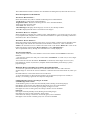
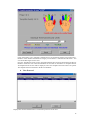
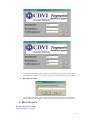
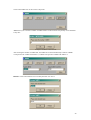
Click on the button “Insert User” to create a new User:
Login Name:
A string used at verification-time. Login Name is unique in the Host Database and has to be
entered in the maximum size of 20 characters. Note that Login Name is case sensitive. It can
be the same as the First Name of registered user.
Note:
· Login Name field can’t be left empty. The database is checked to avoid duplicate of Login
Names.
· Registration Field will be filled out automatically with actual “System-Date” of host and can
not be changed.
User Class:
Controlled: A user, who is under control of Auditor(s).
Auditor: A user, who controls the other user(s). This user can be also a normal user.
Administrator: A user, who has the right to perform tasks for user management,
configuration and
maintenance of device.
Normal: A user with no User Class of Admin, Controlled or Auditor.
Normal (Auditor): Normal user that also has right to control Controlled users.
Administrator (Auditor): Administrator, who that also has right to control Controlled users.
USER ID: code generated automatically by the software for each user and to be used for the
UGL/UGM access control systems (refer to Badge in the LOG/MTSE software). The code can
be set in decimal or hexadecimal from the Configuration menu.
Note: Only the user class “Normal” is supported in this version. However you can enter users
with different users class for usage in next version.
8