1
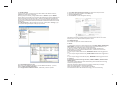
The result of extending the hard disk partition/volume is illustrated below.
Before extend:
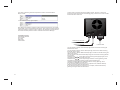
Connect to the computer host through USB or eSATA, and turn on the power
(Instruction will be presented in the following graph). Please do not connect USB
and eSATA at the same time!
2. At a command prompt, type diskpart.
Note: Before the hard drive partition/volume has been extended the “152.67GB
Unallocated” was not accessible for data usage. After using the disk part utility to
extend the hard drive partition/volume capacity, the Windows host side matches
the virtual hard drive partition/volume created in the SteelVine Manager
AC 90V-240V
USB
E-SATA
5. Package contens
FANTEC MR-35DUS2
User manual
AC Cable
USB Cable
eSATA Cable
eSATA Port to PC host
USB Port to PC host
to AC90-240V
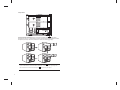
Turn the switch to RAID0, LED will keep bright and the host will be entering the
RAID0 active status.
Turn the switch to RAID1, RAID1 LED keep bright, and the host will be entering
the RAID1 active status.
Turn the switch to JBOD, JBOD LED keep bright, and the host will be entering the
JBOD active status.
Turn the switch to BIG, BIG LED will keep bright, the host will be entering the BIG
active status.
Hard disk LED " "/" " sends blue light and has long-lasting bright light, which
indicates the hard disk connection is correct.
Hard disk LED " "/" " sends the pink light and does not stop glittering, which
indicates the hard disk performing wrong material transmission.
Hard disk LED " "/" " sends red light and does not stop glittering, which
indicates the hard disk connection error.
If you select the USB port connection to a computer host, USB LED will keep
glittering during the material transmission.
If you select the eSATA port connection to a computer, eSATA LED will keep
glittering during the material transmission.
19
4