1
8.7 Modeling tool
The modeling tool used in this pilot has been the Conformiq Qtronic Modeler. It provides a
lightweight framework for building models that can be directly used in Conformiq Qtronic
without any transformations in format.
8.8 Test Case Generator
The test case generator for this pilot has been the Conformiq Qtronic tool. Several of
different versions have been used during the pilot period. Starting with version 1.2.1 and
then quickly moving to 1.3.0 (alpha) and in the end of the pilot using version 1.3.1. The
stable version 1.3.1 has been used for generating the final test case results.
Qtronic can work in two different modes; Offline Script Generation and Online Testing.
Online Testing means that Qtronic is directly connected to the system under test when
generating test cases. In the Offline Script Generation mode Qtronic and the SUT are not
connected together. The test cases are run on the system at a later stage. In this pilot only
Offline Script Generation will be used.
Qtronic supports different adapters for saving the result of the test case generation step. The
adapter used in this model will be the HTML Script Generator that comes bundled with
Qtronic. This is because it provides the best visualizing of the generated test cases. The
learning threshold is also the lowest for this adapter, which is good because the persons that
will analyze the generated test result will rapidly need to understand how the test cases are
described.
8.9 Analyze generated test cases
The generated test cases from Qtronic will be analyzed by a group of test experts.
The RTTI feature has already been tested using manual testing, which is the normal testing
method at BSC function test. The manual test scope will be the baseline for the analysis of
the test cases that Qtronic has generated.
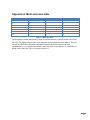
The group members in the expert group are:
Name
Title
Department
Henrik Green
Håkan Persson
Patrik Ekberg
Senior Specialist R&D
Function Tester
BSC I&V Specialist
BSC Design, FT & Env.
BSC Design, FT & Env.
BSC I&V
Table 8.9.1 Names on the persons in the expert group
The persons in the expert group have not worked with the creation of the manual tests for the
RTTI feature so their judgment when they will compare the manual test scope and the one
generated by the model should not be influenced by that.
The BSC Integration & Verification department is the next step after the feature has passed
function testing. The function testing department deliver their result to the I&V department.
52