1
USER MANUAL
Item Matrix Add-on
Configuration
Before starting to use the addon, some configuration is needed.
Setup the Item Matrix
•
•
•
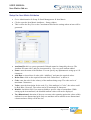
Go to Administration Setup Stock Management Item Matrix.
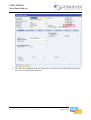
Click to open the Item Matrix – Setup window.
This is where the Key User or the Consultant will define the settings when an item will be
generated.
•
Item Code Separator: specify the separator to be used while creating the Item code
(i.e 10000000-01-01)
Item Name Separator: specify the separator to be used while creating the Item name
(i.e Shirt-Black-Size18)
Always default an Item as Matrix Item: check this option if every new item created will
be defined as a matrix item.
•
•
Copyright © 2011 Supernova Consulting Ltd. All rights reserved.
Page 5 of 20