1
USER MANUAL
Item Matrix Add-on
Setup the Item Matrix Attributes
•
•
•
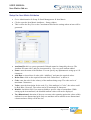
Go to Administration Setup Stock Management Item Matrix.
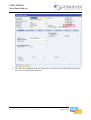
Click to open the Item Matrix Attributes – Setup window.
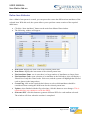
This is where the Key User or the Consultant will define the settings when an item will be
generated.
•
Attribute ID: this is a system generated field and cannot be changed by the user. The
Attribute ID starts with 1 and gets incremented by 1 for every new attribute added.
Name: enter the name of the attribute. You can specify any alphanumeric string up to 150
characters.
Add Row: to insert lines of codes click “Add Row” and enter the required values.
Delete Row: click on the required line and click “Delete Row” to delete it.
Code: enter the code for the value(s) of the attribute being setup. The code can be of
maximum 5 characters.
Value: enter the description for the code. E.g. if the attribute is “Color”, the values could
be Red, Blue, Green etc. The values can be of maximum 25 characters.
Disable: check this field if you want to disable a specific value of an attribute. While
setting up the item attributes, the disabled attribute values will not be displayed.
Two Dimensional: determine if the user can enter order quantity against the values of this
attribute in a two dimensional grid. Only one attribute can be marked as two dimensional
column and more likely will be the size.
•
•
•
•
•
•
•
Copyright © 2011 Supernova Consulting Ltd. All rights reserved.
Page 6 of 20