1
Quick Start Guide for Tempo Trio (Windows Version)
Windows 98SE Driver Installation (continued)
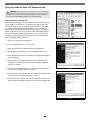
15. When the next window appears, click Next.
16. When the message stating “Windows has found an updated driver for this
device…,” click Next.
17. When the message stating “Windows is now ready to install the best
driver…” appears, click Next.
18. When the message stating “Windows has finished installing the software
that your new device requires,” appears, click Finish; the window will close,
and then New Hardware Found windows will appear.
19. When the Add New Hardware Wizard (PCI OHCI Compliant IEEE 1394 Host
Controller) window appears, click Next.
20. When the next window appears, select “Search for best driver for your device
(Recommended),” and then click Next.
21. When the next window appears, click Next.
22. When the message stating “Windows is now ready to install the best
driver…” appears, click Next.
23. When the message stating “Windows has finished installing the software
that your new device requires,” appears, click Finish; the window will close.
24. When the next Add New Hardware Wizard (PCI Mass Storage Controller) window appears, click Next.
25. When the next window appears, select “Search for best driver for your device
(Recommended),” and then click Next.
26. Insert the Tempo Trio Windows Drivers diskette into your floppy drive, select
“Specify a location,” then type A:\WIN9X-ME, and then click Next.
27. When the message stating “Windows is now ready to install the best
driver…” appears, click Next.
28. When the message stating “Windows has finished installing the software
that your new device requires,” appears, click Finish; the window will close.
29. When the System Settings Change window appears, eject the Tempo Trio
Windows Drivers diskette from your floppy drive, and then click Yes to
restart your system and complete the driver installation.
30. Upon restarting your system, several New Hardware Found windows will
briefly appear, and additional drivers will be installed; you must now format
any attached hard drives. Skip to “Drive Formatting—Windows 98SE and
Windows Me” on page 10.
4